


Software Development Articles
How to Read and Understand System Design Diagrams?
System Engineer Roles and Responsibilities: 12 Proven Duties for Growth
SAP Consultant Roles and Responsibilities: 12 Proven Duties for Growth and Success
Network Engineer Roles and Responsibilities: 12 Essential Duties for Success


Get In Touch For Details! Request More Information

Operating System Structure: A Clear Understanding
Jul 21, 2026 9 Min Read 5651 Views
(Last Updated)
Every task on a computer depends on the operating system managing memory, processes, files, hardware, and applications in the background.
The way these components are organized is called the operating system structure. Different structures prioritize speed, security, flexibility, or fault isolation.
This article explains the major OS structures, their advantages, limitations, real-world examples, and common interview questions.
Table of contents
- Quick Answer
- What is Operating System Structure?
- Quick Comparison: OS Structure Types at a Glance
- Types of Operating System Structures
- Simple Structure
- Layered Structure
- Modular Structure
- Virtual Machine Structure
- Monolithic Structure
- Microkernel Structure
- Exokernel Structure
- OS Structure Types: Advantages and Disadvantages
- Monolithic vs Microkernel vs Layered OS Structure: Comparison
- Monolithic Structure
- Microkernel Structure
- Layered Structure
- Layered Operating System Architecture Diagram
- Function of Each Layer
- Which OS Structure Does Windows Use? Which Does Linux Use?
- Which OS Structure Does Windows Use?
- Which OS Structure Does Linux Use?
- Windows vs Linux Kernel Structure
- OS Structure Interview Questions for Campus Placements
- What Is Operating System Structure?
- What Are the Main Types of OS Structures?
- What Is the Difference Between Monolithic and Microkernel Architecture?
- Why Is a Monolithic Kernel Usually Faster?
- Why Is a Microkernel Considered More Reliable?
- What Is the Main Disadvantage of a Microkernel?
- What Is a Layered Operating System?
- What Is the Main Disadvantage of Layered Architecture?
- What Is a Modular Kernel?
- Is Linux Monolithic or Modular?
- Is Windows a Microkernel Operating System?
- What Is the Difference Between Kernel Mode and User Mode?
- What Happens When a User Program Needs an OS Service?
- What Is an Exokernel?
- Why Are Operating System Structures Important?
- Campus Interview Tip
- Conclusion
- FAQs
- Why are different types of OS structures used?
- Which OS structure is the most efficient?
- How does the OS structure affect system performance?
- Which OS structure is used in Linux?
- What is a virtual machine in OS structure?
- What is the difference between monolithic and microkernel OS?
Quick Answer
Operating system structure defines how components such as the kernel, memory manager, process scheduler, file system, and device drivers are arranged and how they communicate.
The four most important OS structures to understand are:
- Monolithic structure: Most operating system services run together in kernel space.
- Microkernel structure: Only essential functions remain in the kernel, while other services run in user space.
- Layered structure: The operating system is divided into ordered layers with defined responsibilities.
- Modular structure: Independent kernel modules can be added or removed according to system requirements.
Other structures include simple, virtual machine, and exokernel architectures. Each design balances performance, security, maintainability, and hardware control differently.
What is Operating System Structure?
Operating system structure refers to how the core components of an OS, things like the kernel, process scheduler, memory manager, I/O subsystem, and user interface layer, are organized and connected to each other.
Think of it like the blueprint of a building. The same materials can be arranged in very different ways depending on whether you want speed, safety, or flexibility. A well-structured OS makes the system easier to maintain, more secure, and more reliable under load.
Quick Comparison: OS Structure Types at a Glance
| OS Structure Type | Core Idea | Example | Advantages | Disadvantages | Best Suited For |
|---|---|---|---|---|---|
| Simple Structure | OS services operate within one loosely organized system. | MS-DOS | Fast communication, compact design, and simple development | Poor separation, weak security, and difficult maintenance | Early computers and small systems |
| Layered Structure | OS functions are organized into ordered layers with defined roles. | THE Multiprogramming System | Clear organization, easier testing, controlled access, and simpler debugging | Layers are difficult to define, and requests may cross multiple levels | Educational and structured OS development |
| Modular Structure | A central kernel is extended through independent, loadable modules. | Oracle Solaris | Flexible, scalable, extensible, and performance-efficient | A faulty module can affect or crash the entire system | Modern general-purpose operating systems |
| Virtual Machine Structure | A hypervisor runs multiple isolated operating systems on one machine. | IBM VM/370 | Strong isolation, efficient resource sharing, and easier testing | Adds resource, configuration, and management overhead | Cloud computing, testing, and server consolidation |
| Monolithic Structure | Most OS services run together inside one large kernel. | Linux and traditional Unix | High performance and fast direct communication | Large trusted kernel, difficult maintenance, and weak fault isolation | Performance-focused general-purpose systems |
| Microkernel Structure | Only essential functions remain in the kernel; other services run separately. | QNX | Strong security, better fault isolation, easier recovery, and a smaller kernel | Message passing and context switching may reduce performance | Embedded, real-time, and high-reliability systems |
| Exokernel Structure | The kernel allocates hardware securely while applications manage resources directly. | MIT Aegis and ExOS | Low overhead, high performance, and greater application control | Complex development and limited general-purpose adoption | Research and specialized high-performance systems |
Types of Operating System Structures
Now that you have a quick overview, let’s break down what each structure actually does and when it makes sense to use it.
1. Simple Structure
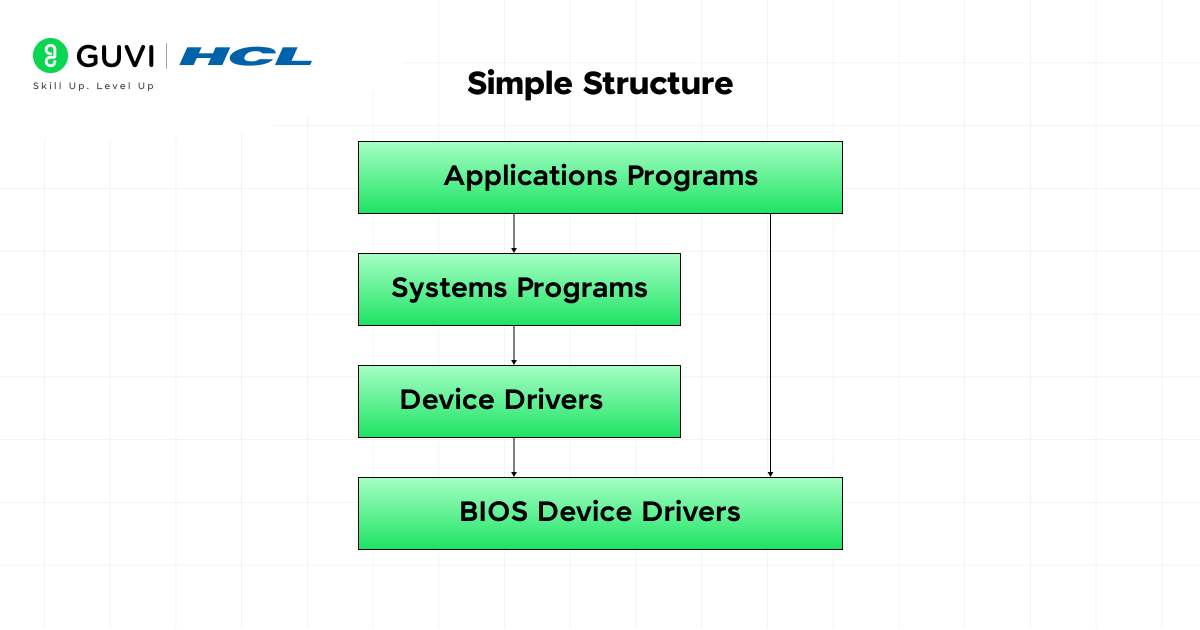
The simple structure is exactly what it sounds like, one large, loosely organized module that handles everything. There is no strict separation between components. File management, device drivers, memory management, and process management all run in the same space.
MS-DOS is the classic example. It was fast and easy to build, but it came with a major downside: a bug in any one component could crash the entire system.
Core features:
- All OS components are combined into a single unit
- Fast execution due to direct communication between parts
- Easy to understand and develop, but difficult to maintain or secure
2. Layered Structure
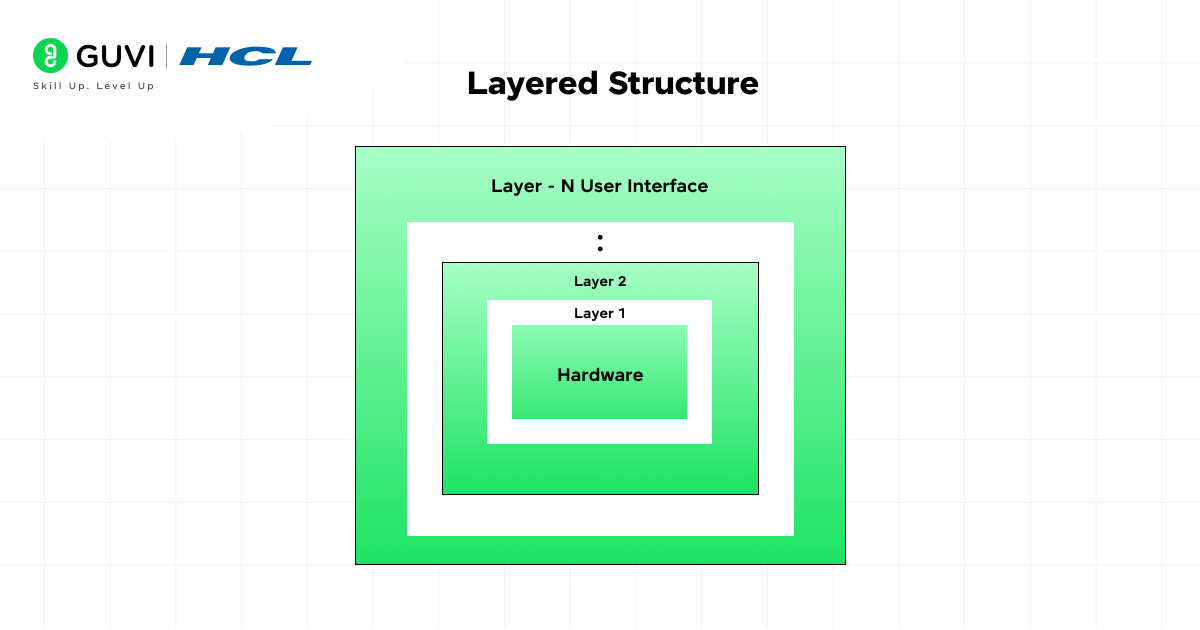
The layered approach brings order to the chaos. The OS is divided into numbered layers, where each layer only talks to the layer directly above or below it. The lowest layer manages hardware, and the topmost layer interacts with the user.
This makes the system much easier to debug and modify. However, the strict layering can slow things down because a request from the top has to pass through multiple layers to reach the hardware.
Core features:
- Each layer has a specific, well-defined role
- Changes to one layer do not affect others
- Better security and stability than the simple structure
3. Modular Structure
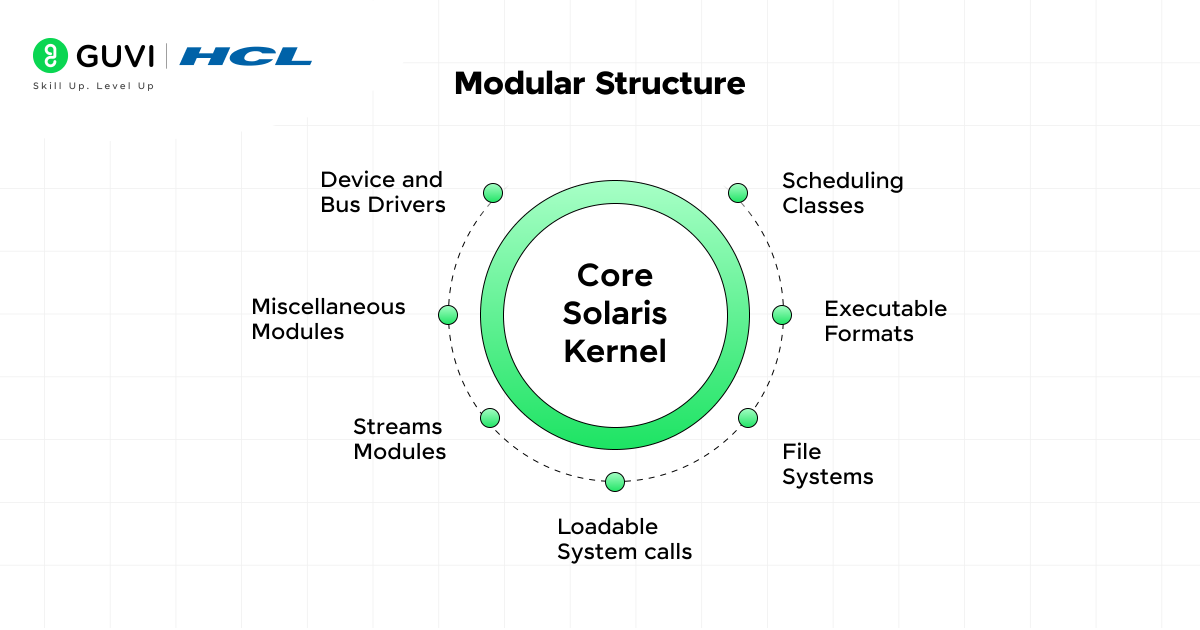
The modular structure is one of the most practical designs used in modern operating systems. Instead of a rigid layer model, the OS is built from independent modules, each responsible for a specific task. All modules communicate through a central kernel.
What makes this powerful is flexibility. You can load or unload modules at runtime without restarting the system. Android and modern versions of Linux use modular design principles.
Core features:
- Modules can be added or removed without affecting the rest of the system
- The kernel acts as a coordinator between modules
- Easy to update and scale as requirements change
Linux, which powers over 96% of the world’s top 1 million web servers, uses a monolithic kernel with loadable kernel modules, a hybrid of the modular and monolithic approaches. This gives it both raw speed and the flexibility to add features on demand.
4. Virtual Machine Structure
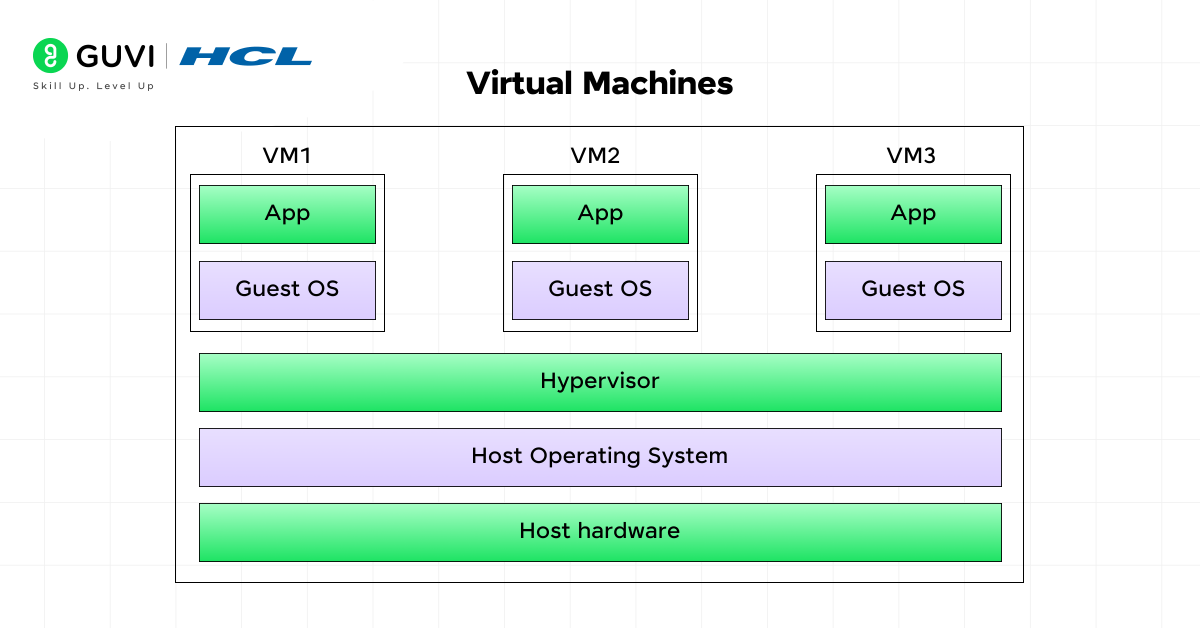
Virtual machines (VMs) take a completely different approach. Instead of running one OS on one machine, the VM structure allows a single physical machine to run multiple isolated operating systems simultaneously. Each VM gets its own allocated CPU, memory, and storage.
This is the foundation of modern cloud computing. When you spin up an AWS EC2 instance or a Google Cloud VM, you are using this exact concept. A software layer called the Virtual Machine Monitor (VMM or hypervisor) manages all the VMs and prevents them from interfering with each other.
Core features:
- Each VM is completely isolated from others
- A failure in one VM does not affect the rest
- Ideal for development, testing, and cloud environments
5. Monolithic Structure
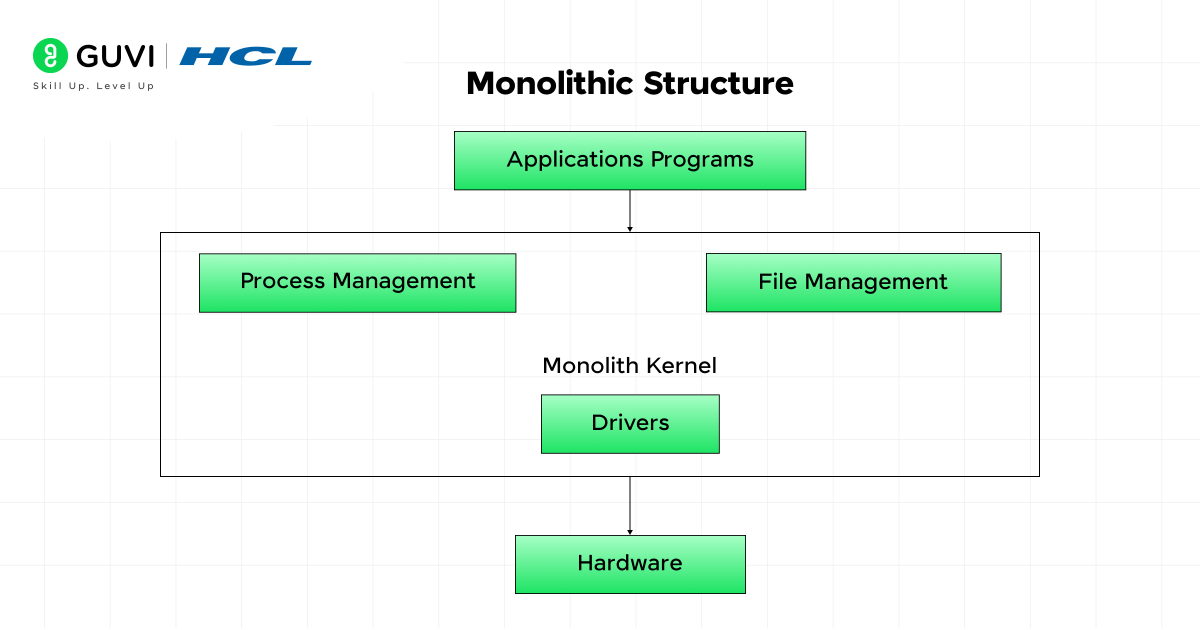
In a monolithic OS, all core services, process management, memory management, file systems, device drivers, run together in kernel space as a single large program. Everything has direct access to everything else.
The result is very fast performance because there is no overhead from passing messages between components. But the downside is significant: one bug in any part of the kernel can bring down the entire system.
Linux, despite having loadable modules, is fundamentally monolithic. So was the original Unix.
Core features:
- Very high performance due to direct function calls between components
- Simple in concept but difficult to maintain as the codebase grows
- Best suited for systems where raw performance is the priority
6. Microkernel Structure
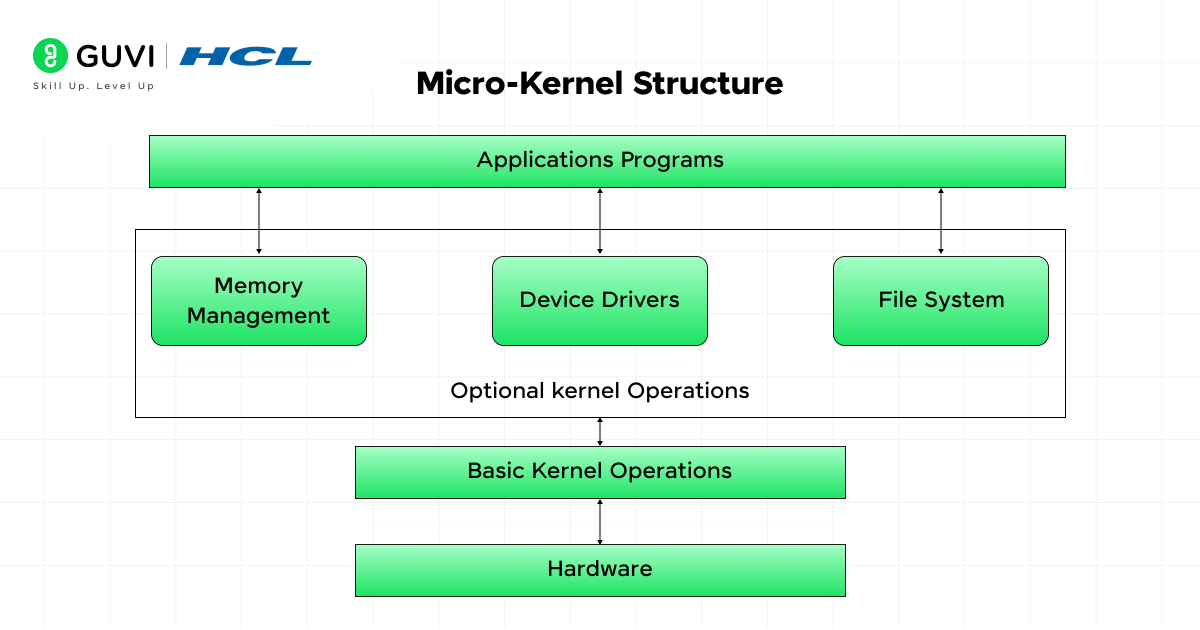
The microkernel takes the opposite philosophy from monolithic design. Only the absolute minimum runs in the kernel, usually just inter-process communication and basic memory management. Everything else (file systems, device drivers, network stacks) runs as separate user-space services.
This makes the system extremely stable and secure. A crash in a device driver does not crash the kernel. QNX, used in medical devices and car infotainment systems, is a well-known microkernel OS.
Core features:
- A small, compact kernel reduces the attack surface
- Failures in user-space services do not affect the core system
- Easier to port to different hardware architectures
The Mach microkernel, developed at Carnegie Mellon University in the 1980s, influenced both macOS and iOS. Apple’s XNU kernel is actually a hybrid combining Mach with components from BSD Unix — a real-world example of microkernel thinking meeting practical performance needs.
7. Exokernel Structure
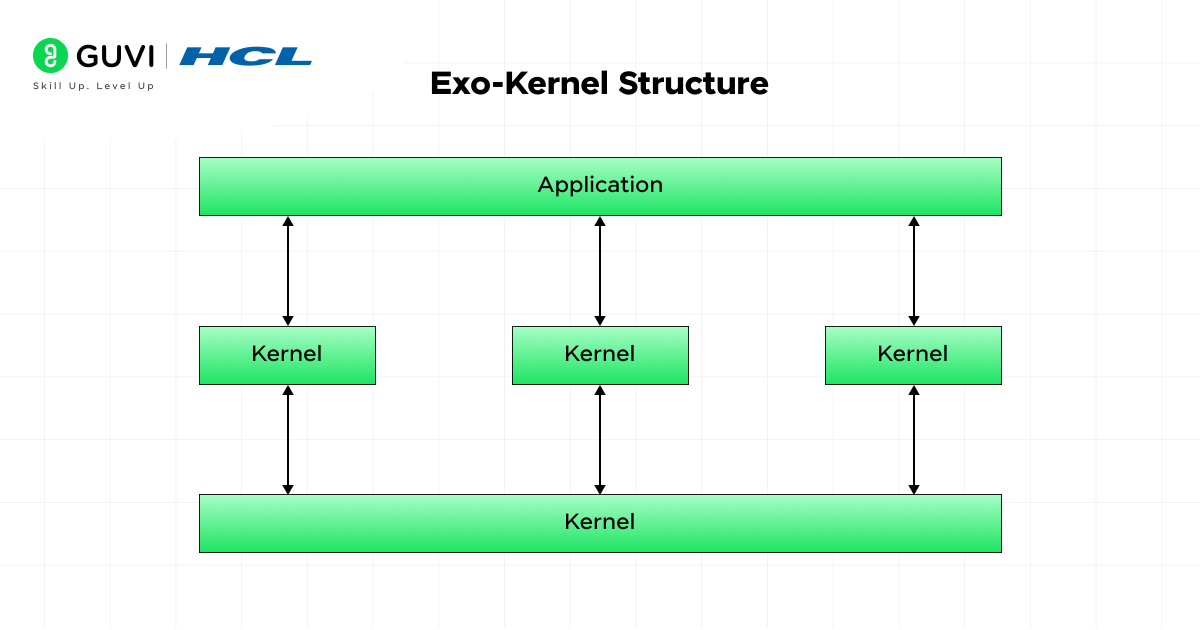
The exokernel is the most radical approach. Instead of abstracting hardware resources for applications, it exposes the hardware almost directly to application-level programs. The kernel’s only job is to ensure secure resource allocation, not to manage how those resources are used.
This gives applications maximum control and the potential for extreme performance. It is mostly used in research and specialized high-performance systems rather than everyday computing.
Core features:
- Applications manage hardware resources directly for maximum efficiency
- Minimal kernel overhead reduces system delays
- Allows each application to implement its own custom resource management strategy
Want to Go Beyond Theory?
Understanding OS structure is a strong foundation, but tech companies want you to apply these concepts in real projects. HCL GUVI’s Full Stack Development Course with AI Integration includes systems-level thinking as part of building production-ready applications — with mentorship from industry experts and placement support.
OS Structure Types: Advantages and Disadvantages
| OS Structure Type | Example OS | Advantages | Disadvantages |
|---|---|---|---|
| Simple Structure | MS-DOS | Fast communication, small design and easy initial development | Weak separation, difficult maintenance and poor fault isolation |
| Layered Structure | THE Multiprogramming System | Clear organization, easier testing and controlled interaction | Layer design can be difficult and requests may pass through several levels |
| Modular Structure | Oracle Solaris | Modules can be loaded when needed, easier extension and strong performance | Faulty kernel modules can still affect the complete system |
| Virtual Machine Structure | IBM VM/370 | Strong isolation, multiple operating systems and easier testing | Virtualization introduces resource and management overhead |
| Monolithic Structure | Linux and traditional Unix | Fast direct function calls and high performance | Large trusted kernel and lower fault isolation |
| Microkernel Structure | QNX | Better service isolation, smaller kernel and easier recovery | Message passing may increase communication overhead |
| Exokernel Structure | MIT Aegis and ExOS | Greater application control and low abstraction overhead | Complex application development and limited general-purpose adoption |
The THE system is a classic example of layered operating system design. Dijkstra described an operating system as a sequence of layers built above one another. IBM’s VM/370 provided concurrent virtual machines on System/370 hardware, while MIT’s Aegis and ExOS demonstrated the exokernel model.
Oracle Solaris supports loadable kernel modules, and QNX places file systems, device I/O, and many other services outside its small microkernel.
Monolithic vs Microkernel vs Layered OS Structure: Comparison
Monolithic, microkernel, and layered structures differ mainly in where operating system services run and how those services communicate.
| Comparison Factor | Monolithic Structure | Microkernel Structure | Layered Structure |
| Core idea | Most services run inside one large kernel | Only essential mechanisms remain in the kernel | OS functions are arranged in ordered layers |
| Service location | Mainly kernel space | Kernel and separate user-space services | Distributed across logical layers |
| Communication | Direct function calls | Inter-process message passing | Requests move through layer interfaces |
| Performance | Usually high | May have IPC and context-switch overhead | May have overhead from crossing layers |
| Fault isolation | Lower | Higher | Moderate |
| Kernel size | Large | Small | Depends on implementation |
| Security | Larger trusted code base | Smaller privileged core | Interfaces can restrict access between layers |
| Maintainability | Harder as the kernel grows | Individual services can be updated separately | Easier because responsibilities are separated |
| Driver failure impact | May crash the complete system | User-space driver failure may remain isolated | Depends on the driver’s assigned layer |
| Best suited for | General-purpose systems requiring performance | Real-time, embedded and high-reliability systems | Educational systems and clearly structured designs |
| Common example | Linux | QNX | THE Multiprogramming System |
Monolithic Structure
A monolithic kernel places process management, memory management, networking, file systems, and many device drivers inside kernel space.
Components communicate through direct calls, which can provide strong performance. However, every kernel-space component operates with high privileges. A serious driver or kernel error may therefore affect the entire operating system.
Linux is monolithic in its core architecture but supports loadable kernel modules. Linux documentation includes dedicated mechanisms for building, loading, unloading, and signing modules.
Microkernel Structure
A microkernel keeps only essential mechanisms in kernel space. These usually include scheduling, low-level memory control, interrupt handling, and inter-process communication.
File systems, network services, and drivers may operate as separate processes. QNX, for example, implements core real-time and message-passing features in its microkernel, while file and device I/O are provided through optional processes and libraries.
This separation improves fault isolation. A failing user-space service may be restarted without bringing down the complete kernel.
Layered Structure
A layered OS divides functionality into levels. Each layer provides services to the layer above it and relies on services from the layer below.
This structure simplifies testing because developers can examine each layer independently. However, strict layering may reduce performance because one request can pass through several interfaces before reaching the hardware.
Layered Operating System Architecture Diagram
A layered operating system can be represented through the following structure:
+--------------------------------------------------+
| Layer 6: User Applications                       |
| Browsers, editors, media players and user tools |
+--------------------------------------------------+
| Layer 5: User Interface and System Utilities     |
| Shell, desktop, command tools and system apps    |
+--------------------------------------------------+
| Layer 4: System Call and API Interface           |
| Connects applications with protected OS services|
+--------------------------------------------------+
| Layer 3: File System and I/O Management          |
| Files, directories, storage and input/output     |
+--------------------------------------------------+
| Layer 2: Process and Memory Management           |
| Scheduling, virtual memory and resource control  |
+--------------------------------------------------+
| Layer 1: Device Drivers                          |
| Communicates with disks, networks and displays   |
+--------------------------------------------------+
| Layer 0: Hardware                                |
| CPU, RAM, storage and peripheral devices         |
+--------------------------------------------------+
Function of Each Layer
Layer 0: Hardware
The lowest layer contains physical resources such as the processor, memory, storage devices, network adapters, and input devices.
Layer 1: Device Drivers
Device drivers translate operating system commands into instructions that specific hardware components understand.
Layer 2: Process and Memory Management
This layer creates and schedules processes. It also allocates memory, manages virtual memory, and prevents programs from accessing memory assigned to other processes.
Layer 3: File System and I/O Management
This layer manages files, directories, storage operations, buffering, and communication with input and output devices.
Layer 4: System Call and API Interface
Applications use system calls or APIs to request protected services. A program may request memory, open a file, create a process, or access a network connection through this interface.
Layer 5: User Interface and Utilities
The user interface includes command shells, desktop environments, system settings, and utilities that make operating system functions accessible.
Layer 6: Applications
Browsers, editors, games, and business applications run at the top. They rely on lower layers instead of controlling the hardware directly.
The exact number and role of layers vary between operating systems. This diagram explains the general concept rather than representing one specific commercial OS.
Which OS Structure Does Windows Use? Which Does Linux Use?
Which OS Structure Does Windows Use?
Windows NT-based systems, including Windows 10 and Windows 11, are commonly classified as using a hybrid kernel architecture.
A hybrid kernel combines ideas from monolithic and microkernel designs. Windows separates applications and many subsystems into user mode, while core operating system components operate in kernel mode. Microsoft’s architecture documentation identifies both user-mode and kernel-mode components.
Important kernel-mode components include:
- Windows kernel
- Executive services
- Memory manager
- Process and thread manager
- I/O manager
- Security Reference Monitor
- Device drivers
- Hardware Abstraction Layer
The Windows executive provides object management, memory management, process management, I/O management, and configuration services. These executive components are part of Ntoskrnl.exe, while drivers and the Hardware Abstraction Layer remain separate kernel-mode components.
Windows is not a pure microkernel because many important services and drivers still operate in kernel mode. It is also more internally separated than a basic monolithic design. The term hybrid kernel therefore provides a useful classroom-level description.
Which OS Structure Does Linux Use?
Linux uses a monolithic kernel with modular capabilities.
Core services such as process scheduling, memory management, networking, file systems, and many drivers execute in kernel space. This allows components to communicate efficiently through direct kernel interfaces.
Linux also supports loadable kernel modules. Drivers and other features can be compiled separately and added to a running kernel when required. Official kernel documentation describes support for in-tree and external modules, module loading, unloading, and cryptographic module signing.
This combination gives Linux:
- The performance of a monolithic kernel
- The flexibility to add hardware drivers
- Support for optional file systems
- Easier kernel customization
- The ability to remove some unused components
Linux should therefore be described as a modular monolithic kernel, not as a pure modular or microkernel operating system.
Windows vs Linux Kernel Structure
| Feature | Windows | Linux |
| General classification | Hybrid kernel | Modular monolithic kernel |
| Core services | Split between user mode and kernel mode | Most core services run in kernel space |
| Driver location | Kernel-mode and selected user-mode drivers | Mainly kernel space, often through modules |
| Extensibility | Drivers, services and system components | Loadable kernel modules |
| Communication style | System calls, kernel interfaces and subsystem communication | System calls and direct internal kernel interfaces |
| Source model | Proprietary | Open-source kernel |
| Main design priority | Compatibility, separation and general-purpose performance | Performance, portability and configurability |
OS Structure Interview Questions for Campus Placements
1. What Is Operating System Structure?
Operating system structure defines how components such as the kernel, memory manager, scheduler, file system, and drivers are arranged and connected.
2. What Are the Main Types of OS Structures?
The main OS structures are:
- Simple structure
- Layered structure
- Modular structure
- Virtual machine structure
- Monolithic structure
- Microkernel structure
- Exokernel structure
3. What Is the Difference Between Monolithic and Microkernel Architecture?
A monolithic kernel keeps most operating system services in kernel space. These services communicate through direct calls.
/* Simplified monolithic-style communication */

void process_request(void) {
    file_system_service();
    memory_manager_service();
}
A microkernel keeps only essential mechanisms inside the kernel. Other services communicate through messages.
/* Simplified microkernel-style communication */

send_message(FILE_SYSTEM_SERVICE, "OPEN_FILE");
receive_message(FILE_SYSTEM_SERVICE, response);
Direct calls usually provide better performance. Message passing provides stronger isolation between services.
4. Why Is a Monolithic Kernel Usually Faster?
A monolithic kernel allows services to communicate through direct function calls inside kernel space.
It does not need to perform repeated message transfers between separate user-space processes.
5. Why Is a Microkernel Considered More Reliable?
A microkernel runs many services as separate processes.
A failure in a file system, network service, or user-space driver may remain isolated instead of crashing the complete kernel.
6. What Is the Main Disadvantage of a Microkernel?
Microkernels may introduce communication overhead.
Services often communicate through message passing, which can require context switches and data transfers.
7. What Is a Layered Operating System?
A layered operating system divides functions into ordered levels.
Each layer uses services from the layer below it and provides services to the layer above it.
8. What Is the Main Disadvantage of Layered Architecture?
Strict layer boundaries may be difficult to define.
Requests may also pass through several layers before reaching the hardware, which can increase processing overhead.
9. What Is a Modular Kernel?
A modular kernel contains a central kernel that can be extended using loadable modules.
The following simplified Linux kernel module prints messages when it is loaded and removed:
#include <linux/init.h>
#include <linux/kernel.h>
#include <linux/module.h>

static int __init example_init(void) {
    pr_info("Example module loaded\n");
    return 0;
}

static void __exit example_exit(void) {
    pr_info("Example module removed\n");
}

module_init(example_init);
module_exit(example_exit);

MODULE_LICENSE("GPL");
MODULE_DESCRIPTION("Simple Linux kernel module");
The module can be loaded and removed using:
sudo insmod example.ko
sudo rmmod example
10. Is Linux Monolithic or Modular?
Linux uses a modular monolithic kernel.
Core services run in kernel space, but additional functionality can be added through loadable kernel modules.
The following command displays loaded Linux modules:
lsmodA module can be loaded using:
sudo modprobe module_nameA module can be removed using:
sudo modprobe -r module_name11. Is Windows a Microkernel Operating System?
No. Windows is commonly classified as a hybrid kernel.
It combines component separation with several services and drivers that continue to run in kernel mode.
12. What Is the Difference Between Kernel Mode and User Mode?
Kernel mode provides privileged access to memory, hardware, and processor instructions.
User mode limits application access to protected resources. Applications must request operating system services through system calls.
#include <stdio.h>

int main(void) {
    printf("This application runs in user mode.\n");
    return 0;
}
The application cannot directly control the display hardware. The output function eventually depends on operating system services.
13. What Happens When a User Program Needs an OS Service?
The program makes a system call.
The processor transfers execution from user mode to kernel mode. The operating system completes the protected task and returns control to the application.
#include <fcntl.h>
#include <stdio.h>
#include <unistd.h>

int main(void) {
    int file_descriptor = open("example.txt", O_RDONLY);

    if (file_descriptor == -1) {
        perror("Unable to open file");
        return 1;
    }

    char buffer[100];

    ssize_t bytes_read = read(
        file_descriptor,
        buffer,
        sizeof(buffer) - 1
    );

    if (bytes_read > 0) {
        buffer[bytes_read] = '\0';
        printf("%s\n", buffer);
    }

    close(file_descriptor);
    return 0;
}
In this example:
open()requests access to a file.read()requests data from the operating system.close()releases the file descriptor.
14. What Is an Exokernel?
An exokernel securely allocates hardware resources while allowing application-level libraries to manage them more directly.
Application
    ↓
Library Operating System
    ↓
Exokernel Permission Check
    ↓
Hardware Resource
The exokernel checks whether the application has permission to use a resource. The application-level library decides how that resource should be managed.
15. Why Are Operating System Structures Important?
OS structure affects:
- System performance
- Security
- Fault isolation
- Maintainability
- Portability
- Hardware support
- Scalability
- Resource management
Campus Interview Tip
Avoid answering only with definitions. Explain where services run, how components communicate, and what happens when one component fails.
For example:
A monolithic kernel usually provides better performance because services communicate directly in kernel space. A microkernel provides stronger fault isolation because many services run separately, but message passing may add overhead.
Conclusion
Operating system structure is not just a textbook topic, it is the backbone of every device you use, from your laptop to cloud servers to the software running in your car. Understanding the trade-offs between simple, layered, modular, monolithic, microkernel, and exokernel designs gives you a real edge in interviews, system design discussions, and software development work.
The key takeaway: no single structure is universally best. The right design depends on what you are optimizing for, speed, security, or flexibility. Start with the basics, build your understanding of the kernel, and explore how Linux structures its components for a practical, real-world perspective.
FAQs
Why are different types of OS structures used?
Different structures suit different needs, some prioritize speed, others security or flexibility.
Which OS structure is the most efficient?
Efficiency depends on use, modular and layered for general systems, microkernel for advanced control, and exokernel for advanced control.
How does the OS structure affect system performance?
It impacts speed, stability, and multitasking by efficiently managing hardware and software.
Which OS structure is used in Linux?
Linux uses a monolithic kernel structure, meaning all core OS services run in a single kernel space.
What is a virtual machine in OS structure?
A virtual machine structure allows one physical machine to run multiple independent operating systems simultaneously, managed by a hypervisor.
What is the difference between monolithic and microkernel OS?
A monolithic OS runs all services inside the kernel for high performance, while a microkernel keeps only essential functions in the kernel and runs other services in user space for improved security and fault isolation.
Success Stories

About the Author
Vaishali
I'm a seasoned writer with four years of experience across technical, non-technical, and just about every genre or niche you can imagine. Adaptable and curious, I enjoy exploring new topics and making information engaging and easy to understand. Fueled by a steady stream of tea, I approach each project with creativity, reliability, and genuine enthusiasm for storytelling.
View all posts by Vaishali
Connect with me @













Did you enjoy this article?