


Selenium Articles
Page Object Model (POM) Design Pattern with Python Selenium: A Complete Guide
Selenium Framework Explained: From Basics to Best Practices


Get In Touch For Details! Request More Information

TestNG Annotations and Their Uses in Selenium Automation
Aug 11, 2026 8 Min Read 6145 Views
(Last Updated)
TestNG annotations are special markers in Java, prefixed with @, that tell the TestNG framework how and when to run each test method.
They control the entire test lifecycle, from environment setup, through the actual test logic, to cleanup, making them the backbone of any structured Selenium automation framework.
The most commonly used TestNG annotations are:
- Setup annotations: @BeforeSuite, @BeforeTest, @BeforeClass, @BeforeMethod
- Core annotation: @Test
- Cleanup annotations: @AfterMethod, @AfterClass, @AfterTest, @AfterSuite
- Data and configuration annotations: @DataProvider, @Parameters
- Advanced annotations: @Listeners, @Factory
Without this structure, a Selenium suite quickly turns into a pile of scripts with no clear setup, order, or cleanup.
This guide covers their types, execution order, and practical use in Selenium, plus how they compare to JUnit, parallel execution, and the mistakes that break real automation frameworks.
Table of contents
- What Are TestNG Annotations?
- Why TestNG Annotations Matter in Selenium Automation
- Commonly Used TestNG Annotations
- @BeforeSuite, One of the Core TestNG Annotations
- @BeforeTest
- @BeforeClass
- @Test, the Most Used of All TestNG Annotations
- @AfterClass
- @AfterTest
- @AfterSuite
- @DataProvider, One of the More Advanced TestNG Annotations
- @BeforeMethod and @AfterMethod
- @Parameters, a Configuration-Focused TestNG Annotation
- @Listeners, an Advanced TestNG Annotation
- @Factory, the Most Advanced of the TestNG Annotations
- TestNG Annotations vs JUnit Annotations: Key Differences
- TestNG Annotations Execution Order
- Key Uses of TestNG Annotations in Selenium Automation
- How to Skip or Disable Tests Using TestNG Annotations
- TestNG Annotations for Parallel Test Execution
- Best Practices for Organizing TestNG Annotations in a Selenium Framework
- Common Mistakes to Avoid with TestNG Annotations
- 💡 Did You Know?
- Conclusion
- FAQs
- What are TestNG annotations?
- What is the execution order of TestNG annotations?
- What is the difference between @BeforeMethod and @BeforeClass in TestNG?
- How does @DataProvider work in TestNG?
- What is the use of @Parameters in TestNG annotations?
What Are TestNG Annotations?

TestNG annotations are special markers in Java that provide instructions to the TestNG framework about how to execute the test methods. These annotations define the life cycle of the test execution, such as before a test, after a test, or when the test should be skipped.
TestNG annotations are defined by the @TestNG library and help organize the execution sequence of test methods, facilitating modular and scalable automation testing.
Why TestNG Annotations Matter in Selenium Automation
Before jumping into each annotation, here is a quick reference of all the major TestNG annotations and what they do:
| TestNG Annotation | Execution Timing | Primary Use |
|---|---|---|
| @BeforeSuite | Once before all tests in the suite | Suite-level setup like WebDriver init |
| @BeforeTest | Before any test method in a <test> tag | Test group-level configuration |
| @BeforeClass | Once before first method in a class | Class-level browser or data setup |
| @BeforeMethod | Before every test method | Login, clear cookies before each test |
| @Test | Marks a method as a test case | Writing actual test logic |
| @AfterMethod | After every test method | Logout, take screenshot on failure |
| @AfterClass | Once after all methods in a class | Close browser at class level |
| @AfterTest | After all test methods in a <test> tag | Reset test-specific configurations |
| @AfterSuite | Once after all tests in the suite | Generate reports, release resources |
| @DataProvider | Provides data to test methods | Data-driven testing |
| @Parameters | Injects values from testng.xml | Environment or config-based testing |
| @Listeners | Attaches event listener classes | Custom reporting and logging |
| @Factory | Creates test instances dynamically | Running tests with different configs |
Commonly Used TestNG Annotations
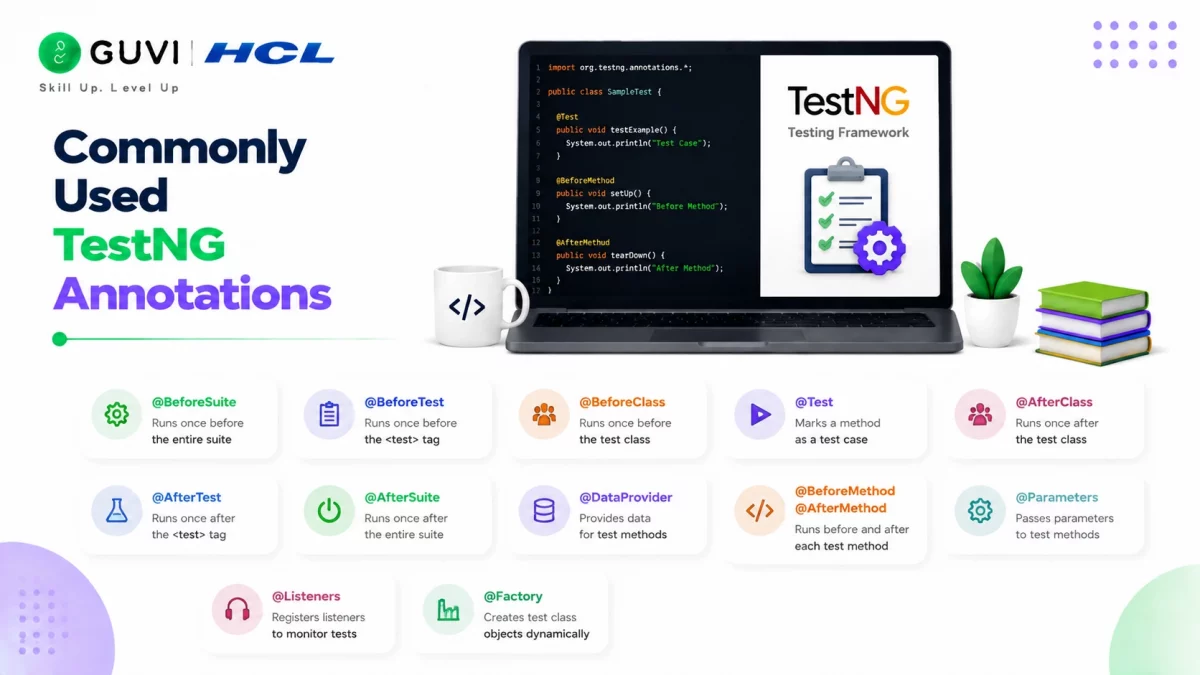
Below are the most commonly used TestNG annotations, their purposes, and how they can be leveraged in Selenium test scripts.
1. @BeforeSuite, One of the Core TestNG Annotations
Purpose: The @BeforeSuite annotation is executed once before any of the tests in the test suite are run. This is typically used to set up the environment for the entire suite, such as initializing WebDriver or reading configuration files.
Use Case:
- Initializing Selenium WebDriver before running all tests in a suite.
- Setting up test environment (e.g., creating a database connection).
Example:
@BeforeSuite
public void setupSuite() {
    // Code to initialize WebDriver or setup suite-level configurations
    System.out.println("Before Suite: Setting up environment...");
}
2. @BeforeTest
Purpose: This annotation is executed before any test methods inside a <test> tag are executed. It is useful for setting up preconditions for specific tests, like configuring a test database or logging into the application.
Use Case:
- Logging in to the application before a set of tests runs.
- Configuring test-specific settings.
Example:
@BeforeTest
public void setupTest() {
    // Code to setup test-specific configurations
    System.out.println("Before Test: Setting up test environment...");
}
Also read: Top Selenium Interview Questions and Answers for 2026
3. @BeforeClass
Purpose: The @BeforeClass annotation is executed once before the first method in the current class is run. It is used for setting up resources needed specifically for the class.
Use Case:
- Setting up a browser window or WebDriver before running all tests within the class.
- Initializing a set of data or configurations that are required for all tests in the class.
Example:
@BeforeClass
public void beforeClass() {
    // Code to initialize browser or setup configurations
    System.out.println("Before Class: Setting up browser...");
}
4. @Test, the Most Used of All TestNG Annotations
Purpose: The @Test annotation marks a method as a test case. This is the most commonly used annotation in TestNG. You can have multiple test methods in a class, each marked with the @Test annotation.
Use Case:
- Writing actual test cases to validate functionalities like form submissions, login, navigation, etc.
- It can be used with parameters, assertions, and expected exceptions.
Key @Test attributes you should know:
| Attribute | What It Does |
|---|---|
| priority | Controls test execution order (lower number runs first) |
| enabled | Set to false to skip a test without deleting it |
| groups | Assigns the test to one or more groups |
| dependsOnMethods | Makes the test run only after another method passes |
| expectedExceptions | Passes the test only if a specific exception is thrown |
| timeOut | Fails the test if it takes longer than the given milliseconds |
| dataProvider | Links the test to a @DataProvider method for data-driven runs |
Example:
@Test
public void testLoginFunctionality() {
    // Selenium WebDriver code for testing login functionality
    Assert.assertTrue(driver.findElement(By.id("loginButton")).isDisplayed());
    System.out.println("Login test passed");
}
5. @AfterClass
Purpose: The @AfterClass annotation is executed after all the test methods in the current class have been run. It is used for cleanup tasks, such as closing the WebDriver or releasing any resources allocated for the class.
Use Case:
- Closing the browser window after all tests in a class are complete.
- Clearing test data or disconnecting resources.
Example:
@AfterClass
public void afterClass() {
    // Code to close browser
    driver.quit();
    System.out.println("After Class: Closing browser...");
}
Explore: Essential Steps to Becoming a Selenium Expert: Key Foundations
6. @AfterTest
Purpose: This annotation is executed after all test methods in the <test> tag have been executed. It is useful for test-specific cleanup, such as logging out or resetting configurations that were set up before the test.
Use Case:
- Logging out of an application after the tests are complete.
- Cleaning up or resetting configurations for the next test.
Example:
@AfterTest
public void afterTest() {
    // Code to logout or clean up after the test
    System.out.println("After Test: Cleaning up...");
}
7. @AfterSuite
Purpose: The @AfterSuite annotation is executed after all tests in the suite have been run. It is useful for performing cleanup tasks at the suite level, such as reporting or releasing suite-wide resources.
Use Case:
- Generating a test report after all tests in the suite have completed.
- Closing connections or releasing suite-level resources.
Example:
@AfterSuite
public void teardownSuite() {
    // Code to generate reports or cleanup after the entire suite
    System.out.println("After Suite: Cleaning up after suite...");
}
8. @DataProvider, One of the More Advanced TestNG Annotations
Purpose: The @DataProvider annotation is used to provide data to a test method. It allows a test method to run multiple times with different inputs, which is useful for data-driven testing.
Use Case:
- Running the same test with different sets of data, such as validating form submissions with various input values.
Example:
@DataProvider(name = "loginData")
public Object[][] loginDataProvider() {
    return new Object[][] {
        { "user1", "password1" },
        { "user2", "password2" }
    };
}

@Test(dataProvider = "loginData")
public void testLogin(String username, String password) {
    // Selenium WebDriver code to perform login with provided data
    Assert.assertTrue(login(username, password));
}
9. @BeforeMethod and @AfterMethod
These annotations are executed before and after each individual test method in a class.
- @BeforeMethod: Used to set up any preconditions before each test method.
- @AfterMethod: Used for cleanup tasks after each test method.
Use Case:
- Setting up and tearing down individual tests, such as clearing cookies or logging in before each test.
Example:
@BeforeMethod
public void beforeMethod() {
    // Code to initialize WebDriver or log in
    System.out.println("Before Method: Logging in before each test...");
}

@AfterMethod
public void afterMethod() {
    // Code to logout or clear browser cache
    System.out.println("After Method: Logging out after each test...");
}
10. @Parameters, a Configuration-Focused TestNG Annotation
Purpose: The @Parameters annotation injects values from the testng.xml configuration file directly into a test method. This is useful when you want to run the same tests against different browsers, environments, or configurations without changing code.
Use Cases:
- Passing browser name (Chrome, Firefox) from testng.xml
- Passing base URL for different test environments (QA, staging, production)
Example:
@Parameters({"browser", "url"})
@BeforeTest
public void setup(String browser, String url) {
    if (browser.equals("chrome")) {
        driver = new ChromeDriver();
    } else if (browser.equals("firefox")) {
        driver = new FirefoxDriver();
    }
    driver.get(url);
}
testng.xml configuration:
<parameter name="browser" value="chrome"/>
<parameter name="url" value="https://your-app.com"/>
11. @Listeners, an Advanced TestNG Annotation
Purpose: The @Listeners annotation attaches one or more listener classes to your test class. Listeners are used to generate custom reports, log test events, take screenshots on failure, or integrate with third-party reporting tools like ExtentReports.
Use Cases:
- Auto-capturing screenshots on test failure
- Integrating with ExtentReports or Allure for rich HTML reports
- Sending Slack or email notifications on test completion
Example:
@Listeners(CustomTestListener.class)
public class LoginTest {
    @Test
    public void testLogin() {
        // your test code
    }
}
12. @Factory, the Most Advanced of the TestNG Annotations
Purpose: The @Factory annotation creates test object instances dynamically at runtime. It is used when you want to run the same test class with different configurations without duplicating code.
Use Cases:
- Running the same test class with different user roles (admin, guest, editor)
- Cross-browser testing with dynamically created test instances
Example:
@Factory
public Object[] createInstances() {
    return new Object[] {
        new LoginTest("admin", "admin123"),
        new LoginTest("user", "user456")
    };
}
TestNG Annotations vs JUnit Annotations: Key Differences
If you’ve worked with JUnit before, mapping TestNG annotations to their closest JUnit equivalent makes the transition much faster, since both frameworks use annotations for the same core purpose. The two frameworks overlap a lot conceptually, but TestNG’s annotation set is noticeably richer.
| TestNG Annotation | Closest JUnit 5 Equivalent | Key Difference |
|---|---|---|
| @BeforeSuite / @AfterSuite | No direct equivalent | JUnit has no native suite-level lifecycle hook |
| @BeforeTest / @AfterTest | No direct equivalent | JUnit lacks TestNG’s <test> tag grouping concept |
| @BeforeClass / @AfterClass | @BeforeAll / @AfterAll | Functionally similar; JUnit 5 requires the method to be static |
| @BeforeMethod / @AfterMethod | @BeforeEach / @AfterEach | Functionally similar across both frameworks |
| @Test | @Test | Same core purpose in both |
| @DataProvider | @ParameterizedTest + @MethodSource | JUnit needs two annotations combined to match one TestNG annotation |
| @Parameters | No clean native equivalent | JUnit typically relies on external config or Spring’s @Value |
| @Listeners | @ExtendWith | Both attach custom behaviour, but the underlying extension model differs |
| @Factory | No direct equivalent | JUnit 5 uses @TestFactory for dynamic tests, which works differently |
Where TestNG clearly wins: native parallel execution via testng.xml (parallel=”methods”, thread-count), a built-in priority attribute for controlling test order, and suite/group-level configuration without extra plugins.
Where JUnit 5 has caught up: it added parallel execution support from version 5.3 onward, and @Order now lets you control method execution order, closing part of the gap that used to clearly favour TestNG.
For Selenium automation specifically, TestNG annotations remain the more popular choice in India’s IT services and product companies, mainly because of the native suite-level configuration and simpler parallel execution setup.
TestNG Annotations Execution Order
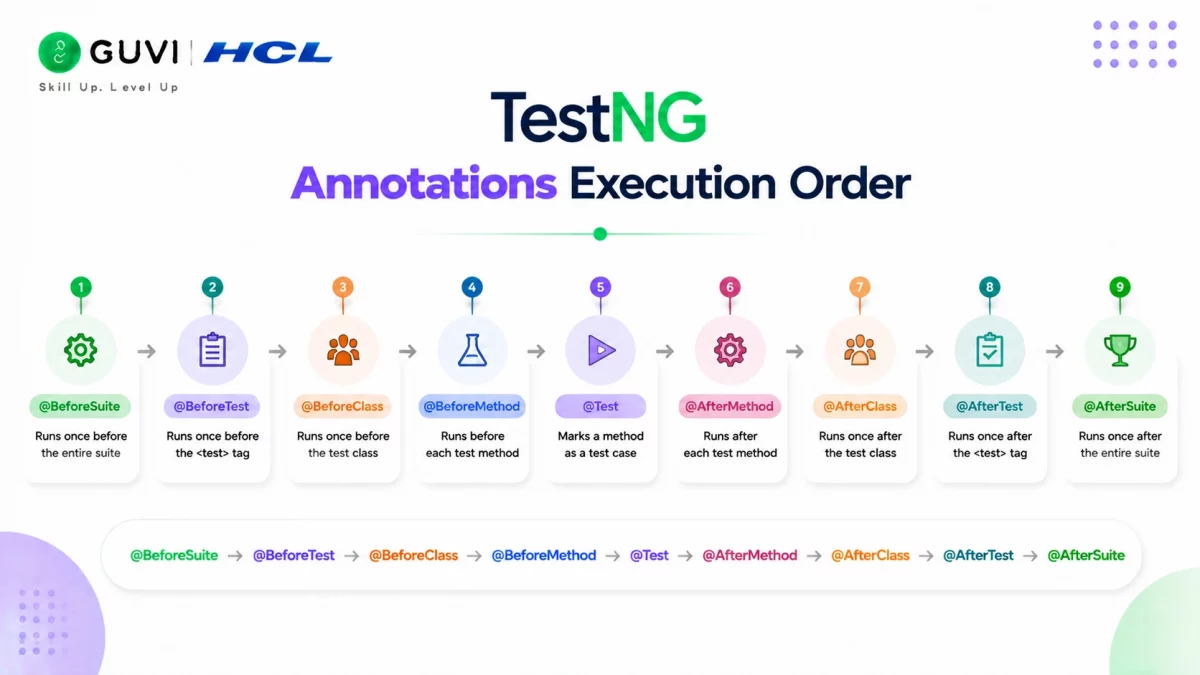
One of the most frequently asked questions about TestNG annotations is: in what order do they actually run? Here is the complete execution order for a single test class:

@BeforeSuite → @BeforeTest → @BeforeClass → @BeforeMethod → @Test → @AfterMethod → @AfterClass → @AfterTest → @AfterSuite
For a complete suite with multiple classes, TestNG annotations fire as follows:
| Step | TestNG Annotation | Runs |
|---|---|---|
| 1 | @BeforeSuite | Once at the very start |
| 2 | @BeforeTest | Once per <test> tag in testng.xml |
| 3 | @BeforeClass | Once per class |
| 4 | @BeforeMethod | Before every @Test method |
| 5 | @Test | Each test method |
| 6 | @AfterMethod | After every @Test method |
| 7 | @AfterClass | Once per class |
| 8 | @AfterTest | Once per <test> tag in testng.xml |
| 9 | @AfterSuite | Once at the very end |
Key Uses of TestNG Annotations in Selenium Automation
- Test Organization and Setup: Annotations like @BeforeSuite, @BeforeClass, and @BeforeTest help organize the setup for a test suite, class, or individual test cases, allowing for better maintainability and structure.
- Efficient Test Execution: Annotations like @Test allow you to define multiple test methods, which can be run in parallel or sequentially. The use of @DataProvider further enhances test execution by running tests with different data sets.
- Resource Management: Annotations like @AfterSuite, @AfterTest, and @AfterClass make it easy to perform cleanup tasks such as closing WebDriver sessions or releasing any external resources after tests have run.
- Flexible and Scalable: TestNG allows you to group tests, run them in parallel, and apply different annotations depending on your needs. This makes it highly flexible and scalable for large test suites.
- Error Handling and Reporting: TestNG provides mechanisms for handling test failures, generating reports, and capturing logs. The annotations allow testers to structure their tests in a way that enhances visibility and debugging.
TestNG annotations streamline automation by managing test execution, parallel runs, and exception handling. But theory alone isn’t enough, real-world application is key.
Looking to master Selenium automation? Get hands-on with HCL GUVI’s Selenium Automation Testing Course and learn to implement TestNG effectively in scalable frameworks.
How to Skip or Disable Tests Using TestNG Annotations
Not every test should run every time, and TestNG annotations give you a few clean ways to control that.
Option 1: Disable a test entirely using TestNG annotations. Set enabled = false on the @Test annotation, and TestNG will skip it completely without deleting the method:
@Test(enabled = false)
public void testUnderMaintenance() {
    // This test is temporarily skipped
}
Option 2: Skip conditionally at runtime, another approach among TestNG annotations. Throw a SkipException inside the test method when a specific condition isn’t met, which is useful when the decision to skip depends on data only available while the test is running:
@Test
public void testPremiumFeature() {
    if (!userIsPremium) {
        throw new SkipException("Skipping: user is not a premium account");
    }
    // premium-only test logic
}
Option 3: Exclude entire groups. Tag tests with groups = {“flaky”} and exclude that group in testng.xml, which is the cleanest way to skip a whole category of tests without touching individual test methods:
<groups>
    <run>
        <exclude name="flaky"/>
    </run>
</groups>
TestNG Annotations for Parallel Test Execution
Parallel execution is one of the strongest reasons teams choose TestNG annotations over JUnit for large Selenium suites. There are two levels of control.
Suite-level parallelism, controlled through TestNG annotations and settings in testng.xml, controls how TestNG splits work across threads:
<suite name="MySuite" parallel="methods" thread-count="4">The parallel attribute accepts methods, tests, classes, or instances, depending on how granular you want the parallelism to be.
Method-level parallelism, one of the finer-grained TestNG annotations settings, set directly on @Test, lets a single test method run multiple times concurrently, useful for load-style checks:
@Test(threadPoolSize = 3, invocationCount = 9)
public void testConcurrentLogins() {
    // Runs 9 times, 3 threads at a time
}
A word of caution: parallel execution only works reliably if your WebDriver instances are thread-safe, typically by making the driver a ThreadLocal variable rather than a shared static field. Skipping this step is one of the most common causes of flaky parallel Selenium suites.
Best Practices for Organizing TestNG Annotations in a Selenium Framework
Knowing what each of these TestNG annotations does is one thing; using them well in a real framework is another.
- Keep WebDriver initialization at the class or suite level, not inside @BeforeMethod, unless every test genuinely needs a fresh browser instance.
- Use @BeforeMethod for state, not setup. Clearing cookies, resetting the URL, or logging in belongs here; expensive one-time setup does not.
- Group tests meaningfully with the
groupsattribute (smoke, regression, sanity) so CI pipelines can run a fast subset instead of the full suite on every commit. - Keep listeners centralized. Like most TestNG annotations meant for suite-wide behaviour, register @Listeners once at the suite level in testng.xml rather than repeating it across every test class.
- Avoid deeply nested dependsOnMethods chains. A test that depends on a test that depends on another test is fragile; keep dependency chains shallow or avoid them where possible.
- Externalize environment values with @Parameters instead of hardcoding browser names or URLs, so the same suite can run against QA, staging, and production without code changes.
Common Mistakes to Avoid with TestNG Annotations
These are the mistakes that break automation frameworks in real projects:
- Putting WebDriver initialization in @BeforeMethod when it should be in @BeforeClass: If each @Test creates and destroys a browser, your suite will be slow and unstable. Initialize WebDriver at the class level unless each test truly needs a fresh browser.
- Not using @AfterMethod for screenshot capture: Skipping this means you have no visual evidence when a test fails in a CI pipeline.
- Using @BeforeSuite for test-specific logic: @BeforeSuite runs once for everything. Test-specific setup belongs in @BeforeTest or @BeforeClass.
- Ignoring the priority attribute of @Test: Without priorities, TestNG annotations execute test methods alphabetically by default, which often produces incorrect results for ordered workflows like checkout flows.
- Not using groups with @Test: In large suites, running all tests every time is wasteful. Using groups like “smoke”, “regression”, “sanity” with @Test and targeting them in testng.xml speeds up feedback loops dramatically.
💡 Did You Know?
- TestNG was created by Cedric Beust in 2004 as a more powerful alternative to JUnit, and “NG” stands for Next Generation. Despite being over 20 years old, it remains the dominant test framework for Java Selenium automation in 2026.
- The @DataProvider TestNG annotation can be combined with parallel execution to run data-driven tests simultaneously, reducing total test execution time by up to 70% in large suites.
- TestNG annotations are fully supported in all major CI/CD platforms including Jenkins, GitHub Actions, and GitLab CI, making them a critical skill for any automation engineer working in a DevOps environment. Knowing your TestNG annotations inside out is what separates junior testers from senior automation engineers in 2026.
- According to job posting analysis on LinkedIn and Naukri.com, TestNG is mentioned in over 65% of Selenium automation testing job descriptions for Indian IT companies in 2026, making it the most in-demand testing framework alongside Selenium.
Conclusion
Mastering TestNG annotations isn’t just about ticking technical boxes—it’s about creating a well-oiled testing framework that can adapt to real-world complexities. By strategically using annotations like @BeforeSuite or @DataProvider, you’re not just managing tests but optimizing workflows for better results.
Think of TestNG as the backbone of your Selenium automation—helping you execute tests with precision while ensuring your framework remains robust and scalable. The more fluently you incorporate these annotations into your testing strategy, the more seamless and effective your automation efforts will become. Here’s to building better testing processes, one annotation at a time!
TestNG annotations streamline automation by managing test execution, parallel runs, and exception handling. But theory alone is not enough, real-world application is key. Looking to master Selenium automation? Get hands-on with HCL GUVI’s Selenium Automation Testing Course and learn to implement TestNG annotations effectively in scalable frameworks.
FAQs
1. What are TestNG annotations?
TestNG annotations are special markers in Java prefixed with @ that tell the TestNG framework how to manage the lifecycle of test execution. Each TestNG annotation has a specific role: @Test marks a method as a test case, @BeforeSuite sets up the environment before any test runs, and @DataProvider feeds multiple data sets to a single test method.
2. What is the execution order of TestNG annotations?
The execution order of TestNG annotations is: @BeforeSuite, @BeforeTest, @BeforeClass, @BeforeMethod, @Test, @AfterMethod, @AfterClass, @AfterTest, and @AfterSuite. Understanding this order is essential for writing stable Selenium test frameworks.
3. What is the difference between @BeforeMethod and @BeforeClass in TestNG?
@BeforeClass runs once before all test methods in a class. @BeforeMethod runs before every individual @Test method. Use @BeforeClass for one-time setup like browser initialization. Use @BeforeMethod for per-test setup like logging in or clearing cookies before each test case.
4. How does @DataProvider work in TestNG?
The @DataProvider TestNG annotation returns a two-dimensional Object array. Each row in the array is passed as a separate set of arguments to the linked @Test method, causing it to run multiple times with different data. This is the foundation of data-driven testing in Selenium with TestNG.
5. What is the use of @Parameters in TestNG annotations?
The @Parameters TestNG annotation reads values from the testng.xml file and injects them into a test method at runtime. This allows you to run the same test against different browsers, environments, or configurations without modifying your test code. It is widely used for cross-browser testing.
Success Stories

About the Author
Jebasta
I translate the language of data into stories that anyone can understand. As a writer with a data science background, I simplify analytics, AI, and decision-making so beginners and enthusiasts can confidently explore the world of data.
View all posts by Jebasta
Connect with me @
















Did you enjoy this article?