


Artificial Intelligence and Machine Learning Articles
Data Analyst vs Machine Learning Engineer: Which Career Grows Faster?
Finance Manager to Data Analytics: Career Growth, Salary and Seniority
How to Evaluate LLM Outputs in Production Deployments
AI/ML Skills Gap 2026: Why Companies Can't Find Job-Ready Talent


Get In Touch For Details! Request More Information
Using Claude for Dockerfile and Cloud Config Generation
Aug 13, 2026 3 Min Read 390 Views
(Last Updated)
Modern software development relies heavily on containerization and cloud infrastructure to build, deploy, and scale applications efficiently. Using Claude for Dockerfile and cloud config generation files manually can be time-consuming and error-prone, especially for complex environments. Claude helps developers generate Dockerfiles, infrastructure configurations, deployment scripts, and best-practice recommendations, making DevOps workflows faster and more consistent.
Table of contents
- TL;DR
- Direct Answer Box
- Benefits of Using Claude for Dockerfile and Cloud Config Generation
- How to Use Claude for Dockerfile and Cloud Config Generation
- Step 1: Define Your Deployment Requirements
- Step 2: Provide Project Details
- Step 3: Generate a Dockerfile
- Step 4: Generate Cloud Configuration Files
- Step 5: Review Security Best Practices
- Step 6: Test and Validate Configurations
- Step 7: Continuously Improve Your DevOps Workflow
- Claude Prompts for Dockerfile and Cloud Config Generation
- Generate a Dockerfile
- Create a Docker Compose File
- Build Kubernetes Manifests
- Generate Terraform Code
- Optimize a Dockerfile
- Debug Deployment Errors
- Improve Cloud Security
- Generate a CI/CD Configuration
- DevOps Tasks You Can Automate with Claude
- Tasks Claude Should Not Replace
- Best Practices for Using Claude for Dockerfile and Cloud Config Generation
- Conclusion
- FAQs
- Can Claude generate Dockerfiles?
- Can Claude generate Kubernetes YAML files?
- Does Claude support cloud platforms?
- Can Claude create Terraform scripts?
- Should I review AI-generated infrastructure code?
- Can Claude help debug deployment errors?
- Is Claude suitable for learning DevOps?
TL;DR
- Claude helps generate Dockerfiles and cloud configuration files.
- AI assists with containerization, deployment, and infrastructure automation.
- It supports Docker, Kubernetes, Terraform, and cloud platforms.
- Human review is essential before deploying configurations.
- Claude improves development speed and DevOps productivity.
📚 Data Point: Containers have become a standard approach for modern application deployment because they provide portability, consistency, and scalability across development, testing, and production environments.
Source: Docker Documentation
Direct Answer Box
| Claude helps developers generate Dockerfiles, cloud configuration files, deployment scripts, Kubernetes manifests, and infrastructure templates. It accelerates DevOps workflows while reducing repetitive manual work, but every configuration should be reviewed and tested before deployment. |
Benefits of Using Claude for Dockerfile and Cloud Config Generation
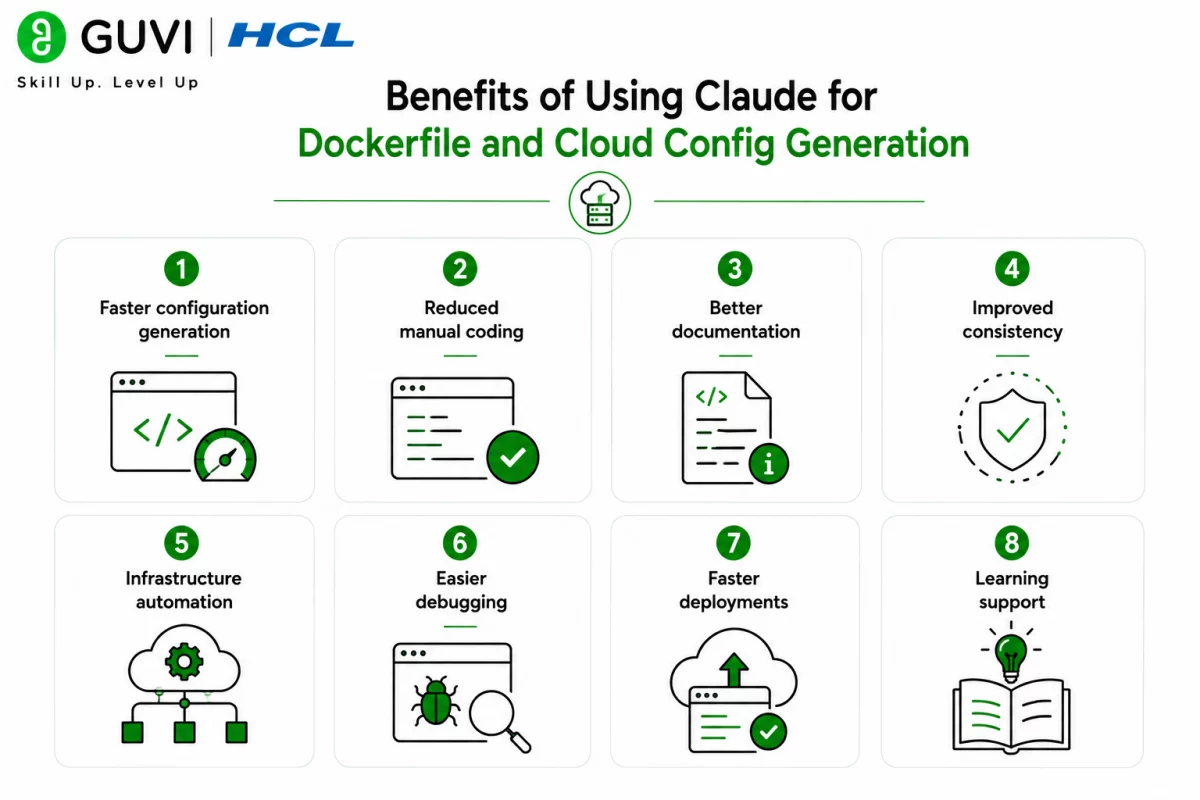
Writing infrastructure configurations requires attention to security, consistency, and deployment best practices. Claude simplifies these tasks by generating structured configurations and explaining how they work.
Key benefits include:
- Faster configuration generation
- Reduced manual coding
- Better documentation
- Improved consistency
- Infrastructure automation
- Easier debugging
- Faster deployments
- Learning support
How to Use Claude for Dockerfile and Cloud Config Generation
Step 1: Define Your Deployment Requirements
Clearly describe the application and deployment environment before requesting configuration files.
Define:
- Application type
- Programming language
- Runtime version
- Deployment target
- Cloud provider
Step 2: Provide Project Details
Share the information Claude needs to build an accurate Dockerfile or cloud configuration.
Include:
- Project structure
- Dependencies
- Environment variables
- Build commands
- Startup commands
- Required services
Step 3: Generate a Dockerfile
Ask Claude to create a Dockerfile following Docker best practices.
Generate:
- Base image
- Multi-stage builds
- Dependency installation
- Build instructions
- Runtime configuration
- Entry point
Step 4: Generate Cloud Configuration Files
Use Claude to create deployment configurations for your preferred cloud platform or orchestration tool.
Create:
- Kubernetes manifests
- Docker Compose files
- Terraform templates
- AWS CloudFormation
- Azure configurations
- Google Cloud deployment files
Step 5: Review Security Best Practices
Before deployment, verify that the generated configurations follow security recommendations.
Review:
- Secrets management
- Least privilege
- Environment variables
- Network rules
- Image security
- Resource limits
Step 6: Test and Validate Configurations
Always validate generated files before deploying them to staging or production environments.
Validate:
- Build success
- Configuration syntax
- Dependency resolution
- Deployment process
- Container startup
- Runtime behavior
Step 7: Continuously Improve Your DevOps Workflow
As your infrastructure evolves, regularly optimize Dockerfiles, deployment pipelines, and cloud configurations for performance, security, and maintainability. Developers interested in mastering CI/CD, cloud platforms, containerization, and automation can build practical expertise through HCL GUVI’s DevOps Course.
Many DevOps teams use AI assistants to generate infrastructure templates, explain deployment errors, optimize Docker images, and automate repetitive configuration tasks, allowing engineers to focus on architecture and reliability.
Claude Prompts for Dockerfile and Cloud Config Generation
Writing detailed prompts helps Claude generate accurate and production-ready infrastructure configurations.
Generate a Dockerfile
| “Create a production-ready Dockerfile for a [programming language/framework] application using Docker best practices, including multi-stage builds and image optimization.” |
Create a Docker Compose File
| “Generate a Docker Compose configuration for an application consisting of [services], including networking, volumes, and environment variables.” |
Build Kubernetes Manifests
| “Generate Kubernetes deployment, service, and ingress YAML files for this application with appropriate resource requests and limits.” |
Generate Terraform Code
| “Create Terraform scripts to provision the required cloud infrastructure for this application, following Infrastructure as Code best practices.” |

Optimize a Dockerfile
| “Review this Dockerfile and recommend improvements for image size, security, build speed, and maintainability.” |
Debug Deployment Errors
| “Analyze this Docker or Kubernetes deployment error, explain the cause, and suggest the correct configuration.” |
Improve Cloud Security
| “Review this cloud configuration for security risks and recommend improvements based on industry best practices.” |
Generate a CI/CD Configuration
| “Create a CI/CD pipeline configuration that builds, tests, containerizes, and deploys this application automatically.” |
Using structured prompts helps Claude generate more reliable Dockerfiles and cloud configurations while reducing manual effort.
DevOps Tasks You Can Automate with Claude
Claude can assist with many infrastructure and deployment tasks.
Claude can help with:
- Dockerfile generation
- Docker Compose files
- Kubernetes manifests
- Terraform templates
- Cloud configuration
- CI/CD pipelines
- Infrastructure documentation
- Deployment troubleshooting
- Configuration optimization
- Security recommendations
- YAML validation
- DevOps documentation
The HCL GUVI’s Artificial Intelligence eBook introduces practical AI concepts, prompt engineering techniques, automation workflows, and real-world applications. It demonstrates how AI can improve software development, DevOps, cloud engineering, and infrastructure management.
Tasks Claude Should Not Replace
Claude supports DevOps workflows but should not replace professional review.
Claude should not replace:
- Production testing
- Security audits
- Infrastructure reviews
- Compliance validation
- Cost optimization
- Disaster recovery planning
- Final deployment approval
- Human engineering judgment
- Organizational policies
While Claude can generate infrastructure configurations, every deployment should be validated, tested, and reviewed before production use.
⚠️ Warning: Claude can generate accurate Dockerfiles and cloud configurations, but AI-generated infrastructure code may contain security risks, outdated practices, or environment-specific issues. Always validate configurations, scan container images, and test deployments before releasing them to production.
Best Practices for Using Claude for Dockerfile and Cloud Config Generation
- Clearly define deployment requirements.
- Provide complete project details.
- Follow Docker best practices.
- Review security settings.
- Test generated configurations.
- Validate infrastructure changes.
- Optimize images regularly.
- Keep dependencies updated.
Conclusion
Claude helps developers accelerate containerization and cloud deployment by generating Dockerfiles, cloud configuration files, Kubernetes manifests, and infrastructure templates. When combined with testing, security validation, and human expertise, it becomes a valuable assistant for building efficient and reliable DevOps workflows.
FAQs
1. Can Claude generate Dockerfiles?
Yes. Claude can create Dockerfiles for various programming languages and frameworks using Docker best practices.
2. Can Claude generate Kubernetes YAML files?
Yes. Claude can generate deployment, service, ingress, and other Kubernetes configuration files.
3. Does Claude support cloud platforms?
Yes. Claude can assist with configurations for AWS, Microsoft Azure, Google Cloud Platform, and other cloud environments.
4. Can Claude create Terraform scripts?
Yes. Claude can generate Infrastructure as Code templates using Terraform for cloud resource provisioning.
5. Should I review AI-generated infrastructure code?
Yes. Always validate, test, and review Dockerfiles and cloud configurations before deployment.
6. Can Claude help debug deployment errors?
Yes. Claude can explain Docker, Kubernetes, and cloud deployment errors and recommend solutions.
7. Is Claude suitable for learning DevOps?
Yes. Claude can explain DevOps concepts, generate examples, assist with automation, and support hands-on learning alongside practical experience.
Success Stories

About the Author
HCL GUVI
This article was selected and published as part of the HCL GUVI AI Blogathon 2026, an initiative designed to encourage students, AI enthusiasts, and aspiring tech writers to simplify complex AI concepts through impactful technical content. The contest recognized high-quality, original, and insightful AI-focused blogs, with selected authors receiving publication opportunities on the HCL GUVI blog platform along with official author credits and recognition.
View all posts by HCL GUVI
Connect with me @














Did you enjoy this article?