


Artificial Intelligence and Machine Learning Articles
AI/ML Skills Gap 2026: Why Companies Can't Find Job-Ready Talent
20 AI/ML Interview Questions Recruiters Can Use Without a Tech Background - Best Guide
How Industry-Backed AI/ML Bootcamps Are Changing the AI/ML Hiring Pipeline - Best Guide 2026
From IT Support to AI Engineer: A Realistic Career Switch Guide 2026


Get In Touch For Details! Request More Information

Claude for Social Media: Creating a Month of Content Fast
Aug 17, 2026 4 Min Read 373 Views
(Last Updated)
Most social media teams spend more time on content production than content strategy, writing captions, reformatting posts for different platforms, and filling calendar gaps instead of focusing on audience growth and engagement analysis. Claude for social media shifts that balance by handling the production layer quickly, letting your team invest time in creative direction, community management, and performance review.
Table of contents
- Quick TL;DR
- What Is Claude for Social Media?
- What Social Media Tasks Claude Handles Best
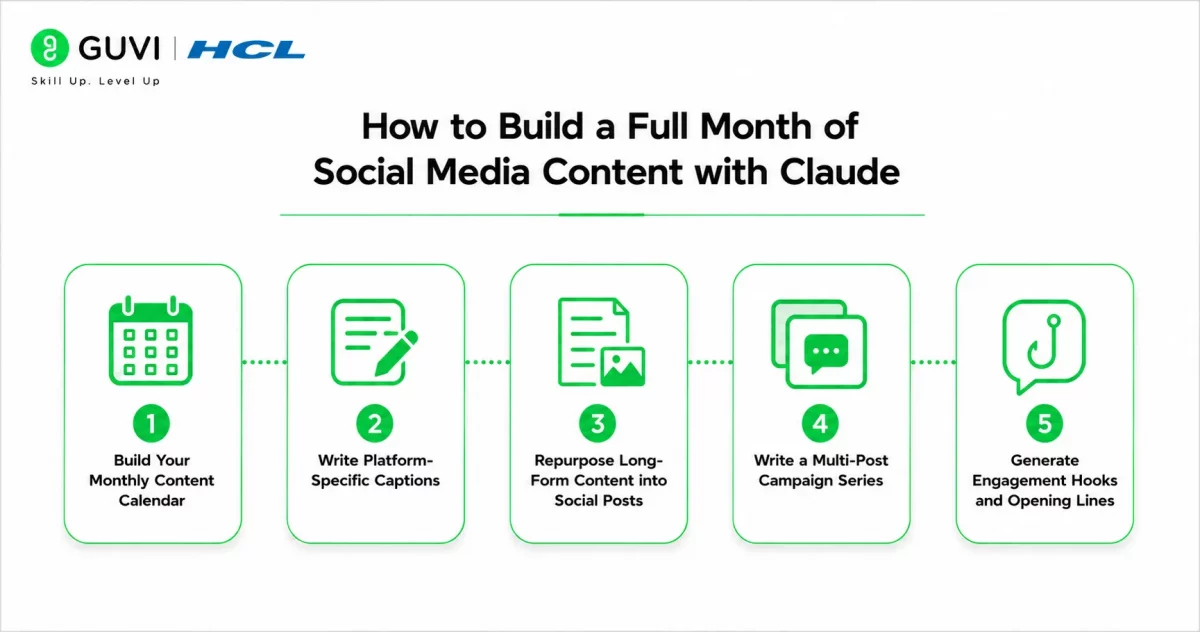
- How to Build a Full Month of Social Media Content with Claude
- Step 1: Build Your Monthly Content Calendar
- Step 2: Write Platform-Specific Captions
- Step 3: Repurpose Long-Form Content into Social Posts
- Step 4: Write a Multi-Post Campaign Series
- Step 5: Generate Engagement Hooks and Opening Lines
- Conclusion
- FAQ
- What is Claude used for in social media content creation?
- Can Claude write in my brand's specific voice?
- How many posts can Claude generate in one session?
- Does Claude suggest hashtags for social media posts?
- Can Claude help with video script writing for social media?
Quick TL;DR
Claude for social media helps content creators, marketing teams, and brand managers generate a full month of social media content across LinkedIn, Instagram, Twitter, and Facebook in a fraction of the time manual creation takes. Claude handles caption writing, hashtag suggestions, content calendar structuring, post variations for different platforms, and repurposing long-form content into short-form posts.
What Is Claude for Social Media?
Claude is an AI assistant that helps marketers, creators, and businesses streamline social media content creation. Instead of spending hours brainstorming ideas, writing captions, and planning posting schedules, you can use Claude to generate organized content tailored to your audience and goals.
From Instagram and LinkedIn to X, Facebook, and TikTok, Claude can produce content variations for different platforms while maintaining a consistent messaging strategy.
Read More: How to Build AI Apps with Claude and Share Them Easily
What Social Media Tasks Claude Handles Best
| Task | What Claude Does |
| Content calendar planning | Generates a month of post topics mapped to themes and dates |
| Caption writing | Produces platform-specific captions in your brand voice |
| Platform reformatting | Adapts one post idea across LinkedIn, Instagram, Twitter, Facebook |
| Hashtag research | Suggests relevant hashtag sets by platform and topic |
| Content repurposing | Converts blog posts, videos, and podcasts into social posts |
| Series and campaign creation | Builds multi-post series around a single theme or product launch |
| Engagement hooks | Writes opening lines optimized to stop the scroll |
Claude works best as a production accelerator when you bring the brand voice, content pillars, and creative direction. The strategy and community management layers remain with your team.
How to Build a Full Month of Social Media Content with Claude
Step 1: Build Your Monthly Content Calendar
Start every monthly content session by giving Claude your content pillars, posting frequency, and any key dates or campaigns for the month. This context shapes everything Claude generates afterward.
You are a social media strategist helping plan a monthly content calendar.

Brand: [Brand name and one-sentence description]

Industry: [Industry]

Target audience: [Who they are and what they care about]

Content pillars: [List 3–5 themes your brand posts about]

Posting frequency: [How many posts per week per platform]

Key dates this month: [Product launches, campaigns, holidays, events]

Platforms: [LinkedIn / Instagram / Twitter / Facebook]

Create a 4-week content calendar with:

- Post topic for each day

- Content pillar it belongs to

- Suggested post format (carousel, single image, video, text-only)

- One-line description of the post angle
The calendar output becomes your team’s working document for the month. Assign post creation tasks from it, flag topics needing visual assets, and use it as the brief for every caption Claude writes in the following steps.
Want to build the content and analytics skills to grow real audiences and measure social media performance professionally? Explore HCL GUVI’s Business Analytics Course, designed to help you develop the data-driven marketing thinking modern content roles demand.
Step 2: Write Platform-Specific Captions
Once your calendar is set, generate captions platform by platform rather than asking for all platforms at once. Each platform has distinct character limits, tone expectations, and engagement mechanics that require separate treatment.
Write captions for this post topic across four platforms:

Topic: [Post topic from your calendar]

Brand voice: [3 adjectives describing your tone]

Key message: [The single idea this post must communicate]

Call to action: [What you want the audience to do]

LinkedIn: Professional tone, up to 150 words, end with a question to drive comments

Instagram: Conversational, up to 125 words, 5 relevant hashtags below

Twitter/X: Under 240 characters, punchy opening, one hashtag maximum

Facebook: Friendly and direct, up to 80 words, include a clear CTA
Generate captions for five to seven posts in one session, then review and edit for brand voice before scheduling. This batch approach produces a week of content in under thirty minutes.
Step 3: Repurpose Long-Form Content into Social Posts
Every blog post, podcast episode, webinar, or case study your brand produces contains enough material for five to ten social posts. Claude makes this repurposing systematic rather than occasional.
Repurpose the following [blog post / podcast transcript / webinar summary]

into social media content.

Extract and create:

1. Five standalone LinkedIn post ideas, each built around a single insight

2. Three Instagram carousel concepts with a suggested slide-by-slide structure

3. Eight Twitter/X posts pulling the most quotable or surprising facts

4. Two Facebook posts framed as conversation starters for the audience

Brand voice: [describe tone]

Audience: [describe who follows you]

Content to repurpose:

[paste your long-form content here]
This prompt consistently produces two to three weeks of social content from a single long-form asset, making it the highest-leverage Claude prompt in a content team’s monthly workflow.
Social media posts with a strong opening line generate significantly higher engagement according to LinkedIn’s content performance research. Most platforms collapse post text after two to three lines, making the visible opening the primary factor in whether a reader clicks to expand or keeps scrolling.

Step 4: Write a Multi-Post Campaign Series
For product launches, awareness campaigns, or themed content weeks, Claude can build a connected series of posts that tell a progressive story across multiple days.
Create a 5-post LinkedIn series for [campaign name or theme].

Series goal: [What you want the audience to think, feel, or do by post 5]

Audience: [Who will read this]

Tone: [Describe brand voice]

Structure each post as:

- Hook line (under 15 words, designed to stop the scroll)

- Body (100–150 words)

- Closing question or CTA

Post 1: Introduce the problem or tension

Post 2: Share a surprising insight or data point

Post 3: Offer a practical tip or framework

Post 4: Address the most common objection or misconception

Post 5: Close with a strong point of view and call to action
Adjust the five-post structure to match your campaign length. The same framework works for Instagram carousels, email sequences, and short video scripts by changing the format instruction per post.
Content repurposing is the highest-ROI social media activity yet fewer than 30 percent of content teams have a systematic process for it according to Content Marketing Institute research. Most teams create original content from scratch every week despite having a library of existing material Claude can repurpose in minutes.
Step 5: Generate Engagement Hooks and Opening Lines
The opening line of any social post determines whether the algorithm surfaces it and whether the audience stops scrolling. Claude can generate ten to fifteen opening line options for any post topic so you select the strongest rather than defaulting to the first thing you write.
Generate 12 opening line options for a social post about [topic].

Audience: [describe]

Brand voice: [describe]

Vary the approach across:

- Surprising statistic or fact

- Contrarian or counterintuitive claim

- Direct question to the reader

- Bold declarative statement

- Short story opener (one sentence)

- Common belief followed by a challenge

All under 15 words. No clickbait or false promises.
Select two or three strong options, test them across different posts, and track which opening styles generate the highest engagement for your specific audience over time.
Conclusion
Claude for social media compresses the production work of a full monthly content calendar into a fraction of the time manual creation requires, covering calendar planning, platform-specific caption writing, long-form repurposing, campaign series, and engagement hook generation in a single structured workflow.
Start by running the content calendar prompt for your next month, select five to seven priority posts, and batch-generate captions for those posts in one Claude session. Once that workflow feels efficient, add the repurposing prompt to convert your existing content library into additional posts, doubling your output without doubling your production time.
FAQ
What is Claude used for in social media content creation?
Writing captions, building content calendars, repurposing long-form content into posts, creating campaign series, and generating engagement hooks across LinkedIn, Instagram, Twitter, and Facebook.
Can Claude write in my brand’s specific voice?
Yes, when you describe your brand voice clearly in the prompt using tone descriptors and examples. Always edit Claude’s output through your brand voice guidelines before publishing.
How many posts can Claude generate in one session?
A single session can produce a full month of post topics, captions for five to seven posts across four platforms, and repurposed content from one long-form asset without hitting practical limits.
Does Claude suggest hashtags for social media posts?
Yes. Ask Claude to suggest hashtags as part of any caption prompt and specify the platform since hashtag strategy differs significantly between Instagram, LinkedIn, and Twitter.
Can Claude help with video script writing for social media?
Yes. Use the campaign series prompt structure and specify short-form video script as the format. Claude produces hook, body, and CTA structures suitable for Reels, TikTok, and YouTube Shorts.
Success Stories

About the Author
Vishalini Devarajan
An Aerospace Engineer turned content writer, I focus on making complex concepts easy to understand through well-structured, reader-friendly blogs. Whether it’s a technical topic or a non-technical one, I love creating content that is clear, engaging, and impactful.
View all posts by Vishalini Devarajan
Connect with me @












Did you enjoy this article?