


Artificial Intelligence and Machine Learning Articles
AI/ML Skills Gap 2026: Why Companies Can't Find Job-Ready Talent
20 AI/ML Interview Questions Recruiters Can Use Without a Tech Background - Best Guide
How Industry-Backed AI/ML Bootcamps Are Changing the AI/ML Hiring Pipeline - Best Guide 2026
From IT Support to AI Engineer: A Realistic Career Switch Guide 2026


Get In Touch For Details! Request More Information
Claude API with LlamaIndex: RAG in 30 Minutes
Aug 17, 2026 3 Min Read 358 Views
(Last Updated)
Claude API with LlamaIndex to build Retrieval-Augmented Generation (RAG) applications that answer questions using your own data. LlamaIndex simplifies document indexing, retrieval, and data management, while Claude generates accurate, context-aware responses. Together, they help developers create AI-powered knowledge assistants, document search systems, and enterprise chat applications in less time.
Table of contents
- TL;DR
- What Is Claude API with LlamaIndex?
- Why Use LlamaIndex with Claude?
- What Do You Need Before Getting Started?
- How to Build a RAG Application with Claude and LlamaIndex
- Step 1: Install the Required Packages
- Step 2: Configure Your API Key
- Step 3: Load Your Documents
- Step 4: Build the Index
- Step 5: Connect Claude and Query the Index
- How Does Retrieval-Augmented Generation (RAG) Work?
- What Can You Build with Claude and LlamaIndex?
- Common Mistakes to Avoid
- Key Takeaways
- Conclusion
- FAQs
- What is Claude API with LlamaIndex?
- What is Retrieval-Augmented Generation (RAG)?
- Can LlamaIndex work with PDFs and other documents?
- Do I need a vector database to use LlamaIndex?
- Is Claude suitable for enterprise RAG applications?
TL;DR
- LlamaIndex helps developers build RAG applications using their own data.
- Claude API generates natural language responses based on retrieved context.
- Together, they simplify building document-aware AI assistants.
- A basic RAG application can be created by indexing documents and connecting them to Claude.
- Secure API key management is essential when working with AI applications.
What Is Claude API with LlamaIndex?
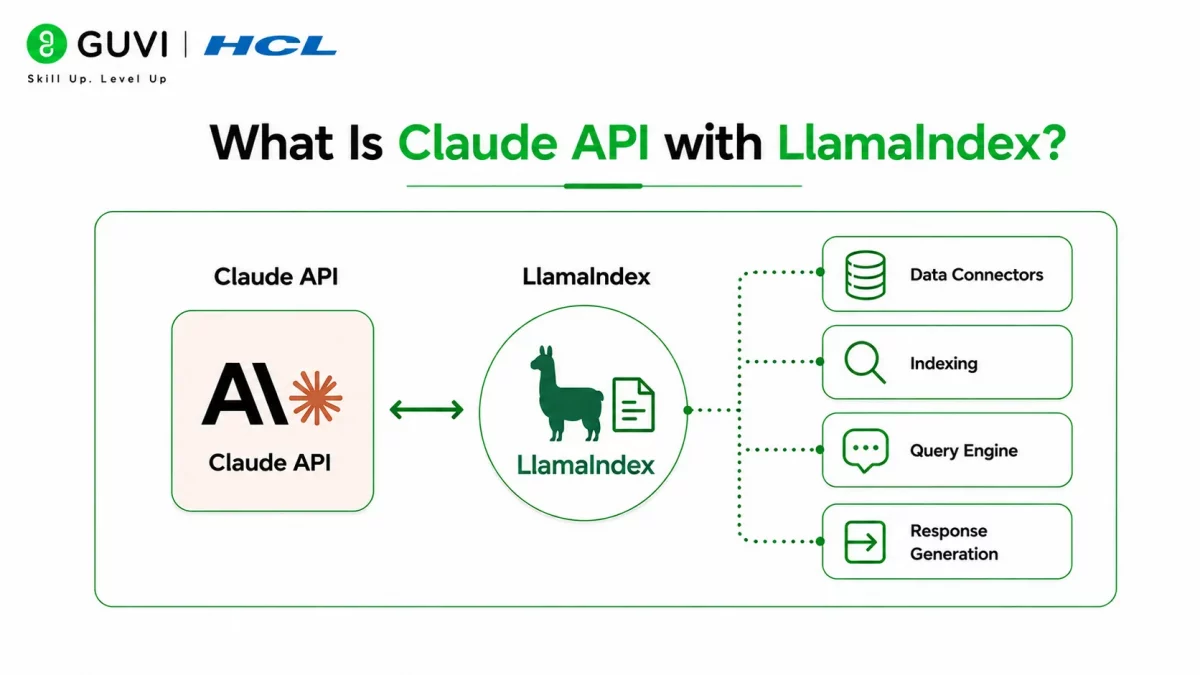
Claude API with LlamaIndex combines Anthropic’s Claude models with the LlamaIndex framework to build Retrieval-Augmented Generation (RAG) applications. Instead of relying only on the model’s training data, LlamaIndex retrieves relevant information from your documents and passes it to Claude, allowing the model to generate responses based on current, domain-specific knowledge.
This approach improves answer quality for applications that work with private documents, company knowledge bases, manuals, or research papers.
Common use cases include:
- Enterprise knowledge assistants
- Document search applications
- Internal support chatbots
- Research assistants
- Customer self-service portals
Retrieval-Augmented Generation (RAG) helps reduce AI hallucinations by retrieving relevant documents before generating a response. This gives the language model accurate, domain-specific context instead of relying only on its pre-trained knowledge.
Read More: Claude Code Tutorial: Generate, Debug, and Document Code
Why Use LlamaIndex with Claude?
While Claude is excellent at understanding and generating text, it doesn’t automatically know the contents of your private documents. LlamaIndex bridges this gap by organizing, indexing, and retrieving relevant information before sending it to Claude.
Some key benefits include:
- More accurate responses. Claude answers questions using retrieved document context instead of relying solely on general knowledge.
- Support for private data. Build AI applications around internal documents without retraining the model.
- Flexible data sources. LlamaIndex works with PDFs, databases, web pages, and other document formats.
- Scalable architecture. The framework supports growing knowledge bases and enterprise applications.
Data Point: Retrieval-Augmented Generation has become one of the most widely adopted approaches for building AI applications that require accurate, up-to-date information from custom data sources.
Want to build intelligent AI applications with Retrieval-Augmented Generation (RAG)? Explore HCL GUVI’s Artificial Intelligence & Machine Learning Course, where you’ll learn LlamaIndex, vector databases, LLMs, LangChain, prompt engineering, and end-to-end AI application development through hands-on industry projects.
What Do You Need Before Getting Started?
Before building a RAG application, prepare your development environment.
You’ll typically need:
- Python installed
- Claude API access
- LlamaIndex
- Anthropic integration package
- Documents for indexing
- A code editor
Having your documents organized before indexing makes the setup process much smoother.
Best Practice: Store your Claude API key as an environment variable instead of placing it directly in your application code.
How to Build a RAG Application with Claude and LlamaIndex
Follow these steps to create a basic Retrieval-Augmented Generation application.
Step 1: Install the Required Packages
Install LlamaIndex and the Anthropic integration.
pip install llama-index llama-index-llms-anthropic anthropicStep 2: Configure Your API Key
Store your Claude API key securely.
export ANTHROPIC_API_KEY="your_api_key"On Windows PowerShell:
$env:ANTHROPIC_API_KEY="your_api_key"Avoid storing credentials directly in source code.
Step 3: Load Your Documents
Load the documents you want your AI application to search.
from llama_index.core import SimpleDirectoryReader

documents = SimpleDirectoryReader("data").load_data()
LlamaIndex reads the files and prepares them for indexing.
Step 4: Build the Index
Create an index from the loaded documents.
from llama_index.core import VectorStoreIndex

index = VectorStoreIndex.from_documents(documents)
The index enables efficient retrieval during user queries.
Step 5: Connect Claude and Query the Index
Configure Claude and start asking questions.
from llama_index.llms.anthropic import Anthropic

llm = Anthropic(model="claude-sonnet-4")

query_engine = index.as_query_engine(llm=llm)

response = query_engine.query("Summarize the uploaded documents.")

print(response)
Claude generates answers using the retrieved document context.

Warning: Never upload confidential or sensitive documents unless your deployment environment and security policies explicitly allow it.
How Does Retrieval-Augmented Generation (RAG) Work?
Retrieval-Augmented Generation combines document retrieval with AI text generation.
A typical workflow looks like this:
- A user submits a question.
- LlamaIndex searches indexed documents.
- The most relevant content is retrieved.
- Claude receives both the user query and retrieved context.
- Claude generates a context-aware response.
This process helps produce more accurate answers based on your own data instead of relying solely on the model’s existing knowledge.
What Can You Build with Claude and LlamaIndex?
Developers use Claude and LlamaIndex to build a wide range of AI-powered applications.
Popular projects include:
- Internal knowledge bases.
- Technical documentation assistants.
- Legal document search tools.
- Research assistants.
- Healthcare knowledge systems.
- Customer support chatbots.
- Enterprise AI search platforms.
These applications become more valuable as document collections grow.
Pro Tip: Start with a small collection of documents to validate your RAG workflow before scaling to larger datasets or integrating vector databases.
Common Mistakes to Avoid
Building a RAG application is straightforward, but several common mistakes can reduce performance.
Some mistakes include:
- Indexing poorly formatted documents.
- Ignoring document updates.
- Hardcoding API credentials.
- Using low-quality source data.
- Skipping retrieval testing.
Regularly reviewing your indexed content helps maintain accurate and reliable responses.
The quality of retrieved documents often has a greater impact on response accuracy than using a larger language model. Well-structured, up-to-date source documents enable more reliable and relevant AI-generated answers in RAG applications.
Key Takeaways
- LlamaIndex simplifies building Retrieval-Augmented Generation applications.
- Claude generates responses using retrieved document context.
- Indexing quality directly affects response accuracy.
- Secure API key management is essential.
- RAG enables AI applications to work with private and domain-specific knowledge.
- Starting with a simple prototype makes future scaling much easier.
Conclusion
Combining Claude API with LlamaIndex provides an efficient way to build Retrieval-Augmented Generation applications powered by your own data. Instead of relying only on pretrained knowledge, Claude can answer questions using information retrieved from indexed documents, making responses more accurate and relevant.
Whether you’re building an enterprise knowledge assistant, document search system, or research tool, LlamaIndex simplifies the retrieval process while Claude delivers high-quality natural language responses. Together, they provide a powerful foundation for modern AI applications.
FAQs
What is Claude API with LlamaIndex?
Claude API with LlamaIndex combines Anthropic’s Claude models with the LlamaIndex framework to build Retrieval-Augmented Generation (RAG) applications. It enables AI to answer questions using your own indexed documents.
What is Retrieval-Augmented Generation (RAG)?
RAG is an AI technique that retrieves relevant information from external data sources before generating a response. This helps produce more accurate and context-aware answers.
Can LlamaIndex work with PDFs and other documents?
Yes, LlamaIndex supports multiple document formats, including PDFs, text files, and other data sources. It organizes and indexes these documents for efficient retrieval.
Do I need a vector database to use LlamaIndex?
No, you can build simple RAG applications without a vector database. However, vector databases become useful as your document collection grows.
Is Claude suitable for enterprise RAG applications?
Yes, Claude can be integrated into enterprise RAG workflows when combined with secure infrastructure, proper access controls, and responsible data management practices.
Success Stories

About the Author
Vishalini Devarajan
An Aerospace Engineer turned content writer, I focus on making complex concepts easy to understand through well-structured, reader-friendly blogs. Whether it’s a technical topic or a non-technical one, I love creating content that is clear, engaging, and impactful.
View all posts by Vishalini Devarajan
Connect with me @











Did you enjoy this article?