


Artificial Intelligence and Machine Learning Articles
AI/ML Skills Gap 2026: Why Companies Can't Find Job-Ready Talent
20 AI/ML Interview Questions Recruiters Can Use Without a Tech Background - Best Guide
How Industry-Backed AI/ML Bootcamps Are Changing the AI/ML Hiring Pipeline - Best Guide 2026
From IT Support to AI Engineer: A Realistic Career Switch Guide 2026


Get In Touch For Details! Request More Information
Claude + Obsidian: AI-Powered Note-Taking Setup
Jul 23, 2026 4 Min Read 386 Views
(Last Updated)
Table of contents
- TL;DR Summary Box
- Why Claude + Obsidian Works
- What An AI Note System Is
- How Claude Helps
- How Obsidian Helps
- Best Setup Structure
- Smart Claude Workflows
- A Practical Workflow
- What To Store
- Common Mistakes
- Real-World Example
- What Makes It Sustainable
- What To Do Next
- Conclusion
- FAQs
- What is Claude + Obsidian used for?
- Is Obsidian good for a second brain?
- How does Claude help with note-taking?
- Should I store raw notes or cleaned notes in Obsidian?
- What is the best Obsidian setup for Claude?
- Can Claude organize my Obsidian vault automatically?
- What is the biggest mistake people make with AI note-taking?
TL;DR Summary Box
- Claude and Obsidian work well together because Obsidian stores your notes while Claude helps you organize, expand, and connect them.
- The best setup is simple: capture raw notes, process them with Claude, and store the cleaned version in Obsidian.
- A strong note-taking system is not about saving more; it is about making notes easier to find and reuse.
- Claude can help with summaries, links, tags, outlines, and turning rough thoughts into structured pages.
- Obsidian becomes more powerful when your notes are linked, searchable, and updated consistently.
Why Claude + Obsidian Works
Claude and Obsidian solve two different problems, which is why they fit together so well. Obsidian gives you a private, markdown-based home for your notes, while Claude helps you think through, rewrite, and refine those notes.
The real benefit is that your notes stop being isolated text files. Instead, they become part of a connected knowledge system that can support writing, research, planning, and decision-making.
If you already keep fragments of ideas, reading notes, meeting takeaways, or project thoughts, Claude can help you turn that raw material into something useful. That saves time and makes your notes easier to act on later.
Use Claude with Obsidian to capture ideas, organize notes, and build a smarter second brain. Learn AI & ML with HCL GUVI’s Artificial Intelligence and Machine Learning course.
What An AI Note System Is
An AI-powered note-taking setup is a workflow where you capture ideas in Obsidian and use Claude to help shape them. It is not about replacing your notes with AI output. It is about improving how you process what you already know.
A good system usually includes:
- Quick capture for rough ideas.
- A place for cleaned-up notes.
- A way to link related topics.
- A review habit so old notes stay useful.
- A prompt style that helps Claude work the way you want.
The goal is to make your notes smarter over time, not just bigger.
How Claude Helps
Claude is especially useful when a note is messy, vague, or too long. It can turn rough thoughts into clean summaries, extract action items, suggest structure, and help you build a note that is easier to revisit later.
Useful Claude tasks include:
- Summarizing long notes.
- Turning a stream of thoughts into bullet points.
- Creating titles and tags.
- Generating outlines for projects or articles.
- Rewriting notes in a cleaner format.
- Comparing related notes and identifying overlaps.
This is what makes Claude more than a writing tool. It becomes a note-processing partner.
How Obsidian Helps
Obsidian is where the knowledge lives. Because it is built around Markdown files, it gives you a flexible and local-first system for storing ideas, research, and project notes.
A strong Obsidian setup usually includes:
- An inbox for raw capture.
- A notes area for cleaned-up content.
- A projects folder.
- A reading or reference library.
- Internal links between related notes.
That structure matters because a note-taking app is only helpful if you can retrieve what you saved. Linking and organizing notes is what turns scattered text into a second brain.
Best Setup Structure
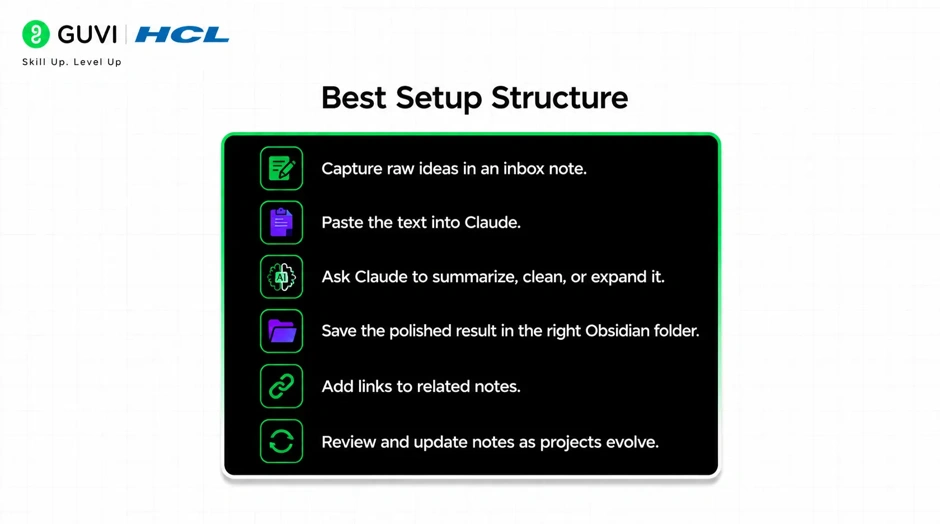
The best Claude + Obsidian workflow is simple enough to maintain every day. Start with a capture inbox, then let Claude help move notes into their final shape.
A practical setup might look like this:
- Capture raw ideas in an inbox note.
- Paste the text into Claude.
- Ask Claude to summarize, clean, or expand it.
- Save the polished result in the right Obsidian folder.
- Add links to related notes.
- Review and update notes as projects evolve.
This process keeps your vault from becoming a junk drawer. It also makes the note system easier to trust.
Smart Claude Workflows
Claude works best when you give it a clear job. If you ask it to “organize my notes,” you may get something broad. If you ask it to do one specific task, the result is usually much better.
Good prompts include:
- “Turn this rough note into a clean summary.”
- “Extract key ideas and action items.”
- “Rewrite this into a project note.”
- “Suggest better tags and a title.”
- “Create an outline from these notes.”
- “Find the main themes across these points.”
Pro Tip: Keep one reusable prompt library inside Obsidian. That way you can copy a tested prompt instead of rewriting instructions every time.
A Practical Workflow
A good workflow should feel easy enough to repeat. If it takes too much effort, you will stop using it.
Try this:
- Capture a thought, article note, or meeting takeaway.
- Paste it into Claude.
- Ask Claude to clean it up and identify the core idea.
- Save the result in Obsidian.
- Add backlinks to related notes.
- Revisit the note when the project becomes active again.
This gives you a system that grows with use. Over time, your notes become more connected and more valuable.

What To Store

Not everything deserves a full note. If you save too much junk, the vault becomes noisy and hard to search.
Good things to store include:
- Ideas worth developing.
- Meeting notes.
- Research snippets.
- Lessons learned.
- Project plans.
- Reusable frameworks.
- Useful summaries.
Things like duplicate notes, vague fragments, and random one-liners should be cleaned up or merged. The aim is clarity, not quantity.
Common Mistakes
The biggest mistake is overcomplicating the system. Many people build complex folder structures before they have a habit of capturing and reviewing notes.
Other common mistakes include:
- Saving too many unrelated notes.
- Using vague note titles.
- Not linking related ideas.
- Never reviewing older notes.
- Depending on AI output without editing it.
- Treating Obsidian like storage instead of a thinking tool.
Another mistake is trying to automate everything too soon. Manual review is still useful, especially when a note matters for a project, article, or decision.
Real-World Example
Imagine you watch a long tutorial and take messy notes while watching. Instead of leaving the note as raw text, you paste it into Claude and ask for a summary, key takeaways, and action steps.
Then you save the cleaned version in Obsidian, link it to the project it belongs to, and tag it for future search. A month later, when you need the idea again, you can find it quickly instead of rewatching the whole video.
That is the real value of Claude + Obsidian. It turns one-time information into reusable knowledge.
What Makes It Sustainable
A note system works only if it fits your real habits. If the workflow feels heavy, you will avoid it. If it feels light, you will use it often.
To keep it sustainable:
- Use one inbox for capture.
- Keep note titles specific.
- Review notes weekly.
- Use the same prompt patterns.
- Link notes as you go.
- Clean up weak notes before they pile up.
When the system stays simple, it becomes easier to maintain. That is what makes it useful over time.
Use Claude with Obsidian to capture ideas, organize notes, and build a smarter second brain. Learn AI & ML with HCL GUVI’s Artificial Intelligence and Machine Learning course.
What To Do Next
Start with one folder and one use case. For example, use Claude to clean up your reading notes or meeting notes before expanding into a bigger system.
A good next step is to create three parts in Obsidian:
- Capture.
- Organize.
- Review.
Then let Claude help you move notes from raw to structured. Once that habit sticks, you can add project tracking, research libraries, and prompt templates.
Conclusion
Claude and Obsidian make a strong combination for AI-powered note-taking because they solve different parts of the same problem. Obsidian stores your thinking, and Claude helps you shape it into something useful.
The best note systems are not the most complicated ones. They are the ones you actually keep using, because they help you find, understand, and reuse your ideas when it matters.
FAQs
1. What is Claude + Obsidian used for?
It is used to build a smarter note-taking system where Obsidian stores your notes and Claude helps summarize, refine, and organize them.
2. Is Obsidian good for a second brain?
Yes. Obsidian works well as a second brain because it uses local markdown files, links, and folders to keep your knowledge connected.
3. How does Claude help with note-taking?
Claude can summarize notes, extract action items, rewrite rough thoughts, create outlines, and suggest titles or tags.
4. Should I store raw notes or cleaned notes in Obsidian?
Both can be useful, but it is best to keep raw notes in an inbox and move cleaned-up notes into your main system after review.
5. What is the best Obsidian setup for Claude?
A simple setup with an inbox, project folder, reference notes, and a prompt library is usually the easiest to maintain.
6. Can Claude organize my Obsidian vault automatically?
It can help, but you should still review the output. AI is useful for processing notes, but human judgment keeps the system clean and accurate.
7. What is the biggest mistake people make with AI note-taking?
They overbuild the system and underuse it. A simple workflow that you repeat is better than a complex one you abandon.
Success Stories

About the Author
Vishalini Devarajan
An Aerospace Engineer turned content writer, I focus on making complex concepts easy to understand through well-structured, reader-friendly blogs. Whether it’s a technical topic or a non-technical one, I love creating content that is clear, engaging, and impactful.
View all posts by Vishalini Devarajan
Connect with me @













Did you enjoy this article?