


Career Articles
Accountant to Data Scientist: A Realistic Career Path in 2026
Quality Analyst to Data Analyst: Skills and Career Roadmap for 2026
Operations Analyst to Data Scientist: Best Skills, Roadmap & Career Transition (2026)
Do You Need Coding for Data Analytics? A BPO Employee’s Career Switch Guide 2026


Get In Touch For Details! Request More Information
ATS Friendly Resume: How to Beat Applicant Tracking Systems in 2026
Jul 13, 2026 5 Min Read 1181 Views
(Last Updated)
Table of contents
- TL;DR Summary
- Introduction
- What Is an ATS Friendly Resume?
- Why Applicant Tracking Systems Matter
- ATS Resume vs Normal Resume
- How to Create an ATS Friendly Resume
- Use a Simple Resume Layout
- Match Keywords from the Job Description
- Write Clear Job Titles and Skill Names
- Add Measurable Achievements
- Use the Right File Format
- Keep Your Skills Section Specific
- ATS Resume Tips for Freshers and Professionals
- ATS Friendly Resume Tips for Freshers
- ATS Resume Tips for Experienced Professionals
- How ATS Friendly Resumes Work in Real Hiring Scenarios
- Common Mistakes to Avoid While Creating an ATS Friendly Resume
- Mistake 1: Using Overdesigned Resume Templates
- Mistake 2: Keyword Stuffing
- Mistake 3: Using Unclear Section Headings
- Mistake 4: Sending the Same Resume Everywhere
- Mistake 5: Ignoring Human Readability
- Wrapping Up
- Frequently Asked Questions
- What is an ATS Friendly Resume?
- How do I know if my resume is ATS-friendly?
- Should I use PDF or Word for an ATS Resume?
- Can ATS read tables and columns?
- How many keywords should I add to an ATS Resume?
- Is an ATS Friendly Resume useful for freshers?
- Can I use Canva templates for ATS resumes?
- What are the best ATS Resume Tips?
TL;DR Summary
An ATS Friendly Resume is a resume formatted so an Applicant Tracking System can read, parse, and rank it correctly. To build one, use a simple layout, match job-description keywords naturally, avoid complex graphics, use standard section headings, and save the file in the format requested by the employer. The goal is not to “trick” the ATS; it is to make your skills, experience, tools, and achievements easy for both software and recruiters to understand.
Introduction
An ATS Friendly Resume can be the difference between getting shortlisted and getting ignored, even when you are qualified.
Most large employers now use recruitment software to manage applications. Jobscan’s 2025 report found that 98.4% of Fortune 500 companies used a detectable ATS in 2024, which shows how common Applicant Tracking Systems have become in modern hiring.
Here is the practical truth: your resume must first be readable by software, then convincing to a recruiter. This guide shows you exactly how to build a resume for ATS without making it robotic, keyword-stuffed, or boring.
What Is an ATS Friendly Resume?
An ATS Friendly Resume is a resume that uses clean formatting, relevant keywords, standard headings, and readable file structure so an Applicant Tracking System can correctly scan your details and match them with a job description.
In simple terms, it helps the system understand:
- Who you are
- What role you are applying for
- What skills you have
- What tools and technologies you know
- Whether your experience matches the job
Why Applicant Tracking Systems Matter
An Applicant Tracking System is software used by employers to collect, organize, filter, and track job applications. LinkedIn explains that ATS platforms can scan resumes for role-specific keywords, organize candidate information, support background checks, and streamline hiring workflows.
For candidates, this means your resume should not just look good. It must also be easy to parse.
Harvard Business School and Accenture’s “Hidden Workers” research found that automated recruiting systems are widely used to filter or rank candidates, with more than 90% of employers in their survey using RMS systems to initially filter or rank middle-skill and high-skill candidates.
ATS tools are not mind readers. If a job description says “SQL,” but your resume only says “database querying,” the system may not always connect the dots.
ATS Resume vs Normal Resume
An ATS resume and a normal resume may contain the same career details, but they are structured differently. The table below shows how formatting, keywords, headings, and file type can affect resume readability.
| Factor | Normal Resume | ATS Resume |
| Design | May include graphics, columns, icons | Simple, clean, text-focused |
| Keywords | General skill mentions | Matched to job description |
| Headings | Creative headings like “My Journey” | Standard headings like “Work Experience” |
| File Format | Often PDF or designed template | PDF/DOCX as requested |
| Goal | Impress visually | Pass ATS + impress recruiter |
A strong ATS Resume balances both sides. It is simple enough for software and clear enough for humans.
How to Create an ATS Friendly Resume
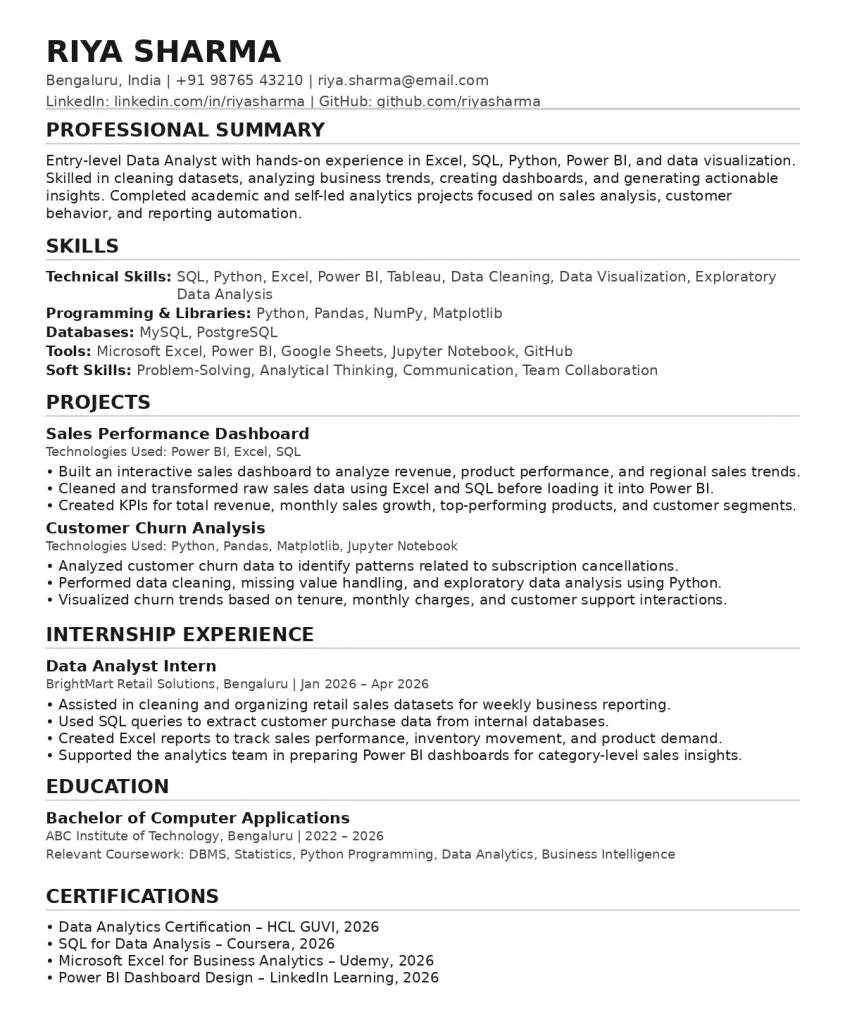
Before you start editing your resume, focus on three things: readability, relevance, and proof of work. The steps below will help you build a resume that is easy for both ATS software and recruiters to scan.
1. Use a Simple Resume Layout
Choose a single-column layout with clear spacing. Avoid tables, text boxes, heavy graphics, icons, images, and unusual fonts.
Use standard section headings such as:
- Summary
- Skills
- Work Experience
- Education
- Projects
- Certifications
This helps the Applicant Tracking System correctly classify each part of your resume.
2. Match Keywords from the Job Description
ATS software often compares your resume with the job description. So, read the job post carefully and identify repeated skills, tools, responsibilities, and qualifications.
For example, if a Data Analyst job mentions “SQL, Power BI, Excel, dashboarding, stakeholder reporting,” your resume should naturally include those terms if you genuinely have those skills.
Avoid copying the entire job description. Use keywords honestly and contextually.
3. Write Clear Job Titles and Skill Names
Use industry-standard wording. For example:
- Write “Full Stack Developer” instead of “Web Wizard”
- Write “Data Analyst” instead of “Insight Ninja”
- Write “Digital Marketing Executive” instead of “Growth Rockstar”
Creative titles may sound fun, but ATS tools and recruiters search for standard role names.
4. Add Measurable Achievements
A resume for ATS should not be only a keyword list. It should show impact.
Instead of writing:
“Worked on social media campaigns.”
Write:
“Managed Instagram and LinkedIn campaigns, improving monthly engagement by 32% in three months.”
Numbers make your resume stronger for both ATS ranking and recruiter evaluation.
5. Use the Right File Format
Follow the employer’s instructions first. If the application page asks for DOCX, upload DOCX. If it accepts PDF, use a clean text-based PDF.
Indeed’s ATS resume guidance also recommends using simple formatting and aligning your resume with the role you are applying for.
6. Keep Your Skills Section Specific
Avoid vague terms like “hardworking,” “team player,” and “quick learner” in the skills section.
Use role-specific skills:
| Role | ATS-Friendly Skills |
| Software Developer | JavaScript, React, Node.js, REST API, Git |
| Data Analyst | SQL, Excel, Power BI, Python, Tableau |
| UI/UX Designer | Figma, Wireframing, Prototyping, User Research |
| Digital Marketer | SEO, Google Ads, GA4, Meta Ads, Email Marketing |
ATS Resume Tips for Freshers and Professionals
Your resume strategy changes based on your experience level. Freshers should highlight projects and tools, while experienced professionals should show measurable business impact.
ATS Friendly Resume Tips for Freshers
Freshers often worry about not having work experience. Instead of filling space with generic statements, focus on projects, internships, certifications, tools, and academic achievements.
Include:
- Final-year projects
- GitHub or portfolio links
- Internship tasks
- Tools learned
- Certifications
- Hackathons or coding challenges
Example:
“Built a student attendance dashboard using Excel and Power BI to track department-wise attendance trends.”
ATS Resume Tips for Experienced Professionals
Experienced candidates should focus on impact, leadership, tools, and role relevance.
Include:
- Business outcomes
- Team size handled
- Tools used
- Revenue, cost, time, or efficiency improvements
- Domain experience
Example:
“Reduced monthly reporting time by 40% by automating Excel dashboards using Power Query.”
How ATS Friendly Resumes Work in Real Hiring Scenarios
The easiest way to understand ATS optimization is to see how companies screen resumes in real hiring situations. These examples show how small wording changes can improve resume relevance.
Example 1: IT Services Company Hiring Java Developers
Imagine a Bengaluru-based IT services company hiring for a Java Developer role. The company may receive hundreds of applications within a few days, especially for entry-level and mid-level openings.
Before a recruiter manually reviews resumes, the Applicant Tracking System may scan each resume for role-specific terms such as Java, Spring Boot, REST API, Microservices, SQL, Git, Agile, and Unit Testing.
Now, consider two candidates with similar skills.
One candidate writes:
“Worked on backend development projects.”

Another candidate writes:
“Built REST APIs using Java and Spring Boot, integrated MySQL databases, and used Git for version control in an Agile development environment.”
The second version is stronger because it gives the ATS clear keywords and gives the recruiter specific proof of work. This is exactly how an ATS Friendly Resume should work: it should connect your actual skills with the language used in the job description.
Example 2: E-commerce Company Hiring Performance Marketers
An e-commerce company hiring a Performance Marketing Executive may use an ATS to shortlist candidates based on campaign platforms, marketing metrics, and analytics tools.
The job description may include keywords such as Google Ads, Meta Ads, ROAS, CAC, CTR, conversion tracking, GA4, landing page optimization, and remarketing campaigns.
A weak resume bullet may say:
“Handled digital marketing campaigns.”
A better ATS-friendly bullet would be:
“Managed Google Ads and Meta Ads campaigns, tracked CTR and ROAS using GA4, and optimized landing pages to improve conversion performance.”
This version works better because it includes platform names, measurable marketing terms, and practical campaign responsibilities. Even if the ATS ranks resumes based on keyword relevance, the recruiter still sees a clear business impact.
Common Mistakes to Avoid While Creating an ATS Friendly Resume
Even a qualified candidate can lose visibility if the resume is difficult to parse or too generic. Watch out for these common mistakes before submitting your next application.
Mistake 1: Using Overdesigned Resume Templates
Many candidates choose resume templates with columns, icons, charts, profile photos, and decorative blocks because they look modern. The problem is that some Applicant Tracking Systems may not read these elements in the correct order.
For example, your skills may appear in the left column, while your experience appears on the right. If the ATS reads the right column first or skips a graphic section, your resume may lose important context.
Fix: Use a clean, single-column format with simple headings, readable fonts, and consistent spacing.
Mistake 2: Keyword Stuffing
Adding too many keywords unnaturally can make your resume look spammy. Some candidates repeat the same skill multiple times or hide keywords in white text, thinking it will help them pass ATS screening.
This is not a good strategy. Recruiters can easily notice forced keyword usage, and it can reduce trust.
Fix: Use keywords naturally in your summary, skills, projects, and work experience. Every keyword should be supported by a real example, project, or responsibility.
Mistake 3: Using Unclear Section Headings
Creative headings like “My Journey,” “Where I Worked,” “What I Know,” or “Career Story” may sound interesting, but they are not ideal for ATS parsing.
Most systems are trained to recognize standard section names. If your resume uses unusual headings, the ATS may fail to categorize your information properly.
Fix: Use direct headings like Professional Summary, Skills, Work Experience, Projects, Education, Certifications, and Achievements.
Mistake 4: Sending the Same Resume Everywhere
A generic resume rarely matches every job description. For example, a Data Analyst role may prioritize SQL and Power BI, while another may focus more on Python and Tableau.
If you send the same resume to both roles, you may miss important keywords that the ATS is looking for.
Fix: Customize your resume for each application. You do not need to rewrite everything. Update your summary, skills, and 3–5 bullet points based on the job description.
Mistake 5: Ignoring Human Readability
An ATS Resume should not become a robotic list of keywords. After the system filters applications, a recruiter or hiring manager still reads your resume.
If your resume is difficult to skim, lacks achievements, or sounds too generic, it may not move forward even after passing the ATS.
Fix: Keep your resume simple, specific, and outcome-focused. Use action verbs, measurable achievements, and short bullet points that show what you actually did.
Wrapping Up
An ATS Friendly Resume is not about gaming the hiring system. It is about presenting your skills in a format that both Applicant Tracking Systems and recruiters can understand. Use a clean layout, include role-specific keywords honestly, write measurable achievements, and customize your resume for each job.
Once your content is ready, the next step is to put it into a format that is easy to scan and submit. You can use HCL GUVI’s Free Resume Builder to organize your skills, projects, education, and experience into a clear resume layout without starting from scratch.
Frequently Asked Questions
1. What is an ATS Friendly Resume?
An ATS Friendly Resume is a resume formatted so an Applicant Tracking System can read and categorize it correctly. It uses clean formatting, standard headings, and relevant job keywords.
2. How do I know if my resume is ATS-friendly?
Copy your resume text into a plain text editor. If the sections, dates, skills, and job titles remain readable, your format is likely ATS-friendly.
3. Should I use PDF or Word for an ATS Resume?
Use the format requested by the employer. If there is no instruction, a clean text-based PDF or DOCX is usually safer than an image-heavy PDF.
4. Can ATS read tables and columns?
Some systems can, but not all parse them correctly. For safety, avoid tables and multi-column layouts in your Resume for ATS.
5. How many keywords should I add to an ATS Resume?
There is no fixed number. Add relevant keywords from the job description naturally across your summary, skills, work experience, and projects.
6. Is an ATS Friendly Resume useful for freshers?
Yes. Freshers can improve ATS compatibility by adding role-specific skills, academic projects, internships, certifications, and tools used.
7. Can I use Canva templates for ATS resumes?
Some Canva templates are visually attractive but may contain columns, icons, and text boxes that ATS tools struggle to parse. Use a simpler template for online applications.
8. What are the best ATS Resume Tips?
Use standard headings, include job-description keywords, avoid graphics, quantify achievements, customize for each role, and keep formatting simple.
Success Stories















Did you enjoy this article?