


Artificial Intelligence and Machine Learning Articles
AI/ML Skills Gap 2026: Why Companies Can't Find Job-Ready Talent
20 AI/ML Interview Questions Recruiters Can Use Without a Tech Background - Best Guide
How Industry-Backed AI/ML Bootcamps Are Changing the AI/ML Hiring Pipeline - Best Guide 2026
From IT Support to AI Engineer: A Realistic Career Switch Guide 2026


Get In Touch For Details! Request More Information
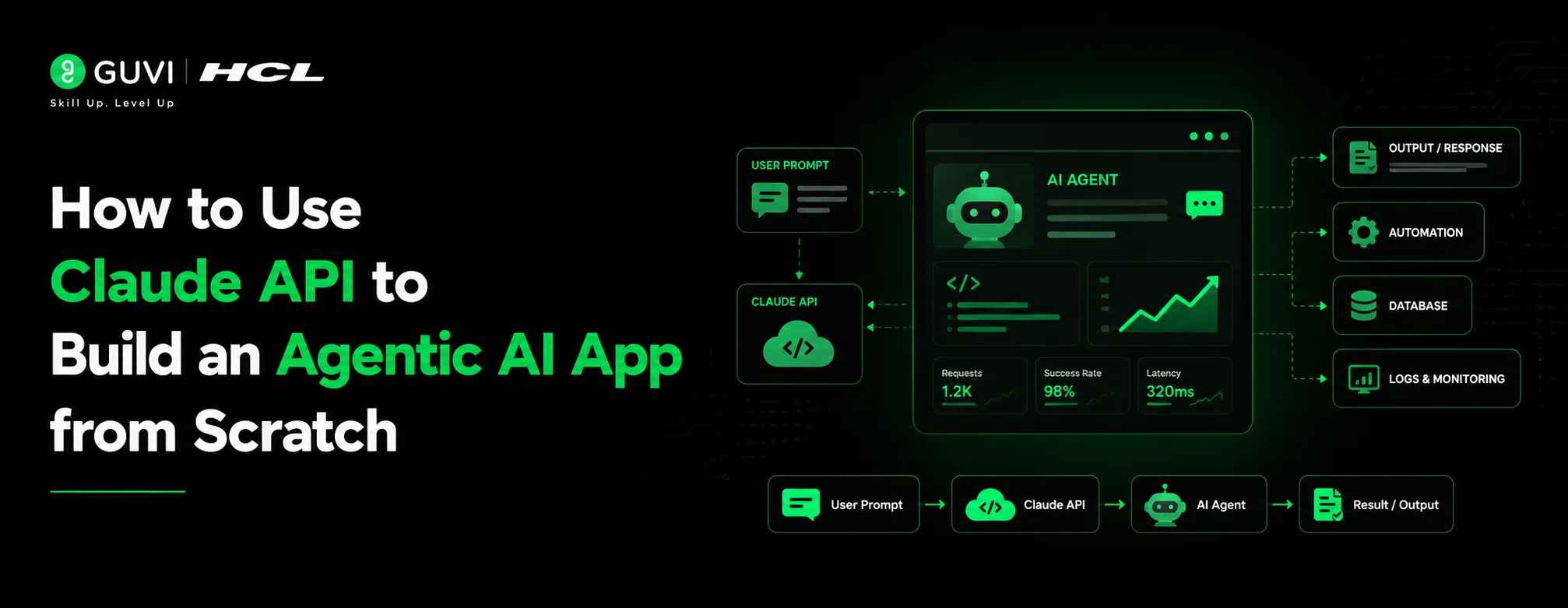
How to Use Claude API to Build an Agentic AI App from Scratch
Jul 09, 2026 9 Min Read 345 Views
(Last Updated)
Table of contents
- TL;DR
- What Is an Agentic AI App?
- Why Use the Claude API for Agentic Apps?
- Prerequisites Before You Start
- How to Set Up the Claude API
- Step 1: Get Your API Key
- Step 2: Install the SDK
- Step 3: Make Your First API Call
- Understanding the Core Building Blocks
- The System Prompt
- The Messages Array
- Tools
- The Agentic Loop
- How to Give Claude Tools to Use
- Comparison: Basic Chat vs. Agentic Tool Use
- Building Your First Agentic Loop
- Real-World Example: A Research Agent
- Common Mistakes to Avoid
- Writing a vague system prompt
- Not handling tool errors
- Forgetting to append messages
- Running the loop without a stopping condition
- Using the wrong model for the task
- Conclusion
- Frequently Asked Questions
- What is the Claude API used for?
- What is an agentic AI app?
- Do I need to know machine learning to use the Claude API?
- How much does the Claude API cost?
- What tools can I give a Claude agent?
- How do I give my Claude agent memory?
- What is the difference between Claude Sonnet and Claude Opus for agents?
- Is it safe to give an AI agent access to real tools like email or file systems?
- How do I debug an agentic loop that is not working?
- What is the maximum context length for Claude agents?
TL;DR
Agentic AI is changing how developers build applications. Instead of creating AI tools that only answer questions, developers can now build systems that reason, plan, use tools, and complete tasks independently. The Claude API makes this possible by giving you access to powerful AI models with built-in tool-use capabilities.
In this guide, you’ll learn how to build an agentic AI app from scratch using the Claude API, starting with API setup, creating your first Claude connection, designing system prompts, adding tools, building an agentic loop, and handling real-world challenges.
By the end, you’ll understand how AI agents work and how to create your own Claude-powered applications for automation, research, coding, and business workflows.
The next wave of AI development is moving beyond chatbots. Companies are now building agentic AI applications that can understand goals, make decisions, use external tools, and complete complex workflows with minimal human involvement. From AI research assistants and coding agents to automated business workflows, AI agents are quickly becoming one of the most in-demand skills for developers in 2026.
But building an AI agent from scratch often sounds complicated. You need to handle model interactions, tool calling, memory, decision-making loops, and error handling — all while keeping the system reliable.
The Claude API from Anthropic makes this process far more accessible. With Claude’s reasoning capabilities and built-in tool-use support, developers can create AI agents that do more than answer questions; they can plan, execute tasks, and interact with real-world systems.
In this guide, you’ll learn how to use the Claude API to build an agentic AI app from scratch, including:
- Setting up your Claude API environment
- Understanding the architecture behind AI agents
- Connecting Claude with tools and external APIs
- Building an agentic loop using Python
- Avoiding common mistakes when deploying AI agents
Whether you are an AI beginner exploring agent development or a developer looking to build production-ready AI applications, this guide will help you move from a simple API call to a functional AI agent.
What Is an Agentic AI App?
An agentic AI app is not just a chatbot. It is a system where the AI model actively decides what to do next, without waiting for instructions at every step.
Think of the difference this way:
- Chatbot: You ask a question → Claude answers → done.
- Agent: You give Claude a goal → Claude reasons about what steps are needed → it calls tools, processes results, and keeps going until the goal is complete.
A simple chatbot responds. An agent acts.
The key components of every agentic app are:
- A language model (Claude) that reasons and decides
- Tools the model can call (web search, databases, APIs, code runners)
- A loop that keeps running until the task is finished
- Memory that carries context between steps
Read: Generative AI vs AI Agents vs Agentic AI: Understanding the Evolution
Why Use the Claude API for Agentic Apps?
There are several AI APIs available today. Here is why Claude stands out for agentic use cases specifically.
Claude’s extended context window (up to 200K tokens) means your agent can hold an entire project’s worth of context, files, tool outputs, and conversation history without losing track.
Claude follows complex instructions reliably. Agentic apps depend on the model sticking to a plan across many steps. Claude is designed to handle nuanced, multi-step reasoning without drifting off-task.
The tool uses the API natively. You don’t need a third-party framework to give Claude tools. The API has built-in support for defining, calling, and processing tool outputs in a structured way.
Safety built in. For production agentic apps, Claude includes built-in safeguards that prevent runaway actions, important when your agent has real-world capabilities like browsing or writing files.
Prerequisites Before You Start
Before writing any code, make sure you have the following ready.
Technical requirements:
- Python 3.9+ or Node.js 18+
- Basic knowledge of REST APIs and JSON
- A code editor (VS Code recommended)
- pip or npm for installing packages
Account setup:
- An Anthropic account (sign up at console.anthropic.com)
- An API key from the Anthropic Console
- Billing enabled (the API is pay-per-use)
Conceptual understanding:
- What a system prompt is
- What tokens are and why they cost money
- Basic understanding of async/await if using JavaScript
If you’re new to APIs in general, it’s worth spending 30 minutes understanding how HTTP requests and JSON responses work before diving in. The rest of this guide assumes you’re comfortable with those basics.
Explore: Python for AI: How to Get Started in 2026
How to Set Up the Claude API
Step 1: Get Your API Key
Go to console.anthropic.com, create an account, and navigate to API Keys. Generate a new key and store it securely; treat it like a password.
Never hardcode your API key in your source code. Use environment variables instead.
# In your terminal
export ANTHROPIC_API_KEY=”your-api-key-here”
Step 2: Install the SDK
Python:
pip install anthropic
Node.js:
npm install @anthropic-ai/sdk
Step 3: Make Your First API Call
Here’s the simplest possible Claude API call in Python:
import anthropic
client = anthropic.Anthropic()
message = client.messages.create(
model=”claude-sonnet-4-6″,
max_tokens=1024,
messages=[
{“role”: “user”, “content”: “What is an agentic AI app?”}
]
)
print(message.content[0].text)
Run this. If you get a response, your API connection is working. You’re ready to build an agent.
Understanding the Core Building Blocks
Before writing your agent, you need to understand four core concepts. Every agentic app is built from these.
1. The System Prompt
The system prompt defines your agent’s identity, goal, and constraints. It is passed at the start of every conversation and sets the rules the agent follows throughout its run.
system_prompt = “””
You are a research assistant agent. Your job is to answer user questions
by searching the web, reading sources, and synthesising accurate answers.
Always cite your sources. Never guess — if you don’t know something,
search for it. Stop when you have a complete, accurate answer.
“””
Write your system prompt carefully. A vague system prompt produces a vague agent.
2. The Messages Array
The messages array is the agent’s memory. Every user message, every Claude response, and every tool result gets added to this array and sent back on the next turn.
messages = [
{“role”: “user”, “content”: “Find the latest AI research papers from 2026”}
]
# After Claude responds, you add its response:
messages.append({“role”: “assistant”, “content”: claude_response})
# Then the next user message or tool result:
messages.append({“role”: “user”, “content”: tool_result})
This is how Claude “remembers” what it has done, it reads the full history on every turn.
Want to go beyond building AI agents and master the skills behind modern AI applications? Explore HCL GUVI Artificial Intelligence and Machine Learning Course to learn AI concepts, machine learning, Generative AI, and real-world development workflows with hands-on projects and an industry-recognized certificate.
3. Tools
Tools are functions your agent can call. You define them, Claude decides when to call them, and your code executes them.
Read: Top AI Tools for Developers in 2026
4. The Agentic Loop
The loop is the engine of your agent. It keeps running, Claude thinks, calls a tool, you run the tool, Claude reads the result, thinks again, until Claude decides the task is done.
How to Give Claude Tools to Use
Tool use is what separates an agent from a chatbot. Here is how it works.
You define the tool by describing what it does, what inputs it takes, and what it returns. Claude reads this description and decides when to use it.
tools = [
{
“name”: “web_search”,
“description”: “Search the web for current information. Use this when you need facts, news, or data you don’t already know.”,
“input_schema”: {
“type”: “object”,
“properties”: {
“query”: {
“type”: “string”,
“description”: “The search query to look up”
}
},
“required”: [“query”]
}
}
]
Claude calls the tool by returning a special tool_use block instead of text:
{
“type”: “tool_use”,
“id”: “toolu_01XA”,
“name”: “web_search”,
“input”: {“query”: “latest Claude API features 2026”}
}
Your code runs the tool with that input and returns the result. Then you send the result back to Claude, and it continues reasoning.
This is the fundamental pattern of every agentic app. Define tools → Claude calls them → you execute them → Claude reads results → repeat.
Comparison: Basic Chat vs. Agentic Tool Use
| Feature | Basic Chat API | Agentic Tool Use |
| Input | Single user message | Goal + tool definitions |
| Output | One text response | Text + tool calls |
| Memory | None (unless you manage it) | Full message history |
| Iteration | Single turn | Multi-turn loop |
| External access | None | Any API, database, or function you define |
| Use case | Q&A, summarisation | Research, automation, workflows |
| Complexity | Low | Medium–High |
Building Your First Agentic Loop
Here is a complete, working agentic loop in Python. This is the core pattern you will build every agent on.
import anthropic
import json
client = anthropic.Anthropic()
# Define your tools
tools = [
{
“name”: “calculate”,
“description”: “Perform a mathematical calculation. Returns the numeric result.”,
“input_schema”: {
“type”: “object”,
“properties”: {
“expression”: {
“type”: “string”,
“description”: “A mathematical expression to evaluate, e.g. ‘(15 * 4) / 2′”
}
},
“required”: [“expression”]
}
}
]
# Implement the tool
def run_tool(tool_name, tool_input):
if tool_name == “calculate”:
try:
result = eval(tool_input[“expression”]) # Use a safe math parser in production
return str(result)
except Exception as e:
return f”Error: {str(e)}”
return “Unknown tool”

# The agentic loop
def run_agent(user_goal):
messages = [{“role”: “user”, “content”: user_goal}]
system = “You are a helpful assistant. Use tools when needed to complete tasks accurately.”
while True:
# Ask Claude what to do next
response = client.messages.create(
model=”claude-sonnet-4-6″,
max_tokens=1000,
system=system,
tools=tools,
messages=messages
)
# Add Claude’s response to message history
messages.append({“role”: “assistant”, “content”: response.content})
# Check if Claude is done
if response.stop_reason == “end_turn”:
# Extract the final text response
for block in response.content:
if hasattr(block, “text”):
return block.text
# If Claude wants to use a tool, process it
if response.stop_reason == “tool_use”:
tool_results = []
for block in response.content:
if block.type == “tool_use”:
print(f”Agent calling tool: {block.name} with {block.input}”)
result = run_tool(block.name, block.input)
tool_results.append({
“type”: “tool_result”,
“tool_use_id”: block.id,
“content”: result
})
# Send tool results back to Claude
messages.append({“role”: “user”, “content”: tool_results})
# Run it
answer = run_agent(“What is (144 / 12) multiplied by the number of months in a year?”)
print(answer)
This loop is the foundation of every production agent. You extend it by adding more tools, a better system prompt, and error handling.
Explore: What is Prompt Engineering? A Complete Beginner’s Guide
Real-World Example: A Research Agent
Let’s look at how a real company could use this pattern.
Scenario: A content marketing team at an EdTech company needs to research trending topics in AI education every week. Previously, a junior analyst spent 3 hours every Monday browsing reports, summarising findings, and writing a brief.
The agentic solution: They built a Claude-powered research agent with three tools:
- web_search – searches for recent articles and reports
- fetch_page – reads the full content of a URL
- save_report – writes the final summary to a shared Google Doc
The agent is given one instruction each Monday morning: “Research the top 5 AI education trends from the past 7 days and write a 500-word brief with sources.”
It searches, reads five to eight sources, filters for relevance, synthesises a brief, and saves it in under four minutes. The analyst now spends that time on higher-value editorial decisions instead.
The result: The same output quality, 97% faster, with a full audit trail of every source the agent read.
This is the practical value of agentic AI, not replacing the human, but removing the repetitive multi-step work so humans can focus on judgment.
Common Mistakes to Avoid
1. Writing a vague system prompt
The system prompt is your agent’s only set of instructions. If it says “be helpful,” Claude will interpret “helpful” differently on every run. Write specific, constrained system prompts that define exactly what the agent should and should not do.
2. Not handling tool errors
Tools fail. APIs time out, web pages block scrapers, and calculations hit edge cases. Always wrap tool execution in try/except blocks and return a meaningful error string, so Claude can decide how to recover rather than crashing your loop.
3. Forgetting to append messages
Every Claude response and every tool result must be appended to the messages array before the next API call. If you skip this, Claude loses its memory of what it just did and starts repeating actions or losing context.
4. Running the loop without a stopping condition
An agent with no exit condition will run forever and drain your API budget. Always check the response.stop_reason == “end_turn” and add a hard maximum iteration count as a safety net.
max_iterations = 10
iteration = 0
while iteration < max_iterations:
# … your loop …
iteration += 1
5. Using the wrong model for the task
claude-sonnet-4-6 is the right default for most agentic tasks, it balances capability and cost. Using a heavier model for simple tool calls wastes money; using a lighter model for complex reasoning produces poor results. Match the model to the complexity of your agent’s task.
Want to build real AI-powered apps using the Claude API? HCL GUVI’s AI & Prompt Engineering Programme takes you from zero to deploying production-grade AI apps, with hands-on projects using real APIs and agentic workflows.
Conclusion
The Claude API makes it genuinely accessible to build agentic AI apps, systems that reason, plan, use tools, and complete multi-step tasks without constant human input. The core pattern is simple: define your tools, build a message loop, let Claude decide what to call and when, and process the results. Start with one tool, one clear goal, and a tight system prompt. Once that works, you can layer in more tools, persistent memory, and error recovery. The gap between a demo agent and a production-ready one is mostly careful engineering around edge cases, and that is a learnable skill.
Frequently Asked Questions
What is the Claude API used for?
The Claude API gives developers programmatic access to Claude, Anthropic’s AI model. It is used to build chatbots, document processors, coding assistants, and agentic apps that can reason and take multi-step actions.
What is an agentic AI app?
An agentic AI app is one where the AI model takes a series of actions, calling tools, processing results, and making decisions to complete a goal, rather than simply answering a single question.
Do I need to know machine learning to use the Claude API?
No. The Claude API is a REST API; you send JSON, you receive JSON. You need programming knowledge (Python or JavaScript recommended), not machine learning expertise.
How much does the Claude API cost?
The Claude API is priced per token (input + output). As of 2026, claude-sonnet-4-6 is the recommended model for most agentic tasks. Check the Anthropic pricing page for current rates, as pricing is updated regularly.
What tools can I give a Claude agent?
Any function your code can run can be a tool, web search, database queries, file reading/writing, sending emails, calling third-party APIs, running Python code, and more. You define the tool schema; Claude decides when to use it.
How do I give my Claude agent memory?
Claude has no built-in persistent memory between conversations. You manage memory by appending every message and tool result to the messages array. For long-running agents, you can summarise older history or store it in a database and inject relevant parts into the context window.
What is the difference between Claude Sonnet and Claude Opus for agents?
Claude Sonnet is faster and more cost-efficient, the right choice for most agentic tasks. Claude Opus is Anthropic’s most capable model, suited for tasks requiring very deep reasoning, complex code generation, or nuanced judgment. For most production agents, start with Sonnet.
Is it safe to give an AI agent access to real tools like email or file systems?
It can be, with the right guardrails. Always run agents in sandboxed environments first, set explicit permission boundaries in your system prompt, require human confirmation for irreversible actions (like sending emails or deleting files), and cap the number of iterations the agent can run.
How do I debug an agentic loop that is not working?
Print every message in the messages array before sending it to the API. Most agentic bugs come from malformed tool results, missing message appends, or stop reason mismatches. Logging the full conversation history at each step is the fastest way to find the issue.
What is the maximum context length for Claude agents?
Claude supports up to 200,000 tokens of context, enough to hold hundreds of tool call results, long documents, and extended conversation histories in a single agent run. For most tasks, you will not hit this limit, but it is worth monitoring token usage for long-running agents.
Success Stories

About the Author
Salini Balasubramaniam
A curious, information-savvy writer loves to turn deep insights into authentic and engaging content that connects. With experience in writing for brands and driving audience engagement, I believe that words can make a powerful difference.
View all posts by Salini Balasubramaniam
Connect with me @









Did you enjoy this article?