


Artificial Intelligence and Machine Learning Articles
Finance Manager to Data Analytics: Career Growth, Salary and Seniority
How to Evaluate LLM Outputs in Production Deployments
AI/ML Skills Gap 2026: Why Companies Can't Find Job-Ready Talent
20 AI/ML Interview Questions Recruiters Can Use Without a Tech Background - Best Guide


Get In Touch For Details! Request More Information
MLflow Experiment Tracking: A Complete Beginner’s Guide
Aug 17, 2026 4 Min Read 961 Views
(Last Updated)
Table of contents
- TL;DR
- Introduction
- What is MLflow Experiment Tracking?
- Why Experiment Tracking Matters
- Benefits of MLflow Experiment Tracking
- Core Concepts in MLflow Experiment Tracking
- Experiments
- Runs
- Parameters
- Metrics
- Artifacts
- Tags
- Setting Up MLflow
- Step 1: Install MLflow
- Step 2: Create an Experiment
- Building Your First MLflow Tracking Workflow
- Step 1: Import Libraries
- Step 2: Start an MLflow Run
- Step 3: Log Parameters
- Step 4: Train the Model
- Step 5: Log Metrics
- Step 6: Save the Model
- Step 7: Add Tags
- Understanding the MLflow UI
- MLflow Autologging
- Real-World Use Cases of MLflow Experiment Tracking
- Hyperparameter Tuning
- Model Benchmarking
- Team Collaboration
- MLOps Pipelines
- MLflow vs Manual Experiment Tracking
- Best Practices for MLflow Experiment Tracking
- Use Descriptive Experiment Names
- Log Dataset Versions
- Track Important Parameters
- Save Relevant Artifacts
- Use Tags Consistently
- Enable Autologging
- Standardize Experiment Workflows
- Common Mistakes Beginners Make
- Using Generic Experiment Names
- Logging Metrics but Not Parameters
- Ignoring Artifacts
- Forgetting Tags
- Not Tracking Dataset Versions
- Creating Inconsistent Processes
- Conclusion
- FAQs
- What is MLflow Experiment Tracking?
- Why should I use MLflow?
- What are runs in MLflow?
- What are artifacts in MLflow?
- What is MLflow Autologging?
- Can MLflow track deep learning experiments?
- Why is experiment tracking important?
- Is MLflow useful for MLOps?
TL;DR
- MLflow Experiment Tracking is a machine learning tool that helps data scientists track experiments by automatically logging parameters, metrics, artifacts, and metadata.
- It organizes machine learning experiments into runs, making model comparison and performance analysis easier.
- MLflow improves reproducibility by storing experiment details in a centralized location.
- The built-in MLflow UI allows teams to visualize, compare, and manage experiment results efficiently.
- Features such as Autologging reduce manual work by automatically capturing training information.
- MLflow is widely used in MLOps workflows to build scalable, collaborative, and production-ready machine learning systems.
Introduction
Machine learning projects often involve dozens of experiments, model versions, and hyperparameter combinations. Without a proper tracking system, reproducing results and comparing model performance can become challenging. MLflow Experiment Tracking helps solve this by organizing experiment data, metrics, and artifacts in one place. To build practical machine learning and MLOps skills, learners can explore HCL GUVI’s AI & Machine Learning Course and gain hands-on experience with real-world AI projects.
What is MLflow Experiment Tracking?
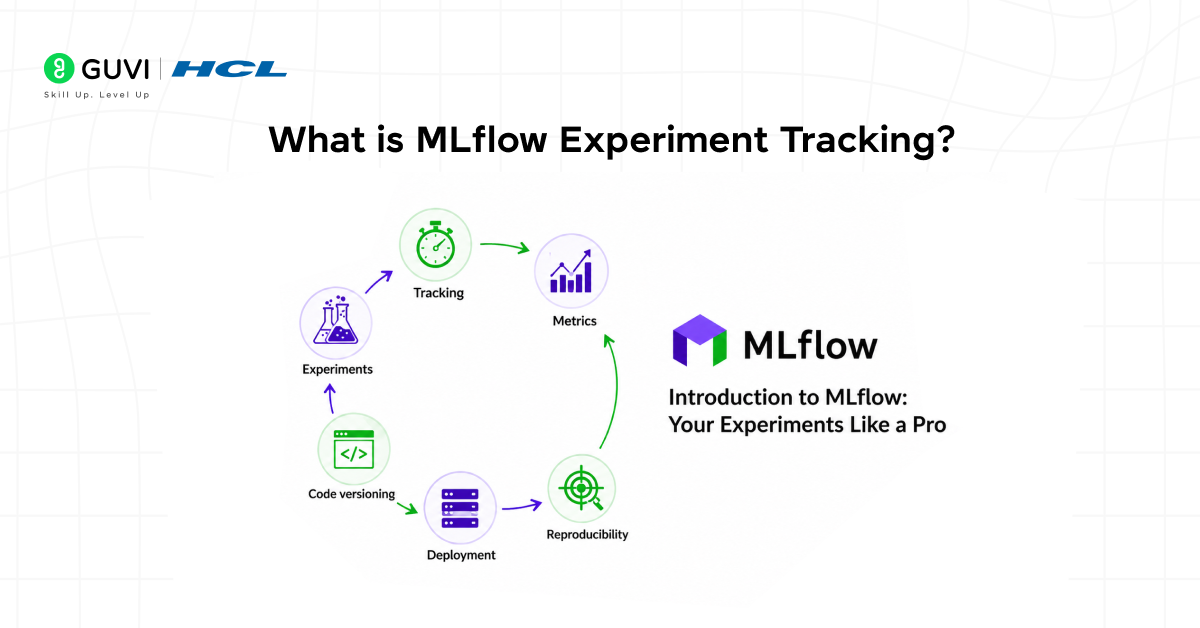
MLflow Experiment Tracking is a feature of MLflow that records machine learning experiments by logging parameters, metrics, artifacts, tags, and metadata.
It helps teams answer critical questions such as:
- Which model performed best?
- What hyperparameters were used?
- Which dataset version was used for training?
- How can the experiment be reproduced?
Instead of manually documenting every experiment, MLflow automatically stores this information and makes it available through a centralized dashboard.
This makes experiment tracking faster, more reliable, and significantly easier to manage as projects grow.
Why Experiment Tracking Matters
Machine learning is an iterative process. Data scientists rarely build the perfect model on the first attempt.
A typical workflow might involve:
- Testing different learning rates.
- Experimenting with feature engineering.
- Trying multiple algorithms.
- Comparing dataset versions.
- Fine-tuning hyperparameters.
Without a tracking system, it becomes difficult to remember what changed between runs.
This often leads to:
- Lost experiment results.
- Difficulty reproducing models.
- Duplicate work.
- Poor collaboration.
- Increased development time.
Experiment tracking provides complete visibility into the model development process, helping teams understand exactly why one model outperformed another.
Benefits of MLflow Experiment Tracking
1. Better Reproducibility
Every training run is stored with its parameters and outputs, making it easier to recreate results later.
2. Faster Debugging
Teams can identify changes between experiments and quickly locate performance issues.
3. Easier Model Comparison
Multiple model runs can be analyzed side by side without maintaining spreadsheets.
4. Improved Collaboration
Experiment history becomes accessible to the entire team rather than remaining on individual machines.
5. Stronger MLOps Workflows
Tracking creates a reliable foundation for deployment, monitoring, and model governance.
Core Concepts in MLflow Experiment Tracking
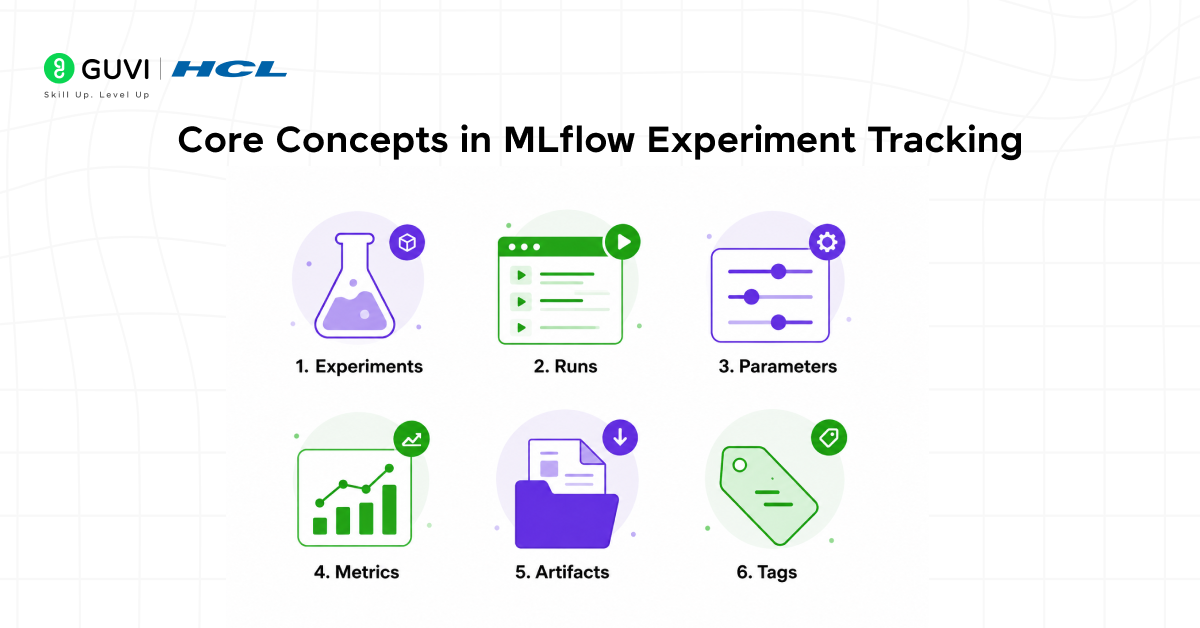
Before using MLflow, it’s important to understand its key components.
1. Experiments
Experiments act as containers that group related runs together.
Examples include:
- Customer Churn Prediction
- Fraud Detection
- House Price Prediction
Each project generally has its own experiment.
2. Runs
A run represents a single execution of model training.
Every run stores:
- Parameters
- Metrics
- Artifacts
- Metadata
3. Parameters
Parameters are training configurations, such as:
- Learning rate
- Batch size
- Number of epochs
- Tree depth
4. Metrics
Metrics measure model performance.
Common examples include:
- Accuracy
- Precision
- Recall
- F1 Score
- Loss
5. Artifacts
Artifacts are output files generated during training.
Examples include:
- Trained models
- Evaluation reports
- Confusion matrices
- Visualizations
- Feature importance charts
6. Tags
Tags provide additional context for experiments.
Examples:
- Baseline Model
- Hyperparameter Tuning
- Production Candidate
Setting Up MLflow
Installing MLflow takes only a few minutes.
Step 1: Install MLflow
pip install mlflow
Step 2: Create an Experiment
import mlflow
mlflow.set_experiment(
“Iris Classification”
)
This creates a dedicated workspace where all future runs will be stored.
Building Your First MLflow Tracking Workflow
Let’s look at a simple MLflow workflow using a machine learning model.
Step 1: Import Libraries
import mlflow

import mlflow.sklearn

from sklearn.linear_model import LogisticRegression
Step 2: Start an MLflow Run
with mlflow.start_run():MLflow now begins recording experiment information.
Step 3: Log Parameters
mlflow.log_param(

   "max_iter",

   100

)
This stores the chosen hyperparameter.
Step 4: Train the Model
model = LogisticRegression(

   max_iter=100

)

model.fit(

   X_train,

   y_train

)
Step 5: Log Metrics
mlflow.log_metric(

   "accuracy",

   accuracy

)
Metrics are automatically associated with the current run.
Step 6: Save the Model
mlflow.sklearn.log_model(

   model,

   "iris_model"

)
The model is stored as an artifact.
Step 7: Add Tags
mlflow.set_tag(

   "project",

   "Iris Classification"

)
Tags help organize experiments and improve searchability.
At this stage, MLflow has successfully recorded your experiment.
Ready to put MLflow into practice? Explore these MLflow Project Ideas and discover hands-on projects that can help you strengthen your machine learning and experiment-tracking skills.
Understanding the MLflow UI
One of MLflow’s most useful features is its visual interface.
Launch the dashboard using:

mlflow server --port 5000The MLflow UI allows you to:
- View experiments.
- Compare runs.
- Analyze metrics.
- Inspect parameters.
- Download artifacts.
- Review model information.
Instead of manually searching through notebooks and scripts, teams can evaluate experiments from a single dashboard.
Want to master machine learning workflows and AI tools? Check out HCL GUVI’s AI & Machine Learning Course for hands-on learning and industry-relevant projects.
MLflow Autologging
Logging every parameter manually can become repetitive.
MLflow solves this with Autologging.
mlflow.sklearn.autolog()Once enabled, MLflow automatically records:
- Parameters
- Metrics
- Models
- Environment information
- Training metadata
This reduces boilerplate code while ensuring comprehensive experiment records.
One of the key motivations behind MLflow was solving a common problem in machine learning workflows: teams often struggled to reliably track hyperparameters, code versions, datasets, and experiment results, which made reproducibility difficult. To address this, MLflow Tracking was introduced as a core component to log and organize experiment metadata in a structured way. This allows data scientists and ML engineers to compare runs, reproduce results, and manage the full lifecycle of experiments more effectively, improving collaboration and consistency across teams.
Real-World Use Cases of MLflow Experiment Tracking
1. Hyperparameter Tuning
Teams often test dozens or hundreds of parameter combinations.
MLflow helps identify which configuration delivers the best performance.
2. Model Benchmarking
Organizations frequently compare multiple algorithms before selecting a production model.
3. Team Collaboration
MLflow provides a shared repository where everyone can access experiment history.
4. MLOps Pipelines
Modern MLOps workflows require reproducibility and traceability.
MLflow integrates naturally into training, deployment, and monitoring pipelines.
MLflow vs Manual Experiment Tracking
| Feature | Manual Tracking | MLflow |
| Parameter Logging | Manual | Automatic |
| Metric Tracking | Manual | Automatic |
| Experiment Comparison | Difficult | Easy |
| Reproducibility | Limited | Strong |
| Collaboration | Challenging | Centralized |
| Scalability | Low | High |
For small projects, manual tracking may work. However, as machine learning workflows grow, MLflow becomes significantly more efficient.
Looking to expand your AI knowledge beyond experiment tracking? Download HCL GUVI’s Generative AI eBook and discover how cutting-edge AI technologies are transforming model development, automation, and intelligent applications.
Best Practices for MLflow Experiment Tracking
Follow these best practices to keep experiments organized.
1. Use Descriptive Experiment Names
Avoid names such as “Experiment 1” or “Test Run.”
Instead, use names that clearly describe the project.
2. Log Dataset Versions
Always record which dataset version was used for training.
3. Track Important Parameters
Store hyperparameters consistently across all runs.
4. Save Relevant Artifacts
Include reports, plots, evaluation metrics, and trained models.
5. Use Tags Consistently
Tags make filtering and searching much easier.
6. Enable Autologging
Autologging reduces manual work and minimizes missing information.
7. Standardize Experiment Workflows
Establishing a consistent tracking process improves project quality and collaboration.
Common Mistakes Beginners Make
Many teams fail to get the full value of MLflow because of avoidable mistakes.
1. Using Generic Experiment Names
Poor naming conventions make experiments difficult to locate later.
2. Logging Metrics but Not Parameters
Without parameters, reproducing results becomes challenging.
3. Ignoring Artifacts
Artifacts often contain valuable insights about model performance.
4. Forgetting Tags
Tags improve organization and simplify filtering.
5. Not Tracking Dataset Versions
Dataset changes can significantly impact results.
6. Creating Inconsistent Processes
A lack of standardization often leads to confusion as projects scale.
Conclusion
MLflow Experiment Tracking plays a crucial role in modern machine learning workflows by making experiments easier to manage, compare, and reproduce. Centralizing parameters, metrics, artifacts, and metadata, it helps teams maintain consistency throughout the model development process. Whether you’re building personal projects or enterprise-scale AI solutions, MLflow provides the foundation needed for scalable, reliable, and production-ready machine learning systems.
FAQs
1. What is MLflow Experiment Tracking?
MLflow Experiment Tracking is a feature that records machine learning experiments by storing parameters, metrics, artifacts, tags, and metadata for every run.
2. Why should I use MLflow?
MLflow improves reproducibility, collaboration, experiment comparison, and overall experiment management.
3. What are runs in MLflow?
Runs are individual executions of machine learning code that store parameters, metrics, artifacts, and metadata.
4. What are artifacts in MLflow?
Artifacts are output files generated during training, including models, plots, reports, and visualizations.
5. What is MLflow Autologging?
Autologging automatically records parameters, metrics, models, and metadata with minimal code changes.
6. Can MLflow track deep learning experiments?
Yes. MLflow supports popular machine learning and deep learning frameworks.
7. Why is experiment tracking important?
Experiment tracking improves reproducibility, debugging, collaboration, and model comparison.
8. Is MLflow useful for MLOps?
Absolutely. MLflow is widely used in MLOps workflows because it provides experiment management, traceability, and reproducibility.
Success Stories

About the Author
Vishalini Devarajan
An Aerospace Engineer turned content writer, I focus on making complex concepts easy to understand through well-structured, reader-friendly blogs. Whether it’s a technical topic or a non-technical one, I love creating content that is clear, engaging, and impactful.
View all posts by Vishalini Devarajan
Connect with me @

















Did you enjoy this article?