


Software Development Articles
System Engineer Roles and Responsibilities: 12 Proven Duties for Growth
SAP Consultant Roles and Responsibilities: 12 Proven Duties for Growth and Success
Network Engineer Roles and Responsibilities: 12 Essential Duties for Success
How to Avoid Burnout as a Software Developer: 7 Practical Strategies


Get In Touch For Details! Request More Information
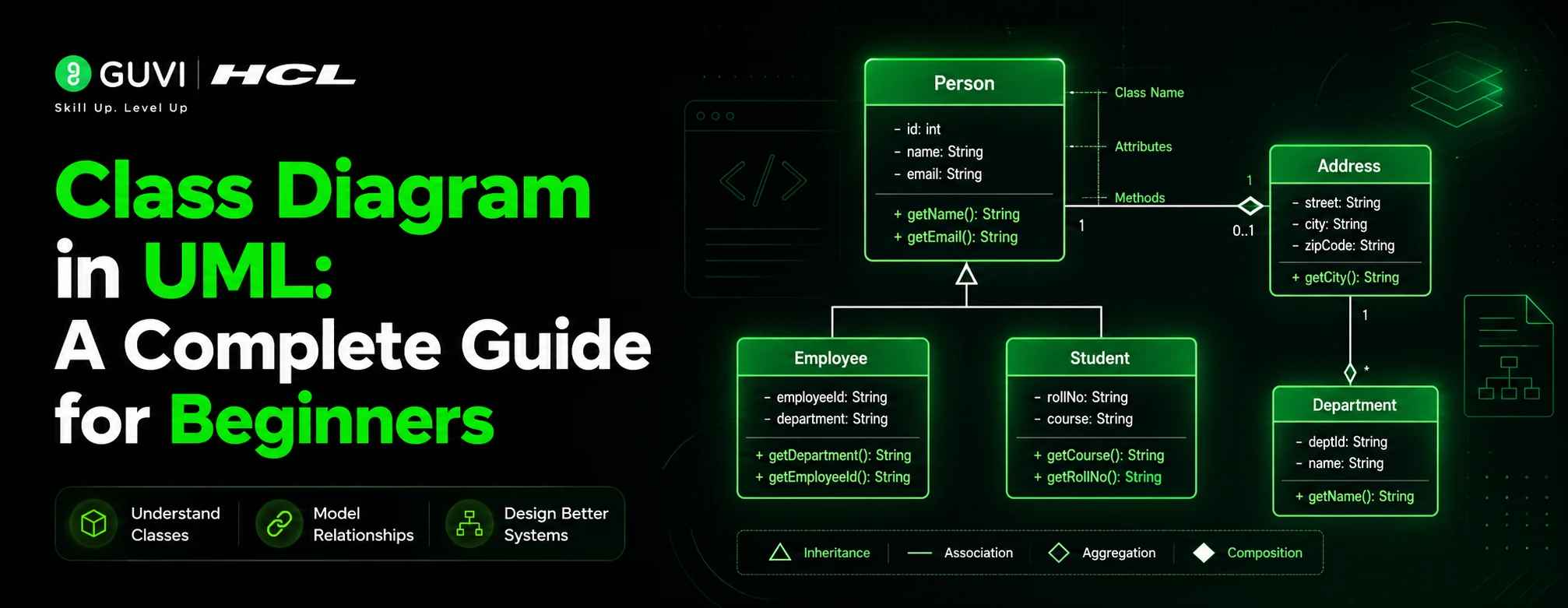
Class Diagram in UML: A Complete Guide for Beginners
Jun 01, 2026 6 Min Read 696 Views
(Last Updated)
Every year software systems are getting more complex. Whether it’s building mobile apps, designing banking systems, creating enterprise software, or developing AI-driven tools, developers must have a method to visualize software architecture prior to coding. This is where the UML Class diagram is very important.
A class diagram is one of the most commonly used diagrams in software engineering as it clarifies and organizes the structure of a system. It assists developers, designers, business analysts, students and project managers in the understanding of interactions between the various parts of the system.
Whether you are a computer science student trying to understand object-oriented programming or a software professional designing scalable applications, learning how to create and interpret a class diagram in UML can significantly improve your development workflow.
In this blog, you will learn:
A UML Class Diagram is a type of diagram that represents classes and their interactions.Why it is important, Class diagram elements, Relationships between classes, Real-world examples, Best practices, Common mistakes and Tools to make diagrams
By the end of this guide, you will have a strong understanding of how class diagrams work and how to use them effectively in software projects.
Quick Answer:
A class diagram in UML is a visual representation of the structure of a software system. It shows the classes in an application, along with their attributes, methods, and relationships with other classes. Developers use class diagrams to plan and organize object-oriented systems before coding, making complex applications easier to understand and manage.
Table of contents
- What is a Class Diagram in UML?
- Why is Class Diagram in UML Important?
- Simplifies Complex Systems
- Improves Team Communication
- Helps Before Coding Begins
- Useful for Documentation
- Supports Object-Oriented Design
- Basic Components of a Class Diagram in UML
- Class
- Attributes
- Methods
- Relationships in Class Diagram in UML
- Association
- Multiplicity
- Inheritance
- Aggregation
- Composition
- Dependency
- How to Create a Class Diagram in UML
- Step 1: Identify Classes
- Step 2: Add Attributes
- Step 3: Add Methods
- Step 4: Define Relationships
- Step 5: Add Multiplicity
- Step 6: Refine the Diagram
- Common Mistakes in Class Diagram in UML
- Adding Too Many Details
- Incorrect Relationships
- Ignoring Multiplicity
- Overusing Inheritance
- Creating Giant Diagrams
- Best Practices for Designing a Class Diagram in UML
- Keep It Simple
- Use Meaningful Class Names
- Follow Object-Oriented Principles
- Maintain Consistency
- Focus on Business Logic
- Class Diagram in UML vs ER Diagram
- Applications of Class Diagram in UML
- Banking Applications
- E-Commerce Platforms
- Healthcare Systems
- Educational Platforms
- Game Development
- Popular Tools for Creating Class Diagram in UML
- Lucidchart
- Draw.io
- StarUML
- Visual Paradigm
- Microsoft Visio
- Wrapping it up:
- FAQs
- What is a class diagram in UML?
- Why is it important to have a class diagram?
- What are the main components of a class diagram?
- What is the difference between aggregation and composition?
What is a Class Diagram in UML?
UML Class Diagram is a static structure diagram, which illustrates relationships, methods, attributes, and classes in a software system.
UML is an acronym of Unified Modeling Language. It’s a common modelling language to represent, specify, design and document software systems.
A class diagram is based on the blueprint of a system, not its behavior. It shows:
- What objects exist in the system
- The types of data it includes.
- How they contribute to the environment.
- The way in which they are linked.
Why is Class Diagram in UML Important?
A lot of developers skip software design and straight to coding. This may result in messy architecture, poor scalability and maintenance problems later on.
In UML, a class diagram can help to overcome this challenge by offering a visual representation of the system.
1. Simplifies Complex Systems
Hundreds of classes and components can be found in large applications. A class diagram breaks the system into understandable pieces.
For example:
- E-commerce platforms
- Banking systems
- Hospital management software
- Social media applications
These types of systems are hard to understand without diagrams.
2. Improves Team Communication
Software development is rarely a one-person task.
All developers, testers, analysts, UI/UX designers and clients should be aware of the system structure. A class diagram is a universal language that is understood by everyone.
Teams do not have to explain the architecture verbally, but can just refer to the UML diagram.
3. Helps Before Coding Begins
In UML, developers can create a class diagram to determine:
- Missing classes
- Redundant components
- Incorrect relationships
- Poor inheritance structures
This will save valuable time when developing.
4. Useful for Documentation
Years after a project is completed, developers may leave the company and new engineers may join.
Class diagrams can assist the future team to understand:
- System architecture
- Data relationships
- Business logic structure
This improves maintainability.
5. Supports Object-Oriented Design
Class diagrams are closely related to the OOP concepts like:
They support the developers to create better object-oriented systems.
UML class diagrams are among the most widely used software design diagrams because they map directly to the core principles of object-oriented programming (OOP). Concepts such as inheritance, encapsulation, and polymorphism can be visually represented in class diagrams, making them especially valuable for designing systems built with languages like Java, C++, and Python. By helping developers visualize relationships between classes, attributes, and methods before implementation, UML class diagrams reduce design complexity and improve communication across engineering teams.

Basic Components of a Class Diagram in UML
It is important to have an understanding of the components of a class diagram in UML before designing one.
1. Class
A class represents a blueprint for objects.
For example:
- Student
- Employee
- Car
- Product
Each class contains:
- Attributes
- Methods
A UML class is represented using a rectangle divided into three sections.
Structure of a Class
| Section | Purpose |
| Top | Class Name |
| Middle | Attributes |
| Bottom | Methods |
Example
Student Class
Attributes:
- studentId
- name
- course
Methods:
- register()
- attendClass()
This visually describes the structure of a Student object and what it can do.
2. Attributes
Attributes define the properties or characteristics of a class.
Examples:
- Name
- Age
- Price
- Salary
Attributes usually include:
- Visibility
- Name
- Data type
Example
- name : String
- age : int
Visibility Symbols
| Symbol | Access Type |
| + | Public |
| – | Private |
| # | Protected |
These visibility modifiers are widely used in OOP.
3. Methods
Methods are the action of a class.
Examples:
- calculateSalary()
- makePayment()
- login()
Methods can also include parameters and return types.
Relationships in Class Diagram in UML
Relationships are the most important part of UML class diagrams because they define how classes interact with each other.
1. Association
Association is a relationship between two classes.
Example:
- A Customer places an Order
- A Teacher instructs a Student.
In this relationship it is generally expressed in a straight line.
2. Multiplicity
Multiplicity defines how many objects participate in a relationship.
Examples:
| Multiplicity | Meaning |
| 1 | Exactly one |
| 0..1 | Zero or one |
| * | Many |
| 1..* | One or many |
This assists a developer to have a clear understanding of the database relationships.
3. Inheritance
An inheritance is an “is-a” relationship.
It enables inheritance of properties and methods from one class to another class.
Example
Superclass:
- Vehicle
Subclasses:
- Car
- Bike
- Truck
All subclasses inherit common features like:
- speed
- fuelType
- startEngine()
Inheritance promotes code reusability.
4. Aggregation
Aggregation represents a weak “has-a” relationship.
Child object does not need to depend on the parent object.
Example
Teachers are members of a Department.
Even if the department is removed, teachers can still exist.
Aggregation is represented using a hollow diamond.
5. Composition
Composition is a good “has-a” relationship.
The child object is destroyed if the parent object is destroyed.
Example
A Room is a part of a House.
If the house is demolished, rooms no longer exist independently.
Composition is represented using a filled diamond.
6. Dependency
Dependency indicates that one class temporarily uses another class.
It is typically illustrated with a dashed arrow.
Example
A PaymentService uses a PaymentGateway.
The dependency exists only during payment processing.
How to Create a Class Diagram in UML
A well-structured approach for creating a class diagram in UML is much easier than drawing classes and connections randomly. A systematic process helps developers organize the software architecture clearly and avoid confusion later during development.
Step 1: Identify Classes
The first step is to determine the main entities or objects within the system. Typically, these are objects in the real world that are part of the application.
For a banking application, the major classes could be:
- Customer
- Account
- Transaction
- Loan
Classes contain their own data and behaviour, each class represents a different aspect of the system.
For example:
- A Customer contains information about customers.
- An Account is used to perform banking transactions.
- A Transaction records the movement of money.
- A Loan is a person who oversees loans.
The simple trick, while analyzing the project requirements is to search for nouns, because nouns are likely to be classes in UML diagrams.
Step 2: Add Attributes
Once the classes are identified, the next step is defining the attributes or properties of each class.
Attributes are the data that is contained in an object.
Example:
Customer Class
Attributes:
- customerId
- customerName
- phoneNumber
- address
These attributes help define the characteristics of a customer in the banking system.
Likewise, an Account class can have:
- accountNumber
- balance
- accountType
Adding proper attributes allows to make an existing system structure more realistic and detailed.
Step 3: Add Methods
Methods represent the actions or behaviors performed by a class.
They specify the functionality of an object.
For example:
Account Class
Methods:
- deposit()
- withdraw()
- checkBalance()
The following are typical banking transactions.
Similarly:
Loan Class
Methods:
- calculateInterest()
- approveLoan()
- closeLoan()
Methods enable developers to grasp the operation of various classes in the application.
Step 4: Define Relationships
Once classes, attributes and methods have been created, the next step is to determine how classes relate to one another.
One of the most important things in a class diagram in UML is relationships since they indicate the relationship between objects.
Questions to ask:
- Does one class own another?
- Is inheritance required?
- Do objects temporarily use each other?
- Does it have an “has-a” relationship?
Example:
- A Customer has several Accounts
- An Account records many Transactions
- A Loan may belong to a Customer
These relationships are useful in representing the flow of the system in the real world more closely.
Step 5: Add Multiplicity
Multiplicity specifies how many objects participate in a relationship.
This helps in a better understanding of the constraints for the system.
Example:
- A customer may have more than one account.
- You can make multiple transactions with one account.
This can be represented as:
- Customer → 1
- Account → *
Multiplicity is very helpful in Database Design and Backend Development to understand the relationship of Data Entities.
Step 6: Refine the Diagram
The last step is to check the diagram and make improvements.
Check for:
- Duplicate classes
- Missing relationships
- Incorrect inheritance
- Unnecessary complexity
- Naming inconsistencies
A good UML diagram should be:
- Clear
- Organized
- Easy to understand
- Visually balanced
Don’t overcrowd the diagram with too much information. If the diagram becomes too large, split it into smaller diagrams for ease of reading.
The well-structured and refined class diagram aids developers in creating scalable, maintainable, and efficient software systems.
Common Mistakes in Class Diagram in UML
Many students make diagrams that “look right” but don’t make sense.
Here are some of the pitfalls to be avoided.
1. Adding Too Many Details
Not all variables and functions are required.
Use diagrams that are simple to understand and easy to read.
2. Incorrect Relationships
Developers often confuse:
- Aggregation
- Composition
- Association
The selection of the wrong relationship can misrepresent the architecture.
3. Ignoring Multiplicity
It is important to grasp the relationships between objects through multiplicity.
Without it, database design may become incorrect.
4. Overusing Inheritance
Inheritance should be used only if there is an “is-a” relationship.
Poor inheritance design creates rigid systems.
5. Creating Giant Diagrams
Diagrams get very hard to read when they are large.
Divide large systems into smaller parts.
Best Practices for Designing a Class Diagram in UML
Professional developers use a set of design principles when they are creating UML diagrams.
1. Keep It Simple
The intent of a class diagram is clarity.
Avoid unnecessary complexity.
2. Use Meaningful Class Names
The easier it is to read, the better.
Bad Example:
- Data1
- TempClass
Good Example:
- UserAccount
- PaymentProcessor
3. Follow Object-Oriented Principles
Use:
- Encapsulation
- Abstraction
- SOLID principles
This results in scalable architecture.
4. Maintain Consistency
Use uniform:
- Naming conventions
- Visibility styles
- Relationship patterns
Consistency improves collaboration.
5. Focus on Business Logic
A UML class diagram should represent the actual domain logic.
Example:
A food delivery app ought to consist of the following:
- Restaurant
- DeliveryPartner
- Customer
- Order
Not random utility classes.
Class Diagram in UML vs ER Diagram
Students often confuse UML class diagrams with Entity Relationship diagrams.
| UML Class Diagram | ER Diagram |
| Software design | Database design |
| Objects and behavior | Data and relationships |
| Yes | No |
| OOP systems | Databases |
Class diagrams are more object-oriented, while ER diagrams focus mainly on data storage.
Applications of Class Diagram in UML
The class diagrams are applied in various industries.
1. Banking Applications
UML diagrams are used by banks for:
- Customer accounts
- Transactions
- Loan systems
- ATM architecture
2. E-Commerce Platforms
Class diagrams are commonly used by application such as shopping websites to:
- Orders
- Products
- Customers
- Payments
3. Healthcare Systems
- Hospitals use UML diagrams for:
- Patient records
- Doctors
- Appointments
- Billing
4. Educational Platforms
The class diagrams are used in learning management systems for:
- Students
- Courses
- Assignments
- Instructors
5. Game Development
Game engines use UML diagrams for:
- Characters
- Weapons
- Levels
- Missions
Popular Tools for Creating Class Diagram in UML
There are a number of tools to help in the development of Uml diagrams efficiently.
1. Lucidchart
A web-based diagramming application that is widely used by teams.
Features:
- Drag-and-drop interface
- Collaboration support
- UML templates
2. Draw.io
A free and lightweight tool.
Best for:
- Students
- Small projects
- Quick diagrams
3. StarUML
A professional UML modelling tool.
Supports:
- Code generation
- Reverse engineering
- Advanced UML diagrams
4. Visual Paradigm
Widely used in enterprise environments.
Features:
- Team collaboration
- Agile support
- Database modeling
5. Microsoft Visio
A premium diagramming solution for enterprises.
Heavily used in a corporate setting.
Wrapping it up:
In UML, a class diagram is a kind of software design tool used to visualize a system, enhance system architecture, communicate with easier and easier, and realize scaling applications.
Students find class diagrams useful to reinforce the concepts of OOP and enhance logical thinking. For professionals, they are blueprints that minimize development mistakes and make the development simpler.
The real power of UML lies in clarity. A well-designed class diagram can explain an entire system faster than pages of documentation.
Learn to create class diagrams using real-life scenarios to get better at software design!
FAQs
1. What is a class diagram in UML?
In UML, a class diagram is a static structure diagram that describes the classes, attributes, operations, and interrelationships of classes in a software system.
2. Why is it important to have a class diagram?
It enables developers to plan their system architecture, communicate among each other and create scalable applications early in the development process before coding.
3. What are the main components of a class diagram?
The main components include:
Classes
Attributes
Methods
Relationships
Multiplicity
4. What is the difference between aggregation and composition?
Aggregation is a weak relationship where child objects can exist independently, while composition is a strong relationship where child objects depend on the parent.
Success Stories

About the Author
Vishalini Devarajan
An Aerospace Engineer turned content writer, I focus on making complex concepts easy to understand through well-structured, reader-friendly blogs. Whether it’s a technical topic or a non-technical one, I love creating content that is clear, engaging, and impactful.
View all posts by Vishalini Devarajan
Connect with me @
















Did you enjoy this article?