


Software Development Articles
How to Read and Understand System Design Diagrams?
System Engineer Roles and Responsibilities: 12 Proven Duties for Growth
SAP Consultant Roles and Responsibilities: 12 Proven Duties for Growth and Success
Network Engineer Roles and Responsibilities: 12 Essential Duties for Success


Get In Touch For Details! Request More Information
Command Method Design Pattern: A Beginner’s Guide
Jul 02, 2026 6 Min Read 820 Views
(Last Updated)
Imagine clicking the “Undo” button in a text editor after accidentally deleting an entire paragraph. Instantly, everything comes back exactly the way it was. Or think about ordering food online and cancelling it seconds later without breaking the app. Features like these may feel simple to use, but behind the scenes they rely on a smart way of handling actions called the Command Method Design Pattern.
Instead of directly tying buttons and actions to complex logic, this pattern turns every action into a separate command object. That makes applications easier to manage, extend, undo, queue, and track. In this guide, you will learn how the Command Method Design Pattern works with simple explanations, real-world analogies, and beginner-friendly code examples.
Quick Answer
The Command Method Design Pattern wraps a request or action inside an object. Instead of calling a function directly, you create a Command object that stores all the details of that action. You can then execute it, undo it, queue it, or log it, all without the caller knowing what is happening inside.
Table of contents
- What is the Command Method Design Pattern?
- Why Use the Command Method Design Pattern?
- How the Command Method Design Pattern Works: Step by Step
- Step 1: Create a Command Interface
- Step 2: Create the Receiver
- Step 3: Create Concrete Commands
- Step 4: Create the Invoker
- Step 5: Put It All Together
- Adding Undo to the Command Method Design Pattern
- A Real Example: Text Editor
- When to Use the Command Method Design Pattern
- When NOT to Use It
- Quick Reference: The 4 Parts
- Tips for Using the Command Method Design Pattern
- 💡 Did You Know?
- Conclusion
- FAQs
- Is the Command Method Design Pattern hard to implement?
- What is the difference between Command and Strategy patterns?
- Can I use the Command Method Design Pattern in JavaScript?
- How many commands can I store in the undo history?
- Is the Command pattern the same as an event?
What is the Command Method Design Pattern?
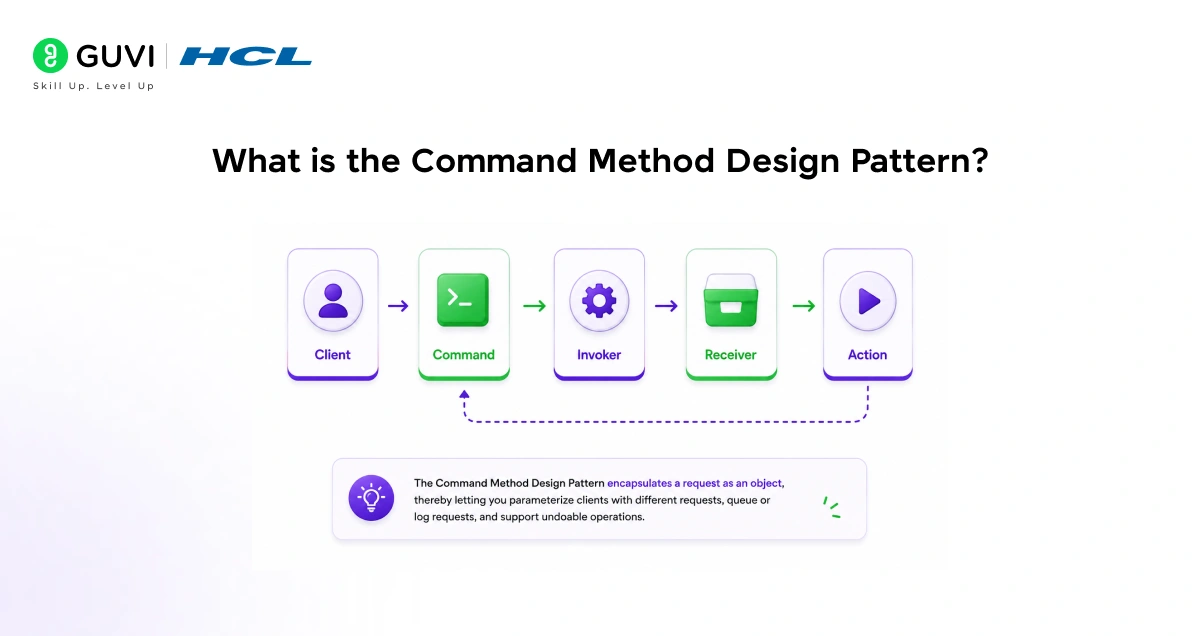
Imagine a restaurant. A customer tells the waiter “I want pasta.” The waiter does not cook the pasta. Instead, he writes the order on a slip of paper and passes it to the kitchen. The chef reads the slip and cooks the pasta.
That slip of paper is the Command. It holds all the information about the request. The waiter does not need to know how pasta is cooked. The kitchen does not need to know who the customer is. The slip carries everything needed to get the job done.
In code, the Command Method Design Pattern works exactly like this:
- The Customer is the part of your code that wants something done (the Invoker)
- The Slip of Paper is the Command object that holds the action
- The Chef is the object that actually does the work (the Receiver)
The four parts of the Command Method Design Pattern:
- Command: An object that holds one action and all the information it needs
- Invoker: Triggers the command without knowing what it does internally
- Receiver: The object that actually performs the real work
- Client: Creates the command and connects the Invoker to the Receiver
Thought to ponder: Every time you click “Undo” in a text editor, the app does not re-read the entire document from scratch. It runs the reverse of the last command it stored. What would happen if the editor did not store commands as objects?
Hint: It would have no way to undo. The action would be gone. The Command Method Design Pattern is the reason undo is possible in almost every application you use.
Why Use the Command Method Design Pattern?
Without this pattern, the code that triggers an action is tightly tied to the code that performs it. Changing one requires changing the other. The Command Method Design Pattern cuts that tie.
What it gives you:
- Undo and Redo: Store executed commands in a list. Undo by reversing the last one. Redo by re-executing it.
- Queuing: Store commands and run them later, in a different order, or on a schedule
- Logging: Record every command that was executed for auditing or debugging
- Decoupling: The part of code that triggers an action does not need to know how it works
Do check out HCL GUVI’s AI Software Development Course if you want to master design patterns, system design, and real-world software development skills. This beginner-friendly program includes hands-on projects, live mentor sessions, AI-powered development training, and industry-recognized certifications to help you build scalable applications and become job-ready.
How the Command Method Design Pattern Works: Step by Step
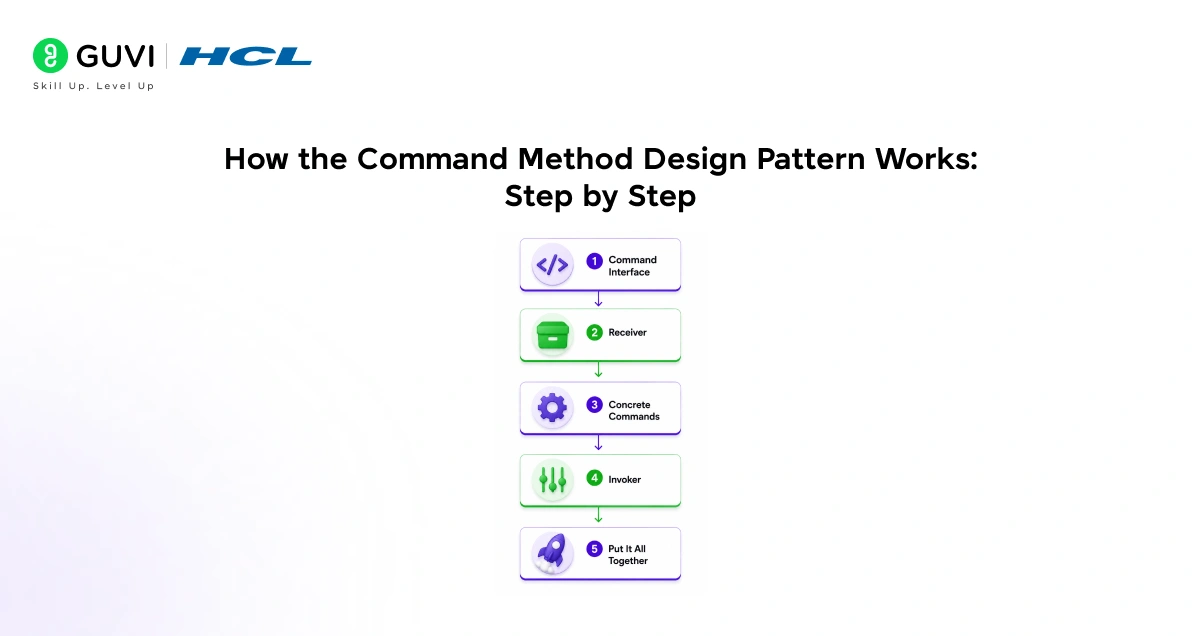
Step 1: Create a Command Interface
Every command will follow the same shape. A single execute() method. This is the contract every command must follow.
Python code
class Command:
    def execute(self):
        pass
That is it. One method. Every command object will implement this.
Step 2: Create the Receiver
The Receiver is the object that does the actual work. The command will call the receiver’s methods.
Python code
class Light:
    def turn_on(self):
        print("Light is ON")

    def turn_off(self):
        print("Light is OFF")
The Light does not know about commands. It just knows how to turn on and off.
Step 3: Create Concrete Commands
Each command wraps one action on the Receiver.
Python code
class TurnOnCommand(Command):
    def __init__(self, light: Light):
        self.light = light

    def execute(self):
        self.light.turn_on()

class TurnOffCommand(Command):
    def __init__(self, light: Light):
        self.light = light

    def execute(self):
        self.light.turn_off()
Each command holds a reference to the Light and knows which method to call on it.
Step 4: Create the Invoker
The Invoker holds a command and triggers it. It does not know what the command does.
Python code
class RemoteControl:
    def set_command(self, command: Command):
        self.command = command

    def press_button(self):
        self.command.execute()
The RemoteControl just calls execute(). Whether it turns a light on, starts a fan, or plays music makes no difference to the remote.
Step 5: Put It All Together
Python code
# Create the receiver
light = Light()

# Create commands
on_command = TurnOnCommand(light)
off_command = TurnOffCommand(light)

# Create the invoker
remote = RemoteControl()

# Use it
remote.set_command(on_command)
remote.press_button()    # Light is ON

remote.set_command(off_command)
remote.press_button()    # Light is OFF
Output:
Light is ON
Light is OFF
The remote does not know anything about the light. It just fires commands. Swap in a FanCommand or a TVCommand and the remote works without any changes.
Adding Undo to the Command Method Design Pattern
Undo is where this pattern truly shines. Add an undo() method to each command that reverses its action.
Python code
class TurnOnCommand:
    def __init__(self, light):
        self.light = light

    def execute(self):
        self.light.turn_on()

    def undo(self):
        self.light.turn_off()    # reverse of execute

class TurnOffCommand:
    def __init__(self, light):
        self.light = light

    def execute(self):
        self.light.turn_off()

    def undo(self):
        self.light.turn_on()     # reverse of execute
Now update the invoker to track history:
Python code
class RemoteControl:
    def __init__(self):
        self.history = []

    def execute(self, command):
        command.execute()
        self.history.append(command)   # store every command

    def undo_last(self):
        if self.history:
            last = self.history.pop()
            last.undo()
            print("Undone!")

# Usage
light = Light()
remote = RemoteControl()

remote.execute(TurnOnCommand(light))    # Light is ON
remote.execute(TurnOffCommand(light))   # Light is OFF
remote.undo_last()                      # Light is ON (undo the off)
Output:
Light is ON
Light is OFF
Light is ON
Undone!
Every executed command goes into history. undo_last() pops the most recent command and calls its undo() method. This is exactly how Ctrl+Z works in text editors.
Riddle: A user places an order in an e-commerce app. Ten seconds later they click “Cancel Order.” The system needs to reverse the payment, restore the stock, and cancel the delivery. How does the Command Method Design Pattern handle this cleanly?

Answer: When the order was placed, a PlaceOrderCommand was created and executed. It stored what it did: charged the payment, deducted stock, scheduled delivery. The cancel button calls undo() on that command, which reverses each of those steps. One command. One undo. All three reversals happen together.
A Real Example: Text Editor
Here is a more practical example showing the Command Method Design Pattern in a simple text editor.
Python code
class TextEditor:
    def __init__(self):
        self.text = ""

    def write(self, words):
        self.text += words
        print(f"Text: '{self.text}'")

    def delete(self, count):
        self.text = self.text[:-count]
        print(f"Text: '{self.text}'")


class WriteCommand:
    def __init__(self, editor, words):
        self.editor = editor
        self.words = words

    def execute(self):
        self.editor.write(self.words)

    def undo(self):
        self.editor.delete(len(self.words))


class Editor:
    def __init__(self):
        self.editor = TextEditor()
        self.history = []

    def type(self, words):
        cmd = WriteCommand(self.editor, words)
        cmd.execute()
        self.history.append(cmd)

    def undo(self):
        if self.history:
            self.history.pop().undo()

# Usage
editor = Editor()
editor.type("Hello ")
editor.type("World")
editor.undo()
editor.type("Python")
Output:
Text: 'Hello '
Text: 'Hello World'
Text: 'Hello '
Text: 'Hello Python'
Each word typed is a command object stored in history. Undo removes the last typed word. This is the core of how every real text editor manages undo.
When to Use the Command Method Design Pattern
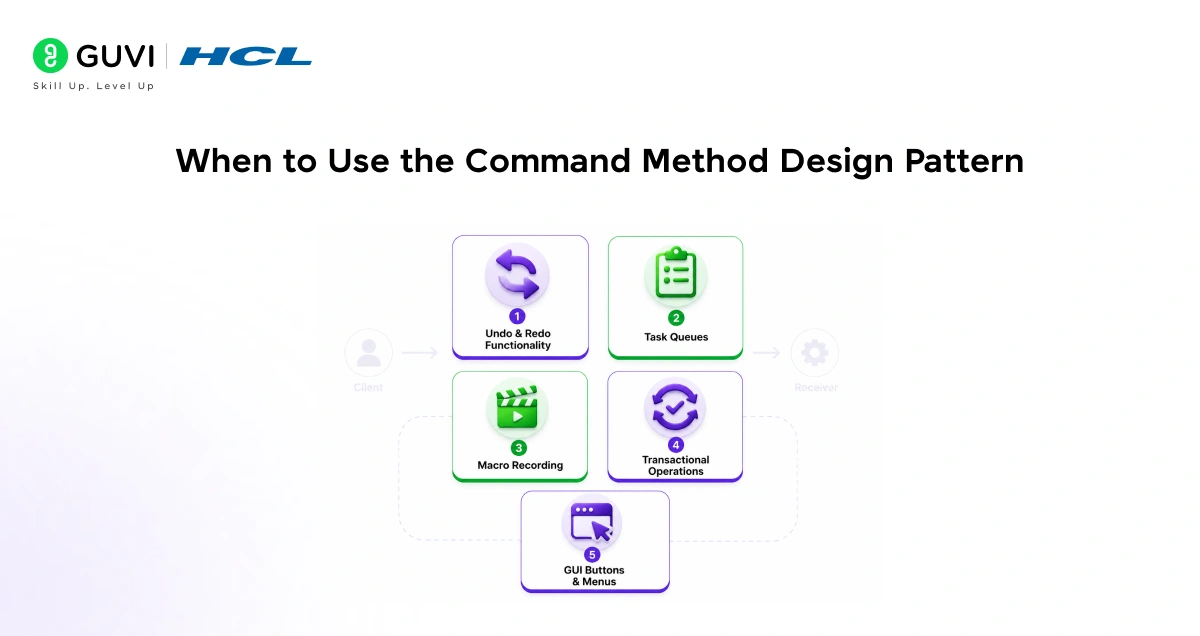
- Undo and Redo functionality: Any app where users need to reverse actions (text editors, design tools, game moves)
- Task queues: Store commands and execute them in sequence, on a delay, or in a background thread
- Macro recording: Record a sequence of commands and replay them later with one click
- Transactional operations: Group multiple commands so they all succeed or all roll back together
- GUI buttons and menus: Each button holds a command object. Swap the command to change what the button does without rewriting the button itself
When NOT to Use It
- Simple one-off actions that will never need undo, queueing, or logging. Wrapping them in command objects adds complexity for no gain.
- Performance-critical tight loops where creating many small objects per iteration has a measurable cost.
Quick Reference: The 4 Parts
| Part | Role | In the Light Example |
| Command | Wraps one action as an object | TurnOnCommand, TurnOffCommand |
| Receiver | Does the actual work | Light |
| Invoker | Triggers the command | RemoteControl |
| Client | Creates and connects everything | The main code |
Tips for Using the Command Method Design Pattern
- Always add undo() from the start: Adding undo later to a command that was not designed for it is painful. If there is any chance users will need undo, add the method when you first write the command.
- Keep commands small: Each command should do one thing. If a command is doing three different things internally, split it into three commands. Small commands compose better and are easier to undo.
- Use a stack for undo history: Python’s list with append() and pop() works perfectly. The last command added is the first to be undone.
- Name commands clearly: WriteTextCommand, DeleteFileCommand, SendEmailCommand. Clear names make the history log readable and the code self-documenting.
- Store enough state to undo: The command must remember everything it needs to reverse itself. If a command deletes a row from a database, it should store the deleted row so undo can restore it.
💡 Did You Know?
- Git, the version control system used by millions of developers, uses a concept closely related to the Command Method Design Pattern. Every commit is a stored, reversible command that records exactly what changed. git revert is essentially undo on a commit.
- Game developers rely heavily on the Command Method Design Pattern to implement replay systems. Every player action (move left, jump, fire) is stored as a command. Replaying a match simply re-executes the stored commands in order.
Conclusion
The Command Method Design Pattern solves a deceptively simple problem. Instead of calling a function directly, you wrap the call in an object. That one change gives you undo, redo, queuing, logging, and full decoupling between the code that triggers actions and the code that performs them.
The pattern has four parts: the Command that wraps the action, the Receiver that does the work, the Invoker that fires the command, and the Client that connects them. Once you see those four parts, you will recognise the Command Method Design Pattern in text editors, game engines, order systems, and every button you have ever clicked.
Start with the light switch example. Add undo. Then try the text editor. The pattern builds naturally from there.
FAQs
1. Is the Command Method Design Pattern hard to implement?
No. The core structure is four simple classes: a Command interface, a Receiver that does the real work, an Invoker that triggers the command, and the concrete commands themselves. The light switch example in this guide is about 20 lines of working code.
2. What is the difference between Command and Strategy patterns?
Both wrap behaviour in an object, but for different reasons. Strategy swaps algorithms at runtime (different ways to do the same thing). Command wraps a specific action so it can be executed, undone, or queued. Strategy is about how. Command is about what happened and when.
3. Can I use the Command Method Design Pattern in JavaScript?
Yes. JavaScript’s functions are first-class objects, which makes implementing the Command Method Design Pattern straightforward. Each command is an object with an execute() and optionally an undo() method. The pattern works identically across Python, JavaScript, Java, and C#.
4. How many commands can I store in the undo history?
As many as you want, but practical apps often cap this. Most text editors limit undo history to a few hundred steps to avoid using too much memory. You can implement this by using a fixed-size deque instead of a plain list.
5. Is the Command pattern the same as an event?
They are related but different. An event notifies multiple listeners that something happened. A Command encapsulates a specific action that can be executed, undone, or queued. Events are about broadcasting. Commands are about storing and controlling actions.
Success Stories

About the Author
Jebasta
I translate the language of data into stories that anyone can understand. As a writer with a data science background, I simplify analytics, AI, and decision-making so beginners and enthusiasts can confidently explore the world of data.
View all posts by Jebasta
Connect with me @















Did you enjoy this article?