


Software Development Articles
How to Read and Understand System Design Diagrams?
System Engineer Roles and Responsibilities: 12 Proven Duties for Growth
SAP Consultant Roles and Responsibilities: 12 Proven Duties for Growth and Success
Network Engineer Roles and Responsibilities: 12 Essential Duties for Success


Get In Touch For Details! Request More Information

Draw High-Level Design Diagram: A Step-by-Step Tutorial
Sep 19, 2026 7 Min Read 1746 Views
(Last Updated)
Ever tried explaining a software system to a teammate and felt like you were going in circles without a shared reference point? Complex systems are genuinely hard to talk through without a visual anchor, and that’s exactly where a High-Level Design diagram earns its place.
A High-Level Design (HLD) diagram is a visual blueprint that maps out a system’s major components and how they interact, without code-level detail. Whether you’re prepping for an interview or documenting a system, it gives everyone a shared picture of how the pieces fit.
This tutorial walks through drawing a High-Level Design diagram from scratch, covering what goes into one, the step-by-step process, common mistakes to avoid, and a full worked example.
Table of contents
- TL;DR Summary
- What is a High-Level Design Diagram?
- High-Level Design vs Low-Level Design: Quick Comparison
- Core Components of a High-Level Design Diagram
- How to Draw a High-Level Design Diagram: Step by Step
- Step 1: Understand the Requirements
- Step 2: Choose an Architecture Pattern
- Step 3: Identify the Major Components
- Step 4: Define Interfaces and Data Flow
- Step 5: Add External Systems and Dependencies
- Step 6: Refine and Review
- Worked Example: High-Level Design for an E-Commerce Checkout System
- Types of Diagrams Used in HLD
- Tools You Can Use
- Common Mistakes to Avoid
- How Interviewers Evaluate Your High-Level Design in System Design Rounds
- Best Practices for a Clean HLD Diagram
- Conclusion
- FAQs
- What is a High-Level Design diagram?
- What is the difference between HLD and LLD?
- What should an HLD diagram include?
- How detailed should an HLD diagram be?
- What tools are best for drawing HLD diagrams?
TL;DR Summary
- What it is: a visual map of a system’s major components and how they interact, without code-level detail
- Core elements: modules, interfaces, data flow, user interfaces, and external systems
- The process: gather requirements, choose an architecture pattern, identify components, map data flow, add external dependencies, then review and refine
- Where it’s used: product planning, system design interviews, and technical documentation
- Key distinction: High-Level Design shows the “what,” Low-Level Design shows the “how”
What is a High-Level Design Diagram?

A High-Level Design diagram is a visual representation of a system’s overall architecture. It provides a macro-level view of how different modules, services, and systems interact, without going into implementation details.
Think of it as a map of your city, not the floor plan of a single building. You can see the roads, neighborhoods, and landmarks, but you’re not looking at the electrical wiring inside each house.
High-Level Design uses non-technical to mildly technical terms that should be understandable to the administrators of the system. Low-Level Design, by contrast, exposes the logical, detailed design of each element for use by engineers and programmers directly.
HLD diagrams are primarily used in three contexts:
- Product planning: before development begins, align teams on what’s being built
- System design interviews: to demonstrate architectural thinking clearly
- Documentation: to give future developers a reference for how the system is structured
High-Level Design vs Low-Level Design: Quick Comparison
These two terms get confused constantly, so it’s worth having a clear side-by-side before going further.
| Factor | High-Level Design (HLD) | Low-Level Design (LLD) |
|---|---|---|
| Focus | The “what,” overall system architecture | The “how,” implementation-level detail |
| Audience | Architects, stakeholders, non-technical reviewers | Developers and engineers implementing the system |
| Detail level | Modules, interfaces, data flow | Classes, functions, database schemas, algorithms |
| Created when | Early in the project, before implementation | After HLD is approved, before coding begins |
| Typical output | A component diagram or system architecture diagram | Class diagrams, sequence diagrams, pseudocode |
In short: HLD comes first and sets the foundation, LLD builds directly on top of it once the high-level structure is agreed upon.
Core Components of a High-Level Design Diagram
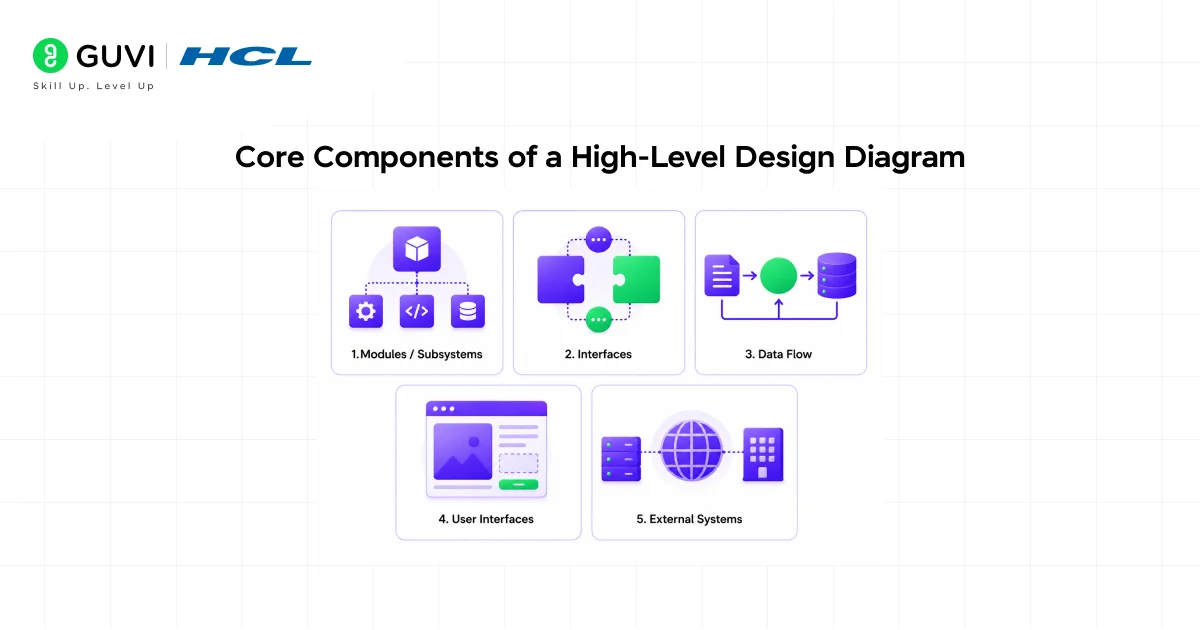
Before you start drawing, you need to know what goes into an HLD diagram. Here are the main components:
- Modules / Subsystems: the major functional building blocks of your system. Each module handles a specific area of responsibility, such as User Authentication, Order Management, or Notification Service.
- Interfaces: these represent the interactions between modules, defining how one communicates with another through APIs, message queues, or direct database calls.
- Data Flow: the movement of data from one module to another as processes are carried out. Arrows in your diagram typically represent this.
- User Interfaces: a high-level view of how users interact with the system, whether through a web app, mobile app, or both.
- External Systems: communications with systems that aren’t part of the core implementation, third-party services, payment gateways, email providers, and so on.
Understanding these five elements gives you a solid foundation before you put anything on paper (or screen).
How to Draw a High-Level Design Diagram: Step by Step

Now let’s get into the actual process of creating a High-Level Design, walked through practically rather than buried in theory.
Step 1: Understand the Requirements
You can’t create a proper High-Level Design without fully understanding the problem first. Before touching any diagramming tool, spend time with the requirements.
Ask yourself:
- What does the system need to do?
- Who are the users, and what actions do they take?
- What scale is expected, hundreds of users or millions?
- Are there any specific constraints like latency, availability, or security?
A good High-Level Design should communicate your thinking clearly to your expected audience. Describe the problem space briefly, what users will do, where they’re located, and which platforms they’ll use.
This step is often underestimated. The more clearly you understand the problem, the cleaner your diagram will be.
Step 2: Choose an Architecture Pattern
Once you’re clear on the requirements, decide how the High-Level Design will be structured at the highest level.
Common architectural patterns include: Monolithic, suitable for small, simple systems; Microservices, ideal for scalability and modularity; Event-Driven, for real-time applications like IoT; and Serverless, for event-based, cost-efficient systems.
For a beginner project or a simple CRUD app, monolithic architecture is perfectly fine. For a large-scale system handling millions of requests, microservices make more sense.
Don’t overthink this step. The goal is to pick the pattern that best fits the requirements from Step 1.
Also Read: Microservices vs. Monolithic Architecture: Key Differences
Step 3: Identify the Major Components
This is where you start populating your High-Level Design diagram. Begin by outlining high-level components, databases, application servers, and client devices. This initial draft should give a clear overview of the system’s architecture.
For each component, ask:
- What is its single responsibility?
- What does it receive as input?
- What does it output or produce?
A rough sketch, even on paper, is completely fine at this stage. List out your components first, then start placing them in a logical order.
A typical web-based system, for instance, might include:
- Client layer (web browser / mobile app)
- API Gateway
- Application servers / microservices
- Database (primary + replica)
- Cache (e.g., Redis)
- External services (payment, email, SMS)
Step 4: Define Interfaces and Data Flow
Once your High-Level Design components are placed, connect them. This is where directional arrows come in.
Focus only on the primary flows that make a difference, user interactions, main read/write processes, and highly important third-party connections. Use directional arrows with short action words like “place order,” “charge card,” or “sync profile,” and skip protocol-level detail here.
A few rules of thumb:
- Arrows should indicate direction, who calls whom
- Label the arrows briefly, don’t just draw lines between boxes
- Avoid crossing arrows where possible, it makes the diagram harder to read
- Use consistent line styles for synchronous vs. asynchronous communication
Connectors can show various communication protocols, such as HTTP requests between a front-end application and an API server, or database connections between an application and its database.
Step 5: Add External Systems and Dependencies
When building out a High-Level Design, most real systems don’t operate in isolation. You’ll likely have third-party services involved, payment gateways, authentication providers, email delivery services, or cloud storage.
Refine your High-Level Design by adding any missing information that aids comprehension, external services like payment gateways, delivery services, authentication services, and logging systems.
Place external systems at the boundaries of your diagram. They should be visually distinct, many designers use a different box shape or color to separate internal components from external ones.
Step 6: Refine and Review
Your first draft will almost certainly need changes. That’s normal and expected.
High-Level Design diagrams often evolve as the system design becomes clearer. Continuously review and refine the diagram as new requirements or insights appear.
Ask during review:
- Is every component’s purpose clear without explanation?
- Are all major data flows represented?
- Are there any components missing, or any that shouldn’t be there?
- Does the diagram tell a clear story from user input to system output?
Share your diagram with at least one other person, a teammate, a mentor, or even just someone familiar with the domain. Fresh eyes catch things you’ve gone blind to.
Research in software engineering suggests that finding and fixing a design issue at the architecture stage costs roughly 10x less than fixing the same issue after development has begun. A well-reviewed HLD diagram is one of the most cost-effective practices in software engineering.
Worked Example: High-Level Design for an E-Commerce Checkout System
Reading the High-Level Design steps in the abstract only gets you so far, here’s how they come together for a real, concrete system.
Requirement: users browse products, add items to a cart, and complete a purchase with payment processing.
Architecture pattern chosen: microservices, since checkout, inventory, and payment genuinely benefit from being deployed and scaled independently.
Major components identified:
- Client layer (web and mobile apps)
- API Gateway (routes requests to the right service)
- Cart Service (manages items in a user’s cart)
- Inventory Service (tracks stock levels)
- Order Service (creates and tracks orders)
- Payment Service (handles transactions)
- Primary database plus a Redis cache for cart data
Data flow mapped: the client sends “add to cart” through the API Gateway to the Cart Service, which checks stock via the Inventory Service. On checkout, the Order Service is called, which in turn calls the Payment Service, an external payment gateway sits at this boundary, clearly marked as external.

External systems added: a third-party payment gateway, an email service for order confirmations, and an SMS provider for delivery updates, all placed at the diagram’s edge, visually distinct from internal services.
This is a deliberately simplified version, a real production system would include more detail around failure handling and retries, but it demonstrates how the six steps actually produce a working High-Level Design rather than staying purely theoretical.
Types of Diagrams Used in HLD
High-Level Design isn’t always a single diagram. Depending on the complexity of your system, you might use several diagram types together.
Here’s a quick breakdown of the most commonly used HLD diagram types:
- Component Diagram: shows the major components and how they connect. This is usually the first and most central diagram in any HLD.
- Data Flow Diagram (DFD): focuses specifically on how data moves through the system, from input to processing to storage to output.
- Sequence Diagram: useful for representing a solution across multiple use cases involving components and actors, particularly when you need to show the order of operations across services.
- Deployment Diagram: shows how the system maps onto physical or cloud infrastructure, which services run where.
For most standard HLD work, a combination of a component diagram and a data flow diagram covers the majority of what you need.
Tools You Can Use
For High-Level Design work, you don’t need any specialized tool to get started, a whiteboard or a sheet of paper works just as well for an initial draft. That said, when you need to share or document your diagram formally, a few tools make the process smoother.
Some widely used options:
- Draw.io (diagrams.net): free, browser-based, and highly flexible. A solid first choice for most use cases.
- Lucidchart: cloud-based with good collaboration features, great for team environments.
- Excalidraw: lightweight and intuitive, ideal for quick sketches that still look clean.
- Microsoft Visio: feature-rich and enterprise-ready, best for large organizations with existing Microsoft tooling.
The tool matters far less than the thinking that goes into the diagram. Pick whatever helps you work fastest, and focus your energy on the design itself.
Common Mistakes to Avoid
Even experienced engineers fall into a few common traps when drawing High-Level Design diagrams.
- Overloading the diagram with details. Adding too much information can make it complex and difficult to understand. Focus on major components and their relationships, and leave detailed logic for other design documents.
- Skipping stakeholder input. Not involving stakeholders during the design phase can lead to misunderstandings and poor design decisions. Include architects, developers, and stakeholders when reviewing the design.
- Inconsistent notations. Using different shapes or styles for the same type of component confuses anyone reading the diagram. Pick a notation style and stick to it throughout.
- No data flow direction. Arrows without direction labels are a very common issue. Always show which way data is flowing, not just that two components are connected.
- Treating the first draft as final. Your first version is meant to be revised. The mistake is treating the initial sketch as complete before it has been reviewed.
How Interviewers Evaluate Your High-Level Design in System Design Rounds
If you’re practicing High-Level Design specifically for interviews, it helps to know what’s actually being assessed beyond just “did you draw boxes and arrows.”
- Do you ask clarifying questions first? Jumping straight to drawing without confirming scale, constraints, and requirements is one of the fastest ways to lose points early.
- Can you justify your architecture choice? Interviewers want to hear why you picked microservices over a monolith, not just that you did.
- Do you address scale and failure explicitly? Mentioning caching, load balancing, or how a component fails gracefully signals deeper understanding than a clean diagram alone.
- Can you explain trade-offs out loud? Every architectural decision has a downside. Naming it unprompted (e.g., “this adds complexity but improves scalability”) is usually what separates strong answers from average ones.
- Do you stay flexible when challenged? Interviewers often push back with a new constraint mid-conversation. Adjusting your High-Level Design cleanly in response matters more than getting it perfect on the first pass.
Best Practices for a Clean HLD Diagram
Following a few consistent habits makes a significant difference in how readable and useful your High-Level Design diagrams are.
- One organizing principle: group components by layer (UI, application, data), by domain (payments, users, notifications), or by boundary (internal vs. external). Pick one and apply it consistently.
- Limit nesting depth: two levels of nesting are usually plenty. Avoid nesting things too deeply, as it reduces clarity significantly.
- Use short, precise labels: each component and arrow should be labelled clearly but concisely. Avoid abbreviations that only your team understands.
- Leave white space: a crowded diagram is hard to read. Give each component room to breathe visually.
- Keep external systems visually distinct: use a different color, border style, or shape to separate third-party services from internal components.
- Update as the system evolves: an outdated diagram is often worse than no diagram. Treat your HLD as a living document.
If you’re serious about mastering High-Level Design and software development, and want to apply it in real-world scenarios, don’t miss the chance to enroll in HCL GUVI’s IITM Pravartak and MongoDB Certified Online AI Software Development Course.
Endorsed with NSDC certification, this course adds a globally recognized credential to your resume, a powerful edge that sets you apart in the competitive job market.
Conclusion
Drawing a High Level Design diagram isn’t about creating something perfect on the first try. It’s about building a shared understanding of how a system works, one that your team can refer to, debate, and refine.
You’ve now covered every step of the process, from understanding requirements and choosing an architecture pattern to identifying components, mapping data flow, and avoiding the most common pitfalls. The ability to translate a complex system into a clear, readable diagram is one of the most valuable skills you can develop as a developer or engineer.
Start simple. Draw your first draft by hand if you need to. And remember, clarity always wins over complexity.
FAQs
1. What is a High-Level Design diagram?
A High-Level Design (HLD) diagram is a visual representation of a system’s architecture. It shows the major components of the system, how they interact, and how data flows between them, without going into code-level implementation details.
2. What is the difference between HLD and LLD?
HLD gives a macro view of the system, the what. Low-Level Design (LLD) goes deeper into the how, covering class structures, algorithms, and database schemas. HLD comes first and sets the foundation for LLD.
3. What should an HLD diagram include?
An HLD diagram should include the major modules or subsystems, the interfaces between them, the data flow across components, any user interfaces at a high level, and all external systems or third-party dependencies.
4. How detailed should an HLD diagram be?
It should be detailed enough to give any stakeholder, technical or non-technical, a clear understanding of the system’s structure, but not so detailed that it includes implementation specifics. If you’re writing code logic into your HLD, you’ve gone too far.
5. What tools are best for drawing HLD diagrams?
Draw.io, Lucidchart, and Excalidraw are popular choices for most teams. For enterprise environments, Microsoft Visio is widely used. That said, even a whiteboard sketch counts, the thinking matters more than the tool.
Success Stories

About the Author
Jebasta
I translate the language of data into stories that anyone can understand. As a writer with a data science background, I simplify analytics, AI, and decision-making so beginners and enthusiasts can confidently explore the world of data.
View all posts by Jebasta
Connect with me @
















Did you enjoy this article?