


Artificial Intelligence and Machine Learning Articles
How to Evaluate LLM Outputs in Production Deployments
AI/ML Skills Gap 2026: Why Companies Can't Find Job-Ready Talent
20 AI/ML Interview Questions Recruiters Can Use Without a Tech Background - Best Guide
How Industry-Backed AI/ML Bootcamps Are Changing the AI/ML Hiring Pipeline - Best Guide 2026


Get In Touch For Details! Request More Information
What is Claude Code? A Beginner’s Guide
May 06, 2026 5 Min Read 1855 Views
(Last Updated)
Software development juggles endless moving parts: writing code, debugging, running tests, hopping between files, and managing Git commits. Even pros waste hours on mechanical drudgery scouring files, turning design notes into code, fixing repetitive errors. These chores steal time from true creative engineering.
Anthropic filled that void with Claude Code. Launched as a research preview in February 2025 and generally available by May, it exploded in popularity. It hit $1 billion in annualized revenue within six months a record for enterprise software and reached an estimated $2 billion by early 2026, powering devs at places like Stripe (over 1,300 engineers strong).
This article dives in: what Claude Code is, how it stands out from other AI tools, its step-by-step mechanics, standout features, ideal users, and key caveats before you dive in.
Quick TL;DR Summary
1. Claude Code = AI agent in your terminal that reads your entire codebase and completes tasks like “add login feature” or “fix mobile bug”
2. Unlike Copilot = Doesn’t suggest lines. It plans changes across multiple files, writes code, runs tests, fixes errors automatically
3. How it works = Type claude → describe task in plain English → approve Plan Mode → get working Git-committable code
4. 78% success = Completes real coding tasks correctly on first try (independent benchmarks)
5. Saves weeks on big refactors/migrations. Non-coders can build prototypes by describing what they want
6. Cost = Pro ($20/mo basics), Max ($100/mo heavy use). Always review changes before committing
Table of contents
- What Makes Claude Code Different from Other AI Tools
- Why the Word Agent Matters Here
- How does Claude Code Work Step by Step?
- Key Features of Claude Code Explained
- Who Benefits Most
- Claude Code Comparisons
- Tips for Getting Started Effectively
- Making the Most of Claude Code from Day One
- Final Thoughts
- FAQs
- Do I need to know how to code to use Claude Code?
- How is Claude Code different from asking Claude.ai to write code?
- What plans include Claude Code access?
- Does Claude Code work with any programming language?
- Is it safe to let Claude Code modify my files?
What Makes Claude Code Different from Other AI Tools
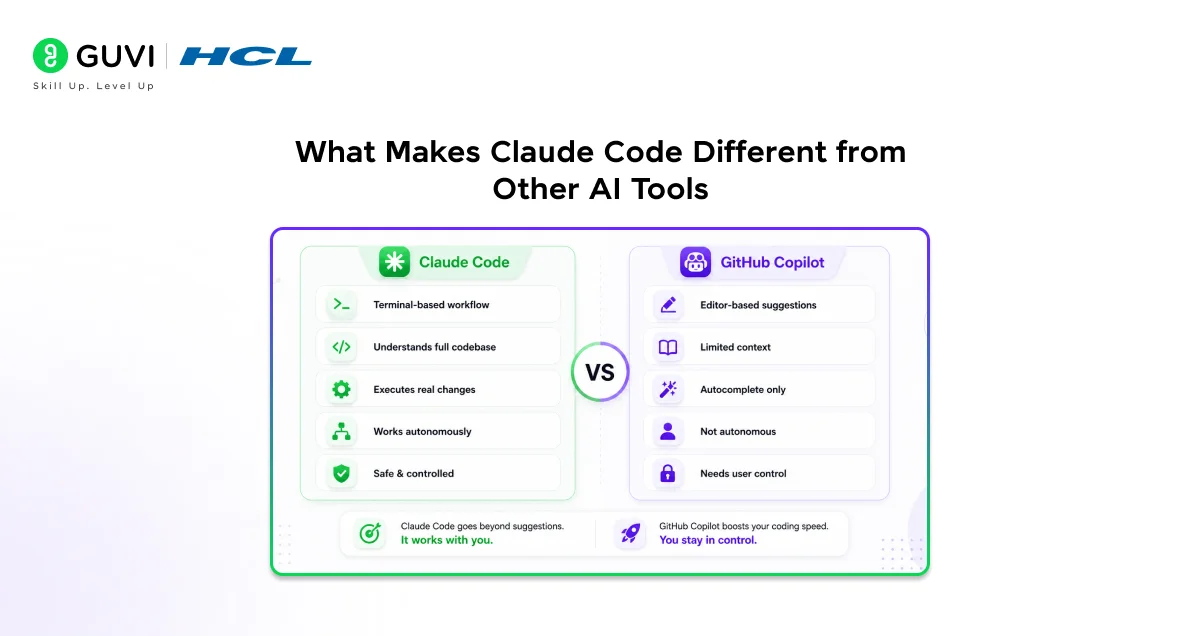
Most AI coding helpers, like GitHub Copilot, watch you type and suggest the next line or two. They’re great for quick coding speed-ups but stay reactive you do the planning and big-picture work.
Claude Code thinks bigger, at the whole project level. It scans your entire codebase, maps files and connections, then handles goals like new features or bug fixes: plans changes, writes code across files, runs tests, and fixes issues until done. Benchmarks show it nails 78% of real tasks on the first trya game-changer.
- Project smarts: Understands your full code structure, not just lines.
- Full execution: Plans, codes, tests, and iterates automatically.
- Proven edge: Tops benchmarks for real-world success.
Why the Word Agent Matters Here
“Agentic” means Claude Code acts on its own toward a goal, like a smart helper that doesn’t just answer questions. Instead of you asking “What to change?” and doing it yourself, it reads your code, makes edits, checks if it works, and reports back all in a loop until done.
It keeps things safe with your approval first for changes or commands. New users approve most steps (only 20% auto), but pros with lots of use let it run more freely (up to 40% auto). Trust grows as you see it work.
- Autonomous loop: Gathers info, acts (edits/runs commands), checks results, repeats.
- Goal-focused: You set the task; it executes without constant hand-holding.
- Human in charge: Always asks permission first, builds trust over time.
How does Claude Code Work Step by Step?
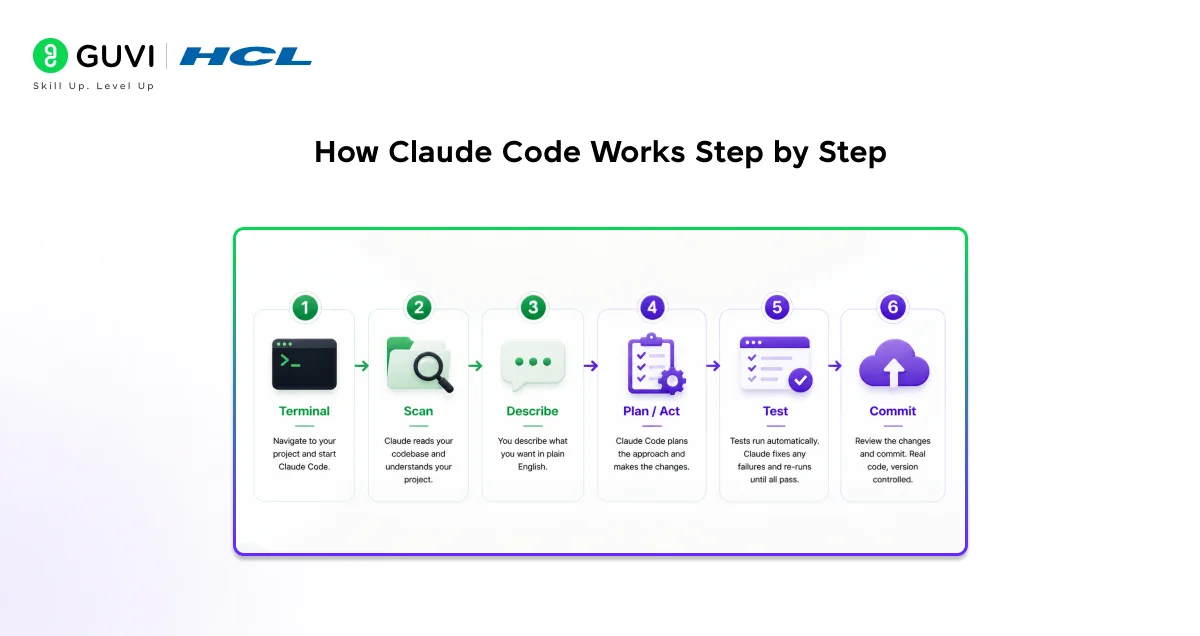
Understanding the actual workflow makes the tool far less intimidating. Here is how a typical Claude Code session unfolds from beginning to end.
Step 1 — Navigate to your project and start Claude Code. You open your terminal, move into your project directory, and type claude.
That single command launches Claude Code and connects it to everything in that directory. On first run, it walks you through a brief setup: choosing your interface preferences and logging into your Anthropic account. The same account you use for Claude.ai works here.
Step 2 — Claude reads your codebase. Before doing anything, Claude Code scans your project structure. It follows imports, reads configuration files, checks dependencies, and builds an understanding of how your application is organized. This happens quickly and without you needing to tell it which files are relevant.
Claude Opus 4.6, which powers Claude Code’s most capable mode, supports up to one million tokens in a single context window roughly 25,000 to 30,000 lines of code in one session meaning it can hold large projects in mind without losing track.
Step 3 — You describe what you want. You type a plain-English instruction. It can be as simple as “fix the bug where the login button doesn’t respond on mobile” or as broad as “refactor the payment module to use the new API.” You do not need to specify which files to look at or which functions to change.
Step 4 — Claude Code plans and acts. Claude Code determines the approach, identifies the relevant files, writes the changes, and executes them. If you are using Plan Mode a feature that shows you its intended approach before it acts, you can review and adjust the plan before a single line of code changes. This is particularly useful for large or risky changes where you want full visibility before anything happens.
Step 5 — Tests run, and failures get fixed. If your project has tests, Claude Code runs them automatically after making changes. When a test fails, it reads the error, adjusts the code, and runs the suite again. This loop continues until tests pass or it encounters a situation that genuinely requires your judgment.
Step 6 — Review and commit. Once the task is complete, you review the changes like you would any pull request. Claude Code produces real, version-controlled code not temporary patches. You commit it through your normal process, and it becomes part of your codebase.
Key Features of Claude Code Explained
Whole-codebase understanding
- is the foundation on which everything else is built on. Claude Code does not require you to manually paste in the relevant files or tell it where to look.
- It navigates your project structure the way a senior developer would starting from entry points, following the dependency graph, and building a coherent picture of how components interact.
CLAUDE.md
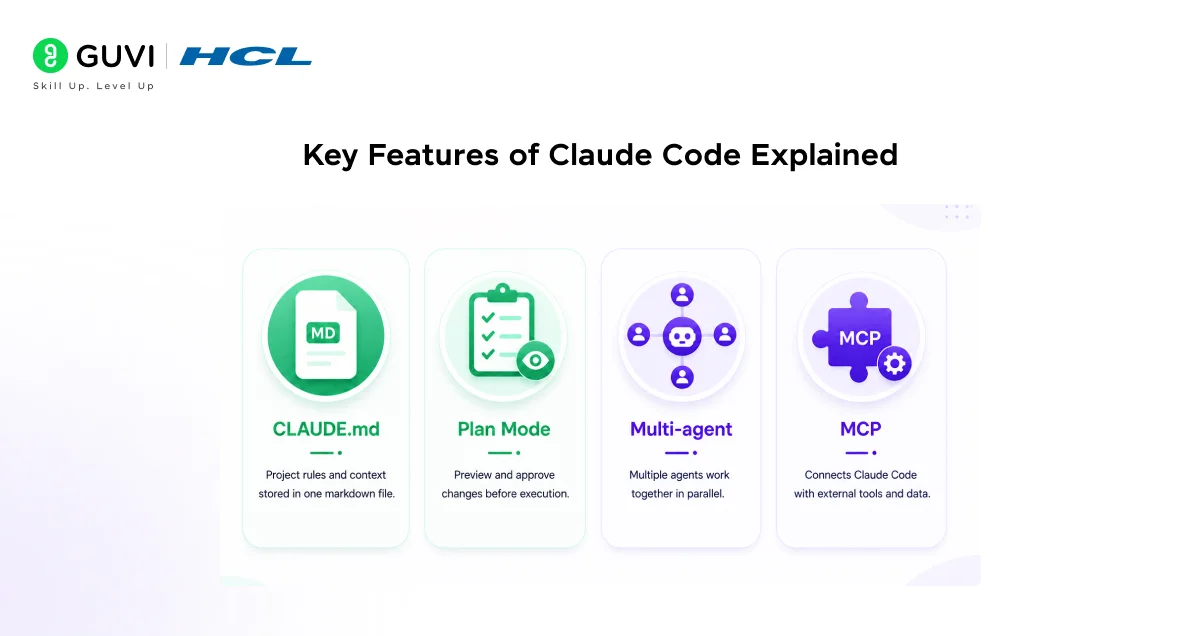
- It is a markdown file you place in your project’s root folder. Claude Code reads this file at the start of every session. You use it to document coding standards, architectural decisions, preferred libraries, and anything else Claude Code should know about your specific project.
- It acts like a briefing document that keeps every session grounded in your team’s conventions without you having to re-explain them each time.
Plan Mode
- Let Claude Code show you its intended approach before it makes any changes. You can read through the plan, push back on decisions you disagree with, and approve it before execution begins.
- For teams working in production codebases where a wrong move has real consequences, this is not a limitation; it is the feature that makes autonomous operation trustworthy.
Multi-agent teams
- This allows multiple Claude Code instances to work on different parts of a problem simultaneously.
- A lead agent coordinates the work, assigns subtasks to specialized agents, and merges the results.
- For large features that can be broken into parallel workstreams, this compresses the calendar time required significantly.
MCP integrations

- These are how Claude Code connects to the outside world. MCP, which stands for Model Context Protocol, is an open standard Anthropic introduced for connecting AI tools to external data sources.
- With MCP, Claude Code can read design specs from Google Drive, pull issues from Jira, query your PostgreSQL database, create GitHub pull requests, draft Gmail messages, or push notifications to Slack. You add these integrations with a single terminal command.
- Think of it as a universal connector between Claude Code and the tools your team already uses.
To know more about PostgreSQL basics, check out this course: PostgreSQL
Who Benefits Most
- Pro developers save huge time on big jobs like refactoring codebases or migrationsClaude Code handles many files at once. One team turned 10 weeks of manual work into just 4 days.
- Non-coders like founders or product managers now build tools and prototypes easily: describe in plain English, review the code it makes. No need to be a coding expert.
Plans start at $20/month (Pro for basics) or $100/month (Max for heavy use and tougher tasks).
- Pro devs: Speeds up refactors, audits, multi-file changes.
- Non-coders: Founders/PMs prototype via simple descriptions.
- Pricing pick: Pro ($20) for light use; Max ($100) for teams/big projects.
Claude Code Comparisons
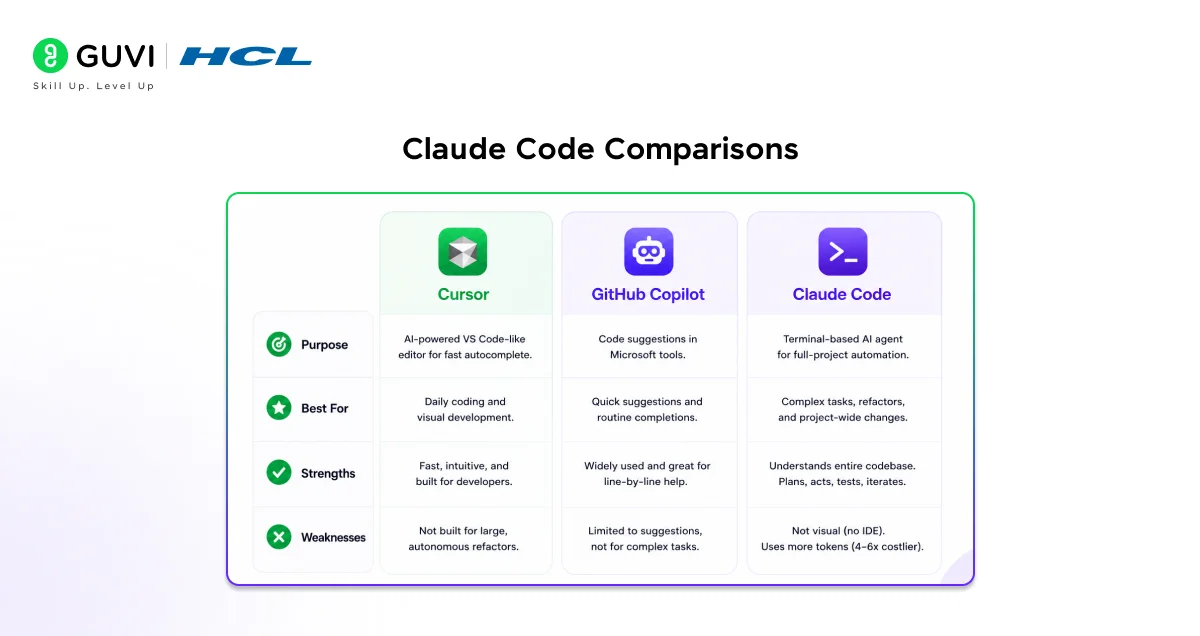
- Cursor: AI-powered VS Code-like editor for fast autocomplete and visual coding. Great for daily hands-on edits. Pairs well with Claude Code for big refactors.
- GitHub Copilot: Popular for quick code suggestions in Microsoft tools. Handles routine completions but skips complex multi-file agents. Best for simple, line-by-line help.
- Claude Code strengths/weaknesses: Excels at goal-based, full-project tasks via terminal. Not visual (no IDE); uses more tokens (4-6x costlier) for heavy work.
Tips for Getting Started Effectively
Making the Most of Claude Code from Day One
- Start with a straightforward, low-stakes task before using Claude Code on anything critical.
- Let it fix a clear bug, write a small utility function, or add a simple API endpoint. This builds familiarity with how it plans and executes before you trust it on a complex feature.
- Write a CLAUDE.md file early. Even a short one covering your tech stack, preferred patterns, and things to avoid will noticeably improve the quality and consistency of what Claude Code produces.
- Treat it as an evolving document and update it when Claude Code makes assumptions that surprise you, so future sessions start with better context.
- Use Plan Mode for anything non-trivial. Reviewing the plan before execution takes an extra minute and saves considerably more time when it catches a misunderstanding about what you actually wanted.
- Always review the code diff after Claude Code makes changes, treating it exactly as you would a pull request from a junior colleague. The output is real code that will live in your codebase, and human review remains an essential part of the workflow.
Claude Code hit $1B revenue in just 6 months after launchfastest ever for enterprise AI software. No other coding tool came close.Its 78% first-pass success rate crushed competitors in 2025 benchmarks. Real tasks, real codebasesnot toy examples
If you’re following this Claude Code guide, always review diffs before merging; this catches agent errors even under pressure. Master AI agents like Claude Code: Enroll in HCL GUVI’s Artificial Intelligence & Machine Learning course for hands-on AI expertise!
Final Thoughts
Claude Code represents something meaningfully new in software development. It is not a better autocomplete tool, it is a different kind of tool altogether.
The ability to describe a goal in plain language and have a system plan, execute, test, and iterate across your entire codebase changes the rhythm of development in a way that takes some adjustment but opens up genuine new possibilities.
Whether you are a seasoned engineer looking to move faster on complex tasks or someone without a coding background trying to build something for the first time, understanding what Claude Code is and how it works puts you in a better position to decide whether it belongs in your workflow.
FAQs
Do I need to know how to code to use Claude Code?
You can accomplish a lot by describing what you want in plain English, especially with Point and Prompt-style instructions. However, reviewing the output still benefits from at least basic familiarity with code, since Claude Code’s results should be treated like any other code change reviewed before it’s committed.
How is Claude Code different from asking Claude.ai to write code?
Claude.ai is a chat interface. You paste code in, get suggestions back, and manually apply them yourself. Claude Code lives in your terminal, reads your actual project files, applies changes directly, runs your tests, and iterates all without you copying and pasting anything.
What plans include Claude Code access?
Claude Pro at twenty dollars per month includes Claude Code access with limited usage. Claude Max at one hundred dollars per month offers much higher limits and access to Claude Opus for the most demanding tasks.
Does Claude Code work with any programming language?
Yes. Claude Code is language-agnostic and works with whatever languages and frameworks your project uses. It reads your existing code and follows your conventions rather than imposing a particular stack.
Is it safe to let Claude Code modify my files?
By default, Claude Code asks for approval before every file change or command. You control how much autonomy it has. Review changes before committing them, use version control so you can revert if needed, and treat the output like code from any other source with a proper review.
Success Stories

About the Author
Lukesh S
A professional content writer who has experience in freelancing and now working as a Technical Content Writer at HCL GUVI having sound knowledge in Blog Writing and Creative Writing!
View all posts by Lukesh S
Connect with me @










Did you enjoy this article?