


Artificial Intelligence and Machine Learning Articles
AI/ML Skills Gap 2026: Why Companies Can't Find Job-Ready Talent
20 AI/ML Interview Questions Recruiters Can Use Without a Tech Background - Best Guide
How Industry-Backed AI/ML Bootcamps Are Changing the AI/ML Hiring Pipeline - Best Guide 2026
From IT Support to AI Engineer: A Realistic Career Switch Guide 2026


Get In Touch For Details! Request More Information
Vercel AI SDK: A Complete Developer Guide to Building AI-Powered Apps in 2026
Jul 20, 2026 7 Min Read 4729 Views
(Last Updated)
Building AI-powered applications has never been more accessible, and Vercel’s AI SDK is a big reason why. Whether you’re adding a smart chatbot to your Next.js app or streaming real-time AI responses to your users, the Vercel AI SDK gives developers a powerful, flexible toolkit to make it happen without the usual complexity. It bridges the gap between cutting-edge language models and production-ready web applications in a way that feels natural for modern JavaScript and TypeScript developers.
This guide is for developers at every level — from beginners who have never touched an AI API, to intermediate builders looking to ship faster and smarter. We’ll cover what the Vercel AI SDK is, how it works, how to set it up, and how to use its core features with practical, real-world examples. By the end, you’ll have everything you need to start integrating AI into your next project.
Quick Answer
The Vercel AI SDK is an open-source TypeScript library that simplifies integrating large language models (LLMs) like OpenAI, Anthropic, and Google Gemini into web applications. It provides unified APIs for text generation, streaming, tool use, and structured outputs , making it easy to build robust AI features in frameworks like Next.js, SvelteKit, and more.
Table of contents
- What Is the Vercel AI SDK and How Does It Work?
- Why Use the Vercel AI SDK for Your Next.js or React Project?
- Multi-Provider Support: Use OpenAI, Anthropic, Gemini, and More
- Built-In AI Streaming for Real-Time User Experiences
- Type-Safe JSON Outputs Using Zod Schema Validation
- LLM Tool Use and Function Calling Made Simple
- Optimized for Vercel Edge Functions and Serverless Environments
- How to Set Up the Vercel AI SDK: Step-by-Step Installation Guide
- Core Features Of The Vercel AI SDK
- Generating Text With generateText()
- Streaming Text With streamText()
- Building Chat Interfaces With useChat()
- Generating Structured Data With generateObject()
- Tool Use And Function Calling
- Multi-Step Agentic Workflows
- Switching Between AI Providers
- Practical Use Cases and Real-World Examples
- Performance Tips for Production
- 💡 Did You Know?
- Conclusion
- FAQs
- Is the Vercel AI SDK free to use?
- Does the Vercel AI SDK only work with Vercel deployments?
- What's the difference between generateText() and streamText()?
- Can I use the Vercel AI SDK with local or self-hosted AI models?
- How does the Vercel AI SDK handle errors from AI providers?
What Is the Vercel AI SDK and How Does It Work?
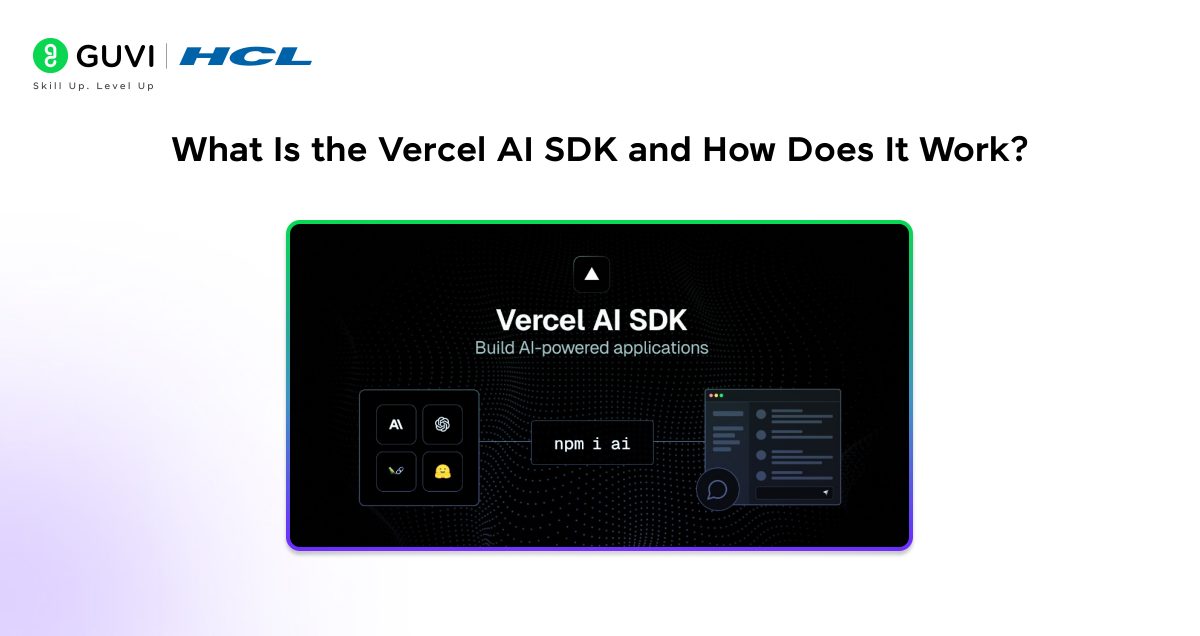
The Vercel AI SDK (also known as the AI SDK by Vercel is an open-source library designed to help developers build AI-powered user interfaces and backends with minimal friction. Released and maintained by Vercel, it abstracts away the complexity of working directly with different AI provider APIs, offering a consistent, streamlined developer experience.
At its core, the SDK has two major parts:
- AI SDK Core – Provider-agnostic utilities for generating text, streaming completions, handling tool calls, and producing structured data outputs.
- AI SDK UI – React hooks (and SvelteKit/Solid.js support) that handle the client-side state for chat interfaces, streaming messages, and user input.
Together, these two layers let you build everything from a simple AI text generator to a full-featured, multi-turn AI assistant, all in a type-safe TypeScript environment.
Why Use the Vercel AI SDK for Your Next.js or React Project?
Before diving into setup, it’s worth understanding why the Vercel AI SDK stands out in a crowded field of AI integration tools.
1. Multi-Provider Support: Use OpenAI, Anthropic, Gemini, and More
One of the biggest advantages is model agnosticism. Instead of rewriting your code every time you want to switch from OpenAI’s GPT-4o to Anthropic’s Claude or Google’s Gemini, the AI SDK uses a unified interface. You swap the provider with a single line of code.
- Works with OpenAI, Anthropic, Google Gemini, Mistral, Cohere, and more
- Community providers extend support to dozens of additional models
- No vendor lock-in – migrate or experiment freely
2. Built-In AI Streaming for Real-Time User Experiences
Streaming is essential for great AI UX. Nobody wants to stare at a loading spinner while the model thinks. The AI SDK provides first-class streaming support out of the box.
- streamText() for real-time token-by-token streaming
- Built-in support for server-sent events (SSE) and ReadableStreams
- React hooks like useChat() that automatically handle stream state
3. Type-Safe JSON Outputs Using Zod Schema Validation
Getting AI to return structured data (like JSON) reliably is notoriously tricky. The AI SDK solves this with schema-based generation using Zod.
- Define your output shape with a Zod schema
- The SDK ensures the model’s response matches that shape
- Eliminates fragile regex parsing or manual JSON extraction
4. LLM Tool Use and Function Calling Made Simple
Modern LLMs can “call tools” meaning they can trigger external functions, query databases, or fetch real-time data. The AI SDK makes this straightforward.
- Define tools with typed parameters
- The model decides when to use them
- Results are automatically fed back into the conversation
5. Optimized for Vercel Edge Functions and Serverless Environments
Vercel’s infrastructure is built for edge functions, and the AI SDK is optimized for it. Streaming responses work natively on Vercel’s Edge Runtime, keeping latency low for users worldwide.
Do check out HCL GUVI’s Artificial Intelligence and Machine Learning Course if you want to master the fundamentals behind building scalable AI-powered applications. It helps you gain hands-on experience in machine learning, deep learning, and real-world deployment skills essential for modern AI development.
Also Read: AI SDK for OpenAI and LLM Integration: Complete Guide
How to Set Up the Vercel AI SDK: Step-by-Step Installation Guide
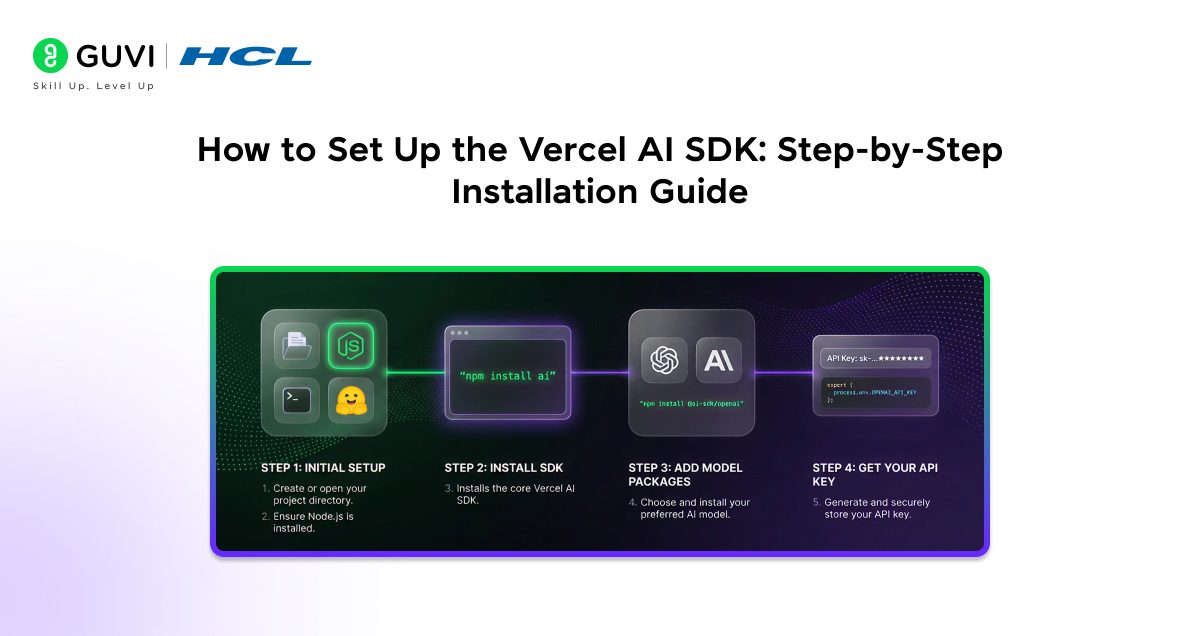
Getting started is quick. Here’s a step-by-step walkthrough to get your first AI-powered endpoint running.
1. Install The SDK
Run: npm install ai
For TypeScript support (highly recommended), also install:
npm install ai zod
2. Install A Provider Package
You’ll also need the specific provider SDK for the LLM you want to use. For example:
OpenAI: npm install @ai-sdk/openai
Anthropic: npm install @ai-sdk/anthropic
Google Gemini: npm install @ai-sdk/google
3. Set Your API Key
Store your API key securely as an environment variable. In a Next.js project, add it to your .env.local file:
OPENAI_API_KEY=your_openai_key_here
4. Create Your First AI Route
In a Next.js App Router project, create a route handler at app/api/chat/route.ts and add the following logic:
Import openai from @ai-sdk/openai
Import streamText from ai
Set: export const runtime = ‘edge’
Create an async POST function that:
- Reads messages from the request body
- Calls streamText with model set to openai(‘gpt-4o’)
- Passes the messages array
- Returns result.toDataStreamResponse()
That’s all it takes for a streaming AI chat endpoint.
Core Features Of The Vercel AI SDK
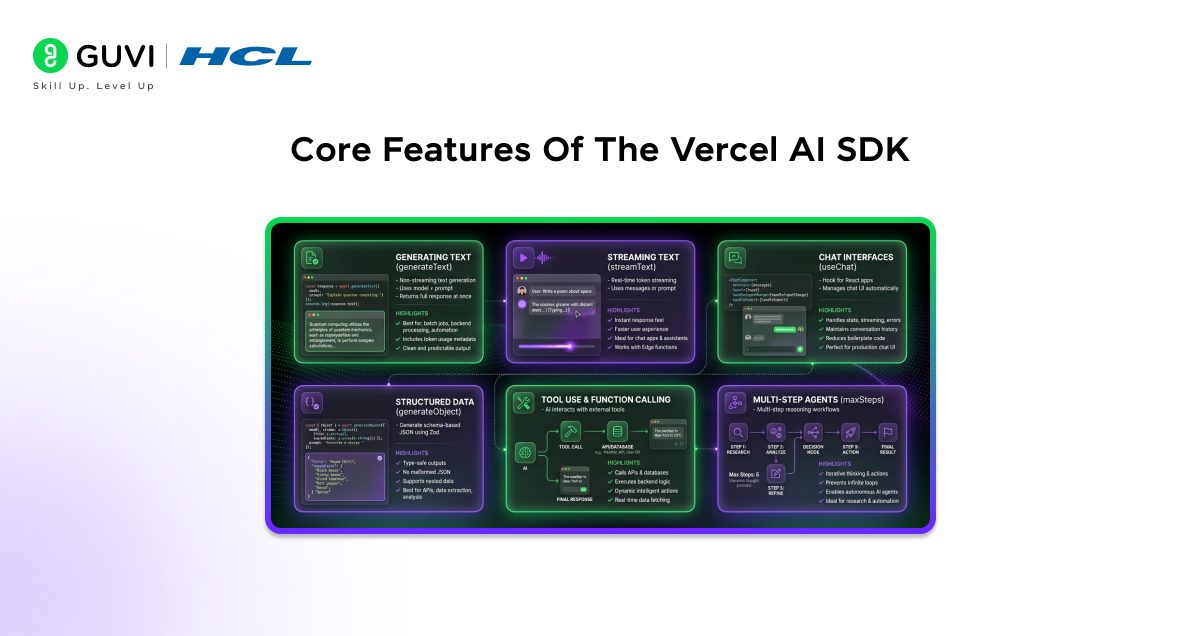
Now that you’re set up, let’s properly break down the most important features you’ll use in real-world applications. These are the building blocks for creating AI-powered products.
1. Generating Text With generateText()
For non-streaming use cases such as summaries, classifications, reports, or one-time responses, generateText() is the simplest and most reliable option.
You import generateText from ai and your provider (for example, OpenAI). Then you call generateText() with:
- A model (such as openai(‘gpt-4o’))
- A prompt containing your instruction
The function returns a response object that includes text, which contains the fully generated output.
Best For:
- Batch jobs
- Backend-only processing
- Non-interactive AI features
- Cron jobs and automation
Why It’s Useful:
- Returns the complete response at once
- Includes usage metadata like token counts
- Clean and predictable for server-side logic
If you don’t need real-time streaming, this is your go-to method.
2. Streaming Text With streamText()
For chat applications and interactive interfaces, streaming is essential. Instead of waiting for the entire response, you receive tokens as they are generated.
You import streamText and your provider, then call streamText() with:
- A model
- A prompt or messages array
The result exposes a textStream that can be iterated over asynchronously. Each chunk arrives in real time.
Why Streaming Matters:
- Tokens arrive instantly as they are generated
- Makes your app feel significantly faster
- Improves perceived performance
- Ideal for chatbots and assistants
- Works perfectly with Edge Functions
If you’re building a ChatGPT-style experience, streaming is mandatory.
3. Building Chat Interfaces With useChat()
The useChat() hook is designed specifically for React applications. It abstracts away complex state handling and streaming logic.
Inside a client component, you:
- Import useChat from ai/react
- Call the hook to access messages, input, and handlers
- Render messages dynamically
- Connect input and form submission
What It Handles Automatically:
- Full conversation history
- Streaming token updates into the UI
- Input state management
- Loading states
- Error handling
This dramatically reduces boilerplate code. Instead of managing WebSockets or manual streaming, everything is handled internally.
If you’re building a production chat UI, this saves hours of work.
4. Generating Structured Data With generateObject()
Sometimes you don’t want free-form text. You want structured, reliable data such as JSON that matches a schema.
That’s where generateObject() comes in.
You define a schema using Zod, describing exactly what structure you expect. Then you call generateObject() with:
- A model
- Your schema
- A prompt
The AI response is validated against the schema before being returned.
Why This Is Powerful:
- Returns fully type-safe objects
- Prevents malformed JSON issues
- Eliminates manual parsing errors
- Supports nested schemas and arrays
This is extremely useful for:
- Content analysis
- Data extraction
- Form generation
- AI-powered APIs
If your AI output must be structured and production-safe, use this method.
5. Tool Use And Function Calling
Tools allow the model to interact with external systems such as APIs, databases, or custom backend logic.
You define tools using the tool() helper. Each tool includes:
- A description
- Typed parameters defined with Zod
- An async execute function
You then pass your tools object into streamText().
How It Works:
- The model decides when to call a tool
- Parameters are validated
- The execute function runs
- Results are injected back into the conversation
- The final response is streamed
This enables dynamic AI behavior such as:

- Fetching live data
- Calling internal APIs
- Querying databases
- Performing calculations
It transforms a simple LLM into an intelligent system that can take action.
6. Multi-Step Agentic Workflows
For more advanced use cases, you can allow the model to reason through multiple steps before producing a final answer.
By setting maxSteps, you enable iterative tool usage. The model can:
- Call a tool
- Analyze the result
- Call another tool
- Continue reasoning
- Produce a final response
What maxSteps Does:
- Controls how many tool iterations are allowed
- Prevents infinite loops
- Enables autonomous reasoning
This is ideal for:
- Research agents
- Comparison tools
- Multi-source analysis
- Workflow automation
Instead of a single prompt-response cycle, the model can think, act, gather information, and refine its answer.
These six features form the foundation of building modern AI applications with the Vercel AI SDK.
Switching Between AI Providers
One of the biggest advantages of the Vercel AI SDK is how easy it is to switch between different AI providers without rewriting your application logic. The SDK standardizes the interface across providers, which means your business logic, streaming setup, and UI components remain unchanged.
Here’s the same model configuration pattern for three different providers:
// OpenAI
import { openai } from '@ai-sdk/openai';
const model = openai('gpt-4o');

// Anthropic Claude
import { anthropic } from '@ai-sdk/anthropic';
const model = anthropic('claude-sonnet-4-5');

// Google Gemini
import { google } from '@ai-sdk/google';
const model = google('gemini-1.5-pro');
How This Works
- Each provider exports its own helper function (openai, anthropic, google).
- You select a model by passing the model name as a string.
- The returned model object follows the same internal interface.
- You can pass this model into generateText(), streamText(), or generateObject() without changing anything else.
For example, your streaming logic might look like this:
const result = await streamText({
 model,
 prompt: 'Explain quantum computing in simple terms.',
});
The only thing that changes is how the model is defined. Everything else in your codebase remains identical.
Why This Is Powerful
This flexibility gives you major strategic advantages:
- A/B Testing
Easily compare model quality, speed, or cost by switching providers. - Cost Optimization
Use a premium model for complex reasoning and a cheaper one for simpler tasks. - Failover & Reliability
Automatically fall back to another provider if one experiences downtime. - Task-Specific Optimization
Choose models based on strengths, such as:- Gemini for large context windows
- Claude for nuanced long-form writing
- OpenAI models for balanced performance and tool integration
Because the SDK abstracts provider differences behind a unified interface, you gain portability without sacrificing control. This makes your AI architecture flexible, future-proof, and production-ready.
Practical Use Cases and Real-World Examples
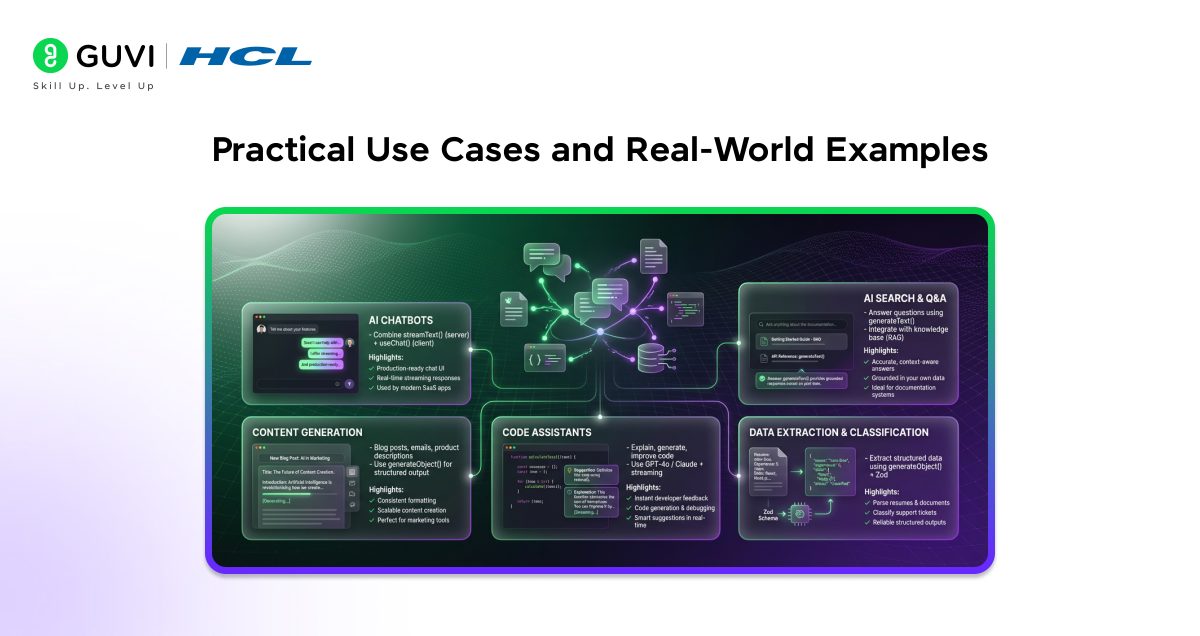
The Vercel AI SDK is versatile enough to power a wide range of AI features. Here are some of the most common and impactful applications.
1. AI Chatbots
The most common use case. Combine streamText() on the server with useChat() on the client for a production-ready chat interface in under 50 lines of code. Companies like Vercel itself use this pattern in their own products.
2. AI-Powered Search and Q&A
Use generateText() to answer user questions based on your product documentation or knowledge base. Pair it with retrieval-augmented generation (RAG) to ground responses in your own data for more accurate, trustworthy answers.
3. Content Generation Tools
Build tools that generate blog posts, email drafts, social media content, or product descriptions. generateObject() is perfect here for producing structured content with consistent formatting across every generation.
4. Code Assistants
Use a capable model like Claude or GPT-4o to explain code, suggest improvements, or generate boilerplate. Streaming the response gives developers instant feedback as the model reasons through the problem.
5. Data Extraction and Classification
Use generateObject() with a Zod schema to extract structured information from unstructured text — like parsing resumes, classifying support tickets, or pulling key fields from uploaded documents.
Performance Tips for Production
When shipping AI features to real users, performance and reliability matter, Here are key best practices to keep in mind:
- Use edge functions – Deploy AI routes to Vercel’s Edge Runtime to minimize latency globally
- Set system prompts – Use the system parameter in streamText() to give the model clear context and reduce token waste
- Limit maxTokens – Set a reasonable cap on response length to control costs and avoid runaway generations
- Implement error handling – Wrap API calls in try/catch and use the SDK’s built-in error types for graceful degradation
- Cache where possible – For deterministic prompts, cache responses at the edge to reduce API calls and costs
- Monitor token usage – The SDK returns usage metadata including promptTokens and completionTokens to log this data for cost tracking
💡 Did You Know?
- The Vercel AI SDK is fully open source and available on GitHub under the Apache 2.0 license, meaning you can contribute to it, fork it, or audit exactly how it works under the hood.
- The SDK supports over 50 AI providers and models through its official and community provider packages, including local models via Ollama, so you can run AI entirely on your own hardware without sending data to a third party.
- The useChat() hook automatically handles optimistic UI updates, meaning the user’s message appears instantly in the chat before the server even processes it, improving perceived performance.
Conclusion
The Vercel AI SDK is one of the most developer-friendly ways to bring AI into modern web applications. It removes the friction of dealing with multiple AI provider APIs, handles the complexity of streaming and tool use, and gives you type-safe, production-ready building blocks that work seamlessly with Next.js and the broader JavaScript ecosystem.
Whether you’re building a quick prototype or a production AI product, the SDK’s provider flexibility, built-in streaming, and structured output support will save you significant time and headaches. Start with streamText() and useChat() for your first chat interface, explore generateObject() for structured data needs, and layer in tools when you’re ready for agentic workflows. The community, documentation, and provider ecosystem are all thriving, meaning the SDK will only get more powerful over time. Pick a use case, follow the setup steps above, and ship your first AI feature today.
FAQs
1. Is the Vercel AI SDK free to use?
Yes, the Vercel AI SDK itself is completely free and open source. However, you will need API keys from your chosen AI providers (like OpenAI or Anthropic), which have their own pricing based on token usage. The SDK itself has no licensing cost.
2. Does the Vercel AI SDK only work with Vercel deployments?
No. Despite the name, the AI SDK is framework-agnostic and can be used in any Node.js, edge, or serverless environment. It works with Express, Hono, SvelteKit, Nuxt, and more — you don’t need to host on Vercel to use it.
3. What’s the difference between generateText() and streamText()?
generateText() waits for the model to finish generating the full response before returning it, which is best for background tasks or batch processing. streamText() returns tokens as they’re generated in real time, which is ideal for interactive chat UIs where you want the response to appear progressively.
4. Can I use the Vercel AI SDK with local or self-hosted AI models?
Yes. Through community providers like ollama-ai-provider, you can use the AI SDK with locally running models via Ollama. This is great for privacy-sensitive use cases or development without incurring API costs.
5. How does the Vercel AI SDK handle errors from AI providers?
The SDK provides typed error classes (like APICallError and NoTextGeneratedError) that you can catch and handle gracefully. For streaming responses, errors surface through the stream’s error event, which hooks like useChat() expose through an error state variable for easy UI handling.
Success Stories

About the Author
Jebasta
I translate the language of data into stories that anyone can understand. As a writer with a data science background, I simplify analytics, AI, and decision-making so beginners and enthusiasts can confidently explore the world of data.
View all posts by Jebasta
Connect with me @








Did you enjoy this article?