


Database Articles
How to Use MySQL Workbench for Database Design and Querying: Complete and Best Guide
How to Use Supabase to Build a Backend in Minutes (With Auth & DB)
How to Use MongoDB Compass: Master Querying & Managing NoSQL Data
How to Use Apache Airflow: 5 Easy Steps to Build Your First Data Pipeline


Get In Touch For Details! Request More Information
ER Model in DBMS: Simplify Complex Data into a Clear Visual Design
Mar 31, 2026 4 Min Read 1375 Views
(Last Updated)
How do applications such as banking programs, online stores, or educational databases handle such a vast amount of data without degenerating into a mess? In the background, an intelligent method is used to arrange things before each table is designed. Rather than going directly to the code, developers initially trace the overall data flow graphically.
And that is where the ER model offers a solution – a very simple and yet effective model to transform complicated data into something simple to comprehend, design, and handle.
In this blog, we are going to deconstruct the ER model in a DBMS, its fundamental components, its benefits, and its application in real-life contexts.
Quick Answer:
An ER model in DBMS is a simple way to design a database using diagrams that show entities, their attributes, and the relationships between them, helping to plan and organize data clearly before creating actual database tables.
Table of contents
- What is an ER Model?
- Advantages of an ER Model
- Core Components of ER Model in DBMS
- Entities and Their Types
- Attributes in ER Model
- Relationships in ER Model
- ER Diagram Symbols
- How to Construct an ER Model
- Step 1: Identify Entities
- Step 2: Define Attributes
- Step 3: Determine Relationships
- Step 4: Assign Keys
- Step 5: Draw the ER Diagram
- Step 6: Review and Refine
- Conclusion
- FAQs
- What is the main purpose of an ER model?
- Can ER diagrams be used for real-world applications?
- Do ER diagrams store data in the database?
What is an ER Model?
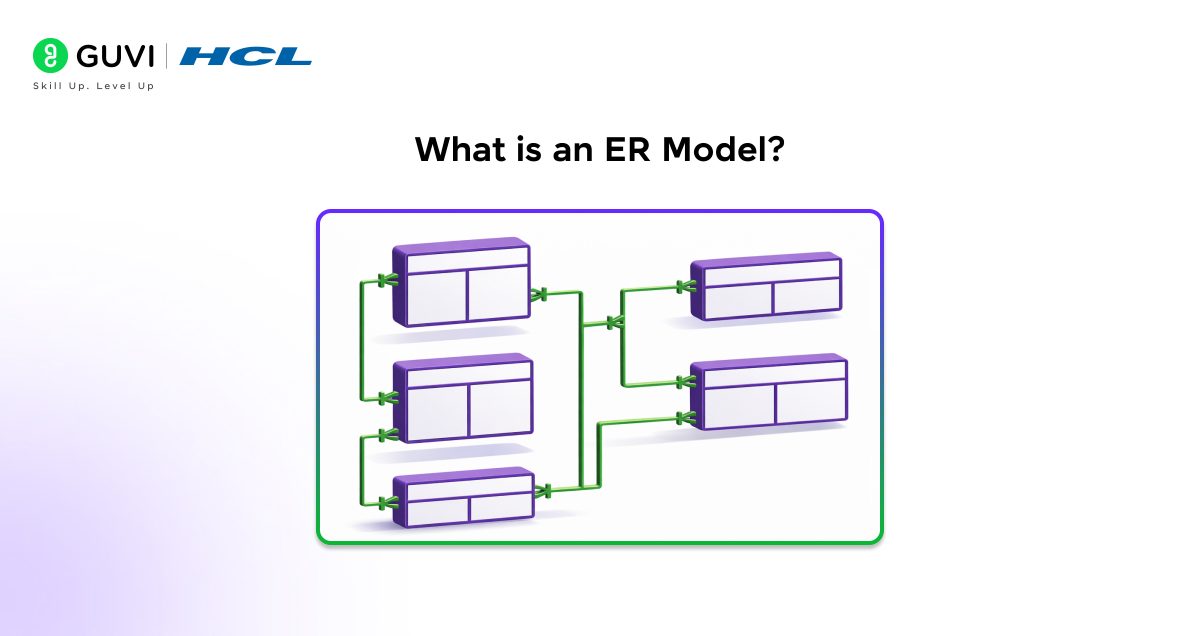
An ER Model (Entity-Relationship Model) is a visual representation used to design and conceptualize how information is organized in a database. It revolves around three key components: entities (real-life objects, such as a student or a book), attributes (such as name or age), and relationships (how entities are interlinked, such as a student borrowing a book).
The model will help you gain a clear understanding of how the various data elements are interconnected before creating the actual database tables.
The ER model is a simplification that does not require working directly with complex tables; instead, it presents everything as a diagram. It is a guide that helps developers organize data effectively, eliminate confusion, and build a well-structured database system.
Advantages of an ER Model
These are the following advantages of an ER model:
- Easy to understand at a glance, complex data is clearly represented in ER diagrams.
- Aids in improved database design and planning, therefore developers are able to design data appropriately before implementation.
- Enhances knowledge of entities, attributes, and relationships, helping avoid confusion during the software development process.
- Minimizes data redundancy through efficient data structuring and elimination of unnecessary data.
- Facilitates easier conversion to a relational database schema, enabling smoother database creation.
The ER Model, introduced by Peter Chen in 1976, remains one of the most influential concepts in database design and is still widely used as the foundation for modern systems.
Core Components of ER Model in DBMS
The ER model in DBMS is constructed with the aid of several basic elements that aid in the representation of data in a clear and structured manner.
These are various types of entities, attributes, relationships between entities, and the standard symbols of the ER diagram that would help visually present everything, and thus, it is very easy to design a database and comprehend it.
1. Entities and Their Types
Entities are items or objects of the real world that we would like to store in a database, such as a Student, a book, or an employee. They are the primary structure of the database and reflect the type of data that the system is going to deal with.
All these entities assist in structuring the information in a meaningful and orderly manner.
Types of Entities:
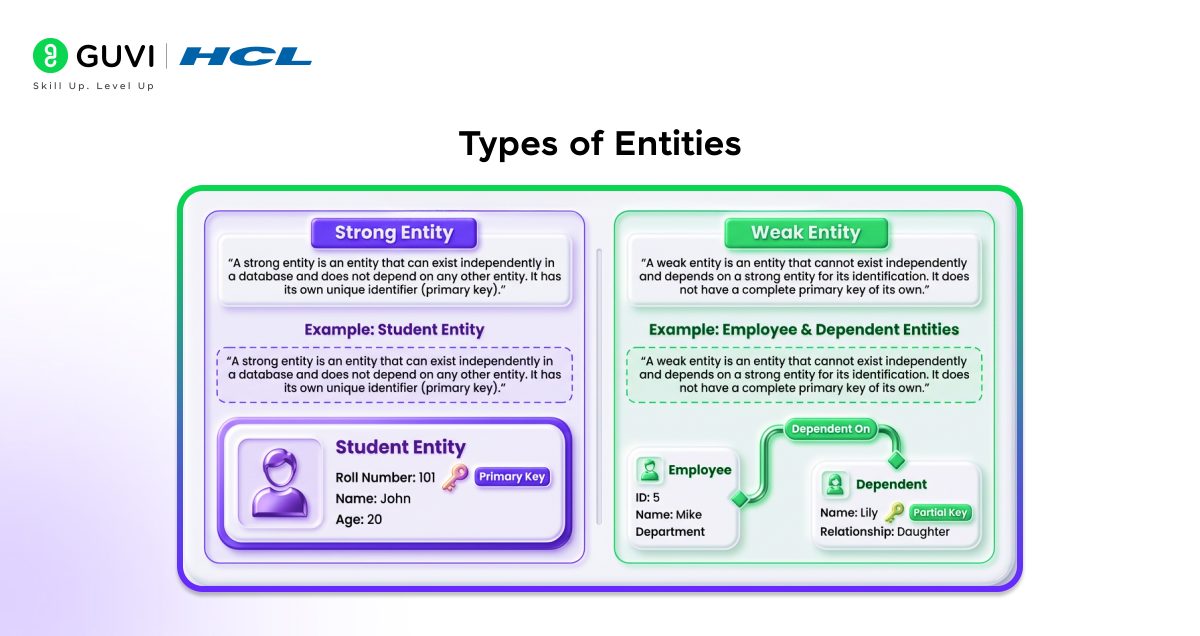
a. Strong Entity
A strong entity is an entity that can exist on its own within a database, and it is not reliant upon another entity. It possesses a distinct identifier (primary key).
Example: A Student object may have its own entity with such information as roll number, name, and age.
b. Weak Entity
A weak entity is an entity that is not able to exist by itself and is identified by a strong entity. It lacks a full primary key of its own.
Example: A Dependent entity (such as a family member) cannot exist without an Employee entity.

2. Attributes in ER Model
Attributes refer to the characteristics or the description of an entity. For example, name, age, or roll number can be said to be attributes of a Student. They offer certain details on each entity and assist in establishing the features of data that are being stored in the database.
Types of Attributes:
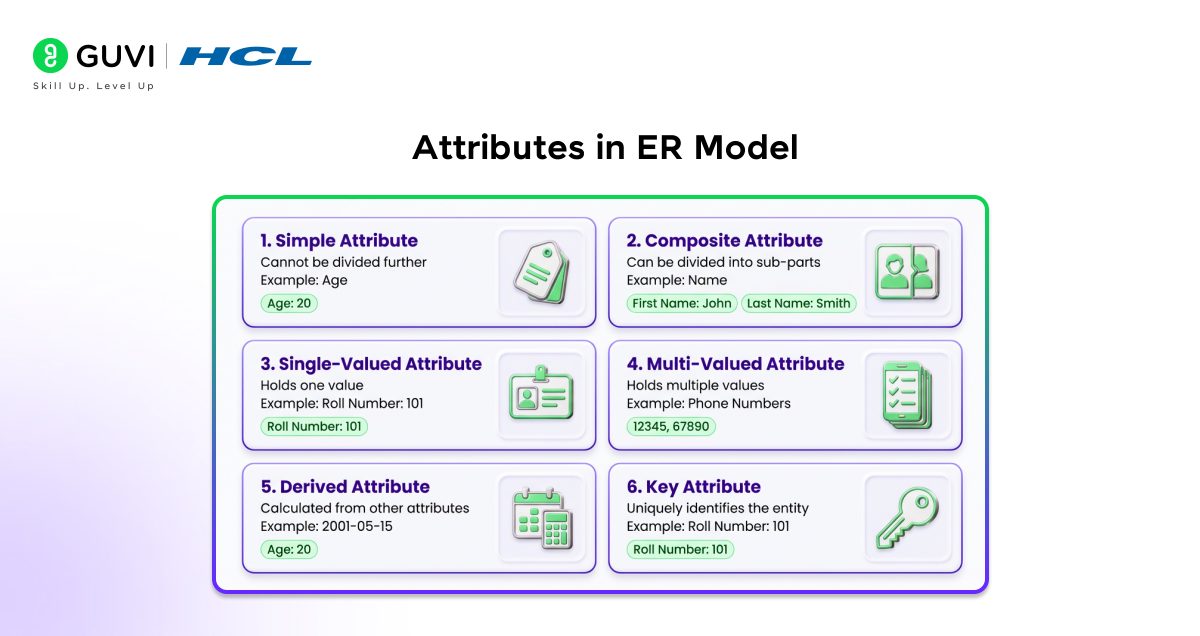
a. Simple Attribute
An attribute that is so simple cannot be broken down into any smaller parts. It stores basic, atomic data.
Example: Age of a student (it is impossible to subdivide it)
b. Composite Attribute
An attribute with numerous parts is called a composite attribute, which can be subdivided into smaller parts.
Example: Name may be divided into first name and last name.
c. Single-Valued Attribute
A single-valued attribute contains only one value per entity.
Example: A student’s roll number.
d. Multi-Valued Attribute
A multi-valued attribute may also contain many different values for one entity.
Example: There can be different phone numbers for a student.
e. Derived Attribute
A derived attribute cannot be stored directly, as it is a calculation of other attributes.
Example: Age can be calculated based on the date of birth.
f. Key Attribute
A key attribute uniquely identifies each entity in a database.
Example: Roll number identifies each student in a unique manner.
3. Relationships in ER Model
Relationships determine the association of various entities in a database. As an example, a Course can be associated with a Student. Such connections are useful in explaining how data interacts and how various entities rely on or are related to other entities.
Types of Relationships:
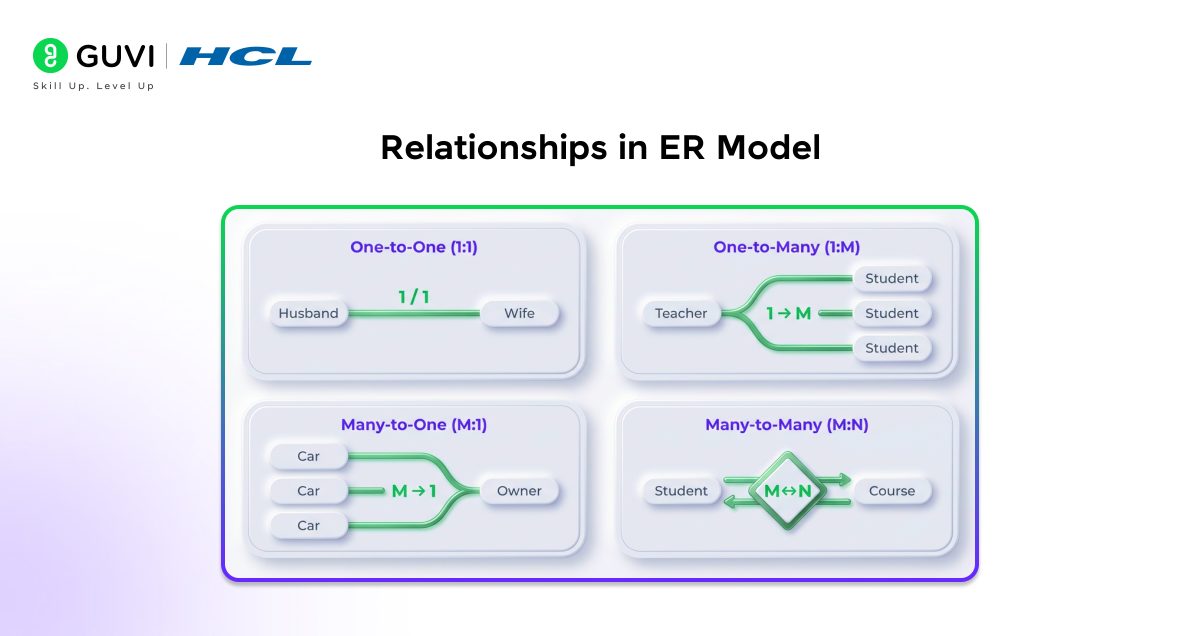
a. One-to-One (1:1): One Husband is related to one Wife, and vice versa.
b. One-to-Many (1:M): One Teacher can teach many Students.
c. Many-to-One (M:1): Many Cars can belong to one Owner.
d. Many-to-Many (M:N): Many Students can enroll in many Courses.
4. ER Diagram Symbols
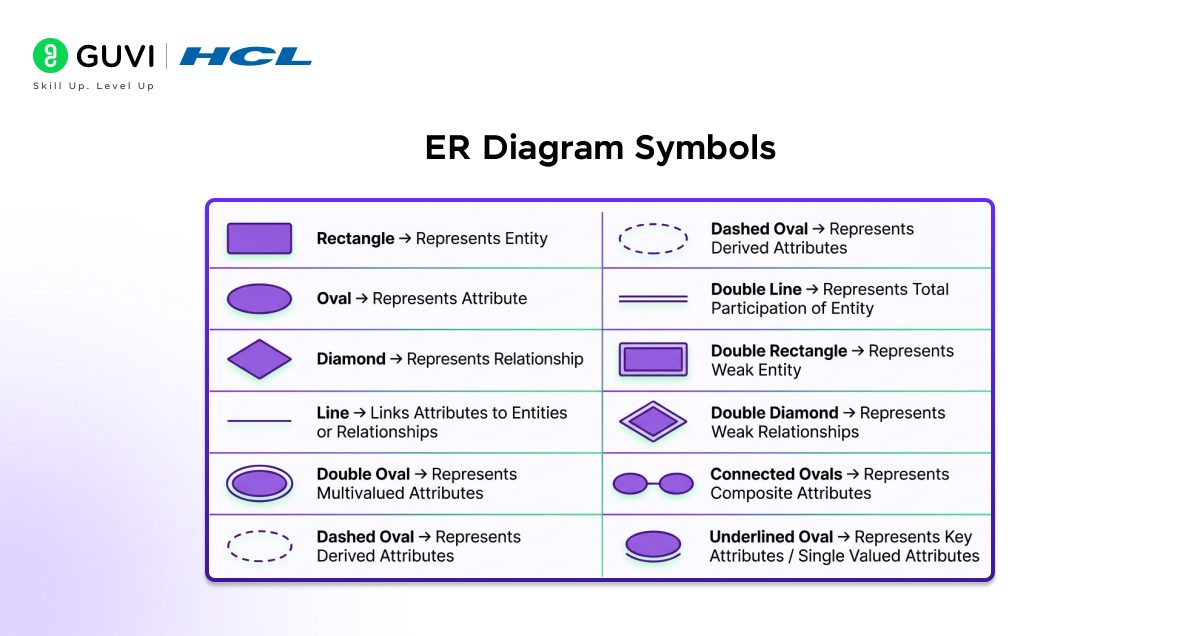
ER diagram symbols are universal symbols that are used to graphically depict entities, attributes, and relationships in an ER diagram. These symbols simplify the interpretation of the structure of the database and aid in the clear presentation of the overall design in a visual format.
Types of Symbols:
Apply ER Model concepts and step up to master relational database management system with HCL GUVI’s Basics of PostgreSQL. Learn installation, architecture, database management, and configuration—enroll now!
How to Construct an ER Model

Follow these simple steps to construct an ER model in DBMS:
Step 1: Identify Entities
Begin by identifying the key entities (real-world objects) that you wish to store data on, such as Student, Book, or Employee.
Step 2: Define Attributes
The second step is to enumerate the attributes (info) of each entity, like name, age, or id, to characterize them.
Step 3: Determine Relationships
Next, specify connections among entities, such as a student enrolling in a Course, to indicate ways of connecting them.
Step 4: Assign Keys
Select a primary key in each entity in such a way that each record will be identified uniquely.
Step 5: Draw the ER Diagram
Entities, attributes, and relationships can be represented visually using standard ER diagram symbols (rectangle, oval, and diamond).
Step 6: Review and Refine
Lastly, proofread the diagram to remove errors, minimize redundancy, and ensure the design is understandable and accurate.
Conclusion
The ER model in a DBMS is an easy yet effective way to graphically organize and design data. Understanding the entities, attributes, relationships, and symbols of a diagram enables you to systematically plan a clear database structure before implementation. ER diagrams make complex data easy to understand, help reduce errors, and ensure a well-organized, efficient database system.
FAQs
What is the main purpose of an ER model?
The ER model helps visually organize and design a database by clearly showing entities, their attributes, and relationships.
Can ER diagrams be used for real-world applications?
Yes, ER diagrams are widely used to plan databases for systems like school management, banking, and e-commerce before actual implementation.
Do ER diagrams store data in the database?
No, ER diagrams are only a visual design tool. The actual data is stored in database tables created from the diagram.
Success Stories
















Did you enjoy this article?