


Javascript Articles
GraphQL with Strawberry Tutorial: Build Your First Python API
gRPC Tutorial: A Beginner's Guide to Building Fast, Modern APIs
Temporal Workflow Engine Tutorial: Build Reliable Workflows
Tauri 2.0 Desktop App Tutorial: Build Your First App Without the Bloat


Get In Touch For Details! Request More Information

Arrow Functions in JavaScript: A Complete Guide
Mar 16, 2026 6 Min Read 1592 Views
(Last Updated)
If JavaScript already has functions, why did it need arrow functions at all? This is a question many developers quietly ask when they first encounter the => syntax.
At a glance, arrow functions may look like a shorter way to write the same old logic, but that assumption misses the bigger picture. Arrow functions change how JavaScript handles context, callbacks, and readability, especially in modern applications where asynchronous code and functional patterns are everywhere.
To use them well, you need to understand not just how they look, but how they behave and when they should replace regular functions and when they absolutely should not. That is what you are going to learn in this article and by the end of this, you’ll be able to use arrow functions with ease!
Quick Answer:
An arrow function in JavaScript is a concise function syntax introduced in ES6 that uses => and inherits this from its surrounding scope, making callbacks and functional code cleaner and more predictable compared to regular functions.
Table of contents
- What is an Arrow Function in JavaScript?
- Basic Syntax of an Arrow Function
- Why Were Arrow Functions Introduced?
- Anatomy of an Arrow Function
- Basic Structure
- Parameters in Arrow Functions
- Function Body Variants
- Implicit Return in Arrow Functions
- Example of Implicit Return
- Why Implicit Return Exists
- When Implicit Return Can Be Misleading
- Returning Objects Implicitly
- Arrow Functions and this Keyword
- Lexical this Explained
- Why This Matters in Real Code
- What Arrow Functions Do Not Have
- Common Mistake With Object Methods
- Arrow Functions vs Regular Functions
- Syntax and Readability
- Behavior of this
- Constructors and Prototypes
- Hoisting and Execution Timing
- Best Practices for Using Arrow Functions
- Use Arrow Functions Where They Shine
- Avoid Arrow Functions Where They Don’t Belong
- Keep Readability Front and Center
- When Arrow Functions Changed JavaScript for the Better
- Impact on Asynchronous Programming
- Influence on Modern JavaScript Style
- Why Arrow Functions Still Matter Today
- Conclusion
- FAQs
- What is an arrow function in JavaScript?
- What is the difference between arrow functions and regular functions?
- Why is this undefined in arrow functions?
- Can arrow functions be used as constructors?
- When should I avoid using arrow functions?
What is an Arrow Function in JavaScript?
An arrow function in JavaScript is a compact syntax introduced in ES6 (ECMAScript 2015) for writing functions. It uses the => syntax and provides a cleaner, more expressive way to define function behavior.
At its core, an arrow function is still a function. It can:
- Accept parameters
- Return values
- Be stored in variables
- Be passed as arguments
- Be used as callbacks
But it behaves differently from traditional functions in a few critical areas.
Basic Syntax of an Arrow Function
Here’s a simple comparison.
Traditional function
function add(a, b) {

  return a + b;

}
Arrow function
const add = (a, b) => {

  return a + b;

};
Same logic. Cleaner syntax. Now let’s go deeper.
Why Were Arrow Functions Introduced?
Arrow functions were introduced to solve a few long-standing problems in JavaScript:
- Verbose function syntax
- Confusing behavior of this
- Excessive boilerplate in callbacks
- Poor readability in functional programming patterns
JavaScript relies heavily on callbacks. Before arrow functions, nested callbacks often looked noisy and hard to follow.
Arrow functions reduce visual clutter and make intent clearer.
Anatomy of an Arrow Function
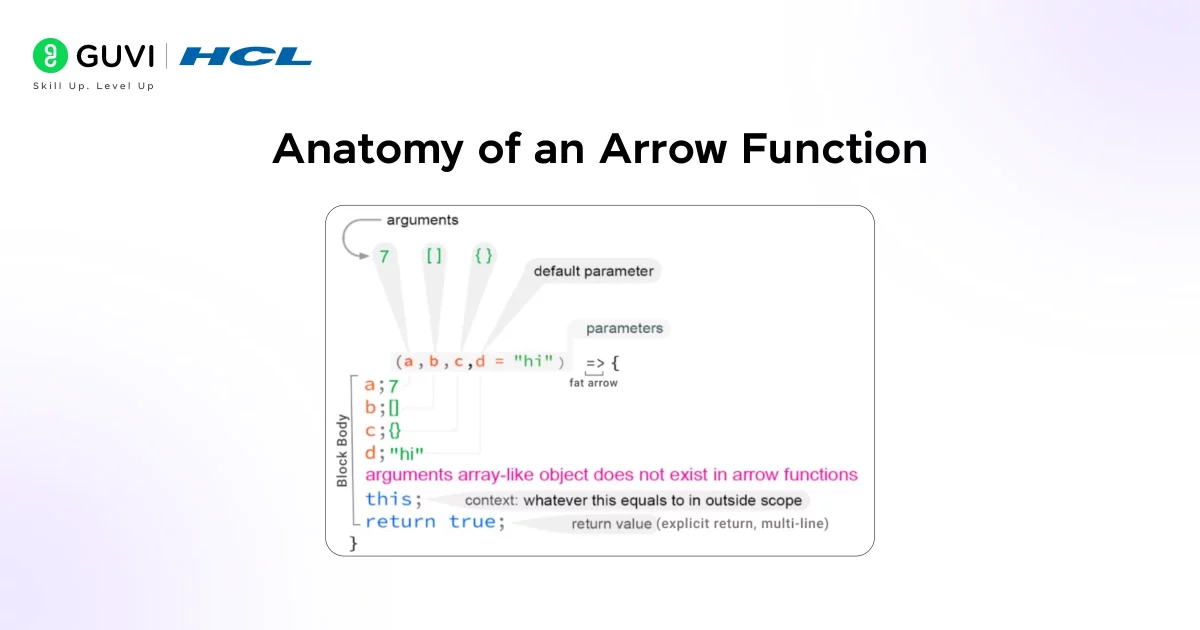
To really understand arrow functions, you need to look past the syntax shortcut and see how each part behaves. An arrow function is made up of three core elements: parameters, the arrow itself, and the function body. While this may sound obvious, each part has rules that directly affect how your code executes.
At a high level, an arrow function replaces the function keyword with the => symbol. This change is not just cosmetic. It signals a different execution model, especially around scope and context.
Basic Structure
const functionName = (parameters) => {

  // function body

};
This structure tells JavaScript three things:
- The function is an expression, not a declaration
- It is assigned to a variable
- It follows lexical scoping rules for this
Because arrow functions are expressions, they must be assigned to a variable, passed as an argument, or returned from another function. You cannot define a standalone arrow function the way you can with a function declaration.
Parameters in Arrow Functions
Parameters behave the same way they do in regular functions, but the syntax is more flexible.
If there is only one parameter, parentheses are optional:
const double = x => x * 2;
If there are multiple parameters, parentheses are mandatory:
const add = (a, b) => a + b;
If there are no parameters, you must include empty parentheses:
const getTime = () => Date.now();
This consistency helps JavaScript parse intent clearly, and it helps you read the code faster once you’re familiar with the patterns.
Function Body Variants
Arrow functions support two types of function bodies:
- Block body using curly braces
- Concise body without curly braces
A block body behaves like a traditional function body and requires an explicit return. A concise body automatically returns the expression value. This distinction becomes important when writing more complex logic.
Implicit Return in Arrow Functions
One of the defining features of arrow functions is their ability to return values implicitly. This is where arrow functions move from being merely shorter to being meaningfully expressive.
When an arrow function contains a single expression and does not use curly braces, JavaScript automatically returns the result of that expression. There is no need to write the return keyword.
Example of Implicit Return
const square = n => n * n;
This function returns the square of n without explicitly stating it. For small, predictable operations, this makes the code easier to read and reason about.
Why Implicit Return Exists
Implicit return was designed to:
- Reduce boilerplate
- Encourage functional programming patterns
- Improve readability in chained operations
- Make callback-heavy code less noisy
In real-world applications, implicit returns are most commonly used with array methods.
const names = users.map(user => user.name);
This reads almost like plain English, which is exactly the point.
When Implicit Return Can Be Misleading
Implicit return only works when you omit curly braces. The moment you add braces, JavaScript assumes you are managing the return yourself.
const square = n => {

  n * n; // returns undefined

};
This is a common mistake. The function above does not return anything because there is no return keyword.
Returning Objects Implicitly
Returning objects requires extra care because JavaScript confuses curly braces with a block body.
Incorrect version:
const createUser = name => { name: name };
Correct version:
const createUser = name => ({ name: name });
The parentheses tell JavaScript that you are returning an object literal, not defining a block.
If you are just starting your journey into the world of JavaScript, then this roadmap is for you – Best JavaScript Roadmap Beginners Should Follow
Arrow Functions and this Keyword
This is the most important conceptual difference between arrow functions and regular functions. If you understand this section clearly, you will avoid many real-world bugs.
In JavaScript, this keyword traditionally depends on how a function is called, not where it is defined. This dynamic behavior often causes confusion, especially in callbacks and asynchronous code.
Arrow functions change this model entirely.
Lexical this Explained
Arrow functions do not have their own this. Instead, they inherit this from the surrounding scope at the time they are defined. This behavior is called lexical scoping.
const user = {

  name: "Alex",

  greet() {

    setTimeout(() => {

      console.log(this.name);

    }, 1000);

  }

};
Here, this inside the arrow function refers to the user object because that is the surrounding context where the arrow function was created.
Why This Matters in Real Code
Before arrow functions, developers had to use workarounds like:
- bind(this)
- Storing this in another variable (const self = this)
- Using .call() or .apply()
Arrow functions eliminate the need for these patterns in most cases, leading to cleaner and more predictable code.
What Arrow Functions Do Not Have
Because arrow functions inherit this, they also lack:
- Their own arguments object
- Their own super
- Their own new.target
This design choice makes arrow functions unsuitable for certain use cases like constructors or prototype methods.
Common Mistake With Object Methods
Using arrow functions as object methods often leads to bugs.
const user = {

  name: "Alex",

  greet: () => {

    console.log(this.name);

  }

};
Here, this does not refer to the object. It refers to the surrounding scope, which is usually the global scope or undefined. For object methods, regular function syntax is the correct choice.
Arrow Functions vs Regular Functions
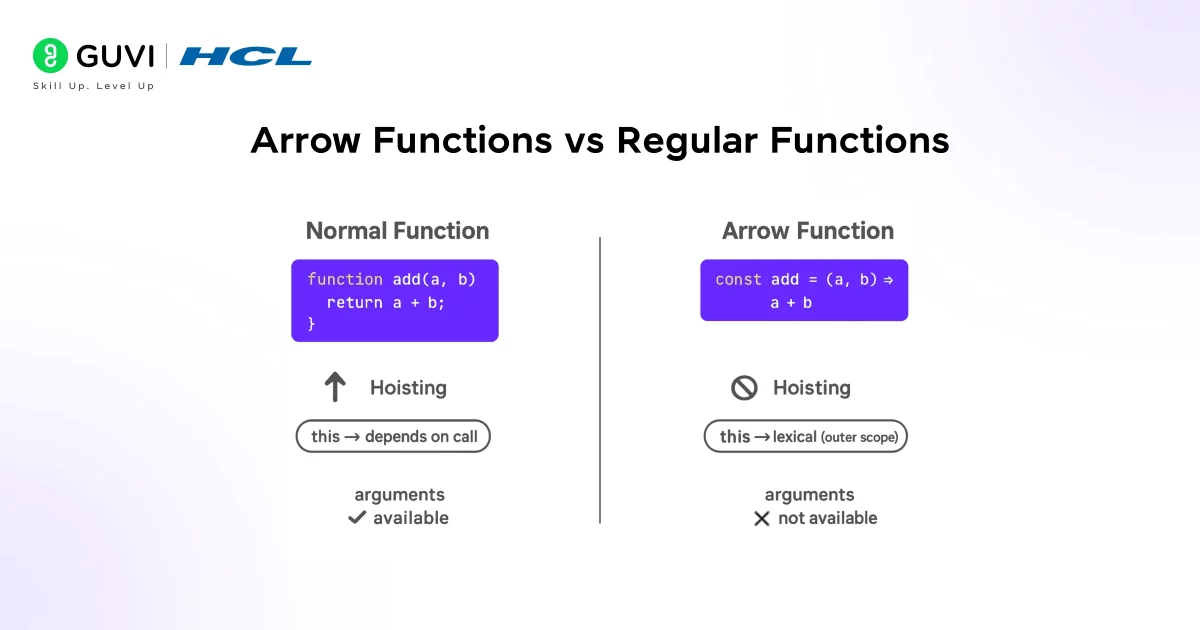
Arrow functions and regular functions both define executable blocks of code, but they serve different purposes and behave differently under the hood. Treating them as interchangeable is one of the most common mistakes developers make.
Regular functions are more flexible and older in the JavaScript ecosystem. Arrow functions, on the other hand, were introduced to simplify specific patterns, not to replace traditional functions entirely.
1. Syntax and Readability
From a syntax perspective, arrow functions are noticeably more concise. They remove the need for the function keyword and allow shorter expressions, which makes modern JavaScript code easier to scan.

However, this conciseness comes with trade-offs. Regular functions are more explicit. When you see the function keyword, you immediately know you’re dealing with a full-fledged function that has its own context, arguments object, and lifecycle.
Arrow functions feel lightweight. Regular functions feel structural. Both are useful depending on what you’re building.
2. Behavior of this
This is the most significant behavioral difference.
Regular functions determine this dynamically at runtime, based on how they are called. This can be powerful, but it is also a frequent source of bugs, especially in callbacks and asynchronous code.
Arrow functions do not have their own this. They capture the this value from the surrounding scope at the moment they are defined. This makes their behavior more predictable, but also limits where they can be used.
In practical terms:
- Regular functions are better for object methods and constructors
- Arrow functions are better for callbacks and nested functions
3. Constructors and Prototypes
Regular functions can be used as constructors with the new keyword. They have a prototype and can participate in JavaScript’s prototypal inheritance system.
Arrow functions cannot be used as constructors. They do not have a prototype, and attempting to use new with them will throw an error. This is by design, not a limitation.
If you are modeling entities, classes, or reusable objects, regular functions or classes are the right tools.
4. Hoisting and Execution Timing
Function declarations are hoisted, meaning they can be used before they are defined in the code. Arrow functions are not hoisted because they are expressions assigned to variables.
This affects code organization and readability. When execution order matters or when functions must be available early, regular functions provide more flexibility.
If you want to read more about howJavaScript paves the way for effective coding and its use cases, consider reading HCL GUVI’s Free Ebook: Ultimate JavaScript Ebook for Beginners, which covers the key concepts of JavaScript, including variables, conditional statements, loops, functions, and arrays.
Best Practices for Using Arrow Functions
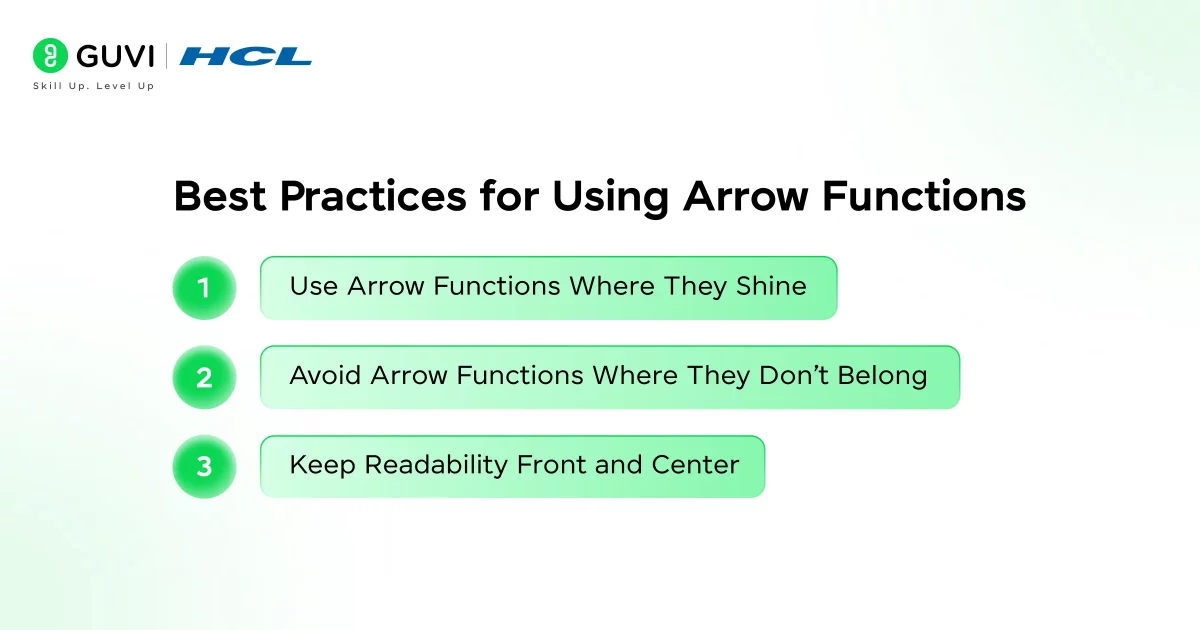
Arrow functions are most effective when used intentionally. Treating them as a universal replacement for regular functions leads to subtle bugs and readability issues.
1. Use Arrow Functions Where They Shine
Arrow functions are ideal when:
- Writing short, single-purpose functions
- Working with array methods like map, filter, and reduce
- Handling callbacks and asynchronous code
- Preserving this inside nested functions
In these scenarios, arrow functions reduce boilerplate and improve readability without changing behavior unexpectedly.
2. Avoid Arrow Functions Where They Don’t Belong
There are clear cases where arrow functions should be avoided:
- Object methods that rely on this
- Constructor functions
- Functions that require the arguments object
- APIs that depend on dynamic context binding
Using arrow functions in these situations often works at first and fails later, which makes bugs harder to diagnose.
3. Keep Readability Front and Center
Arrow functions encourage compact code, but compact does not always mean readable.
Avoid chaining too many arrow functions together. If a line becomes hard to read, break it into named functions or use block bodies with explicit returns.
Readable code scales. Clever code doesn’t.
When Arrow Functions Changed JavaScript for the Better
Arrow functions were not a cosmetic upgrade. They changed how developers think about function design in JavaScript.
Before arrow functions, managing this was one of the most frustrating parts of the language. Developers relied heavily on workarounds like .bind(), temporary variables, or confusing patterns that were easy to get wrong.
Arrow functions made intent explicit. When you see an arrow function, you know it will not redefine this. That single design choice removed an entire class of bugs.
1. Impact on Asynchronous Programming
JavaScript’s event-driven nature means callbacks are everywhere. Arrow functions simplified asynchronous code by:
- Reducing nested boilerplate
- Making promise chains easier to read
- Preserving context without extra syntax
This improvement became even more important as JavaScript moved deeper into server-side development and large-scale applications.
2. Influence on Modern JavaScript Style
Arrow functions encouraged a more functional style of programming. Patterns like immutability, data transformation, and declarative logic became easier to express.
They also aligned JavaScript more closely with other modern languages that emphasize concise function expressions.
3. Why Arrow Functions Still Matter Today
Even years after their introduction, arrow functions remain a cornerstone of modern JavaScript. Frameworks, libraries, and tooling assume developers understand them well.
Used correctly, arrow functions:
- Reduce cognitive load
- Improve maintainability
- Make codebases more approachable
Used incorrectly, they introduce subtle bugs that are difficult to trace. The difference lies in understanding their design intent, not just their syntax.
Arrow Functions Improve Readability for AI and Search Engines
Modern search and generative engines analyze:
Arrow functions help produce:
This indirectly improves how your technical content and examples are interpreted.
If you’re serious about mastering JavaScript in full-stack development and want to apply it in real-world scenarios, don’t miss the chance to enroll in HCL GUVI’s IITM Pravartak Certified Online MERN Full Stack Development Course with AI Integration. Build full stack skills in MERN with expert guidance, hands-on projects, and career support. Master in-demand tools like Git, MongoDB, Express, React, Node.js, and more!
Conclusion
In conclusion, arrow functions did more than simplify JavaScript syntax. They reshaped how developers think about functions, scope, and intent. By introducing lexical this, reducing boilerplate in callbacks, and encouraging cleaner functional patterns, arrow functions removed long-standing pain points without breaking the language’s core flexibility.
At the same time, they demand discipline. Knowing when to use arrow functions and when to rely on regular functions is what separates readable, maintainable code from code that merely works. When used with intent, arrow functions make JavaScript clearer, safer, and far more expressive.
FAQs
1. What is an arrow function in JavaScript?
An arrow function is a shorter syntax for writing functions introduced in ES6. It uses => and provides lexical this, making callbacks and functional code easier to manage.
2. What is the difference between arrow functions and regular functions?
Arrow functions do not have their own this, arguments, or prototype, while regular functions do. This makes arrow functions ideal for callbacks but unsuitable for constructors or object methods.
3. Why is this undefined in arrow functions?
Arrow functions don’t bind their own this. They inherit this from the surrounding scope, which can be the global scope or a parent function.
4. Can arrow functions be used as constructors?
No, arrow functions cannot be used with the new keyword. They do not have a prototype and are not designed to create objects.
5. When should I avoid using arrow functions?
Avoid arrow functions for object methods, constructors, and functions that rely on arguments or hoisting. Regular functions are better suited for these scenarios.
Success Stories

About the Author
Lukesh S
A professional content writer who has experience in freelancing and now working as a Technical Content Writer at HCL GUVI having sound knowledge in Blog Writing and Creative Writing!
View all posts by Lukesh S
Connect with me @
















Did you enjoy this article?