


Artificial Intelligence and Machine Learning Articles
Data Analyst vs Machine Learning Engineer: Which Career Grows Faster?
Finance Manager to Data Analytics: Career Growth, Salary and Seniority
How to Evaluate LLM Outputs in Production Deployments
AI/ML Skills Gap 2026: Why Companies Can't Find Job-Ready Talent


Get In Touch For Details! Request More Information

What Is LiteLLM and How Does It Work?
Nov 06, 2026 6 Min Read 1857 Views
(Last Updated)
LiteLLM is an open-source Python library and proxy server that lets developers call 100+ large language models using the OpenAI format. It works with providers such as OpenAI, Anthropic, Google Gemini, and Amazon Bedrock, using the same code for all of them.
Each AI provider has its own API, authentication method, and response format, so using several models means maintaining separate code for each one. LiteLLM solves this by giving every model the same interface, so switching models takes one line instead of a rewrite.
Table of contents
- TL;DR Summary
- What Is LiteLLM?
- Main Features of LiteLLM
- How LiteLLM Works (Architecture)
- Request Flow
- Core Components
- SDK Mode vs Proxy Mode
- How to Install and Set Up LiteLLM
- Install the Python SDK
- Set Up the Proxy Server
- LiteLLM Fallbacks, Retries, and Cost Tracking
- Retries
- Fallbacks
- Cost Tracking
- LiteLLM vs OpenRouter vs Direct SDKs
- When Not to Use LiteLLM
- Conclusion
- FAQs
- What is LiteLLM used for?
- Is LiteLLM free to use?
- What is the difference between LiteLLM and OpenRouter?
- Does LiteLLM need a proxy server?
- How do I install LiteLLM?
TL;DR Summary
- This blog covers what LiteLLM is and the main features that set it apart.
- It explores how LiteLLM works behind the scenes, from the request flow to the SDK and proxy modes.
- It explains how retries, fallbacks, and cost tracking keep AI applications reliable and affordable.
- It compares LiteLLM with OpenRouter and direct SDKs to show where each one fits.
- It also guides you through installing LiteLLM and setting up both the SDK and the proxy server, and points out when it may not be the right fit.
What Is LiteLLM?
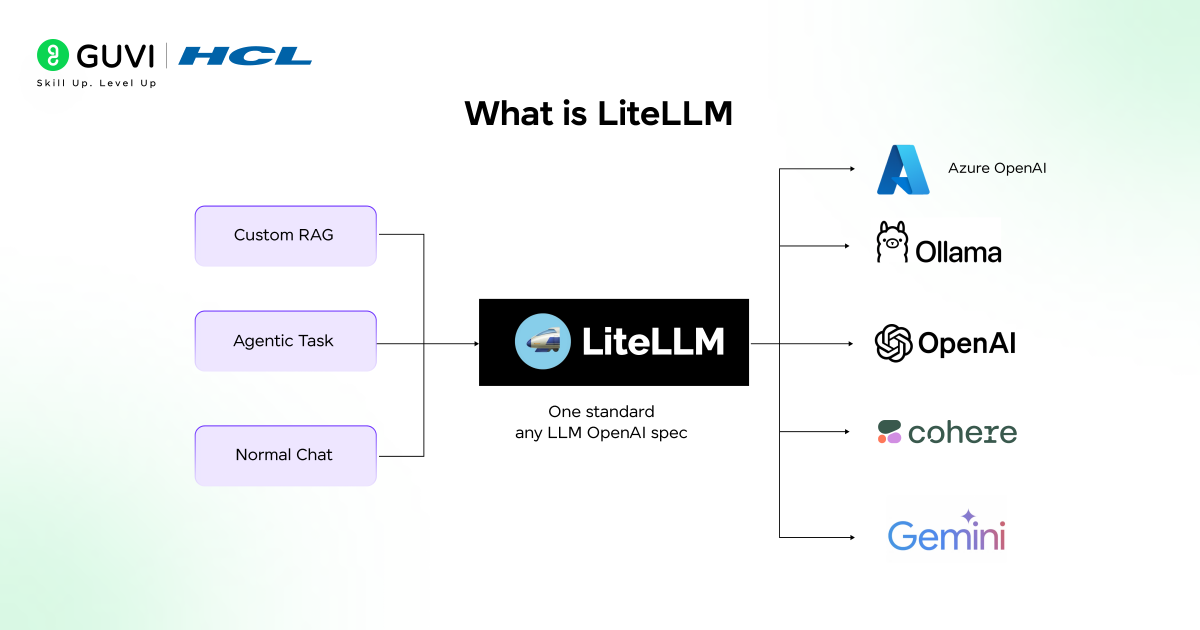
LiteLLM is an open-source tool that gives applications one standard way to work with AI models from many vendors. You write code once in the OpenAI format, and LiteLLM translates it for the service you choose, including OpenAI, Anthropic, Google Gemini, and Amazon Bedrock.
It also handles production-grade tasks, such as retrying failed calls, switching to a backup when one service goes down, tracking spend, and setting budgets and rate limits.
LiteLLM comes in two forms:
| # | Python SDK | Proxy Server (AI Gateway) |
|---|---|---|
| What it is | A library imported into your code | A central server that applications connect to |
| Best for | Individual developers and single applications | Teams sharing access across many applications |
| Setup | Install with pip and use it in code | Run as a service and set it up with a configuration file |
It is commonly used by:
- Developers building applications that need more than one LLM
- Platform teams that give several groups controlled access to AI
- Companies that want to monitor and limit AI spending
Calling every major AI model from one place is just the start. If you want to build, deploy, and scale such systems yourself, explore HCL GUVI’s Intel & IITM Pravartak Certified AI/ML Course and turn curiosity about AI into a real career. No coding background needed!
Main Features of LiteLLM
LiteLLM combines a unified interface with the controls teams need to run AI applications in production.
- One API for every provider: Requests to 100+ providers use the OpenAI format. Changing vendors means changing a model name instead of rewriting code.
- Broad endpoint coverage: LiteLLM handles chat completions, the Responses API, embeddings, images, audio, batches, and reranking. A single tool can support most AI workloads.
- Load balancing: The router spreads traffic across several deployments of the same model, such as separate Azure and OpenAI instances. No single deployment carries the full load.
- Retries and fallbacks: A failed call is retried automatically and can be sent to a backup deployment. Applications stay available during an outage.
- Cost tracking, budgets, and rate limits: Spend is recorded per project, API key, or model, and you can set limits at each level. Teams see where money goes and can cap it before it grows.
- Virtual keys: The proxy server issues its own keys, so teams can use LiteLLM without receiving the original credentials. Teams can grant and revoke access in one place.
- Logging and guardrails: Built-in hooks record requests and apply safety checks before and after a model responds. This gives teams visibility and control over what the application sends and receives.
- MCP and agent support: LiteLLM can connect MCP servers and A2A agents to supported models. Tools and agents are then reached through the same gateway as the models themselves.
How LiteLLM Works (Architecture)
LiteLLM acts as a translation and control layer between an application and the AI providers it uses. The application talks to LiteLLM in one format, and LiteLLM handles everything on the provider side.
Request Flow
- The application sends a call in the OpenAI format, either as a function call to the SDK or as an HTTP call to the proxy server.
- LiteLLM reads the model name and identifies the provider that serves it.
- The call is converted into the format that provider expects.
- The router picks a deployment, and if that attempt fails, it retries or switches to a backup.
- The provider replies, and LiteLLM converts the answer back into the OpenAI format.
- LiteLLM records token usage, cost, and logs for later review.
The application never sees provider-specific formats, so the same code works with every supported model.
Core Components
- Python SDK: A library that exposes functions such as
completion(). It performs the format conversion directly inside the application. - Router: The logic that balances traffic across deployments and handles retries and fallbacks.
- Proxy Server: A standalone service, running on port 4000 by default, that applications reach over HTTP. It adds authentication, virtual keys, rate limits, and spend tracking on top of the core features.
- Database: A PostgreSQL connection that lets the proxy store keys, budgets, and usage data.
SDK Mode vs Proxy Mode
| Criteria | SDK Mode | Proxy Mode |
|---|---|---|
| Where LiteLLM runs | Inside the application process | As a separate service |
| How applications connect | Python function calls | Any OpenAI-compatible client over HTTP |
| Key management | Provider keys held by the application | Virtual keys issued by the proxy |
| Database needed | No | Yes, for keys and spend tracking |
| Best fit | A single Python project | Several applications or teams |
How to Install and Set Up LiteLLM
You can run LiteLLM in a few minutes, either as a Python library or as a proxy server. Both options need Python 3.10 or higher, plus an API key from at least one model provider.
1. Install the Python SDK
Step 1 – Install the package:
pip install litellmThis installs the core library, which is all you need to call models from Python code.
Step 2 – Set the provider key and make the first call:
import os
from litellm import completion

os.environ["OPENAI_API_KEY"] = "your-openai-key"

response = completion(
    model="openai/gpt-6.1-terra",
    messages=[{"role": "user", "content": "Hello!"}],
)

print(response.choices[0].message.content)
The openai/ prefix in the model name tells LiteLLM which provider should receive the request. The messages list follows the standard OpenAI structure, where each entry has a role and its content.
The reply comes back in the OpenAI response format, so the generated text is always found at choices[0].message.content.
In real projects, set the API key in the environment instead of hardcoding it. To use a different provider, change the prefix and model name and supply that provider’s key. The rest of the code stays the same.
2. Set Up the Proxy Server
Step 1 – Install the package with the proxy extras:
pip install 'litellm[proxy]'The [proxy] extra adds the server components needed to run LiteLLM as a service.
Step 2 – Create a config file that lists the models to expose:
Save the following as config.yaml:
model_list:
  - model_name: gpt-6.1-terra
    litellm_params:
      model: openai/gpt-6.1-terra
      api_key: os.environ/OPENAI_API_KEY
The model_name field is the name that applications will use when they send requests.
Under litellm_params, the model field names the real provider and model, and api_key points to an environment variable so the key stays out of the file. You can add more models as extra entries in the same list.
Step 3 – Start the proxy:
litellm --config config.yamlThe server starts on port 4000 by default. The console logs list the models loaded from the config, which confirms the file was read correctly. Keep this terminal open while sending requests.
Step 4 – Send a test request with any OpenAI-compatible client:
import openai

client = openai.OpenAI(api_key="anything", base_url="http://0.0.0.0:4000")

response = client.chat.completions.create(
    model="gpt-6.1-terra",
    messages=[{"role": "user", "content": "Hello!"}],
)

print(response.choices[0].message.content)
The base_url points the client to the proxy instead of OpenAI, so existing OpenAI-based code works with no other changes.
The API key can be any placeholder here because this basic setup does not enforce keys.
The model value is the model_name from the config file, not the provider’s own name. A text reply confirms that the proxy is working.

Your first LiteLLM call is running, so imagine building the models behind it. HCL GUVI’s Intel & IITM Pravartak Certified AI/ML Course takes you from Python to Generative AI and MLOps through 20+ industry-grade projects. Ready to go beyond using AI and start creating it?
LiteLLM Fallbacks, Retries, and Cost Tracking
AI applications fail in predictable ways: providers hit rate limits, servers return errors, and spending grows unnoticed. LiteLLM handles each of these with a few settings, so the application code stays unchanged.
1. Retries
A retry sends a failed request again to the same model. It fixes short-lived problems such as rate-limit errors or brief network issues. The settings go in config.yaml:
litellm_settings:
  num_retries: 3
  request_timeout: 10
num_retries sets how many times a failed call is repeated, and request_timeout sets the number of seconds to wait before a call is treated as failed.
2. Fallbacks
When retries do not solve the problem, a fallback moves the request to a different model. This keeps the application available if one provider goes down. Backups are listed in the same file, and each one must also exist in model_list:
model_list:
  - model_name: gpt-6.1-terra
    litellm_params:
      model: openai/gpt-6.1-terra
      api_key: os.environ/OPENAI_API_KEY
  - model_name: claude-sonnet-5-5
    litellm_params:
      model: anthropic/claude-sonnet-5-5
      api_key: os.environ/ANTHROPIC_API_KEY

litellm_settings:
  num_retries: 3
  request_timeout: 10
  fallbacks: [{"gpt-6.1-terra": ["claude-sonnet-5-5"]}]
In this setup, a request to gpt-6.1-terra is retried three times. If it still fails, LiteLLM sends it to claude-sonnet-5-5. The reply returns in the same OpenAI format, so the application doesn’t need to know a switch happened. Fallbacks apply to errors such as rate limits (429) and server failures (500).
3. Cost Tracking
LiteLLM calculates the cost of every call in US dollars using the token count and the stored model price. The SDK exposes this through the completion_cost function:
from litellm import completion, completion_cost

response = completion(
    model="openai/gpt-6.1-terra",
    messages=[{"role": "user", "content": "Hello!"}],
)

cost = completion_cost(completion_response=response)
print(f"Cost: ${cost:.6f}")
The proxy server also records spend per key, user, and team. This needs a PostgreSQL database and a master key.
Step 1 – Connect a database and set a master key:
export DATABASE_URL="postgresql://<user>:<password>@<host>:<port>/<dbname>"general_settings:
master_key: os.environ/LITELLM_MASTER_KEYStep 2 – Create a virtual key with a spending limit:
curl 'http://0.0.0.0:4000/key/generate' \
  -H 'Authorization: Bearer <your-master-key>' \
  -H 'Content-Type: application/json' \
  -d '{"max_budget": 10}'
The key can now spend up to 10 dollars. Once it passes that amount, the proxy rejects further requests made with it.
Step 3 – Check the spend:
curl 'http://0.0.0.0:4000/key/info?key=<virtual-key>' \
  -H 'Authorization: Bearer <your-master-key>'
The response includes a spend field with the total for that key. Each reply from the proxy also carries a x-litellm-response-cost header showing the cost of that single call.
These figures are estimates based on LiteLLM’s price data, so they may differ slightly from the provider’s final bill.
LiteLLM vs OpenRouter vs Direct SDKs
The table below compares LiteLLM, OpenRouter, and direct provider SDKs on the points that matter most when choosing how to connect an application to AI models.
| Criteria | LiteLLM | OpenRouter | Direct SDKs |
|---|---|---|---|
| What it is | Open-source Python SDK and proxy server (AI gateway) | Hosted service with one API for many models | The official client library of each model provider |
| Hosting | Self-hosted, or used as a library inside the application | Hosted by OpenRouter only | Calls go straight to each provider |
| Open source | Yes | No | Usually yes, for the client libraries |
| Setup effort | Moderate: install, configure, and host the proxy | Low: create an account and use one key | Low for one provider, rising with each provider added |
| Model coverage | 100+ providers | Hundreds of models from many providers | One provider per SDK |
| API format | OpenAI format for every model | Consistent, OpenAI-compatible API | A different format for each provider |
| Pricing | Free software; you pay providers and your own infrastructure | Provider token prices passed through, plus a platform fee on credit purchases (5.5% on the Standard plan) | Provider prices only |
| Retries and fallbacks | Built-in and configurable | Handled by the service through provider routing | Must be written by the developer |
| Cost tracking and budgets | Spend per key, user, and team, with budgets and rate limits | Usage shown in the account dashboard | A separate dashboard for each provider |
| Data path | Through infrastructure you control | Through OpenRouter’s servers | Directly to the provider |
| Best for | Teams that want control, self-hosting, and one interface | Quick access to many models without running anything | Projects that use a single provider |
When Not to Use LiteLLM
LiteLLM is not the right choice for every project. These situations usually call for a simpler option:
- Only one provider is used: The unified interface adds little value, so that provider’s own SDK is simpler.
- No capacity to run infrastructure: The proxy has to be hosted, monitored, and connected to a database, so a hosted service such as OpenRouter suits small teams better.
- Newest provider-specific features are needed immediately: LiteLLM translates requests into a common format, so a brand-new feature may be missing until it adds support. The provider’s SDK gives direct access.
- Every millisecond of latency matters: The proxy adds an extra network hop, so calling the provider directly is faster.
AI skills are the difference between using tools and shaping them. HCL GUVI’s Intel & IITM Pravartak Certified AI/ML Course offers live expert-led classes, 20+ projects, a joint certification, and placement guidance. Start your AI career today!
Conclusion
AI providers keep multiplying, and the way an application reaches them has become a design decision in its own right. LiteLLM operates at that layer, reflecting a broader shift in AI development: independence from any single vendor is now a basic requirement, not an optional extra.
As new models and vendors keep arriving, the ability to switch between them without rewriting code is becoming central to how AI applications are built. A single consistent interface keeps that choice open as the landscape continues to change.
FAQs
1. What is LiteLLM used for?
It lets an application call many AI models through one OpenAI-style interface, with routing, retries, fallbacks, and spend tracking added on top.
2. Is LiteLLM free to use?
The core SDK and proxy are open source and free, so the only costs are the model providers and the infrastructure it runs on.
3. What is the difference between LiteLLM and OpenRouter?
It is an open-source software you run yourself, while OpenRouter is a hosted service that gives you access to many models through one account.
4. Does LiteLLM need a proxy server?
No, the Python SDK works on its own inside application code, and you only need the proxy to share access across several apps or teams.
5. How do I install LiteLLM?
Run pip install litellm for the SDK or pip install 'litellm[proxy]' for the proxy server, using Python 3.10 or higher.
Success Stories
















Did you enjoy this article?