


Software Development Articles
How to Read and Understand System Design Diagrams?
System Engineer Roles and Responsibilities: 12 Proven Duties for Growth
SAP Consultant Roles and Responsibilities: 12 Proven Duties for Growth and Success
Network Engineer Roles and Responsibilities: 12 Essential Duties for Success


Get In Touch For Details! Request More Information

Top Splunk Interview Questions & Answers in 2026
Feb 12, 2026 6 Min Read 2906 Views
(Last Updated)
The technical challenges associated with the software architecture increase with respect to its scalability and complexity. Various sources, such as servers, applications, hardware devices, and other networks, generate raw machine data during their operations, as a consequence of which it becomes tough to organize, analyze, and search this data.
That is why Splunk was created to overcome this limitation. To put it simply, Splunk is a powerful software platform that allows users to gather, analyze, and search the raw machine data, such as logs, errors, events, and performance information. After assembling and categorizing these data, it then displays them in the form of user-friendly and interactive dashboards, reports, and graphs. Through this detailed documentation, activities such as troubleshooting technical malfunctions, identifying security loopholes, and enhancing system performance become smoother.
Table of contents
- Splunk Interview-based Questions
- Splunk Admin Questions
- Splunk Dashboard Questions
- Splunk Advanced Interview Questions
- Conclusion
Splunk Interview-based Questions
Based on the significance of real-time system monitoring and troubleshooting operational failures, IT (information technology) companies require proficiency in Splunk as a prerequisite for job applications. Software roles such as Data Analyst, Compliance Auditor, and DevOps Engineer often require Splunk as their core skill.
In this blog, we have curated a set of the most crucial Splunk interview questions.
Splunk Admin Questions

Meaning of Admin: A Splunk Administrator is a professional who is responsible for inspecting and managing the Splunk platform of an organization or entity. The job of an admin is to ensure the proper setup of the Splunk platform, encompassing installation and maintenance, as well as monitoring performance and troubleshooting technical issues.
- Can you describe how Splunk processes data?
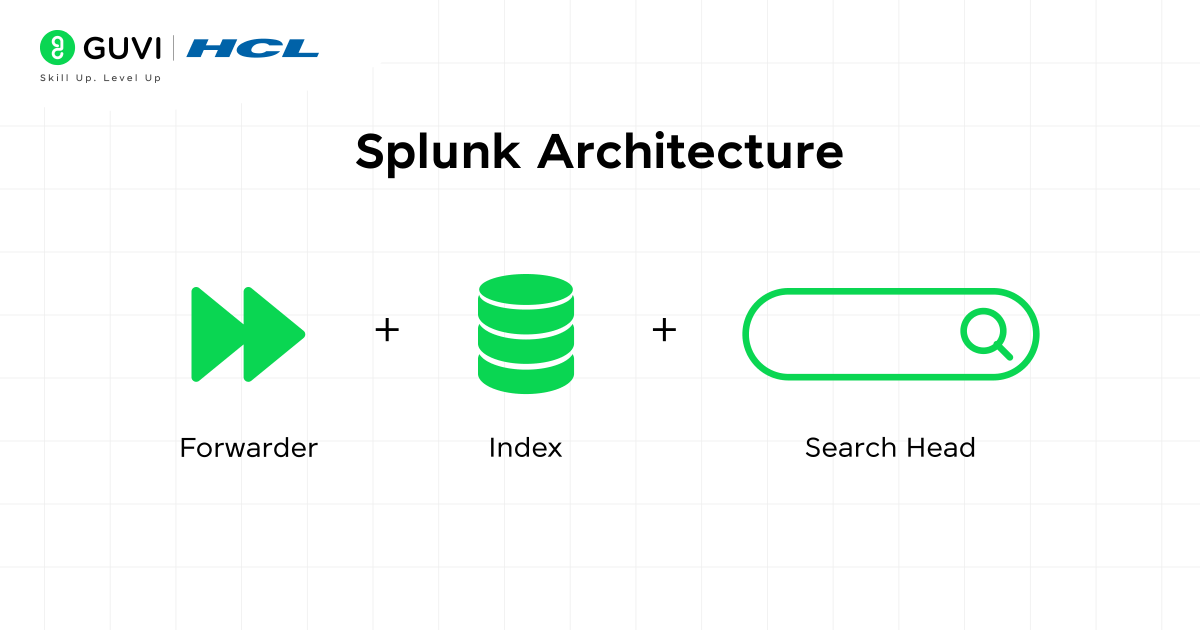
Splunk processes the data in three steps:
- Forwarder: This acts as a collector and is attached to the source machines, like servers or primary applications. It collects raw machine data from sources like logs, errors, and events. After gathering this data, securely forward it to the Splunk platform for processing.
- Indexing: Here, the received data then reaches the Indexer. And this is the point where the indexer separates the data into distinct events, parses them, and finally stores them as index records. These records are stored in an inverted index structure, which enables exceptionally fast user searches.
- Search Head: Once the data is fed into the Indexer, users can pass queries to filter, analyze events, and build dashboards. In simple terms, Search Head is a visualizer that enables searching through Search Processing Language (SLP) for performing various activities and tasks.
- What are the different types of Splunk forwarders?
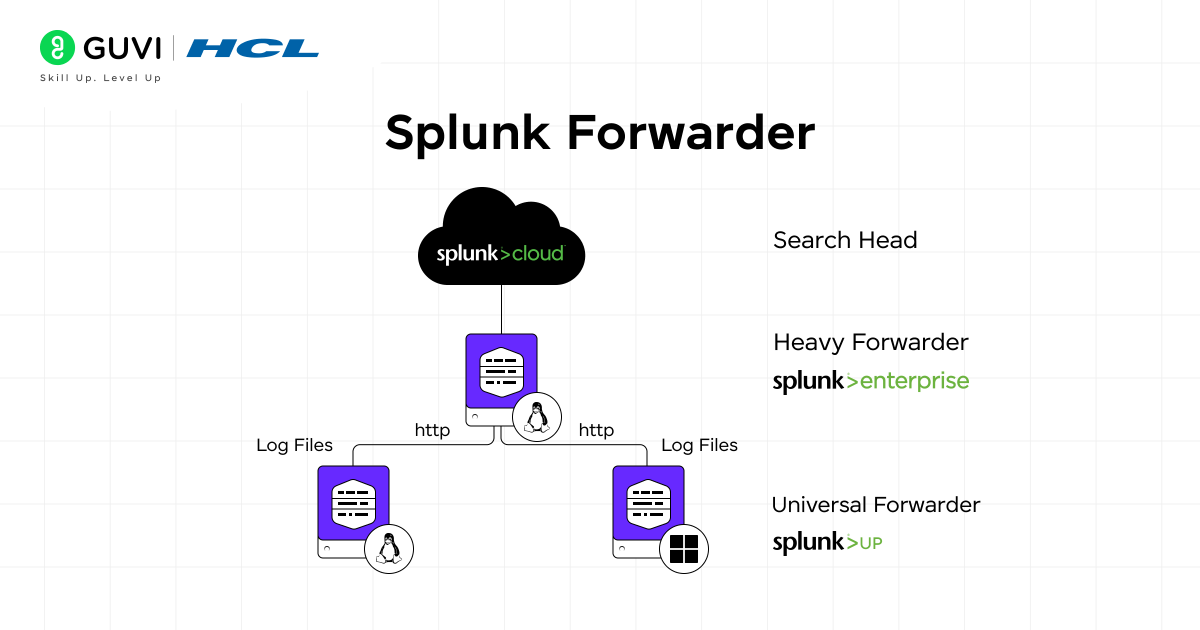
There are two main types of Splunk forwarders:
- Universal Forwarder (UF): This functional block collects and sends the raw data without parsing it. As it is a lightweight entity, it avoids parsing because of high memory usage.
- Heavy Forwarder (HF): HF, on the other hand, has enough resources for both parsing and indexing of data. So before forwarding the raw data, it extracts the fields and filters the events.
- Describe the Splunk indexing pipeline.
The Splunk indexing pipeline includes 4 phases. In the Indexing stage, first, the data is gathered from multiple machine sources. After that, the collected data is divided into events and timestamps. Then each chunk of data is stored in index records to enable fast user search. This is the final step where queries are requested and the required results are returned to the users.
- What are the key configuration files in Splunk, and what are their purposes?
The key configuration files in Splunk are as follows:
- inputs.conf: Presents the data inputs and defines their respective properties.
- props.conf: This file determines the parsing and indexing of data.
- transforms.conf: Defines data transformations as well as field extractions.
- indexes.conf: Involves configuration of index settings and retention policies.
- server.conf: This specific file consists of general settings for the server.
- How do you troubleshoot a Splunk forwarder that is not sending data?
The critical checkpoints for troubleshooting a Splunk forwarder include checking the logs, validating network connectivity, reconfiguring the indexer settings to receive data without interruption, and confirming whether the forwarder has the necessary permissions to forward raw machine data. Following this flow will increase the success rate of troubleshooting.
- What commands are used to start and stop the Splunk service?
To manage Splunk services, you can use the following commands in the terminal:
- To start the Splunk service: ./splunk start
- To stop the service: ./splunk stop
- To restart the service: ./splunk restart
These commands are executed from the Splunk installation directory and allow you to control the service easily.
Also Read: Answers To 10 Most Common Job Interview Questions
Splunk Dashboard Questions
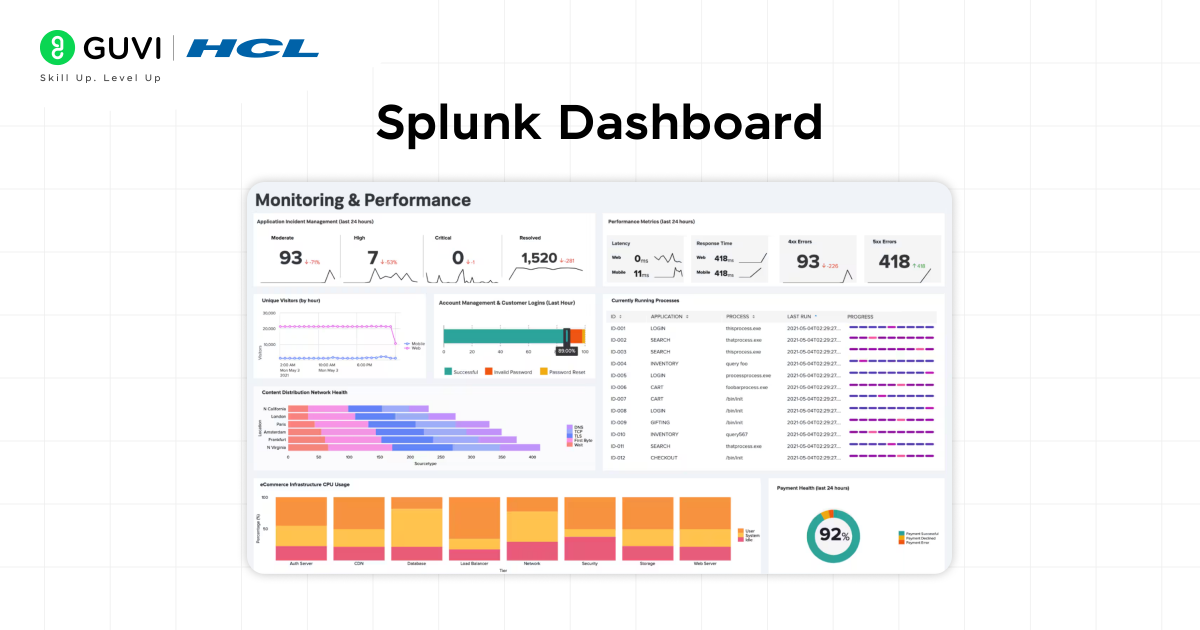
- What is the meaning of a Splunk Dashboard, and what are the different types of dashboards?
A Splunk dashboard is a type of panel that presents essential information based on the user queries in the form of charts, tables, and reports. It processes the raw machine data and presents it in an interactive format along with essential metrics. In the case of an e-commerce application, Splunk Dashboard can be used to monitor online user traffic, track technical errors in real-time, and more. Based on this information, the team can assess the slow rendering pages, server issues, or inconsistencies in user interactions.
Types of Dashboards:
- Classic Dashboard (XML-based)
Built using Simple XML, they support panels like charts, tables, and single values, and can include inputs like dropdowns and time pickers.
- Dashboard Studio
It offers advanced visualization options, drag-and-drop design, flexible layouts, and better customization for interactive, rich dashboards.
- What are drilldowns in Splunk Dashboards?
Drilldown in Splunk Dashboards is the process of delving into any specific data presentation figure, such as a graph, a chart, or a table.
For example:
A pie chart representing sales of various product categories (Apparel, Electronics, Household items, etc.) in slices. If a user wants to gather more details on the apparel category, they can click on that specific slice, which will navigate to an additional dashboard displaying the types of apparel and the age group that purchases them.
- How do you optimize dashboard performance in Splunk?
Dashboard optimization can be done through the following methods:
- By executing efficient and detailed search queries.
- Show the most relevant and compelling data to minimize the initial load time. This will help users click on deep-level data only when they need it.
- Use the summary indexing to increase the response time for heavy searches.
- How do you create a dashboard in Splunk?
- Run an SPL search query in Splunk to retrieve error logs or sales trends, and then create a dashboard.
- Select “Save As” and then navigate to the Dashboard Panel to add the results to an existing dashboard or create a new one.
- Choose a chart, table, single value, or map to display data in the dashboard editor, and arrange multiple panels to create a cohesive layout. Add filters, time ranges, and drilldowns to make the dashboard dynamic.
- Finally, save it to create a real-time, shareable visual interface for your team to monitor, analyze, and take action on data.
- What are the advantages of Splunk Dashboard?
The main advantages of Splunk Dashboard are:
- It provides the ability to track events and operational metrics in real-time, which facilitates the organization’s ability to detect technical issues and mitigate potential risks and downtime.
- The Splunk Dashboard effortlessly converts the raw machine data into user-friendly charts and figures. These visual representations, in turn, aid in identifying the trends and patterns that lead to better decision-making.
- Users have the flexibility to customize the dashboard according to their business requirements and needs.
- What are the inputs in Splunk Dashboard?
The most essential Splunk Dashboard inputs are: dropdown, time picker, text box, radio buttons, checkbox, and multi-select list.

Explore: Mastering the Data Science Interview
Splunk Advanced Interview Questions
- What’s the difference between stats and eventstats?
- Stats: This command is used to summarize the entire dataset while simultaneously removing each detail of the index records. The users are only able to see the overall figure.
- Evenstats: Whereas in the evanstats command, every single log displays its original information, and in addition to that, it also maintains the total summary of data.
- What are buckets in Splunk?
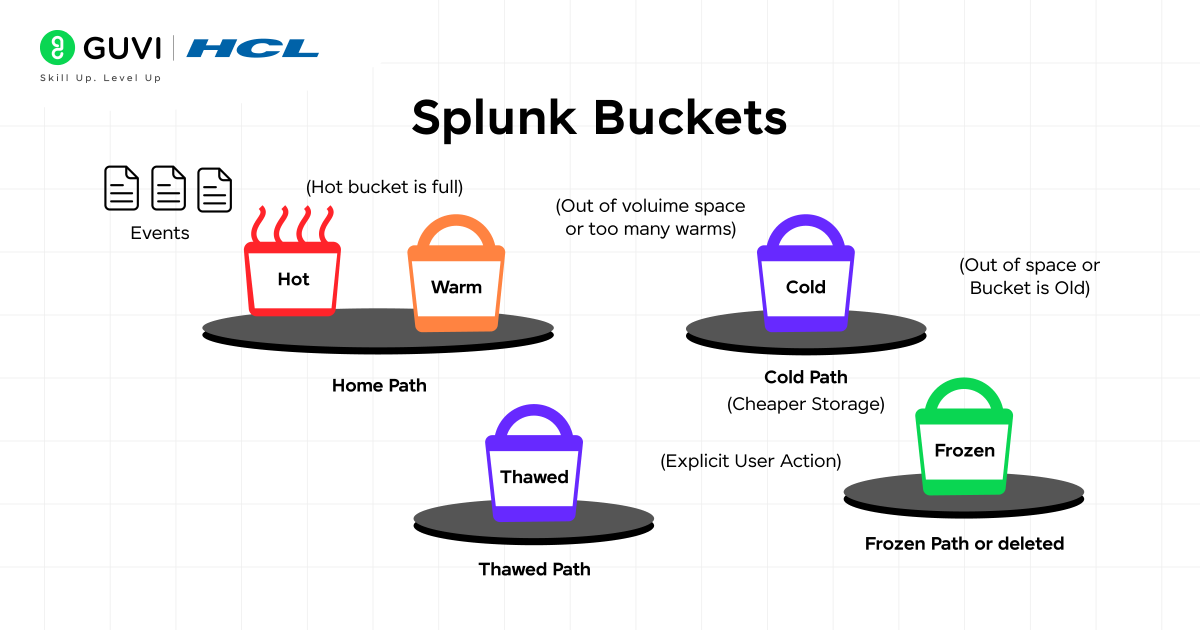
Buckets in Splunk are basically containers for events (indexed data), and this data moves through various stages as it matures. These are the following buckets:
- Hot Bucket: In this phase, the fresh data is being written by Splunk, and users can search those events immediately.
- Warm Bucket: The data then moves to this bucket. Here, the search action continues, but the data is no longer written.
- Cold Bucket: Among all the data, there is a proportion of outdated data that users rarely search for. So, Splunk stores this type of data in slower/cheaper storage. If a search is performed, then it will be delayed.
- Frozen Bucket: Once the data is rolled out from the cold bucket, the indexer clears the frozen (outdated) data, as it has already exceeded the retention limit. However, users can choose to archive it instead of permanently deleting it.
- How does Splunk license management work?
The working principle of Splunk’s license management is like a regular data limit. The users have limitations on forwarding a certain amount of data to Splunk. In the event of excessive data transfer, users are alerted by the Splunk platform. The License Usage dashboard clearly presents details regarding data usage, allowing users to reduce their data transmission or upgrade their license to access essential information.
- What happens if two search heads go down in a 3-member search head cluster?
If two search heads go down, the remaining one can handle search requests, but performance may degrade. To ensure high availability:
Configure search head clustering with an odd number of members.
Implement load balancing to distribute search traffic evenly.
Regularly monitor cluster health and address issues promptly.
- A new log format is not being parsed correctly. How would you implement field extraction using props.conf and transforms.conf?
In this particular scenario, the most optimal solution is to define a fresh new prototype in props.conf file. After that, utilize the Report directive present in the props.conf file that refers to a field extraction rule. That specific rule needs to be created in transforms.conf using regular expressions. And at last, this configuration will lead to extracting the user identification, IP address, and status fields from the logs.
- How to filter out specific log entries before indexing, give an example?
This can be achieved by configuring the Splunk platform in a way that only error and warning data are indexed. The filtering process is executed by using props.conf and transforms.conf at the forwarder.
For example:
[props.conf]
[my_sourcetype]
TRANSFORMS-set = setnull
[ transforms.conf ]
[setnull]
REGEX = DEBUG|VERBOSE
DEST_KEY = queue
FORMAT = nullQueue
This regex sends DEBUG or VERBOSE logs to nullQueue, where Splunk drops and doesn’t index them. Thus, only useful logs (ERROR, WARN) are preserved.
- How to create a summary index solution for large data volumes to speed up queries—what scheduled searches, storage, and retention will you use?
Whenever there is a heavy concentration of indexed data, performing a search directly on raw logs can be slow or delayed. So the best way to avoid this technical issue is to follow some essential steps mentioned below:
Start the process by creating a scheduled search.
After the search function, store and save the output into a summary index by using the collect command.
Once that is done, configure data retention on the summary index so old results are rolled off after a specific period.
And the final step is to refer to the Splunk dashboard for querying the pre-processed data instead of reviewing raw logs.
- What are Splunk commands? List some of the more common ones.
Splunk commands are instructions to process, filter, or analyze data while searching.
- search: Filters events based on keywords or conditions.
- stats: Creates summaries like count, sum, and average.
- eventstats: Adds summary fields to each event while keeping original data.
- streamstats: Creates running totals or trends across events.
- table: Shows specific fields in a table format.
- fields: Includes or excludes certain fields.
- eval: Creates new fields or changes values with expressions.
- sort: Orders results by field values.
- dedup: Removes duplicate events based on a field.
- where: Applies conditions to filter results.
Discover: Top 130+ Core Java Interview Questions and Answers
Adobe implemented the Splunk platform to track and visualize data from its Cloud platforms and services. The company’s main challenge was the vast volume of raw machine data generated by millions of users worldwide.
To tackle this problem, Adobe used Splunk to identify downtime and errors much faster. By doing so, the entire organization experienced an increase in application performance, along with establishing a robust security monitoring system.
Transform your tech career with HCL GUVI’s IIT-M Pravartak certified Full Stack Development Course with AI tools. Get in touch with us by enrolling yourself in a comprehensive program that benefits you with real-time interview experiences, placement guidance & mentorship from industry experts.
Conclusion
Top tech giants who are actively searching for professionals with competency in DevOps, IT operations, business analysis, and cybersecurity understand the significance of the Splunk software platform. That is why preparing for Splunk interviews is exceptionally beneficial for aspiring software enginners. Having a thorough understanding of Splunk fundamentals and its applications can help you in facing interviews confidently, which increases your chances of landing top SDE (software development engineer) roles in leading software companies.
Success Stories












Did you enjoy this article?