


Artificial Intelligence and Machine Learning Articles
Data Analyst vs Machine Learning Engineer: Which Career Grows Faster?
Finance Manager to Data Analytics: Career Growth, Salary and Seniority
How to Evaluate LLM Outputs in Production Deployments
AI/ML Skills Gap 2026: Why Companies Can't Find Job-Ready Talent


Get In Touch For Details! Request More Information
Semantic Kernel Tutorial: Microsoft’s AI Orchestration Framework
Sep 07, 2026 6 Min Read 443 Views
(Last Updated)
Semantic Kernel is Microsoft’s open-source SDK for orchestrating AI models, plugins, and agents into cohesive applications. It supports .NET, Python, and Java, and integrates with Azure OpenAI, OpenAI, and other LLM providers. This tutorial shows how to set up Semantic Kernel, create your first AI agent, add plugins and memory, and run a simple multi-step workflow.
Table of contents
- Direct Answer Box
- TL;DR Summary Box
- What Is Semantic Kernel?
- Why Use Semantic Kernel?
- Core Concepts: Kernel, Plugins, Prompts, and Memory
- Kernel
- Plugins
- Prompts and Prompt Functions
- Memory
- Step-by-Step: Setting Up Semantic Kernel (Python)
- Step 1: Install the SDK
- Step 2: Configure Your Environment
- Step 3: Create the Kernel
- Step 4: Define a Simple Prompt Function
- Step 5: Invoke the Function
- Adding Native Plugins (Tools)
- Step 6: Define a Native Plugin Class
- Step 7: Register the Plugin
- Step 8: Use the Plugin in a Prompt
- Step 9: Invoke the Tool-Enabled Function
- Adding Memory for Retrieval-Augmented Generation
- Step 10: Set Up a Vector Store (Example with In-Memory)
- Step 11: Save Documents to Memory
- Step 12: Query Memory in a Prompt
- Step 13: Run a RAG Query
- Building AI Agents and Multi-Agent Workflows
- Single AI Agent
- Multi-Agent Orchestration
- Common Mistakes to Avoid
- What Should You Do Next?
- Conclusion
- FAQs
- What is Semantic Kernel?
- Do I need Azure to use Semantic Kernel?
- What languages does Semantic Kernel support?
- What is a plugin in Semantic Kernel?
- How does memory work in Semantic Kernel?
Direct Answer Box
Semantic Kernel is a model-agnostic orchestration framework that lets you connect LLMs, tools, memory, and business logic into AI agents and workflows. You create a kernel, register AI services and plugins (native code and prompt functions), optionally add vector memory, and then invoke functions or agents that can plan and call tools automatically. Semantic Kernel is designed for building enterprise-grade AI applications, from simple chatbots to complex multi-agent systems.
TL;DR Summary Box
- Semantic Kernel is an SDK for orchestrating LLMs, tools, and memory.
- The kernel is the central runtime that invokes plugins and agents.
- Plugins can be native code functions or prompt-based functions.
- Memory enables retrieval-augmented generation over your data.
- Agents and orchestration patterns support multi-step, multi-agent workflows.
What Is Semantic Kernel?
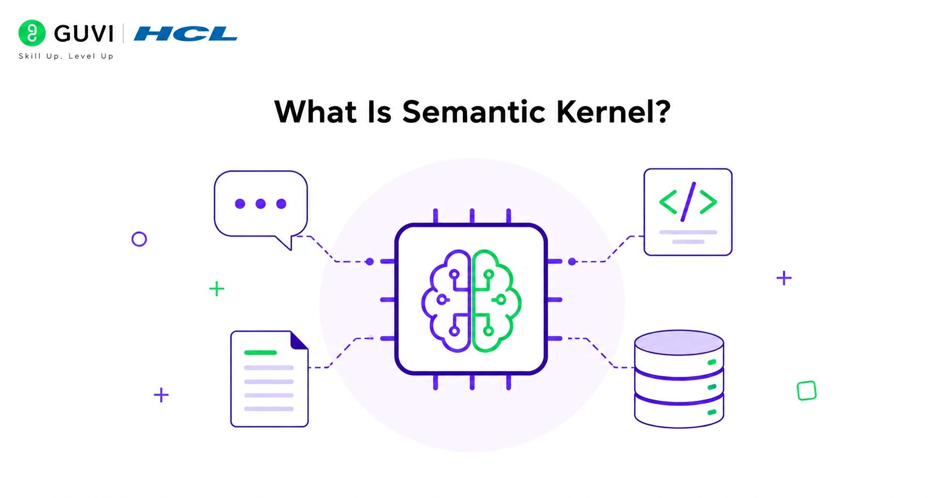
Semantic Kernel (SK) is an open-source AI orchestration framework from Microsoft. It provides a lightweight runtime and SDK for integrating large language models (LLMs) with your code, data, and services.
Key characteristics:
- Model-agnostic: works with Azure OpenAI, OpenAI, and other providers.
- Multi-language: .NET, Python, and Java SDKs.
- Plugin-based: wrap APIs, databases, and business logic as callable functions.
- Prompt + code: combine natural language prompts with native functions.
- Memory support: integrate vector stores for retrieval-augmented generation (RAG).
- Agent frameworks: build single and multi-agent workflows with orchestration patterns.
Semantic Kernel is commonly used for:
- Enterprise copilots and assistants.
- Document Q&A and knowledge-base chatbots.
- Process automation with AI-driven decision making.
- Multi-agent systems where specialized agents collaborate.
- Integrating AI into existing .NET, Python, or Java applications.
Why Use Semantic Kernel?
Semantic Kernel helps you:
- Avoid building AI integration logic from scratch.
- Standardize how LLMs call tools and access data.
- Combine prompts and code in a unified programming model.
- Add memory and retrieval without managing low-level vector details.
- Build reusable plugins and agents across projects.
- Leverage enterprise patterns for security, observability, and governance.
It is especially useful when you want a structured, extensible way to build AI applications on top of LLMs.
Semantic Kernel is Microsoft’s open-source, model-agnostic SDK that lets you plug in LLMs, build prompt functions and tools, add vector memory, and orchestrate single- or multi-agent workflows with planning and tool-calling. Learn AI & ML with HCL GUVI’s Artificial Intelligence and Machine Learning course.
Core Concepts: Kernel, Plugins, Prompts, and Memory
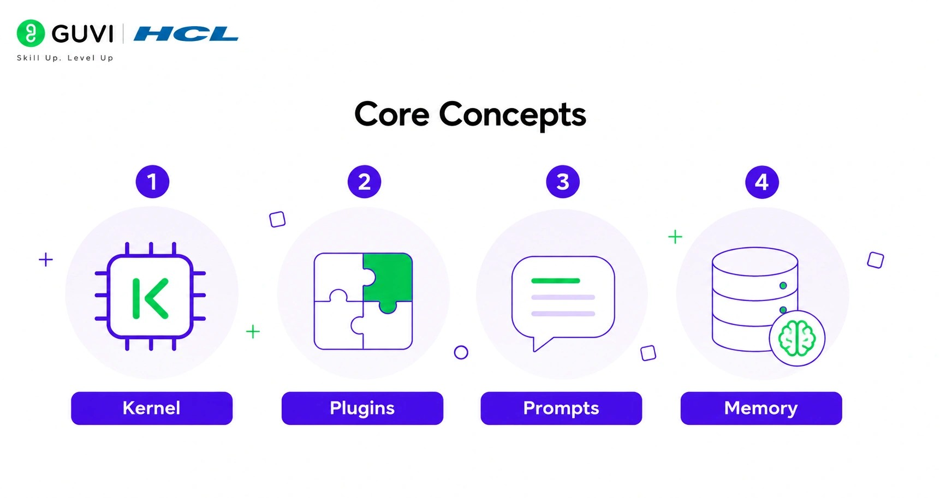
Before writing code, you need to understand four core ideas.
1. Kernel
The kernel is the central runtime in Semantic Kernel.
- It holds AI services (LLM clients).
- It registers plugins (functions callable by the LLM).
- It manages execution of prompt and native functions.
- It can host agents and orchestration workflows.
You can think of the kernel as the “app container” for your AI logic.
2. Plugins
Plugins are collections of functions that the kernel can invoke.
There are two main types:
- Native functions: Regular code methods (C#, Python, Java) that perform actions such as calling APIs, querying databases, or running business logic.
- Prompt functions: Natural language prompts stored in files or strings that the LLM executes, optionally with parameters.
Plugins enable the LLM to:
- Call external tools and services.
- Access structured data and APIs.
- Perform deterministic actions alongside generative capabilities.
3. Prompts and Prompt Functions
Prompts are the instructions and context you send to the LLM.
In Semantic Kernel:
- Prompts can be defined inline or in template files.
- They can include variables, function calls, and conditional logic.
- Prompt functions are prompts exposed as callable functions within the kernel.
This allows you to treat prompts as first-class functions that can be composed, tested, and versioned.
4. Memory
Memory in Semantic Kernel refers to vector-based retrieval over your data.
- You store documents or chunks with embeddings in a vector store.
- The kernel can retrieve relevant pieces based on a query.
- Retrieved content is injected into prompts for RAG.
Memory enables your AI to answer questions grounded in your own documents, not just its pre-trained knowledge.
Step-by-Step: Setting Up Semantic Kernel (Python)
This section walks you through a minimal end-to-end setup using Python. Equivalent patterns exist in .NET and Java.
Step 1: Install the SDK
Install the Semantic Kernel package with your preferred AI provider.
For OpenAI:
bash
pip install semantic-kernel openai python-dotenv
For Azure OpenAI:
bash
pip install semantic-kernel azure-identity python-dotenvOptionally, install Jupyter support for notebooks:
bash
pip install ipykernelStep 2: Configure Your Environment
Create a .env file in your project directory:
text
OPENAI_API_KEY=sk-...

# or for Azure OpenAI:

# AZURE_OPENAI_ENDPOINT=https://your-resource.openai.azure.com/

# AZURE_OPENAI_DEPLOYMENT_NAME=your-deployment

# AZURE_OPENAI_API_KEY=...
Never hard-code secrets in your code. Load them from environment variables.
Step 3: Create the Kernel
In a Python script or notebook:
python
import asyncio

import os

from dotenv import load_dotenv

import semantic_kernel as sk

from semantic_kernel.connectors.ai.open_ai import OpenAIChatCompletion

load_dotenv()

api_key = os.getenv("OPENAI_API_KEY")

model_id = "gpt-4o-mini"  # or your preferred model

kernel = sk.Kernel()

chat_service = OpenAIChatCompletion(

    service_id="chat",

    ai_model_id=model_id,

    api_key=api_key

)

kernel.add_service(chat_service)
Now you have a kernel with an LLM service registered.
Step 4: Define a Simple Prompt Function
Create a basic prompt that uses the LLM.
python
from semantic_kernel.functions import KernelFunctionFromPrompt

summarize_prompt = """

Summarize the following text in 2-3 sentences.

Text: {{$input}}

Summary:

"""

summarize_function = KernelFunctionFromPrompt(

    function_name="Summarize",

    plugin_name="TextPlugin",

    prompt=summarize_prompt

)

kernel.add_function(summarize_function)
This defines a Summarize function in a TextPlugin plugin.
Step 5: Invoke the Function
Run the function with some input text.
python
text = """

Semantic Kernel is Microsoft's open-source AI orchestration framework.

It lets developers integrate LLMs with code, data, and services using plugins,

prompts, and memory. It supports .NET, Python, and Java.

"""

result = asyncio.run(

    kernel.invoke(

        summarize_function,

        input=text

    )

)

print(str(result))
The LLM will generate a short summary based on your prompt.
Adding Native Plugins (Tools)
Native plugins let the LLM call your own code.
Step 6: Define a Native Plugin Class
Create a class with methods that perform actions.
python
text = """

Semantic Kernel is Microsoft's open-source AI orchestration framework.

It lets developers integrate LLMs with code, data, and services using plugins,

prompts, and memory. It supports .NET, Python, and Java.

"""

result = asyncio.run(

    kernel.invoke(

        summarize_function,

        input=text

    )

)

print(str(result))
Each method decorated with @kernel_function becomes callable by the kernel and, if enabled, by the LLM.
Step 7: Register the Plugin
python
time_plugin = TimePlugin()

kernel.add_plugin(time_plugin, plugin_name="TimePlugin")
Now the kernel knows about TimePlugin.get_current_time and TimePlugin.add_numbers.
Step 8: Use the Plugin in a Prompt
Create a prompt that can call these functions.
python
tool_prompt = """

You are a helpful assistant. You can use the following functions:

- TimePlugin.get_current_time: Get the current date and time.

- TimePlugin.add_numbers: Add two numbers.

User: {{$input}}

Assistant:

"""

tool_function = KernelFunctionFromPrompt(

    function_name="Assistant",

    plugin_name="AssistantPlugin",

    prompt=tool_prompt,

    prompt_execution_settings=sk.PromptExecutionSettings(

        function_choice_behavior=sk.FunctionChoiceBehavior.Auto()

    )

)

kernel.add_function(tool_function)
With function choice enabled, the LLM can decide to call get_current_time or add_numbers when appropriate.
Step 9: Invoke the Tool-Enabled Function
python
questions = [

    "What time is it now?",

    "Add 12.5 and 7.3 for me."

]

for q in questions:

    result = asyncio.run(

        kernel.invoke(

            tool_function,

            input=q

        )

    )

    print("Q:", q)

    print("A:", str(result))

    print("-" * 40)
The LLM may call the native functions to answer the questions.

Adding Memory for Retrieval-Augmented Generation
Memory lets the kernel retrieve relevant documents from a vector store.
Step 10: Set Up a Vector Store (Example with In-Memory)
For demonstration, use the built-in volatile memory store. In production, use a real vector database.
python
from semantic_kernel.connectors.memory.volatile import VolatileMemoryStore

from semantic_kernel.core_plugins import TextMemoryPlugin

memory_store = VolatileMemoryStore()

memory_plugin = TextMemoryPlugin(

    memory_store=memory_store,

    embeddings_service=chat_service  # or a dedicated embedding service

)

kernel.add_plugin(memory_plugin, plugin_name="Memory")
Step 11: Save Documents to Memory
python
docs = [

    "Semantic Kernel is an AI orchestration SDK from Microsoft.",

    "It supports .NET, Python, and Java for building AI agents.",

    "Plugins let LLMs call native code and external APIs.",

]

for i, doc in enumerate(docs):

    asyncio.run(

        memory_plugin.save_information(

            text=doc,

            id=f"doc_{i}",

            collection="sk_docs"

        )

    )
These documents are embedded and stored for retrieval.
Step 12: Query Memory in a Prompt
python
rag_prompt = """

You are a helpful assistant. Use the Memory plugin to retrieve relevant information.

Relevant information:

{{Memory.search collection='sk_docs' query=$input}}

User question: {{$input}}

Answer based on the retrieved information:

"""

rag_function = KernelFunctionFromPrompt(

    function_name="RagAssistant",

    plugin_name="RagPlugin",

    prompt=rag_prompt

)

kernel.add_function(rag_function)
When invoked, the prompt will search memory and ground the answer in your documents.
Step 13: Run a RAG Query
python
question = "What is Semantic Kernel and what languages does it support?"

result = asyncio.run(

    kernel.invoke(

        rag_function,

        input=question

    )

)

print("Q:", question)

print("A:", str(result))
The LLM uses retrieved snippets to answer based on your data.
Building AI Agents and Multi-Agent Workflows
Semantic Kernel supports agent patterns where the LLM can plan, call tools, and collaborate with other agents.
Single AI Agent
A simple agent is a kernel with:
- An LLM service.
- Plugins (tools).
- A prompt or function that acts as the agent’s “brain”.
You already built this with AssistantPlugin and tool-enabled prompts.
Multi-Agent Orchestration
For more complex scenarios, Semantic Kernel provides agent orchestration patterns:
- Sequential: Pass results from one agent to the next in a pipeline.
- Parallel: Run multiple agents concurrently and combine results.
- Manager-based: A manager agent delegates tasks to specialist agents.
- Custom: Implement your own selection and termination strategies.
Typical steps:
- Define specialist agents (each with its own kernel, plugins, and prompts).
- Create an orchestration that wires agents together.
- Provide a task to the orchestration.
- Run the orchestration and collect final results.
Example conceptual pattern (Python-like pseudocode):
python
# Define agents

research_agent = create_agent("ResearchAgent", research_plugins)

writer_agent = create_agent("WriterAgent", writing_plugins)

reviewer_agent = create_agent("ReviewerAgent", review_plugins)

# Create orchestration

orchestration = SequentialOrchestration(

    agents=[research_agent, writer_agent, reviewer_agent]

)

# Run

result = asyncio.run(

    orchestration.invoke("Write a short article about Semantic Kernel.")

)
The exact API varies by version and language; refer to the latest Semantic Kernel docs for current orchestration classes and patterns.
Semantic Kernel is Microsoft’s open-source, model-agnostic SDK that lets you plug in LLMs, build prompt functions and tools, add vector memory, and orchestrate single- or multi-agent workflows with planning and tool-calling. Learn AI & ML with HCL GUVI’s Artificial Intelligence and Machine Learning course.
Common Mistakes to Avoid
- Hard-coding API keys instead of using environment variables.
- Mixing different embedding models for memory and queries.
- Registering plugins but not enabling function calling in prompts.
- Using volatile memory in production instead of a real vector store.
- Overloading a single agent with too many responsibilities.
- Not setting clear termination conditions for multi-agent workflows.
- Ignoring security and access control when exposing tools to LLMs.
- Treating prompts as free-form text instead of versioned, testable functions.
- Skipping evaluation of agent behavior and tool usage.
- Assuming orchestration patterns are one-size-fits-all without tuning.
Semantic Kernel can automatically choose which plugin functions to call based on your prompt and function metadata. You can combine multiple agents with different specialties and orchestrate them to solve complex tasks that a single model might struggle with.
What Should You Do Next?
Use this practical checklist:
- Install the Semantic Kernel SDK for your language (.NET, Python, or Java).
- Configure your LLM provider (Azure OpenAI, OpenAI, or other).
- Create a kernel and register an AI service.
- Define your first prompt function and invoke it.
- Build native plugins for your key tools and APIs.
- Enable function calling in prompts to let the LLM use tools.
- Add memory with a vector store for RAG over your documents.
- Experiment with a simple single-agent assistant.
- Explore multi-agent orchestration patterns for complex workflows.
- Integrate logging, monitoring, and access control for production use.
Conclusion
Semantic Kernel provides a structured, extensible way to build AI applications on top of LLMs. By combining a kernel, plugins, prompts, and memory, you can create agents that call tools, retrieve knowledge, and execute multi-step workflows.
Whether you are building a simple chatbot, an enterprise copilot, or a multi-agent system, Semantic Kernel offers the primitives to orchestrate AI capabilities with enterprise-grade flexibility. Start with a single agent and simple plugins, then evolve to richer orchestration patterns as your needs grow.
FAQs
What is Semantic Kernel?
Semantic Kernel is Microsoft’s open-source SDK for orchestrating LLMs, tools, memory, and agents into AI applications. It supports .NET, Python, and Java.
Do I need Azure to use Semantic Kernel?
No. Semantic Kernel works with Azure OpenAI, OpenAI, and other LLM providers. Azure is optional but common in enterprise scenarios.
What languages does Semantic Kernel support?
Semantic Kernel has SDKs for .NET (C#), Python, and Java, with similar concepts and patterns across languages.
What is a plugin in Semantic Kernel?
A plugin is a collection of functions (native code or prompts) that the kernel can invoke. Plugins let LLMs call tools, APIs, and business logic.
How does memory work in Semantic Kernel?
Memory uses vector embeddings and a vector store to retrieve relevant documents for a query. Retrieved content is injected into prompts for retrieval-augmented generation.
Success Stories

About the Author
HCL GUVI
This article was selected and published as part of the HCL GUVI AI Blogathon 2026, an initiative designed to encourage students, AI enthusiasts, and aspiring tech writers to simplify complex AI concepts through impactful technical content. The contest recognized high-quality, original, and insightful AI-focused blogs, with selected authors receiving publication opportunities on the HCL GUVI blog platform along with official author credits and recognition.
View all posts by HCL GUVI
Connect with me @















Did you enjoy this article?