


HTML Articles
HTMX vs. React: Do You Really Need a Heavy Framework for Your First Project?
HTML Developer Salary and How to Boost It
Free HTML Course with Certificate
How to Add Background Image in HTML: A Simple Step-by-Step Guide!


Get In Touch For Details! Request More Information
HTML and XML are both markup languages used to share and structure information on the internet in a clear, more organized way. HTML (HyperText Markup Language) was created primarily to give structure to web applications and websites (in simple terms, HTML acts as a skeleton for a website).
At the same time, XML (eXtensible Markup Language) was introduced for storing and transporting information in a human-readable format. Unlike HTML, XML was not developed for how data is displayed on the screens but for how it’s organized and shared among different systems.
After going through this brief intro, we can now understand that, though they both are used to annotate documents with tags, they serve various purposes. In this blog, we are going to discuss that. So, let’s begin our discussion on HTML vs XML.
Table of contents
- What is HTML?
- What is XML?
- Key Differences Between HTML vs XML
- Purpose
- Tag Definition
- Focus
- Error Handling
- Data Storage
- Output
- Case Sensitivity
- Typing
- Schema
- Conclusion
- FAQs
- Is XML better than HTML?
- Can we use HTML and XML together?
- Why is XML still used today?
What is HTML?
HTML (HyperText Markup Language) is the fundamental building block of every website today. It helps the browser understand how to structure elements such as text, images, videos, and other content on a webpage.
HTML uses two types of tags: semantic (reflect the meaning: <header>, <nav>, and <article>) and non-semantic (don’t represent any meaning: <div>,<span> ) to define the content and their types, which leads to how they appear on the front-end.
Use Cases of HTML
- Building Websites and Webpages – Used to build and structure web pages.
- Creating Online Forms – Used to create forms for user input.
- Embedding Multimedia Content – Used to embed videos, images, and audio on websites.
<!DOCTYPE html>

<html>

  <head>

    <title>My First Webpage</title>

    <style>

      body {

        background-color: #f0f8ff;   /* light blue background */

        font-family: Arial, sans-serif;

        text-align: center;

        color: #333;    /* dark gray text */

      }

      h1 {

        color: #3b71fe;    /* bright blue heading */

      }

      p {

        color: #555;    /* slightly lighter gray for paragraph */

        font-size: 18px;

      }

      img {

        margin-top: 15px;

        width: 300px;

        border: 3px solid #3b71fe;

        border-radius: 10px;

      }

    </style>

  </head>

  <body>

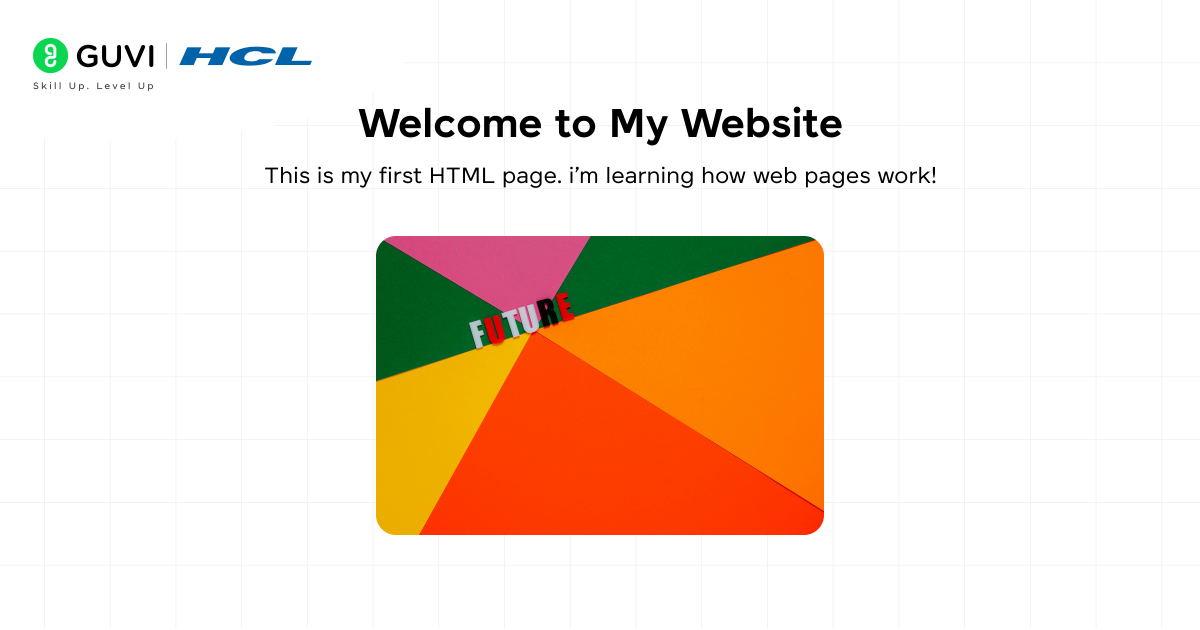
    <h1>Welcome to My Website</h1>

    <p>This is my first HTML page. I’m learning how web pages work!</p>

    <img src="image.jpg" alt="My Image">

  </body>

</html>
Output:
Explanation:
- In this HTML code, we have designed a basic and simple component. Here, we set the entire page’s background color to light blue, added a blue heading, and wrapped a one-line paragraph inside the <p> tag.
- This HTML document starts with <!DOCTYPE html>, which tells the browser that it is an HTML5 document.
- Inside the <head> tag, the <title> tag defines the project name in the browser tab.
- The <style> section is where we added internal CSS styling, such as colors, fonts, and alignment.
- The <body> tag that you observe in this code is the main section where all the visible content is placed: the <h1> tag represents the heading, the <p> tag is used for wrapping the explanation text, and the <img> tag is used for integrating an image or picture into our page. In short, this HTML file presents content in a structured, styled format.
Start your development journey with our free JavaScript resource: JS eBook

What is XML?
XML (eXtensible Markup Language) is used to store and transport data in a structured, readable format. XML also uses tags, but it doesn’t have a wide array of pre-built tags for wrapping content. Instead, here the programmers can create their own custom tags for the content they intend to forward, such as <student>, <name>, <age>, or <food_items>.
This flexibility to define your own tags enables data exchange between different applications or platforms. XML is primarily used in areas such as web services, APIs (request-response cycles), and software configuration.
Use Cases of XML
- Data Exchange Between Applications – Used to share data between different applications.
- Configuration Files – Used to store configuration and settings in software.
- Web Services and APIs – Used in web services and APIs for data exchange.
<?xml version="1.0" encoding="UTF-8"?>

<bookstore>

  <book>

    <title>Harry Potter and the Sorcerer's Stone</title>

    <author>J.K. Rowling</author>

    <price>499</price>

  </book>

  <book>

    <title>The Hobbit</title>

    <author>J.R.R. Tolkien</author>

    <price>399</price>

  </book>

</bookstore>
Output: Unlike HTML, XML doesn’t produce visual output. Basically, it is a data container that stores and shares the data.
Explanation:
- As you know, XML is used to store and transfer data. Similarly, inside the <bookstore> tag, we are storing the book details, which in this case is the root element.
- Here, each <book> tag contains information about the book, such as <title>, <author>, and <price>.
- The XML file starts with the declaration line <?xml version=”1.0″ encoding=”UTF-8″?>, which specifies the version and character encoding. In simple terms, an XML file stores and represents data in a machine-readable format.
Key Differences Between HTML vs XML
So now let’s look at all the key differences between these two markup languages:
1. Purpose
HTML: HTML was created to display the content of websites in a well-structured format to the end users. HTML elements such as headings, paragraphs, images, links, tables, and forms allow users to interact with real-world applications seamlessly.
XML: In contrast, XML was designed to hold the data in both machine and human-readable formats and transfer it to different systems. It is not concerned with how the following data will be presented on various screen devices; it only defines a set of rules for encoding documents.
2. Tag Definition
HTML: HTML has a built-in, limited set of tags for wrapping content. Here, each tag has its own specific feature and usability. By using these tags, developers first define the layout of the webpages.
XML: On the other hand, XML is way more flexible than HTML. Here, you are free to define your own set of tags for sending any specific data file, such as <price>, <bankDetails>, or anything. But while defining each should represent its actual value. As a result, XML is adaptable to a wide range of data formats.
3. Focus
HTML: The core focus of HTML is presenting data in a user-friendly, interactive format with appropriate layout, fonts, colors, and the overall appearance of the content. HTML, when written efficiently, also helps boost a website’s SEO (Search Engine Optimization) performance. Heading tags (<h1> to <h6>), hyperlinks (<a>), attributes, and alt text in the <img> tag are factors that improve a website’s SEO ranking.
XML: Whereas XML focuses purely on how the data is organized and whether it justifies its own meaning or not, allowing the machines to comprehend, interpret, and exchange it between systems, applications, and databases.
4. Error Handling
HTML: HTML is lenient when it comes to checking coding errors. Even when developers make mistakes, like forgetting to close a tag, defining a tag with block letters, or specifying incorrect attributes, the entire code doesn’t break. In this case, web browsers can either fix or ignore these minor errors and still display the page without breaking it.
XML: But XML, when it comes to checking the error, is very concrete and precise. Every tag that you define must be open and closed appropriately, and the nesting must be correct. While wrapping the information with these tags, even a minor mistake, like a missing quote or a mismatched tag, can make the XML document invalid.
5. Data Storage
HTML: HTML was not designed to store or transfer data; it’s purely focused on presenting data. Neither can it exchange any kind of data between the applications.
XML: XML is explicitly designed for storing and transporting data. You can easily structure your data with meaningful labels across all platforms in a readable format.
6. Output
HTML: HTML generates the output, which browsers render into beautiful visual layouts with formatted text, images, videos, links, and many other components, such as forms and animations. In technical terms, it creates the front-end, also known as the client-side, of the applications that customers or business stakeholders interact with.
XML: XML doesn’t produce visual outputs; instead, it stores well-structured information that can be used by other machines and systems, as well as by technologies such as HTML, JavaScript, and APIs (application programming interfaces).
7. Case Sensitivity
HTML: HTML tags are not case-sensitive, meaning you can define the paragraph tag <p> in block letters, like <P>, and it will still work perfectly. As a result, it becomes easier for beginners to learn this language without worrying about typing errors.
XML: XML is case-sensitive; here, writing <Book> is totally different from <book>, as you can observe one is in capital letters and the other is in lower-case letters. Here, these two tags will be treated as distinct entities.
8. Typing
HTML: HTML doesn’t support typed data because it’s only responsible for presenting the data. Everything you wrap in your HTML tags, such as numbers, text, or links, is simply rendered on the webpage by the browser without specifying their data types.
Example
<p>Age: 25</p>Here, “25” is just text — not recognized as a number data type.
XML: XML, on the other hand, supports typed data when implemented with schemas like XSD (XML Schema Definition). Because of this feature of XML, developers can specify the data type for each tag, such as string, number, or date, ensuring data integrity and accuracy.
Example
<age xsi:type="xsd:integer">25</age>Here, “25” is defined as an integer, not just plain text.
9. Schema
HTML: As the HTML structure is standardized with respect to the latest version (HTML5), it doesn’t require any additional or external schemas to define its document structure or validations.
XML: Whereas XML allows the utilization of DTD (Document Type Definition) or XSD (XML Schema Definition) to define the structure, rules, and data types that the XML files or documents must follow to be considered as valid.
The very first version of HTML, created by Tim Berners-Lee in 1991, had only 18 tags — and most of them are still in use today, like <p>, <h1>, and <a>.
XML was designed by the World Wide Web Consortium (W3C) in 1998 to make data sharing easier between different systems.
If you’re aiming to stand out and become truly job-ready in today’s competitive tech world, it’s time to learn from top industry mentors and work on practical projects that strengthen your portfolio. Take a step toward a successful tech career by joining HCL GUVI’s IITM Pravartak Certified MERN Full Stack Development Course with AI Integration.
Conclusion
To sum up, HTML and XML serve different but equally vital purposes in the web world. HTML is all about presenting data in a structured, visually appealing way for users, while XML is designed to store, organize, and share data across different systems. Both work together to make the web functional — HTML builds what we see, and XML manages the data behind it.
FAQs
Is XML better than HTML?
No, both serve different purposes. HTML displays content on web pages, while XML stores and transports data.
Can we use HTML and XML together?
Yes, they can work together. XML stores data that HTML can display using tools like JavaScript or XSLT.
Why is XML still used today?
XML remains popular because it provides a reliable, structured way to share data between systems, especially in APIs and configuration files.
Success Stories












Did you enjoy this article?