


Web Development Articles
What Is CRUD? A Complete Guide to Create, Read, Update, Delete in Modern Applications
How to Build Your First ML Powered Web App (Even If You're Not a Data Scientist)
How to Stay Valuable as a Web Developer in The Era of AI [2026]
PHP Developer Resume: Writing Guide & Key to Landing Your Dream Job


Get In Touch For Details! Request More Information

The Ultimate Guide to Python Web Development: Fundamental Concepts Explained
Feb 12, 2026 7 Min Read 1271 Views
(Last Updated)
Python web development is the process of developing websites or web applications, a practice widely used by developers at many tech companies over the past decade. Due to the simplicity and versatility of Python as a programming language, developers can invest much of their time and effort in solving core business logic rather than getting stuck on understanding the syntax and other language elements.
If you wonder how Python alone is handling the complete web development cycle, then you are not alone. This is a common concern among people beginning their development journey. So, a simple, brief answer to this doubt is: there are many external Python-based frameworks, such as Django, Flask, and FastAPI. With these advanced, powerful tools, you can handle multiple tasks, including routing, database management, authentication, and security.
In this blog, we will explore all the key concepts and aspects of Python web development. So, let’s get started.
Table of contents
- Why Choose Python for Web Development?
- Fundamental Concepts of Python Web Development
- Popular Python Frameworks
- How Python Handles Frontend and Backend Integration
- Working with Databases
- Routing, Views, and Templates
- Handling User Authentication and Sessions
- Testing and Debugging
- Deploying Your Python Web App
- Conclusion
- FAQs
- What is Python web development?
- Which Python framework should I choose?
- Do I need to know databases?
Why Choose Python for Web Development?
If you compare Python with other programming languages (such as C++, Java, or C), where the syntax is complex, Python is much easier to comprehend and maintain. This exclusive advantage of Python makes the web development process simpler and more flexible. The most vital point is that you can seamlessly integrate artificial intelligence (AI) features and capabilities into your web applications by choosing Python.
Apart from these, developers can also build machine learning (ML) models and perform data analysis to ensure innovative, dynamic projects. Whether it is crafting efficient prototypes or designing enterprise-grade web projects, Python excels in every field, offering performance, stability, security, flexibility, and scalability —making it one of the most intelligent choices for modern web development.
Advantages
- Easy to Learn and Readable: Python has a clean, simple syntax, making it beginner-friendly and an effective programming language.
- Rapid Development: Python frameworks such as Django and Flask accelerate the development process with built-in tools and features; developers don’t need to write extra code to perform specific tasks.
- Cross-Platform Compatibility: Websites or web applications developed using Python run smoothly across different platforms and operating systems (OS) without any significant modifications.
- Extensive Libraries and Frameworks: There is a comprehensive set of libraries and frameworks (such as Django, Flask, FastAPI, and Pyramid) for performing tasks such as database management, API management, URL routing, and more.
- Strong Community Support: There is a large and active global community of developers using Python for web development, where essential resources (best coding practices, optimization techniques, tutorials, etc ) and updates are shared.
Explore the basics of the Python language and delve deep into OOP concepts without any significant cost: Python eBook
Fundamental Concepts of Python Web Development
Python web applications are built using a set of core components that work together to deliver dynamic and interactive experiences. Understanding these building blocks is essential for any web developer:
1. Popular Python Frameworks
In Python web development, frameworks are pre-written code or toolkits integrated into a project to provide complex functionality, features, and tools. With Python-based frameworks, web developers can start building scalable applications and websites without having to create components and modules from scratch. Now, let’s have a look at the three most popular frameworks used in Python web development:
A. Django
Django is a high-level Python web development framework that helps developers build software components rapidly without compromising performance or build quality. Developers don’t have to write code from scratch because Django has built-in features such as authentication, database management, and an admin panel. This framework follows the DRY (Don’t Repeat Yourself) principle for minimizing monotonous tasks.
Features
- There is a pre-built admin panel for managing data effectively and straightforwardly.
- Django uses an ORM (Object-Relational Mapping) to interact with databases without writing raw SQL queries.
- It follows the MTV (Model-Template-View) design pattern for managing the business data and logic, acting as a middleman between the model and a template.
Use Cases
- e-Commerce platforms
- Social networks
- Content management systems (CMS)
- Customer relationship management (CRM) systems
B. Flask
Flask is a lightweight, flexible Python web development framework that provides the core features for developing websites. Unlike providing pre-built components, it offers minimal support features such as session management, requests and response handling, error management, and a templating engine (Jinja2). The primary goal of using this tool is to gain complete control over the app’s design and organization.
Features
- It is very simple and easy to learn for beginners.
- Flask also supports templates, routing, and request handling for providing structure to your application.
- According to business and user requirements, it can be customized; developers can add only tools aligned with the project objectives.
Use Cases
- Small to medium applications
- Small prototypes and projects
- Data Visualization Dashboards
C. FastAPI
FastAPI is a modern Python web development framework designed to ensure high-performance applications by building fast, efficient APIs (Application Programming Interfaces). To automatically validate the data, this framework uses Python hints and generates well-structured, interactive API documentation.
In Python applications where speed and efficiency are essential, FastAPI becomes an integral tool for handling a large number of user requests simultaneously. In addition to these, FastAPI is also used for real-time applications and AI/ML-based services.
Features
- It supports background tasks, such as sending messages or saving logs, and enables real-time features, such as chats and live notifications or updates via WebSockets.
- FastAPI provides built-in support for JSON (JavaScript Object Notation), helping convert Python data to JSON format and enhancing readability and the request-response cycle.
- This framework also promotes code reuse to keep the project clean and enable rapid development.
Use Cases
- Modern APIs
- Microservices Development
- Real-time applications
- Data Validation and Serialization

2. How Python Handles Frontend and Backend Integration
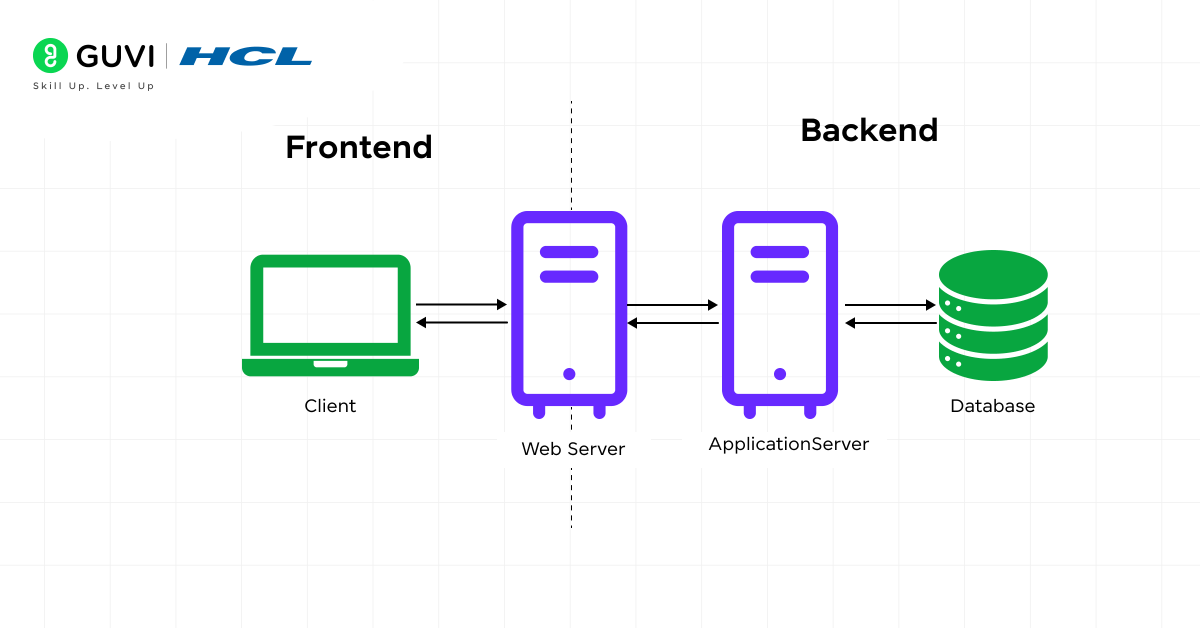
When a client system uses a Python application, it means it is interacting with the software’s frontend (User Interface).
The HTTP lifecycle begins when a user sends an HTTP request to a URL using an HTTP method. After that, the web server receives client requests and sends the processed data back to the Python application. During this process, the router matches the URL and HTTP method to a controller entity, where the incoming data is thoroughly parsed by middlewares and other program utilities, including query params, form data, JSON bodies, and multipart files.
Once that is done, the data is further validated via serializers. While this process is active, the Middleware layers execute cross-cutting concerns such as authentication, CORS checks, rate limiting, input sanitization, CSRF verification for browser forms, and session lookup (cookie → session store).
The handler function then implements the business logic, such as fetching or updating data from the database using an ORM like Django ORM or SQLAlchemy. Finally, the backend system returns a response to the frontend for rendering and displaying the information to end users.
If you explore modern Python web apps, you’ll see that front-end and back-end are integrated through asynchronous operations, establishing a real-time communication channel. Frameworks like FastAPI also support async/await for efficiently managing multiple client requests.
3. Working with Databases
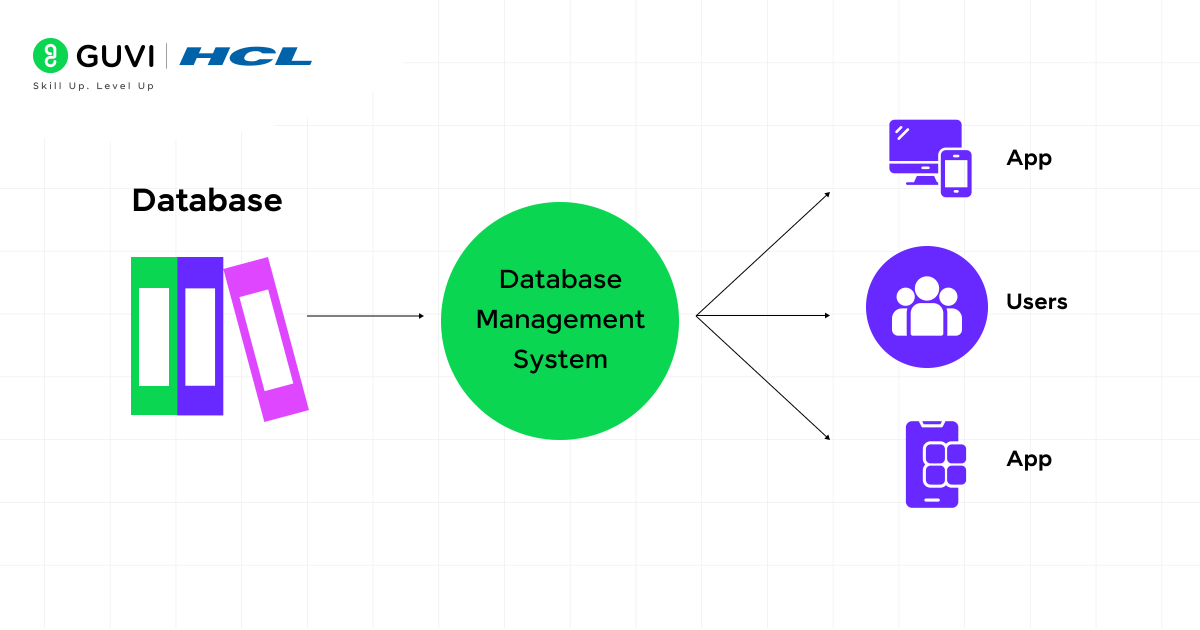
Databases are the most vital component of Python web applications because they store sensitive and essential business data, such as user profiles, orders, messages, and product details. In Python web development, database management is a fundamental task that must be performed to ensure every data-related action runs smoothly, without technical glitches or data leakage.
A. Connecting Python to Databases
With libraries such as sqlite3, mysql-connector, or psycopg2, developers can establish a direct connection between web applications and databases by executing SQL commands in the Python codebase.
ORMs such as Django ORM or SQLAlchemy further simplify writing SQL queries in Python rather than writing raw SQL.
B. Performing CRUD Operations
CRUD (Create, Read, Update, Delete) operations are used to manipulate data.
- Create: Adding new data or records, such as when an end user signs up for an account.
- Read: This is the process for fetching details from the existing database, such as displaying a specific user profile along with its purchase history.
- Update: Change the existing information, for instance, when a user is modifying his/her password.
- Delete: Removing records from database servers —for example, clearing older messages or permanently deleting the account.
C. Querying the Database
Instead of writing plain SQL commands, performing query operations through Django or SQLAlchemy becomes very simple. The ORM automatically converts your Python code into an SQL statement and internally resolves any database errors it encounters.
user = User.objects.get(id=1)      # Read a user with ID 1

user.name = "Abhishek"      # Update the name

user.save()      # Save changes
D. Database Migrations
Let’s say a developer is changing or modifying the database structure. For example, if you insert a new column into a table that contains phone numbers, no manual edits are required. Frameworks like Django provide migration tools that automatically update the database while preserving your original data.
E. Ensuring Data Security
Python frameworks also place strong emphasis on database security. They protect against SQL injection, validate user inputs, and use prepared statements to make sure attackers can’t insert harmful code into your database. This built-in protection helps keep user data safe and the web app secure.
4. Routing, Views, and Templates
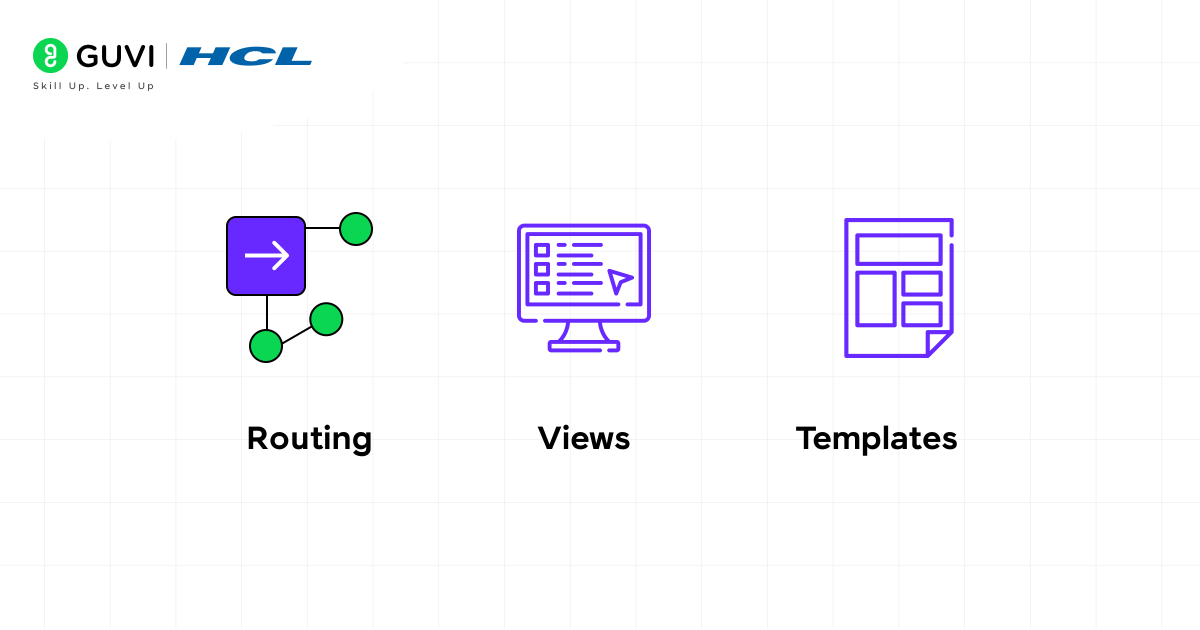
In Python web development, Routing, Views, and Templates are three key parts that work together to control how users interact with your web app and what they see on the screen. You can think of them as three steps in a chain: the user sends a request (Routing) → the app processes it (Views) → and sends back a page (Templates).
A. Routing – Handling URLs and Requests
Routing decides what happens when a user visits a specific URL in your web application. Each URL is connected to a function or view that tells the app what to do. For example, if a user visits /login, the app knows it should show the login page; if they visit /profile, it should fetch and display their details.
Here, /login is the route. When someone visits this URL, the login() function runs and returns the login.html page. Routing helps manage multiple pages and keeps navigation smooth across the website.
@app.route('/login')

def login():

    return render_template('login.html')
B. Views – Processing Data and Logic
Views are where your app’s main logic lives. A view takes a user’s request, performs necessary actions (like getting data from the database, validating a form, or calculating results), and returns a response.
Here, the view fetches data from the database and sends it to the template for display. Views act like the “middleman” between the database and the frontend, ensuring the right information is shown to the right user.
# views.py

from django.shortcuts import render
from .models import Product  # assuming you have a Product model

def product_list(request):
    # Fetch data from the database
    products = Product.objects.all()

    # Send data to the template
    return render(request, 'product_list.html', {'products': products})
_________________________
<!-- product_list.html -->

<!DOCTYPE html>

<html>

<head>

    <title>Product List</title>

</head>

<body>

    <h1>Available Products</h1>

    <ul>

        {% for product in products %}

            <li>{{ product.name }} - ₹{{ product.price }}</li>

        {% empty %}

            <li>No products available.</li>

        {% endfor %}

    </ul>

</body>

</html>
Workflow:
- The view (product_list) fetches data from the Product model.
- It passes that data to the template (product_list.html).
- The template then displays the data in a user-friendly format.
C. Templates – Displaying the Output
Templates control what the user actually sees on the webpage. They are usually HTML files combined with template engines like Jinja2 (Flask) or Django Template Language (DTL). These templates can include dynamic content using placeholders — for example, showing a user’s name or a list of products fetched from the backend.
When rendered, Python replaces {{ user.name }} with the actual user’s name before sending the page to the browser. This makes your pages dynamic and personalized.
<h2>Welcome, {{ user.name }}!</h2>5. Handling User Authentication and Sessions
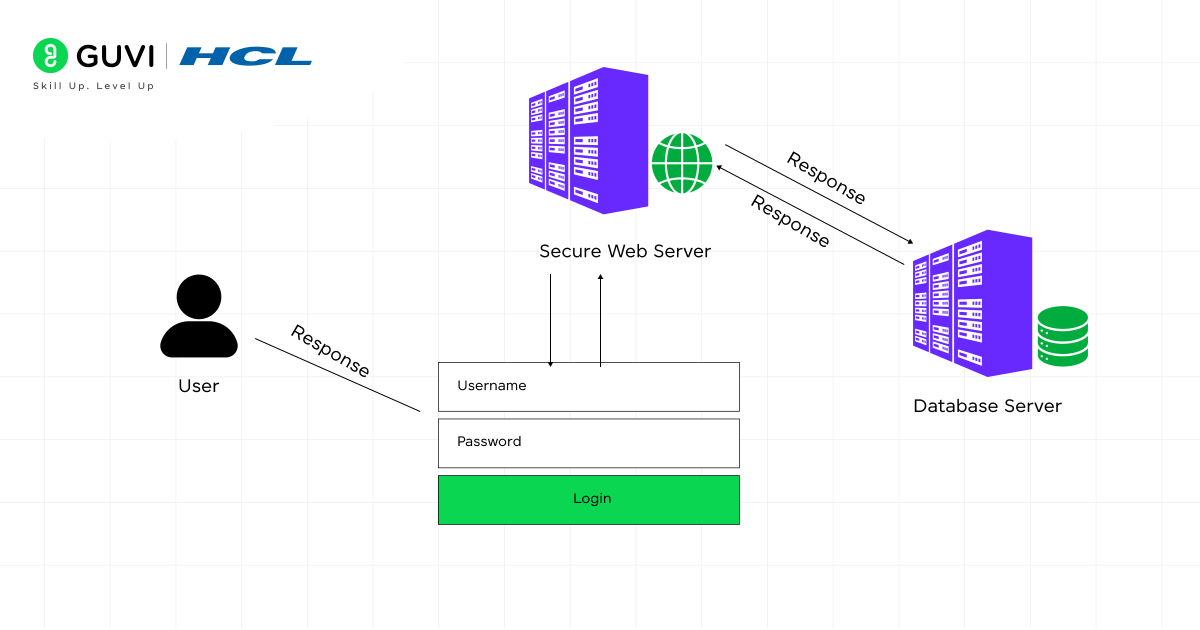
User authentication is the process of verifying that a person trying to access the web application is who they claim to be. When a user logs in with a username and password, the Python backend (using frameworks such as Django, Flask, or FastAPI) checks the credentials against the database. If the credentials match, the user is authenticated and allowed to access the application’s protected areas. Modern web apps often use secure password hashing, token-based authentication (JWT), or OAuth2 for APIs to keep user data safe from attacks. Authentication ensures that only authorized users can perform specific actions or view private information.
Sessions are how the application remembers users after they log in. Once authenticated, Python creates a session — a small piece of data stored on the server or in a cookie — to track the user’s state as they navigate the app. Each page request checks the session to confirm the user is logged in and has permission for the requested action. Sessions can also store other helpful information, such as shopping cart items or user preferences. Together, authentication and sessions make web apps secure, interactive, and personalized, providing a seamless experience while protecting sensitive user data.
6. Testing and Debugging
Testing checks if your Python web app works correctly before going live. Developers write test cases to simulate user actions, verify responses, and ensure database operations are correct. Python provides unittest and pytest, while frameworks like Django offer test clients to simulate requests. Tests can be unit tests for small functions, integration tests for components together, or functional tests for real user behavior.
Debugging finds and fixes errors when something goes wrong. Python frameworks provide error messages, stack traces, and debug modes to locate issues quickly. Developers can also use logging and interactive debuggers (like pdb) to inspect code step by step. Together, testing and debugging make web apps reliable, error-free, and ready for real-world use.
7. Deploying Your Python Web App
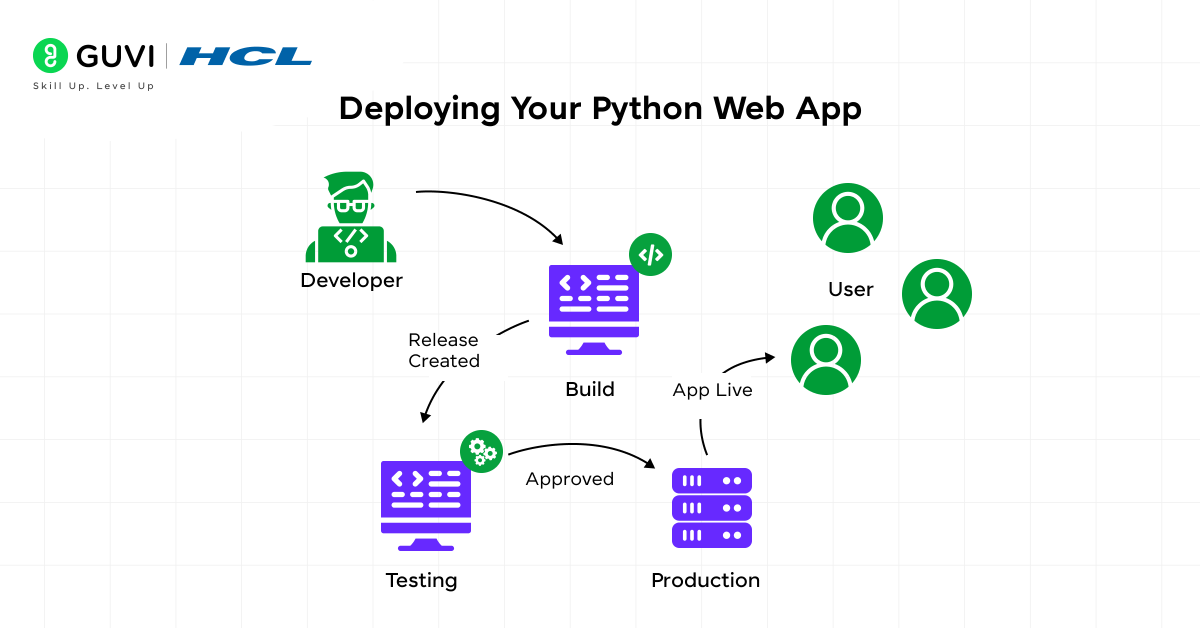
- Choosing a Hosting Environment: Pick a server based on app size and traffic — options include cloud platforms (AWS, Google Cloud, Azure), PaaS (Heroku, Render), or VPS/dedicated servers for complete control.
- Setting Up the Server: Install Python and dependencies, configure a web server (Nginx/Apache) and application server (Gunicorn/Uvicorn), and set environment variables for secrets and API keys.
- Configuring the Database: Connect to the production database, apply migrations, and ensure authentication, sessions, and security are set correctly.
- Managing Static and Media Files: Serve static files via Nginx/CDN and ensure media uploads are stored securely with proper permissions.
- Security and Performance: Enable HTTPS, configure firewalls and secure headers, and use caching, load balancing, and background tasks to improve speed and handle traffic.
- Going Live: Test the app, monitor logs for issues, and once stable, share the URL so users can access the application globally.
Level up your programming skills with our comprehensive Python Tutorial Hub: Python Handbook
With so many platforms claiming to offer the ultimate full-stack development course, choosing the right one can feel overwhelming. That’s where HCL GUVI comes in. We don’t just promise results — we help you achieve them. Join HCL GUVI’s IITM Pravartak Certified MERN Full Stack Development Course with AI Integration and gain hands-on expertise in highly sought-after technologies like Git, MongoDB, Express, React, Node.js, and more!
Conclusion
Python web development makes it easier than ever to build dynamic, secure, and scalable web applications. With powerful frameworks like Django, Flask, and FastAPI, developers can handle everything from routing, database management, and user authentication to testing and deployment efficiently. By understanding these core building blocks, you can create web apps that are fast, reliable, and user-friendly, ready to meet modern web demands.
FAQs
What is Python web development?
Python web development involves building web applications with Python, managing backend logic and data, and integrating them smoothly with the frontend.
Which Python framework should I choose?
Django is best for large apps with many features, Flask works well for small or medium apps and APIs, and FastAPI is ideal for high-performance apps and modern APIs.
Do I need to know databases?
Yes, databases are essential for storing and managing app data, and Python ORMs like Django ORM and SQLAlchemy make database operations easier.
Success Stories
























Did you enjoy this article?