


Career Articles
How I Switched from Web Developer to ML Engineer (A Web Developer's Real Story)
PHP Developer Resume: Writing Guide & Key to Landing Your Dream Job
My Frontend Developer Interview at Google: What Really Happens Behind Closed Doors
Future of Electric Vehicle Course: Fast-Track Your EV Career


Get In Touch For Details! Request More Information
ATS-Friendly Resume Format for 2026: Examples & Tips That Actually Work
Jan 09, 2026 4 Min Read 2330 Views
(Last Updated)
Quick Answer: An ATS-friendly resume format uses a single-column layout, standard section headings, and role-relevant keywords so applicant tracking systems can accurately scan and shortlist resumes.
Hiring processes today rely heavily on automation, and this trend is only expected to grow in 2026. Before a recruiter reviews a resume, it is often scanned by software that checks structure, keywords, and overall readability. This makes choosing the right ATS-friendly resume format far more important than visual design or styling.
Many candidates unknowingly lose opportunities because their resumes are difficult for systems to read. Using the wrong layout, unconventional headings, or complex formatting can prevent even strong profiles from being shortlisted. Understanding how an ATS evaluates resumes and following a resume format for ATS helps ensure your skills and experience are not overlooked before they reach any HR professional.
Table of contents
- What Is ATS and How Hiring Will Work in 2026
- ATS-Friendly Resume Formats That Work
- Resume Standards ATS Systems Prefer
- ATS-Friendly Resume Formats That Work (With Examples)
- Example 1: Clean Single-Column Resume Structure
- Example 2: Experience-Forward Resume Structure
- Example 3: Skill-Grouped Resume Structure
- Example 4: Balanced Hybrid Resume Structure
- Practical Tips to Keep Your Resume ATS-Friendly
- Wrapping Up
- Frequently Asked Questions
- How do I know if my resume is truly ATS-friendly?
- Can an ATS-friendly resume still look professional and well-presented?
- Are ATS-friendly resume examples different across industries or roles?
- Does using an ATS-friendly resume format improve my chances of getting shortlisted?
- Is it better to create an ATS-friendly resume manually or use a tool?
- Should I update my resume format frequently as ATS systems evolve?
What Is ATS and How Hiring Will Work in 2026
An Applicant Tracking System, or ATS, is software used by organisations to collect, organise, and screen job applications at scale. It reads resumes by extracting text, identifying sections, and matching content against role requirements before a recruiter reviews them. This makes the ATS-friendly resume format a practical requirement rather than a preference in modern hiring.
Looking ahead, hiring in 2026 is expected to rely even more on automated and data-driven processes:
- Increased use of AI-assisted screening
ATS tools are becoming better at analyzing context, skill relevance, and consistency rather than relying only on exact keyword matches. - Greater emphasis on structured resumes
Resumes with clear headings, predictable section order, and clean layouts are easier for systems to parse accurately. - Reduced tolerance for complex formatting
Design-heavy resumes with tables, graphics, or multiple columns are more likely to cause parsing errors during screening. - Faster shortlisting cycles
With higher application volumes, ATS systems will continue to filter resumes more quickly, making first-pass accuracy critical.
By understanding how these systems work and how hiring processes are evolving, job seekers can make informed choices about resume structure that support both automated screening and recruiter review.
Also read: How to Build an ATS-Friendly Resume That Actually Gets You Interviews
ATS-Friendly Resume Formats That Work
Not all resume formats are read the same way by applicant tracking systems. While design trends change, ATS tools continue to prioritise structure, predictability, and clarity. Understanding which formats work best helps you choose a layout that supports accurate parsing and fair shortlisting.
Resume Standards ATS Systems Prefer
Before choosing a format, it’s important to understand the basic standards ATS systems are built to recognize. These rules apply across roles and industries and form the foundation of a reliable resume format for ATS.
- Single-column layouts
ATS tools read resumes from top to bottom. Multi-column designs can disrupt how information is parsed and ordered. - Standard section headings
Headings like Skills, Work Experience, Education, and Projects are easier for systems to identify and categorize. - Text-based content
Icons, graphics, charts, and tables often fail to be read correctly and can cause information to be skipped. - Logical section order
Information should flow in a predictable sequence so both systems and recruiters can follow it easily.
ATS-Friendly Resume Formats That Work (With Examples)
Applicant tracking systems rely on structure, consistency, and predictable formatting to read resumes accurately. The examples below highlight how different resume structures can remain ATS-friendly while presenting information clearly. Each example focuses on layout logic rather than visual design, showing how structure supports both automated screening and recruiter review.
Example 1: Clean Single-Column Resume Structure
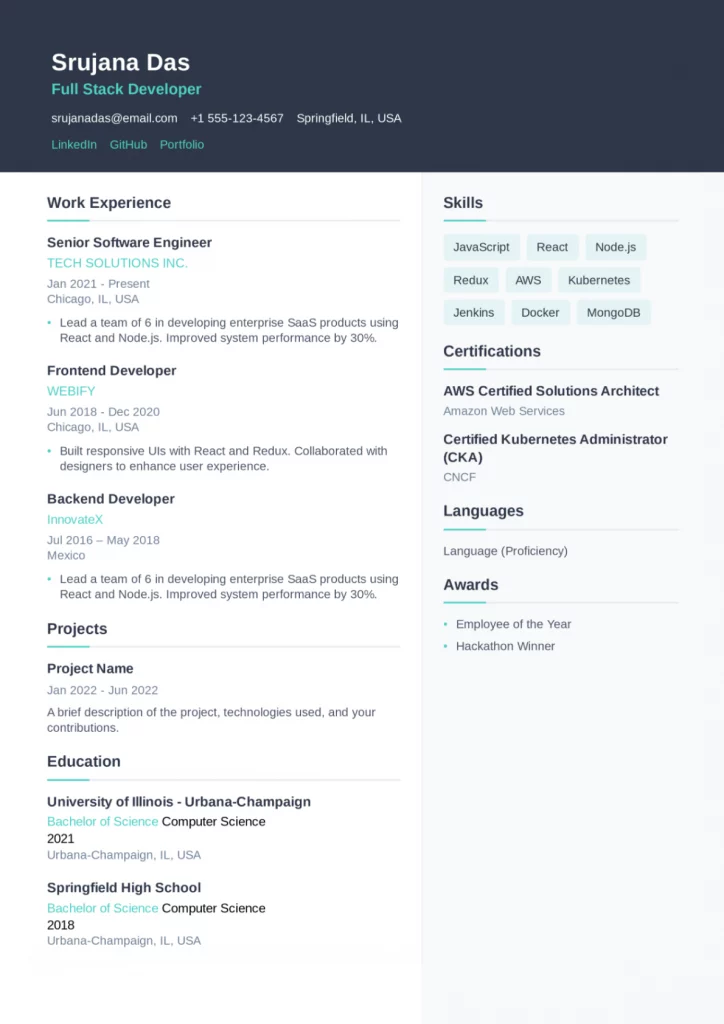
This example shows a straightforward, single-column resume layout where information flows from top to bottom without interruption. All sections are clearly defined, making it easy for applicant tracking systems to identify and categorise details such as skills, experience, and certifications.
What makes this structure effective for ATS is its simplicity. No visual elements are competing with text, and section headings follow a standard naming convention that most systems are trained to recognise.
- Uses a single-column layout that avoids parsing errors
- Keeps section headings clear and conventional
- Presents skills, experience, and education in a logical order
- Avoid icons, graphics, or tables that could disrupt scanning

Example 2: Experience-Forward Resume Structure
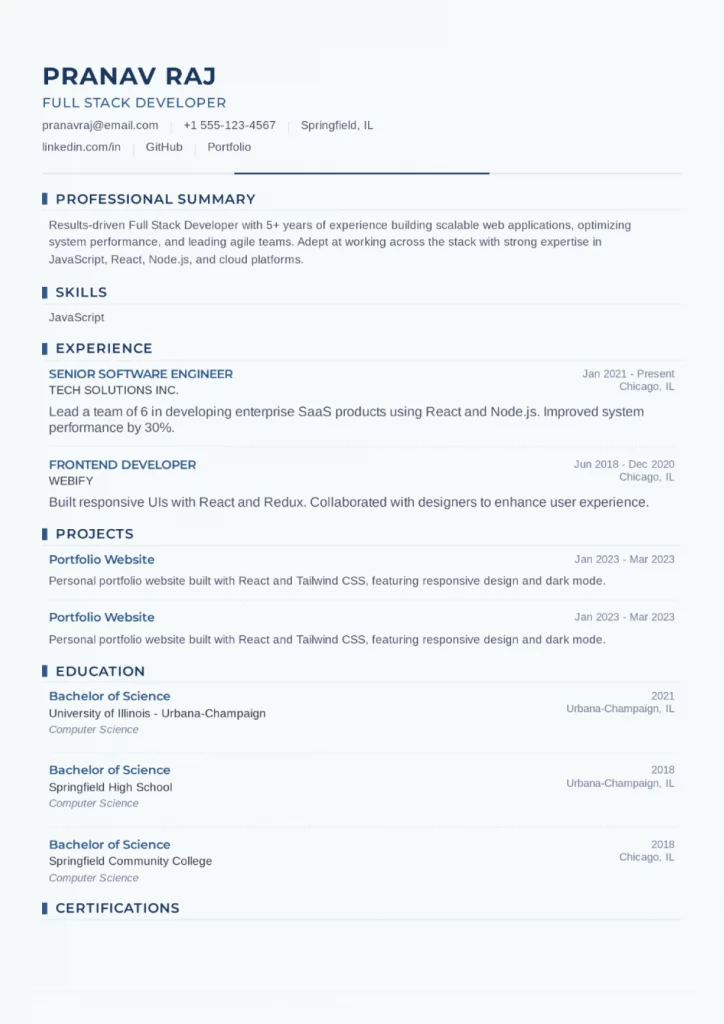
In this structure, professional experience is placed prominently after the summary, allowing ATS systems to quickly detect job titles, timelines, and responsibilities. Dates, roles, and organisations follow a consistent format, which helps systems map career progression accurately.
This layout works well when experience forms a central part of the profile, while still keeping supporting sections like skills and education easy to locate and read.
- Positions work experience early for quick identification
- Maintains consistent formatting for roles and dates
- Separates experience clearly from skills and education
- Keeps content text-based and evenly spaced
Example 3: Skill-Grouped Resume Structure
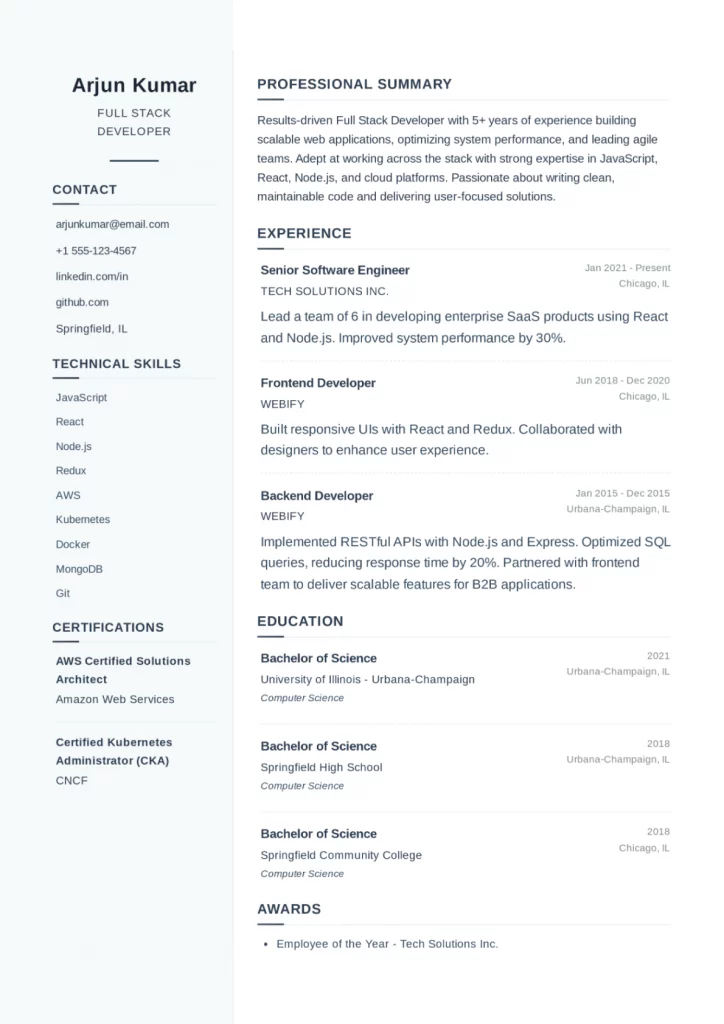
This example highlights how skills can be grouped clearly without compromising ATS readability. Skills are organized under a dedicated section, making it easier for systems to match role-specific keywords against job descriptions.
Supporting sections such as experience and education are still structured predictably, ensuring that the resume remains balanced and easy to parse.
- Group skills under clear, text-based headings
- Supports keyword matching without overloading content
- Maintains separation between skills and experience
- Uses consistent formatting across all sections
Example 4: Balanced Hybrid Resume Structure
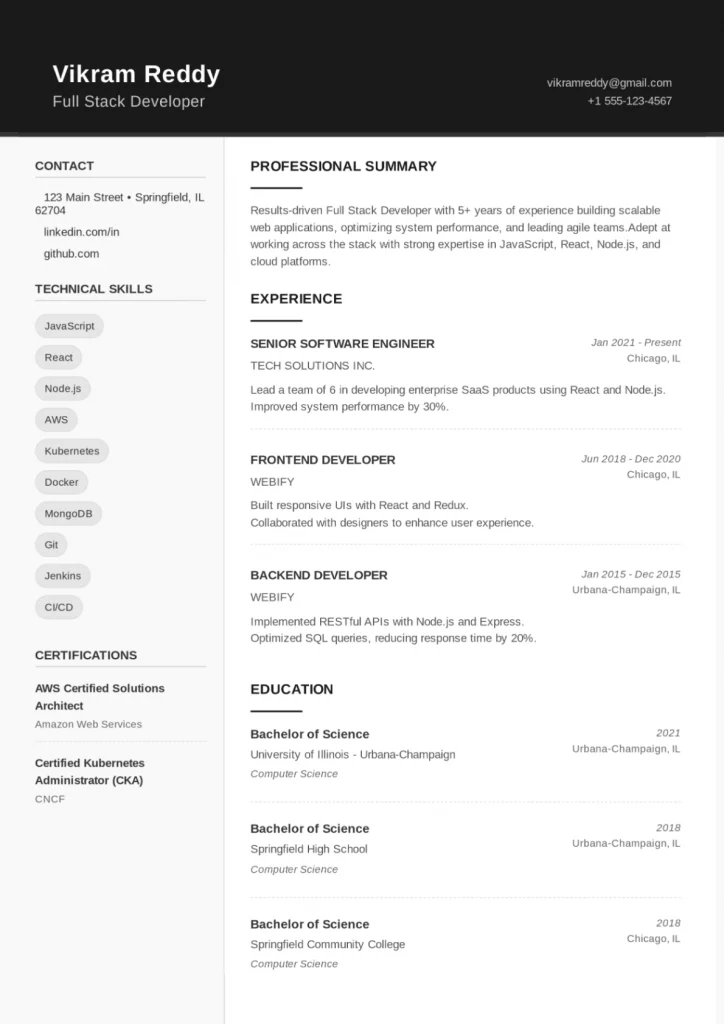
This layout demonstrates a balanced approach where both skills and experience receive equal emphasis. While the resume includes mild visual styling, it remains text-focused and follows standard section ordering, which helps ATS systems read it accurately.
The structure shows that limited visual polish can coexist with ATS-friendly formatting, as long as clarity and consistency are maintained throughout the document.
- Balances skills and experience without disrupting structure
- Uses standard section headings recognized by ATS
- Maintains text readability despite light visual elements
- Keeps alignment and spacing consistent across sections
Practical Tips to Keep Your Resume ATS-Friendly
After reviewing how ATS-friendly resumes are structured and how different layouts work in practice, the next step is applying these principles consistently. The tips below act as a practical checklist to help ensure your resume remains readable, accurate, and compatible with applicant tracking systems across roles and industries.
- Stick to a simple, single-column layout
Multi-column designs can disrupt how ATS systems read information. A linear, top-to-bottom structure ensures content is scanned in the intended order. - Use standard section headings
Headings such as Skills, Work Experience, Education, and Certifications are easier for ATS tools to recognize and categorize correctly. - Keep all content text-based
Avoid icons, graphics, charts, tables, and text boxes. These elements often fail to parse properly and can cause important details to be skipped. - Maintain a logical section order
Group related information together and avoid jumping between sections. Predictable sequencing improves both ATS accuracy and recruiter readability. - Format dates and job titles consistently
Use a uniform format for roles, organisations, and employment dates so systems can clearly map timelines and experience. - Use role-relevant keywords naturally
Match skills and terminology from job descriptions where appropriate, but avoid overloading sections with repeated keywords. - Choose ATS-compatible file formats
PDF or DOCX formats are generally safe, provided the resume is text-based and not image-heavy. - Avoid unusual fonts or excessive styling
Stick to common, readable fonts and consistent spacing to reduce the risk of parsing errors.
These practical steps reinforce what the examples above demonstrate: ATS-friendly resumes rely on clarity, consistency, and structure rather than visual complexity.
Also Explore: AI Tools for ATS-Friendly Resumes
Wrapping Up
To sum up, building an ATS-friendly resume makes sure that your skills and experience are presented in a way that hiring systems and recruiters can actually read and understand. As automated screening becomes a standard part of the hiring process, structure, clarity, and consistency play a far bigger role than visual flair. Getting these elements right helps ensure your profile is evaluated on merit and not filtered out due to formatting issues.
If you want to apply these best practices without spending hours adjusting or worrying about layouts, our free ATS resume tool, the HCL GUVI Resume Builder, offers a practical way forward by helping you create resumes that follow ATS-friendly structures while keeping the process simple and guided. This allows you to focus on highlighting your skills, projects, and experience with confidence, knowing that your resume is aligned with how modern hiring systems work.
Frequently Asked Questions
How do I know if my resume is truly ATS-friendly?
One reliable way to check is to review whether your resume follows a clean structure with standard headings and readable text flow. If your content can be easily copied and pasted without losing order or meaning, it is more likely to work well with ATS systems. Using an ATS-friendly resume format also ensures your resume is parsed accurately before it reaches a recruiter.
Can an ATS-friendly resume still look professional and well-presented?
Yes. An ATS-friendly resume focuses on structure rather than heavy design, but that does not mean it has to look plain or unprofessional. Clean spacing, consistent formatting, and clear section separation help maintain a polished appearance while still meeting automated screening requirements.
Are ATS-friendly resume examples different across industries or roles?
The core structure remains consistent across industries, but content emphasis may vary. For example, technical roles often prioritize skills and projects, while managerial roles may highlight experience and leadership outcomes. Reviewing ATS-friendly resume examples can help you understand how structure stays consistent even when content changes.
Does using an ATS-friendly resume format improve my chances of getting shortlisted?
While no format guarantees selection, using an ATS-friendly resume format significantly reduces the risk of early rejection due to parsing or formatting issues. It ensures your qualifications are accurately captured during automated screening, giving your profile a fair chance to be reviewed by hiring teams.
Is it better to create an ATS-friendly resume manually or use a tool?
Creating one manually is possible, but it often involves trial and error with layout, spacing, and formatting rules. A free ATS resume tool can simplify this process by applying ATS-compatible structures automatically, allowing you to focus more on content quality than technical formatting details.
Should I update my resume format frequently as ATS systems evolve?
You do not need to change formats frequently, but it is a good idea to review your resume periodically. As hiring tools evolve, maintaining a simple, structured layout and updating content relevance helps ensure your resume continues to align with modern screening practices and expectations.
Success Stories
















Did you enjoy this article?