


Python Articles
Excel SQL Python for BPO Professionals Best Guide to Move Into Data Science
Go vs Python for Forward Deployed Engineering Workloads
Python for Forward Deployed Engineers: What You Actually Need to Know
Freelancing as a Python Developer: Getting Your First Client


Get In Touch For Details! Request More Information

In today’s data-driven era, Pandas DataFrame has become an essential tool for anyone working with data in Python. From data scientists and analysts to beginners learning Python, mastering DataFrames is the key to performing efficient data analysis and manipulation.
Built as part of the powerful Pandas library, a DataFrame allows you to organize, clean, and explore large datasets seamlessly — just like working with an Excel sheet, but with the speed and flexibility of Python.
This guide will help you understand what a Pandas DataFrame is, why it’s so important for modern analytics, and how you can create, manipulate, and analyze data using it effectively.
Table of contents
- What Is A Pandas DataFrame
- Why Pandas Dataframe Is Important In Data Analysis
- Structure Of A DataFrame
- Creating A DataFrame
- Creating A DataFrame From A Dictionary
- Creating A DataFrame From A List Of Lists
- Creating A DataFrame From A CSV File
- Creating A DataFrame From A Numpy Array
- Key Functions Of Pandas DataFrame
- head() and tail() – Quick Preview of Data
- info() – Summary of the DataFrame
- describe() – Statistical Overview of Data
- value_counts() – Count Unique Values
- sort_values() – Arrange Data in Order
- dropna() and fillna() – Handle Missing Data
- Manipulating Data With A DataFrame
- Best Practices For Working With DataFrames
- Conclusion
- FAQs
- How is a Pandas DataFrame different from a NumPy array?
- Can a DataFrame hold different data types in each column?
- What happens if a DataFrame contains missing values?
- Is Pandas suitable for large datasets?
- How can I export my DataFrame to other formats?
What Is A Pandas DataFrame
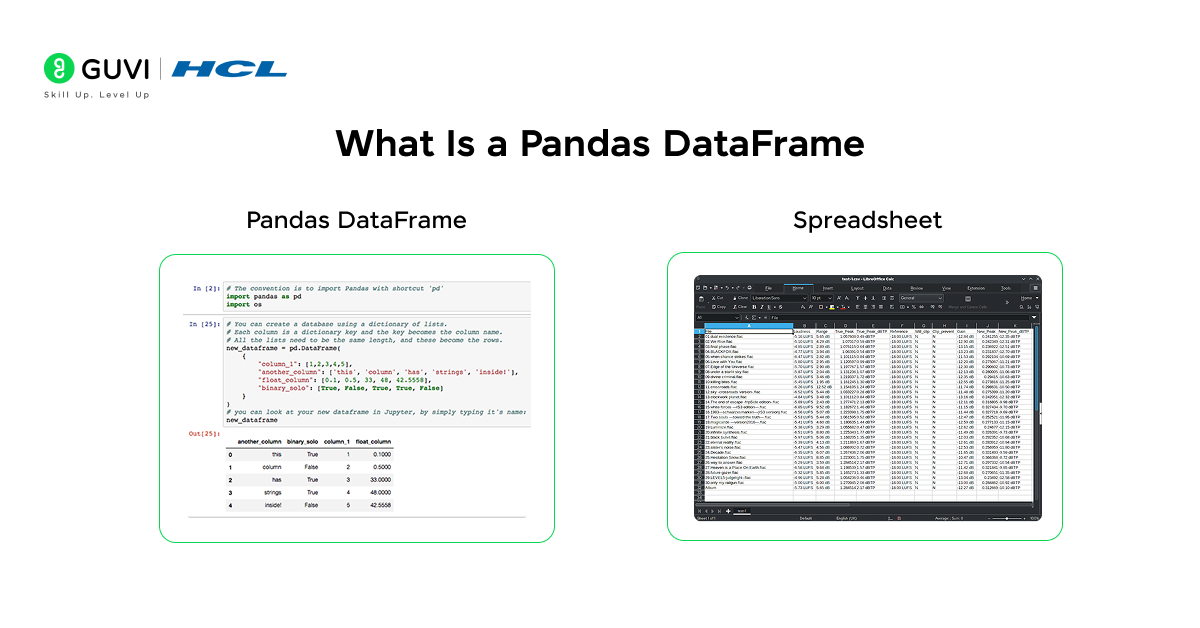
Before exploring advanced features, let’s first understand what a Pandas DataFrame actually is. In simple terms, a Pandas DataFrame is a two-dimensional data structure in Python that stores data in rows and columns, just like a spreadsheet or an SQL table.
Each column in a DataFrame can hold a different data type, making it ideal for organizing and analyzing structured data efficiently. Whether it’s numbers, text, or dates, you can easily store and process them all in a single DataFrame.
Think of it as a more powerful version of Excel within Python, where you can clean, filter, merge, and analyze datasets in just a few lines of code, making it one of the most used tools in data science and analytics today.
Example:
Here’s how you can create a basic DataFrame:
import pandas as pd
data = {
    'Name': ['Alice', 'Bob', 'Charlie'],
    'Age': [25, 30, 28],
    'City': ['Delhi', 'Mumbai', 'Chennai']
}
df = pd.DataFrame(data)
print(df)
Output:
Name Age City
0 Alice 25 Delhi
1 Bob 30 Mumbai
2 Charlie 28 Chennai
Just like that, you’ve created a table that is simple, readable, and structured perfectly for analysis.
Why Pandas Dataframe Is Important In Data Analysis

A Pandas DataFrame is one of the most useful tools for anyone working with data in Python. It makes data analysis faster, easier, and more organized. With a few lines of code, you can clean messy data, merge multiple datasets, and explore large amounts of information without any hassle.
Pandas also has built-in features for handling missing values, doing quick statistics, and connecting with other Python libraries like NumPy, Matplotlib, and Seaborn. This makes it a complete solution for anyone learning or practicing data science and analytics.
If you want to strengthen your basics in Python and data handling, HCL GUVI’s Data Science eBook is a great place to start. It covers topics like Python fundamentals, working with Pandas DataFrames, data cleaning, exploratory data analysis, and visualization techniques. This makes it the perfect companion to deepen your understanding of everything you’re learning in this blog.
Structure Of A DataFrame
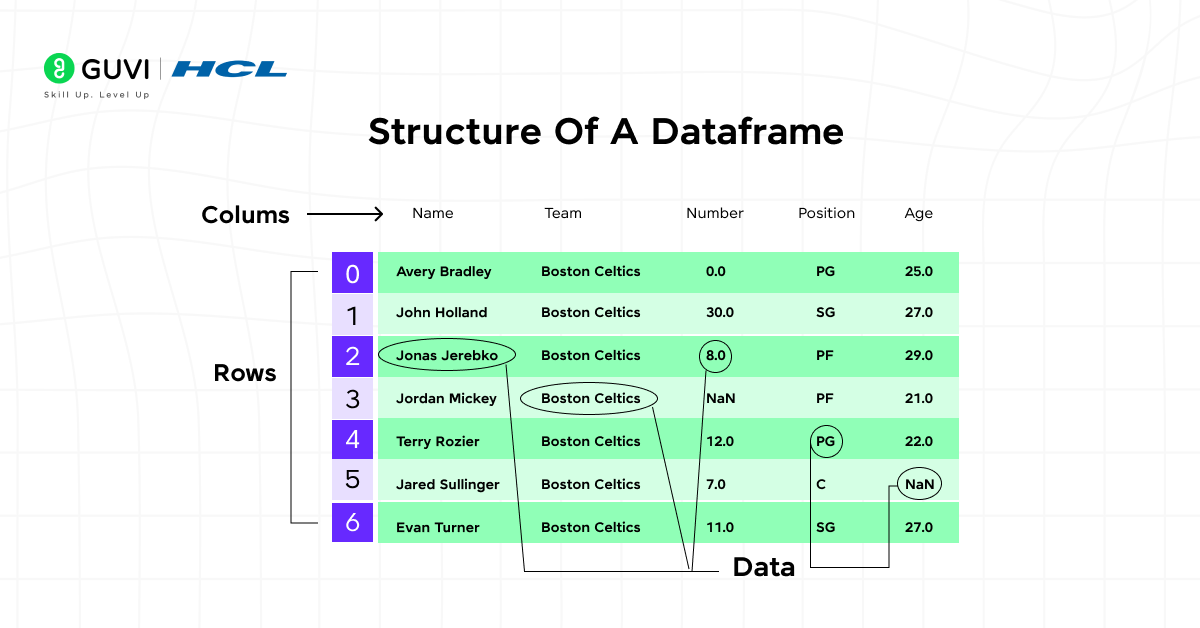
The structure of a Pandas DataFrame defines how your data is stored, accessed, and analyzed. It is made up of three key elements that help in managing data efficiently:
1. Rows
Rows represent individual records or entries in your dataset. Each row holds related information about a single observation — for example, details about one customer, transaction, or product.
df.shape # Shows the number of rows and columns
2. Columns
Columns store variables or attributes of your data. Each column contains values of the same type, such as names, ages, or sales amounts. This makes it easy to perform operations like sorting or filtering based on a specific column.
df.columns # Lists all column names
3. Index
The index acts as a unique identifier for each row. It helps in locating and referencing data quickly, especially when merging or aligning multiple DataFrames.
df.index # Displays the index labels
Creating A DataFrame
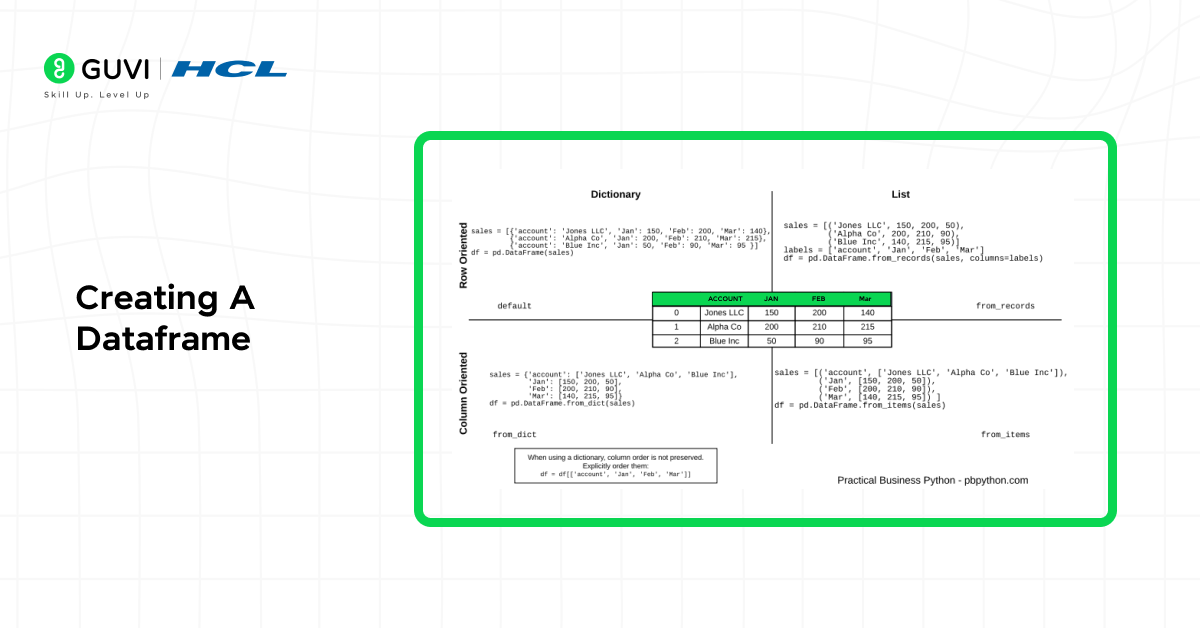
Creating a DataFrame is the first step in working with data using Pandas. A Pandas DataFrame can be built from different types of data sources, such as dictionaries, lists, CSV files, or NumPy arrays. This flexibility makes it one of the most powerful and user-friendly tools for handling data in Python. Whether you are importing data from files or building datasets manually, Pandas provides simple methods to create structured data efficiently.
1. Creating A DataFrame From A Dictionary
One of the easiest and most common ways to create a DataFrame is by using a Python dictionary. Each key in the dictionary represents a column name, and its values form the column data. This method is especially useful when you already have your data organized as key-value pairs.It gives you a quick and clean tabular representation of your data that’s easy to read and manipulate.
Sample Code:
import pandas as pd
data = {
    'Name': ['Alice', 'Bob', 'Charlie'],
    'Age': [24, 30, 27],
    'City': ['Delhi', 'Mumbai', 'Chennai']
}
df = pd.DataFrame(data)
print(df)
2. Creating A DataFrame From A List Of Lists
When your data is arranged as a collection of lists, you can convert it directly into a DataFrame. Each inner list represents a single row, while the outer list holds all rows. This method is great for small datasets or when data is generated manually or collected from simple sources like forms or scripts.
Sample Code:
data = [[1, 'John', 'Hyderabad'], [2, 'Sara', 'Kolkata']]
df = pd.DataFrame(data, columns=['ID', 'Name', 'City'])
print(df)
3. Creating A DataFrame From A CSV File
One of the most common real-world use cases is loading data from a CSV file. Pandas simplifies this process using the read_csv() function, which instantly converts the file into a structured DataFrame.This method is widely used in data analytics projects because most datasets are stored in CSV format. Once imported, you can explore and analyze your data using various Pandas functions without needing external tools like Excel.
Sample Code:
df = pd.read_csv('data.csv')
print(df.head())
4. Creating A DataFrame From A Numpy Array
If your data is numerical, you can use NumPy arrays to create a DataFrame quickly. This is especially useful when you perform mathematical operations or work with large numerical datasets. Using NumPy with Pandas gives you the best of both worlds — speed and structure. It’s ideal for performing computations and then converting results into a tabular format for easy analysis.
Creating DataFrames in these different ways gives you complete flexibility to work with data from any source — whether it’s user input, database exports, or external files. Once your data is structured in a DataFrame, you can easily clean, analyze, and visualize it for better insights.
Sample Code:
import numpy as np
array = np.array([[10, 20, 30], [40, 50, 60]])
df = pd.DataFrame(array, columns=['A', 'B', 'C'])
print(df)
Key Functions Of Pandas DataFrame
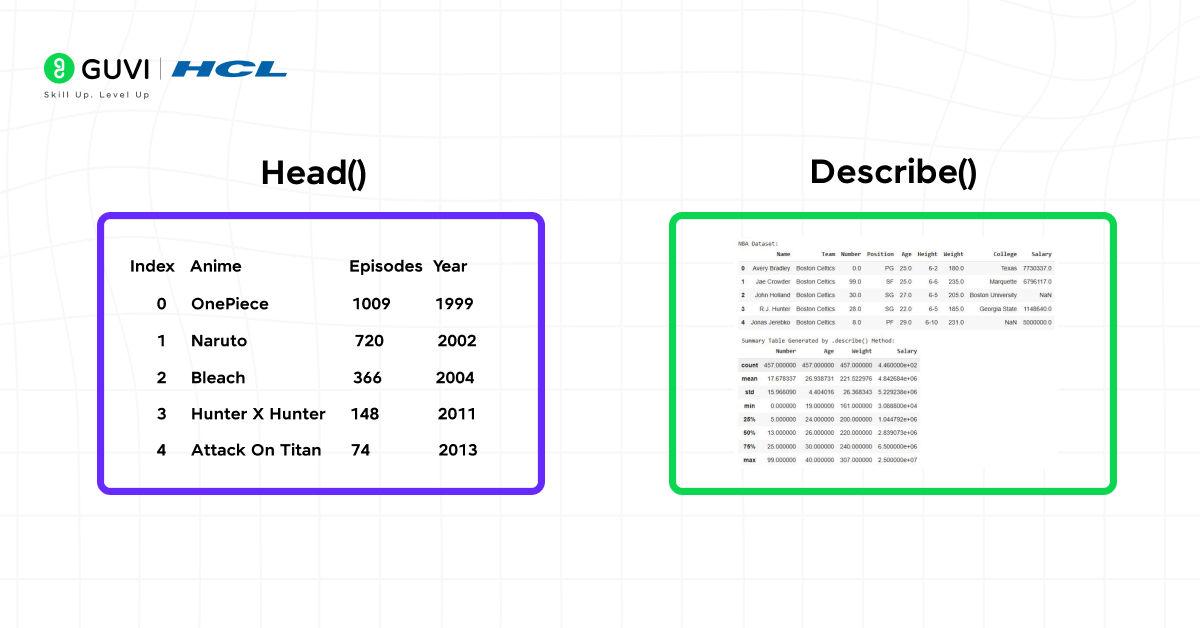
When analyzing data with Python, knowing the key Pandas DataFrame functions can save you time and effort. These functions make it easier to explore, clean, summarize, and transform data — all with simple commands. Whether you’re working on a small dataset or handling large-scale analytics, these built-in Pandas tools help you make data-driven decisions quickly and efficiently.

1. head() and tail() – Quick Preview of Data
The head() and tail() functions in Pandas help you view a few rows from the start or end of your DataFrame. This quick check ensures that your data has been loaded correctly and gives you an overview of its structure. This step is especially useful in data preprocessing, allowing you to confirm column names, data types, and overall layout before performing further operations.
Sample Code:
df.head()      # Displays first 5 rows
df.tail(3)     # Displays last 3 rows
2. info() – Summary of the DataFrame
The info() function gives a detailed summary of your dataset, including the number of entries, column names, data types, and missing values. It’s one of the first steps in data analysis using Pandas, helping you identify issues in your data structure and fix them early for accurate analysis.
Sample Code:
df.info()
3. describe() – Statistical Overview of Data
The describe() function is one of the most powerful tools for exploratory data analysis (EDA) in Pandas. It returns key statistical values such as mean, median, standard deviation, and percentiles for all numerical columns.This quick statistical summary helps you understand data distribution, spot outliers, and detect any inconsistencies in your dataset.
Sample Code:
df.describe()The groupby() function allows you to organize data based on specific columns and apply aggregate functions like mean, sum, or count. This function is widely used in business and analytics to compare performance metrics, such as average sales or revenue per category. It’s a must-know for anyone working on data aggregation or summary reports.
Sample Code:
df.groupby('Department')['Salary'].mean()
5. value_counts() – Count Unique Values
value_counts() is ideal for categorical data analysis. It counts the frequency of each unique entry in a column, helping you identify trends or imbalances.This is particularly useful when analyzing user demographics, survey responses, or product preferences.
Sample Code:
df['Gender'].value_counts()6. sort_values() – Arrange Data in Order
The sort_values() function helps you organize your dataset in ascending or descending order based on one or more columns. Sorting is a key part of data visualization and reporting, making it easier to highlight top-performing categories, highest values, or key rankings.
Sample Code:
df.sort_values(by='Age', ascending=False)
7. dropna() and fillna() – Handle Missing Data
Real-world datasets often contain missing or null values. The dropna() and fillna() functions are essential for data cleaning and ensuring analysis accuracy. While dropna() removes incomplete rows or columns, fillna() replaces them with specified values — both ensuring smoother data analysis workflows.
Sample Code:
df.dropna(inplace=True)     # Remove rows with missing data
df.fillna(0, inplace=True)  # Replace missing values with zero.
Mastering these core Pandas DataFrame functions helps you handle, explore, and analyze data efficiently. As you practice, you’ll see how easily Pandas turns raw datasets into meaningful insights, which is a skill every data analyst and data scientist needs.
Manipulating Data With A DataFrame
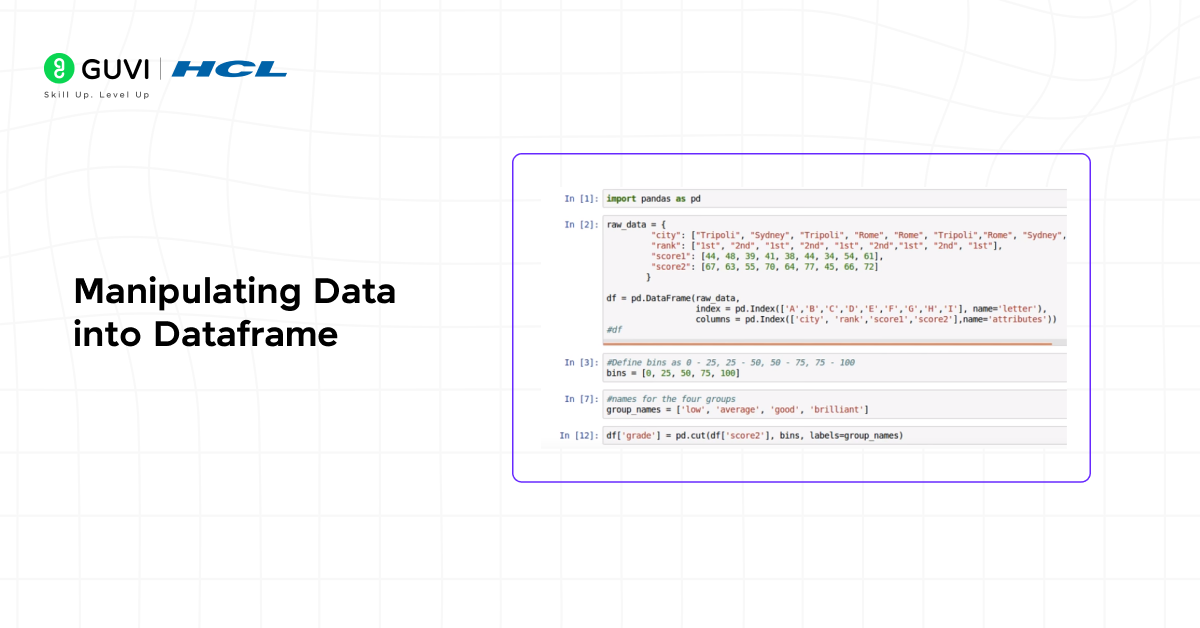
One of the main reasons Pandas is so popular for data analysis in Python is because of how easily it lets you manipulate data. With a Pandas DataFrame, you can filter, update, merge, and reshape datasets in just a few lines of code.
1. Filtering data:
df[df[‘Age’] > 25]
2. Adding new columns:
df[‘Country’] = [‘India’, ‘India’, ‘India’]
3. Renaming columns:
df.rename(columns={‘Name’: ‘Full_Name’}, inplace=True)
4. Merging and joining data:
pd.merge(df1, df2, on=’ID’)
If you want to practice these transformations step by step, join HCL GUVI’s 5-day free Data Science Email Series. The email series walks you through daily lessons on Python basics, Pandas DataFrames, data cleaning, visualization, and storytelling with data — helping you apply everything you read in this blog to real examples.
Best Practices For Working With DataFrames
Working with Pandas DataFrames becomes much smoother when you follow a few good practices. These tips will help you write cleaner code, avoid errors, and make your data analysis process more efficient.
- Always check the structure of your DataFrame using info() before starting any operation.
- Use vectorized operations instead of loops to improve speed and performance.
- Handle missing values early using fillna() or dropna() to prevent issues later.
- Keep your column names clear and consistent so your data remains easy to understand.
- Use .copy() when creating new DataFrames to avoid changing the original data by mistake.
- Save your cleaned or processed data using to_csv() or to_excel() to maintain reproducibility.
Following these simple practices will help you manage data more effectively and make your analysis faster and more reliable.
Conclusion
Pandas DataFrame is at the core of data analysis in Python. Its easy-to-use structure and wide range of features make it an essential tool for anyone working with data — from complete beginners to experienced professionals. Once you understand how to create, clean, and analyze data with Pandas, you build a strong foundation for your journey in data science and analytics.
If you want to take your skills to the next level, explore HCL GUVI’s Data Science Course. It offers hands-on projects, one-on-one mentorship, and complete training in real-world analytics, helping you move from learning to professional-level data science.
FAQs
1. How is a Pandas DataFrame different from a NumPy array?
A DataFrame offers labeled rows and columns, while NumPy arrays only store raw data without labels.
2. Can a DataFrame hold different data types in each column?
Yes, each column can have its own data type, like integers, floats, strings, or even objects.
3. What happens if a DataFrame contains missing values?
You can handle them easily with functions like fillna() or dropna(), depending on your needs.
4. Is Pandas suitable for large datasets?
Yes, but for extremely large data, integrating Pandas with Dask or PySpark is recommended.
5. How can I export my DataFrame to other formats?
You can export it using commands like to_csv(), to_excel(), or to_json().
Success Stories

About the Author
Jebasta
I translate the language of data into stories that anyone can understand. As a writer with a data science background, I simplify analytics, AI, and decision-making so beginners and enthusiasts can confidently explore the world of data.
View all posts by Jebasta
Connect with me @
















Did you enjoy this article?