


Business Analytics Articles
How to Use Claude for YouTube Script writing
Claude for Financial Analysis and Report Summarization


Get In Touch For Details! Request More Information
Using Claude for Personalized Content at Scale
Aug 10, 2026 2 Min Read 461 Views
(Last Updated)
Claude for Personalized Content at Scale works because it speaks to specific roles, pain points, and buying contexts. Claude is useful here because it can adapt the same base message into multiple versions without forcing your team to rewrite everything from scratch.
Table of contents
- TL;DR Summary
- Direct Answer Box
- Where Claude Helps Most
- High-Value Use Cases
- Why It Scales
- How To Set It Up
- Give It The Right Context
- Use Templates
- Best Workflows
- Comparison Table
- Common Mistakes
- Real-World Example
- What To Do Next
- Conclusion
- FAQs
- What type of content can Claude personalize best?
- What do I need to give Claude first?
- Can Claude replace a copywriter?
- How do I keep the content on-brand?
- Is Claude good for large campaigns?
TL;DR Summary
- Claude helps create personalized variants faster than manual writing does.
- It works best when you give it brand voice, ICP, and messaging context.
- Use it for emails, landing pages, ads, and content repurposing.
- Human review is still needed for nuance, accuracy, and conversion quality.
- The best workflow is template plus audience data plus editorial oversight.
Direct Answer Box
| Claude is a strong fit for personalized content at scale because it can turn one core message into many audience-specific variations quickly. The key is to feed it clear brand rules, audience details, and examples so the output stays consistent while still feeling tailored. |
Where Claude Helps Most
Claude is especially helpful in content workflows where speed and consistency matter. That includes marketing emails, landing pages, ad variations, nurture sequences, and repurposed content for different channels.
1. High-Value Use Cases
Claude works well for:
- Personalized email campaigns.
- Segment-specific landing pages.
- Ad copy variants.
- Sales enablement content.
- Repurposed blog, social, and email assets.
2. Why It Scales
Instead of writing every version manually, you can give Claude a template and segment details. That lets one campaign become many variations while keeping the core message aligned.
How To Set It Up

Claude performs better when your inputs are structured. The more context you provide, the more useful the output becomes.
1. Give It The Right Context
Include:
- Brand voice guidelines.
- Ideal customer profile details.
- Product positioning.
- Audience pain points.
- Examples of strong existing content.
2. Use Templates
Templates keep your messaging consistent across segments. Claude can then fill in the variables, adapt tone, and tailor the copy for the audience without drifting off-brand.
Best Workflows
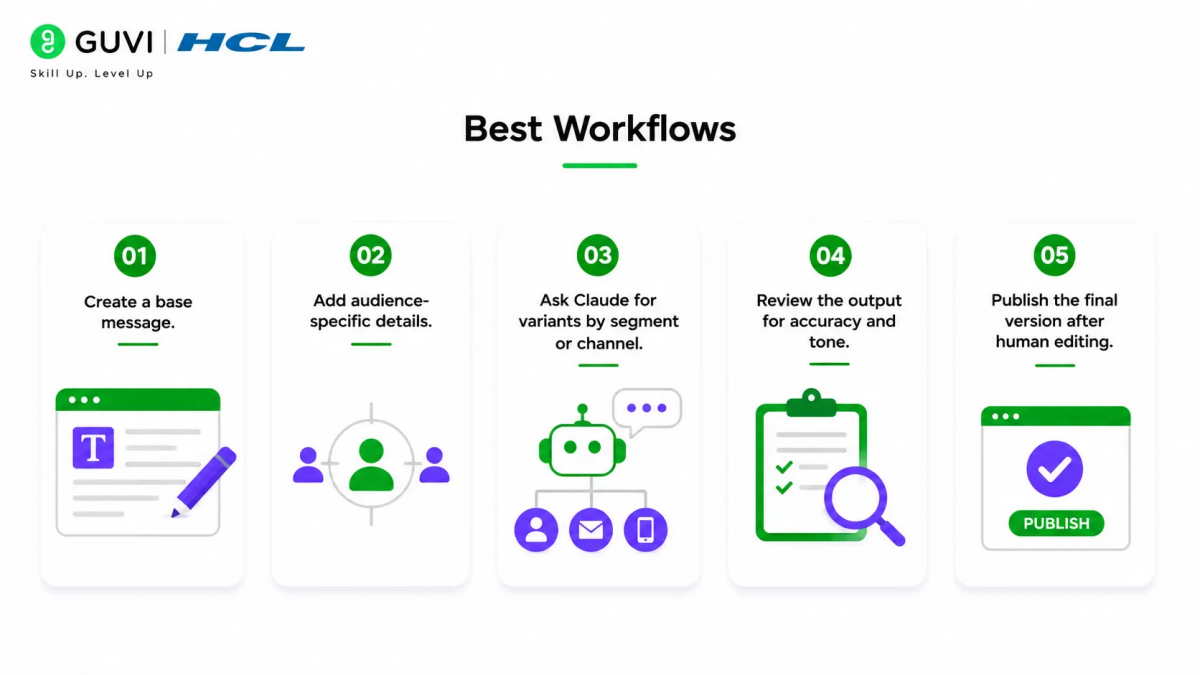
The strongest workflow is not “generate and publish.” It is “generate, review, and refine.”
- Create a base message.
- Add audience-specific details.
- Ask Claude for variants by segment or channel.
- Review the output for accuracy and tone.
- Publish the final version after human editing.
Claude can draft quickly, but it does not know what is currently converting best in your market. Human judgment is still needed to make the final version feel sharp and persuasive.
Comparison Table
| Task | Claude’s Strength | Human Role |
| Email personalization | Fast variant generation | Approve tone and accuracy |
| Landing pages | Segment-specific copy | Check messaging fit |
| Ad copy | Multiple angles quickly | Pick the best performer |
| Repurposing | Reformat content efficiently | Polish high-visibility pieces |
| Brand consistency | Follows given rules well | Define and maintain standards |
Claude is especially useful when you want one campaign to sound personally written for many different audiences. The best results usually come from combining structured prompts with real customer insights.

Use Claude to create personalized content at scale with faster targeting and stronger engagement. Explore more with HCL GUVI’s Complete Business Analytics Professional Program.
Common Mistakes
The most common mistake is using Claude without enough context. If the model does not know your audience, positioning, or voice, the output can feel generic.
Avoid:
- Using vague prompts.
- Skipping brand voice guidelines.
- Treating AI output as final copy.
- Personalizing too much without a clear strategy.
- Ignoring human review before launch.
Real-World Example
A marketing team could take one product announcement and turn it into different versions for founders, managers, and technical buyers. Claude can adjust the angle for each group while keeping the same core offer intact.
What To Do Next
Start with one content type, such as email or landing pages. Build a clear template, add audience data, and use Claude to generate variations that your team can review and refine.
Conclusion
Claude is a practical tool for personalized content at scale because it combines speed, structure, and adaptation. It works best when your team gives it strong context and uses human editing to preserve quality and conversion power.
FAQs
1. What type of content can Claude personalize best?
Claude works well for emails, landing pages, ads, nurture sequences, and repurposed content.
2. What do I need to give Claude first?
Give it brand voice guidelines, audience details, product positioning, and strong examples.
3. Can Claude replace a copywriter?
No. It can speed up drafting, but human review is still needed for nuance and final quality.
4. How do I keep the content on-brand?
Use clear templates, specific voice rules, and example content that reflects your brand.
5. Is Claude good for large campaigns?
Yes, it is useful for scaling personalized variants across segments and channels.
Success Stories

About the Author
HCL GUVI
This article was selected and published as part of the HCL GUVI AI Blogathon 2026, an initiative designed to encourage students, AI enthusiasts, and aspiring tech writers to simplify complex AI concepts through impactful technical content. The contest recognized high-quality, original, and insightful AI-focused blogs, with selected authors receiving publication opportunities on the HCL GUVI blog platform along with official author credits and recognition.
View all posts by HCL GUVI
Connect with me @











Did you enjoy this article?