


Artificial Intelligence and Machine Learning Articles
Claude for Code Documentation with JSDoc
How to Integrate Claude into a Next.js App with App Router


Get In Touch For Details! Request More Information

AI-Augmented Developer Workflow: AI Tools That Save Time
Aug 07, 2026 3 Min Read 142 Views
(Last Updated)
An AI-augmented developer workflow combines artificial intelligence tools with traditional software development practices to automate repetitive tasks, improve code quality, and speed up development. From AI coding assistants to documentation generators and debugging tools, the right AI tools can help developers write, review, test, and deploy code more efficiently while focusing on solving real problems.
Table of contents
- TL;DR
- What Is an AI-Augmented Developer Workflow?
- Why Should Developers Use AI Tools?
- What AI Tools Actually Save Developers Time?
- How Can AI Improve Each Stage of Development?
- What Makes an Effective AI-Augmented Workflow?
- Common Mistakes When Using AI for Development
- Key Takeaways
- Conclusion
- FAQs
- What is an AI-augmented developer workflow?
- Which AI tools are most useful for developers?
- Can AI replace software developers?
- Does using AI improve coding speed?
- Should beginners use AI coding tools?
TL;DR
- AI tools help developers automate repetitive coding tasks.
- Modern AI assistants improve coding, debugging, testing, and documentation.
- Choosing the right AI tools depends on your workflow and project requirements.
- AI enhances productivity but should not replace critical thinking.
- A balanced AI-augmented workflow helps developers build software faster and more efficiently.
What Is an AI-Augmented Developer Workflow?

An AI-augmented developer workflow is a software development process that incorporates artificial intelligence into everyday development tasks. Instead of replacing developers, AI acts as a productivity assistant — helping with code generation, debugging, documentation, testing, and code reviews.
Today’s developers spend a considerable amount of time on repetitive work such as writing boilerplate code, searching documentation, and fixing syntax errors. AI tools reduce this overhead, allowing developers to focus on architecture, business logic, and problem-solving.
Some common areas where AI improves development include:
- Code generation
- Debugging
- Documentation
- Testing
- Code reviews
- Learning new frameworks
Read More: The Ethics And Responsibility Of Being An AI-Augmented Developer
Many professional developers use multiple AI tools throughout the day rather than relying on a single assistant for every task.
Why Should Developers Use AI Tools?
AI tools streamline repetitive development tasks without changing how developers build software. They help reduce manual effort, improve consistency, and speed up common workflows.
Some major benefits include:
- Faster development. AI generates boilerplate code, saving valuable development time.
- Improved code quality. Many AI tools identify bugs and suggest improvements before code reaches production.
- Better documentation. AI can generate comments, README files, and API documentation quickly.
- Accelerated learning. Developers can understand unfamiliar frameworks and libraries more efficiently.
Data Point: AI-assisted development can significantly reduce the time spent on repetitive coding tasks, allowing developers to focus on designing better software solutions.
Ready to work smarter with AI? HCL GUVI’s Artificial Intelligence & Machine Learning Course covers machine learning, generative AI, and real-world AI tools to help you automate workflows and build intelligent applications.
What AI Tools Actually Save Developers Time?
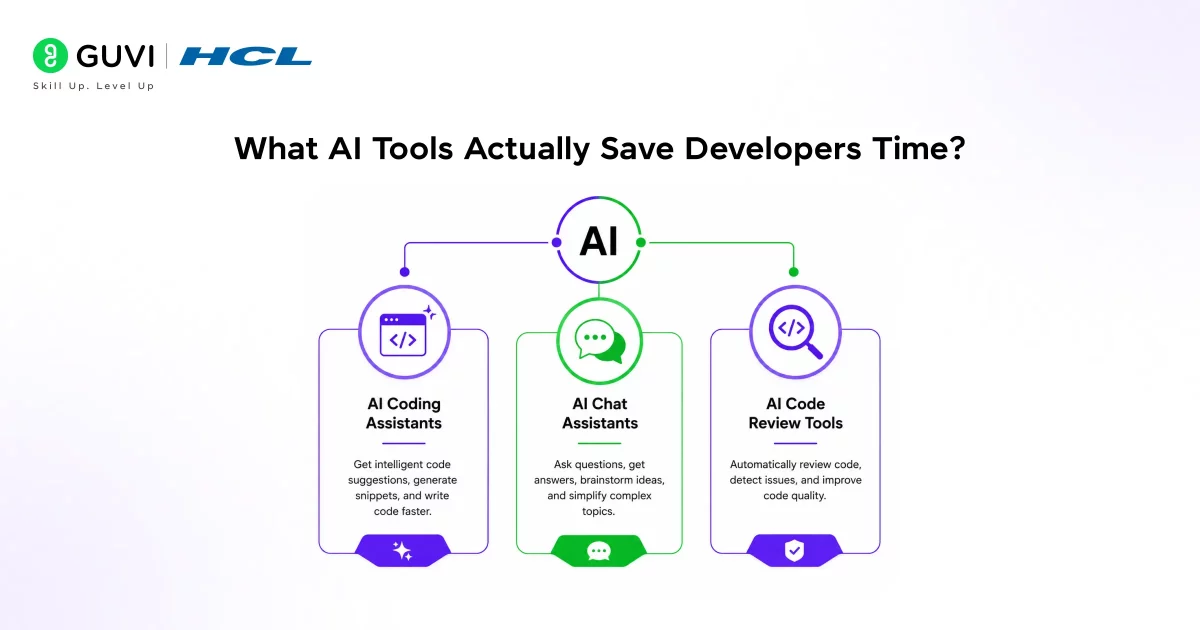
Not every AI tool delivers measurable productivity gains. The most effective ones integrate naturally into existing workflows and solve specific problems.
- AI Coding Assistants
AI coding assistants help developers write code faster by suggesting functions, completing code snippets, and explaining unfamiliar syntax.
Popular examples include:
- GitHub Copilot
- Cursor
- Amazon Q Developer
- Codeium
These tools are especially useful for reducing repetitive coding and speeding up development.
- AI Chat Assistants
AI chat assistants answer technical questions, explain concepts, and assist with debugging.
Developers commonly use them for:
- Explaining complex code
- Learning new technologies
- Generating sample implementations
- Troubleshooting errors
Instead of searching multiple documentation pages, developers can receive contextual explanations in seconds.
- AI Code Review Tools
Code review tools use AI to identify potential issues before code reaches production.
They can help detect:
- Code smells
- Security vulnerabilities
- Performance issues
- Style inconsistencies
Best Practice: Treat AI suggestions as recommendations rather than final answers — always review generated code before using it in production.
How Can AI Improve Each Stage of Development?
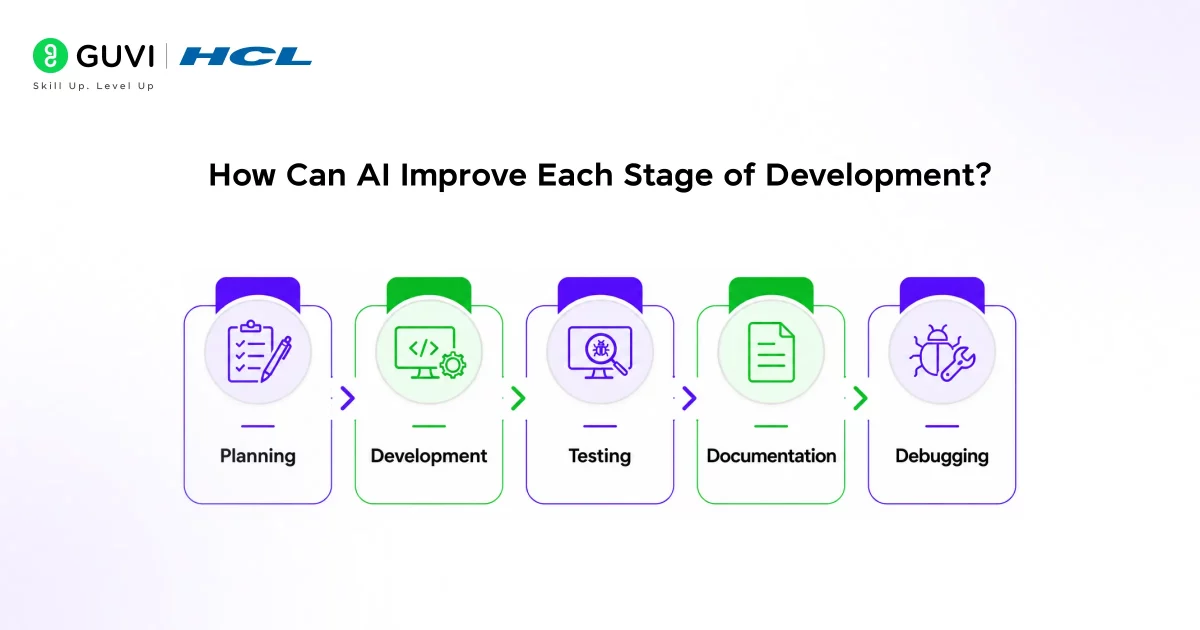
AI supports nearly every stage of the software development lifecycle.
- Planning
AI helps developers understand project requirements, generate architecture ideas, and create implementation plans.
This reduces time spent researching possible approaches.
- Development
During coding, AI assists with:
- Writing boilerplate code
- Generating functions
- Completing repetitive code
- Explaining unfamiliar APIs
These capabilities speed up development without changing your existing workflow.
- Testing
AI can generate unit tests, suggest edge cases, and identify missing test scenarios.
This improves software reliability while reducing manual testing effort.

- Documentation
Writing documentation is often overlooked. AI can generate:
- README files
- API documentation
- Function descriptions
- Code comments
Good documentation becomes easier to maintain with AI assistance.
- Debugging
Debugging becomes more efficient when AI explains error messages, suggests fixes, and helps identify root causes.
Warning: AI-generated fixes should always be tested thoroughly — an incorrect suggestion can introduce new bugs into your application.
What Makes an Effective AI-Augmented Workflow?
Simply installing AI tools isn’t enough. Productivity comes from integrating them into your existing workflow.
A practical workflow might look like this:
- Plan features with an AI assistant.
- Generate boilerplate code.
- Write business logic manually.
- Use AI for debugging.
- Generate tests.
- Review code before deployment.
This approach keeps developers in control while allowing AI to handle repetitive tasks.
Ready to work smarter with AI? HCL GUVI’s Artificial Intelligence & Machine Learning Course covers machine learning, generative AI, and real-world AI tools to help you automate workflows and build intelligent applications.
Common Mistakes When Using AI for Development
Although AI improves productivity, relying on it without careful review can create problems.
Some common mistakes include:
- Accepting generated code without understanding it.
- Ignoring security implications.
- Depending entirely on AI for debugging.
- Skipping manual code reviews.
- Using outdated or incorrect AI-generated examples.
Remember — AI is a productivity tool, not a replacement for software engineering knowledge.
Pro Tip: Use AI to automate repetitive work, but make architecture decisions and business logic yourself for better long-term maintainability.
Key Takeaways
- AI-augmented developer workflows improve productivity without replacing developers.
- AI tools assist with coding, debugging, documentation, and testing.
- Coding assistants help reduce repetitive programming tasks.
- AI-generated code should always be reviewed and tested.
- The best workflow combines human expertise with AI automation.
- Choosing tools that integrate naturally into your workflow delivers the greatest productivity gains.
Conclusion
AI has become an important part of modern software development, helping developers write code faster, debug more efficiently, and automate repetitive tasks. However, the greatest benefits come from using AI strategically rather than relying on it completely.
The goal isn’t to let AI build your software — it’s to let AI handle routine work while you focus on designing, solving problems, and creating high-quality applications. When used thoughtfully, an AI-augmented developer workflow can significantly improve both productivity and code quality.
FAQs
What is an AI-augmented developer workflow?
An AI-augmented developer workflow combines AI tools with traditional software development to automate repetitive tasks and improve productivity. Developers remain responsible for reviewing and validating the generated output.
Which AI tools are most useful for developers?
Popular AI tools include coding assistants, AI chat assistants, and AI-powered code review tools. The best choice depends on your development workflow and project requirements.
Can AI replace software developers?
No, AI is designed to assist developers rather than replace them. Human expertise is still essential for architecture, business logic, and decision-making.
Does using AI improve coding speed?
Yes, AI can speed up coding by generating boilerplate code, explaining concepts, and assisting with debugging. However, generated code should always be reviewed before deployment.
Should beginners use AI coding tools?
Yes, beginners can use AI tools to learn programming concepts and improve productivity. However, it’s important to understand the generated code rather than relying on it blindly.
Success Stories

About the Author
Vishalini Devarajan
An Aerospace Engineer turned content writer, I focus on making complex concepts easy to understand through well-structured, reader-friendly blogs. Whether it’s a technical topic or a non-technical one, I love creating content that is clear, engaging, and impactful.
View all posts by Vishalini Devarajan
Connect with me @












Did you enjoy this article?