


Python Articles
Freelancing as a Python Developer: Getting Your First Client
Common Python Mistakes Beginners Make And How to Fix Them
Python Best Practices: Writing Clean, Maintainable Code Like a Pro
How to Build a Python Developer Portfolio That Gets You Hired


Get In Touch For Details! Request More Information

Converting an integer to a string sounds like a solved problem, and it is; Python has had str() since day one. But if that were the whole story, nobody would be searching for this. The real question is not whether you can convert an integer to a string in Python. It is which method to use, what the difference actually is, and what breaks if you pick the wrong one.
This blog walks through every method worth knowing, shows you exactly where each one fits, and flags the mistakes that trip up beginners and intermediate developers alike. If you have ever gotten a TypeError when trying to concatenate a number with a string, this is the guide that explains why and makes sure it does not happen again.
Table of contents
- TL;DR Summary
- What Converting an Integer to a String Actually Does
- The Methods You Will Actually Use
- str() — The Default
- f-Strings — When You Are Already Building a String
- format() — When You Need Alignment or Templates
- repr() — For Debugging, Not Display
- Python Integer to String: Quick Reference
- Common Mistakes When Converting Integers to Strings
- Conclusion
- FAQs
- How do I convert an integer to a string in Python?
- What is the difference between str() and repr() for integers?
- Why does Python throw a TypeError when I add an integer and a string?
- Can I convert a negative integer to a string?
- What is the fastest way to convert an integer to a string in Python?
- How do I convert an integer to a string with comma formatting?
- Is int() the opposite of str() for this conversion?
TL;DR Summary
- Python gives you several ways to convert an integer to a string, and each one fits a slightly different situation.
- str() is your default fast, readable, always works. f-strings are the move when you are already building a string with variables in it.
- format() earns its place when you need alignment or padding. repr() is for debugging, not display.
- Once you know which one to reach for and why, this stops being a lookup and starts being instinct.
Want to go beyond the basics and build real Python applications with hands-on guidance? Check out HCL GUVI’s Python Programming Course designed for learners who want to write Python that actually works in production, not just in tutorials.
What Converting an Integer to a String Actually Does
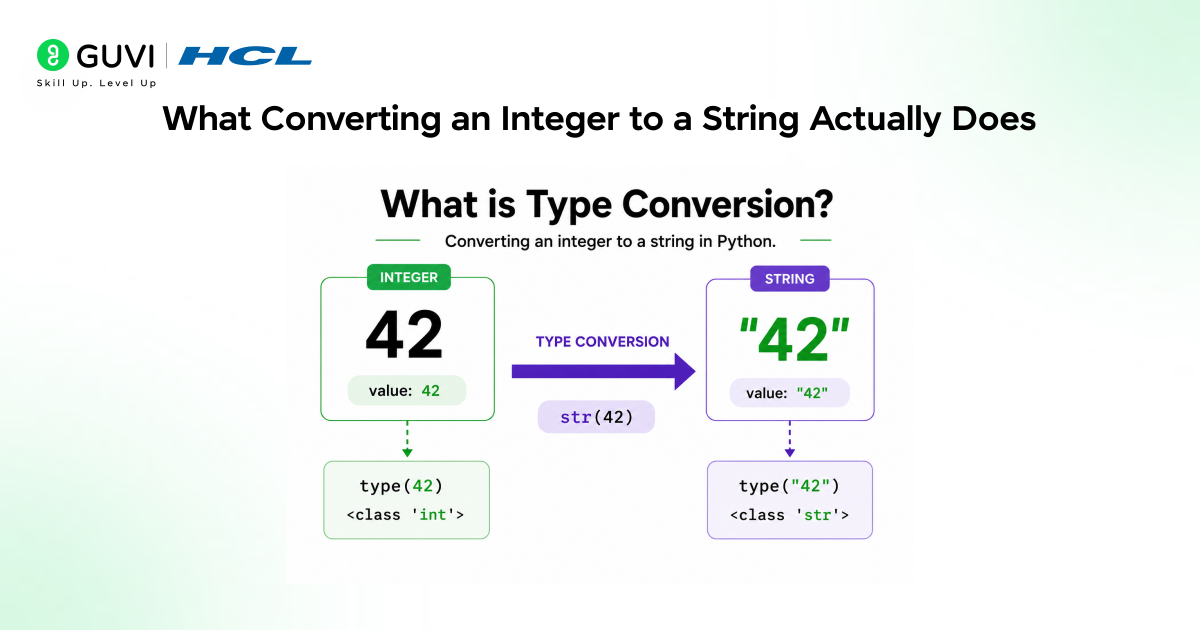
In Python, integers and strings are completely different types. An integer stores a numeric value. A string stores a sequence of characters. They do not mix; you cannot concatenate them directly, pass an integer where a string is expected, or write an integer to a text file without converting it first.
When you convert an integer to a string, Python is not changing the number. It is creating a new string object whose characters represent that number. The original integer is untouched. This matters because it means every conversion method returns a new value it does not modify the variable in place.
| num = 42 print(type(num)) # <class ‘int’> result = str(num) print(type(result)) # <class ‘str’> print(result) # ’42’ |
Read More: How to Create an API in Python: A Complete Guide
Want to go beyond the basics and build real Python applications with hands-on guidance? Check out HCL GUVI’s Python Programming Course designed for learners who want to write Python that actually works in production, not just in tutorials.
The Methods You Will Actually Use
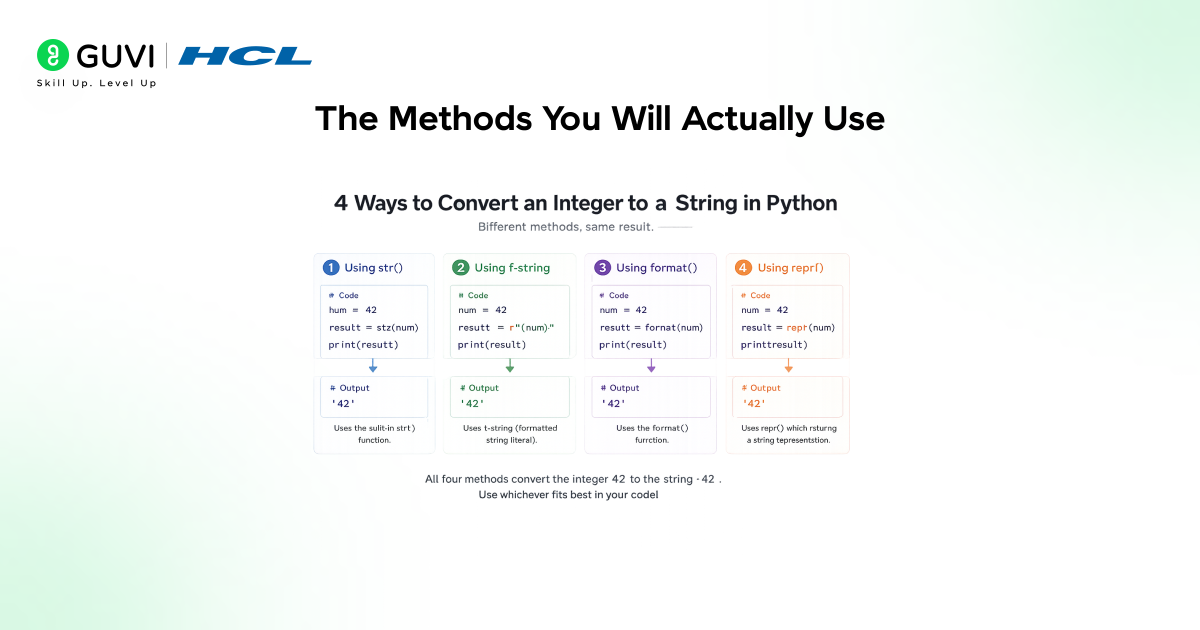
Python gives you four methods worth knowing. Each solves a slightly different problem.
str() — The Default
str() is the most direct conversion. Pass it an integer, get back a string. No options, no formatting, no surprises. This is the one to use ninety percent of the time.
| age = 25 message = “You are ” + str(age) + ” years old” print(message) # You are 25 years old |
The only thing to watch: str() does not format the number. If you need commas, decimal places, or padding, you need a different method.
f-Strings — When You Are Already Building a String
f-strings handle the conversion automatically when you embed a variable inside curly braces. They are faster to write than concatenation and more readable than format() for most cases.
| score = 98 print(f”Final score: {score}”) # Final score: 98 |
f-strings also accept format specifiers inside the braces, so you can add comma separators or control decimal places at the same time as the conversion.
| population = 1000000 print(f”Population: {population:,}”) # Population: 1,000,000 |
format() — When You Need Alignment or Templates
format() is more verbose than f-strings but useful when you are working with reusable templates or need to align columns in output.
print(“Value: {:>10}”.format(42)) # Value: 42 print(“Value: {:<10}”.format(42)) # Value: 42 |
repr() — For Debugging, Not Display
repr() also converts integers to strings and in this specific case produces the same output as str(). The difference matters more for other types. Use repr() when you are inspecting values for debugging, not when you are building output for a user.
| print(repr(42)) # 42 print(repr(-7)) # -7 |
Python’s f-strings were introduced in Python 3.6 and are now consistently benchmarked as the fastest string formatting method in the language, faster than both % formatting and str.format(). If performance matters in a loop running thousands of iterations, f-strings are not just more readable; they are genuinely quicker.
Python Integer to String: Quick Reference
| Method | Syntax | Best Used When |
| str() | str(num) | Default conversion, any situation |
| f-string | f”{num}” | Embedding in a larger string |
| format() | “{:}”.format(num) | Templates, alignment, padding |
| repr() | repr(num) | Debugging and inspection only |

Common Mistakes When Converting Integers to Strings
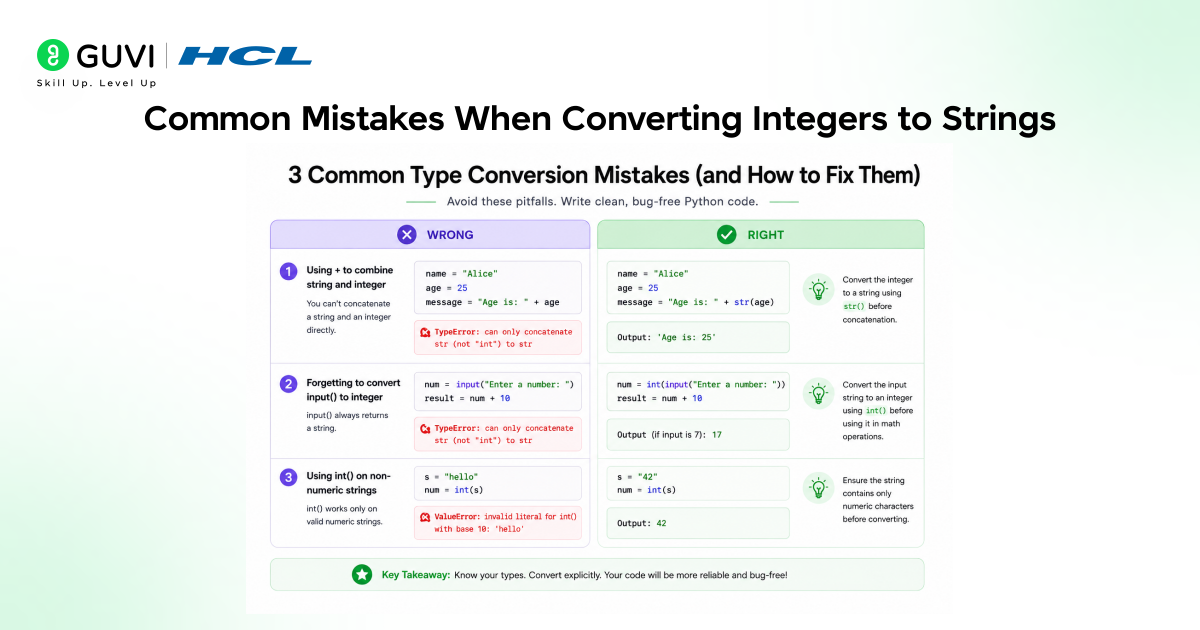
These are the errors that show up most often, especially for developers coming from languages where types are looser.
1. Concatenating an integer directly with a string:
# This raises TypeError
name = “Order #” + 1042
# Fix: convert first
name = “Order #” + str(1042)
Python does not silently coerce types the way JavaScript does. If you try to concatenate a string and an integer without converting, you get a TypeError every time. The fix is always to wrap the integer in str() or use an f-string instead.
2. Using int() when you meant str():
int() converts a string to an integer. str() converts an integer to a string. They go in opposite directions. If you pass an integer to int(), you just get the same integer back, and your concatenation still breaks. Always check which direction the conversion needs to go.
3. Expecting str() to format the number:
| # str() gives you plain digits, no formatting print(str(1000000)) # 1000000, not 1,000,000 # Use f-string format spec instead print(f”{1000000:,}”) # 1,000,000 |
str() is a conversion, not a formatter. If you need comma separators, zero-padding, or decimal control, you need an f-string or format() with the right specifier.
Conclusion
Converting an integer to a string in Python is a one-liner in every case, but knowing which one-liner to use is what separates code that is readable and intentional from code that just happens to work. str() for plain conversion. f-strings when you are embedding a value in text. format() when you need templates or alignment. repr() only when debugging.
The TypeError from concatenating an integer with a string directly is one of the most common early Python errors, and now you know exactly why it happens and how to avoid it every time. If you want to keep building from here, HCL GUVI’s Python Programming Course is a solid next step toward writing Python you can actually ship.
FAQs
1. How do I convert an integer to a string in Python?
Use str(). Pass the integer as the argument, and it returns a string representation of that number. For example, str(42) returns ’42’. If you are embedding the number inside a larger string, an f-string like f”{42}” is cleaner and does the conversion automatically.
2.What is the difference between str() and repr() for integers?
For integers specifically, they produce the same output. The difference matters more for other types like strings, where repr() adds quote marks and escape characters to make the value unambiguous for debugging.
3. Why does Python throw a TypeError when I add an integer and a string?
Python does not implicitly convert types during concatenation. When you write “Order ” + 5, Python does not know whether you want the string “Order 5” or the number 5 added to some numeric representation of the string. Rather than guess, it raises a TypeError. The fix is to be explicit: “Order ” + str(5) or f”Order {5}”.
4. Can I convert a negative integer to a string?
Yes, all conversion methods handle negative integers correctly. str(-42) returns ‘-42’, f”{-42}” returns ‘-42’, and so on. The negative sign is included in the output string automatically. There is no special handling required.
5. What is the fastest way to convert an integer to a string in Python?
f-strings are benchmarked as the fastest option for embedding integers in strings. For a standalone conversion where you just need the string value, str() and f-strings perform comparably. The difference is measurable only in tight loops running millions of iterations for most code, readability should drive the choice, not micro-benchmarks.
6.How do I convert an integer to a string with comma formatting?
Use an f-string with the comma format specifier: f”{1000000:,}” returns ‘1,000,000’. You can also use format(): “{:,}”.format(1000000). str() alone does not add formatting it just gives you the raw digits.
7.Is int() the opposite of str() for this conversion?
Yes. str() converts an integer to a string, and int() converts a string back to an integer. int(’42’) returns 42. Note that int() will raise a ValueError if the string contains non-numeric characters, so ’42abc’ would fail.
Success Stories

About the Author
Vishalini Devarajan
An Aerospace Engineer turned content writer, I focus on making complex concepts easy to understand through well-structured, reader-friendly blogs. Whether it’s a technical topic or a non-technical one, I love creating content that is clear, engaging, and impactful.
View all posts by Vishalini Devarajan
Connect with me @














Did you enjoy this article?