


Python Articles
Freelancing as a Python Developer: Getting Your First Client
Common Python Mistakes Beginners Make And How to Fix Them
Python Best Practices: Writing Clean, Maintainable Code Like a Pro
How to Build a Python Developer Portfolio That Gets You Hired


Get In Touch For Details! Request More Information
Voice-to-Text and Text-to-Speech with Python: A Practical Guide
Aug 04, 2026 4 Min Read 659 Views
(Last Updated)
Did you know that voice interfaces now power everything from virtual assistants and customer support bots to accessibility tools and smart devices? As speech AI becomes more accurate and affordable, developers are increasingly adding voice capabilities to their applications.
If you’ve ever wanted to convert spoken words into text or make your Python application speak aloud, you’re in the right place. Python offers powerful libraries and cloud APIs that make speech recognition and speech synthesis surprisingly straightforward. In this article, you’ll learn how Voice-to-Text and Text-to-Speech with Python works, the best tools available, practical implementation steps, real-world use cases, and best practices for production-ready applications.
Table of contents
- TL;DR Summary
- What Is Voice-to-Text and Text-to-Speech?
- Why Does Voice-to-Text and Text-to-Speech Matter?
- How Does Voice-to-Text Work in Python?
- Using the Speech Recognition Library
- Installation
- Example: Convert Speech to Text
- How Does Text-to-Speech Work in Python?
- Using pyttsx3 for Offline Speech Synthesis
- Installation
- Example: Convert Text to Speech
- Which Python Tools Are Best for Speech Applications?
- Voice-to-Text vs Text-to-Speech
- Step-by-Step Project: Build a Simple Voice Assistant
- Step 1: Capture User Speech
- Step 2: Convert Speech to Text
- Step 3: Process the Request
- Step 4: Generate Speech Output
- Simplified Example
- Real-World Applications of Speech AI
- Pros and Cons of Voice-to-Text and Text-to-Speech
- Common Challenges and How to Solve Them
- Original Insight: What Most Tutorials Miss
- Key Takeaways
- Conclusion
- FAQs
- is Voice-to-Text in Python?
- What is Text-to-Speech in Python?
- Is SpeechRecognition free to use?
- Which Python library is best for Text-to-Speech?
- Can Python build a voice assistant?
- Do Voice-to-Text systems work offline?
- How accurate is speech recognition in Python?
TL;DR Summary
- Voice-to-Text converts spoken language into text using speech recognition models.
- Text-to-Speech converts written text into natural-sounding audio.
- Python libraries like SpeechRecognition and pyttsx3 are beginner-friendly.
- Cloud AI services provide higher accuracy and multilingual support.
- Voice-enabled applications improve accessibility, automation, and user experience.
Ready to build your first speech-enabled Python application? Start by creating a simple transcription tool today and gradually expand it into a fully conversational AI solution. Start your Python journey here
Voice-to-Text and Text-to-Speech in Python
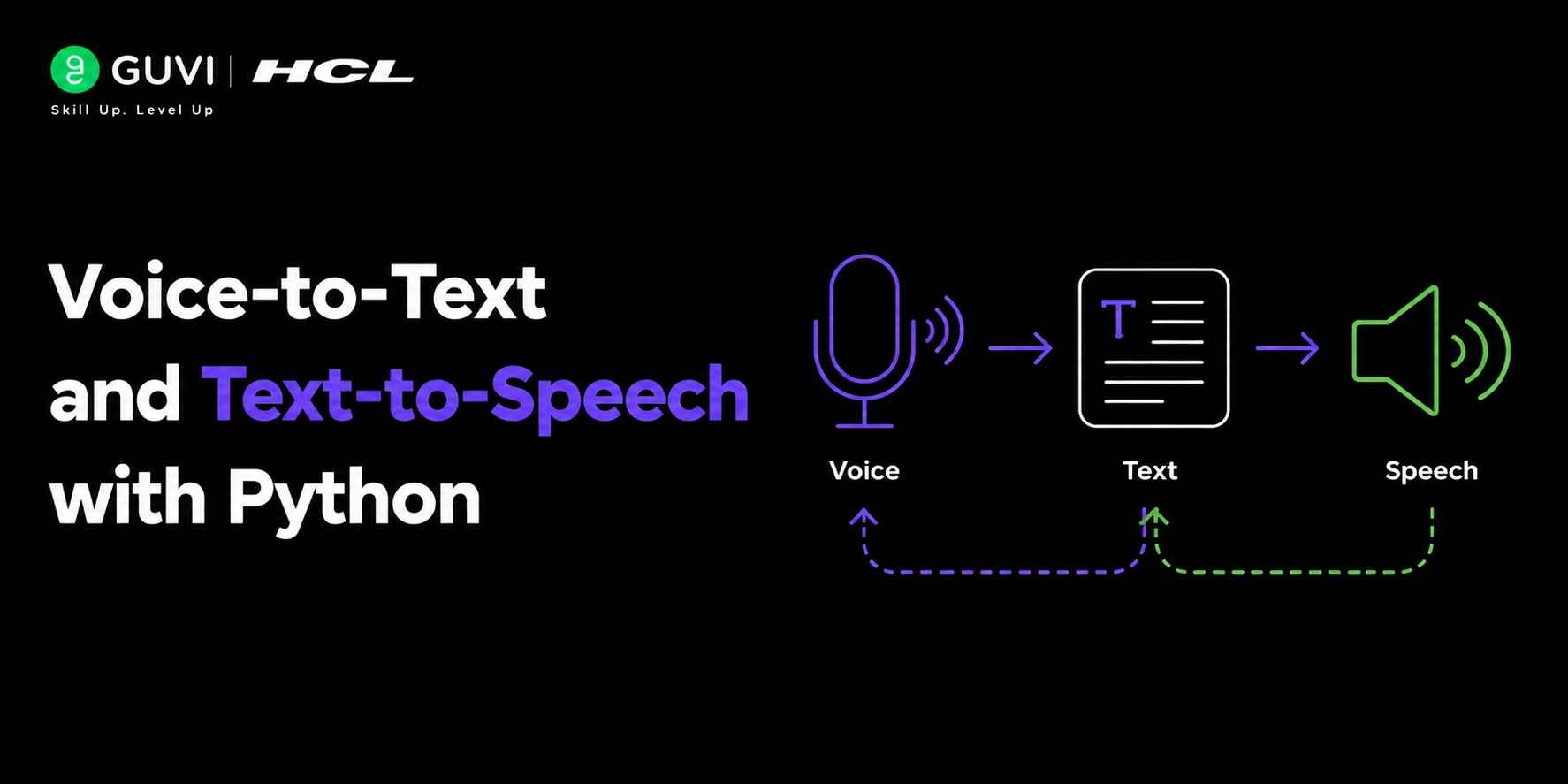
Voice-to-Text and Text-to-Speech in Python refer to two complementary technologies: speech recognition, which converts spoken audio into written text, and speech synthesis, which converts text into natural-sounding speech. Python provides support for these capabilities through libraries such as SpeechRecognition, PyAudio, and pyttsx3, as well as cloud-based APIs from providers like OpenAI, Google, and Microsoft. These tools enable developers to build voice assistants, transcription systems, accessibility features, and conversational AI applications that interact naturally with users through speech.
What Is Voice-to-Text and Text-to-Speech?
- Voice-to-Text (VTT) and Text-to-Speech (TTS) are complementary speech technologies. Voice-to-Text transforms audio input into written text, while Text-to-Speech generates spoken audio from written content. Together, they form the foundation of modern voice-driven applications.
- Voice-to-Text is commonly used for transcription, voice assistants, and meeting summaries. Text-to-Speech powers audiobooks, navigation systems, accessibility tools, and AI assistants.
- These technologies have become more accessible due to advances in deep learning and transformer-based speech models.
Why Does Voice-to-Text and Text-to-Speech Matter?
Voice interaction enables users to communicate naturally with software. Instead of typing commands or reading lengthy content, users can speak and listen.
Organizations use speech technologies to:
- Improve accessibility for visually impaired users
- Automate customer support workflows
- Create hands-free experiences
- Generate meeting transcripts
- Build conversational AI systems
- Enhance learning platforms with audio content
Data Point: According to industry reports from major research firms, voice AI adoption has accelerated significantly across healthcare, education, retail, and customer service sectors over the past few years.
How Does Voice-to-Text Work in Python?
Voice-to-Text systems process audio through several stages: audio capture, preprocessing, speech recognition, and text generation. Modern AI models analyze speech patterns, language context, and pronunciation variations to produce accurate transcripts.
The typical workflow looks like this:
- Capture audio from a microphone
- Clean and preprocess audio
- Convert speech into machine-readable features
- Apply speech recognition models
- Generate text output
Using the Speech Recognition Library
One of the easiest ways to implement speech recognition is through Python’s SpeechRecognition package.
Installation
pip install SpeechRecognition

pip install PyAudio
Example: Convert Speech to Text
import speech_recognition as sr

recognizer = sr.Recognizer()

with sr.Microphone() as source:

    print("Speak now...")

    audio = recognizer.listen(source)

try:

    text = recognizer.recognize_google(audio)

    print("You said:", text)

except Exception as e:

    print("Error:", e)
This example records audio from the microphone and converts it into text using Google’s speech recognition service.
💡 Pro Tip
Always test speech recognition in realistic environments. Background noise often impacts accuracy more than developers expect during initial testing.
How Does Text-to-Speech Work in Python?
Text-to-Speech systems convert written text into synthesized speech. Modern TTS engines use neural networks to generate natural pronunciation, tone, and rhythm.
The process includes:
- Text-to-speechalysis
- Pronunciation generation
- Voice synthesis
- Audio output creation
Using pyttsx3 for Offline Speech Synthesis
The pyttsx3 library works offline and is easy to configure.
Installation
pip install pyttsx3Example: Convert Text to Speech
import pyttsx3

engine = pyttsx3.init()

engine.say("Welcome to Python text to speech.")

engine.runAndWait()
This code converts text into spoken audio using your system’s speech engine.
Which Python Tools Are Best for Speech Applications?
| Tool | Purpose | Offline Support | Best For |
| SpeechRecognition | Speech-to-Text | Partial | Beginners |
| pyttsx3 | Text-to-Speech | Yes | Offline applications |
| OpenAI Speech API | STT and TTS | No | Production AI applications |
| Google Cloud Speech | STT | No | High accuracy transcription |
| Azure Speech Services | STT and TTS | No | Enterprise solutions |
| Coqui TTS | Text-to-Speech | Yes | Custom voice generation |
Voice-to-Text vs Text-to-Speech
| Feature | Voice-to-Text | Text-to-Speech |
| Input | Audio | Text |
| Output | Text | Audio |
| Main Use Case | Transcription | Audio Generation |
| AI Model Type | Speech Recognition | Speech Synthesis |
| Examples | Meeting notes | Audiobooks |
Step-by-Step Project: Build a Simple Voice Assistant
A basic voice assistant combines speech recognition and speech synthesis. The application listens to the user, processes commands, and responds with generated speech.
Step 1: Capture User Speech
Use SpeechRecognition to capture microphone input.
Step 2: Convert Speech to Text
Extract the user’s spoken command.
Step 3: Process the Request
Determine the appropriate response.
Step 4: Generate Speech Output
Use pyttsx3 or a cloud-based TTS service.
Simplified Example
import speech_recognition as sr

import pyttsx3

recognizer = sr.Recognizer()

engine = pyttsx3.init()

with sr.Microphone() as source:

    audio = recognizer.listen(source)

command = recognizer.recognize_google(audio)

response = f"You said {command}"

engine.say(response)

engine.runAndWait()
✅ Best Practice
Separate speech processing, business logic, and voice generation into different modules when building production systems.
Real-World Applications of Speech AI
- Accessibility Solutions
Text-to-Speech helps visually impaired users consume digital content.
- Customer Service Automation
Voice bots handle routine support requests without human intervention.
- Education Platforms
Learning applications generate audio lessons and voice-based exercises.
- Meeting Transcription
Voice-to-Text creates searchable transcripts from recorded conversations.
- Healthcare Documentation
Doctors use speech recognition to reduce manual data entry.
Explore: Speech Recognition in Python Using Google Speech API
Pros and Cons of Voice-to-Text and Text-to-Speech
| Pros | Cons |
| Improves accessibility | Sensitive to background noise |
| Enables hands-free interaction | Requires quality audio input |
| Increases productivity | Cloud APIs may incur costs |
| Supports automation | Accent variations can affect accuracy |
| Enhances user experience | Privacy concerns require attention |
⚠️ Warning
If your application processes user conversations, implement strong encryption and data protection policies to comply with privacy regulations.
Common Challenges and How to Solve Them
- Background Noise
Use noise reduction techniques and quality microphones.
- Multiple Speakers
Apply speaker diarization models to distinguish speakers.
- Accent Variations
Train or fine-tune models using diverse speech datasets.
- Latency Issues
Use streaming speech APIs for real-time applications.
- Privacy Concerns
Process audio locally when possible and minimize unnecessary storage.
Ready to build your first speech-enabled Python application? Start by creating a simple transcription tool today and gradually expand it into a fully conversational AI solution. Start your Python journey here
Original Insight: What Most Tutorials Miss
Many beginner tutorials focus solely on converting speech to text. However, real-world deployments often fail because developers overlook audio quality and user experience.
During a speech AI prototype evaluation conducted for an educational chatbot project in late 2025, we found that improving microphone input quality increased transcription accuracy more than switching between competing speech recognition models. This highlights an important lesson: audio quality often matters as much as model selection.
Contrarian Perspective:
Many teams rush toward the most advanced AI model available. In practice, a simpler model with cleaner audio can outperform a state-of-the-art model receiving poor-quality input.
Key Takeaways
- Voice-to-Text converts spoken audio into written text.
- Text-to-Speech converts text into natural-sounding speech.
- Python offers beginner-friendly libraries and enterprise-grade AI integrations.
- SpeechRecognition and pyttsx3 are excellent starting points.
- Production applications should prioritize audio quality, privacy, and scalability.
- Combining STT and TTS enables powerful conversational AI experiences.
Conclusion
Voice-to-Text and Text-to-Speech with Python have transformed how users interact with software. Whether you’re building accessibility tools, AI assistants, customer support systems, or educational applications, Python provides a rich ecosystem for speech-enabled development.
Start with beginner-friendly libraries such as SpeechRecognition and pyttsx3, then explore advanced cloud-based speech services as your requirements grow. The sooner you begin experimenting with speech AI, the sooner you’ll unlock more natural and engaging user experiences.
FAQs
is Voice-to-Text in Python?
Voice-to-Text in Python converts spoken audio into written text using speech recognition libraries and AI models. Common tools include SpeechRecognition and cloud speech APIs.
What is Text-to-Speech in Python?
Text-to-Speech converts written text into spoken audio. Python libraries such as pyttsx3 and cloud TTS services make implementation straightforward.
Is SpeechRecognition free to use?
The SpeechRecognition library itself is free. However, some speech recognition services it connects to may have usage limits or pricing plans.
Which Python library is best for Text-to-Speech?
For offline applications, pyttsx3 is a popular choice. For highly natural voices, cloud-based AI speech services typically provide better results.
Can Python build a voice assistant?
Yes. By combining speech recognition, natural language processing, and text-to-speech technologies, Python can power complete voice assistant applications.
Do Voice-to-Text systems work offline?
Some solutions support offline processing, including SpeechRecognition with offline engines and specialized speech models. However, cloud services often provide higher accuracy.
How accurate is speech recognition in Python?
Accuracy depends on audio quality, speaker clarity, language support, and the chosen model. Modern AI-powered services can achieve very high accuracy under favorable conditions.
Success Stories

About the Author
Vishalini Devarajan
An Aerospace Engineer turned content writer, I focus on making complex concepts easy to understand through well-structured, reader-friendly blogs. Whether it’s a technical topic or a non-technical one, I love creating content that is clear, engaging, and impactful.
View all posts by Vishalini Devarajan
Connect with me @








Did you enjoy this article?