


Python Articles
Ray Serve Tutorial: How to Deploy Scalable ML Models with RayServe
SQLModel: Combining SQLAlchemy + Pydantic for Cleaner Code


Get In Touch For Details! Request More Information

How to Round Off in Python: A Complete Guide
Jul 06, 2026 6 Min Read 427 Views
(Last Updated)
Numbers are everywhere in programming, prices, measurements, scientific values, statistics, and financial calculations; all rely on accurate numeric representation. But computers store floating-point numbers with inherent imprecision, and real-world applications almost always need values expressed to a specific number of decimal places.
Rounding is the answer. Whether you are displaying a price to two decimal places, computing an average to one decimal, binning sensor readings to the nearest integer, or ensuring consistent comparisons between floating-point values, Python provides a rich set of tools to handle every rounding scenario correctly.
This complete guide covers everything you need to know about how to round off in Python: the built-in round() function and its banker’s rounding behaviour, the math module’s ceiling and floor functions, the decimal module for precision-critical applications, NumPy rounding for arrays, and the formatting functions that control how rounded numbers are displayed.
Table of contents
- TL;DR
- The Built-In round() Function in Python
- Syntax
- Basic Examples
- Negative ndigits
- Banker's Rounding: Round Half to Even
- Floating-Point Representation Caveats
- Rounding with the Math Module
- math.floor() Always Round Down
- math.ceil() Always Round Up
- math.trunc() Remove the Decimal Part
- Comparing floor, ceil, and trunc for Negative Values
- Precise Rounding with the Decimal Module
- Basic Usage
- Rounding Modes in the Decimal Module
- Setting a Global Decimal Context
- Rounding Arrays with NumPy
- np.round() Round Array Elements
- np.floor(), np.ceil(), np.trunc()
- np.fix() Truncate Toward Zero
- How to Get Traditional Half-Up Rounding
- Using the decimal Module with ROUND_HALF_UP
- Using the Math Module Approach
- Rounding vs. Formatting: Displaying Rounded Numbers
- Formatting with f-strings
- Formatting with format() and %
- When to Round vs. When to Format
- Choosing the Right Rounding Method in Python
- Conclusion
- FAQs
- How do I round a number in Python?
- Why does round(2.5) return 2 in Python, not 3?
- What is the difference between floor, ceil, and round?
- How do I round to 2 decimal places in Python?
- How do I round a NumPy array in Python?
TL;DR
- round(number, ndigits) rounds to a given number of decimal places using banker’s rounding.
- math.floor() always rounds down; math.ceil() always rounds up; math.trunc() removes the decimal.
- The decimal module provides exact decimal arithmetic and full control over rounding modes.
- NumPy’s np.round() rounds entire arrays element-wise in one operation.
- Use f-strings or format() to control how a rounded number is displayed as a string.
What Does Rounding Off Mean in Python?
Rounding off in Python is the process of adjusting a numeric value to a specified number of decimal places or significant digits, reducing precision in a controlled manner. Python provides several tools for this purpose, including the built-in round() function, which uses banker’s rounding (round half to even), math.floor() for rounding down, math.ceil() for rounding up, and math.trunc() for removing the decimal portion without rounding. For advanced precision and rounding control, Python also offers the decimal module and NumPy’s array-based rounding functions.
The Built-In round() Function in Python
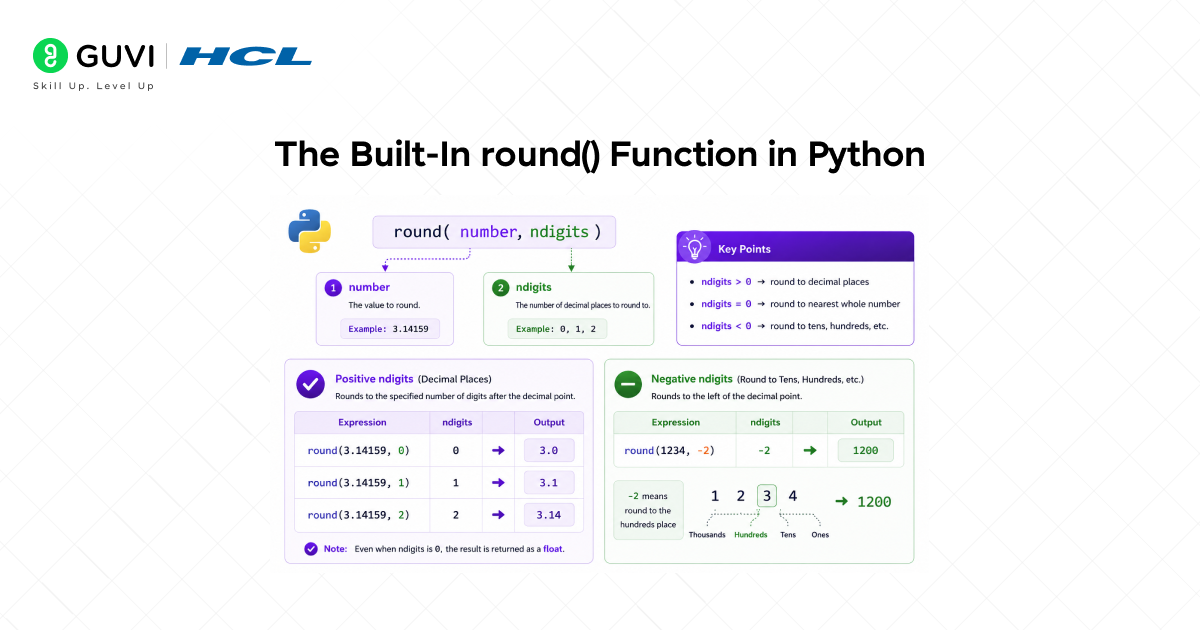
Python’s built-in round() function is the most commonly used way to round off numbers in Python. It requires no imports and works directly with integers, floats, and Decimal objects.
Syntax
| round(number, ndigits=None) # number — the value to round# ndigits — decimal places to round to (default: 0, returns int) |
Basic Examples
| # Round to the nearest integerprint(round(3.7)) # 4print(round(3.2)) # 3print(round(-2.6)) # -3 # Round to specific decimal placesprint(round(3.14159, 2)) # 3.14print(round(3.14159, 4)) # 3.1416print(round(2.675, 2)) # 2.67 (floating-point quirk — see below) # Round to tens, hundreds (negative ndigits)print(round(1234, -2)) # 1200print(round(1567, -3)) # 2000 |
Negative ndigits
When ndigits is negative, round() rounds to the left of the decimal point tens, hundreds, thousands, and so on. This is useful for displaying approximate magnitudes or binning large numbers.
Banker’s Rounding: Round Half to Even
Python’s round() uses banker’s rounding, also called round half to even or IEEE 754 rounding. When a value is exactly halfway between two options (e.g., 0.5, 1.5, 2.5), it rounds to the nearest even number rather than always rounding up.
| # Banker’s rounding — rounds 0.5 to the nearest EVEN numberprint(round(0.5)) # 0 (rounds down — 0 is even)print(round(1.5)) # 2 (rounds up — 2 is even)print(round(2.5)) # 2 (rounds down — 2 is even)print(round(3.5)) # 4 (rounds up — 4 is even)print(round(4.5)) # 4 (rounds down — 4 is even) |
This behaviour often surprises developers expecting traditional half-up rounding. Banker’s rounding minimises cumulative bias when many values are rounded together important in financial and statistical calculations, where systematic rounding errors could compound over millions of operations.

Floating-Point Representation Caveats
Some decimal values cannot be represented exactly in binary floating-point. This can produce unexpected results with round():
| print(round(2.675, 2)) # 2.67 instead of expected 2.68print(round(0.1 + 0.2, 1)) # 0.3 (works here due to rounding) # The cause: 2.675 in binary floating-point is slightly below 2.675import decimalprint(decimal.Decimal(2.675)) # 2.67499999999999982236431605997495353221893310546875 |
For applications where exact decimal arithmetic is essential, such as financial software, billing systems, and tax calculations, use the decimal module instead of float arithmetic.
Rounding with the Math Module
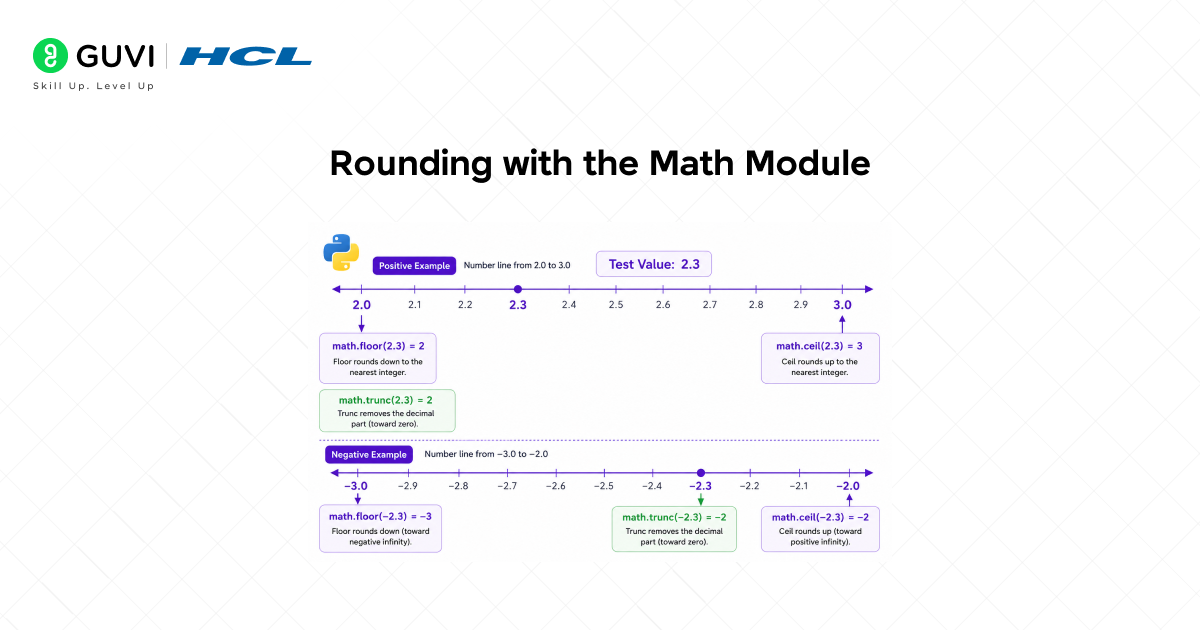
Python’s math module provides three directional rounding functions: floor, ceil, and trunc. Unlike round(), which rounds to the nearest value, these functions always round in a specific direction regardless of proximity.
math.floor() Always Round Down
math.floor(x) returns the largest integer less than or equal to x it always rounds toward negative infinity.
| import math print(math.floor(3.9)) # 3print(math.floor(3.1)) # 3print(math.floor(3.0)) # 3print(math.floor(-3.1)) # -4 (rounds toward negative infinity)print(math.floor(-3.9)) # -4 |
math.ceil() Always Round Up
math.ceil(x) returns the smallest integer greater than or equal to x it always rounds toward positive infinity.
| import math print(math.ceil(3.1)) # 4print(math.ceil(3.9)) # 4print(math.ceil(3.0)) # 3print(math.ceil(-3.9)) # -3 (rounds toward positive infinity)print(math.ceil(-3.1)) # -3 |
math.trunc() Remove the Decimal Part
math.trunc(x) removes the fractional part without rounding it always rounds toward zero. For positive numbers, trunc behaves identically to floor. For negative numbers, trunc behaves identically to ceil.
| import math print(math.trunc(3.9)) # 3 (same as floor for positives)print(math.trunc(-3.9)) # -3 (rounds toward zero, not -4)print(math.trunc(3.0)) # 3 # Equivalent with int() for simple truncationprint(int(3.9)) # 3print(int(-3.9)) # -3 |
Comparing floor, ceil, and trunc for Negative Values
The difference between these three functions is most visible with negative numbers:
| import mathx = -2.7 print(math.floor(x)) # -3 (toward negative infinity)print(math.ceil(x)) # -2 (toward positive infinity)print(math.trunc(x)) # -2 (toward zero) |
Did You Know?
Python’s built-in round() function changed its rounding behaviour between Python 2 and Python 3, a breaking change that surprised many developers upgrading their codebases. In Python 2, round() used traditional half-up rounding (round(0.5) returned 1.0, round(1.5) returned 2.0). In Python 3, round() was changed to use banker’s rounding, rounding half to even, to comply with the IEEE 754 floating-point standard and to reduce systematic cumulative rounding bias.
Precise Rounding with the Decimal Module
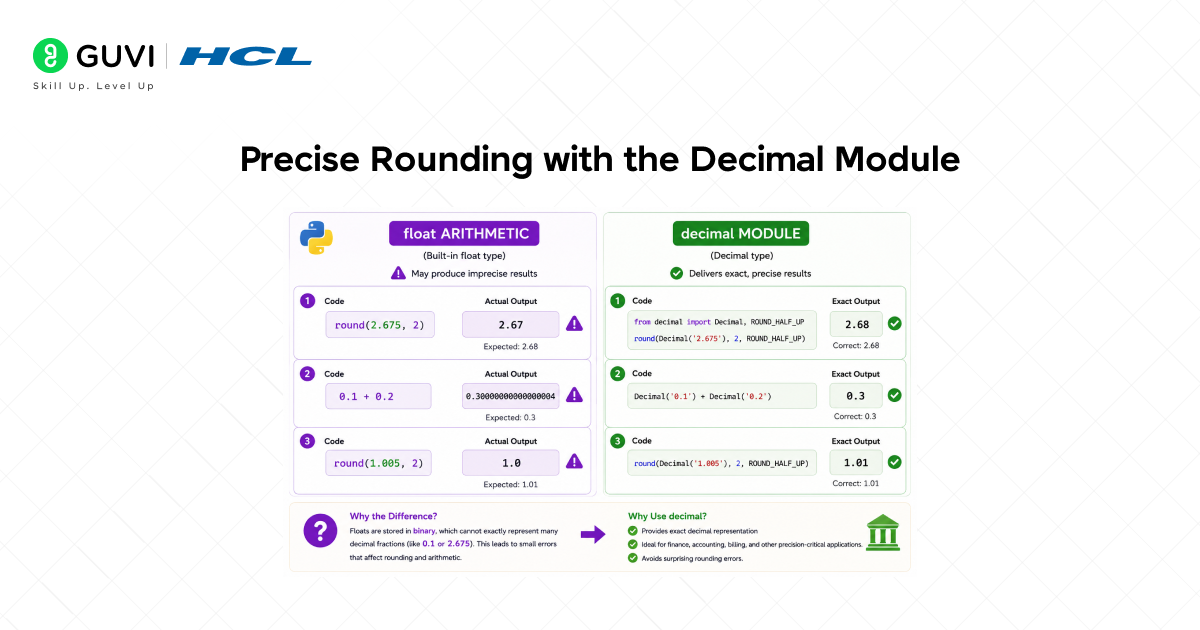
For applications where floating-point imprecision is unacceptable financial calculations, billing systems, scientific measurements Python’s decimal module provides arbitrary-precision decimal arithmetic with full control over rounding behaviour.
Basic Usage
| from decimal import Decimal, ROUND_HALF_UP, ROUND_HALF_EVEN # Always use strings to initialise Decimal — avoids float imprecisionx = Decimal(‘2.675’)print(x.quantize(Decimal(‘0.01’), rounding=ROUND_HALF_UP)) # 2.68print(x.quantize(Decimal(‘0.01’), rounding=ROUND_HALF_EVEN)) # 2.68 # Float initialisation captures the imprecision — avoid thisy = Decimal(2.675) # Decimal(‘2.67499999999999982236…’)print(y.quantize(Decimal(‘0.01’), rounding=ROUND_HALF_UP)) # 2.67 (wrong!) |
Rounding Modes in the Decimal Module
The decimal module defines eight rounding modes, giving complete control over rounding behaviour:
- ROUND_HALF_UP: Round half away from zero, the traditional school rounding rule. 2.5 → 3, -2.5 → -3.
- ROUND_HALF_EVEN: Round half to even (banker’s rounding). The default mode. 2.5 → 2, 3.5 → 4.
- ROUND_HALF_DOWN: Round half toward zero. 2.5 → 2, -2.5 → -2.
- ROUND_UP: Always round away from zero or round up in magnitude. 2.1 → 3, -2.1 → -3.
- ROUND_DOWN: Always round toward zero, truncate. 2.9 → 2, -2.9 → -2.
- ROUND_CEILING: Always round toward positive infinity. 2.1 → 3, -2.9 → -2.
- ROUND_FLOOR: Always round toward negative infinity. 2.9 → 2, -2.1 → -3.
- ROUND_05UP: Round away from zero if the last digit before rounding would be 0 or 5; otherwise, round toward zero.
Setting a Global Decimal Context
| from decimal import Decimal, getcontext, ROUND_HALF_UP # Set global precision and rounding modegetcontext().prec = 10getcontext().rounding = ROUND_HALF_UP a = Decimal(‘1.005’)print(round(a, 2)) # 1.01 (correct with ROUND_HALF_UP context) |
Rounding Arrays with NumPy
When working with arrays of numbers, sensor readings, financial time series, and scientific measurements, applying Python’s round() in a loop is inefficient. NumPy provides vectorised rounding functions that operate on entire arrays in a single, highly optimised operation.
np.round() Round Array Elements
| import numpy as np arr = np.array([1.234, 2.567, 3.891, 4.125, -1.678]) print(np.round(arr, 2)) # [1.23 2.57 3.89 4.12 -1.68]print(np.round(arr, 1)) # [1.2 2.6 3.9 4.1 -1.7]print(np.round(arr, 0)) # [1. 3. 4. 4. -2.] # np.round_ and ndarray.round() are equivalentprint(arr.round(2)) # [1.23 2.57 3.89 4.12 -1.68] |
np.floor(), np.ceil(), np.trunc()
| import numpy as np arr = np.array([1.7, 2.3, -1.7, -2.3]) print(np.floor(arr)) # [ 1. 2. -2. -3.]print(np.ceil(arr)) # [ 2. 3. -1. -2.]print(np.trunc(arr)) # [ 1. 2. -1. -2.] |
np.fix() Truncate Toward Zero
np.fix() is NumPy’s equivalent of math.trunc() it rounds each element toward zero, equivalent to floor for positives and ceil for negatives.
| import numpy as np arr = np.array([2.9, -2.9, 3.1, -3.1])print(np.fix(arr)) # [ 2. -2. 3. -3.] |
How to Get Traditional Half-Up Rounding
If your application requires traditional half-up rounding, where 0.5 always rounds up to 1, 1.5 rounds up to 2, and so on, Python offers several approaches.
Using the decimal Module with ROUND_HALF_UP
The most reliable approach for precise half-up rounding is the decimal module:
| from decimal import Decimal, ROUND_HALF_UP def round_half_up(value, decimals=0): factor = Decimal(‘1.’ + ‘0’ * decimals) if decimals > 0 else Decimal(‘1’) return float(Decimal(str(value)).quantize(factor, rounding=ROUND_HALF_UP)) print(round_half_up(0.5)) # 1.0print(round_half_up(1.5)) # 2.0print(round_half_up(2.5)) # 3.0print(round_half_up(2.675, 2)) # 2.68 |
Using the Math Module Approach
For simple integer rounding without importing decimals, you can use the floor trick:
| import math def round_half_up_int(x): return math.floor(x + 0.5) print(round_half_up_int(0.5)) # 1print(round_half_up_int(1.5)) # 2print(round_half_up_int(2.5)) # 3print(round_half_up_int(-0.5)) # 0 (note: -0.5 + 0.5 = 0.0) |
Rounding vs. Formatting: Displaying Rounded Numbers
It is important to distinguish between rounding a number (changing its numeric value) and formatting a number for display (controlling how it looks as a string without altering its value).
Formatting with f-strings
F-strings with format specifications display a float to a specific number of decimal places without changing its underlying value:
| value = 3.14159265 print(f'{value:.2f}’) # ‘3.14’ — display to 2 decimal placesprint(f'{value:.4f}’) # ‘3.1416’ — display to 4 decimal placesprint(f'{value:.0f}’) # ‘3’ — display as integer # The value itself is unchangedprint(value) # 3.14159265 |
Formatting with format() and %
| value = 2.71828 # format() built-inprint(format(value, ‘.3f’)) # ‘2.718’ # Old-style % formattingprint(‘%.2f’ % value) # ‘2.72’ # Formatting currencyprice = 1234.5678print(f’${price:,.2f}’) # ‘$1,234.57’ — with comma separator |
When to Round vs. When to Format
- Round when you need a value with reduced precision to pass into further calculations, comparisons, or storage.
- Format when you need to display a number to the user in a specific visual form, such as a price, a percentage, or a scientific notation value.
- Do both when you need a consistently rounded value stored and displayed: round first, then format.
Choosing the Right Rounding Method in Python
Python offers multiple rounding tools, and choosing the right one depends on the data type, precision requirements, and desired rounding behaviour.
- round(x, n): Use for general-purpose rounding of floats and Decimals. Built-in, no import needed. Uses banker’s rounding.
- math.floor(x): Use when you always need to round down page count, integer division, resource allocation.
- math.ceil(x): Use when you always need to round up minimum container sizes, ceiling of divisions.
- math.trunc(x): Use when you need to drop the decimal without rounding, isolating the integer part.
- Decimal + ROUND_HALF_UP: Use for financial calculations, billing, taxes, and any domain where exact decimal representation and traditional rounding rules are mandatory.
- np.round() / np.floor() / np.ceil(): Use when the input is a NumPy array vectorised, efficient, and concise.
- f-string / format(): Use for display formatting only when you need to control decimal places in output without affecting the stored value.
Now that you understand how Python’s eval() dynamically evaluates string expressions and where it’s safe (or unsafe) to use it, ready to go deeper into Python and build real, secure programs? Start learning Python with HCL GUVI’s Programming Course and master core concepts, functions, and best practices for writing clean, safe code.
Conclusion
Rounding in Python is not a single operation it is a family of tools, each designed for a different rounding need. The built-in round() function covers most everyday use cases with its concise syntax and banker’s rounding behaviour. The math module provides directional rounding always up, always down, or always toward zero, without any approximation. The decimal module delivers exact arithmetic and full control over rounding modes for precision-critical domains like finance. NumPy extends all of these capabilities to arrays with efficient, vectorised operations. And Python’s string formatting tools ensure that rounded values are displayed exactly as needed.
The most important distinction to keep in mind: round() uses banker’s rounding, not traditional half-up rounding. This is intentional; it reduces cumulative bias when many values are rounded together. If your application requires traditional half-up rounding, use the decimal module with ROUND_HALF_UP.
With a clear understanding of all these tools, you can handle any rounding requirement in Python confidently, from simple display formatting to precise financial arithmetic to high-performance array processing.
FAQs
1. How do I round a number in Python?
Use the built-in round(number, ndigits) function. For example, round(3.14159, 2) returns 3.14. If ndigits is omitted, round() returns the nearest integer. Python uses banker’s rounding, so round(0.5) returns 0 and round(1.5) returns 2.
2. Why does round(2.5) return 2 in Python, not 3?
Python uses banker’s rounding (round half to even), which rounds 2.5 to 2 because 2 is even, and rounds 3.5 to 4 because 4 is even. This behaviour reduces cumulative rounding bias and follows the IEEE 754 standard. To get traditional half-up rounding, use the decimal module with ROUND_HALF_UP.
3. What is the difference between floor, ceil, and round?
math.floor() always rounds down to the nearest integer. math.ceil() always rounds up. round() rounds to the nearest value using banker’s rounding; the direction depends on the value. For -2.7: floor gives -3, ceil gives -2, and round gives -3.
4. How do I round to 2 decimal places in Python?
Use round(value, 2) for general use, for example round(3.14159, 2) gives 3.14. For exact decimal arithmetic (e.g., financial data), use Decimal(str(value)). quantise (Decimal(‘0.01′), rounding=ROUND_HALF_UP) from the decimal module. For display only, use f'{value:.2f}’.
5. How do I round a NumPy array in Python?
Use np.round(array, decimals) to round all elements to the specified number of decimal places in one vectorised operation. Use np.floor(array) and np.ceil(array) for directional rounding across the entire array. All NumPy rounding functions return a new array and leave the original unchanged.
Success Stories

About the Author
Vishalini Devarajan
An Aerospace Engineer turned content writer, I focus on making complex concepts easy to understand through well-structured, reader-friendly blogs. Whether it’s a technical topic or a non-technical one, I love creating content that is clear, engaging, and impactful.
View all posts by Vishalini Devarajan
Connect with me @















Did you enjoy this article?