


Artificial Intelligence and Machine Learning Articles
Finance Manager to Data Analytics: Career Growth, Salary and Seniority
How to Evaluate LLM Outputs in Production Deployments
AI/ML Skills Gap 2026: Why Companies Can't Find Job-Ready Talent
20 AI/ML Interview Questions Recruiters Can Use Without a Tech Background - Best Guide


Get In Touch For Details! Request More Information

Principal Component Analysis (PCA): A Beginner’s Guide
Jul 20, 2026 7 Min Read 1519 Views
(Last Updated)
Imagine analyzing data with 100 features where many are redundant or highly correlated; training models on all of them is slow, hard to interpret, and increases the risk of overfitting. Principal Component Analysis (PCA) compresses the dataset by finding a new set of uncorrelated axes principal components that capture the most variance, preserving the most important information while discarding redundancy.
PCA dates back to Pearson (1901) but became essential as datasets grew and dimensionality became a practical problem. By projecting data onto the top principal components, you get a smaller, cleaner representation that speeds computation, improves visualization, and often separates signal from noise while retaining most of the original structure.
In this article, we will walk through exactly what PCA is, the intuition behind principal components, the five-step mathematical process that produces them, how to implement PCA in Python using scikit-learn, how to choose the right number of components using explained variance and the scree plot, real-world applications, and the limitations you need to understand before applying it.
Table of contents
- TL;DR
- IMPACT OF PCA
- The Intuition: What Is a Principal Component?
- The Five Mathematical Steps of PCA
- Complete Python Implementation with scikit-learn
- How to Choose the Right Number of Components
- Real-World Applications of PCA
- Important Limitations to Know
- Final Thoughts
- FAQ
- Q Do I always to data before PCA?
- How many components should I keep?
- Can PCA improve supervised model performance?
- When should I not use PCA?
- How do I interpret principal components?
TL;DR
- PCA (Principal Component Analysis) is a linear dimensionality‑reduction method that finds orthogonal directions (principal components) capturing the most variance and projects data onto them.
- Standardize features first (mean 0, variance 1); PCA is sensitive to scale.
- Choose the number of components via explained variance (e.g., 95%), scree plot (elbow), or automatic MLE; always validate chosen dimensionality on downstream tasks.
- PCA is great for compression, visualization, noise reduction, and preprocessing, but it is linear and unsupervised—so it can miss nonlinear structure and may discard predictive directions.
- Interpret components via loadings, and prefer PCA when many features are redundant or highly correlated.
What Is Principal Component Analysis (PCA)?
Principal Component Analysis (PCA) is an unsupervised dimensionality reduction technique that transforms a set of correlated features into a smaller set of uncorrelated variables called principal components. These components are ordered by the amount of variance they capture from the original dataset, allowing PCA to retain the most important information while reducing complexity. It is widely used in data preprocessing, visualization, noise reduction, and machine learning feature engineering.
IMPACT OF PCA
- Principal component analysis (PCA) is a linear dimensionality reduction technique that can be used to extract information from a high-dimensional space by projecting it into a lower-dimensional subspace.
- In the language of linear algebra, PCA finds the eigenvectors of the covariance matrix to identify the directions of maximum variance in the data.
- PCA is unsupervised it does not use labels. It finds structure in the features themselves, making it useful for both preprocessing and exploratory analysis.
The Intuition: What Is a Principal Component?
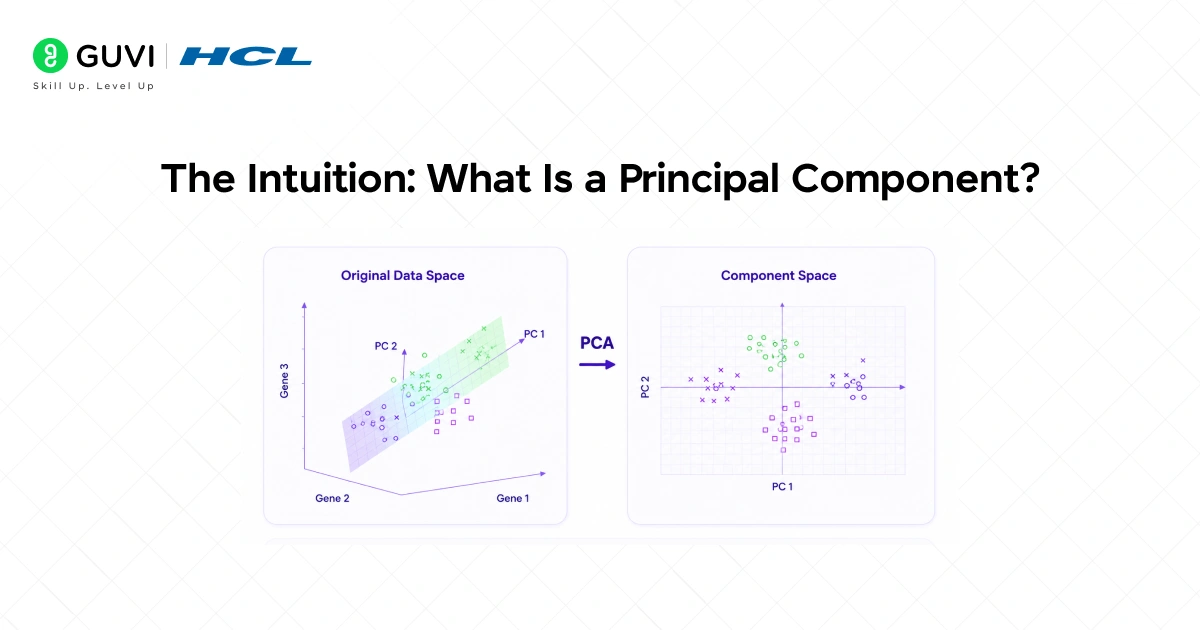
A principal component (PC) is a new axis a rotated direction in feature space, chosen so that projecting the data onto it captures as much variance (spread) as possible. PCs are ordered: PC₁ captures the most variance, PC₂ the next most, and so on.
- Why PC₁ matters most
PC₁ is the single direction through the data cloud along which the points vary the most. Because it explains the largest share of the data’s variability, it often carries the most useful signal for tasks like visualization or compression. - Orthogonality and successive components
Each principal component is perpendicular (orthogonal) to the ones before it. After PC₁ is chosen, PC₂ finds the direction of maximal remaining variance subject to being orthogonal to PC₁, then PC₃ does the same relative to the first two, etc. - Dimensionality reduction intuition
When you reduce dimensions with PCA, you keep the top PCs (the axes with largest variance) and drop the low-variance directions. The discarded axes usually contain mostly noise, so the reduced representation retains the important structure while simplifying the data.
The Five Mathematical Steps of PCA

PCA follows a well-defined sequence of steps. Understanding each one helps you know where things can go wrong and how to debug your results.
Step 1: Standardize the Data. PCA is sensitive to the scale of features. A feature measured in thousands will dominate a feature measured in single digits, not because it is more important but because its numerical range is larger. PCA is affected by differences in scale, so we first standardize the dataset by subtracting the mean and dividing by the standard deviation for each feature. After standardization, every feature has a mean of 0 and a standard deviation of 1, putting them on equal footing before PCA begins.
Step 2: Compute the Covariance Matrix. The covariance matrix captures relationships between features. A high covariance means the two features are correlated, and PCA aims to eliminate redundancy by transforming data into uncorrelated principal components. For a dataset with n features, the covariance matrix is n×n.
The diagonal entries are the variance of each feature. The off-diagonal entries measure how much two features vary together. PCA works by finding a transformation that diagonalizes this matrix, making all the off-diagonal entries zero, which means all the resulting components are uncorrelated.
Step 3: Compute Eigenvectors and Eigenvalues. Each eigenvector defines a principal axis. Its corresponding eigenvalue tells us how much variance is captured along that axis. The eigenvectors of the covariance matrix are the directions of the principal components. The eigenvalues tell you how important each direction is larger eigenvalue means more variance captured. The first principal component is the eigenvector with the largest eigenvalue. The second is the eigenvector with the second-largest eigenvalue, and so on.
Step 4: Select the Top k Components. After calculating the eigenvalues and eigenvectors, PCA ranks them by the amount of information they capture. We then select the top k components that capture most of the variance, like 95% and transform the original dataset by projecting it onto these top components. The number k is the key decision in PCA too few and you lose important information, too many and you have not reduced dimensionality meaningfully.
Step 5: Project the Data. The final step is multiplying your standardized data matrix by the matrix of selected eigenvectors. This rotates your data into the new coordinate system defined by the principal components. Center the data (subtract the mean), compute the covariance matrix, compute eigenvectors and eigenvalues of the covariance matrix, select top n_components eigenvectors, and project data onto these components.
Complete Python Implementation with scikit-learn
Here is a complete, annotated PCA implementation using Python and scikit-learn on the Iris dataset a classic dataset with four features that compress naturally into two components for visualization.
import numpy as np
import pandas as pd
import matplotlib.pyplot as plt
from sklearn.decomposition import PCA
from sklearn.preprocessing import StandardScaler
from sklearn.datasets import load_iris
# Step 1: Load data
iris = load_iris()
X = iris.data # 150 samples, 4 features
y = iris.target # 3 species (labels for coloring only)
feature_names = iris.feature_names
# Step 2: Standardize the data
scaler = StandardScaler()
X_scaled = scaler.fit_transform(X)
# Step 3: Apply PCA — keep all components first to analyze variance
pca_full = PCA()
pca_full.fit(X_scaled)
# Step 4: Examine explained variance ratio
explained_variance = pca_full.explained_variance_ratio_
cumulative_variance = np.cumsum(explained_variance)
print(“Explained variance ratio:”, explained_variance)
print(“Cumulative variance:”, cumulative_variance)
# Scree plot
plt.figure(figsize=(8, 4))
plt.bar(range(1, 5), explained_variance, alpha=0.7, label=’Individual’)
plt.plot(range(1, 5), cumulative_variance, ‘r-o’, label=’Cumulative’)
plt.xlabel(‘Principal Component’)
plt.ylabel(‘Explained Variance Ratio’)
plt.title(‘Scree Plot’)
plt.legend()
plt.show()
# Step 5: Apply PCA with 2 components for visualization
pca = PCA(n_components=2)
X_pca = pca.fit_transform(X_scaled)
print(f”\n2 components explain {pca.explained_variance_ratio_.sum():.2%} of variance”)
# Step 6: Visualize the 2D projection
colors = [‘red’, ‘green’, ‘blue’]
species = [‘Setosa’, ‘Versicolor’, ‘Virginica’]
plt.figure(figsize=(8, 6))
for i, (color, name) in enumerate(zip(colors, species)):
plt.scatter(X_pca[y == i, 0], X_pca[y == i, 1],
c=color, label=name, alpha=0.7)
plt.xlabel(f’PC1 ({pca.explained_variance_ratio_[0]:.1%} variance)’)
plt.ylabel(f’PC2 ({pca.explained_variance_ratio_[1]:.1%} variance)’)
plt.title(‘PCA of Iris Dataset’)
plt.legend()
plt.show()
# Step 7: Examine component loadings
loadings = pd.DataFrame(
pca.components_.T,
columns=[‘PC1’, ‘PC2’],
index=feature_names
)
print(“\nComponent Loadings:”)
print(loadings)
Running this code typically shows that the first two principal components of the Iris dataset explain around 97% of the total variance, meaning you can drop from 4 features to 2 while keeping almost all the information.
The scatter plot reveals the three species as clearly separated clusters even in 2D, which would be impossible to see directly from the original 4-dimensional data.

How to Choose the Right Number of Components

1. Explained‑variance ratio (target cumulative variance)
- Pick a cumulative variance target (commonly 90–99%; 95% is a typical default).
- Sum the explained-variance ratios of PCs in order until the cumulative sum ≥ target; keep that many components.
- In scikit-learn: PCA(n_components=0.95) selects the smallest number of components that explain 95% of the variance.
2. Scree plot/elbow method (visual check)
- Plot eigenvalues (or explained variance) in descending order.
- Look for the “elbow” where the curve sharply flattens; components left of the elbow capture meaningful signal, those right are mostly noise.
- Use this visual cue as a sanity check or tie-breaker when the explained variance threshold is ambiguous.
3. Minka’s MLE (automatic data-driven choice)
- Let the data decide: scikit‑learn’s n_components=’mle’ uses Minka’s maximum likelihood estimation to estimate an optimal number of components.
- Useful when you prefer an automated, statistically principled selection rather than a manual threshold.
4. How to combine them (practical recipe)
- Start with an explained-variance target (e.g., 0.95) to get a baseline number.
- Inspect the scree plot to confirm there’s no obvious elbow that would suggest fewer (or occasionally more) components.
- If you want a fully automatic choice or the scree plot is ambiguous, try n_components=’mle’ and compare the result to your threshold-based choice.
- Prefer the smallest number of components that preserves the structure you need for downstream tasks (accuracy, interpretability, or visualization).
Quick scikit-learn example
- To pick by explained variance: PCA(n_components=0.95).fit(X)
- To inspect a scree plot: compute PCA().fit(X).explained_variance_ and plot it.
- To use MLE: PCA(n_components=’mle’, svd_solver=’full’).fit(X)
Tip: always validate the chosen dimensionality by checking downstream performance (model accuracy, clustering quality, or reconstruction error).
Principal Component Analysis (PCA) dates back to Karl Pearson (1901) and can be understood as finding the eigenvectors of the covariance matrix of the data, which reveal directions of maximum variance. In computer vision, this idea led to the famous “eigenfaces” approach, where face images are represented in a lower-dimensional space using principal components, enabling early face recognition systems with reduced storage and computation requirements. In practical machine learning workflows, libraries like scikit-learn allow an automated selection of components using options such as PCA(n_components=0.95), which retains just enough principal components to explain 95% of the variance. This provides a convenient and widely used starting point for dimensionality reduction before further model tuning.
Real-World Applications of PCA
Understanding where PCA is actually used helps you develop intuition for when to reach for it in your own projects.
- Face recognition in computer vision is one of the most famous applications. Images of faces can have tens of thousands of pixels each pixel is a feature. PCA reduces this to a much smaller set of principal components called “eigenfaces,” capturing the directions of maximum variation across human faces.
- Early face recognition systems worked entirely on these PCA-compressed representations and achieved good accuracy with a tiny fraction of the original data.
- In genomics, datasets routinely have tens of thousands of gene expression measurements per sample. PCA is applied to identify the major sources of variation across samples often revealing batch effects from different experimental runs, biological subtypes of disease, or population structure in genetic studies.
- A 2D PCA plot of genetic data can visually separate populations from different geographic regions with remarkable clarity.
- For preprocessing before supervised learning, PCA removes correlated features and reduces noise before training classifiers or regressors.
- PCA improves performance by speeding up machine learning algorithms and reducing the risk of overfitting, while uncovering hidden patterns and helping to visualize the underlying structure of the data. This is especially useful when your training set has fewer samples than features a situation where models are prone to overfitting and PCA can significantly help.
Important Limitations to Know
- PCA is powerful but not appropriate for every situation. Understanding its limitations helps you avoid applying it where it will hurt rather than help.
- PCA is a linear technique it can only capture linear relationships between features. If your data has an important non-linear structure, PCA will miss it.
- In those cases, non-linear dimensionality reduction methods like UMAP, t-SNE, or kernel PCA are more appropriate. PCA is also unsupervised; it finds the directions of maximum variance in the features regardless of whether those directions are useful for predicting the target variable.
- PCA can discard dimensions that are highly informative for the prediction task while preserving dimensions that explain a lot of variance but are irrelevant to the outcome.
- The interpretability of principal components is another limitation. Original features have names and meanings.
- A principal component is a weighted combination of all original features, and interpreting what it means requires examining the component loadings carefully.
- For applications where explainability matters, such as healthcare, finance, and legal this loss of interpretability can be a significant barrier to using PCA in production.
If you’re serious about mastering Principal Component Analysis (PCA), understanding dimensionality reduction, explained variance, and how to implement PCA in Python for cleaner, more interpretable datasets—don’t miss the chance to enroll in HCL GUVI’s Artificial Intelligence & Machine Learning Course, co‑designed by Intel.
Final Thoughts
Principal Component Analysis is one of the most foundational techniques in data science and machine learning, and understanding it properly, including the linear algebra underneath it makes you a more effective practitioner across every domain. PCA reduces dimensions while preserving variance, is based on covariance, eigenvalues, and eigenvectors, and is useful for visualization, noise reduction, and preprocessing. The first components always capture the most meaningful variance.
Start with the Iris dataset as shown in the code above it is small enough to understand completely and large enough to demonstrate every step of PCA clearly. Examine the component loadings, understand which original features contribute most to each principal component, and trace the transformation from 4 dimensions to 2.
Once that process is intuitive, apply PCA to a real dataset from your field and explore what the first two principal components reveal about the structure of your data. That exploratory application is where PCA stops being a technique you read about and becomes a tool you actually use.
FAQ
1. Q Do I always to data before PCA?
Yes, always. PCA is variance‑based, so unscaled features with larger numeric ranges will dominate the principal components.
2. How many components should I keep?
There’s no universal answer. Common approaches: pick components that reach a cumulative explained‑variance target (e.g., 90–95%), inspect the scree plot for an elbow, or use PCA(n_components=’mle’) for an automated estimate. Validate against downstream performance.
3. Can PCA improve supervised model performance?
Often yes when features are noisy or highly correlated or when you have more features than samples. But because PCA is unsupervised it may discard low‑variance features that are predictive always check model metrics after applying PCA.
4. When should I not use PCA?
Avoid PCA when important structure is nonlinear (use kernel PCA, t‑SNE, or UMAP), when interpretability of original features is critical, or when you suspect low‑variance features are crucial for prediction.
5. How do I interpret principal components?
Examine component loadings (the weights of original features for each PC). Large positive or negative loadings indicate which original features drive that component; interpreting PCs often requires domain knowledge and careful inspection.
Success Stories

About the Author
Vishalini Devarajan
An Aerospace Engineer turned content writer, I focus on making complex concepts easy to understand through well-structured, reader-friendly blogs. Whether it’s a technical topic or a non-technical one, I love creating content that is clear, engaging, and impactful.
View all posts by Vishalini Devarajan
Connect with me @


















Did you enjoy this article?