


Software Development Articles
System Engineer Roles and Responsibilities: 12 Proven Duties for Growth
SAP Consultant Roles and Responsibilities: 12 Proven Duties for Growth and Success
Network Engineer Roles and Responsibilities: 12 Essential Duties for Success
How to Avoid Burnout as a Software Developer: 7 Practical Strategies


Get In Touch For Details! Request More Information
Process State Diagram in OS: A Complete Guide
Jul 06, 2026 9 Min Read 669 Views
(Last Updated)
At any given moment, a modern computer is managing dozens, sometimes hundreds of processes simultaneously. A browser tab loads a page, a music player streams audio, an antivirus scan runs in the background, and the operating system itself performs continuous housekeeping tasks.
Each of these processes does not run continuously from start to finish. It transitions through a series of states: created, waiting for CPU time, executing, paused for input/output, and eventually terminated. Understanding these transitions is fundamental to understanding how an operating system manages concurrent processes.
The process state diagram is the formal model that captures this lifecycle. It defines every state a process can occupy, every event that causes a transition between states, and the rules governing those transitions.
This guide provides a thorough explanation of the process state diagram in operating systems — covering each state, every transition, the data structures that support process management, and the real-world scheduling and synchronisation implications that flow from this model.
Table of contents
- TL;DR
- What Is a Process in an Operating System?
- The Five-State Process State Diagram
- State 1: New
- State 2: Ready
- State 3: Running
- State 4: Waiting (Blocked)
- State 5: Terminated
- Process State Transitions in Detail
- New → Ready: Admission
- Ready → Running: Scheduler Dispatch
- Running → Waiting: I/O or Event Request
- Waiting → Ready: I/O or Event Completion
- Running → Ready: Preemption or Time Quantum Expiry
- Running → Terminated: Exit
- The Seven-State Model: Adding Suspend States
- Ready Suspended
- Waiting Suspended (Blocked Suspended)
- The Process Control Block (PCB)
- PCB Contents
- Context Switching
- Process Scheduling Queues
- Job Queue
- Ready Queue
- Device Queues
- Process States in Real Operating Systems
- Linux Process States
- Windows Process States
- Why the Process State Diagram Matters
- Conclusion
- FAQs
- What is a process state diagram in OS?
- What are the five states in the process state diagram?
- Why does a process move from Running back to Ready?
- What is the difference between the Waiting and Ready states?
- What is a zombie process?
TL;DR
- A process moves through five states: New, Ready, Running, Waiting, and Terminated.
- Only one process per CPU core can be running at any instant.
- A Running process moves to waiting when it requests I/O; it returns to Ready when I/O completes.
- A Running process returns to Ready when preempted by the scheduler or when its time quantum expires.
- The Process Control Block (PCB) stores all state information needed to save and restore a process.
What Is a Process State Diagram in OS?
A process state diagram in an operating system is a model that represents the different states a process can go through during its execution and the transitions between those states. The typical states include New, Ready, Running, Waiting (Blocked), and Terminated. This diagram helps explain how the CPU scheduler manages processes, how tasks move through the system, and how resources are allocated in a multitasking environment. It is widely used to understand process lifecycle management, scheduling behavior, and system concurrency.
What Is a Process in an Operating System?
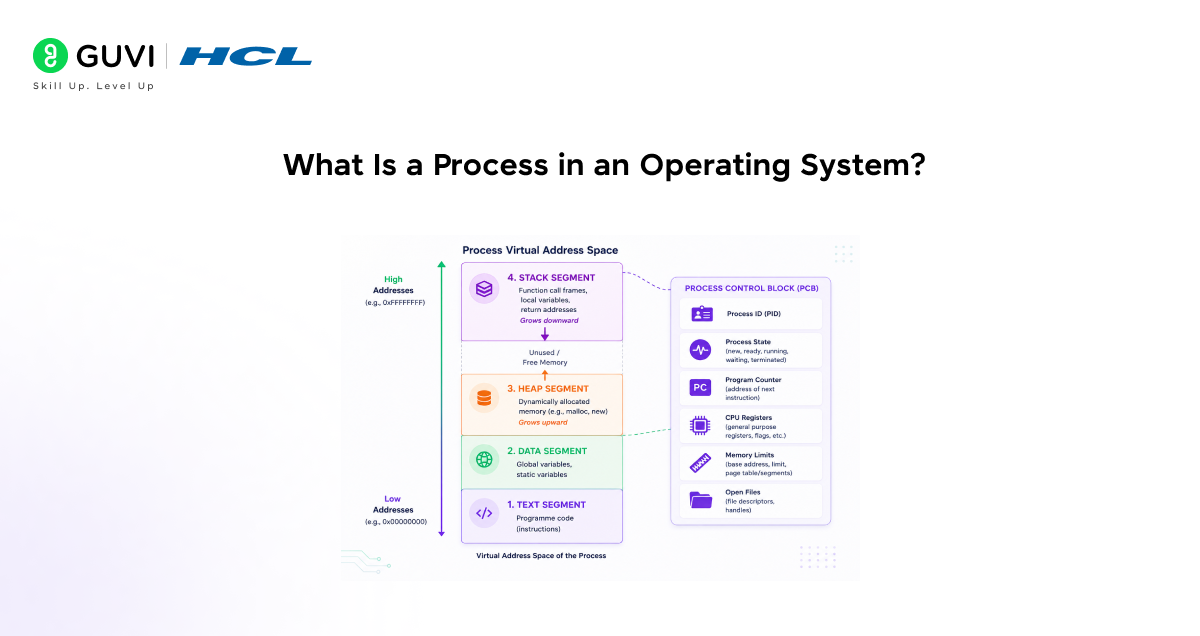
Before examining the state diagram, it is important to establish precisely what a process is, because the state diagram describes what happens to a process, and the answer depends on understanding what a process is at a fundamental level.
A process is a programme in execution. A programme is a passive entity, a set of instructions stored on disk. A process is the active, dynamic instance of that programme running in memory, consuming CPU time, and interacting with system resources.
A process consists of:
- Text segment: The compiled machine code instructions of the programme.
- Data segment: Global and static variables initialised at compile time.
- Heap: Memory allocated dynamically at runtime via malloc(), new, or equivalent.
- Stack: Function call frames containing local variables, parameters, and return addresses.
- Process Control Block (PCB): A kernel data structure containing all metadata needed to manage the process, including its current state, program counter, CPU register values, memory maps, and file descriptor table.
The PCB is the operating system’s complete record of a process. Every time a process is suspended, preempted by the scheduler or blocked waiting for I/O, the OS saves the process’s CPU state into its PCB. When the process is resumed, the OS restores this state, allowing execution to continue exactly where it left off.

The Five-State Process State Diagram
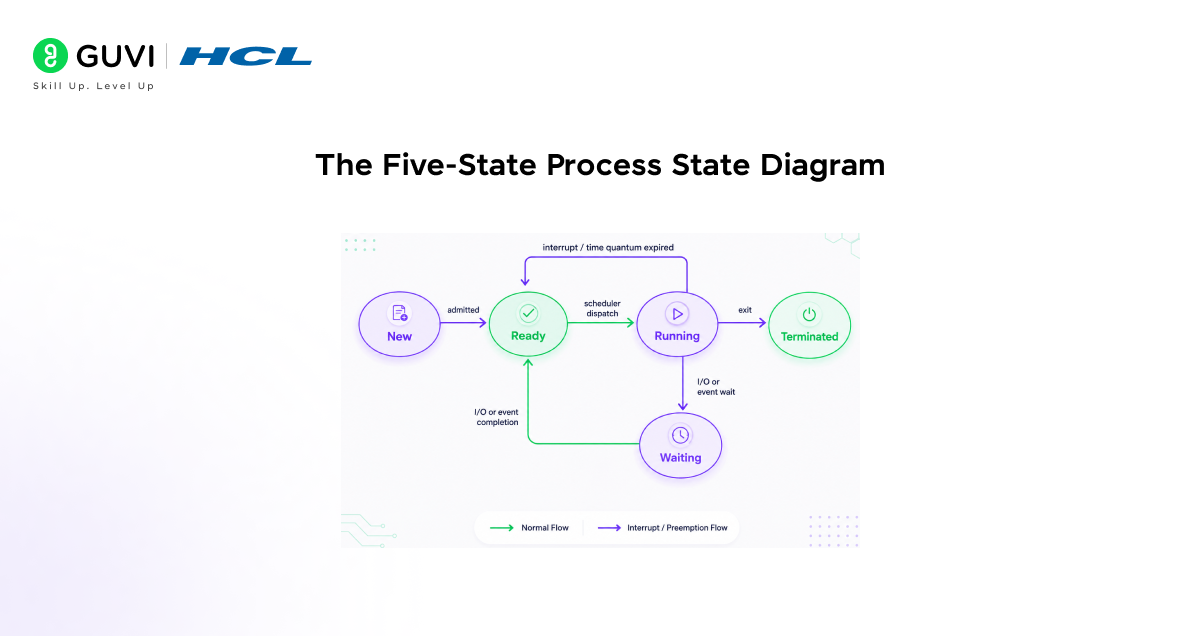
The standard process state diagram in operating systems defines five states. Every process occupies exactly one of these states at any point in time.
State 1: New
The New state represents a process that has been created but has not yet been admitted to the pool of executable processes. At this stage:
- The process has been initialised, memory has been allocated, the PCB has been created, and the programme code has been loaded (or is being loaded).
- The operating system has not yet committed the process to the ready queue.
- In some systems, the New state exists to allow the OS to control the degree of multiprogramming, the number of processes simultaneously in memory, before admitting new ones.
Transition out of New: when the OS is ready to admit the process, it transitions to the Ready state.
State 2: Ready
A process in the Ready state is fully prepared to execute. It is loaded in memory, all necessary resources have been allocated, and it is waiting only for CPU time.
- Multiple processes can be in the Ready state simultaneously.
- They are held in a data structure called the ready queue typically implemented as a priority queue or a multi-level queue, depending on the scheduling algorithm.
- A process enters the Ready state either from New (on admission), from Waiting (when its I/O request completes), or from Running (when it is preempted or its time quantum expires).
Transition out of Ready: the CPU scheduler selects a process from the ready queue and dispatches it to the CPU. This is the scheduler dispatch transition, which moves the process to Running.
State 3: Running
A process in the Running state is actively executing on a CPU core; its instructions are being fetched, decoded, and executed by the processor.
- At any instant, at most one process per CPU core can be running.
- On a multi-core processor, one process can be running on each core simultaneously, for true parallel execution.
- The process occupies the CPU until one of three events occurs: it completes, it requests I/O (or another event requiring a wait), or it is preempted by the scheduler.
Transitions out of Running:
- Exit → Terminated: The process finishes its execution normally, or is killed by the OS or another process.
- I/O or event wait → Waiting: The process requests an I/O operation (disk read, network receive) or another event that cannot be completed immediately.
- Interrupt/time quantum expired → Ready: The scheduler preempts the process either because a higher-priority process became ready, or because the process’s allocated time quantum has expired in a time-sharing system.
State 4: Waiting (Blocked)
A process in the Waiting state, also called the Blocked state, cannot execute because it is waiting for an event to occur. The most common cause is an I/O request: the process has asked for data from disk or the network, and the operation is not yet complete.
- While waiting, the process relinquishes the CPU entirely. The scheduler can assign the CPU to another process.
- Multiple processes can be in the Waiting state simultaneously, each waiting for a different event.
- Processes in the Waiting state are held in device queues, separate queues associated with each I/O device or resource they are waiting for.
Transition out of Waiting: when the event the process is waiting for occurs (I/O completes, a semaphore is signalled, a timeout fires), the process transitions back to Ready, not directly back to Running. It must re-enter the ready queue and wait for the scheduler to dispatch it again.
State 5: Terminated
A process in the Terminated state has finished execution. Its work is done either because it called exit(), returned from main(), encountered an unhandled exception, or was forcibly killed by the operating system or another process.
- The process no longer executes, but its PCB may remain in the process table temporarily.
- In UNIX-like systems, a terminated process that has not yet been “waited on” by its parent is called a zombie process. Its PCB is retained until the parent calls wait() to collect the exit status.
- Once the parent collects the exit status (or the process is orphaned and reparented to init/systemd), the PCB is removed, and all resources are fully reclaimed.
The five-state process model (New, Ready, Running, Waiting/Blocked, and Terminated) was formalized in early operating systems theory during the 1960s and 1970s, as researchers worked on large-scale systems such as IBM OS/360 and early time-sharing systems developed at Bell Labs, where UNIX was also created. This model became a foundational abstraction for understanding how an operating system manages CPU scheduling, I/O waiting, and process lifecycle transitions. It remains widely used today in modern OS design, teaching, and system simulation because it clearly captures the dynamic behavior of processes as they move through execution states.
Process State Transitions in Detail
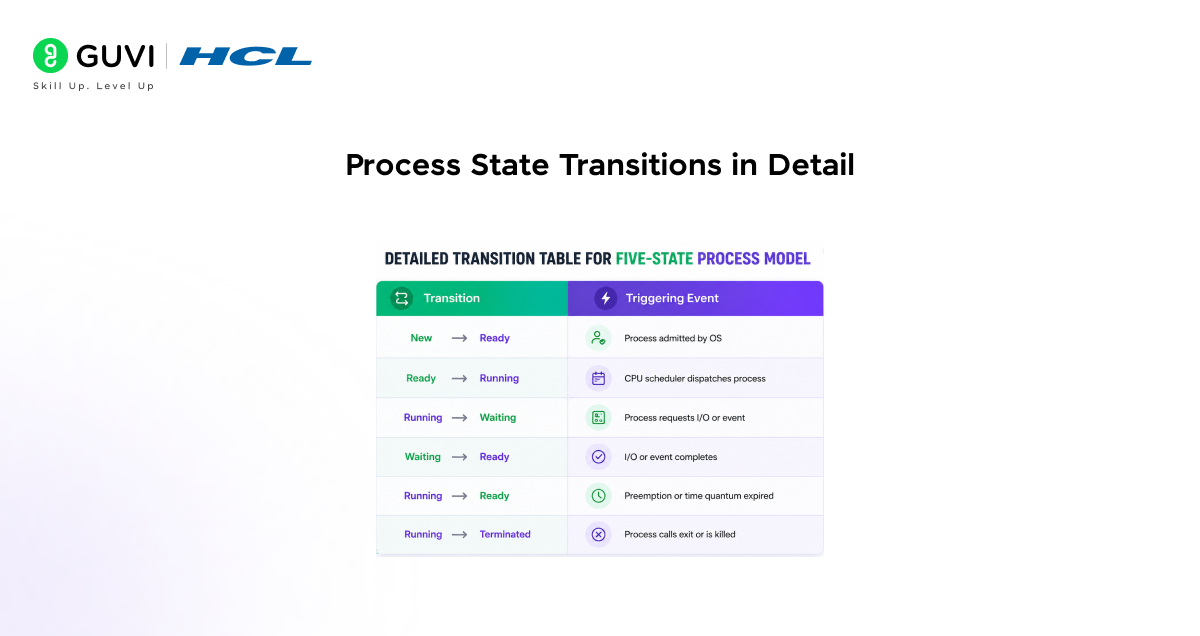
Every arrow in the process state diagram represents a transition, a change of state triggered by a specific event. Understanding each transition is essential for understanding CPU scheduling, I/O management, and process synchronisation.
New → Ready: Admission
When the OS creates a process and decides to admit it to the pool of executable processes, it moves from New to Ready. The admission decision may be influenced by the current degree of multiprogramming. The OS may delay admission if too many processes are already in memory to prevent excessive swapping.
Ready → Running: Scheduler Dispatch
The short-term scheduler (CPU scheduler) selects a process from the ready queue according to the scheduling algorithm in use (First-Come-First-Served, Round Robin, Shortest Job Next, Multi-Level Feedback Queue, etc.) and dispatches it to the CPU. This involves a context switch the OS saves the CPU state of the previously running process into its PCB, and loads the state of the newly selected process from its PCB.
Running → Waiting: I/O or Event Request
When a running process issues an I/O request reading from disk, waiting for keyboard input, or receiving network data, it cannot continue executing until the I/O completes. The OS moves it to the Waiting state and places it in the device queue for the requested resource. The CPU is freed, and the scheduler dispatches another ready process.
Waiting → Ready: I/O or Event Completion
When the I/O operation or event the process was waiting for completes, an interrupt is raised by the device controller. The interrupt handler runs, removes the process from the device queue, and places it back in the ready queue. The process is now Ready it does not immediately resume running but must wait for the scheduler to select it.
Running → Ready: Preemption or Time Quantum Expiry
In preemptive scheduling systems, which include all modern general-purpose operating systems, the OS can remove a running process from the CPU before it voluntarily yields. This happens when:
- A higher-priority process becomes ready (priority preemption).
- The process’s time quantum (time slice) expires in a Round Robin or time-sharing scheduler.
- A real-time deadline requires another process to run immediately.
The process is moved back to the Ready state, not to Waiting, because it is still executable; it simply does not have CPU time at this moment.
Running → Terminated: Exit
When a process finishes its work, it calls exit() (or the equivalent system call), causing the OS to move it to the Terminated state. The OS releases most of the process’s resources memory, open file handles, and network connections and removes it from the ready queue. The PCB is retained briefly for the zombie cleanup mechanism described above.
The Seven-State Model: Adding Suspend States
The five-state model is the conceptual foundation, but real operating systems often implement an extended seven-state model that handles the case where memory is insufficient to hold all processes simultaneously.
When the OS faces memory pressure, more processes are in memory than available RAM can support it can swap processes out to disk. Two additional states support this:
Ready Suspended
A process that was in the Ready state but has been swapped out to disk by the medium-term scheduler. It is ready to run in the sense that it is not waiting for I/O, but it is not in memory, so it cannot be dispatched to the CPU until it is swapped back in.
Waiting Suspended (Blocked Suspended)
A process that was in the Waiting state has been swapped out to disk. It is waiting for an I/O event and is not in memory. When the event completes, it transitions to Ready Suspended (not directly to Ready), because it still needs to be swapped back into memory before it can run.
The medium-term scheduler manages swapping decisions, choosing which processes to swap out when memory is scarce and which to swap back in when memory becomes available. This is distinct from the short-term CPU scheduler.
The Process Control Block (PCB)
The Process Control Block is the operating system’s central data structure for process management. Every process has exactly one PCB. The PCB contains everything the OS needs to manage, schedule, and restore the process.
PCB Contents
• Process ID (PID): A unique integer identifier assigned by the OS when the process is created.
• Process state: The current state of the process New, Ready, Running, Waiting, or Terminated.
• Program counter (PC): The memory address of the next instruction to be executed. Saved and restored on every context switch.
• CPU register values: The values of all CPU registers at the time the process was last preempted. Saved and restored on every context switch.
• Memory management information: Page tables, segment tables, base and limit registers, or other memory mapping structures depending on the memory management scheme.
• I/O status information: A list of open file descriptors, network connections, devices allocated to the process, and pending I/O requests.
• Accounting information: CPU time consumed, wall-clock time elapsed, time limits, job accounting data used by the OS for scheduling and resource management.
Context Switching
A context switch is the act of saving the CPU state of the currently running process into its PCB and restoring the CPU state of the next process to run from its PCB. Context switches are triggered whenever the CPU scheduler dispatches a different process.
Context switching is pure overhead — the CPU performs no useful user work while switching. Operating systems minimise context switch time through hardware support (special save/restore instructions), optimised kernel code paths, and careful scheduling to reduce unnecessary switches.
Process Scheduling Queues
The operating system maintains a set of queues to implement the process state diagram in practice. Each queue holds the PCBs of processes in a particular state.
Job Queue
Contains the PCBs of all processes in the system in every state from New to Terminated. The job queue gives the OS a global view of all processes.
Ready Queue
Contains the PCBs of all processes that are in the Ready state loaded in memory and waiting for CPU time. The short-term scheduler selects from this queue to dispatch the next process to the CPU. The implementation varies by scheduling algorithm: a simple FCFS queue, a priority queue, or multiple queues in a multi-level feedback queue scheduler.
Device Queues
For each I/O device (disk, network interface, keyboard, etc.), the OS maintains a separate device queue containing the PCBs of processes waiting for that device. When a process requests I/O, its PCB is placed in the appropriate device queue. When the I/O completes, the PCB is removed from the device queue and placed back in the ready queue.
Process States in Real Operating Systems
Real operating systems implement the conceptual five-state model with additional detail and OS-specific substates.
Linux Process States
- TASK_RUNNING: The process is either running on a CPU or in the ready queue waiting to run. Linux combines Running and Ready into a single state.
- TASK_INTERRUPTIBLE: The process is sleeping (waiting) and can be woken up by a signal or by the completion of the event it is waiting for.
- TASK_UNINTERRUPTIBLE: The process is sleeping and cannot be woken up by a signal used for critical waits where interruption would leave the kernel in an inconsistent state (typically during direct disk I/O).
- TASK_STOPPED: The process has been stopped by a signal (SIGSTOP or SIGTSTP) and will not run until it receives SIGCONT.
- TASK_ZOMBIE: The process has terminated but its PCB (task_struct) has not yet been collected by the parent via wait().
Windows Process States
Windows defines six process states: Initialised (being created), Ready (in the ready queue), Running (executing on a processor), Waiting (waiting for an object handle or event), Transition (waiting for a resource needed to continue a kernel-level ready-suspended state), and Terminated (execution complete). The Transition state is Windows’ implementation of the ready-suspended concept from the seven-state model.
Why the Process State Diagram Matters
The process state diagram is not merely a theoretical model. It is the operational blueprint for every major subsystem in a modern operating system.
- CPU scheduling: The scheduler’s entire job is to manage transitions between the Ready and Running states. Every scheduling algorithm, Round Robin, Priority Scheduling, Shortest Job First, Multi-Level Feedback Queue, is an algorithm for deciding which Ready process to move to running next, and when to preempt the current Running process.
- Memory management: The medium-term scheduler uses the suspend states to manage physical memory pressure. Understanding when and why processes move between Ready, Ready Suspended, Waiting, and Waiting Suspended is essential for understanding virtual memory and swapping.
- I/O management: Every I/O operation triggers a Running → Waiting transition and eventually a Waiting → Ready transition. The efficiency of the I/O subsystem directly determines how long processes spend in the Waiting state — a key factor in overall system throughput.
- Process synchronisation: Semaphores, mutexes, and condition variables work by moving processes between the Running and Waiting states. A wait() call on a locked semaphore moves the process to Waiting; a signal() call moves a waiting process back to Ready. The process state diagram is the foundation for understanding all synchronisation primitives.
- Debugging and performance analysis: Tools such as top, htop, ps, and Process Explorer display process states in real time. Understanding the state diagram allows engineers to diagnose whether a system is CPU-bound (many processes in Ready), I/O-bound (many processes in Waiting), or correctly balanced.
Curious about how modern software and operating systems work behind the scenes? Join HCL GUVI’s AI Software Development Course to learn AI development, Python programming, OS fundamentals, process management, memory management, backend systems, APIs, and real-world software engineering concepts used in intelligent applications and scalable web platforms
Conclusion
The process state diagram is one of the most fundamental and enduring models in operating systems design. By defining the five states New, Ready, Running, Waiting, and Terminated — and the precise events that cause transitions between them- it provides a complete and rigorous description of how a process lives and evolves within a multitasking operating system.
Every component of the OS depends on this model. The CPU scheduler manages the Ready-to-Running transition. The I/O subsystem drives the Running-to-Waiting and Waiting-to-Ready transitions. The memory manager uses the extended suspend states to handle memory pressure. Synchronisation primitives use the Waiting state to implement mutual exclusion and coordination.
The Process Control Block is the data structure that makes all of this possible. It is the OS’s complete record of a process, enabling it to be suspended, resumed, and managed across potentially millions of state transitions during its lifetime.
Understanding the process state diagram is not just academic knowledge it is the foundation for understanding CPU scheduling algorithms, I/O performance, memory management, and process synchronisation. It is the model that every operating systems engineer works with, consciously or not, every day.
FAQs
1. What is a process state diagram in OS?
A process state diagram is a formal model that defines all states a process can occupy during its lifetime in an operating system New, Ready, Running, Waiting, and Terminated — and the events that trigger transitions between those states. It is the foundational model for CPU scheduling, I/O management, and process synchronisation.
2. What are the five states in the process state diagram?
The five states are New (process just created), Ready (loaded in memory, waiting for CPU), Running (actively executing on CPU), Waiting or Blocked (waiting for I/O or an event), and Terminated (execution complete). Every process occupies exactly one of these states at any instant.
3. Why does a process move from Running back to Ready?
A Running process returns to Ready when it is preempted by the scheduler either because its time quantum (time slice) has expired in a Round Robin system, or because a higher-priority process has become ready and the scheduler performs priority preemption. The process is still executable; it simply lacks CPU time.
4. What is the difference between the Waiting and Ready states?
A process in the Ready state is fully prepared to run and is only waiting for CPU time. A process in the Waiting (Blocked) state cannot run; even if the CPU is free, it is waiting for an external event, such as I/O completion. When the event occurs, the process moves from Waiting back to Ready, not directly to Running.
5. What is a zombie process?
A zombie process is a process that has terminated, moved to the Terminated state, but whose Process Control Block (PCB) has not yet been removed because its parent has not called wait() to collect the exit status. It occupies a slot in the process table but consumes no CPU or memory beyond its PCB.
Success Stories

About the Author
Vishalini Devarajan
An Aerospace Engineer turned content writer, I focus on making complex concepts easy to understand through well-structured, reader-friendly blogs. Whether it’s a technical topic or a non-technical one, I love creating content that is clear, engaging, and impactful.
View all posts by Vishalini Devarajan
Connect with me @













Did you enjoy this article?