


Artificial Intelligence and Machine Learning Articles
Time Series Forecasting Evaluation Metrics: MAPE, RMSE, MAE
What is Statistical Power Analysis Explained


Get In Touch For Details! Request More Information
Master Allotrope Skill for Instrument Data in Claude
Jun 22, 2026 6 Min Read 567 Views
(Last Updated)
Science labs generate enormous amounts of data every single day. Instruments like spectrometers, chromatographs, and analytical balances are constantly producing readings, measurements, and results. But here is the problem: all that data sits in different formats, different files, and different systems that do not talk to each other easily.
That is where the Allotrope Framework comes in. And when you combine it with Claude, something genuinely useful happens.
This guide walks you through what the Allotrope Framework is, what the Instrument Data to Allotrope skill does, and how you can use Claude to make the whole process simpler, faster, and less painful. No prior lab informatics experience needed.
Quick TL;DR Summary
- This guide explains what the Allotrope Framework is and why it is becoming essential for managing scientific instrument data in labs and research environments.
- You will learn what the Instrument Data to Allotrope skill does and how Claude makes the conversion process simple, even without a technical background.
- The guide walks you through every step of converting raw instrument data into a valid Allotrope-compliant format using Claude.
- Real-world examples show you exactly what the process looks like in practice, from a raw CSV file to a finished Allotrope output.
- Practical tips help you avoid the most common mapping mistakes and get accurate, validated results every time.
- By the end, you will have a clear workflow you can repeat for any instrument data your lab or team produces.
Table of contents
- What Is the Allotrope Framework?
- What Is the Instrument Data to Allotrope Skill?
- Why This Actually Matters
- How to Use the Instrument Data to Allotrope Skill with Claude: Step by Step
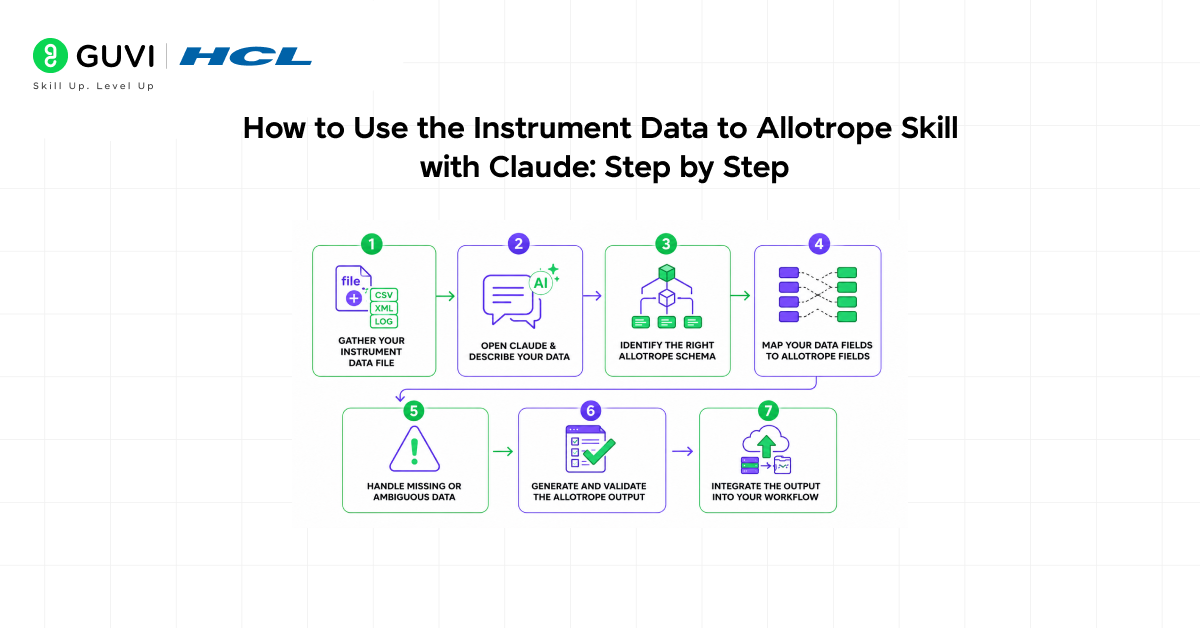
- Step 1: Gather Your Instrument Data File
- Step 2: Open Claude and Describe Your Data
- Step 3: Identify the Right Allotrope Schema
- Step 4: Map Your Data Fields to Allotrope Fields
- Step 5: Handle Missing or Ambiguous Data
- Step 6: Generate and Validate the Allotrope Output
- Step 7: Integrate the Output into Your Workflow
- Real-World Example
- Common Formats the Skill Works With
- Top Tips for Getting the Best Results
- Common Mistakes to Avoid
- How This Skill Saves Time and Reduces Errors
- Conclusion
- FAQs
- Do I need coding experience to use this skill with Claude?
- What types of instruments does the Allotrope Framework support?
- Is my data safe when I share it with Claude?
- What if my data does not fit any existing Allotrope schema?
- Can I automate this process once I understand the mapping?
What Is the Allotrope Framework?
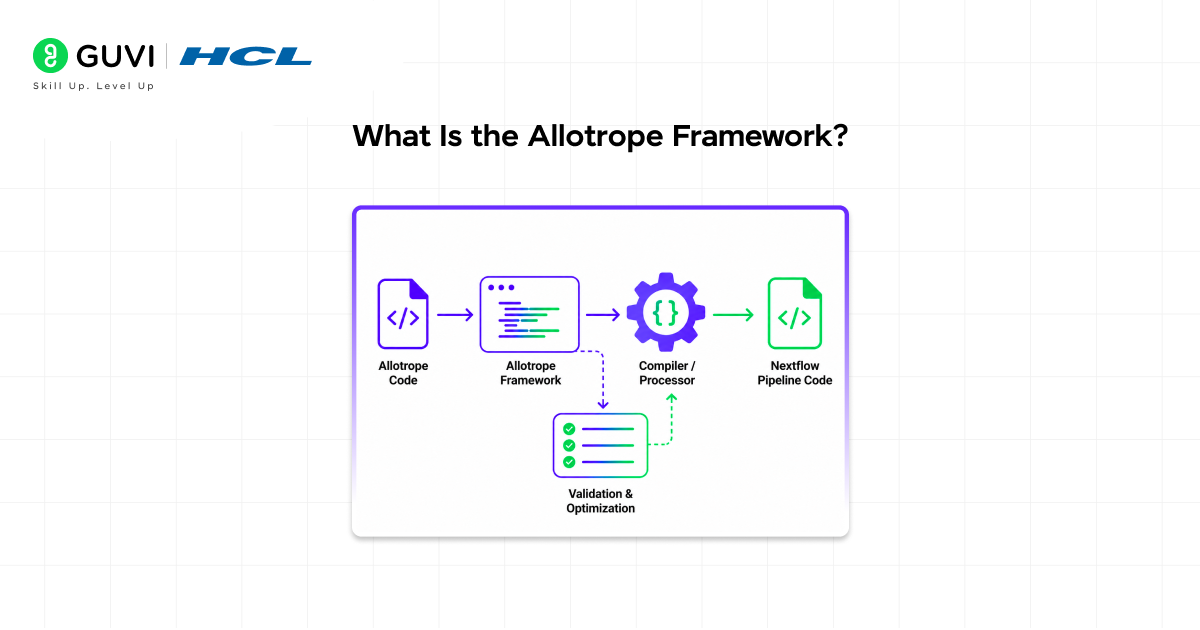
The Allotrope Foundation is a consortium of pharmaceutical and biotech companies that came together to solve a very specific problem: scientific data in labs was a mess. Every instrument manufacturer used its own proprietary file format. Sharing data between systems meant hours of manual conversion work, and errors crept in constantly.
Allotrope created a set of open, standardized data formats called Allotrope Simple Models (ASM). Think of it like a universal language that all lab instruments can eventually speak. When your data is in an Allotrope format, it becomes interoperable, meaning different software systems, teams, and even companies can read and use it without confusion.
The format is built on widely accepted technologies like HDF5 for data storage and JSON-LD for metadata, so it is both human-readable and machine-friendly.
In short: Allotrope is to lab data what PDF became to documents. A reliable, consistent format that just works everywhere.
What Is the Instrument Data to Allotrope Skill?
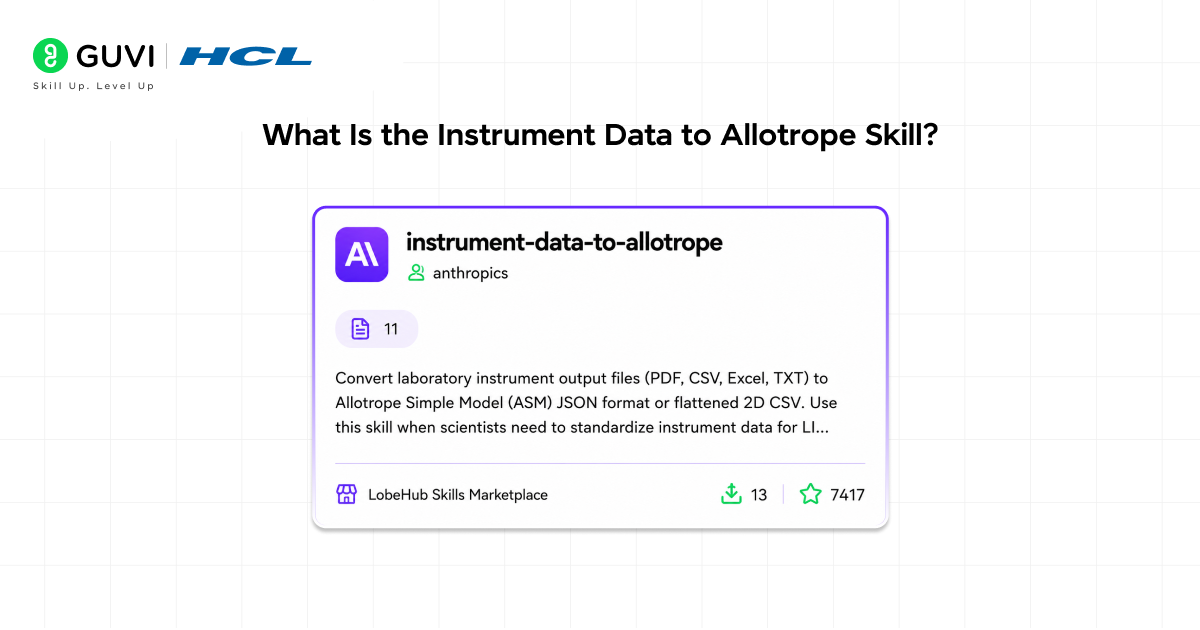
The Instrument Data to Allotrope skill is a structured capability that helps users take raw data files from scientific instruments and convert them into valid Allotrope-compliant formats.
Here is what that means in plain language:
Your instrument spits out a file. Maybe it is a CSV, an XML, a proprietary binary file, or even a plain text report. That file has all the measurements and results you need, but it is not in a format that your data management system or downstream software can easily use.
The skill bridges that gap. It takes the raw output, understands the structure of the data inside it, maps that data to the correct Allotrope fields and schemas, and produces a clean, standardized output.
When Claude uses this skill, it acts as your guide through every step of that process, helping you identify the right schema, checking that your data maps correctly, and flagging anything that looks off before it becomes a bigger problem.
Read More: Train Claude Your Way with Skills: Practical Guide
Why This Actually Matters
You might be thinking: can I not just handle this with a spreadsheet or a simple script?
Technically, yes. Practically, no.
Here is why:
Lab instruments produce highly structured scientific data that carries a lot of context. A number like “245.6” means nothing without knowing the unit, the method, the instrument used, the time it was recorded, and dozens of other metadata points. Allotrope formats capture all of that context in a standardized way. A basic spreadsheet does not.
Beyond that, regulatory environments in pharma and biotech require audit trails, data integrity, and reproducibility. Allotrope-compliant data satisfies those requirements in a way that ad-hoc conversions simply cannot.
Using Claude with the Instrument Data to Allotrope skill means you get the accuracy of a structured conversion process without needing a full team of data engineers to set it up.
Did You Know? The Allotrope Foundation was not built by a tech company. It was built by scientists who were simply tired of wasting time converting data files. Frustration turned into one of the biggest data standards in life sciences history.
How to Use the Instrument Data to Allotrope Skill with Claude: Step by Step
Step 1: Gather Your Instrument Data File
Start by collecting the raw data output from your instrument. This could be:
- A CSV or TSV file exported from your instrument software
- An XML report generated automatically after a run
- A plain text log file from a legacy system
- A proprietary format file that you have already converted to a readable form
Make note of what instrument produced the data and what type of measurement it represents. For example: an HPLC chromatography run, a UV-Vis absorbance measurement, or a plate reader assay result. This context matters.
Step 2: Open Claude and Describe Your Data
Start a conversation with Claude and describe what you are working with. Be specific. Tell Claude:
- What instrument produced the data
- What kind of experiment or measurement it represents
- What file format the data is currently in
- What you are trying to achieve with the conversion
The more context you give Claude upfront, the more accurate and useful its guidance will be. You can also paste a sample of your data directly into the conversation so Claude can see the structure firsthand.
Step 3: Identify the Right Allotrope Schema
Allotrope has different schemas for different types of instruments and measurements. A chromatography result uses a different schema than a spectroscopy result, for example.
Claude will help you identify which Allotrope Simple Model applies to your data. It will ask clarifying questions if needed, such as:
- Is this a single measurement or a time series?
- Does the data include multiple channels?
- What units are used for the key measurements?
This step is important because picking the wrong schema leads to data that does not validate correctly later.
Step 4: Map Your Data Fields to Allotrope Fields
Once you know the right schema, the next task is mapping. This means matching each column or field in your raw data to the corresponding field in the Allotrope format.
For example, your CSV might have a column called “Retention Time (min)” and the Allotrope schema has a field called “retention time” with a specific unit definition. Claude helps you make these connections clearly, pointing out where field names match, where units need converting, and where required fields might be missing from your raw data.
This is often the step where people get stuck on their own, but with Claude walking you through it, it becomes much more manageable.
Step 5: Handle Missing or Ambiguous Data
Real lab data is rarely perfect. There are often missing values, ambiguous labels, or measurements recorded in slightly different ways than the schema expects.
Claude helps you decide how to handle these situations. Should a missing field be left blank, filled with a default value, or flagged for manual review? Should a unit be converted before mapping? Claude gives you options and explains the tradeoffs so you can make an informed decision rather than guessing.
Step 6: Generate and Validate the Allotrope Output
Once the mapping is complete, Claude helps you structure the output in the correct Allotrope format. This is where the actual conversion happens.
You can then take that output and validate it against the official Allotrope schema to confirm it is compliant. Claude can also walk you through what validation errors mean if any come up, and help you fix them without starting over from scratch.
Step 7: Integrate the Output into Your Workflow
The final step is using your newly converted Allotrope file in whatever system or workflow needs it. This might mean uploading it to a laboratory information management system (LIMS), sharing it with a collaborator, archiving it for regulatory purposes, or feeding it into a data analysis pipeline.

Claude can help you think through this step too, especially if you are not sure how your downstream system expects to receive Allotrope data.
Scientists spend up to 30% of their work week reformatting data before analysis — nearly one and a half days lost to manual tasks like copy-pasting. The Instrument Data to Allotrope skill is designed to eliminate this inefficiency and streamline data workflows.
Real-World Example
Say you work in a pharmaceutical lab and you have just completed an HPLC run to analyze a drug compound. Your instrument software exports a CSV file with columns for retention time, peak area, peak height, and compound name.
You bring that file to Claude and explain what it is. Claude identifies that the Allotrope chromatography schema is the right fit. It walks you through mapping each CSV column to the corresponding Allotrope field, flags that your peak area values are in arbitrary units that need to be labeled correctly, and helps you add the required metadata like instrument name, method name, and run date.
Within a single conversation, you have a validated Allotrope file ready to upload to your LIMS. What might have taken a developer half a day to script from scratch takes you under an hour, and you understand every decision that was made along the way.
Common Formats the Skill Works With
The Instrument Data to Allotrope skill through Claude works with a wide range of starting formats including:
- CSV and TSV files from any instrument export
- XML files from automated instrument reporting systems
- Plain text or log files from older instruments
- JSON files from modern connected instruments
- Structured data pasted directly into the conversation
If your data is in a truly proprietary binary format, you will typically need to export it to one of the above formats first using your instrument software before Claude can work with it.
Top Tips for Getting the Best Results
- Give Claude as much context as possible upfront.
The instrument type, measurement type, and end goal all shape the guidance Claude provides. Vague inputs lead to vague outputs.
- Paste a sample of your data directly.
Even just the first ten rows of a CSV help Claude understand your data structure immediately rather than asking a series of clarifying questions.
- Do not skip the validation step.
Even if everything looks right, running your output through an Allotrope validator catches small errors before they cause problems downstream.
- Ask Claude to explain its reasoning.
If Claude maps a field in a way that surprises you, ask why. Understanding the logic helps you catch mistakes and learn the schema faster.
- Start with a small dataset.
When you are learning the process, use a single run or a small sample file. Once you are comfortable, scaling up is straightforward.
- Keep notes on your mapping decisions.
If you convert the same type of instrument data regularly, documenting which fields map to which saves time on future conversions.
Common Mistakes to Avoid
- Assuming all instrument data of the same type uses the same schema.
Different instruments measuring the same thing can structure their output differently. Always review your specific file before assuming a mapping from a previous conversion will work.
- Ignoring units.
Allotrope is very precise about units. A value recorded in milliseconds that gets mapped to a field expecting seconds will pass validation but produce wrong results. Always double-check units during mapping.
- Skipping metadata.
It is tempting to focus only on the measurement values and ignore fields like instrument name, operator, and run date. But metadata is what makes Allotrope data genuinely useful and regulatory-compliant. Do not leave it out.
- Treating the first output as final.
The first conversion attempt rarely produces a perfect file. Expect to iterate, validate, and refine. That is a normal part of the process.
- Using Claude without providing your data.
Claude can explain the process in general terms, but the real value comes when you share your actual data and work through a real conversion together.
How This Skill Saves Time and Reduces Errors
Manual data conversion is one of the most error-prone tasks in any lab. When a person manually reformats data, small mistakes happen: a column gets shifted, a unit gets dropped, a value gets misread. These errors can cascade into larger problems, especially in regulated environments.
The Instrument Data to Allotrope skill with Claude reduces that risk by making the conversion process structured and systematic. Every field mapping is deliberate. Every decision is documented in the conversation. And because Claude explains each step, you are not just getting a converted file. You are building an understanding of the process that makes future conversions faster and more reliable.
If you want to learn more on how to use the Instrument Data to Allotrope Skill with Claude, do not miss the chance to enroll in HCL GUVI’s Intel & IITM Pravartak Certified Artificial Intelligence & Machine Learning course. Endorsed with Intel certification, this course adds a globally recognized credential to your resume, a powerful edge that sets you apart in the competitive AI job market.
Conclusion
Lab data does not have to be a formatting headache. The Allotrope Framework exists to make scientific data consistent, shareable, and trustworthy, and the Instrument Data to Allotrope skill with Claude makes adopting that framework accessible to anyone, not just data engineers or developers.
Whether you are a researcher dealing with chromatography data, a lab manager trying to standardize outputs across your team, or a tech-curious professional exploring what AI-assisted workflows can do, this skill is worth exploring.
Start small. Bring one file to Claude. Walk through the process. See how much simpler it can be.
FAQs
1. Do I need coding experience to use this skill with Claude?
No. Claude guides you through the process in plain language. You do not need to write any code to complete a basic conversion.
2. What types of instruments does the Allotrope Framework support?
The Allotrope Foundation has developed schemas for many common lab instruments including chromatography systems, spectrophotometers, plate readers, and more. The list continues to grow as new schemas are published.
3. Is my data safe when I share it with Claude?
You should always follow your organization’s data sharing policies. For sensitive or proprietary data, consider using anonymized or sample data during the learning phase.
4. What if my data does not fit any existing Allotrope schema?
Claude can help you identify the closest matching schema and discuss how to handle fields that do not have a direct equivalent. In some cases, custom extensions to the schema are possible.
5. Can I automate this process once I understand the mapping?
Yes. Once you have worked through a conversion manually with Claude, you have all the information needed to build an automated script or pipeline if that suits your workflow.
Success Stories

About the Author
Vishalini Devarajan
An Aerospace Engineer turned content writer, I focus on making complex concepts easy to understand through well-structured, reader-friendly blogs. Whether it’s a technical topic or a non-technical one, I love creating content that is clear, engaging, and impactful.
View all posts by Vishalini Devarajan
Connect with me @




Did you enjoy this article?