


Artificial Intelligence and Machine Learning Articles
AI/ML Skills Gap 2026: Why Companies Can't Find Job-Ready Talent
20 AI/ML Interview Questions Recruiters Can Use Without a Tech Background - Best Guide
How Industry-Backed AI/ML Bootcamps Are Changing the AI/ML Hiring Pipeline - Best Guide 2026
From IT Support to AI Engineer: A Realistic Career Switch Guide 2026


Get In Touch For Details! Request More Information
Nextflow Deployment Agent Skill with Claude Code: A Complete Guide
Jun 22, 2026 5 Min Read 632 Views
(Last Updated)
Picture this: You are a data scientist who wants to automate your machine learning pipelines but gets stuck every time you need to deploy them across different environments. The frustration is real.
Here is the good news: Claude Code’s Nextflow Deployment Agent skill can transform how you build, test, and deploy computational workflows. No more wrestling with cryptic error messages or spending weekends troubleshooting deployment issues.
This guide walks you through everything you need to know about using the Nextflow Deployment Agent skill with Claude Code.
Quick TL;DR Summary
- This guide explains what the Nextflow Deployment Agent skill is and why it revolutionizes workflow management.
- You will learn when to use this skill and which projects benefit most from it.
- The guide provides the core components you need to understand before getting started.
- Step-by-step instructions show you exactly how to set up and use the skill effectively.
- Real-world examples demonstrate what successful Nextflow deployments look like in practice.
- Practical tips help you avoid common mistakes and maximize your productivity.
Table of contents
- What Is the Nextflow Deployment Agent Skill?
- Why the Nextflow Deployment Agent Skill Matters
- When You Need the Nextflow Deployment Agent Skill
- Core Components You Need to Understand
- Step-by-Step: Using the Nextflow Deployment Agent Skill
- Step 1: Install and Set Up Claude Code
- Step 2: Enable the Nextflow Deployment Agent Skill
- Step 3: Define Your Workflow Requirements
- Step 4: Start a Conversation with Claude Code
- Step 5: Build Your Pipeline with Guidance
- Step 6: Configure Deployment Settings
- Step 7: Test, Debug, and Refine
- Real-World Examples of Nextflow Deployments
- Common Formats for Different Deployment Contexts
- Top Strategies for Effective Nextflow Deployment
- Conclusion
- FAQs
- Do I need to be a Nextflow expert to use this skill?
- What if I encounter an error that Claude Code cannot solve?
- Can I use this skill for workflows in other languages?
- How much does it cost to use Claude Code with this skill?
- Will my pipeline work the same way across different environments?
What Is the Nextflow Deployment Agent Skill?
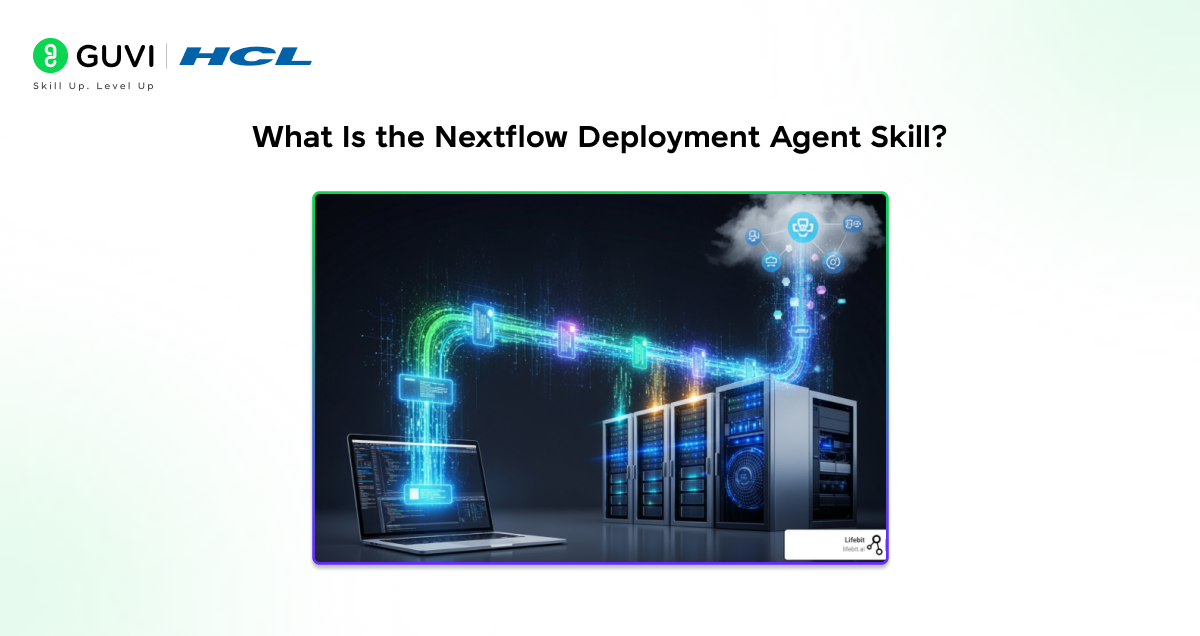
The Nextflow Deployment Agent skill is a specialized capability within Claude Code that helps you create, configure, and deploy Nextflow workflows with expert guidance. Think of it as having a Nextflow expert sitting right beside you, ready to help whenever you hit a roadblock.
Nextflow itself is a powerful workflow management system used primarily in bioinformatics and data-intensive computational research. It lets you write scalable, reproducible pipelines that can run anywhere from your laptop to massive cloud computing clusters.
The skill acts as your personal assistant for all things Nextflow. It understands pipeline syntax, deployment configurations, container management, resource allocation, and troubleshooting. Instead of searching through documentation for hours, you simply ask Claude Code, and it provides tailored solutions.
Why the Nextflow Deployment Agent Skill Matters
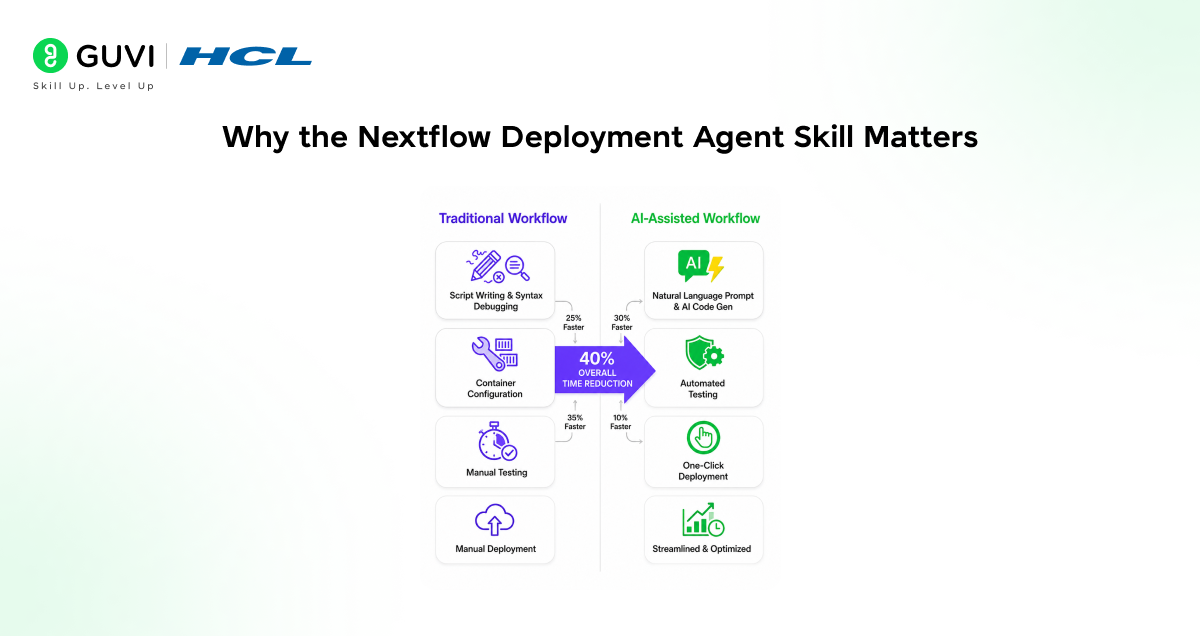
Nextflow workflows are incredibly powerful, but they come with a steep learning curve. The Deployment Agent skill bridges that gap in ways that transform your productivity.
- What Happens Without Expert Guidance
You spend hours debugging syntax errors that an expert would spot immediately. Your workflows fail mysteriously in production environments. Resource allocation becomes a guessing game, wasting computing time and money.
- The Real Impact
Research projects get delayed by deployment issues instead of moving forward. Computing budgets balloon due to inefficient resource usage. Reproducibility suffers when workflow configurations are inconsistent.
- Why This Skill Changes Everything
The Nextflow Deployment Agent skill accelerates your development by providing instant expert answers. It prevents costly mistakes before they happen. It ensures your workflows follow best practices from day one.
Read More: How to Use Claude Code: A Beginner’s Guide
When You Need the Nextflow Deployment Agent Skill
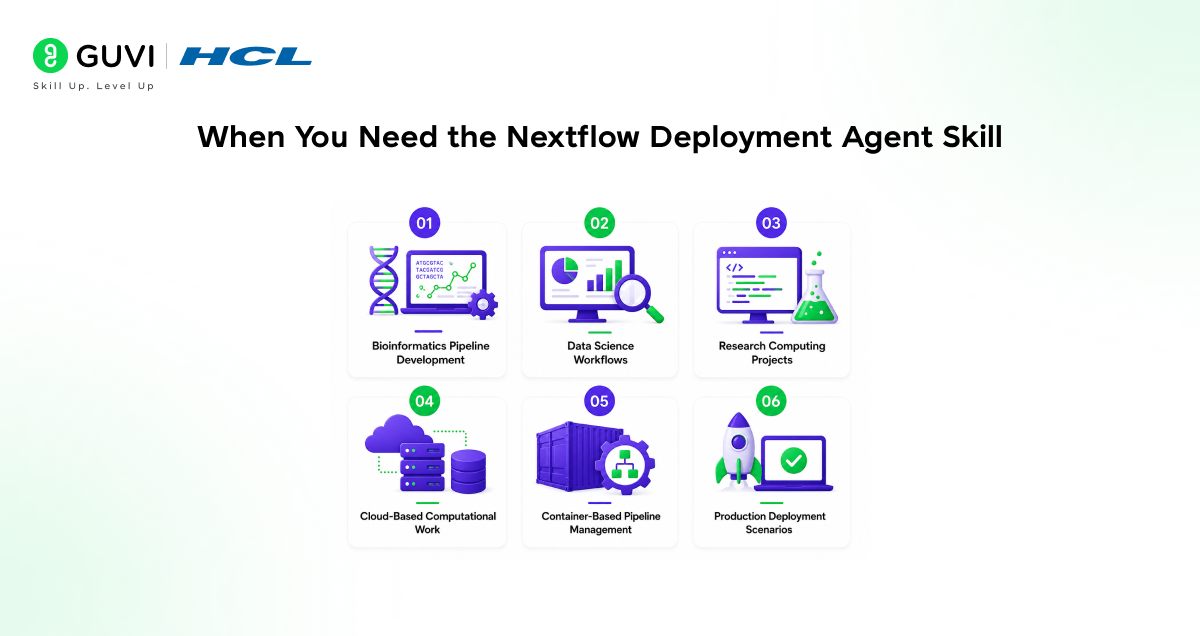
Not every project requires Nextflow, but knowing when this skill becomes invaluable is crucial.
- Bioinformatics Pipeline Development
Genomic sequencing analysis, RNA-seq workflows, variant calling pipelines, metagenomics projects, and proteomics data processing all benefit enormously from Nextflow’s capabilities. The skill guides you through complex biological data processing steps.
- Data Science Workflows
Machine learning pipelines that need reproducibility, batch processing of large datasets, automated model training and evaluation, and data transformation workflows at scale. Get expert help configuring parallel processing and resource optimization.
- Research Computing Projects
Any computational research requiring reproducible results, workflows that need to run on different computing environments, collaborative projects where multiple researchers run the same analyses, and projects with complex dependency chains. The skill ensures your research is reproducible and shareable.
- Cloud-Based Computational Work
Workflows deploying to AWS, Google Cloud, or Azure, pipelines that need to scale dynamically based on workload, cost-sensitive projects requiring efficient resource management, and multi-cloud deployment scenarios. Save money with optimized cloud configurations.
- Container-Based Pipeline Management
Projects using Docker or Singularity containers, workflows requiring strict environment reproducibility, pipelines that need to run identically across different systems, and collaborative research with diverse computing setups. Avoid container configuration headaches.
- Production Deployment Scenarios
Moving research pipelines into production environments, automating recurring computational tasks, building workflows that non-technical users will run, and establishing robust, maintainable analysis infrastructure. Deploy with confidence using tested best practices.
Research shows that scientists using workflow management systems like Nextflow save an average of 40% of their time on computational tasks. Teams that use expert guidance systems during their first three months become 3.5× more productive compared to those learning independently.
Core Components You Need to Understand
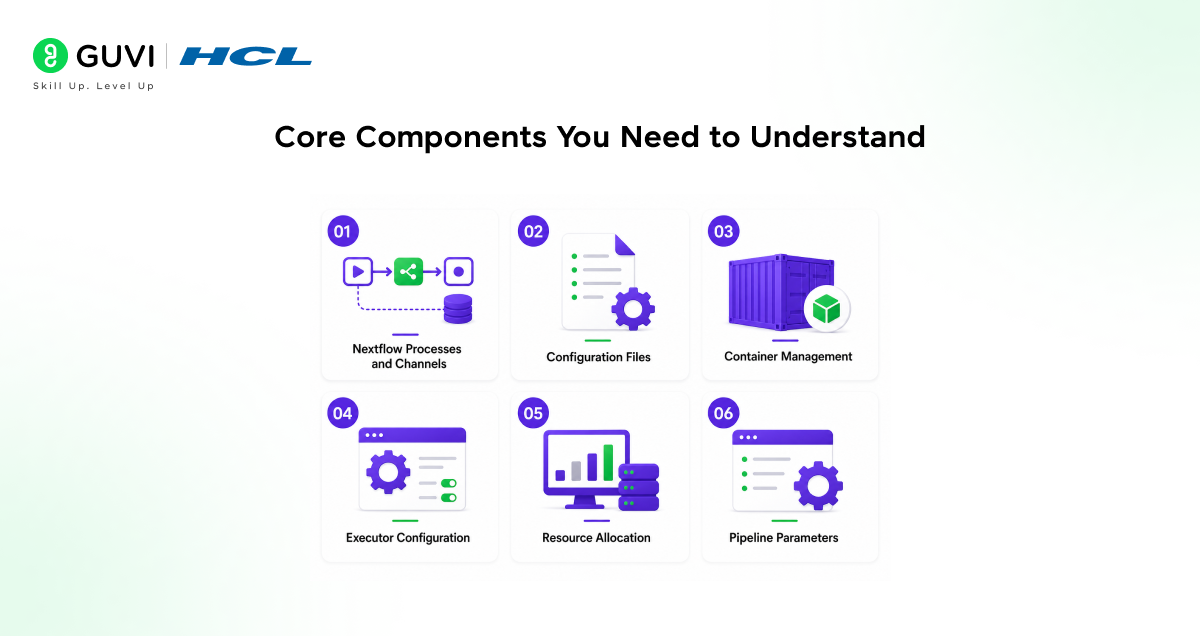
Before diving into using the skill, understanding these fundamental concepts makes everything smoother.
- Nextflow Processes and Channels
Processes are the individual computational steps in your workflow. Channels are the data streams that connect processes together. The skill helps you design both efficiently and correctly.
- Configuration Files
Nextflow uses configuration files to specify execution parameters, resource requirements, and environment settings. The skill guides you in creating configurations that actually work across different environments.
- Container Management
Modern Nextflow workflows run processes in containers for reproducibility. The skill helps you configure Docker or Singularity containers correctly and troubleshoot container-related issues.
- Executor Configuration
Executors determine where and how your workflow runs: local machines, HPC clusters, cloud platforms, or Kubernetes. The skill provides executor-specific guidance for your target environment.
- Resource Allocation
Memory, CPU, and storage requirements vary by process. The skill helps you specify appropriate resources, preventing failures and optimizing costs.
- Pipeline Parameters
Parameters make workflows flexible and reusable. The skill assists in designing clean parameter structures that make your pipelines easy for others to use.
Step-by-Step: Using the Nextflow Deployment Agent Skill
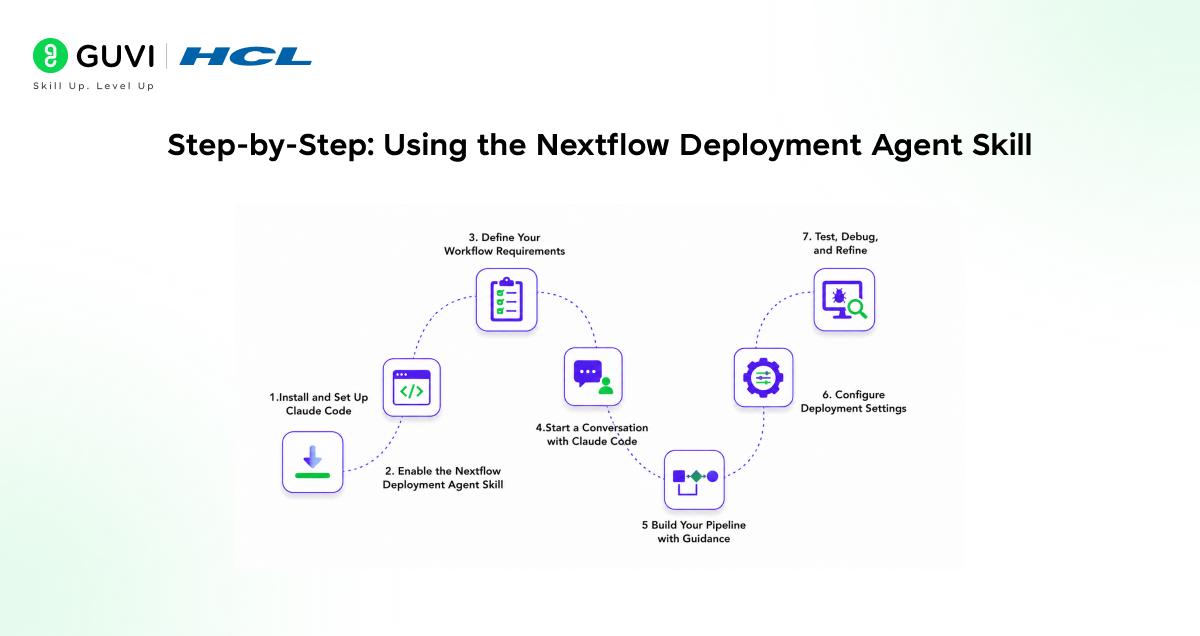
Step 1: Install and Set Up Claude Code
Download Claude Code for your operating system. Install it following the setup instructions. Ensure you have Node.js installed as required.
Step 2: Enable the Nextflow Deployment Agent Skill
Access the skills menu in Claude Code. Locate the Nextflow Deployment Agent skill in the available skills list. Enable the skill for your current project.
Step 3: Define Your Workflow Requirements
Clearly describe what your pipeline needs to accomplish. Identify your input data types and expected outputs. Determine which computational steps your workflow requires.
Step 4: Start a Conversation with Claude Code
Open Claude Code and begin describing your Nextflow project. Ask specific questions about pipeline structure, configuration, or deployment. Provide context about your computing environment and constraints.
Step 5: Build Your Pipeline with Guidance
Follow the suggestions Claude Code provides for pipeline structure. Ask for code examples for specific processes. Request help with channel design and data flow.
Step 6: Configure Deployment Settings
Describe your target deployment environment to Claude Code. Get help creating appropriate configuration files. Receive guidance on resource allocation for each process.

Step 7: Test, Debug, and Refine
Run your pipeline in a test environment. Share error messages with Claude Code for troubleshooting help. Refine configurations based on actual performance.
Developers who document their workflow decisions while building pipelines create more maintainable code. By explaining choices to Claude Code and getting feedback in real time, design flaws can be identified up to 3× earlier than during post-development testing.
Real-World Examples of Nextflow Deployments
- Genomic Variant Calling Pipeline
A researcher needed to process whole genome sequencing data for hundreds of samples. Using Claude Code with the Nextflow Deployment Agent skill, they built a pipeline that handled quality control, alignment, variant calling, and annotation.
Claude Code helped optimize resource allocation, saving 35% on cloud computing costs. The pipeline now processes samples automatically, and the configuration works seamlessly across their local cluster and AWS.
- Machine Learning Model Training Workflow
A data science team wanted to automate hyperparameter tuning across multiple models. With Claude Code’s guidance, they created a Nextflow pipeline that spawned parallel training jobs, collected results, and generated comparison reports.
The skill helped them implement proper container isolation for different model frameworks. They configured dynamic resource scaling based on model complexity, dramatically improving efficiency.
- RNA Sequencing Analysis Pipeline
A bioinformatics core facility needed a standardized RNA-seq workflow for multiple research groups. Claude Code assisted in building a robust pipeline with configurable parameters for different experimental designs.
The skill provided crucial help with error handling, ensuring the pipeline could recover from individual sample failures. The facility now serves dozens of researchers with consistent, reliable analysis.
Common Formats for Different Deployment Contexts
- Local Development Environment
Run Nextflow on your laptop for testing and small datasets. Use minimal resource specifications and configure simple local executor settings. Focus on rapid iteration and debugging.
- HPC Cluster Deployment
Submit jobs through schedulers like SLURM or PBS. Configure appropriate queue systems and resource limits. Handle module loading and environment setup for shared computing resources.
- Cloud Platform Deployment
Deploy to AWS Batch, Google Cloud Life Sciences, or Azure Batch. Configure auto-scaling and cost controls while implementing proper cloud storage integration. Handle credentials and security settings appropriately.
- Kubernetes-Based Execution
Run workflows in containerized Kubernetes environments. Configure pod specifications and resource quotas while implementing proper volume mounting. Handle namespace and service account configurations correctly.
Top Strategies for Effective Nextflow Deployment
- Start Simple, Then Scale
Begin with a basic pipeline that works on small test data. Verify each process individually before connecting them. Add complexity gradually as you understand the behavior.
- Leverage Container Best Practices
Use specific container tags rather than “latest” for reproducibility. Test containers independently before integrating into pipelines. Keep containers focused on single purposes.
- Design for Reproducibility from Day One
Pin all software versions explicitly in your configuration. Document parameter choices and their rationale. Use version control for your pipeline code.
- Monitor Resource Usage
Track actual memory and CPU usage during test runs. Adjust resource requests based on real performance data. Implement retry logic with increased resources for occasional failures.
- Plan for Error Scenarios
Implement proper error handling in each process. Create informative error messages that aid debugging. Design workflows to fail gracefully and report useful diagnostics.
- Document as You Build
Explain what each process does and why. Document parameter meanings and acceptable ranges. Create usage examples for other users.
- Ask Claude Code for Code Reviews
Share your pipeline code and ask for improvement suggestions. Request feedback on potential bottlenecks or issues. Learn alternative approaches to common problems.
If you want to learn more about writing an AI Diligence Statement, do not miss the chance to enroll in HCL GUVI’s Intel & IITM Pravartak Certified Artificial Intelligence & Machine Learning course. Endorsed with Intel certification, this course adds a globally recognized credential to your resume, a powerful edge that sets you apart in the competitive AI job market.
Conclusion
The Nextflow Deployment Agent skill in Claude Code is not just about making deployment easier. It is about democratizing access to powerful workflow management capabilities that were previously accessible only to experts.
The best approach is to start small, ask questions freely, and build your understanding incrementally. Use Claude Code as your learning partner, not just a code generator.
Start practicing today. Build a simple pipeline with Claude Code’s guidance. Experience how much faster and more confidently you can work. The future of computational research belongs to those who can build reliable, scalable workflows efficiently.
FAQs
1. Do I need to be a Nextflow expert to use this skill?
Not at all. The skill is designed to help beginners and experts alike. If you are new to Nextflow, Claude Code will guide you through the basics and help you avoid common mistakes.
2. What if I encounter an error that Claude Code cannot solve?
While the skill is very knowledgeable, some issues might require community help or official support. Claude Code can help you formulate good questions for Nextflow forums and suggest debugging approaches.
3. Can I use this skill for workflows in other languages?
The Nextflow Deployment Agent skill specializes in Nextflow specifically. For other workflow languages like Snakemake or CWL, you would use Claude Code’s general coding assistance capabilities.
4. How much does it cost to use Claude Code with this skill?
Claude Code has its own pricing structure. Check the official Anthropic website for current pricing details. The skill itself is included as part of Claude Code’s capabilities.
5. Will my pipeline work the same way across different environments?
With proper configuration, yes. Part of what the skill helps with is ensuring your pipeline is portable. It guides you in using containers and configuration practices that make workflows reproducible.
Success Stories

About the Author
Vishalini Devarajan
An Aerospace Engineer turned content writer, I focus on making complex concepts easy to understand through well-structured, reader-friendly blogs. Whether it’s a technical topic or a non-technical one, I love creating content that is clear, engaging, and impactful.
View all posts by Vishalini Devarajan
Connect with me @











Did you enjoy this article?