


Artificial Intelligence and Machine Learning Articles
Finance Manager to Data Analytics: Career Growth, Salary and Seniority
How to Evaluate LLM Outputs in Production Deployments
AI/ML Skills Gap 2026: Why Companies Can't Find Job-Ready Talent
20 AI/ML Interview Questions Recruiters Can Use Without a Tech Background - Best Guide


Get In Touch For Details! Request More Information

Train Claude Your Way with Skills: Practical Guide
Jun 18, 2026 6 Min Read 953 Views
(Last Updated)
Imagine having an assistant who learns exactly how you work, understands your preferences, and adapts to your specific needs. Not a generic helper that gives the same answers to everyone, but one that genuinely knows your style, your standards, and your goals. That is what skills make possible with Claude.
A data analyst who runs the same type of reports weekly with particular formatting requirements. A teacher who creates lesson plans following a consistent educational framework. A project manager who needs meeting notes structured the same way every time. These professionals do not want to explain their preferences every single time. They want Claude to remember and apply their way of working automatically.
This guide explains what Claude skills customization is, why they matter for your productivity, how to create them, and how to use them effectively. No technical background needed. No complex setup. Just practical guidance to make Claude work your way.
Quick Summary
- This guide explains what skills are and why they represent one of the most powerful ways to personalize your AI experience.
- You will learn the core components of skills, including instructions, examples, and triggers that activate them automatically.
- The guide covers when skills genuinely improve your workflow and when they add unnecessary complexity.
- A step-by-step walkthrough shows you how to create your first skill the right way.
- Real-world examples demonstrate how professionals across different fields are using custom skills today.
- Practical strategies help you build skills that actually work and avoid the most common mistakes.
Table of contents
- What Are Skills?
- The Problem with Repetitive Instructions
- When to Use Skills
- The Core Building Blocks
- Types of Skills You Can Create Today
- Step-by-Step: Creating Your First Skill
- Step 1: Identify a Task You Do Repeatedly
- Step 2: Document Your Requirements Clearly
- Step 3: Gather Examples of Good Output
- Step 4: Write Clear Trigger Instructions
- Step 5: Create the Skill with Claude
- Step 6: Test the Skill with Real Requests
- Step 7: Refine Based on Results
- Real-World Examples of Skills in Action
- Pros and Cons of Using Skills
- Pros
- Cons
- Top Strategies to Get the Most Out of Skills
- Common Mistakes to Avoid
- Conclusion
- FAQs
- How many skills should I create?
- Can I edit or delete skills after creating them?
- Do skills work across all conversations with Claude?
- How detailed should skill instructions be?
- What if a skill produces wrong results?
What Are Skills?

Skills are custom instructions that teach Claude your specific way of working. They work like training a new team member on your processes, except Claude learns instantly and applies your methods consistently every time.
In a business context, a skill might ensure all your emails follow your company’s communication style. In a research setting, a skill might format all your data analysis according to your department’s standards. In an educational environment, a skill might structure all lesson plans according to your teaching framework.
The key difference between using Claude without skills and using Claude with skills is consistency and efficiency. Without skills, you explain your requirements every single conversation. With skills, Claude already knows what you need and how you want it done.
The Problem with Repetitive Instructions
- What People Face Without Skills
People type the same preferences into every conversation. They get inconsistent results because they phrase instructions slightly differently each time. They spend minutes explaining context that should already be understood. They receive generic outputs that need extensive editing to match their standards.
- The Real Cost
Productivity suffers because repetitive instruction-giving consumes valuable time. Quality becomes inconsistent because human explanations vary from day to day. Frustration builds when AI does not remember what you told it yesterday.
- Why Skills Change Everything
Generic AI assistants treat every conversation as brand new. They cannot remember your preferences or learn your patterns. Skills solve this fundamental problem by encoding your way of working into reusable instructions. This means Claude adapts to you instead of forcing you to adapt to it.
When to Use Skills
Skills are not necessary for every type of work with Claude. Being clear about where they add genuine value helps you invest time wisely.
- Repetitive Tasks with Consistent Requirements
Any work you do regularly that follows the same pattern benefits from skills. Creating weekly reports, analyzing data sets, generating lesson plans, or drafting meeting summaries all have predictable structures that skills can capture.
- Work Requiring Specific Formatting or Style
If your outputs must match particular organizational guidelines, tone requirements, structural templates, or formatting standards, skills ensure consistency automatically.
- Domain-Specific Expertise
If you work in a specialized field with unique terminology, standards, or approaches, skills help Claude understand and apply your domain knowledge correctly.
Studies on workflow efficiency show that professionals spend up to 30% of their time on repetitive, pattern-based tasks. Skills eliminate this overhead by letting you teach Claude your process once and have it applied automatically whenever needed.
The Core Building Blocks
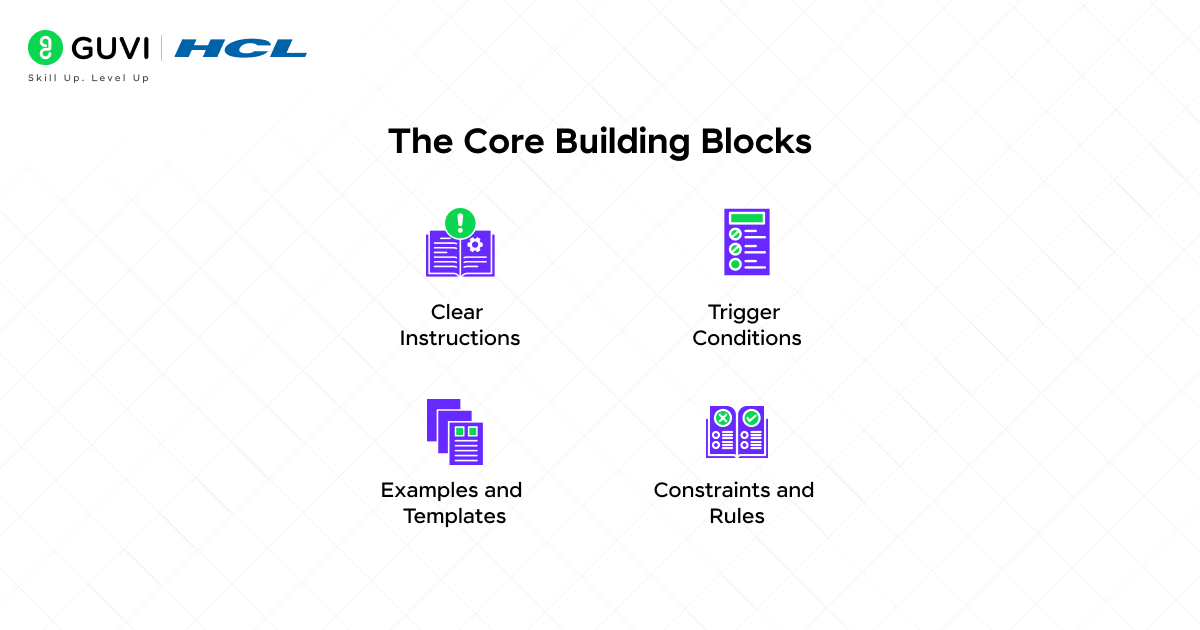
Every skill you create for Claude contains the same fundamental components. Understanding these helps you build effective skills.
- Clear Instructions
This is the heart of your skill. It tells Claude exactly what to do, how to do it, and what the result should look like. Good instructions are specific, actionable, and leave no room for misinterpretation.
- Trigger Conditions
Skills need to know when to activate. This might be when you use certain keywords, request a specific type of output, or work on particular tasks. Clear triggers ensure skills activate at the right time.
- Examples and Templates
Showing Claude what good output looks like is more powerful than just describing it. Examples demonstrate your standards, style, and structure in concrete terms.
- Constraints and Rules
Every skill should define what Claude must do, what it should avoid, and what boundaries it must respect. These constraints ensure consistent quality.
Read More: Building Skills for Claude Code
Types of Skills You Can Create Today
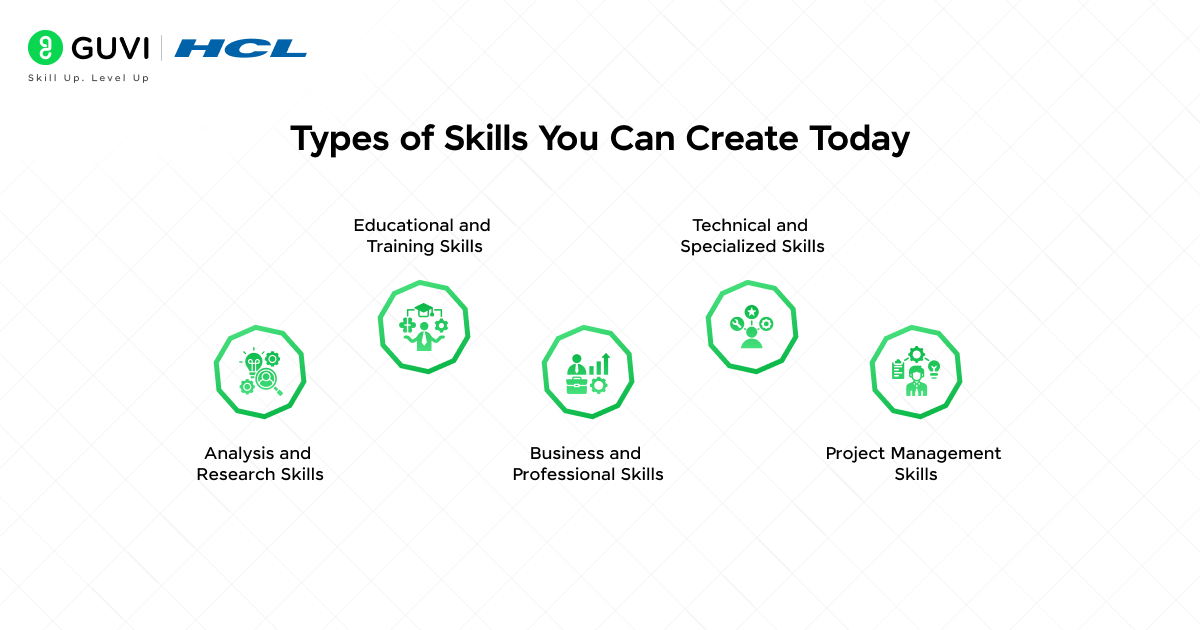
- Analysis and Research Skills
Research skills guide how Claude analyzes information, what factors to consider, how to structure findings, and what format to present results in. Data analysts, researchers, and consultants benefit from these skills.
- Educational and Training Skills
Teaching skills define how to structure lessons, explain concepts, create assessments, and adapt material for different learning levels. Educators and trainers use these to maintain pedagogical consistency.
- Business and Professional Skills
Professional skills encode business communication standards, report formats, meeting structures, and decision-making frameworks. Managers, consultants, and business professionals rely on these for consistent professional output.
- Technical and Specialized Skills
Domain-specific skills capture technical terminology, industry standards, specialized processes, and expert knowledge in fields like law, medicine, engineering, or finance.
- Project Management Skills
Planning skills define how to structure project plans, track progress, manage timelines, and communicate updates according to your team’s methodology.
Step-by-Step: Creating Your First Skill
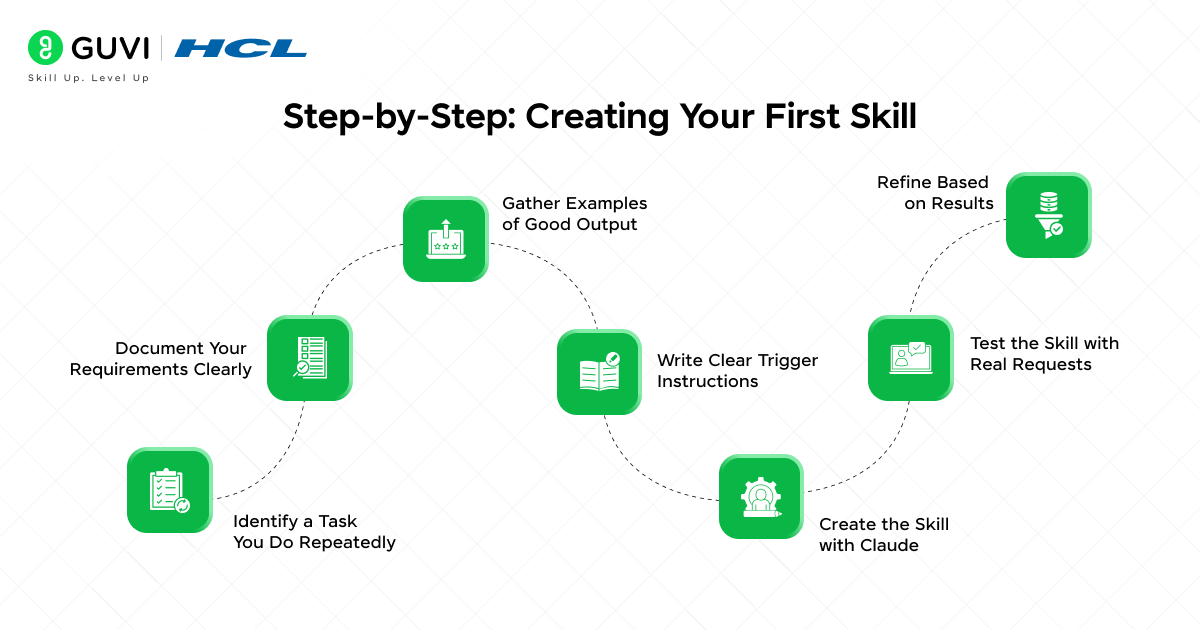
Step 1: Identify a Task You Do Repeatedly
Choose something you do often that follows a consistent pattern. The best first skill solves a real, recurring need. Look for tasks where you find yourself giving Claude similar instructions multiple times.
Step 2: Document Your Requirements Clearly
Write down exactly how you want this task done. Include the structure, style, required elements, things to avoid, and what makes a good result. Be as specific as possible.
Step 3: Gather Examples of Good Output
Collect 2-3 examples of this task done well. These show Claude what success looks like in concrete terms. Real examples are more powerful than abstract descriptions.
Step 4: Write Clear Trigger Instructions
Decide what words or phrases should activate this skill. Make triggers specific enough to activate when needed but not so narrow they never trigger.
Step 5: Create the Skill with Claude
Tell Claude you want to create a custom skill. Provide your documented requirements, examples, and trigger conditions. Claude will help you structure this into a proper skill format.
Step 6: Test the Skill with Real Requests
Use the skill for actual work, not just test cases. Try different variations of requests that should trigger it. Verify that outputs match your requirements and maintain consistency.

Step 7: Refine Based on Results
No skill is perfect on the first try. Note what works well and what needs adjustment. Update the skill to address gaps, clarify ambiguous instructions, or add missing requirements.
Real-World Examples of Skills in Action
- The Data Analyst Standardizing Reports
A financial analyst creates a skill for monthly performance reports. Every report automatically includes key metrics, uses consistent visualization formats, highlights anomalies, and follows the company’s reporting template. Report generation time drops by 65 percent.
- The Teacher Creating Consistent Lesson Plans
A high school teacher builds a skill for lesson plan generation. Every plan includes learning objectives, state standards alignment, assessment methods, and differentiation strategies. Planning time decreases from 90 minutes to 25 minutes per lesson.
- The Consultant Generating Client Reports
A business consultant develops a skill for client reports. Reports automatically follow the firm’s template, include required sections, and use appropriate professional language. Report quality becomes more consistent, and client feedback improves.
- The Project Manager Documenting Meetings
A project manager creates a skill for meeting notes. Notes automatically capture action items, decisions made, participants, and next steps in the exact format the team expects. Meeting documentation becomes faster and more thorough.
Pros and Cons of Using Skills
Pros
- Save enormous amounts of time by eliminating repetitive instruction-giving
- Ensure consistent quality across all outputs
- Reduce mental load by not having to remember and explain preferences each time
- Enable better results because instructions are refined and comprehensive
- Scale your personal standards across unlimited tasks
Cons
- Creating good skills requires upfront time investment
- Overly rigid skills can limit Claude’s creativity or adaptability
- Skills need maintenance and updates as your needs evolve
- Too many skills can create confusion about which activates when
- Poorly written skills can produce consistently wrong outputs
Organizations that implement standardized processes can improve quality consistency by up to 45% compared to ad-hoc approaches. AI Skills bring the same advantage to individual workflows by ensuring consistent, repeatable outputs every time.
Top Strategies to Get the Most Out of Skills
- Start with One High-Value Skill
Do not try to create skills for everything at once. Pick the single most repetitive, time-consuming task in your workflow. Perfect that skill first, then expand.
- Be Specific, Not Vague
“Write in a professional tone” is vague. “Use active voice, avoid jargon, keep sentences under 20 words, and address the reader directly” is specific. Specificity produces better results.
- Include Both Rules and Examples
Rules tell Claude what to do. Examples show what success looks like. Combining both is more powerful than either alone.
- Test Skills with Edge Cases
Do not just test the obvious uses. Try unusual requests and variations to see where the skill breaks down. Fix these gaps.
- Update Skills as You Learn
Your first version will not be perfect. As you use a skill and notice issues, update the instructions. Skills should evolve with your understanding.
- Give Skills Clear, Descriptive Names
Name skills so you instantly know what they do. “Data Analysis Report” is clear. “Analysis Skill 3” is not. Good names help you remember what skills you have.
Common Mistakes to Avoid
- Making Skills Too Broad
A skill that tries to handle ten different types of tasks will do none of them well. Keep skills focused on specific, well-defined tasks.
- Writing Ambiguous Instructions
If you can interpret an instruction two different ways, Claude can too. Eliminate ambiguity by being precise and providing examples.
- Never Updating Skills
Your needs change. Your understanding improves. Your standards evolve. Skills that never get updated become outdated and less useful over time.
- Creating Skills for One-Time Tasks
Skills solve repetitive problems. If you only do something once, the time spent creating a skill exceeds the time saved using it. Choose tasks you do regularly.
If you want to learn more about teaching Claude your way of working using skills, do not miss the chance to enroll in HCL GUVI’s Intel & IITM Pravartak Certified Artificial Intelligence & Machine Learning course. Endorsed with Intel certification, this course adds a globally recognized credential to your resume, a powerful edge that sets you apart in the competitive AI job market.
Conclusion
Skills represent one of the most powerful ways to make AI work for you instead of the other way around. The potential to save time, ensure consistency, maintain quality, and scale your personal standards is real and immediately actionable.
The best approach is to start small, focus on real needs, test thoroughly, and refine based on experience. The professionals who benefit most from skills are not those who create the most skills the fastest. They are those who create the right skills for the right tasks with clear instructions and regular refinement.
Start with one skill today. Pick a task you do weekly that frustrates you with its repetitiveness. Build a skill that handles it the way you want. Experience the difference of having Claude work your way. Your way of working deserves to be encoded, remembered, and applied consistently. Skills make that possible.
FAQs
1. How many skills should I create?
Start with 3-5 skills for your most common tasks. Quality matters more than quantity. Well-crafted skills for frequent tasks deliver more value than dozens of poorly defined skills you rarely use.
2. Can I edit or delete skills after creating them?
Yes. Skills are not permanent. You can update instructions, refine triggers, improve examples, or delete skills that no longer serve you. Regular refinement improves skill effectiveness.
3. Do skills work across all conversations with Claude?
Yes. Once created, skills persist across all your conversations. They activate whenever their trigger conditions are met, regardless of which conversation you are in.
4. How detailed should skill instructions be?
Detailed enough to get consistent results, but not so rigid that they eliminate helpful flexibility. Include must-have requirements clearly, provide guidance on preferences, and leave room for Claude to adapt to specific contexts.
5. What if a skill produces wrong results?
This indicates the skill instructions need refinement. Review the output, identify what went wrong, update the skill to address that issue, and test again. Skills improve through this iteration process.
Success Stories

About the Author
Vishalini Devarajan
An Aerospace Engineer turned content writer, I focus on making complex concepts easy to understand through well-structured, reader-friendly blogs. Whether it’s a technical topic or a non-technical one, I love creating content that is clear, engaging, and impactful.
View all posts by Vishalini Devarajan
Connect with me @













Did you enjoy this article?