


Full Stack Development Articles
Claude for Architecture and Engineering Documentation
Freelancing as a Python Developer: Getting Your First Client


Get In Touch For Details! Request More Information
Qwik City Routing Explained: File-Based Routing Made Simple
Jun 17, 2026 6 Min Read 2025 Views
(Last Updated)
Modern web applications demand routing systems that deliver speed, scalability, and easy management without complex configuration. Traditional routing setups often involve manual work, which becomes difficult to maintain as applications grow.
Qwik City Routing solves this by using a file based system where your project structure directly defines application routes. This approach simplifies navigation while integrating layouts, dynamic routing, and server side data handling into a single system.
In this article, you will learn how Qwik City Routing works, how routes are structured, and how its features help build scalable and high performance web applications.
TL;DR Summary:
- Qwik City Routing offers a straightforward way to handle routing by using your folder structure to map URL paths, removing the need for manual route setup.
- You can organize pages within the routes directory, and Qwik handles navigation automatically.
- It supports dynamic routes, nested layouts, and flexible routing patterns, making it suitable for real-world applications.
- A major advantage is how it combines routing with server-side data fetching and layouts into one cohesive system.
- Leveraging Qwik’s resumability model, it ensures fast loading times and efficient performance.
- This makes it a strong choice for modern web applications that need to scale effectively.
Table of contents
- What is Qwik City Routing?
- How Qwik City Routing Works
- Why It Matters for Modern Web Apps
- File Based Routing in Qwik Explained
- Understanding the Routes Folder
- How Files Map to URL Paths
- Qwik Routing Structure (Visual Breakdown)
- Visualizing the Route Hierarchy
- How This Helps in Real Projects
- Dynamic Routes in Qwik City
- Route Parameters
- Catch All Routes
- Nested Layouts and Routing Hierarchy
- Using layout.tsx
- How Layout Rendering Works
- Data Fetching with Route Loaders
- How Route Loaders Work
- Why This Matters
- Navigation and Linking in Qwik
- Using Links for Navigation
- Programmatic Navigation
- Real World Use Case of Qwik City Routing
- Example Scenario: Blog Platform
- Why This Approach Works in Practice
- Common Mistakes to Avoid
- Conclusion
- FAQs
- What is Qwik City Routing?
- How does file based routing work in Qwik?
- What are dynamic routes in Qwik City?
- What is the role of layout.tsx in Qwik?
- Why is Qwik City Routing important?
What is Qwik City Routing?
Qwik City Routing is a file based routing system that automatically maps your project structure to URL paths. Instead of manually defining routes, developers create folders and files inside the routes directory, and Qwik uses this structure to generate routes.
This approach simplifies development by combining routing, layouts, and data handling into a single system. It reduces the need for separate configuration and makes applications easier to scale as new pages are added.
How Qwik City Routing Works
Qwik City Routing works by reading the folder structure inside the routes directory and converting it into application routes. Each folder represents a URL segment, and each index.tsx file acts as the main entry point for that route.
This means developers can control navigation simply by organizing files, without writing additional routing logic.
Why It Matters for Modern Web Apps
Modern applications need routing systems that are fast, scalable, and easy to maintain. Qwik City Routing removes manual complexity and allows developers to focus on building features instead of managing navigation logic.
To understand how modern frameworks enable scalable applications, you can explore this guide on JavaScript frameworks
It also works with Qwik’s resumability, enabling faster loading and efficient performance, which is important for scalable and high performance web applications.
Qwik’s routing system is designed around resumability, meaning it only loads the code required for a specific route instead of reloading the entire application. This significantly improves performance and makes navigation faster compared to traditional routing approaches.
File Based Routing in Qwik Explained
Qwik City Routing changes how file based routing is handled. Instead of defining routes manually, developers create folders and files within the routes directory, and Qwik maps them to URL paths automatically.
If you’re new to how frameworks structure applications, this guide on Web Development Frameworks will help you understand the fundamentals:
This approach combines routing, layouts, and data handling into one cohesive system, making development smoother. It removes the need for manual configuration and makes scaling easier as new pages are added.
Understanding the Routes Folder
Qwik City Routing works by interpreting the folder structure inside the routes directory to define application routes. Each folder represents a segment of the URL, and the index.tsx file acts as the entry point for that route.
Developers can manage navigation by simply organizing files, without writing additional routing logic. This is important because modern web applications require routing systems that are fast, scalable, and easy to maintain.
Qwik City Routing reduces manual complexity and allows developers to focus on building features instead of managing navigation. It also works with Qwik’s resumability, enabling faster load times and more efficient performance for scalable applications.
How Files Map to URL Paths
Each file inside the routes directory directly corresponds to a URL. This mapping is automatic and removes the need for manual setup.
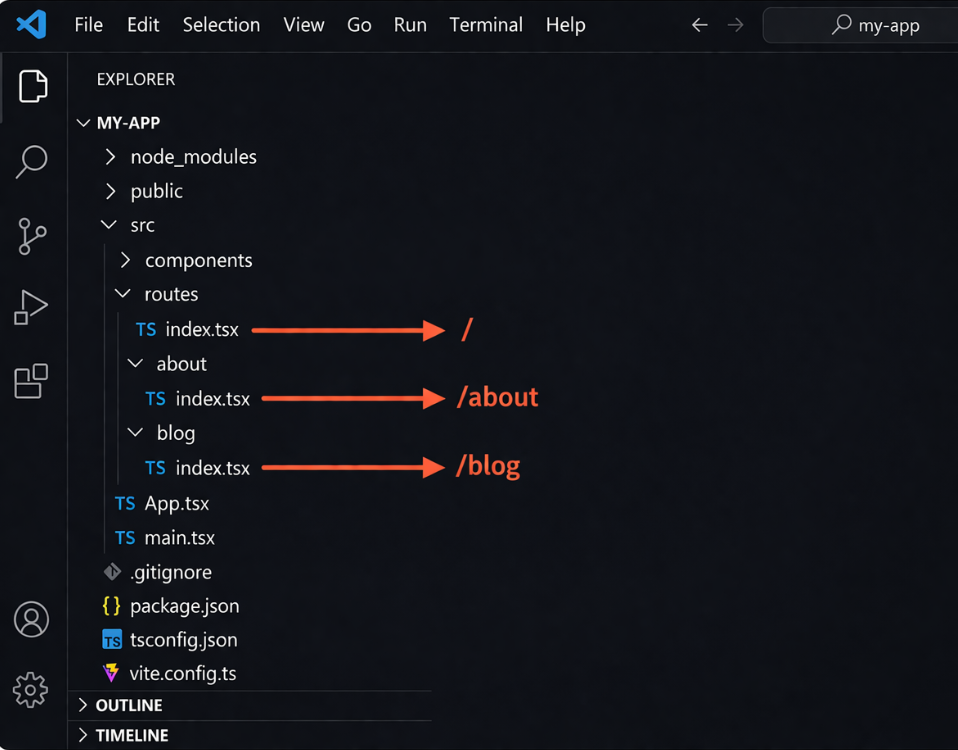
This structure shows how folders and files translate into URL paths. Once this pattern is understood, building and scaling routes becomes much easier.
Qwik Routing Structure (Visual Breakdown)
Getting the hang of Qwik City Routing is simpler than it seems. When you understand how your folder structure maps to URLs, the concept becomes much easier to follow.
With Qwik, you can think of your application as a tree of folders and files. Each level in the routes directory represents a segment of the URL, and as you go deeper into folders, the URL becomes more specific.
This approach removes the need for complex routing logic, allowing you to understand and manage routes directly through your project structure.
Visualizing the Route Hierarchy
Think of your routes folder as a tree, where branches represent paths in your application. The root acts as the homepage, and deeper routes are defined by nested folders. For example, adding a blog folder with files inside it will naturally reflect in the URL structure.
This approach makes it easier to organize large applications while keeping the structure clear and predictable.
How This Helps in Real Projects
In real world projects, this visual method helps developers understand navigation directly from the folder layout. It reduces confusion in complex applications with multiple routes and also simplifies maintenance, as routes can be adjusted by reorganizing folders instead of modifying routing logic.
Dynamic Routes in Qwik City
Dynamic routes allow you to create pages that change based on URL parameters. Instead of creating separate files for every page, a single route can handle multiple values.
This approach is useful in real world scenarios like product pages, blog posts, or user profiles, where pages share the same structure but display different content.
Working with dynamic routes becomes much easier when you’re comfortable with JavaScript fundamentals and how applications handle data flow.
Route Parameters
In Qwik City, dynamic routes are created using square brackets. The name inside the brackets becomes a parameter that can be accessed inside your component.
Example:
src/routes/blog/[id]/index.tsx
This route matches URLs like:
/blog/1
/blog/hello-world
Catch All Routes
Catch all routes are used when you want to match multiple levels of a path. This is useful for cases like documentation pages or deeply nested content.
Instead of matching a single value, it captures everything after a certain path.
Example:
src/routes/docs/[…all]/index.tsx
This can match:
/docs/getting-started
/docs/guides/routing
/docs/a/b/c
This makes your routing system more flexible and avoids creating multiple nested files for similar paths.
Nested Layouts and Routing Hierarchy
Qwik City Routing includes nested layouts, which allow you to reuse the same UI and structure across multiple routes. Instead of duplicating elements like headers or sidebars on every page, you can define them once and apply them to multiple routes.
This approach keeps your application organized and makes it easier to maintain as it grows.
Using layout.tsx
In Qwik, layouts are defined using a file called layout.tsx. This file acts as a wrapper around all routes inside its folder.
For example, if you create a layout inside a folder, it automatically applies to all pages within that route.

src/routes/
├── layout.tsx
└── dashboard/
├── layout.tsx
└── index.tsx
In this structure:
- The root layout applies to the entire app
- The dashboard layout applies only to /dashboard routes
How Layout Rendering Works
Layouts work by nesting based on the folder structure. When a user visits a route, Qwik renders layouts from top to bottom before displaying the final page.
- First, the global layout is loaded
- Then, any nested layouts are applied
- Finally, the page content is rendered
This approach helps maintain a consistent UI, manage authentication flows, and ensure design consistency across different parts of the application.
Explore: Qwik 2.0 Explained: Building Lighter, Faster, Better Web App
Data Fetching with Route Loaders
In Qwik City, you can fetch data directly within your routes using route loaders. This approach loads data on the server before the page is rendered, improving performance and efficiency.
To better understand how data moves between the client and server, you can explore this networking course, which helps you grasp request response cycles and backend communication.
Instead of fetching data after the page loads, route loaders provide the required data in advance. As a result, users get a better experience because the content is ready as soon as the page is displayed.
How Route Loaders Work
Route loaders run on the server and return data that can be used inside your components. They are typically used for fetching API data, database queries, or preparing content before rendering.
Here’s a simple example:
export const useBlogData = routeLoader$(() => {

 return { title: "Hello Qwik" };

});
This data can then be accessed inside your component, allowing you to render dynamic content without additional client-side requests.
Why This Matters
Route loaders improve performance by reducing unnecessary network requests from the browser. They also help organize data fetching by keeping it closely aligned with your routes.
This approach is especially useful for scalable applications, as it ensures data is loaded efficiently and consistently across different pages, making the application more reliable.
Navigation and Linking in Qwik
Qwik City makes navigation simple and efficient. Instead of relying on traditional anchor tags everywhere, it provides built in tools that improve how navigation works.
With Qwik’s routing system, you can move between pages smoothly without unnecessary reloads. This approach maintains high performance while offering flexibility.
Using Links for Navigation
Qwik provides a Link component that is used to navigate between routes. It works similarly to standard links but is optimized for Qwik’s rendering model.
Here’s a simple example:
<Link href="/about">Go to About</Link>
This allows smooth navigation while keeping the application fast and responsive.
Programmatic Navigation
Sometimes, you may need to change routes based on user actions, such as submitting a form. Qwik allows you to handle navigation programmatically, giving you control over how routes are changed.
This is useful when building features where navigation depends on logic rather than fixed links.
Real World Use Case of Qwik City Routing
Imagine a blog platform where multiple pages share the same layout but display different content. Instead of creating a separate route for each page, developers can use file based routing along with dynamic routes to keep things organized.
A single dynamic route can handle multiple blog posts, while shared layouts manage common elements like headers and navigation.
Example Scenario: Blog Platform
In a blog application, the routing structure can be simplified as:
- Homepage at /
- Blog listing page at /blog
- Individual blog posts like /blog/post-title
This approach makes it easier to scale the application, as new content can be added without modifying routing logic.
Why This Approach Works in Practice
This routing system reduces repetition by allowing the same layout and logic to be reused across multiple pages. Developers benefit from easier maintenance, as they can update the structure instead of rewriting routing logic.
In real world projects, this approach speeds up development and keeps the application organized. It also leads to a cleaner codebase, especially when managing large applications.
Common Mistakes to Avoid
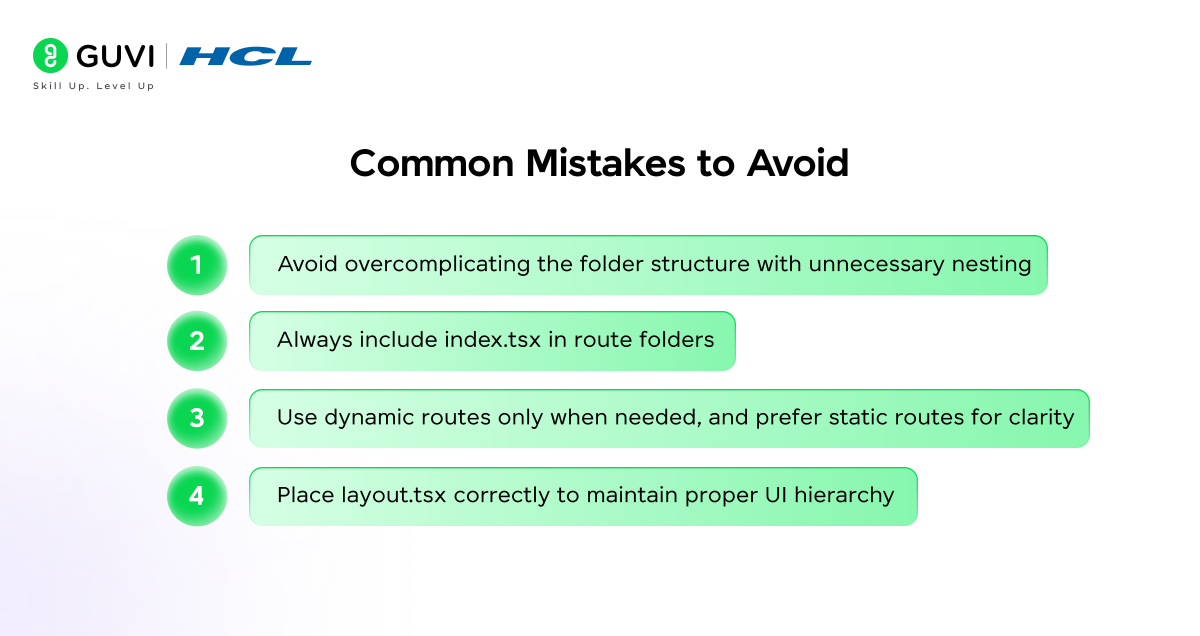
Qwik City Routing makes development easier, but small mistakes in structure or setup can cause issues or confusion. Keeping things simple and consistent helps avoid most problems.
- Avoid overcomplicating the folder structure with unnecessary nesting
- Always include index.tsx in route folders
- Use dynamic routes only when needed, and prefer static routes for clarity
- Place layout.tsx correctly to maintain proper UI hierarchy
As modern web applications become more dynamic, having a full stack understanding of frontend and backend systems becomes critical for building scalable routing architectures. HCL GUVI’s Full Stack Development course can help you strengthen these fundamentals and apply them in real world scenarios.
Conclusion
Qwik City Routing simplifies navigation by using a file based approach that aligns your project structure with URL paths, reducing the need for manual setup.
It combines layouts, dynamic routing, and data fetching into a unified system, making development more efficient and organized.
As modern applications demand better performance and scalability, Qwik’s resumability and structured routing become more important. Understanding these concepts helps developers build faster, more maintainable, and efficient web applications with less complexity.
FAQs
1. What is Qwik City Routing?
Qwik City Routing is a file based routing system where your folder structure automatically defines URL paths. It removes the need for manual route configuration and simplifies navigation in web applications.
2. How does file based routing work in Qwik?
File based routing works by mapping folders and files inside the routes directory to URL paths. Each folder represents a route segment, and index.tsx files act as page entry points.
3. What are dynamic routes in Qwik City?
Dynamic routes allow you to create flexible URLs using parameters. They are defined using square brackets and are commonly used for pages like blog posts, product details, or user profiles.
4. What is the role of layout.tsx in Qwik?
The layout.tsx file is used to create shared layouts across multiple routes. It helps maintain consistent UI elements like headers, navigation, and sidebars without repeating code.
5. Why is Qwik City Routing important?
Qwik City Routing improves developer experience by simplifying routing, reducing configuration, and supporting scalable application structure. It also works with Qwik’s resumability to enhance performance.
Success Stories

About the Author
Lukesh S
A professional content writer who has experience in freelancing and now working as a Technical Content Writer at HCL GUVI having sound knowledge in Blog Writing and Creative Writing!
View all posts by Lukesh S
Connect with me @








































Did you enjoy this article?