


Artificial Intelligence and Machine Learning Articles
Finance Manager to Data Analytics: Career Growth, Salary and Seniority
How to Evaluate LLM Outputs in Production Deployments
AI/ML Skills Gap 2026: Why Companies Can't Find Job-Ready Talent
20 AI/ML Interview Questions Recruiters Can Use Without a Tech Background - Best Guide


Get In Touch For Details! Request More Information
Run GLM-4.7 Flash Locally: Step-by-Step Installation Guide
May 27, 2026 5 Min Read 1301 Views
(Last Updated)
Think of an AI that is fully functional on your laptop, not dependent on the internet, no API constraints, and no worries about where the data is stored. That’s the shift happening right now in the world of artificial intelligence. Rather than using remote servers, more professionals are increasingly looking to local LLMs to develop faster, more secure, and fully controlled AI systems.
The main focus of this movement is the GLM-4.7 Flash, a model that is not only built on performance but also on practicality. It combines speed, efficiency, and accessibility, where one can experiment with a powerful open-source model without having hardware on the enterprise level. This model is an interesting option whether you are a developer who wants to simplify the workflows or a data enthusiast who wants to dive into automation, or a content creator who does not want to be tied to paid tools.
Through this blog, you will know how to Run GLM-4.7 Flash Locally using a step-by-step installation tutorial. You will learn how to convert your system into a trustworthy self-hosted AI environment that will integrate into the real-world scenarios perfectly.
Table of contents
- What is GLM-4.7 Flash?
- Reasons to Run GLM-4.7 Flash Locally
- Data Control and Privacy
- Cost Efficiency
- Offline Access
- Customization
- System Requirements
- Tools You Need
- Step 1: Set Up Your Environment
- Step 2: Install Required Dependencies
- Step 3: Download GLM-4.7 Flash Model
- Step 4: Load the Model in Python
- Step 5: Optimize Performance
- Step 6: Build a Simple Chat Interface
- Real-Life Applications
- Content Creation
- Data Analysis Assistance
- Personal Productivity
- Development Support
- Wrapping it up:
- FAQs
- What does it mean to run GLM-4.7 Flash on your computer?
- Can people who are new to this run GLM-4.7 Flash on their own?
- What kind of computer do you need to run GLM-4.7 Flash?
- Is GLM-4.7 Flash a type of artificial intelligence model?
- What are the benefits of using a self-hosted AI model?
What is GLM-4.7 Flash?
Before getting down to installation, it is better to know what you are dealing with.
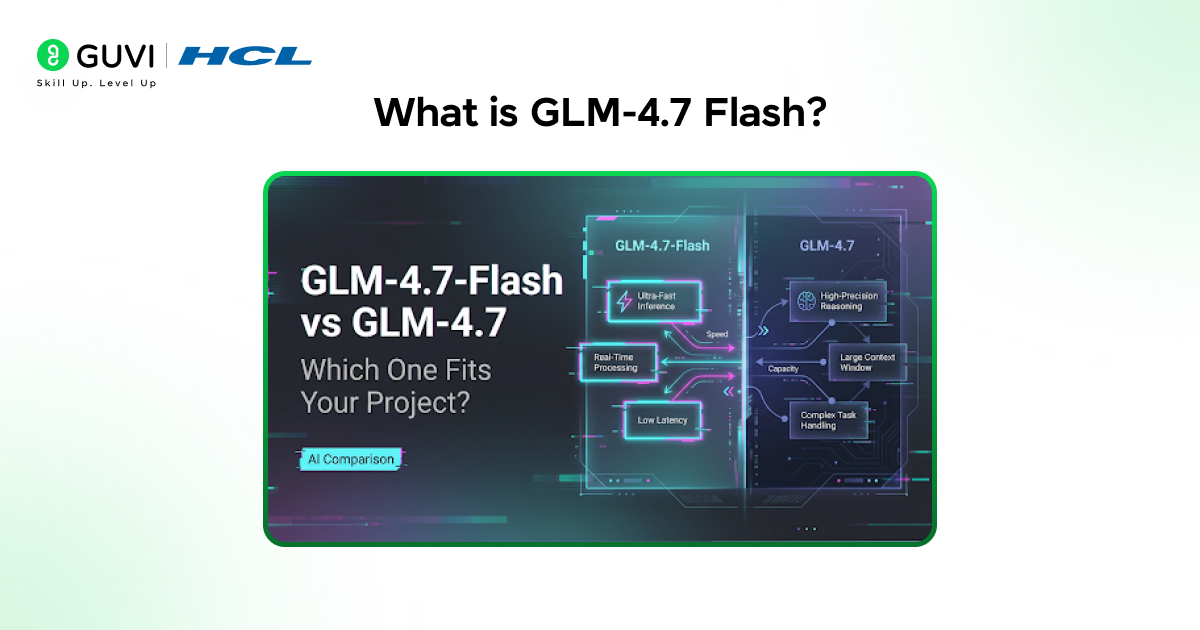
GLM-4.7 Flash is a compact, high-performance language model that is able to provide good results using fewer resources than larger models. It is a member of the GLM (General Language Model) family and is optimized to:
- Fast inference speed
- Lower hardware requirements
- Efficient memory usage
- Practical deployment for local environments
It is a great option to developers, data analysts, and content creators who may wish to experiment with self-hosted AI without the need to pay high costs to use cloud infrastructure.
Reasons to Run GLM-4.7 Flash Locally
Operating a local LLM, such as GLM-4.7 Flash, is not only a technical decision but also a strategic decision. It provides greater power, flexibility, and long-term effectiveness compared to relying entirely on cloud-based AI tools.
1. Data Control and Privacy
When you run a model locally, all your data is run on your own system rather than being transferred to other servers. This is especially important when you are dealing with sensitive information like:
- Confidential business reports
- Customer or personal information.
- Confidential data or company reports
To give an example, self-hosted AI can be a better choice in companies that handle financial data or user analytics to avoid leaks and comply with privacy regulations.
2. Cost Efficiency
The vast majority of cloud-based AI services have a pay-as-you-use model, either per request, per token, or API call. This might appear cheap in the short term but the expenses can easily become very high with the frequent usage..
Using GLM-4.7 Flash locally, you do away with such recurrent costs. After the model is configured, all you need to do is spend money on hardware and electricity, and it is a far more sustainable alternative to:
- Low-budget startups
- Freelancers and creators
- Long-term AI projects
If you’re interested in learning more about Generative AI through a structured and beginner-friendly approach, you can explore HCL GUVI’s Free Generative AI Ebook. It covers the core concepts of GenAI and how it is applied in real-world areas like content creation, coding, automation, and more.
3. Offline Access
The biggest benefit of a local system is that it does not require an internet connection. This comes in handy, especially in situations such as:
- Unstable connectivity in remote work environments.
- Secure systems in which access to the internet is limited
- Fieldwork, including research, travel or on-site research
This guarantees constant availability of AI capabilities at any time or place.
4. Customization
In local deployment, you have the absolute freedom to customize the model to your requirements. In comparison to cloud tools that have fixed capabilities, you can:
- Train the model yourself on your data
- Combine it with internal applications, dashboards, or tools
- Create custom workflows to your application
An example is a content writing AI assistant that you can personalize, automated customer support replies, or even develop domain-specific internal applications to your business.
Fun Fact
Even mid-range laptops today are powerful enough to run optimized open-source models like GLM-4.7 Flash, something that required servers just a few years ago.
System Requirements
Before the GLM-4.7 Flash local installation, the following requirements are to be ensured in your system.
Minimum Requirements
- CPU: 4 cores
- RAM: 8 GB
- Storage: 10 to 15 GB of free space.
Recommended Setup
- CPU: 8+ cores
- RAM: 16 GB or more
- GPU: Optional (NVIDIA GPU with CUDA support improves performance)
The model can also be run on a CPU even without a GPU, although it may be slower.
Tools You Need
To complete the installation successfully, you will require:
- Python (3.9 or higher)
- Git
- Pip (Python package manager)
- Virtual environment Virtual environment tool (venv or conda)
Optional:
- CUDA Toolkit (GPU acceleration)
Step 1: Set Up Your Environment
Start by creating a clean working environment to avoid dependency conflicts.
Create a Virtual Environment
| python -m venv glm_env |
Activate the Environment
Windows:
| glm_env\Scripts\activate |
Mac/Linux:
| source glm_env/bin/activate |
Upgrade Pip
| pip install –upgrade pip |
This ensures you install the latest compatible packages.
Step 2: Install Required Dependencies
Next, install the essential libraries required to run a local LLM.
| pip install torch transformers accelerate sentencepiece |
If you’re using a GPU, install the CUDA-enabled version of PyTorch from the official site.
Step 3: Download GLM-4.7 Flash Model
To run GLM-4.7 Flash locally, you need access to the model weights.
Clone the Repository
| git clone https://github.com/your-repo/glm-4.7-flash.git cd glm-4.7-flash |
(Replace with the official repository when available.)
Download Model Weights
Some models are hosted on platforms like Hugging Face. You may need to:
- Create an account
- Accept usage terms
- Download model files
Step 4: Load the Model in Python
Now comes the important step of loading the model.
Create a Python file called run_glm.py:
| from transformers import AutoTokenizer, AutoModelForCausalLM model_name = “glm-4.7-flash” tokenizer = AutoTokenizer.from_pretrained(model_name) model = AutoModelForCausalLM.from_pretrained(model_name) input_text = “Explain AI in simple terms.” inputs = tokenizer(input_text, return_tensors=”pt”) outputs = model.generate(**inputs, max_length=100) print(tokenizer.decode(outputs[0])) |
Run the script:
| python run_glm.py |
If everything is set up correctly, you’ll see a generated response.
Step 5: Optimize Performance
Running a self-hosted AI model efficiently requires optimization.
1. Use Half Precision (FP16)
| model = model.half() |
This reduces memory usage.
2. Enable GPU Acceleration
| model.to(“cuda”) |
3. Use Quantization
Quantization reduces model size and speeds up inference:
| pip install bitsandbytes |

Step 6: Build a Simple Chat Interface
To make your setup practical, create a basic interactive loop.
| while True: user_input = input(“You: “) inputs = tokenizer(user_input, return_tensors=”pt”) outputs = model.generate(**inputs, max_length=150) response = tokenizer.decode(outputs[0]) print(“AI:”, response) |
Now you have your own local AI assistant.
Riddle Time
I answer your questions instantly,
But I never leave your machine.
I don’t need the internet,
Yet I know what you mean.
What am I?
Answer:
A local LLM like GLM-4.7 Flash running on your system.
Real-Life Applications
Running GLM-4.7 Flash on your computer is not just about setting up a program. It is about making your daily work faster and more efficient. A local GLM-4.7 Flash model can be used in real-life situations across different fields.
1. Content Creation
If you make content all the time GLM-4.7 Flash can be your writing helper. You can use it to:
- Make blog drafts or outlines in a few seconds
- Rewrite content to make it clearer or change the tone
- Create social media captions or scripts
For example, instead of staring at a blank screen, you can prompt the model for ideas and refine them, saving both time and effort.
2. Data Analysis Assistance
GLM-4.7 Flash can make complex tasks easier for people who work with data. You can use it to:
- Sum up sets of data into important points
- Make SQL queries based on what you need
- Explain trends or patterns in words
This is really useful when you are working with raw data and need to understand it quickly without using many different tools.
3. Personal Productivity
A self-hosted GLM-4.7 Flash model can also work as your assistant. You can use it to:
- Write emails or messages
- Plan your schedule or to-do list
- Think of ideas, for projects or decisions
Since GLM-4.7 Flash runs on your computer you can put in personal or private information without worrying about your privacy.
4. Development Support
Developers can get a lot of help from running a GLM-4.7 Flash model. It can help you:
- Find mistakes in your code
- Make code snippets to work faster
- Explain ideas or concepts you do not know
This makes GLM-4.7 Flash a reliable helper when you are coding especially when you need quick help and do not want to use tools from outside.
- Most AI tools you use daily run on remote servers, not on your device — but local LLMs bring that power directly to your own system.
- Local language models can deliver faster responses since they don’t rely on internet latency or server communication delays.
- Running AI locally means your data stays on your device, offering better privacy and security compared to cloud-based tools.
- Many modern laptops can now run open-source AI models like GLM-4.7 Flash without requiring expensive, high-end hardware.
Local AI is putting power back into your hands — faster, private, and more accessible than ever before!
If running GLM-4.7 Flash locally sparked your curiosity, it might be the right time to go deeper into AI. Moving from using models to actually understanding and building them is where the real growth happens.
You can explore HCL GUVI’s Become AI ML Expert With Intel & IITM Pravartak Certification Program to take that next step and gain practical skills along with a valuable industry-recognised certification.
Wrapping it up:
Stepping into the world of artificial intelligence can feel like a big change, but it is one that really pays off. Running GLM-4.7 Flash on your computer gives you more control, better privacy and the freedom to use artificial intelligence on your own terms.
Whether you are working on content or data, or developing a local artificial intelligence model, this can make your work easier and more flexible. The real value of artificial intelligence comes when you start trying new things and building your own artificial intelligence setup.
Hope you had a great time reading this guide and found it useful—happy building and exploring your own AI setup!
FAQs
1. What does it mean to run GLM-4.7 Flash on your computer?
Running GLM-4.7 Flash on your computer means you get to install it and use it right on your system instead of using it online. This gives you control over the data and how it works.
2. Can people who are new to this run GLM-4.7 Flash on their own?
Yes, people who are new to this can run GLM-4.7 Flash by following some steps to install it. It is helpful if you know a bit about Python and how to use the command line, but you do not need to be an expert.
3. What kind of computer do you need to run GLM-4.7 Flash?
To run GLM-4.7 Flash, your computer needs to have least 8 GB of memory and a processor that can do many things at the same time. If you want it to work well it is better to have 16 GB of memory and a special graphics card.
4. Is GLM-4.7 Flash a type of artificial intelligence model?
Yes, GLM-4.7 Flash is an artificial intelligence model that you can use on your own computer. This makes it good for using intelligence on your own without needing to connect to the internet.
5. What are the benefits of using a self-hosted AI model?
Using a self-hosted artificial intelligence model like GLM-4.7 Flash is good because it keeps your information private, saves you money in the long run, lets you use it even when you are not connected to the internet and gives you the freedom to make it work the way you want GLM-4.7 Flash to work.
Success Stories

About the Author
Vishalini Devarajan
An Aerospace Engineer turned content writer, I focus on making complex concepts easy to understand through well-structured, reader-friendly blogs. Whether it’s a technical topic or a non-technical one, I love creating content that is clear, engaging, and impactful.
View all posts by Vishalini Devarajan
Connect with me @











Did you enjoy this article?