


Python Articles
Go vs Python for Forward Deployed Engineering Workloads
Python for Forward Deployed Engineers: What You Actually Need to Know
Freelancing as a Python Developer: Getting Your First Client


Get In Touch For Details! Request More Information
What Is Slicing in Python? A Comprehensive Guide
Sep 24, 2026 9 Min Read 1969 Views
(Last Updated)
Have you ever needed just a part of a string or a few elements from a list without writing a loop? Python makes this surprisingly simple through slicing.
Slicing in Python is a sequence operation that extracts a contiguous subset of elements from an ordered collection like a string, list, tuple, or range, using a start:stop:step syntax. With a clean and expressive syntax, slicing lets you extract, reverse, or step through sequences in a single line of code, keeping your programs concise and readable.
This guide covers what slicing in Python is, how the slicing syntax works internally, and how you can apply it effectively across strings, lists, tuples, and other sequence types in real-world programs.
Table of contents
- TL;DR Summary
- What is Slicing in Python?
- Slicing Syntax in Python
- Basic Slicing Patterns
- Slicing with Negative Indexes
- Using Step in Slicing
- String Slicing in Python
- List Slicing in Python
- Tuple Slicing in Python
- Slicing range() Objects
- Slicing NumPy Arrays vs Python Lists
- Slice Objects in Python
- Slicing vs Indexing in Python
- How Slicing in Python Works: Step-by-Step
- Step 1: Verify That the Object Supports Slicing
- Real-World Use Cases of Slicing
- Extracting Substrings and Tokens from Text
- Pagination and Batch Processing of Data
- Reversing Sequences Efficiently
- Copying and Cloning Lists Safely
- Sampling and Skipping Elements in Sequences
- Common Mistakes with Slicing
- Best Practices for Using Slicing in Python
- Slicing Interview Questions You Should Be Ready For
- Conclusion
- FAQs
- Is slicing zero-based in Python?
- Does slicing modify the original object?
- Is slicing faster than loops?
TL;DR Summary
- What it is: an operation using start:stop:step syntax to extract a subsequence from a string, list, tuple, or range
- Zero-based and exclusive: the start index is inclusive, the stop index is exclusive, just like normal indexing
- Mutability matters: strings and tuples always return a new object; lists support both read-only slicing and in-place slice assignment
- Never raises IndexError: unlike indexing, out-of-range slice boundaries are silently clamped instead of causing an error
- The gotcha to know: omitting the stop value for a negative-step slice is not the same as literally writing -1
What is Slicing in Python?
In Python, slicing is a sequence operation that allows you to extract a contiguous subset of elements from an ordered collection such as a string in Python, list, tuple, or range. It works by specifying a start index, a stop index, and an optional step, enabling Python to create a new sequence containing the selected elements. Slicing builds on the same zero-based indexing model used for single-element access, but instead of returning one value, it produces a sequence derived from the original.
Slicing Syntax in Python
- Basic Slicing Format
The universal slicing syntax is:
sequence[start:stop:step]
This syntax works uniformly across all sliceable sequence types. Internally, Python converts this syntax into a slice(start, stop, step) object and passes it to the sequence’s __getitem__() method.
- Meaning of Each Component
- start: The index at which slicing begins (inclusive).
- stop: The index at which slicing ends (exclusive).
- step: The number of positions to move forward or backward between elements.
Each component controls a different part of the traversal logic and is resolved dynamically at runtime.
Default Values When Parameters Are Omitted
- If start is omitted, Python uses the beginning of the sequence (or the end for negative steps).
- If stop is omitted, Python slices until the end of the sequence (or, for negative steps, conceptually before the very first element, not the literal value -1).
- If step is omitted, it defaults to 1.
Defaults are not fixed constants; Python computes them based on sequence length and traversal direction.
Struggling to apply Python slicing correctly across strings, lists, and real code? Download HCL GUVI’s Python eBook to master slicing and other core Python concepts with clear explanations and practical examples.
Basic Slicing Patterns
- Slicing from the Beginning
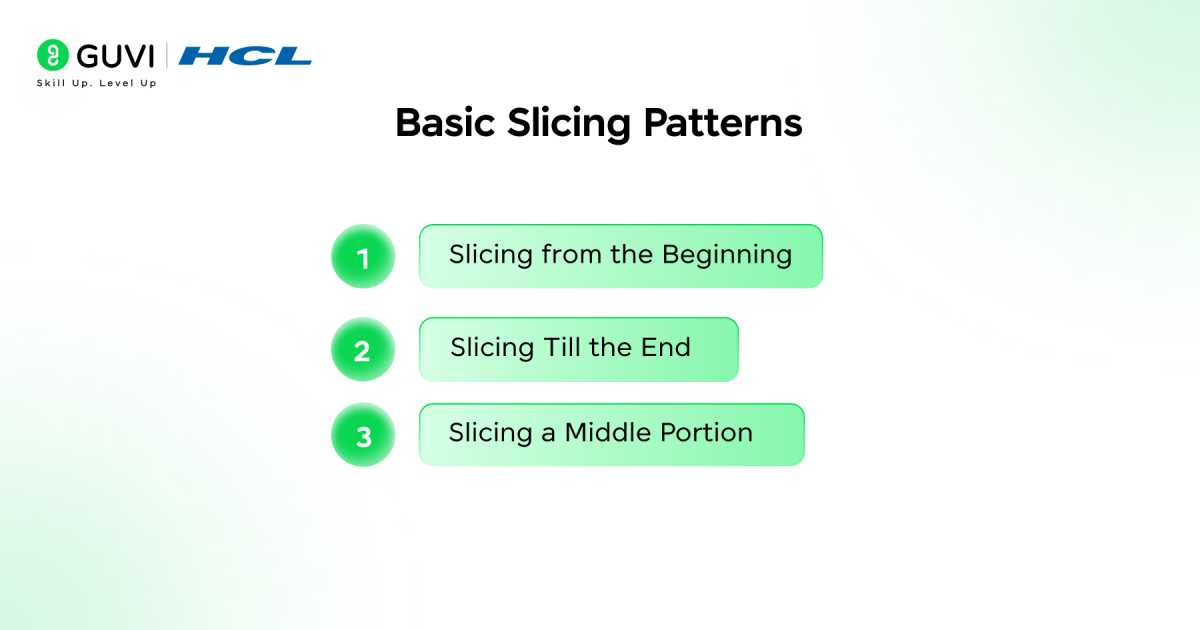
When the start index is omitted, Python assumes a start value of 0, meaning slicing begins from the very first element of the sequence. This pattern is frequently used to extract prefixes, such as the first few characters of a string, the initial records from a dataset, or header rows from structured data.
- Slicing Till the End
Omitting the stop index instructs Python to continue slicing until the end of the sequence. This technique is commonly used to discard leading elements, skip processed records, or isolate the remaining portion of a dataset after a known offset.
- Slicing a Middle Portion
Providing both start and stop indexes extracts a bounded segment from the sequence. This is widely used for pagination, batch processing, and sliding-window operations where fixed-size chunks are required. In string processing, middle slicing enables precise substring extraction without modifying the original text. The exclusive stop index ensures clean segment boundaries and predictable slice lengths.
Slicing with Negative Indexes
How Negative Indexing Works
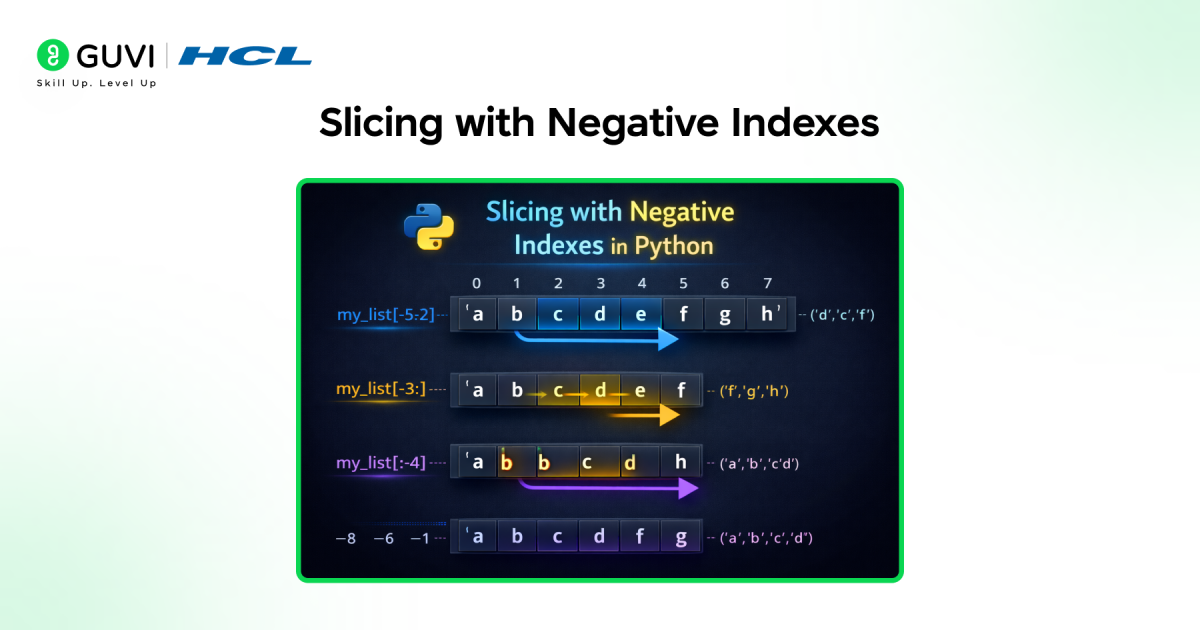
Negative indexes count backward from the end of the sequence, where -1 refers to the last element. Python internally converts negative indexes into valid positive offsets before slicing begins.
Slicing from the End of a Sequence
Negative start or stop values allow slicing relative to the end, which is useful for extracting suffixes, recent items, or trailing segments without computing exact positions.
A Common Gotcha: Negative Steps and the Stop Value
It’s tempting to assume that reversing a sequence with sequence[::-1] is equivalent to writing sequence[len(sequence)-1:-1:-1]. It isn’t.
Since -1 is itself a valid index (the last element), using it as a literal stop value creates a contradictory range and returns an empty result instead of a reversed sequence:
seq = [0, 1, 2, 3, 4]
print(seq[::-1])        # [4, 3, 2, 1, 0]
print(seq[4:-1:-1])     # [], empty, not reversed
If you need to specify the stop explicitly for a negative-step slice, omit it entirely or use None rather than reaching for -1.
Using Step in Slicing
- Skipping Elements Using Step
A step greater than 1 selects elements at fixed intervals. This is useful for downsampling datasets, processing periodic data, or extracting patterned subsets.
- Reversing Sequences Using Step -1
A step of -1 reverses a sequence efficiently. This works consistently across strings, lists, tuples, and ranges, making it a concise alternative to manual reversal logic.
- Creating Alternate and Complex Slices
Combining start, stop, and step enables advanced slicing patterns, such as extracting alternating elements within a specific range. This is commonly used in data processing, formatting, and algorithmic transformations.
String Slicing in Python
- Extracting Substrings
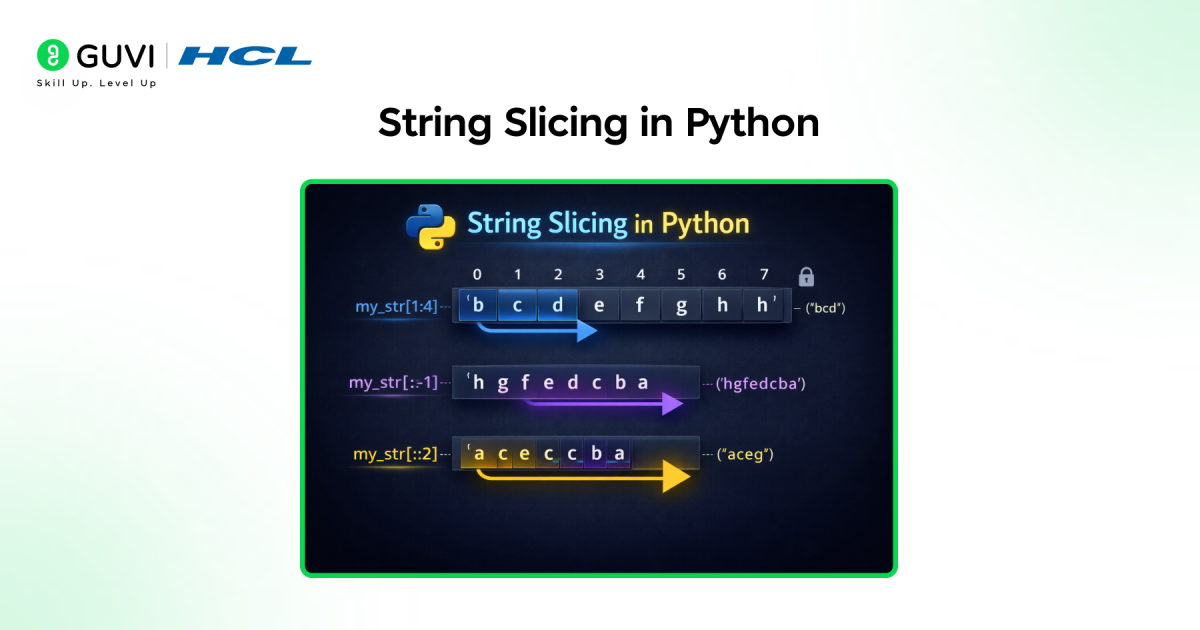
String slicing allows you to extract specific portions of a string using index boundaries without modifying the original value. Because strings are immutable, every slicing operation creates a new string object. Python copies the selected Unicode characters into new memory, ensuring the original string remains unchanged. This behavior makes slicing ideal for parsing fixed-length records, extracting prefixes or suffixes, isolating tokens, and handling structured text formats such as dates, IDs, or filenames.
- Case Transformation with Slicing
Slicing itself does not alter character casing, but it is frequently combined with string methods such as upper(), lower(), or casefold() to transform only a selected portion of a string. This enables partial formatting, such as capitalizing a prefix, normalizing a specific segment, or masking sensitive sections while leaving the rest of the string intact. This pattern is common in data cleaning and preprocessing workflows.
- Common String Slicing Use Cases
- Trimming Whitespace and Unwanted Characters: Remove leading or trailing characters such as spaces, delimiters, or fixed prefixes without modifying the original string.
- Removing Headers or Footers: Exclude known header or footer sections from structured text, logs, or formatted files by slicing specific ranges.
- Masking Sensitive Information: Hide parts of strings such as email addresses, phone numbers, or tokens by slicing and replacing only selected segments.
- Extracting File Extensions or Identifiers: Isolate suffixes like file extensions, IDs, or codes from filenames and structured values using precise index boundaries.
- Reversing Strings Efficiently: Reverse entire strings or selected portions using step-based slicing without additional logic.
- Processing User Input Safely: Handle user-provided strings of unpredictable length without risking index errors, thanks to slicing’s safe boundary handling.
List Slicing in Python
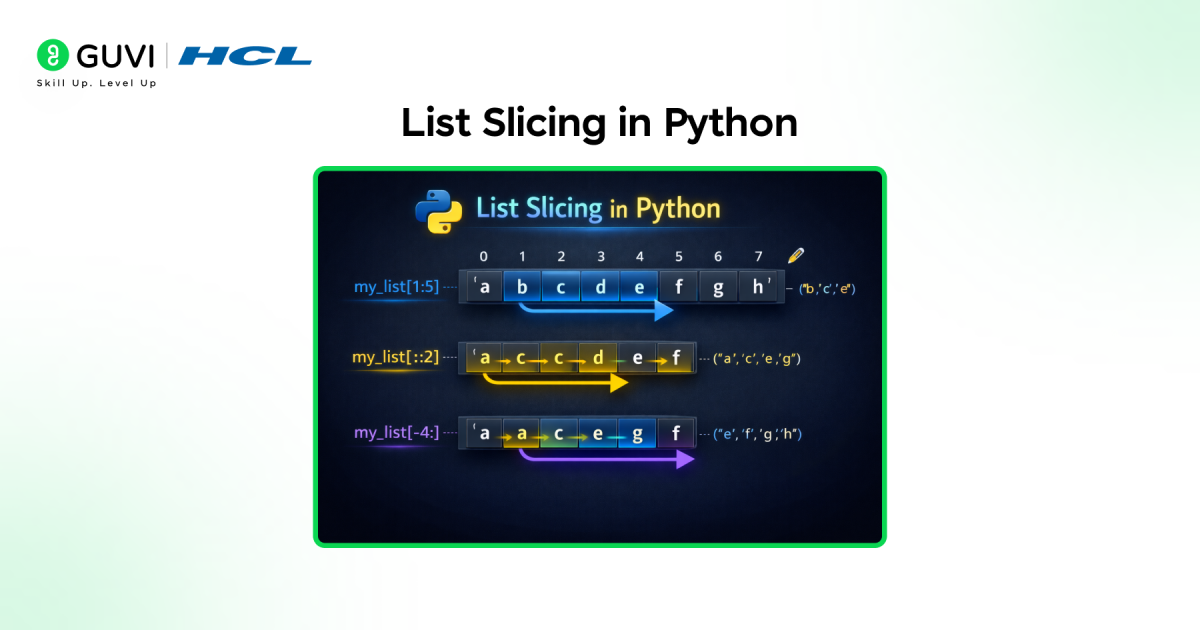
- Extracting Sublists
List slicing extracts a contiguous subset of elements and returns a new list. The new list contains references to the same elements as the original list, making it a shallow copy. This approach is commonly used for pagination, batch processing, sliding windows, and dividing datasets into manageable chunks.
- Modifying Lists Using Slicing
Lists uniquely support slice assignment, allowing developers to replace, insert, or delete multiple elements in a single operation. Assigning an iterable to a slice can change both the contents and the length of the list. This makes slice assignment a powerful mechanism for in-place transformations, bulk updates, and restructuring data without explicit loops.
- Copying Lists Safely
Using full slicing (list[:]) creates a shallow copy of a list container. This prevents accidental side effects when lists are passed between functions or modified independently. While the list object itself is copied, nested objects inside the list remain shared, which is an important consideration for complex data structures.
Tuple Slicing in Python
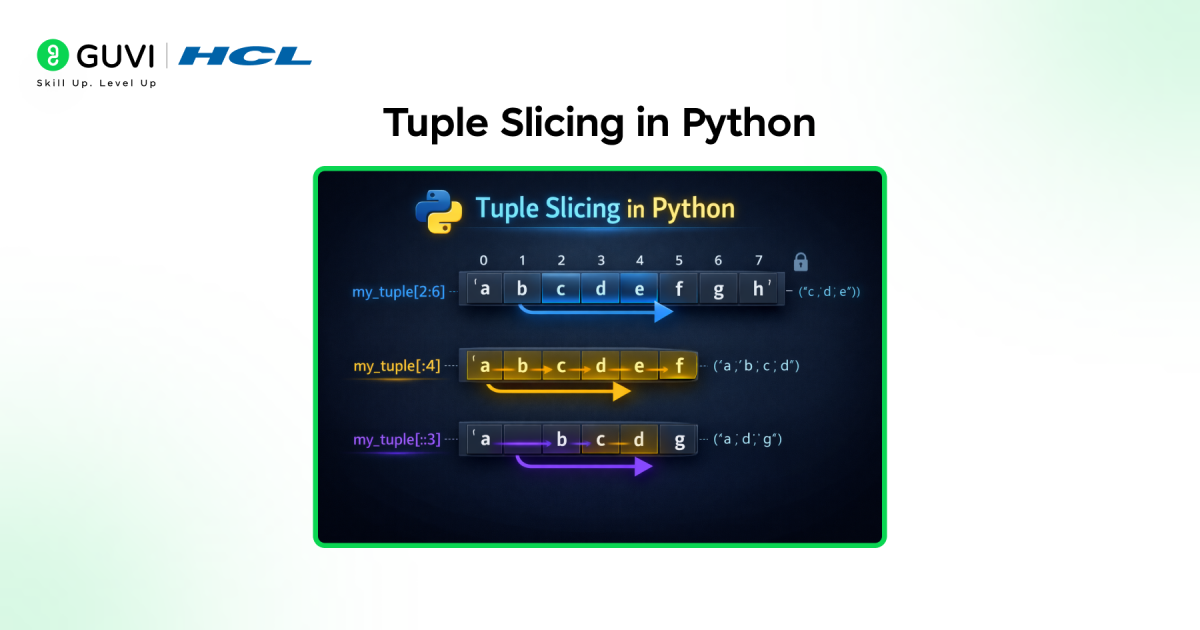
- Tuple Slicing Behavior
Tuple slicing follows the same syntax and index resolution rules as list slicing but always returns a new tuple. Because tuples are immutable, slicing is strictly read-only and cannot be used for assignment or modification.
- Immutability and Slicing
Tuple immutability ensures that slicing operations are safe and side-effect free. Once a tuple is created, its contents cannot change, making tuple slicing predictable and suitable for concurrent or functional-style programming.
- Practical Use Cases
Tuple slicing is commonly used when working with fixed records, coordinate data, configuration values, or function return tuples. It allows partial access to structured data while preserving integrity and preventing accidental mutation.
Slicing range() Objects
Slicing in Python isn’t limited to strings, lists, and tuples, ranges are sliceable too, and the result is genuinely useful in a way many beginners don’t expect: slicing a range doesn’t expand it into a list, it returns a new, equally memory-efficient range object.
r = range(10)
sliced = r[2:8:2]
print(sliced)           # range(2, 8, 2)
print(list(sliced))     # [2, 4, 6]
This matters for performance. Slicing a range with a billion elements is instant and uses almost no memory, because Python only stores the start, stop, and step, it never materializes the full sequence unless you explicitly convert it with list() or iterate over it.
This is one of the clearest illustrations of why slicing is a language-level operation, not just a convenience wrapper around a loop.
Slicing NumPy Arrays vs Python Lists
If you work with data science or numerical code, you’ll run into NumPy arrays constantly, and their approach to slicing in Python differs from standard lists in a way that catches people off guard.
The core difference: views vs. copies. Slicing a Python list always creates a new list, a full copy. Slicing a NumPy array returns a view into the original array, meaning the sliced object shares the same underlying memory.
import numpy as np

arr = np.array([1, 2, 3, 4, 5])
sliced = arr[1:4]
sliced[0] = 99
print(arr)  # [1, 99, 3, 4, 5], the original changed too!

lst = [1, 2, 3, 4, 5]
lst_slice = lst[1:4]
lst_slice[0] = 99
print(lst)  # [1, 2, 3, 4, 5], unaffected, lists always copy on slice
Why this matters: NumPy’s view-based slicing is a deliberate performance choice, it avoids copying potentially huge arrays every time you slice one. But it also means modifying a NumPy slice can silently modify your original data, a common source of subtle bugs. If you genuinely need an independent copy from a NumPy array, call .copy() explicitly on the slice.
Slice Objects in Python
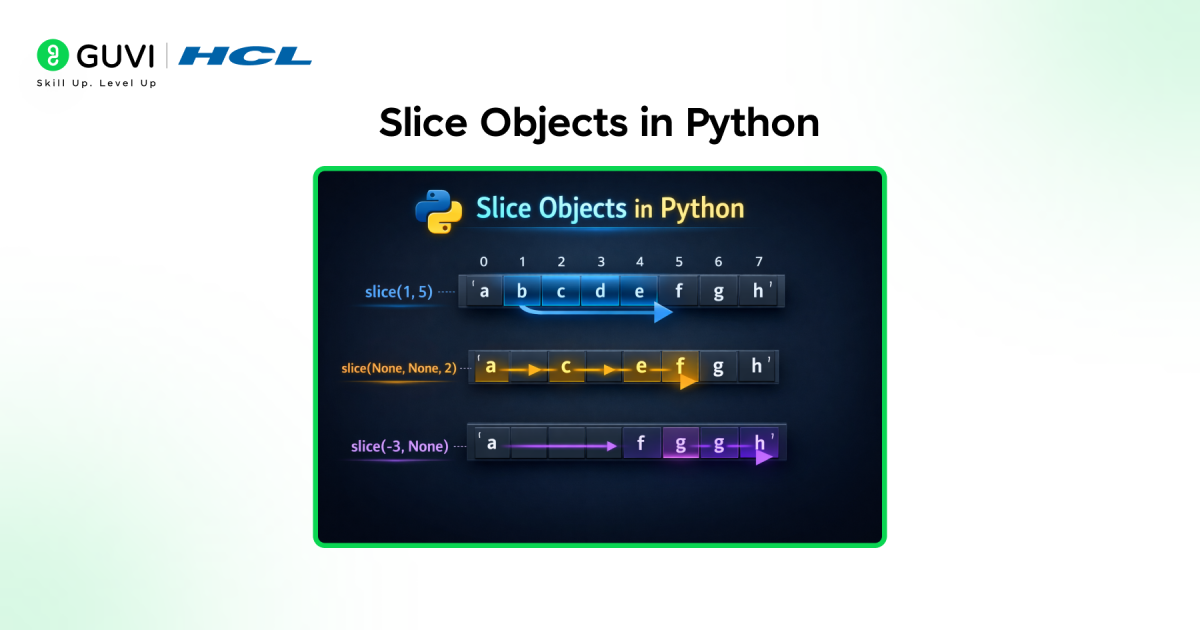
- What a Slice Object Is?
A slice object is an internal representation of slicing parameters, encapsulating start, stop, and step. When Python encounters slice syntax, it creates a slice object and passes it to the sequence’s __getitem__() method. This abstraction allows slicing logic to be separated from syntax.
- Using slice() Explicitly
The built-in slice(start, stop, step) function allows developers to construct slice objects programmatically. This is especially useful when slice boundaries are calculated dynamically, reused across multiple sequences, or passed as arguments to functions or methods.
- When Slice Objects Are Useful
Slice objects are valuable in advanced scenarios such as implementing custom sequence types, building reusable data views, and applying consistent slicing logic across multiple datasets. They improve maintainability by centralizing slicing rules and reducing duplicated slicing expressions.
Slicing vs Indexing in Python
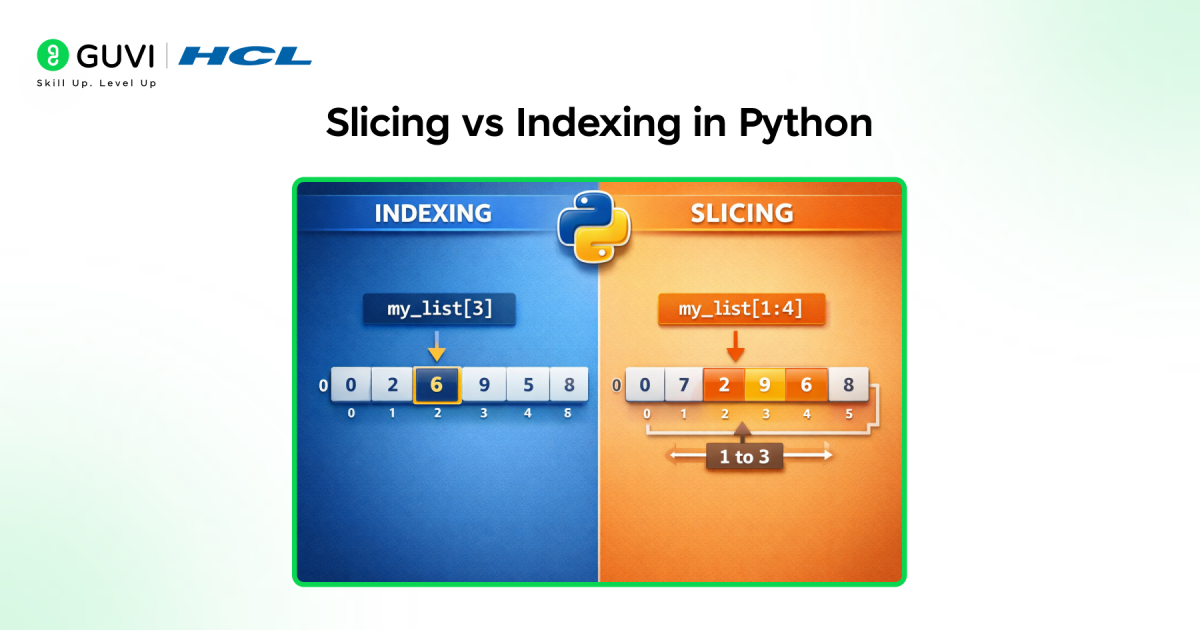
Slicing and indexing in Python both operate on sequences, but they serve different purposes and behave differently at runtime. Indexing retrieves a single element from a sequence using one position and raises an IndexError if the index is out of range.

Slicing, on the other hand, extracts a range of elements using start, stop, and step values, returning a new sequence rather than a single item. Unlike indexing, slicing never raises IndexError for out-of-bounds indexes because Python silently clamps slice boundaries. Slicing supports negative indexes, reverse traversal, and step-based selection, making it more expressive for batch operations.
| Factor | Indexing | Slicing |
| Purpose | Access a single element | Extract multiple elements |
| Syntax | sequence[index] | sequence[start:stop:step] |
| Output | Single value | New sequence |
| Zero-based | Yes | Yes |
| Boundary Behavior | Raises IndexError if out of range | Safely adjusts bounds, no error |
| Negative Index Support | Yes | Yes |
| Step Support | No | Yes |
| Reverse Access | Manual logic required | Built-in using [::-1] |
| Internal Handling | Direct element lookup | Uses a slice object |
| Mutability Impact | Does not modify object | Returns new object (except list slice assignment) |
| Typical Use Case | Precise element access | Subsequence extraction, copying, sampling |
How Slicing in Python Works: Step-by-Step
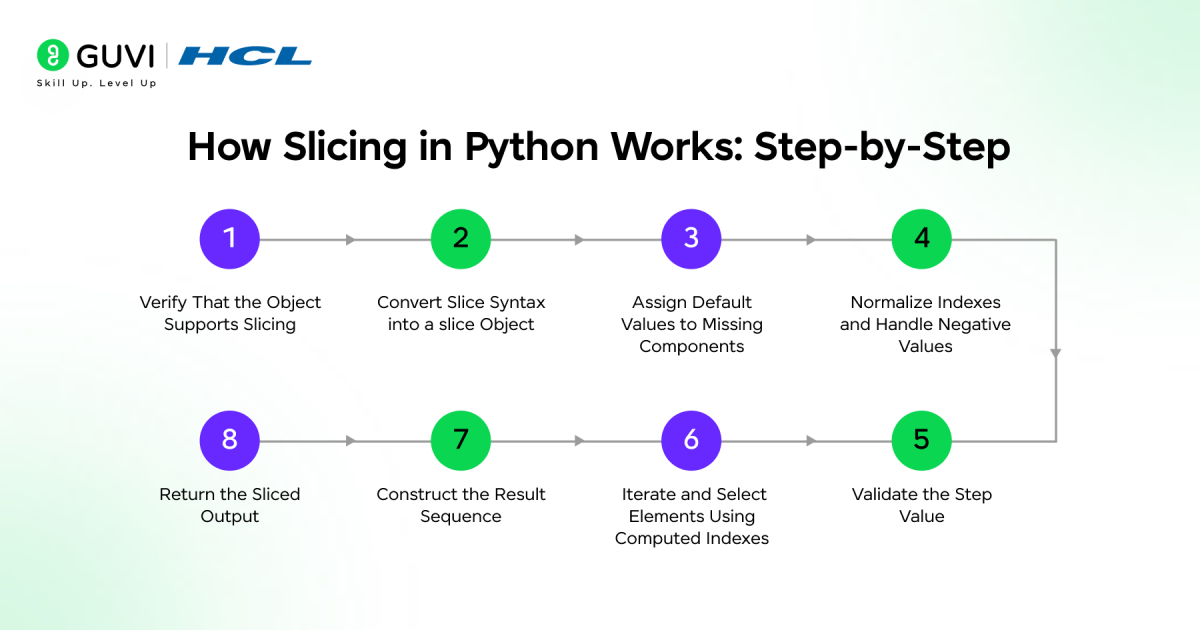
Mastering how slicing works step by step helps a Python developer write efficient and production-ready code with confidence. Below are the main steps that explain how slicing in Python works internally, from syntax interpretation to result construction:
Step 1: Verify That the Object Supports Slicing
Python first checks whether the target object implements the sequence protocol or supports the __getitem__() method with slice handling. Built-in sequence types such as str, list, tuple, and range natively support slicing. Custom objects can also support slicing by implementing __getitem__(self, key) and explicitly handling slice objects.
Step 2: Convert Slice Syntax into a slice Object
When Python encounters slicing syntax like:
sequence[start:stop:step]
it internally converts it to:
sequence.__getitem__(slice(start, stop, step))
This shows that slicing is not a special execution construct. It is translated into a standard method call using a sliceobject that stores start, stop, and step as attributes.
Step 3: Assign Default Values to Missing Components
If any slice component is omitted, Python assigns defaults dynamically based on traversal direction:
- start defaults to 0 (or len(sequence) – 1 for negative steps)
- stop defaults to len(sequence) for positive steps, or conceptually “before index 0” for negative steps (not the literal value -1)
- step defaults to 1
These defaults are computed at runtime, ensuring consistent behavior across different sequence lengths.
Step 4: Normalize Indexes and Handle Negative Values
Python converts negative indexes into valid positions relative to the sequence length. For example, -1 becomes len(sequence) – 1.
If start or stop exceeds sequence boundaries, Python clamps them silently instead of raising an error. This guarantees that slicing never raises an IndexError, even when boundaries are out of range.
Step 5: Validate the Step Value
Before iteration begins, Python validates the step. A step value of 0 is invalid and raises a ValueError because traversal would be undefined. Positive step values move forward through the sequence, while negative step values reverse the traversal direction.
Step 6: Iterate and Select Elements Using Computed Indexes
Python generates indexes starting from start, incrementing by step, and stopping when the stop condition is met. Each valid index retrieves an element from the original sequence. For built-in sequence types, this iteration is implemented efficiently in C.
Step 7: Construct the Result Sequence
The construction behavior depends on mutability:
- Immutable sequences (strings, tuples): Python allocates a new object and copies the selected elements.
- Mutable sequences (lists): Python creates a new list unless slicing is used on the left side of an assignment.
The original sequence remains unchanged unless slice assignment is explicitly applied.
Step 8: Return the Sliced Output
Python returns the newly created sequence object. Because slicing produces a new object in read-only contexts, it guarantees no unintended side effects on the original data.
Want to practice Python slicing and strengthen your core Python fundamentals? Explore HCL GUVI’s Python Hub for clear explanations, hands-on examples, and concept-by-concept learning that builds real coding confidence.
Real-World Use Cases of Slicing
1. Extracting Substrings and Tokens from Text
Slicing is commonly used to extract meaningful parts of strings such as usernames, file extensions, prefixes, or fixed-format data. For example, slicing helps isolate date segments, remove headers or footers, and parse structured text without additional libraries.
2. Pagination and Batch Processing of Data
Slicing is widely used to divide large datasets into smaller chunks for pagination, batching, or incremental processing. This is especially useful in APIs, data pipelines, and UI rendering, where only a subset of records should be processed or displayed at a time.
3. Reversing Sequences Efficiently
Using slicing with a negative step is a clean and efficient way to reverse strings, lists, or tuples. This technique is often applied in data management and validation, algorithm design, and formatting output without writing extra logic or loops.
4. Copying and Cloning Lists Safely
List slicing is a reliable way to create shallow copies of lists. This prevents unintended side effects caused by shared references when passing lists between functions or modifying data structures independently.
5. Sampling and Skipping Elements in Sequences
Slicing with step values allows developers to sample elements at regular intervals, such as selecting every nth item from a dataset. This is commonly used in data analysis, logging, and performance-sensitive operations where full iteration is unnecessary.
Common Mistakes with Slicing
This is where slicing in Python trips up beginners most often:
- Off-by-One Errors: one of the most frequent slicing mistakes occurs when developers miscalculate slice boundaries. Because Python uses zero-based indexing and an exclusive stop index, it is easy to unintentionally include or exclude an element. These errors often surface in pagination, batching, or substring extraction where precise boundaries are required.
- Confusion with the Stop Index: many beginners assume the stop index is inclusive, which leads to missing or extra elements in the result. Python’s exclusive stop index is intentional and enables predictable slice lengths, but misunderstanding it can cause logical bugs that do not raise runtime errors.
- Using -1 as a Literal Stop for Negative-Step Slices: as covered earlier, this produces an empty result rather than the expected reversed range. Omit the stop entirely instead.
- Incorrect Step Usage: improper step values can lead to empty slices or unintended traversal direction. A step of 0 raises a ValueError, while mismatched start, stop, and step directions (such as a positive step with reversed boundaries) silently produce empty results, making issues harder to detect.
Want to move from understanding Python slicing to using it confidently in real programs? Enroll in HCL GUVI’s Python course with 100% online, self-paced learning and full lifetime access to build strong Python fundamentals that go beyond syntax.
Best Practices for Using Slicing in Python
- Be Explicit with Start and Stop Indexes: Always choose start and stop indexes deliberately to avoid off-by-one errors. Remember that the stop index is exclusive, which makes slicing predictable but easy to misuse if not planned carefully.
- Use Negative Indexes Intentionally, Not Implicitly: Negative indexes are powerful for slicing from the end of a sequence, but overusing them can reduce readability. Prefer clear boundaries, especially in shared or production code.
- Use Step Values Sparingly for Readability: While steps like sequence[::2] or sequence[::-1] are concise, they can be confusing to beginners. Use step slicing when it clearly communicates intent, such as reversing a sequence.
- Avoid Large Slices on Memory-Critical Data: Slicing creates a new sequence in memory. For large datasets, unnecessary slicing can increase memory usage. Consider iterators or views when working with large collections.
- Use List Slicing for Safe Copying: Create shallow copies of lists using list[:] when you need an independent copy. This avoids unintended side effects caused by shared references.
Slicing Interview Questions You Should Be Ready For
Since slicing in Python comes up constantly in technical interviews, here are a few questions worth having a ready answer for.
1. What does sequence[::-1] do, and why does it work without specifying start or stop? It reverses the sequence. Python computes the defaults dynamically based on the negative step: start conceptually becomes the last index, and the traversal continues to the beginning without needing explicit boundaries.
2. Why doesn’t slicing raise an IndexError, but indexing does? Indexing accesses one specific position, so an out-of-range index is a real error.
Slicing defines a range and Python silently clamps that range to valid boundaries instead of failing, since a partially valid range is still a meaningful result.
3. What’s the difference between slicing a Python list and slicing a NumPy array? List slicing always returns a new, independent list (a copy). NumPy array slicing returns a view that shares memory with the original array, so modifying a NumPy slice can modify the source array too.
4. How would you safely copy a list using slicing? Use list[:], a full slice with no start or stop, which creates a shallow copy. For NumPy arrays, you’d need .copy() explicitly, since a plain slice there returns a view.
5. What happens if you use a step of 0 in a slice? Python raises a ValueError, since a step of 0 would mean the traversal never advances, an undefined operation.
Conclusion
Slicing is one of Python’s most expressive features, enabling precise and efficient access to sequence data without complex logic. When learning Python, understanding slicing syntax, internal behavior, and its effect on different sequence types helps you write cleaner, safer, and more performant code. From simple substring extraction to advanced batch processing and data transformation, slicing scales seamlessly from everyday tasks to real-world applications, making it a core concept in learning Python effectively.
FAQs
Is slicing zero-based in Python?
Yes, slicing in Python is zero-based because it follows the same indexing model as Python sequences. The first element of a sequence has an index of 0, and slice boundaries are calculated using this zero-based system. The start index is inclusive, while the stop index is exclusive, which makes slicing predictable and consistent across strings, lists, and tuples.
Does slicing modify the original object?
No, slicing does not modify the original object in read-only operations. For immutable sequences such as strings and tuples, slicing always creates a new object. For lists, slicing returns a new list by default. The original object is only modified when slicing is used in an assignment context, such as replacing part of a list.
Is slicing faster than loops?
In most cases, slicing is faster and more concise than manual loops for extracting contiguous data. Slicing operations are implemented in optimized C code within the Python interpreter, reducing overhead compared to Python-level iteration. However, slicing creates a new object, so for very large datasets, memory usage should also be considered.
Success Stories

About the Author
Jebasta
I translate the language of data into stories that anyone can understand. As a writer with a data science background, I simplify analytics, AI, and decision-making so beginners and enthusiasts can confidently explore the world of data.
View all posts by Jebasta
Connect with me @












Did you enjoy this article?