


Interview Articles
My Full Stack Developer Interview Experience: What Nobody Tells You
My Digital Marketing Interview Experience: What They Don't Tell You [2026]
How Long Does Technical Interview Preparation Take? An Expert's Reality Check
Technical QA Interview Questions: What Top Companies Really Ask in 2026


Get In Touch For Details! Request More Information
40 Best PHP Interview Questions and Answers To Get Started
Dec 01, 2025 8 Min Read 2863 Views
(Last Updated)
Are you preparing for a PHP interview and unsure what topics to focus on? If you’re a fresher entering the tech world or a developer brushing up on skills for your next opportunity, having a solid grasp of PHP interview questions can make a real difference.
This article compiles the top 40 PHP interview questions and answers, thoughtfully divided into beginner, intermediate, advanced, and scenario-based sections.
You’ll find commonly asked theoretical questions, practical coding examples, and real-world scenarios employers love to ask. Let’s help you walk into your next interview with clarity and confidence.
Table of contents
- Quick Answer
- Beginner-Level PHP Interview Questions and Answers
- What is PHP, and what are its key features?
- How is PHP executed on a server?
- What is the difference between echo and print in PHP?
- What are PHP variables, and how do you declare them?
- What is the difference between == and === in PHP?
- What are the data types supported in PHP?
- How do you define a constant in PHP?
- What is the use of isset() and empty()?
- How can you include one PHP file into another?
- Write a simple PHP script to display “Hello, World!”
- Intermediate-Level PHP Interview Questions and Answers
- What is the difference between the GET and POST methods in PHP?
- What is a session in PHP? How is it different from a cookie?
- How do you start and destroy a session in PHP?
- How can you connect PHP to a MySQL database?
- What are superglobals in PHP?
- How do you prevent SQL injection in PHP?
- What is the use of explode() and implode()?
- What are magic methods in PHP?
- How can you handle errors in PHP?
- Write a PHP function to reverse a string.
- Advanced-Level PHP Interview Questions and Answers
- What is the difference between include and require?
- Explain the difference between mysqli and PDO.
- What is Composer in PHP?
- Explain traits in PHP.
- How does autoloading work in PHP?
- What are PHP namespaces, and why are they important in large applications?
- How does PHP handle memory management internally?
- What is the purpose of PHP’s SPL (Standard PHP Library)?
- What is OPCache, and how does it improve PHP performance?
- How does dependency injection improve PHP application design?
- Scenario-Based PHP Interview Questions and Answers
- You’re building a login system. How would you securely store user passwords?
- A form is not submitting data via POST. What steps would you take to debug?
- You need to upload a user profile image. How would you do it in PHP?
- How would you implement pagination for 1000 rows in PHP?
- A user reports session data is missing after login. What could be the reasons?
- A PHP API endpoint is responding slowly. How do you diagnose the issue?
- You need to prevent SQL injection in a legacy PHP project. What steps do you take?
- A PHP session ends unexpectedly during user activity. What would you check?
- You must handle large user file uploads efficiently. What is your approach?
- A PHP script processing millions of records keeps timing out. What is your solution?
- Tips and Tricks to Prepare for PHP Interviews
- Conclusion
Quick Answer
PHP interviews usually focus on basics like syntax, arrays, functions, and OOP, along with how you use PHP to handle forms, sessions, and databases. You may also face questions on debugging, security practices, and building simple features. This blog covers 40 most commonly asked questions to help you prepare quickly and confidently.
Beginner-Level PHP Interview Questions and Answers
If you’re just getting started with PHP, this section is for you. These questions are often asked in entry-level interviews to test your understanding of core concepts like syntax, data types, variables, and basic functions.
1. What is PHP, and what are its key features?
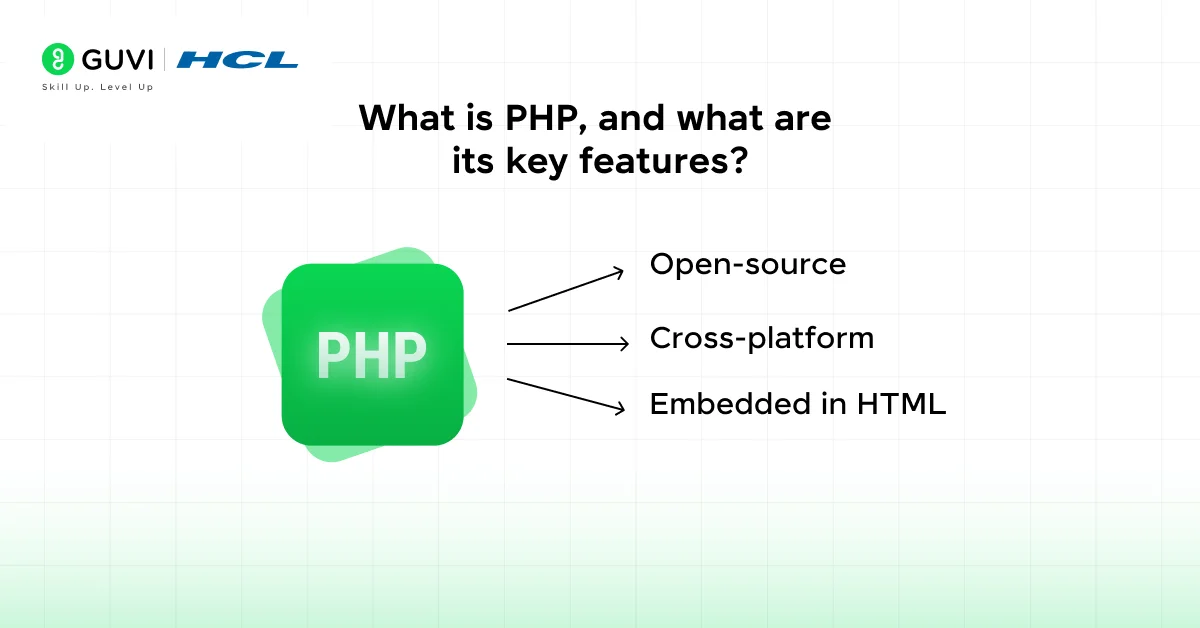
PHP stands for Hypertext Preprocessor, and it’s a widely used open-source server-side scripting language primarily designed for web development. It can also be used for general-purpose programming.
Key Features:
- Open-source: Freely available for use and distribution.
- Cross-platform: Works on Windows, Linux, macOS, etc.
- Embedded in HTML: PHP code can be written inside HTML for dynamic content generation.
2. How is PHP executed on a server?
When a user visits a web page containing PHP code:
- The web server (e.g., Apache or Nginx) recognizes the .php extension.
- It sends the file to the PHP interpreter on the server.
- The interpreter processes the PHP code and generates HTML output.
- This HTML is sent back to the browser, and the user sees the result.
This process ensures that users never see the actual PHP code—only the final output.
3. What is the difference between echo and print in PHP?
Both echo and print are used to output data to the browser, but there are slight differences:
- echo:
- Can take multiple parameters (though rarely used this way).
- Faster than print because it doesn’t return a value.
- print:
- Takes only one argument.
- Returns 1, so it can be used in expressions.
- Slightly slower than echo.
In most cases, echo is preferred for its speed and simplicity.
4. What are PHP variables, and how do you declare them?
In PHP, variables are used to store data (like strings, numbers, arrays, etc.) during program execution.
Declaration Syntax:
php
$variableName = value;
Rules for naming PHP variables:
- Must begin with a dollar sign ($), followed by a letter or underscore.
- Cannot start with a number.
- Variable names are case-sensitive ($Name and $name are different).
Example:
php
$name = "Alice";

$age = 25;
5. What is the difference between == and === in PHP?
This is a common point of confusion, but important to understand:
== checks for value equality but ignores data types (type juggling).
php5 == "5"; // true
=== checks for both value and data type equality.
php5 === "5"; // false, because one is an integer, the other is a string
You should use === when strict comparison is necessary to avoid unexpected bugs.
6. What are the data types supported in PHP?
PHP is a dynamically typed language, meaning you don’t need to specify the type when declaring a variable. PHP supports the following primary data types:
- String – A sequence of characters.
Example: $name = “John”; - Integer – Whole numbers, positive or negative.
Example: $age = 30; - Float (Double) – Decimal numbers.
Example: $price = 99.99; - Boolean – Represents true or false.
Example: $isAvailable = true; - Array – A Collection of multiple values.
Example: $colors = [“red”, “blue”];
7. How do you define a constant in PHP?
A constant is a value that cannot be changed during the script execution. You define constants using the define() function.
Syntax:
php
define("SITE_NAME", "OpenAI");
- Constants do not start with a dollar sign ($).
- By convention, constant names are written in uppercase.
- Constants are global, meaning they can be accessed anywhere in the script.
8. What is the use of isset() and empty()?
These are two built-in functions used for variable checking:
isset($var) – Returns true if the variable is set and not null.
empty($var) – Returns true if the variable is empty.
9. How can you include one PHP file into another?
PHP provides several ways to include code from one file into another, useful for reusing templates, functions, and configurations:
- include ‘file.php’; – Generates a warning if the file is not found, and continues execution.
- require ‘file.php’; – Generates a fatal error if the file is not found, and stops execution.
- include_once and require_once – Prevent multiple inclusions of the same file.
Use require when the file is essential for the application to run properly.
10. Write a simple PHP script to display “Hello, World!”
Here’s a basic PHP script that outputs a simple message to the browser:
php
<?php

  echo "Hello, World!";

?>
When this script runs on a server with PHP installed, it will display:
Hello, World!
This is often the first program written to test if your PHP environment is working.
Learn More: Python vs PHP: Which Language is The Clear Winner for Web Development?
Intermediate-Level PHP Interview Questions and Answers
Now that you’re comfortable with the basics, it’s time to tackle questions that dive deeper into how PHP is used in real-world projects.
These intermediate-level questions test your knowledge of sessions, form handling, database connections, error management, and security best practices.
11. What is the difference between the GET and POST methods in PHP?
Both GET and POST are used to send data from a client (browser) to a server, typically through HTML forms.
GET:
- Sends form data as URL parameters (e.g., ?name=John&age=25)
- Data is visible in the address bar
- Limited length of data
- Suitable for non-sensitive data (like search queries)
POST:
- Sends data in the HTTP request body
- Not visible in the browser’s address bar
- No size limitation
- Suitable for sensitive or large data (like login info, file uploads)
12. What is a session in PHP? How is it different from a cookie?
A session stores data on the server for a user, allowing persistence across multiple page visits.
Cookies, on the other hand, store data in the user’s browser.
| Feature | Session | Cookie |
| Storage | Server-side | Client-side |
| Security | More secure | Less secure |
| Size Limit | Higher (~2MB) | Limited (~4KB) |
| Accessibility | Server only | Browser + server |
13. How do you start and destroy a session in PHP?
To use sessions, you must start one before any HTML output using session_start().
Start a session:
php
session_start();

$_SESSION['user'] = 'JohnDoe';
Access a session value:
php
echo $_SESSION['user'];
Destroy a session:
php
session_destroy(); // Ends session and clears session data
You can also unset specific session variables using unset().
14. How can you connect PHP to a MySQL database?
You can use mysqli or PDO. Here’s an example using mysqli:
php
$servername = "localhost";

$username = "root";

$password = "";

$database = "test_db";

$conn = new mysqli($servername, $username, $password, $database);

if ($conn->connect_error) {

  die("Connection failed: " . $conn->connect_error);

}
Tips:
- Always check for connection errors
- Use prepared statements to prevent SQL injection
15. What are superglobals in PHP?
Superglobals are built-in variables in PHP that are accessible from any scope (global or local). Common ones include:
- $_GET – Data sent via URL parameters
- $_POST – Data sent via the POST method
- $_SESSION – Data stored in user session
- $_COOKIE – Data stored in the browser
- $_REQUEST – Combines GET, POST, and COOKIE
- $_FILES – For file uploads
- $_SERVER – Server and execution environment info
They simplify handling form data, sessions, files, and more.
16. How do you prevent SQL injection in PHP?
The best way is to use prepared statements with mysqli or PDO.
With mysqli:
php
$stmt = $conn->prepare("SELECT * FROM users WHERE email = ?");

$stmt->bind_param("s", $email);

$stmt->execute();
With PDO:
php
$stmt = $pdo->prepare("SELECT * FROM users WHERE email = :email");

$stmt->execute(['email' => $email]);
Why this works:
Prepared statements separate SQL logic from user input, neutralizing malicious injections like OR 1=1.
17. What is the use of explode() and implode()?
explode() splits a string into an array using a delimiter:
php
$str = "apple,banana,cherry";

$array = explode(",", $str); // ['apple', 'banana', 'cherry']
implode() joins array elements into a string with a delimiter:
php
$arr = ['red', 'blue', 'green'];

$str = implode("-", $arr); // "red-blue-green"
These functions are useful for working with comma-separated values, tags, or keywords.
18. What are magic methods in PHP?
Magic methods are special functions that start with double underscores (__). They are triggered automatically by PHP in certain situations.
Common magic methods:
- __construct() – Called when a class is instantiated
- __destruct() – Called when the object is destroyed
- __get($name) – Called when accessing a non-existing or inaccessible property
- __set($name, $value) – Called when setting such a property
- __toString() – Converts object to string when used with echo
Example:
php
class Test {

  public function __toString() {

    return "Test class as string";

  }

}

$obj = new Test();

echo $obj; // Outputs: Test class as string
19. How can you handle errors in PHP?
You can handle errors in several ways:
Using error_reporting() – Controls which errors are reported:
phperror_reporting(E_ALL);
Using try-catch blocks (Exception handling):
php
try {

  throw new Exception("Something went wrong");

} catch (Exception $e) {

  echo "Error: " . $e->getMessage();

}
Using set_error_handler() – For custom error handling logic.
Logging errors to a file using ini_set():
phpini_set("log_errors", 1);
ini_set("error_log", "/path/to/php-error.log");
Always turn off error display in production and use logging instead.
20. Write a PHP function to reverse a string.
Here’s a simple function to reverse a string:
php
function reverseString($str) {

  return strrev($str);

}

echo reverseString("hello"); // Outputs: olleh
Explanation:
- strrev() is a built-in PHP function that reverses the order of characters in a string.
- This is often asked to test your understanding of string functions.
If you’re looking to strengthen your PHP fundamentals through self-paced learning, then HCL GUVI’s PHP Certification Course is the right choice for you.
Advanced-Level PHP Interview Questions and Answers
These questions are designed for experienced PHP developers who understand object-oriented programming, architecture, performance, and tooling. If you’re applying for mid to senior-level roles, be prepared to explain these concepts and how you’ve used them in your past work.
21. What is the difference between include and require?
Both are used to include one PHP file inside another. The key difference lies in how they handle missing files.
- include:
- Generates a warning (E_WARNING) if the file is not found.
- The script continues execution.
- require:
- Generates a fatal error (E_COMPILE_ERROR) if the file is not found.
- The script terminates immediately.
Example:
php
include "header.php"; // Continues even if file missing
require "config.php"; // Halts if file missing
Use require for critical files and include for optional components like layout pieces.
22. Explain the difference between mysqli and PDO.
Both are PHP extensions used for database interaction, but they differ in scope and features.
| Feature | mysqli | PDO |
| Database Support | MySQL only | Supports 12+ databases |
| Named Params | No | Yes (:name) |
| OOP Support | Yes | Yes |
| Prepared Stmts | Supported | Supported |
| Fetch Modes | Associative, numeric | Object, associative, both |
Conclusion:
Use PDO if you want database flexibility. Use mysqli if you’re working only with MySQL and want slightly better performance.
23. What is Composer in PHP?
Composer is a dependency manager for PHP, similar to NPM for Node.js or pip for Python. It helps you:
- Manage and install third-party libraries
- Autoload classes using vendor/autoload.php
- Track dependencies using composer.json
Example:
bash
composer require phpmailer/phpmailer
24. Explain traits in PHP.
Traits allow PHP to reuse sets of methods across multiple classes, solving the problem of single inheritance.
Example:
php
trait Logger {

  public function log($msg) {

    echo "Log: $msg";

  }

}

class User {

  use Logger;

}

$user = new User();

$user->log("User created");
Traits do not support properties, but they are useful for horizontal code reuse, especially for utility methods.
25. How does autoloading work in PHP?
Autoloading allows you to automatically load class files when they’re needed, without manually including each one.
PHP uses spl_autoload_register() to register an autoloading function.
Example:
php
spl_autoload_register(function ($class) {

    include 'classes/' . $class . '.php';

});

$obj = new MyClass(); // Automatically includes classes/MyClass.php
26. What are PHP namespaces, and why are they important in large applications?
Namespaces allow grouping related classes and functions under a unique name to avoid naming conflicts. They are especially useful when multiple libraries define similar class names. This keeps the code modular and organized. It also helps maintain cleaner and more maintainable large-scale applications.
27. How does PHP handle memory management internally?
PHP uses reference counting to track variable usage and applies copy-on-write to improve efficiency. When references form cycles, the garbage collector removes them automatically. This reduces memory leaks and improves performance. It ensures resources are freed when no longer needed.
28. What is the purpose of PHP’s SPL (Standard PHP Library)?
The SPL provides ready-made classes and interfaces for common data structures and iterators. It simplifies working with stacks, queues, heaps, array-like objects, and directory traversal. Developers use it to write cleaner and more efficient code. It also enhances performance by using optimized internal implementations.
29. What is OPCache, and how does it improve PHP performance?
OPCache caches precompiled PHP bytecode in memory, so scripts don’t need to be recompiled for every request. This significantly reduces CPU usage on busy servers. It speeds up execution and lowers response time. It is one of the most effective performance boosters in PHP.
30. How does dependency injection improve PHP application design?
Dependency injection reduces tight coupling by providing external dependencies instead of creating them inside classes. This makes the code easier to test and extend. It supports cleaner architecture aligned with SOLID principles. It also improves maintainability in large systems.
Scenario-Based PHP Interview Questions and Answers
Knowing syntax is one thing, but applying it in real scenarios is what makes you job-ready. These scenario-based questions help interviewers assess how you think through problems, debug issues, and implement secure and scalable solutions using PHP.
31. You’re building a login system. How would you securely store user passwords?
You should never store plain-text passwords. Use PHP’s password_hash() to encrypt passwords, and password_verify() to check them.
Example:
php
// During registration

$hash = password_hash($password, PASSWORD_DEFAULT);

// During login

if (password_verify($password, $hash)) {

    // Login successful

}
This ensures passwords are hashed using secure algorithms like bcrypt.
32. A form is not submitting data via POST. What steps would you take to debug?
To resolve the issue, check the following:
Make sure the form uses method=”POST”:
html<form method="POST" action="submit.php">
- Check the name attributes on form fields.
- Verify $_POST variables using print_r($_POST) in submit.php.
- Look for browser errors using developer tools (Console/Network tab).
- Ensure there are no syntax errors or missing closing tags in the form.
33. You need to upload a user profile image. How would you do it in PHP?
Use the $_FILES superglobal and move_uploaded_file().
Example:
php
if ($_FILES['profile']['error'] == 0) {

  $target = "uploads/" . basename($_FILES['profile']['name']);

  move_uploaded_file($_FILES['profile']['tmp_name'], $target);

}
Best Practices:
- Validate file type (image/jpeg, image/png, etc.)
- Limit file size
- Rename the file to avoid collisions
34. How would you implement pagination for 1000 rows in PHP?
Use SQL LIMIT and OFFSET along with page numbers in the URL:
php
$limit = 10;

$page = $_GET['page'] ?? 1;

$offset = ($page - 1) * $limit;

$sql = "SELECT * FROM products LIMIT $limit OFFSET $offset";
Other Considerations:
- Show next/prev links
- Show total pages using COUNT(*)
- Sanitize $_GET[‘page’]
35. A user reports session data is missing after login. What could be the reasons?
Possible causes include:
- session_start() is not called at the top of the script.
- Output sent before session_start(), which breaks session initialization.
- Browser cookies are disabled, preventing the session ID from persisting.
- Server session timeout settings (php.ini session.gc_maxlifetime) are too short.
- The sessions were accidentally due to improper use.
To fix, ensure session_start() is at the top and test session persistence across pages.
36. A PHP API endpoint is responding slowly. How do you diagnose the issue?
First, measure bottlenecks using tools like Xdebug or profiling logs. Check database queries for inefficiencies and confirm OPCache is enabled. Review loops, external calls, and file operations. Use application-level monitoring if a framework is involved.
37. You need to prevent SQL injection in a legacy PHP project. What steps do you take?
Replace all dynamic SQL with prepared statements using PDO or MySQLi. Validate and sanitize incoming data before use. Remove direct concatenation of user input into queries. Ensure all inputs are handled on the server side.
38. A PHP session ends unexpectedly during user activity. What would you check?
Review session lifetime settings like session.gc_maxlifetime to ensure they’re not too low. Confirm that multiple servers share sessions properly if load balancing is used. Check cookie behavior and ensure the session is not overwritten or destroyed. Verify storage permissions and cleanup frequency on the server.
39. You must handle large user file uploads efficiently. What is your approach?
Implement chunked or streamed uploads to prevent memory overload. Store files outside the public directory and keep only file paths in the database. Use cloud storage like S3 for scalability. Validate size, type, and integrity before saving.
40. A PHP script processing millions of records keeps timing out. What is your solution?
Break the work into smaller batches and process them sequentially or via queue workers. Move heavy operations to background jobs or cron tasks. Optimize memory by using generators instead of loading everything at once. Increase execution limits only after optimizing logic.
Tips and Tricks to Prepare for PHP Interviews
Preparing for a PHP interview becomes much easier when you know what to focus on and how to practice. Here are some simple and effective tips to help you build confidence and perform well.
- Master the Basics
Make sure you clearly understand variables, arrays, loops, functions, and OOP concepts because most questions come from these core areas. - Practice Common PHP Tasks
Try building small features like form handling, login systems, file uploads, and session management to gain hands-on confidence. - Review SQL and Database Integration
PHP is often used with MySQL, so practice queries, CRUD operations, joins, and connecting PHP with databases. - Understand PHP Error Handling
Learn how to debug usingerror_reporting(), try–catch blocks, and common warnings/notices. - Focus on Security Essentials
Be ready to explain XSS, SQL injection, password hashing, and input validation with simple examples. - Go Through Real Code
Read sample PHP code snippets and predict the output — many interviews include this. - Revise Framework Basics
If the job requires it, review Laravel or CodeIgniter fundamentals like routing, controllers, and migrations. - Practice Mini-Projects
Build a small project (e.g., a to-do app or blog page) to talk about during the interview. - Learn to Explain Your Approach
Interviewers check your thinking process, so practice explaining how you solve a problem step by step. - Do Mock Interviews
Use online platforms or ask a friend to test you with timed questions for real interview feel.
If you are looking to learn PHP and go in-depth about Full Stack Development, you can join HCL GUVI’s Full Stack Development Career Program with Placement Assistance that not only teaches you the basics but also makes you an experienced developer through hands-on projects guided by an actual mentor.
Conclusion
In conclusion, mastering PHP doesn’t stop at writing scripts—it’s also about explaining your thought process during interviews. These 30 questions cover the fundamentals, practical coding tasks, advanced concepts, and real-world scenarios you’re likely to face.
By preparing smartly and revising these answers, you’re not just memorizing content, you’re developing the problem-solving mindset that hiring managers are looking for. Stay curious, keep coding, and walk into your next PHP interview ready to impress.
Success Stories

About the Author
Jebasta
I translate the language of data into stories that anyone can understand. As a writer with a data science background, I simplify analytics, AI, and decision-making so beginners and enthusiasts can confidently explore the world of data.
View all posts by Jebasta
Connect with me @













Did you enjoy this article?