


Software Development Articles
My Google SDE Interview Experience: From Rejection to Selection [2026 Success Story]
Apple Interview Experience for Software Developers: What to Expect
Decoding Differences between Network OS and Distributed OS
Operating System Examples: Top OS Types, Features, and Uses Explained


Get In Touch For Details! Request More Information
7 Operating System Layers Explained Simply
Dec 05, 2025 5 Min Read 3393 Views
(Last Updated)
Have you ever wondered what’s actually happening underneath the apps you use every day? We tap, click, type, and swipe without thinking about the layers of work the operating system handles behind the scenes.
Once you peel back that surface, you’ll find a structured stack of components, each with its own job, each supporting the next.
Understanding these operating system layers gives you a clearer picture of why your computer behaves the way it does and how everything fits together. That’s why in this article, we will be dissecting all 7 operating system layers and how they relate to each other. So, let’s get started!
Table of contents
- Quick Answer:
- Why talk about Operating System Layers?
- 7 Operating System Layers: Explained Simply
- Layer: 1 - Hardware
- Layer: 2 - Kernel (The Core Brain)
- Layer: 3 - Device Drivers
- Layer: 4 - Memory Management
- Layer: 5 - Process and Task Management
- Layer: 6 - Input/Output Management
- Layer: 7 - User Applications
- How the Operating System Layers Relate to Each Other
- Real-World Variations & Extra Architectural Detail
- Protection rings and privileges
- Kernel vs. user-space
- Variations in modern systems
- Why the layered model is still useful
- Conclusion
- FAQs
- What are the layers of an operating system?
- Why do operating systems use a layered architecture?
- How do operating system layers interact?
- Are real operating systems strictly layered?
- Which layer is most important?
Quick Answer:
An operating system is built in seven layers: hardware, kernel, device drivers, memory management, process management, I/O management, and user applications, each handling its own job and passing work to the layer beneath it so the whole system runs smoothly.
Why talk about Operating System Layers?
When you use a computer, you click an icon, open an app, type a document, and you mostly don’t worry about what’s happening behind the scenes. But beneath the surface, an operating system is juggling hardware, memory, processes, input/output, and user programs.
Organising all that complexity into layers helps us understand, design, and maintain the operating system in a clearer way.
With this:
- You’ll understand how user actions map down to hardware operations and back.
- You’ll see why bugs in one part don’t always affect everything else.
- You’ll have a clearer mental model when you learn about OS internals like scheduling, memory management, or I/O.
7 Operating System Layers: Explained Simply

When people talk about operating system layers, it can sound a bit stiff or overly technical. But once you see how each layer fits into the bigger picture, the whole stack feels surprisingly logical. Think of it like a well-run building: every floor has its own job, and the people on the top floors only stay productive because everything underneath is working quietly and efficiently.
Let’s walk through the seven layers the way you might explain it to someone who’s curious but doesn’t want a textbook thrown at them.
Layer: 1 – Hardware
Before anything else can happen inside a computer, you need a physical foundation. This layer is where the entire operating system begins.
Everything starts here, the actual machine. It’s the part you can touch: the CPU, the memory chips, the storage, the keyboard, the display.
If the OS were a city, the hardware would be the land it’s built on. It doesn’t make decisions or organize anything; it just sits there waiting to be controlled. But without it, nothing else exists.
Layer: 2 – Kernel (The Core Brain)
Once you have the hardware, something needs to take charge of it. That’s where the kernel comes in. It’s the inner core of the OS, quietly managing the machine’s most essential operations and making sure the rest of the system has a stable base to stand on.
Whenever your computer needs to do something serious, like move data, access memory, or respond to a mouse click, the kernel is involved. It’s always active, always watching, always coordinating. You never see it, but everything depends on it.
Layer: 3 – Device Drivers
Not every piece of hardware speaks the same language, and that’s a problem unless there’s a translator in the middle. Device drivers step into that role, helping the OS communicate smoothly with every device plugged into or built into your computer.
A printer doesn’t “sound” like a keyboard, and a graphics card has a completely different language from a trackpad. Device drivers step in as translators. They help the kernel understand what each device is trying to say. Without them, your OS would stare blankly at your hardware like someone hearing a foreign language for the first time.

Layer: 4 – Memory Management
Your computer constantly juggles data, more than you might realize. The memory management layer steps in to keep everything organized, making sure every program gets the space it needs while keeping the whole system running efficiently.
This layer decides who gets what, who has to wait, and what needs to be moved somewhere else for a while. It makes sure one program doesn’t take over everything or accidentally mess with another program’s data.
If you’ve ever wondered why too many tabs slow your laptop down, the answer lives here.
Layer: 5 – Process and Task Management
Modern computers feel fast because they can hop between tasks in a split second. This layer is responsible for that dance. It decides what runs when, keeps programs from stepping on each other, and helps multitasking feel natural.
Your computer can only do one thing at a time on each CPU core, but it switches between tasks so quickly that it feels like everything is happening at once. This layer is the one juggling those tasks.
It starts processes, pauses them, wakes them up, and keeps them from interfering with each other. Imagine a very calm air-traffic controller making sure every plane lands safely.
Layer: 6 – Input/Output Management
Every click, keypress, file save, or network request lands in this layer. It’s the part of the OS that handles the constant flow of data in and out of the system, making sure your actions and your computer’s responses stay in sync.
This layer makes sure all of that movement of information actually gets where it needs to go. It keeps things smooth so the keyboard doesn’t lag, files save correctly, and your screen shows what you expect. Without this layer, using a computer would feel like shouting into the void.
Layer: 7 – User Applications
At the top of the stack, you reach the part you actually interact with. This layer is where all your apps live: the browsers, editors, games, and tools you rely on. They’re the visible face of the OS, powered by all the work happening in the layers below.
These programs don’t talk to the hardware on their own; they pass their requests down through the layers, and those layers work together to make things happen. The apps are what you see, but everything below them is what makes them possible.
If you want to understand how an operating system functions in reality, read the blog – Functions of an Operating System: A Beginner’s Guide
How the Operating System Layers Relate to Each Other
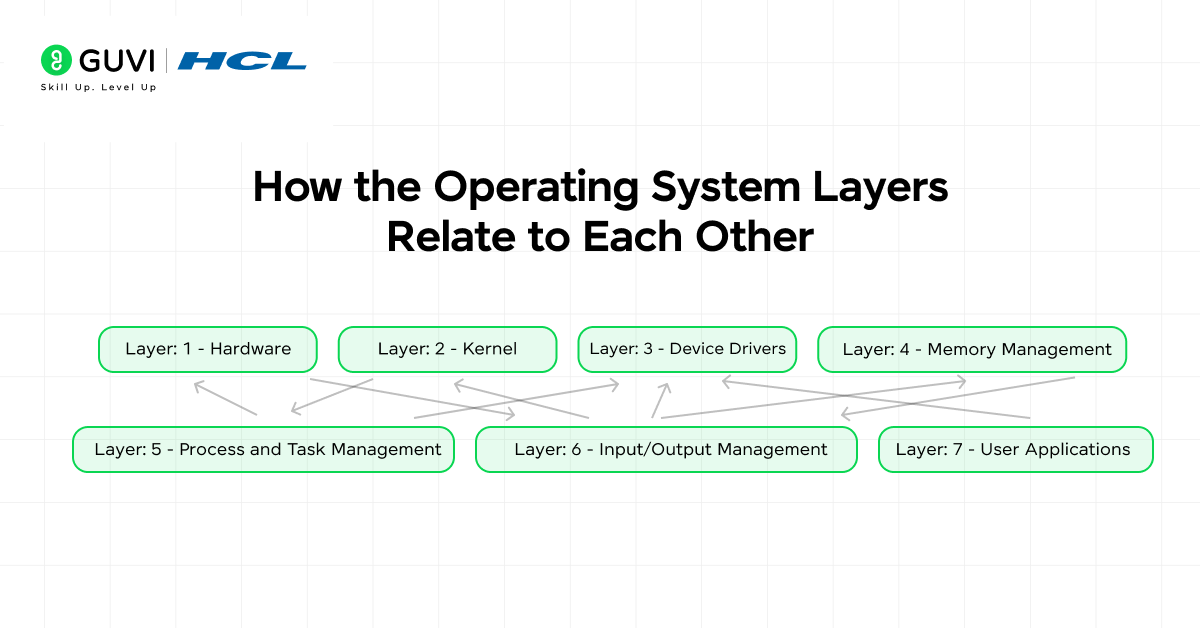
When you stack these seven layers together, they don’t behave like independent pieces. They work more like a relay team. Each layer depends on the one below it and supports the one above it. Nothing acts alone, and nothing can jump the chain. That structure is what keeps an operating system stable instead of turning into a chaotic tangle.
Here’s the thing you really want to remember: A layer only communicates with the layer directly beneath it. Not two layers down. Not sideways. Just the one immediately below.
This rule keeps the system organized. If an application needs to save a file, it doesn’t shout directly at your disk hardware. It sends the request down the stack step by step until it reaches the hardware. Each layer adds its own little piece to the process, turning a simple user action into a coordinated series of system events.
This separation also helps with:
- Debugging: If something breaks, you know roughly where to look instead of searching everywhere.
- Security: A program at the top can’t sneak around and touch hardware directly.
- Flexibility: You can improve or replace one layer without rewriting the entire OS.
So, while the OS feels like one seamless thing, it’s really a carefully layered system with clear boundaries. Those boundaries are what keep everything running smoothly.
There are 8 different types of Operating Systems out there, and if you want to know about all of them in detail, read – 8 Different Types of Operating Systems You Should Know
Real-World Variations & Extra Architectural Detail

Now, here’s the twist: real operating systems don’t always follow the textbook model perfectly. The seven-layer idea gives you a clean mental picture, but modern systems often blend or stretch layers depending on what they’re trying to achieve.
Protection rings and privileges
Some OS architectures add the concept of protection rings: layers of privilege where kernel mode, system services, and user mode have different rights. For example, a reference explains how operating system layers relate to privilege rings.
Kernel vs. user-space
Within the middle layers (CPU scheduling, memory, process), a major distinction exists: the kernel space (privileged code) and the user space (less privileged). This split is critical for security and stability.
Variations in modern systems
Real operating systems might have more nuanced layering. For instance:
- Device drivers may run in separate modules or even in user mode.
- Virtual machines, containers, and microkernels change the layering paradigm.
- Some OSes adopt hybrid or modular kernels, combining characteristics of layered and monolithic designs.
Why the layered model is still useful
Even though real OSes evolve, the layered model remains a strong teaching tool. You can map almost any system you encounter back to these layers and ask: which layer is responsible for this behaviour? That perspective helps both learners and writers.
Did you know that when you click a simple button on your screen, the request travels through almost every OS layer before anything happens? Your app sends the signal down to the I/O layer, which hands it to the drivers, which rely on the kernel, which finally nudges the hardware to respond. Then the whole chain runs in reverse just to show you the result. All of this happens in a fraction of a second, and you never even notice—proof of how well these layers work together behind the scenes.
If you’re serious about mastering software development along with AI and want to apply it in real-world scenarios, don’t miss the chance to enroll in HCL GUVI’s IITM Pravartak and MongoDB Certified Online AI Software Development Course. Endorsed with NSDC certification, this course adds a globally recognized credential to your resume, a powerful edge that sets you apart in the competitive job market.
Conclusion
In conclusion, if you look at an operating system as a layered structure rather than one big mysterious block, the whole thing suddenly feels far more understandable. Each layer has a purpose, each one solves a specific problem, and together they create the smooth experience you rely on every time you use your device.
From hardware all the way up to user applications, the stack works like a coordinated team, passing tasks upward and downward without you ever noticing. And once you know how these layers operate, everything, from system performance to app behavior, starts to make a lot more sense.
FAQs
1. What are the layers of an operating system?
They’re structured parts of the OS that work together, starting from hardware and building up to user applications. Each layer handles a specific responsibility and supports the one above it.
2. Why do operating systems use a layered architecture?
It keeps the system organized, easier to debug, and more secure. Each layer handles its own tasks without interfering with the others.
3. How do operating system layers interact?
A layer communicates only with the one directly below it. This creates a clean, predictable flow of information from apps down to hardware and back.
4. Are real operating systems strictly layered?
Not always. Modern systems often blend or optimize layers for performance, but the general layered idea still guides their design.
5. Which layer is most important?
All layers matter, but the kernel is the core of the system. It directly manages hardware, memory, processes, and acts as the foundation for everything else.
Success Stories

About the Author
Lukesh S
A professional content writer who has experience in freelancing and now working as a Technical Content Writer at GUVI. Google Certified Digital Marketer. Have a sound knowledge of SQL, Data Structures and Cloud Computing.
View all posts by Lukesh S
Connect with me @















Did you enjoy this article?