


Academics Articles
What is a Command Line Interface? Complete Guide to Command Line Prompt
Why These Essential Characteristics of Operating System Matter in 2025
Essential Features of Operating System: A Beginner's Guide for 2025


Get In Touch For Details! Request More Information
Imagine your computer as a symphony orchestra, where every musician represents a hardware component playing a crucial role. The conductor who keeps them in perfect rhythm and harmony is the Operating System (OS). It doesn’t just connect software and hardware — it ensures that every process runs smoothly, efficiently, and securely.
Understanding the architecture of an operating system helps you see how computers truly work beneath the surface. It explains how the OS manages resources, controls processes, and enables communication between applications and hardware devices.
In this blog, we’ll explore what Operating System Architecture is, its key components, and the different architectural models that shape how systems operate — from simple and monolithic designs to advanced modular and hybrid structures. You’ll also learn about their importance, real-world applications, challenges, and future trends in OS design.
Table of contents
- Key Components of Operating System Architecture
- Hardware Layer
- Kernel
- Shell or User Interface
- System Services and Device Drivers
- Application Layer
- Major Architectures of Operating Systems
- Simple Structure
- Monolithic Kernel Architecture
- Layered Architecture
- Microkernel Architecture
- Hybrid Kernel Architecture
- Exokernel Architecture
- Architecture Comparison Table
- Importance of Operating System Architecture
- Real-World Applications
- Challenges in OS Architecture
- Conclusion
- FAQs
- What is the main purpose of OS architecture?
- Why is modularity important in OS design?
- Which architecture is used in Linux?
- What are the future trends in OS architecture?
- Can we change an OS architecture after development?
Key Components of Operating System Architecture
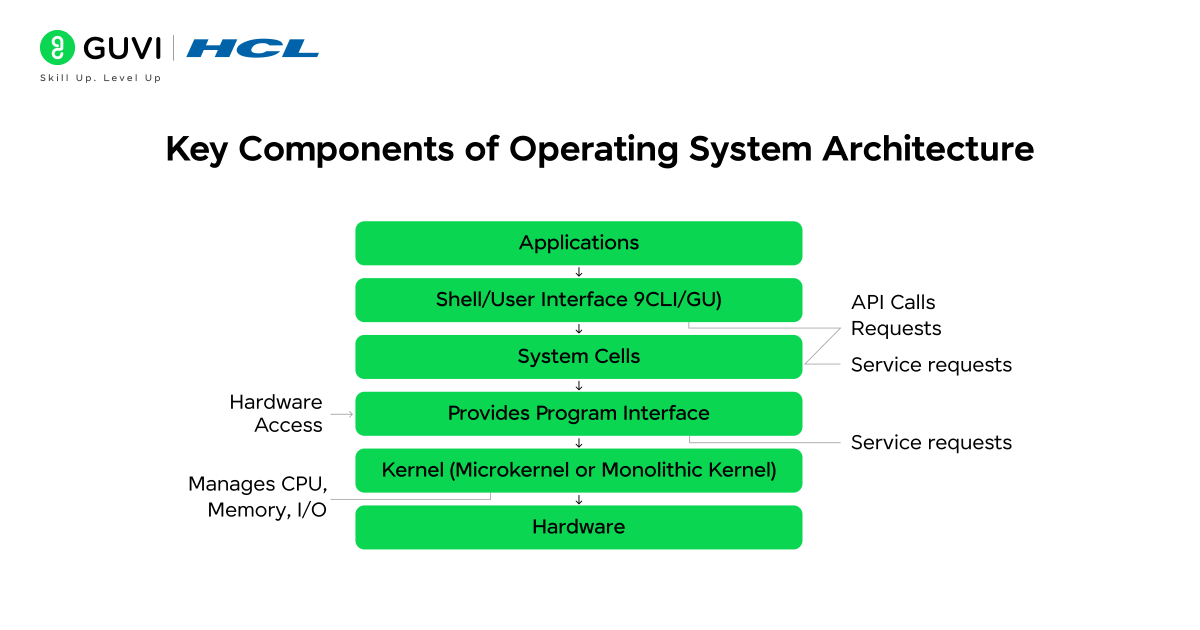
Before we dive into the complex architecture models of operating systems, let’s first uncover the building blocks that make them work. Every operating system relies on five essential components – the Hardware Layer, Kernel, Shell, System Services and Device Drivers, and the Application Layer. Together, these elements form the heartbeat of your computer, managing everything from memory to user commands. Understanding these components will give you a clearer view of how an OS seamlessly connects users, software, and hardware to create a smooth computing experience.
1. Hardware Layer
The hardware layer forms the physical base of your computer system. It includes all the tangible components — such as the CPU, RAM (memory), storage devices, input/output units, and peripherals like printers or monitors.
This layer doesn’t perform operations on its own; instead, it waits for instructions from the operating system. The OS uses device drivers and firmware to communicate with each hardware component, translating software requests into electrical signals that the hardware can understand.
For instance, when you press “Print,” the OS sends a command through the printer driver, which then instructs the printer hardware to start printing. Similarly, when you type on your keyboard or move your mouse, the signals travel through the hardware layer before reaching the OS for interpretation.
This layer is crucial because without hardware, no software can function — and without an OS, hardware remains just a set of silent components waiting for directions.
2. Kernel
The kernel is the heart of the operating system — the central part that directly interacts with the hardware. It acts as the brain that manages all critical system activities such as:
- Process management: Deciding which programs run and in what order.
- Memory management: Allocating and freeing memory for running processes.
- Device management: Handling input/output operations through drivers.
- System calls: Providing a gateway for applications to request OS services.
When you open multiple applications at once — say, a browser, a video player, and a document — the kernel decides which process gets CPU time first and how resources are divided. It performs context switching, allowing seamless multitasking without freezing the system.
Essentially, the kernel ensures everything runs in harmony behind the scenes. Without it, your OS would not be able to manage hardware or software efficiently.
3. Shell or User Interface
The shell is the layer that allows users to interact with the operating system. It can appear in two main forms:
- Graphical User Interface (GUI) – where users interact through icons, windows, and buttons (like Windows or macOS).
- Command Line Interface (CLI) – where users type text commands (like in Linux or DOS).
The shell translates user actions into commands the OS can understand. For example, when you double-click a file in Windows Explorer or type “open file.txt” in a terminal, the shell interprets your request and instructs the OS to execute it.
Modern shells make systems more user-friendly. GUIs simplify complex commands into visual actions, while CLIs provide flexibility and control for developers and power users. Together, they make system interaction intuitive and powerful.

4. System Services and Device Drivers
System services and device drivers play a vital role in managing background tasks and enabling communication between hardware and software.
- System services handle essential operations like networking, file management, user authentication, and system monitoring.
- Device drivers act as translators between hardware devices and the OS, ensuring that programs can access hardware without needing to know its details.
For example, when you connect to Wi-Fi, the network driver manages data exchange between your wireless adapter and the OS. Similarly, audio drivers control how sound is played through your speakers.
Without these components, applications wouldn’t be able to access hardware functionalities. Drivers make sure every device — from printers to graphics cards — works properly with your OS.
5. Application Layer
The application layer is the topmost layer of the OS architecture, where users interact with various software programs. It allows applications like browsers, games, word processors, or video editors to run and communicate with the operating system.
Applications don’t directly interact with hardware; they use Application Programming Interfaces (APIs) to send system requests. For instance, when you open Google Chrome, it uses APIs to request memory, handle network connections, and display graphics — all coordinated by the OS.
This layer makes computing meaningful for end-users. It’s where your commands, inputs, and actions are transformed into results that you can see and use — whether it’s watching a movie, editing a photo, or browsing the web.
Want to strengthen your understanding of how computers and operating systems work? Check out HCL GUVI’s IT and Software Courses. From the basics of computers to advanced system concepts, these courses are available in Tamil, Telugu, Hindi, and English, making learning simple, interactive, and accessible in your own language.
Major Architectures of Operating Systems
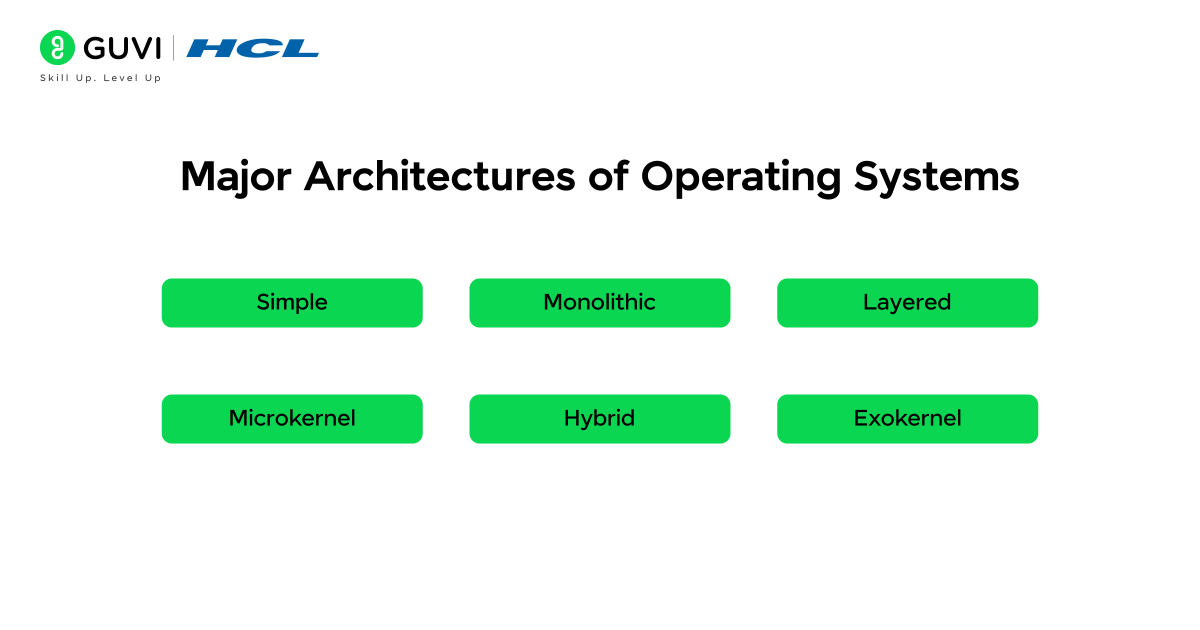
Operating systems are built using different architectural models — each defining how system components are organized and how tasks like process management, memory allocation, and hardware communication are handled. These designs affect the performance, scalability, and reliability of the entire system. Let’s explore the major OS architectures, their structure, features, advantages, disadvantages, and examples in detail.
1. Simple Structure
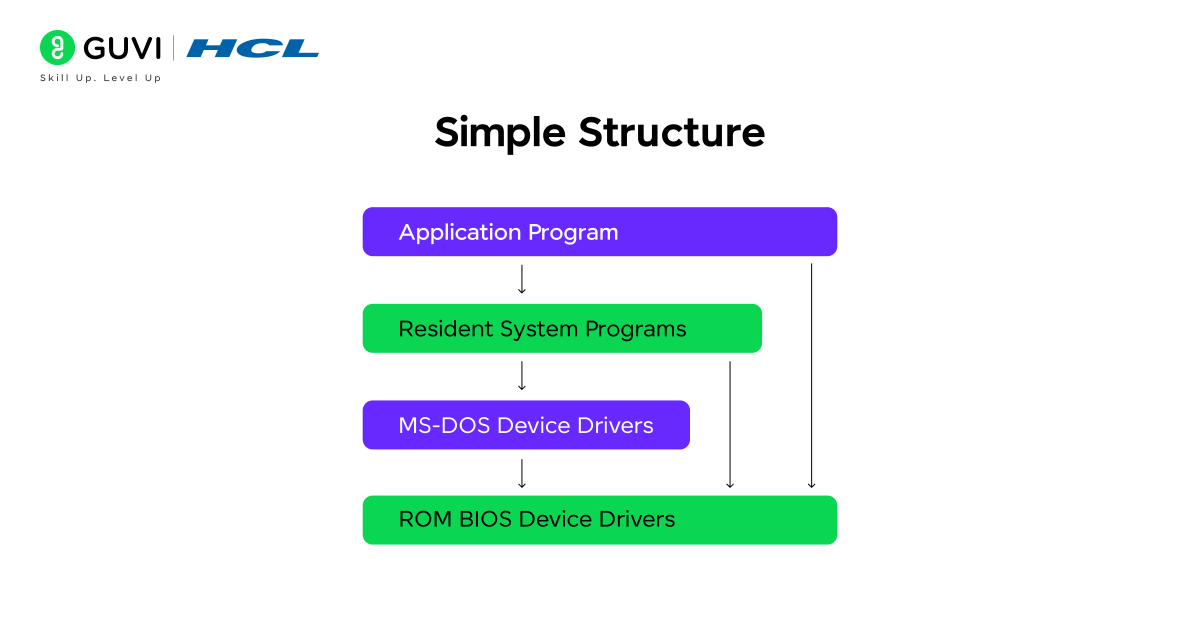
The Simple Structure is the earliest and most basic form of operating system architecture. It lacks proper modular separation, meaning that all the essential OS functions are grouped and operate as one large unit.
How It Works:
- All OS activities — such as process control, file management, and device operations — are handled together.
- Since there are no defined layers, functions directly communicate with each other and the hardware.
- This makes execution fast but maintenance extremely difficult.
Key Features:
- Single-layer design
- Direct interaction with hardware
- No modular boundaries
Advantages:
- Simple and easy to design
- Low overhead and faster execution
Disadvantages:
- Poor security and reliability
- Difficult to update or debug
- A single error can crash the entire system
Example:
MS-DOS is the most popular example of a simple structured OS. It interacts directly with the hardware, allowing basic command execution but offering minimal abstraction and protection.
2. Monolithic Kernel Architecture
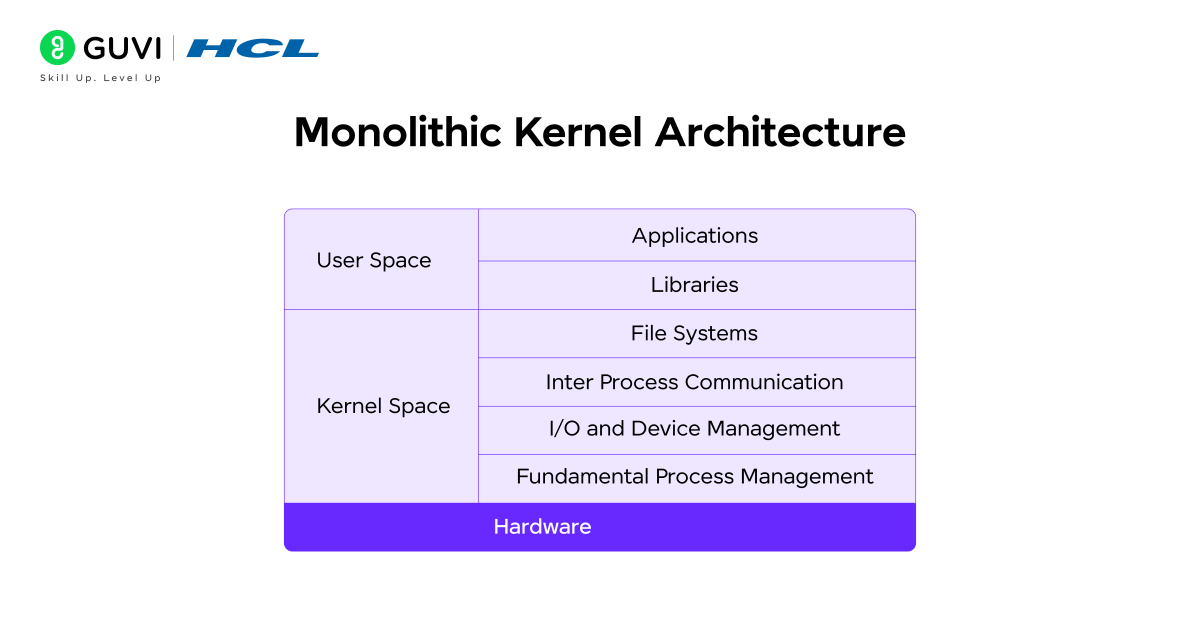
The Monolithic Kernel architecture is one of the most widely used OS designs. Here, all operating system services and functions are grouped inside a single large kernel running in the same memory space.
How It Works:
- The kernel contains all core modules, including file systems, device drivers, and memory managers.
- System calls from applications are handled directly by the kernel without switching between layers.
- This structure enables fast and efficient processing but can be difficult to maintain.
Key Features:
- Single large kernel handling all operations
- Direct communication between modules
- All components share the same address space
Advantages:
- High performance due to direct execution
- Efficient resource management
- Reduced communication overhead
Disadvantages:
- A fault in one module can crash the whole system
- Complex to update or debug
- A larger kernel size makes maintenance difficult
Example:
Linux and UNIX systems use monolithic kernels. They offer great performance and speed but can face issues like “kernel panic” if any internal module fails.
3. Layered Architecture
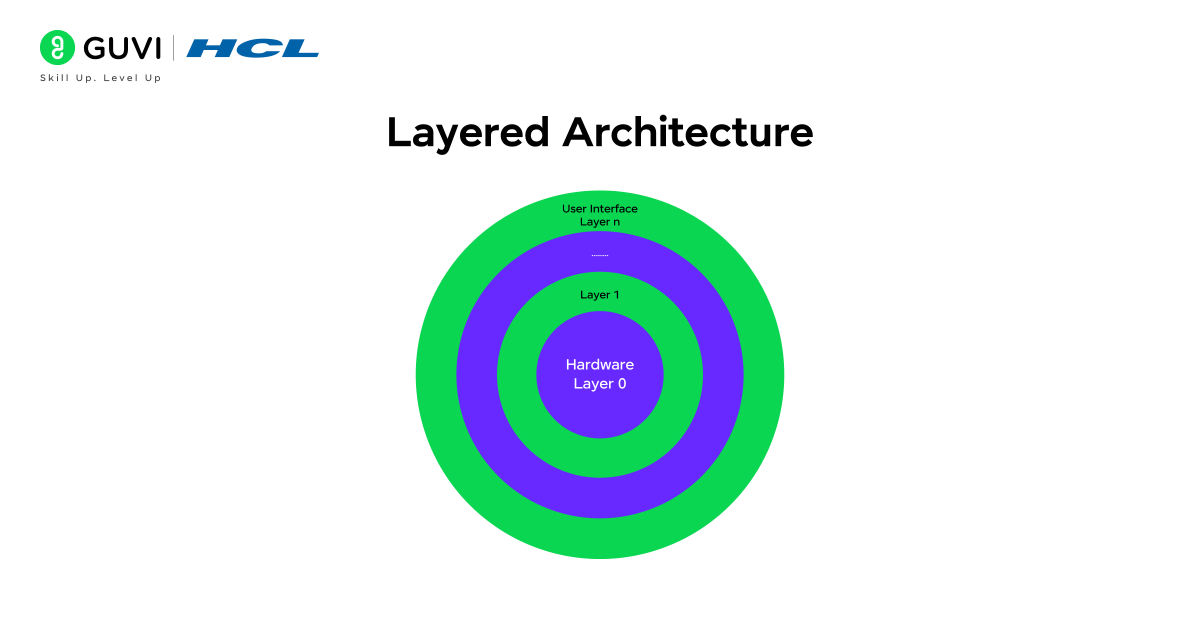
The Layered Architecture brings a structured and organized approach to OS design. It divides the system into layers, each responsible for specific tasks.
How It Works:
- The lowest layer interacts directly with the hardware.
- The uppermost layer manages user applications and the interface.
- Each layer can only communicate with the one directly above or below it.
Key Features:
- Multi-layered structure with clear separation of concerns
- Controlled communication between layers
- Easier to test and modify individual layers
Advantages:
- Highly modular and maintainable
- Easier debugging and testing
- Improved security since access is restricted between layers
Disadvantages:
- Slower communication due to multiple layers
- Rigid structure — changing one layer may affect others
Example:
The Operating System (developed by Edsger Dijkstra) and early MULTICS versions used this architecture. This structured model inspired the layered organization used in modern operating systems today.
4. Microkernel Architecture
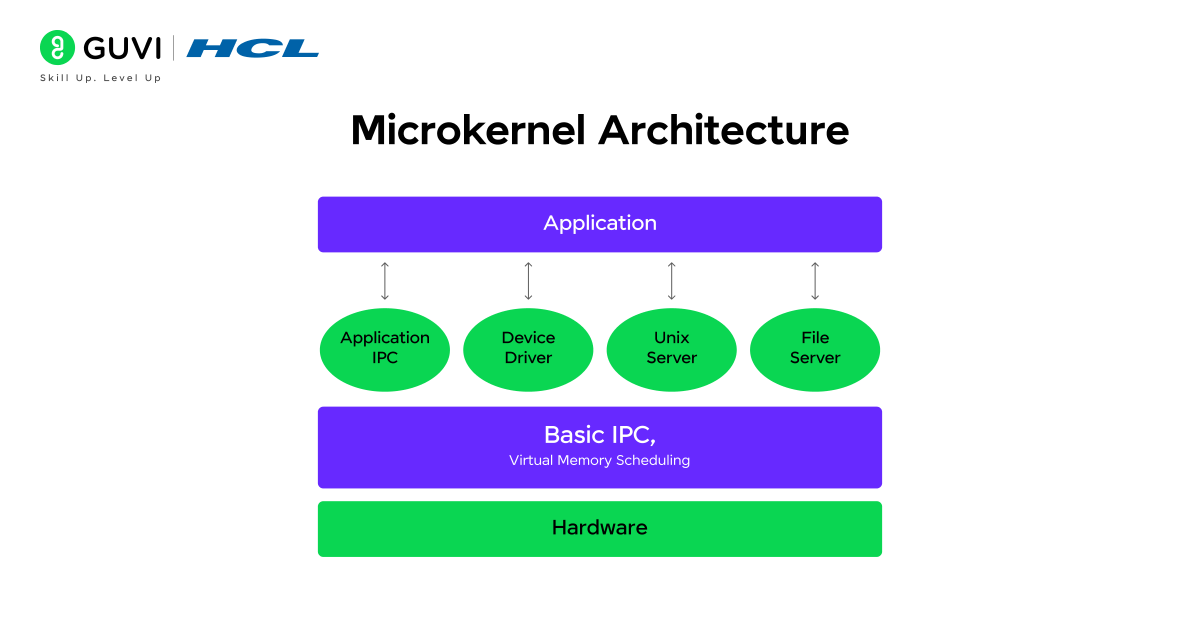
The Microkernel Architecture focuses on keeping the kernel minimal and secure by moving most system services to the user space. This makes the OS more stable and modular.
How It Works:
- Only essential services like interprocess communication (IPC), memory, and process management run inside the kernel.
- Other services, such as file systems and drivers, run in user space.
- Communication happens through messages passing between these components.
Key Features:
- Minimal kernel size
- Modular design separating services
- Uses message passing for communication
Advantages:
- Highly stable and secure
- Easier to extend or remove services
- Fault isolation — one service crash doesn’t affect others
Disadvantages:
- Slightly slower due to message passing overhead
- More complex communication structure
Example:
MINIX and QNX use microkernel designs. Even macOS and Windows NT integrate microkernel principles for modularity and better fault tolerance.
5. Hybrid Kernel Architecture
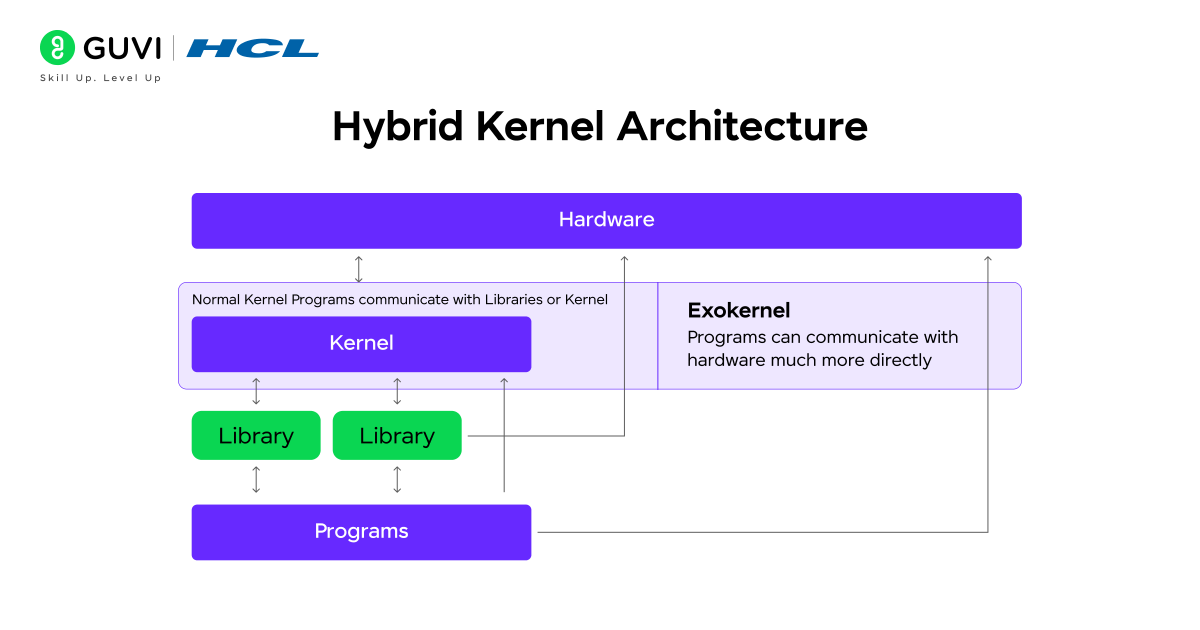
The Hybrid Kernel combines the efficiency of a monolithic kernel with the flexibility of a microkernel. It’s designed to deliver strong performance while maintaining modularity.
How It Works:
- Core OS services (like process and memory management) run in kernel mode.
- Other components, such as device drivers or system servers, can operate in user mode.
- This hybrid setup balances speed and stability.
Key Features:
- Mix of monolithic and microkernel structures
- Critical modules run in kernel space
- Supports dynamic loading and modular updates
Advantages:
- High performance with improved fault tolerance
- Easier to maintain and extend than monolithic kernels
- Better system stability
Disadvantages:
- Complex to design and implement
- Can still experience kernel-level failures
Example:
Windows NT, Windows 10, and macOS use hybrid kernels. These systems efficiently manage multitasking, device handling, and system security without compromising speed.
6. Exokernel Architecture
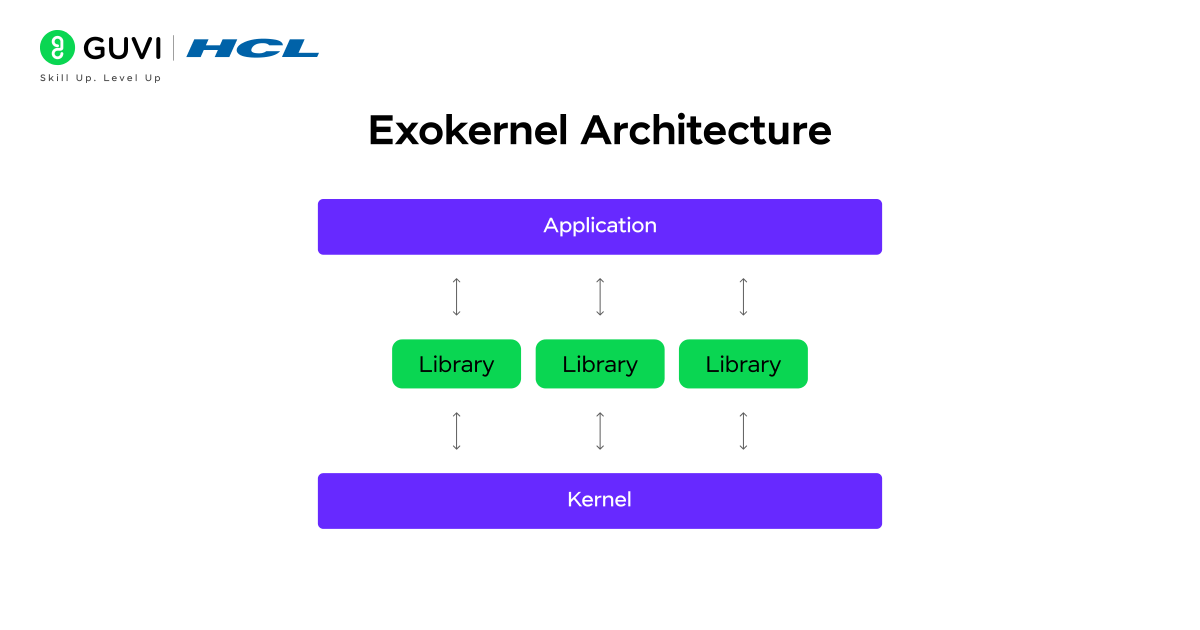
The Exokernel Architecture takes a different approach by minimizing the kernel’s role and giving applications more direct control over hardware.
How It Works:
- The kernel acts as a lightweight layer that securely allocates resources like CPU, memory, and storage.
- Instead of abstracting hardware functions, it allows applications to manage resources independently.
- This enables developers to optimize performance based on specific needs.
Key Features:
- Extremely lightweight kernel
- Direct hardware access for applications
- Provides high flexibility and customization
Advantages:
- Maximum efficiency and control
- Suitable for high-performance and experimental systems
- Enables custom resource management for each application
Disadvantages:
- Difficult to implement for a general-purpose OS
- Complex for developers to manage directly
- Limited compatibility across different hardware
Example:
The MIT Exokernel Project is a prime example. It demonstrates how direct hardware management can achieve unmatched performance for specialized computing environments.
Architecture Comparison Table
| Architecture Type | Core Concept | Advantages | Disadvantages | Example |
|---|---|---|---|---|
| 1. Simple Structure | Single-layer OS, minimal abstraction | Fast, easy to design | Unstable, insecure | MS-DOS |
| 2. Monolithic Kernel | All services in one kernel space | High performance | Hard to modify, risky | Linux |
| 3. Layered Architecture | Hierarchical OS design | Easy maintenance | Slower performance | MULTICS |
| 4. Microkernel | Minimal kernel, user-space services | Stable, modular | IPC overhead | MINIX, QNX |
| 5. Hybrid Kernel | Mix of monolithic and microkernel | Balanced, flexible | Complex | Windows NT, macOS |
| 6. Exokernel | Direct hardware access for apps | Efficient, customizable | Complex | MIT Exokernel |
Importance of Operating System Architecture
The architecture of an OS is the blueprint that defines how efficiently a computer functions. A well-designed architecture ensures that the OS is:
- Efficient: Proper layering ensures optimal use of CPU, memory, and I/O devices.
- Secure: Segregated modules reduce vulnerabilities.
- Reliable: Modular design helps isolate faults, preventing system crashes.
- Scalable: Supports adding new hardware or updating components with minimal disruption.
- Adaptable: Enables support for different platforms (like desktops, mobile, and cloud).
In short, the architecture decides how well an OS can balance performance, stability, and flexibility — the three pillars of system design.
Real-World Applications
Different OS architectures power diverse environments:
- Linux (Monolithic): Popular in servers due to its speed and stability.
- Windows NT (Hybrid): Ideal for desktops where performance and security must coexist.
- QNX (Microkernel): Used in automotive systems for reliability and safety.
- Android (Modified Linux Kernel): Optimized for mobile hardware.
Each architecture’s design reflects its purpose — from raw performance in servers to fault tolerance in embedded systems.
Challenges in OS Architecture
- Performance vs. Modularity: Microkernels offer modularity but reduce performance due to IPC overhead.
- Security: More kernel code increases the attack surface.
- Scalability: Supporting multi-core and virtual environments adds complexity.
- Hardware Compatibility: Diverse hardware requires numerous drivers and abstractions.
Conclusion
The architecture of an operating system defines how every element of your computer — hardware, software, and resources — works together to perform tasks seamlessly. It lays out the framework that determines how processes are managed, data is stored, and devices communicate efficiently.
Each architectural model, whether it’s monolithic, microkernel, layered, hybrid, or exokernel, offers a unique balance between performance, flexibility, and reliability.
By understanding OS architecture, you gain deeper insight into how computers operate at their core — a knowledge that forms the foundation for advanced fields like networking, cybersecurity, cloud computing, and system development.
If you’re looking to strengthen your foundation before diving further into OS architecture, consider enrolling in HCL GUVI’s Basics of Computer course. It walks you through hardware, software, and operating system fundamentals in a beginner-friendly way.
FAQs
1. What is the main purpose of OS architecture?
It defines how the OS manages resources, executes processes, and ensures seamless interaction between hardware and software.
2. Why is modularity important in OS design?
Modular architecture makes debugging, updating, and maintaining systems easier while isolating faults.
3. Which architecture is used in Linux?
Linux uses a monolithic kernel that combines performance with flexibility through loadable modules.
4. What are the future trends in OS architecture?
The focus is shifting toward verified microkernels, virtualization, and lightweight architectures for IoT.
5. Can we change an OS architecture after development?
Not completely — though modules can be updated, the fundamental architecture remains fixed.
Success Stories

About the Author
Jebasta
I translate the language of data into stories that anyone can understand. As a writer with a data science background, I simplify analytics, AI, and decision-making so beginners and enthusiasts can confidently explore the world of data.
View all posts by Jebasta
Connect with me @
















Did you enjoy this article?