


Artificial Intelligence and Machine Learning Articles
AI/ML Skills Gap 2026: Why Companies Can't Find Job-Ready Talent
20 AI/ML Interview Questions Recruiters Can Use Without a Tech Background - Best Guide
How Industry-Backed AI/ML Bootcamps Are Changing the AI/ML Hiring Pipeline - Best Guide 2026
From IT Support to AI Engineer: A Realistic Career Switch Guide 2026


Get In Touch For Details! Request More Information

Unlocking Medidata in Claude: Smarter Site Selection And Platform Help
Jun 24, 2026 5 Min Read 697 Views
(Last Updated)
Clinical trials rank among modern medicine’s most complex and costly efforts. A single Phase 3 trial can exceed a billion dollars, span over a decade, and span hundreds of sites across dozens of countries. At the heart of this lies site selection, choosing locations poised to enroll the right patients at the optimal pace.
Strong choices keep trials on track; weak ones trigger delays, added sites, and scrutiny from regulators and investors. For 25+ years, Medidata has been the go-to platform for mastering this complexity. The industry trusts its innovations, with over 37,000 trials and 11 million patients managed.
This builds one of the richest databases of historical enrollment and site performance data. In January 2026, Anthropic’s Claude for Healthcare launch made it accessible via Claude for Medidata Study Feasibility users.
In this article, we will walk through exactly what the Medidata in Claude is, what its two core tools do, who has access to each, how to set it up, what kinds of prompts get the best results, and how it fits into the broader clinical operations workflow.
TL;DR:
- Connects Claude to Medidata’s vast clinical trial database (38,000+ trials, 12M patients) for site selection and platform support.
- Two tools: Platform Help (all users: query docs via natural language) and Predictive Site Ranking (subscribers: rank sites by enrollment potential).
- Set up via OAuth in Claude settings, no software install needed.
- Best prompts are specific (e.g., phase, indication, SOPs) for actionable insights.
- Fits workflows by accelerating site selection, ops troubleshooting, and proactive monitoring alongside other connectors.
Table of contents
- What Is the Medidata in Claude?
- Understanding Medidata's Data Foundation
- Tool One: Platform Help
- Platform Help: Universal Access
- Natural Language Queries & Daily Value
- Powerful Example Use Cases
- Tool Two: Predictive Site Ranking
- Site Ranking: Strategic Access & Requirements
- How Site Ranking Works
- Who the Two Tools Are Designed For
- Clinical Feasibility Lead/Strategist: Site Ranking Focus
- Study Manager: Both Tools
- CRAs/Data Teams: Platform Help Priority
- How to Set Up the Medidata Connector
- Step 1: Access Remote Connectors
- Step 2: Initiate Connection
- Step 3: Complete Authentication
- Step 4: Enable and Manage Access
- Where This Fits in the Clinical Operations Workflow
- Final Thoughts
- FAQs
- What is the Medidata Connector?
- Who can use Platform Help?
- What do you need for site ranking?
- How do you set it up?
- What prompts work best?
What Is the Medidata in Claude?
It connects Claude to Medidata’s clinical trial platform, giving you access to site ranking intelligence and product documentation through natural language
The Medidata connector provides two tools for Medidata users: Platform Help and Predictive Site Ranking. Platform Help allows users to query Medidata’s platform documentation. Predictive Site Ranking allows users to rank candidate study sites based on indication, past performance, and a variety of contexts.
These two tools address two very different pain points in the clinical trial workflow, one operational, one strategic. Together, they make Medidata’s platform both easier to use and more powerful for decision-making, all without leaving the Claude interface.
Understanding Medidata’s Data Foundation
Before getting into how the connector works, it is worth understanding the quality and scale of the data it draws from.
- The intelligence behind the site ranking tool is not built on generic industry benchmarks or public registries alone. Medidata AI is purpose-built for clinical trials, trained on validated data from 38,000 trials, 12 million patients, and 70 billion data points per year.
- Embedded throughout a unified platform that spans the full trial lifecycle, Medidata AI connects every stage of your trial, ensuring seamless handoffs and eliminating costly rework that often leads to errors. This matters because the quality of a site ranking recommendation depends entirely on the quality and breadth of the underlying data.
- A site that enrolled well for oncology Phase 2 trials five years ago may perform differently today. A site that looks promising based on its patient population size might have slow regulatory approval processes.
- Medidata’s database captures these nuances at scale, including historical enrollment rates, site-level operational data, country-level patient population characteristics, and regulatory environment factors, and the connector brings that intelligence into Claude.
Medidata’s AI leverages data from over 38,000 clinical trials, 12 million patients, and 70 billion data points annually to predict site performance, including factors like enrollment rates, regulatory delays, and regional patient availability.
Integrated into Claude for Healthcare (launched in January 2026), this enables site ranking and optimization, helping avoid costly delays that can add months and millions to clinical trials — all through conversational insights within your workflow.
Tool One: Platform Help
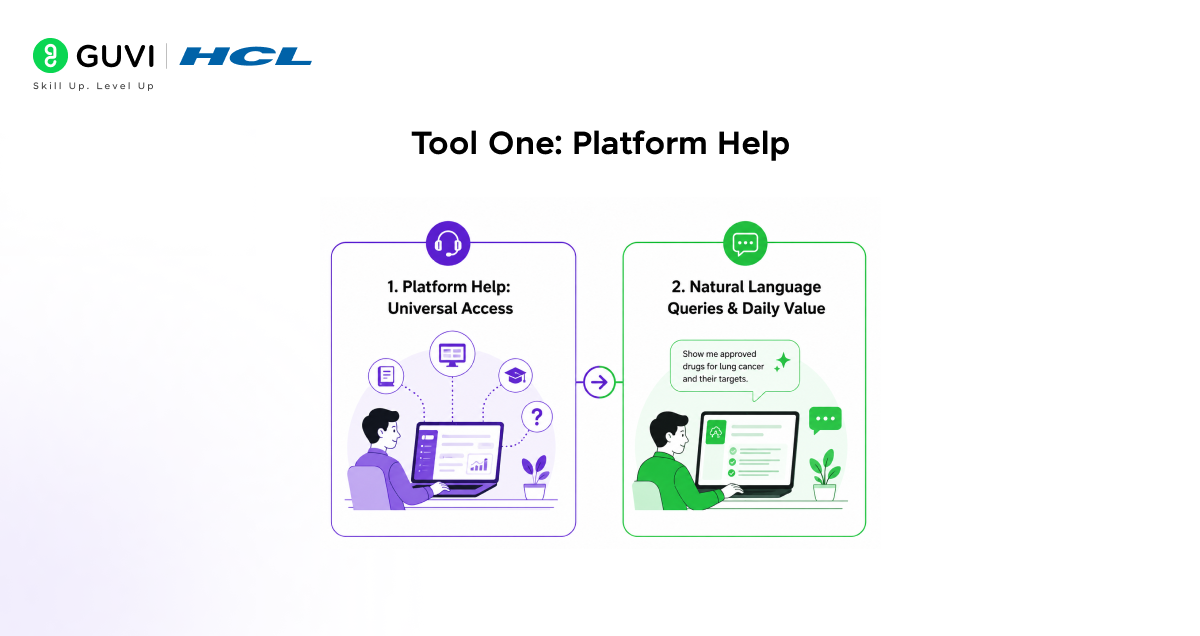
1. Platform Help: Universal Access
Platform Help is available to all Medidata users regardless of subscription, granting Claude access to the full Medidata Knowledge Hub, comprehensive documentation, and FAQs for every product in the suite.
2. Natural Language Queries & Daily Value
Query the entire knowledge base conversationally for instant guidance on tasks like data checks or study module setup, combining Medidata insights with your internal practices to ensure execution aligns with team standards. It eliminates portal searches and cross-referencing, tackling daily friction in complex platform work.
Powerful Example Use Cases
- Key prompts include “How do I create a derived dataset in Data Connect?”, “Configure edit checks for Rave EDC?” “Latest Clinical Data Studio release features?” or
- “Import lab data into Data Connect?” aligning with our SOPs?” Combining product questions with internal context uniquely verifies compliance across vendor and organizational knowledge. No other tool does this simultaneously.
Tool Two: Predictive Site Ranking
1. Site Ranking: Strategic Access & Requirements
Site ranking is the more strategically vital tool, restricted to Medidata Intelligent Trials/Study Feasibility subscribers whose access matches query needs. For customers, it delivers conversational site intelligence instead of static reports, leveraging aggregated historical enrollment, population/country data, and standardized site metrics to rank locations by predicted performance based on phase, indication, and study parameters.
2. How Site Ranking Works
Medidata’s AI analyzes site data from historical/active trials to predict enrollment success for your goals, starting with broad queries like top sites for Phase 3 oncology globally. Outputs provide ranked lists as conversation starters, enabling progressive refinement by geography, eligibility, study arms, or protocol specifics for deeper, iterative analysis within Claude.
Who the Two Tools Are Designed For
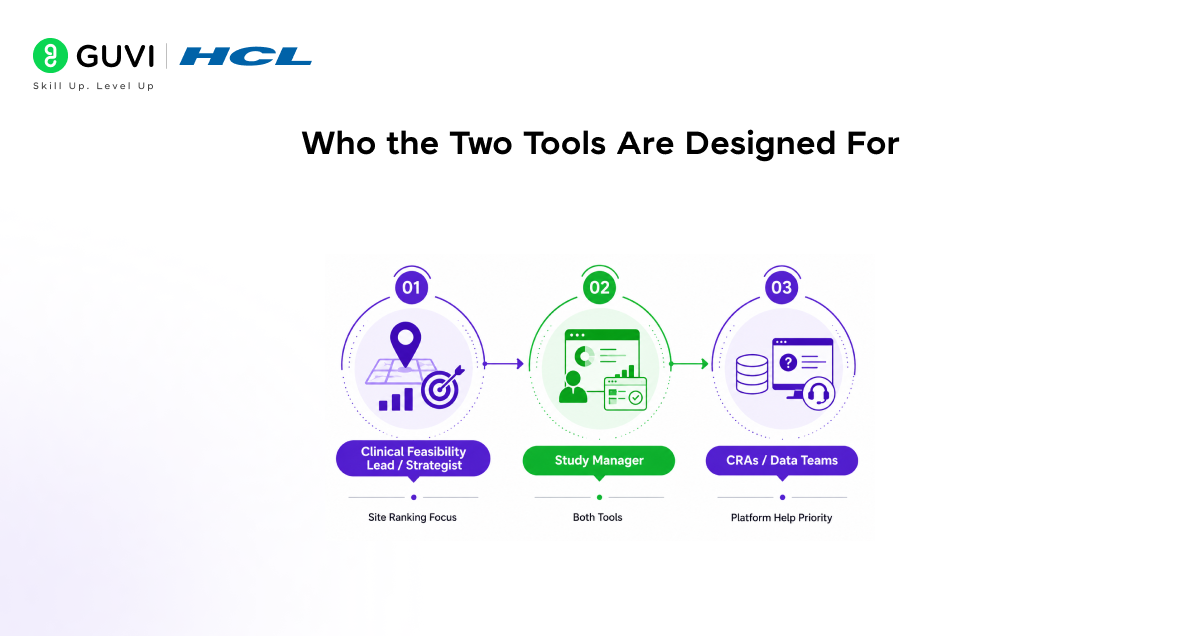
1. Clinical Feasibility Lead/Strategist: Site Ranking Focus
The Clinical Feasibility Lead or Strategist role gains the most from site ranking, using it to define global site criteria, analyze historical data for optimal patient access, craft feasibility surveys, and validate site lists against recruitment goals and protocol needs. This replaces manual data pulls, analyst requests, and spreadsheets with direct conversational access to Medidata’s underlying data.
2. Study Manager: Both Tools
Study managers benefit from both tools. Site Ranking to review final site recommendations, ensuring balanced, cost-effective geographic coverage, and Platform Help for operational queries on configuring and managing study modules within the Medidata platform.
3. CRAs/Data Teams: Platform Help Priority
Clinical Research Associates and data management teams primarily use Platform Help to quickly resolve configuration questions, ensuring technical setups align with Medidata capabilities and organizational SOPs.

How to Set Up the Medidata Connector
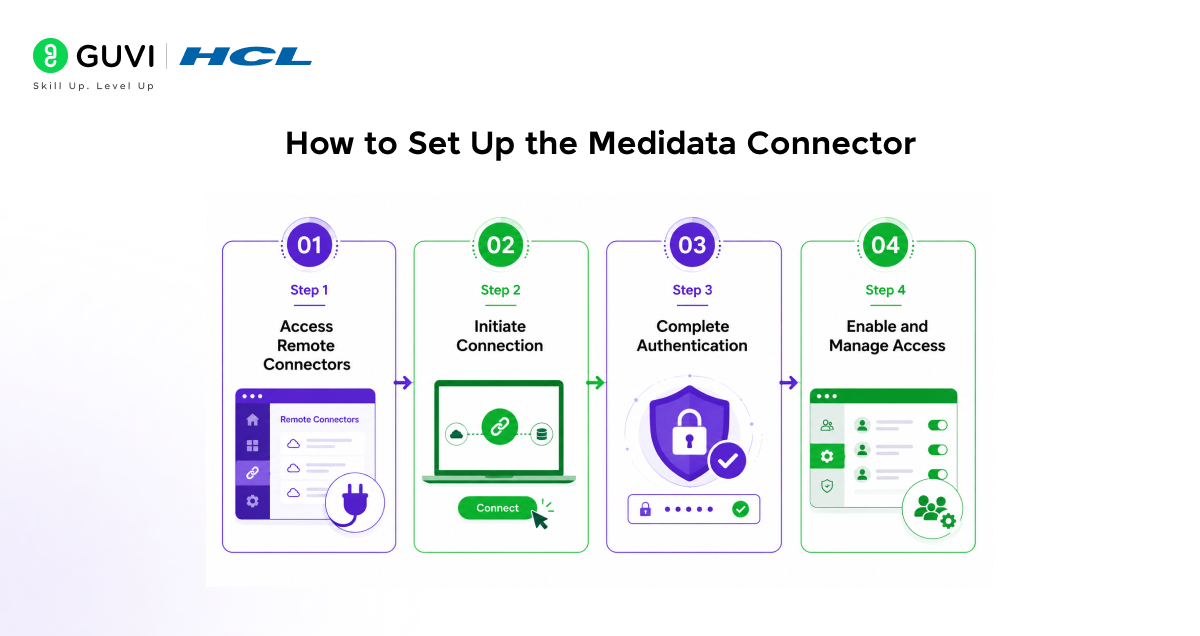
Step 1: Access Remote Connectors
The Medidata integration uses Claude’s remote connector system, with no software installs or local servers needed for a simpler setup than desktop tools. Navigate to Connectors in your Claude settings and search for “Medidata” to find the connector listing.
Step 2: Initiate Connection
Click the “Connect” button on the Medidata connector listing to start the OAuth authentication flow.
This securely links your Medidata account to Claude, ensuring data access matches your platform permissions exactly.
Step 3: Complete Authentication
The authentication process confirms what data your Medidata account can access, applying the same controls through Claude. Once done, the connector is ready for use in your conversations.
Step 4: Enable and Manage Access
Enable the connector in relevant conversations; team/enterprise admins can deploy organization-wide with user controls. Pro/Max users connect directly via personal settings for immediate individual access.
Getting the Best Results From Your Prompts
Key to Better Results: Depth and specificity in prompts drive superior outputs from both tools, outperforming vague or broad requests.
- Use targeted prompt patterns for consistent high-quality responses.
Site Ranking Queries: Specify study parameters (phase, indication, patient traits, geography, eligibility) for actionable rankings.
- Strong examples:
“Top 10 predicted high-performing sites for Phase 3 oncology trials?”
“Geographical distribution of top sites by country for indication X?”
- Granular examples:
“Top sites based on age/eligibility, study arms, etc.?”
“Sites in top 25% for predicted performance per my criteria?”
- Refine iteratively: Filter by country, exclude competing trial sites, or analyze top performers’ distribution.
Platform Help Queries: Pair technical questions with your internal context (e.g., SOPs) for complete, tailored answers.
- Weak: “How do I set up edit checks in Rave EDC?”
- Strong: “How do I set up Rave EDC edit checks complying with our SOP requiring business justification documentation?”
Where This Fits in the Clinical Operations Workflow
- The Medidata connector is most powerful when it sits alongside the other tools that Claude has access to for clinical trial work, rather than being used in isolation.
- Used together with the ClinicalTrials.gov connector, which provides data on registered trials and their sites, you can cross-reference Medidata’s enrollment performance predictions with the public trial landscape to understand which sites are currently running competing studies that might affect your enrollment rates.
- Using Medidata trial data, Claude can track important indicators like enrollment and site performance that allow it to surface issues before they begin to affect a trial’s timeline. This proactive monitoring use case extends the connector’s value beyond the planning phase into active trial management.
- Rather than waiting for quarterly enrollment reports to reveal underperforming sites, clinical operations teams can ask Claude to flag sites that are trending below their predicted enrollment rates and surface those issues early enough to intervene.
- With new agent skills for bioinformatics, protocol development, and data analysis, Claude is positioning itself as a digital co-pilot in the entire R&D chain, from hypothesis to clinical study.
- Claude is focusing on AI as a connecting layer between fragmented data, regulations, and daily practice, not as a replacement for professionals but as an accelerator of insight, collaboration, and decision-making.
Ready to supercharge your clinical trial site selection with Claude’s Medidata Connector? Dive into HCL GUVI’s IIT Pravartak AI and ML Course at HCL GUVI. Build AI-powered clinical ops agents, automate feasibility analysis pipelines, and master connectors like Medidata for smarter trial workflows step by step.
Final Thoughts
The Medidata connector in Claude brings two very practical capabilities to clinical trial teams: intelligent site selection grounded in 25 years of real trial data and instant access to platform documentation that integrates with your internal policies.
This integration with Claude anticipates the evolving ambitions of the life sciences industry, and Medidata will continue to collaborate with customers to identify the next frontier of high-impact expansions for the Medidata ecosystem through Claude. More transformative use cases are already in development.
For teams with access to Medidata’s Intelligent Trials application, the Site Ranking tool alone can meaningfully compress the time it takes to move from a protocol concept to a feasible, ranked site list.
For all Medidata platform users, Platform Help removes one of the most persistent small frictions in clinical operations, having to leave your workflow to hunt through documentation. Connect the integration through your Claude settings, start with a question that reflects a real challenge in your current protocol or study, and build from there.
FAQs
1. What is the Medidata Connector?
It links Claude to Medidata’s platform for natural language access to docs (Platform Help) and AI-powered site rankings (Predictive Site Ranking).
2. Who can use Platform Help?
All Medidata users, regardless of subscription, can query the full knowledge hub for setup, configs, and features.
3. What do you need for site ranking?
A Medidata Intelligent Trials/Study Feasibility subscription with matching permissions for historical enrollment data analysis.
4. How do you set it up?
Go to Claude settings > Connectors > Medidata > Connect via OAuth; access controls match your Medidata permissions.
5. What prompts work best?
Specific ones like “Top 10 sites for Phase 3 oncology in Europe” or “Set up Rave EDC edit checks per our SOPs” for refined, iterative results.
Success Stories

About the Author
Vishalini Devarajan
An Aerospace Engineer turned content writer, I focus on making complex concepts easy to understand through well-structured, reader-friendly blogs. Whether it’s a technical topic or a non-technical one, I love creating content that is clear, engaging, and impactful.
View all posts by Vishalini Devarajan
Connect with me @













Did you enjoy this article?