


Career Articles
How I Switched from Web Developer to ML Engineer (A Web Developer's Real Story)
PHP Developer Resume: Writing Guide & Key to Landing Your Dream Job
My Frontend Developer Interview at Google: What Really Happens Behind Closed Doors
Future of Electric Vehicle Course: Fast-Track Your EV Career


Get In Touch For Details! Request More Information
IT Project Manager Resume: 7 ATS-Friendly Tips To Follow
Mar 03, 2026 6 Min Read 861 Views
(Last Updated)
Ever wondered why some IT Project Manager resumes get callbacks almost instantly while others disappear into the void? Here’s the thing: hiring managers and ATS filters aren’t just looking for technical knowledge.
They want clarity, direction, and a sense that you can lead complex projects without losing sight of business goals. If you’re aiming for opportunities in IT project management, your resume has to show more than tools and certifications; it needs to tell a sharp, well-structured story about how you solve problems, guide teams, and deliver results.
Let’s break down how to craft an IT project manager resume that follows the ATS filters and actually gets you noticed. We also provided an example resume with proper formatting and following all the ATS tips. So, sit tight and read till the end to benefit more!
Quick Answer:
You can write an effective IT Project Manager resume by highlighting your technical strengths, project leadership experience, certifications, and measurable results in a clear, ATS-friendly format that mirrors the language of the job description.
Table of contents
- Why a Strong Resume Matters
- Sections to Include in Your IT Project Manager Resume
- Contact Information
- Professional Summary
- Core Skills
- Work Experience
- Highlighting Projects (Optional Section)
- Education and Certifications
- Additional Sections (Optional)
- Optimising for ATS and Keywords
- Resume Writing Best Practices
- Example of a Proper IT Manager Resume
- Conclusion
- FAQs
- What should an IT Project Manager put on a resume?
- How do I write a summary for an IT Project Manager resume?
- How do I make my IT Project Manager resume ATS-friendly?
- Which skills are most important for an IT Project Manager resume?
- Do I need certifications for an IT Project Manager resume?
Why a Strong Resume Matters
In the tech world, hiring managers and recruiters are overwhelmed with applications. They scan resumes – often just 6–8 seconds on a first pass – and rely on ATS filters to shortlist candidates.
A survey found that 75% of resumes get filtered out by ATS software before a human even sees them. Moreover, only about 3% of resumes ever lead to an interview. These facts underscore why your IT project manager resume must clearly highlight your qualifications, experience, and results.
As one career guide points out, writing a standout IT Project Manager resume is “more crucial than ever” in a competitive industry. Think of your resume as your personal brand story: it needs to quickly show that you can bridge technical teams with business goals. Focus on relevant IT experience and project management skills to land interviews.
If you need tools to help in crafting your ATS-friendly resume, read the blog – AI Tools for Resume Building: Unlock ATS-Friendly Resumes
Sections to Include in Your IT Project Manager Resume
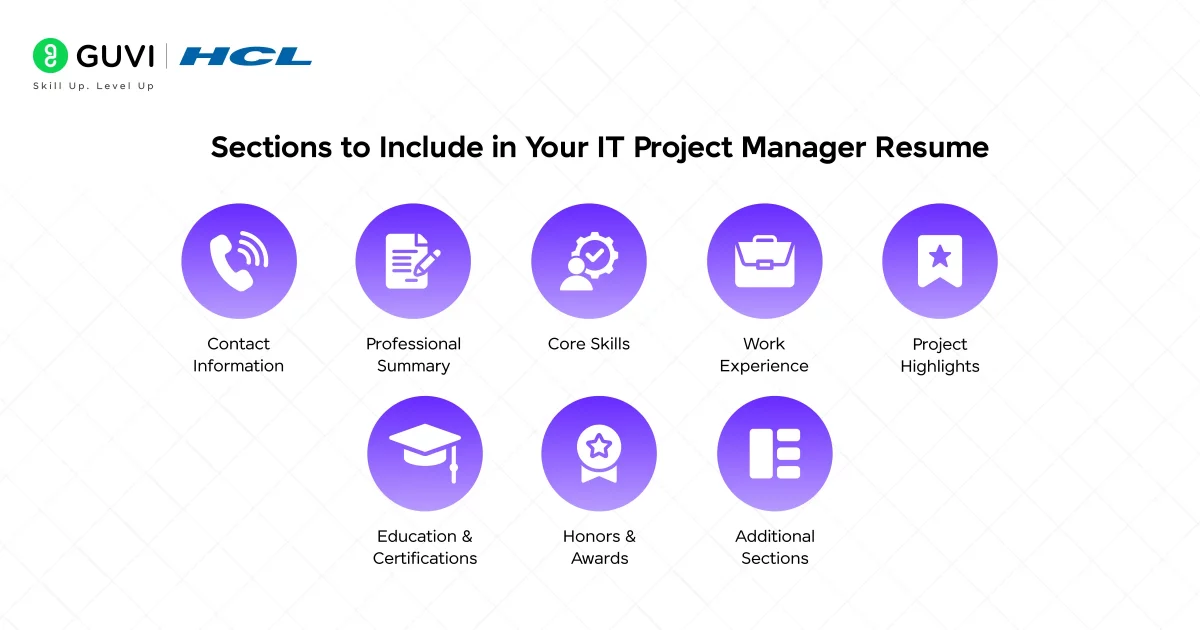
A well-structured resume makes it easy for readers (and ATS software) to find what they want. Make sure your resume has these core sections (in most cases, in this order):
- Contact Information: Your full name, professional email, phone number, and location (city/state). Include a LinkedIn profile or professional website if you have one.
- Professional Summary (or Objective): A brief 2–4 sentence overview of your experience, key achievements, and career goals. Think of it as your elevator pitch.
- Core Skills: A bulleted list of your top technical and soft skills (e.g., “Agile & Scrum, risk management, cloud computing, leadership”). Include industry keywords so ATS will pick them up.
- Work Experience: Your job history in reverse chronological order. For each role, use bullet points to describe achievements and projects (not just duties). Use numbers to quantify your impact whenever possible.
- Project Highlights (optional but recommended): Especially for an IT Project Manager, consider adding a separate “Projects” section. List key IT projects you led or contributed to – describe the scope, team size, technologies, and outcomes (e.g. budget savings or process improvements).
- Education & Certifications: Your degrees (major, school, year) and any relevant coursework. Then list industry certifications (PMP, ScrumMaster, ITIL, AWS, CompTIA, etc.).
- Honours & Awards (if any): Awards like “Employee of the Year” or project-management awards can boost credibility.
- (Optional) Additional Sections: You might add “Volunteer Experience,” “Professional Development,” or “Tools/Software” if relevant, but only if they add real value.
By clearly labelling these sections with common headers (e.g., Work Experience, Education, Skills), you help the ATS and hiring managers find your information quickly. Avoid creative headings that an ATS might not recognise – stick to standard terms.

1. Contact Information
At the very top, list your name and contact details. You don’t need a label like “Resume” or “Curriculum Vitae.” Simply put:
John Doe
IT Project Manager
Chennai, India | (+91) 123-456-7890 | [email protected]
linkedin.com/in/johndoe
Keep it simple and professional. ATS systems will look here for your contact info, so avoid putting them in a header/footer graphic. You can add a link to an online portfolio or GitHub if it’s relevant.
2. Professional Summary
Your summary (sometimes called a resume objective or profile) is your chance to hook the reader. In 2–4 sentences, highlight:
- Your experience level (years in IT and project management).
- Key certifications or technical strengths (PMP, Agile, cloud, etc.).
- Major achievements (e.g. projects delivered, cost savings).
- Career goals (briefly if relevant).
For example, a strong summary might read:
“Results-driven IT Project Manager with over 8 years of experience leading cross-functional teams to deliver complex software development and infrastructure projects. Proven track record of improving operational efficiency, managing project timelines, and aligning IT strategies with business objectives in agile environments.”
Notice this example includes years of experience, mentions leadership and Agile, and hints at outcomes (efficiency, alignment). Your own summary should similarly be specific. Use keywords from the job ad if possible (e.g. mention “Cybersecurity,” “Cloud migration,” or the particular tools used in that industry).
3. Core Skills
Under the Skills section, list your strongest abilities. Split them into two groups if you want: Hard Skills (technical/project tools and methodologies) and Soft Skills (management and communication). For instance:
- Technical Skills: Agile/Scrum, Waterfall, Jira, Microsoft Project, AWS/Azure, IT Security, SDLC, Data Analysis, and Budgeting.
- Soft Skills: Team Leadership, Stakeholder Communication, Strategic Planning, Risk Management, Problem-Solving, Adaptability.
ATS parses these bullet lists for exact keywords, so it mirrors what’s in the job description. (If the posting asks for “Jira” or “Azure,” include those names exactly.)
4. Work Experience
This is the heart of your resume. List each position (title, company, dates) and describe what you accomplished, not just your day-to-day tasks. Use bullet points for each role. Here’s how:
- Start each bullet with a strong action verb (led, implemented, managed, optimised, etc.).
- Quantify results whenever possible (percentages, timeframes, money, team size).
- Mention the technology or methodology used (e.g. “Agile”, specific software).
- Explain the business impact (cost saved, time cut, revenue gained, efficiency improved).
- Keep each bullet concise (one or two lines).
For example, instead of writing “Responsible for managing software upgrades,” write:
- “Led a cross-functional team of 15 to deliver a $3M enterprise software upgrade 2 months ahead of schedule, improving system performance by 30%.”.
This bullet is powerful because it names the scope (15 people, $3M), the action (led team, delivered upgrade early) and the measurable outcome (30% performance boost).
Another good bullet example:
- “Oversaw a company-wide cloud migration to AWS, ensuring zero downtime and reducing IT costs by 20%.”.
This shows what you did, how (cloud/AWS), and why it mattered (downtime and costs).
Avoid vague bullets like “Worked on various IT projects with the team” or “Managed project schedules.” These don’t tell a story. Instead, focus on tangible achievements and improvements, as in the examples above.
5. Highlighting Projects (Optional Section)
If you led particularly noteworthy projects (especially those that didn’t fall under one specific job title or complex multi-year initiatives), you can include a Projects section. Under this heading, briefly describe each project (name it or describe it), along with:
- The objective and your role in it.
- Scope and tools: technologies used, team size, and budget.
- Outcome: completion time, budget variance, results (like “achieved 99% user acceptance”).
For instance:
- “Global IT Infrastructure Upgrade (2024): Led a cross-regional team of 20 in upgrading network infrastructure across 50 offices. Used Cisco and VMware technologies. Completed the project 3 weeks ahead of schedule, reducing annual maintenance costs by 15%.”
This kind of project bullet shows initiative and results.
6. Education and Certifications
List your highest degree first (e.g., B.S. in Computer Science – University Name, Year). For recent graduates, you can include relevant coursework (e.g., “Project Management, Network Security”), but for experienced candidates, this is optional.
Next, create a Certifications section. Relevant IT Project Manager certs include:
- PMP (Project Management Professional) – highly valued for project leadership roles.
- Certified ScrumMaster (CSM) or other Agile certs.
- CompTIA Project+, ITIL Certification, Scrum Product Owner, or any tech cert like AWS/Azure Certifications if they apply.
- Relevant IT certs (e.g., Cisco, Microsoft) can also go here if they strengthen your IT knowledge.
7. Additional Sections (Optional)
- Awards and Honours: If you have awards related to your work (e.g. “IT Project of the Year,” “Employee of the Quarter”), include them briefly.
- Volunteer or Community Projects: Only include if they demonstrate relevant skills (e.g. leading a non-profit tech project).
- Publications or Presentations: Uncommon for this role, but if you wrote an article on Agile or spoke at a conference, it can set you apart.
Keep these sections short and relevant. Every part of your resume should reinforce the skills and experience for an IT Project Manager role.
Optimising for ATS and Keywords
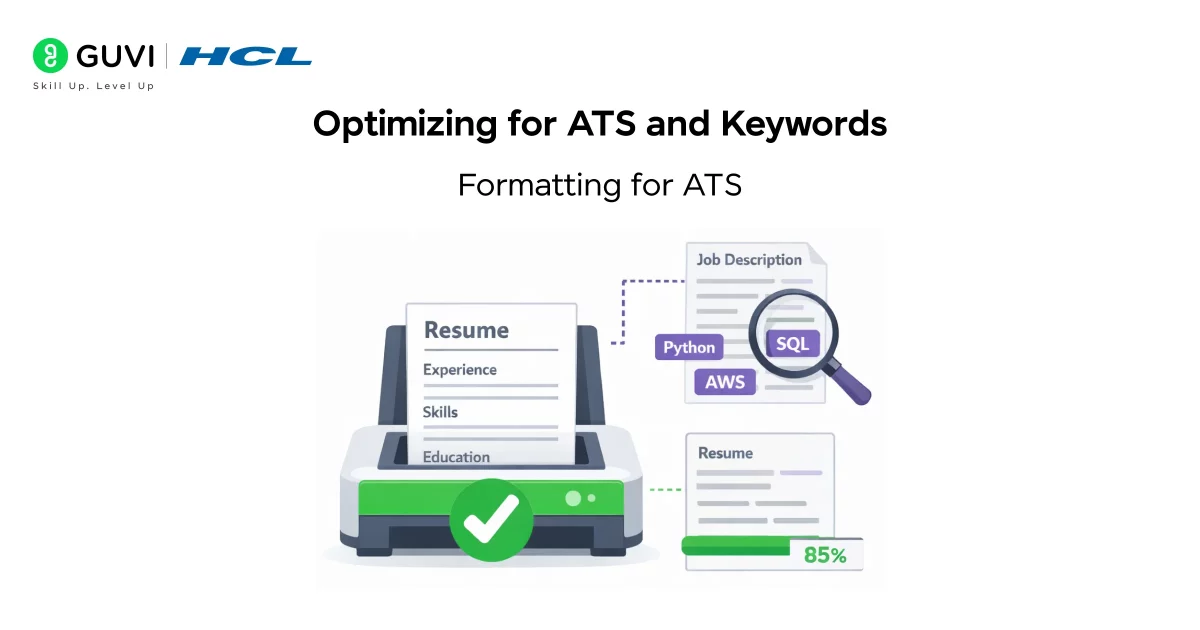
Why ATS matters: Most medium-to-large companies use Applicant Tracking Systems (ATS) to pre-screen resumes for keywords and qualifications. If your resume isn’t ATS-friendly, a recruiter might never see it.
Formatting for ATS:
- Use a simple, one-column layout. ATS can misread multi-column resumes or text boxes.
- Stick to standard section headings (e.g. Work Experience, Education, Certifications). ATS look for these labels.
- Use common fonts like Arial, Calibri, or Times New Roman, size 11 or 12.
- Avoid graphics, tables, or unusual symbols. ATS may skip over or break on images/graphics. (For example, the TalentBurst guide advises against images and fancy formatting.)
- Save your file as a Word or PDF, as specified (Word is often safest for ATS).
Keyword optimisation:
- Carefully read the job description and incorporate exact keywords and phrases. For instance, if the posting asks for “Agile, Jira, Python,” make sure those words appear in your Skills or Experience sections.
- Don’t “keyword-stuff” with irrelevant terms, but do mirror the job’s language naturally. Tailoring each resume to the posting increases your chances of passing the ATS filters.
- Include both acronyms and spelt-out terms (e.g., “CI/CD” and “Continuous Integration/Continuous Deployment”) to match different ATS scans.
Headings and structure: Remember to label sections clearly. Using “Experience” and “Education” instead of creative titles (like “My Career Journey”) ensures nothing is missed.
If you want to build your IT project manager resume in minutes and also check the ATS score for it, then use HCL GUVI’s Free Resume Builder Tool – Create and Check ATS Score For Free
Resume Writing Best Practices
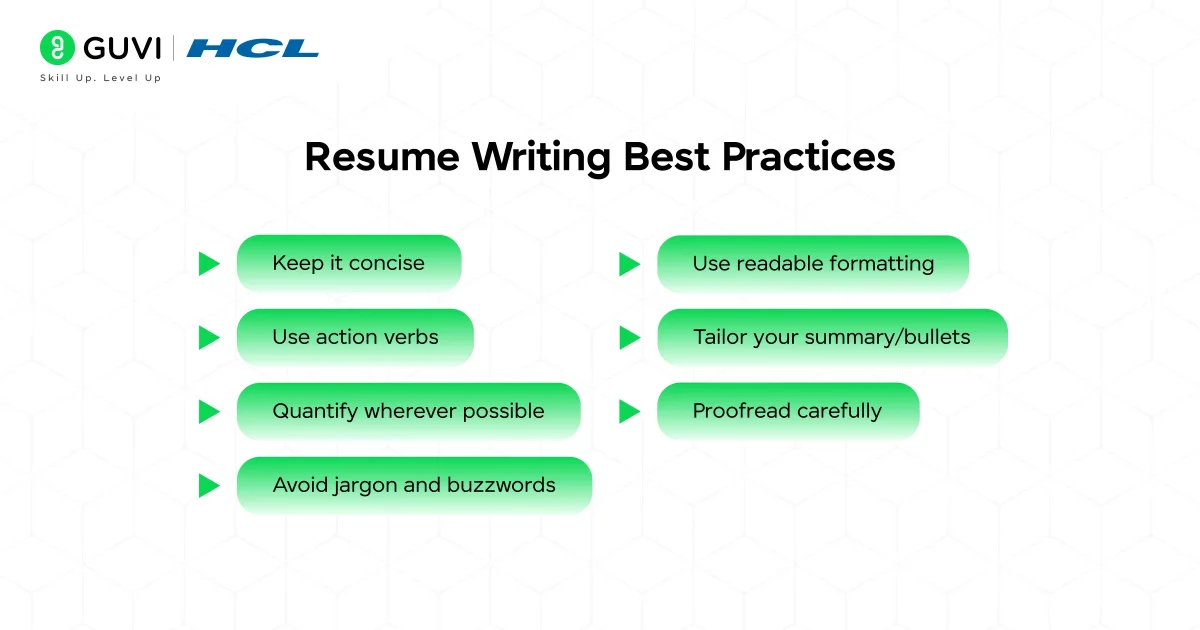
Follow these general tips to make your resume clear, professional, and impactful:
- Keep it concise. One to two pages is standard. Hiring managers spend mere seconds skimming, so put your strongest points up top.
- Use action verbs. Begin bullets with verbs like led, initiated, streamlined, negotiated, designed, and improved. This creates a dynamic tone.
- Quantify wherever possible. Numbers speak volumes. Examples: budgets (“$500K”), timeframes (“3 weeks early”), percentages (“20% cost reduction”), team sizes (“led 10-member team”). Even use “X+” if it’s approximate (“15+ projects delivered”).
- Avoid jargon and buzzwords. While technical terms are good, don’t overdo acronyms or slang. Make sure a non-IT manager can still grasp the point.
- Use readable formatting. Plenty of white space and bullet points help. Keep consistent indentation and font sizes. Use bold or italics sparingly for emphasis (e.g. bolding job titles).
- Tailor your summary/bullets. As noted, tweak each resume for the specific role. If the job emphasises “budget management,” ensure you highlight relevant budgeting achievements in your resume.
- Proofread carefully. Typos and grammar mistakes can be a quick deal-breaker. (In fact, about 58% of resumes contain errors) Read your resume out loud, use spell-check, and have someone else review it.
By following these practices, you’ll create a polished, professional resume. A strong action verb and a metric make your bullet more convincing.
Also Read: How to Become a Project Manager? 7 Steps For Beginners
Example of a Proper IT Manager Resume
Here is an example of a proper IT manager resume that follows all the pointers mentioned above:
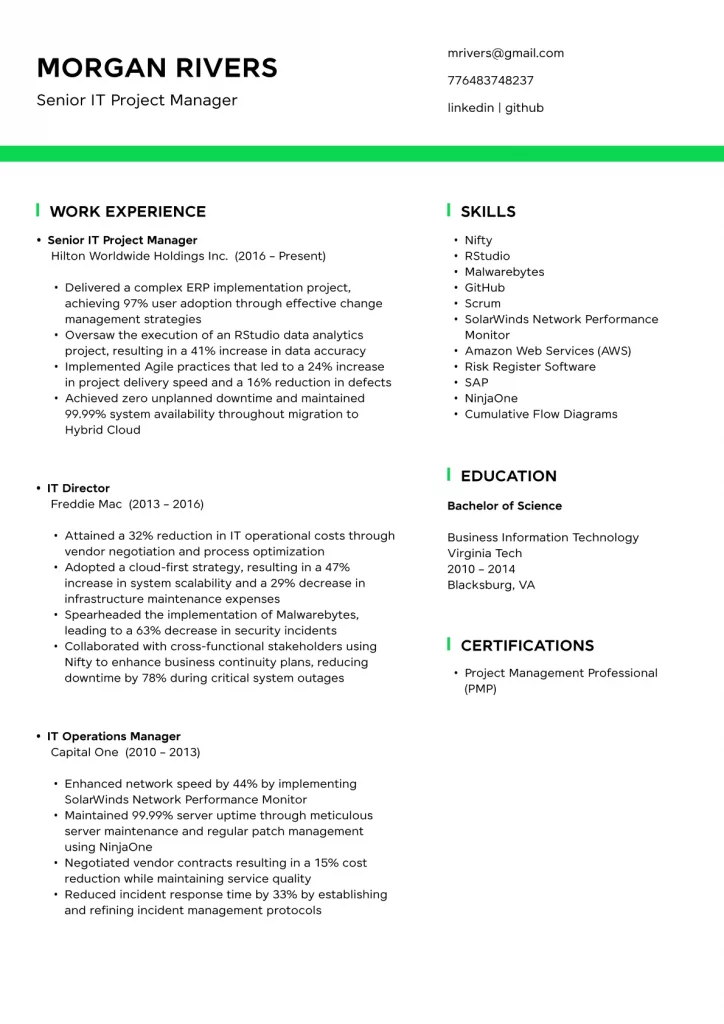
Most IT Project Manager resumes never reach a recruiter’s hands. Around three-quarters of all applications get filtered out by ATS systems before anyone even reads them, and the average recruiter scans a resume for less than ten seconds. Small changes, like using the right keywords, quantifying achievements, and keeping formatting simple, can dramatically increase your chances of making it past the first gate.
If you are serious about mastering Project Management in a self-paced, structured environment, then check out HCL GUVI’s pool of Project Management Courses that range from basic foundations to Agile to even Jira project management!
Conclusion
In conclusion, a strong IT Project Manager resume isn’t about cramming in every project you’ve ever touched; it’s about presenting the right information in a clean, focused way. When you highlight measurable wins, use clear language, include the right keywords, and tailor your content for each role, you make it easier for both ATS systems and real people to see your value.
Think of your resume as your first project deliverable: it should be organised, intentional, and aligned with the goals of the role you want. Put in the effort here, and you’ll set yourself up for better conversations, stronger interviews, and more chances to lead the kind of projects you’re excited about.
FAQs
1. What should an IT Project Manager put on a resume?
Focus on a clear summary, core skills, certifications, technical tools, and measurable project achievements. Prioritise results, not job duties.
2. How do I write a summary for an IT Project Manager resume?
Keep it to 2–3 lines highlighting your experience level, key strengths, certifications, and the type of projects you lead. Use keywords from the job posting.
3. How do I make my IT Project Manager resume ATS-friendly?
Use standard headings, simple formatting, and job-specific keywords. Avoid tables, graphics, and uncommon fonts.
4. Which skills are most important for an IT Project Manager resume?
Mention Agile/Scrum, budgeting, risk management, communication, leadership, and tools like Jira, MS Project, and cloud platforms.
5. Do I need certifications for an IT Project Manager resume?
Certifications aren’t mandatory but strongly boost credibility. PMP, CSM, ITIL, and cloud certifications often help you stand out.
Success Stories

About the Author
Lukesh S
A professional content writer who has experience in freelancing and now working as a Technical Content Writer at GUVI. Google Certified Digital Marketer. Have a sound knowledge of SQL, Data Structures and Cloud Computing.
View all posts by Lukesh S
Connect with me @
















Did you enjoy this article?