


Software Development Articles
My Google SDE Interview Experience: From Rejection to Selection [2026 Success Story]
Apple Interview Experience for Software Developers: What to Expect
Decoding Differences between Network OS and Distributed OS
Operating System Examples: Top OS Types, Features, and Uses Explained


Get In Touch For Details! Request More Information
Debugging in Software Development: Techniques, Tools, and Best Practices in 2026
Feb 19, 2026 6 Min Read 3358 Views
(Last Updated)
Everything in the world of software development runs on code. Developers write code, they build things with code, and they rely on code to run the applications, websites, and systems we use every day. But sometimes, your code doesn’t run as you expect it would, and that’s when you get a software bug, an error in the code that results in a minor glitch or even crashes an entire application.
At this point, the developer takes on the role of the detective. The process of finding and fixing bugs is called debugging. It sounds hard, but debugging is one of the most important and even rewarding abilities to have as a programmer.
This blog will provide information to developers of all skill levels about debugging in software development including what it is, why it is important, and different techniques, tools, and strategies that make debugging easier and more effective. Regardless of programming expertise, once you comprehend debugging, your confidence and efficiency of developing software will be improved.
Table of contents
- What is Debugging in Software Development?
- The Critical Role of Debugging in Software Development
- Common Types of Software Bugs
- The Workflow of Systematic Debugging
- Essential Debugging Techniques in Software Development
- The Scientific Process: Proposing a Hypothesis.
- Print Debugging (or Logging)
- Using a Debugger
- Binary Search (The Divide and Conquer Strategy)
- Rubber Duck Debugging
- Static Code Analysis
- Code Review and Pair Programming
- Powerful Debugging Tools
- Debugging Best Practices for Sustainable Code
- Debugging in Agile Development
- Debugging Examples: From Theory to Practice
- Final thoughts…
- FAQs
- What is the difference between debugging and testing?
- Can debugging help prevent software bugs from happening again?
- How long does it take to debug software?
- Is debugging for developers only?
What is Debugging in Software Development?
What exactly is debugging in the context of software? It’s a multi-step process for identifying, investigating, and removing software errors (“bugs”) that create unexpected behavior, incorrect results, or crashes.
The origin story of the term “bug” is rather delightful. Computer pioneer Grace Hopper discovered the first “real” computer bug in 1947. She was checking on the relays of the Harvard Mark II computer when she found a moth that caused the computer to fail. She taped the moth into the logbook and said they were “debugging” the computer. And that’s how the term bug came to be used!
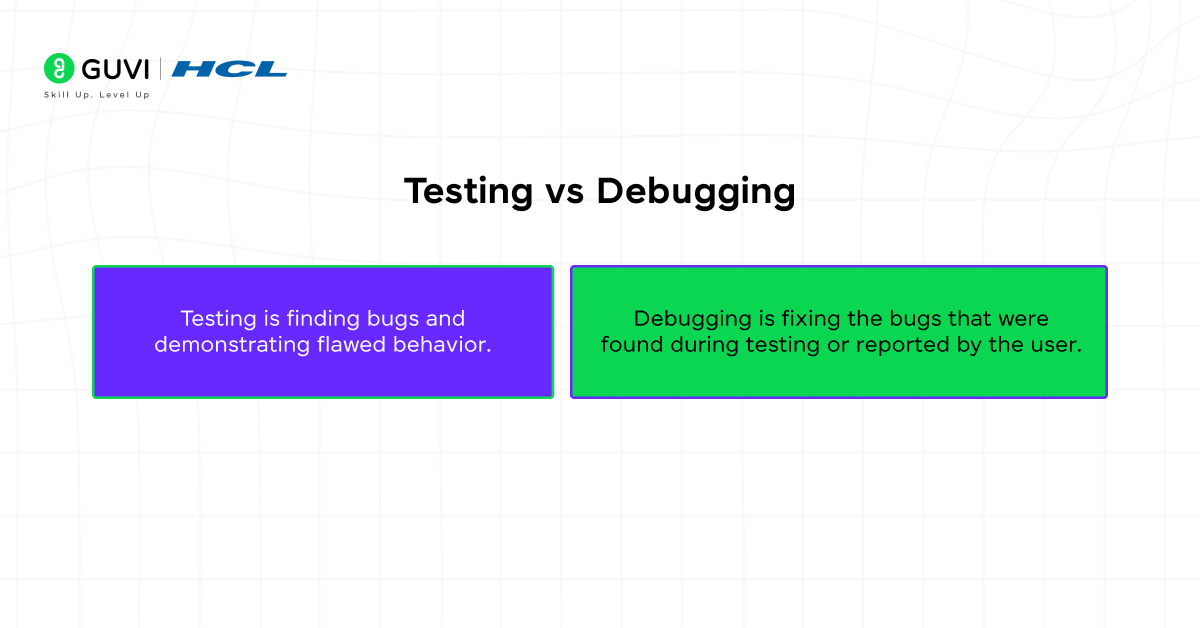
It’s important to distinguish between debugging and testing:
- Testing is finding bugs and demonstrating flawed behavior.
- Debugging is fixing the bugs that were found during testing or reported by the user.
The Critical Role of Debugging in Software Development
The importance of debugging in the development of software cannot be overestimated. It is not a particular stage but an ongoing thread that is interwoven in the whole Software Development Life Cycle (SDLC).
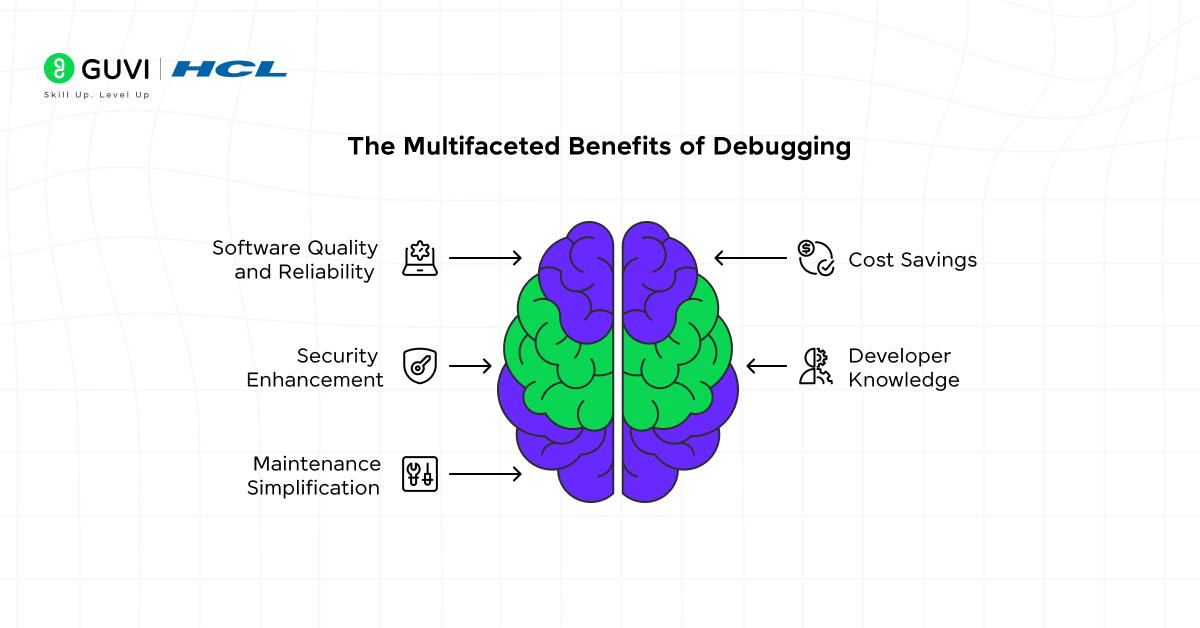
- Ensures Software Quality and Reliability: The most apparent role. Debugging directly impacts the stability and correctness of the final product, leading to higher user satisfaction and trust.
- Saves Time and Money: The earlier a bug is found and eliminated in the development cycle (e.g. during coding or unit testing), the more cost-effective the end product will be.
- Improves Security: Various security bugs, such as SQL injections or buffer overflows, are certain forms of software bugs. The primary defense against cyber threats is proactive debugging and code analysis.
- Increases Developer Knowledge: Debugging requires a developer to gain a deep insight into their own code as well as how it interacts with libraries, frameworks, and systems. It’s a powerful learning tool.
- Simpler Maintenance: Well-debugged code is cleaner, more predictable, and easier to maintain and extend in the future.
Common Types of Software Bugs
It is impossible to fix a bug if it is not recognized. And different kinds of bugs exist:
- Syntax Errors: The simplest to detect. The code does not comply with the programming language’s rules (incorrectly matched brackets, lack of semicolon). Modern IDEs usually do so right away.
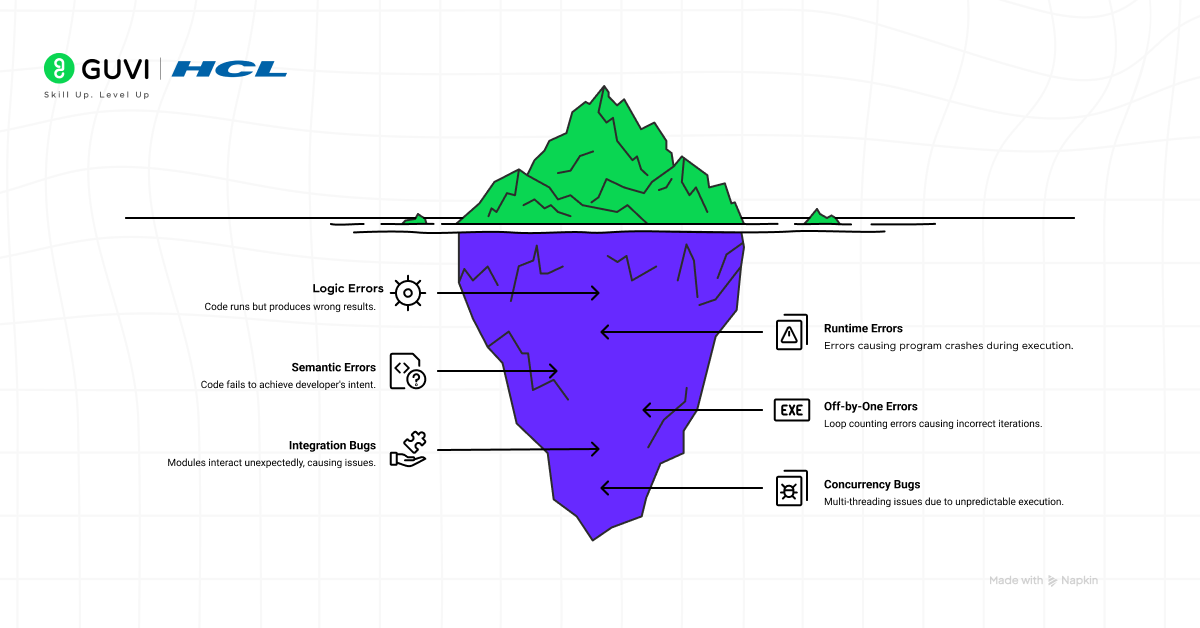
- Logic Errors: The code executes successfully, but gives the incorrect answer. They can be more difficult since the program believes that it is doing the right thing (e.g., the wrong formula, a bad conditional statement such as if (a > b) rather than if (a >= b).
- Runtime Errors: These are errors that happen as the program is running. They often cause a crash. Division by zero, attempting to open a file that does not exist, or memory exhaustion are some of the examples.
- Semantic Errors: These are logic errors in which the code is not syntactically incorrect but fails to accomplish the intended goal of the developer.
- Off-by-One Errors: An error in logic that is prevalent in loops where the loop counts incorrectly by either counting more times than it should count or counting fewer times than it should count (e.g. use <= instead of <).
- Integration Bugs: Occur when modules or services that are developed independently interact with each other in unintended ways (e.g., API version mismatch, wrong data format expectations).
- Concurrency (Race Condition) Bugs: These are bugs that are found in multi-threaded applications when the outcome depends on the unpredictable sequence of execution of threads. They are also infamously hard to reproduce and repair.

The Workflow of Systematic Debugging
The process of debugging a program cannot be done by mere guesses. It has a sequential, logical debugging process. This systematic practice is the initial move to mastery.
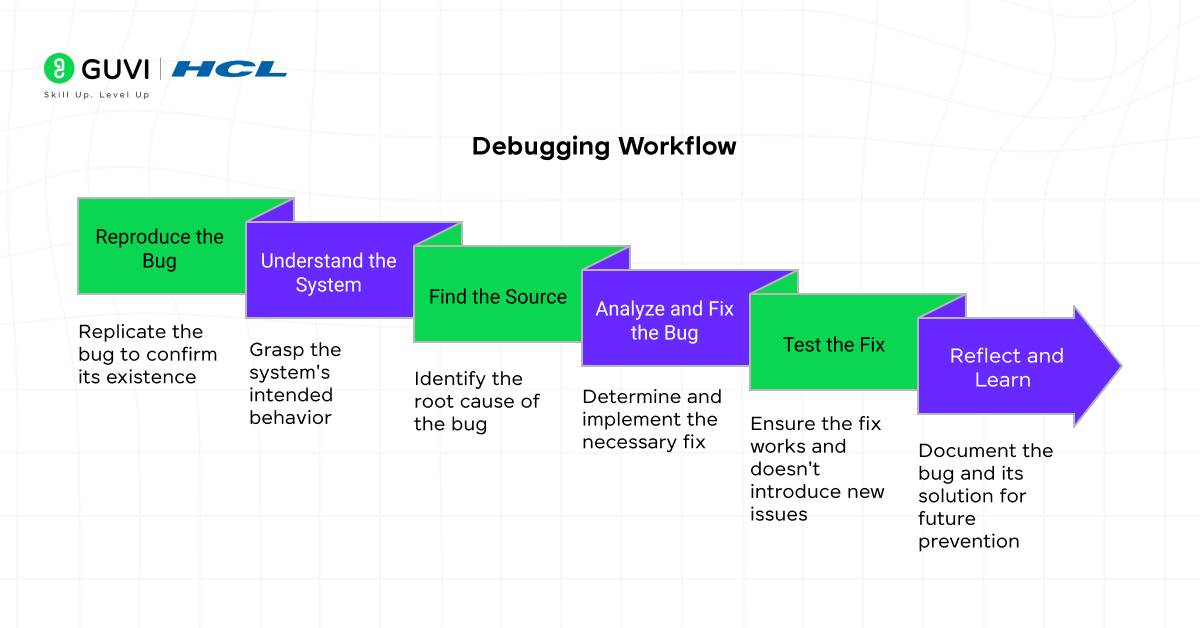
- Reproduce the Bug: The very first step. You cannot be sure you have fixed the problem unless you have been able to replicate the problem. Determine the precise procedures and input data, as well as the environmental factors that cause the bug.
- Understand the System: It is important to know what the code is meant to do. Make sure to check documentation, user stories, and requirements. A bug is a deviation from expected behavior..
- Find the Source (The Detective Work): This is the core of debugging. Identify the faulty logic that caused the problem with the help of debugging techniques and debugging tools discussed below.
- Analyze and Fix the Bug: Once the bug is found, examine the cause. Is it a mere typing mistake or a deeper structural defect? Devise a correction. The fix should be minimal and targeted to avoid introducing new bugs.
- Test the Fix: Make sure that your fix does not introduce a regression (it does not affect the functionality that already exists). Repeat the procedure to reproduce to ensure the bug is no longer there. Run the full test suite.
- Reflect and Learn: This is an ideal of best practice in debugging. Write down the bug and the remedy. Is it possible to avoid this kind of error in the future with a code review, a linter rule, or a unit test?
- NASA uses advanced debugging methods to ensure spacecraft code runs error-free during critical space missions.
- The world’s first computer bug — a moth found in 1947 — is preserved at the Smithsonian Museum in Washington, D.C.
- Research shows that nearly 90% of software project delays are caused by debugging and fixing unexpected errors.
- Google once revealed that a single memory leak bug in Chrome cost millions of dollars in lost ad revenue before it was fixed.
Essential Debugging Techniques in Software Development
A proficient debugger has access to a wide range of debugging methods. The following are the best:
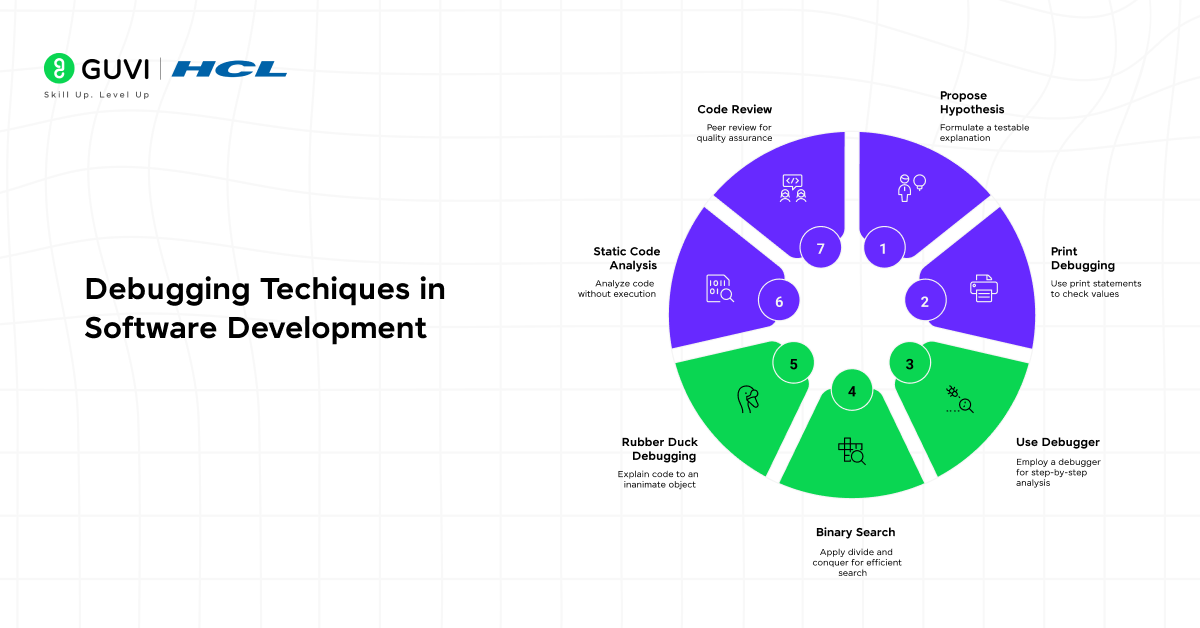
1. The Scientific Process: Proposing a Hypothesis.
Approach debugging as an experiment. Using the evidence (error messages, logs, behavior) come up with a hypothesis about the possible causes of the bug. Then write a test (with a breakpoint, print statement, or log) to confirm or invalidate that hypothesis.
2. Print Debugging (or Logging)
The most effective but the simplest method. Placing and locating print statements (console.log, print, System.out.println) in strategic locations within the code to display the values of variables, flow of execution, and the value of functions returned. It is an easy method of seeing what is going on in your code at runtime.
3. Using a Debugger
A debugger with the ability to control program execution in fine-grained control mode. Modern debuggers (built into IDEs such as VS Code, IntelliJ, PyCharm, or Eclipse) can enable you to:
- Set Breakpoints: Stop on a given line of code.
- Step through Code: Debug the code line by line (Step Over), to the inside (step into) or the outside (step out) of functions.
- Inspect State: Examine the current value of all variables and the call stack when an object pauses.
This is the most effective method of knowing the state of run time in your program.
4. Binary Search (The Divide and Conquer Strategy)
To deal with large codebases, divide the problem space in half repeatedly until the bug is isolated. Comment out big chunks of code or find strategic breakpoints to identify which half the bug is in. Repeat this till you have narrowed down on the culprit.
5. Rubber Duck Debugging
One of the most interesting and popular debugging methods. Write out, line-by-line, to an inanimate object (such as a rubber duck), what you are coding and what the problem is. The process of stating the problem causes you to take your time and analyze your assumptions, which in most cases, causes you to arrive at the solution yourself.
6. Static Code Analysis
Running tools based on the source code (not running it) to identify possible bugs, code smells, and code violations (e.g., ESLint to analyze JavaScript, Pylint to analyze Python, SonarQube to analyze many languages).
7. Code Review and Pair Programming
One of the best debugging tools is having another pair of eyes. An error that you have grown blind to after too much time at the code can be frequently noticed by a colleague.
Powerful Debugging Tools
The right tools make your debugging process faster. They are divided into a few categories:
- Intelligent Debuggers: Embedded in IDEs (Visual Studio Code, JetBrains IntelliJ IDEA, Xcode, Eclipse). They offer a graphical interface in which breakpoints, stepping, and inspecting may be set.
- Standalone Debuggers: Command-line (GDB) (C/C++): and Command-line (PDB) (Python).
- Browser Developer Tools: Chrome DevTools or Firefox Developer Tools. The most powerful in front-end web code debugging (JavaScript, DOM, CSS, network requests).
- Frameworks of Logging: Not simple prints. Leveled logging (DEBUG, INFO, ERROR) and logging to multiple destinations are supported by tools such as Log4j (Java), Winston (Node.js), or structlog (Python).
- Application Performance Monitoring (APM): This is a category of tools, such as DataDog, New Relic, or Sentry, which are used to identify and trace performance problems and errors in the production environment.
- Profilers: Tools that assist in determining performance bottlenecks, e.g., memory leakage or CPU-intensive functions.
Debugging Best Practices for Sustainable Code
It is by following best practices in debugging that you will become an effective developer and your code will become robust.
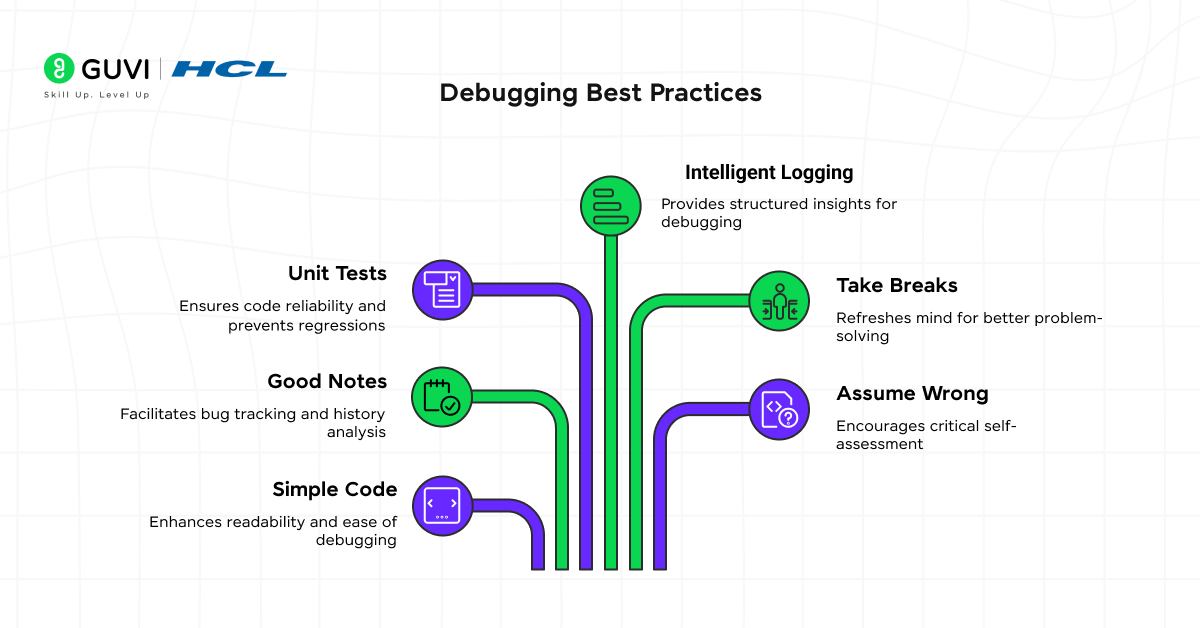
- Simple and Readable Code: Simple Code is simple to debug and well-structured, and simple to read. Do not use too smart and complicated one-liners. Use descriptive variable and function names.
- Take Good Notes: git bisect is a magical tool that searches your history of commit binarywise, automatically determining which commit introduced a bug.
- Adopt Unit Tests: A comprehensive test suite is your safety net. It allows you to do bugs, and, most importantly, makes sure your fix is not regressive. Test-Driven Development (TDD) inherently makes bugs minimized.
- Intelligent Logging: It is not necessary to debug with print, use a proper, structured logging early in life. Log at varying levels and ensure that your logs are meaningful.
- Take Breaks: Sometimes debugging is mentally tiring. When you’re stuck, walk away. You would find the solution when you come back with a new attitude.
- Assume You Are Wrong: Question yourself. The bug is where you believe to have your code right.
- Keep a Bug Book: Keep a record of difficult bugs and how to solve them. This will form a good body of knowledge to you and your team.
Debugging in Agile Development
In agile development, debugging is not an independent process, but it is one that happens within every sprint. The Agile concept of the early and continuous delivery of viable software requires early and continuous debugging.
- Shift-Left Debugging: The concept of moving debugging and testing activities earlier in the development process (to the “left” on a project timeline). . Developers write tests and debug their own code, as they write it.
- Continuous Integration (CI): Automated builds and tests run on every commit to code that instantly find integration and regression bugs, making them easier to track down and repair.
- Sprint Retrospectives: Teams discuss things that went badly, including what bug types keep coming up, and improve their process to prevent them in future (ex: “we should add a new linting rule to catch that”).
Debugging Examples: From Theory to Practice
Let’s look at some simple debugging examples.
Problem: A function calculateAverage(numbers) is returning NaN (Not a Number).
- Reproduce: We call calculateAverage([]) with an empty array and get NaN.
- Hypothesize: The function is likely trying to divide by zero when the array is empty.
- Investigate (using print debugging or a debugger):
| function calculateAverage(numbers) { let sum = 0; for (let i = 0; i < numbers.length; i++) { sum += numbers[i]; } const average = sum / numbers.length; // Division happens here return average; } |
We see that when numbers.length of numbers is 0, we execute sum / 0, which results in NaN.
4. Fix: Handle the edge case.
| function calculateAverage(numbers) { if (numbers.length === 0) { return 0; // Or throw an error, or return null, based on requirements. } let sum = 0; for (let i = 0; i < numbers.length; i++) { sum += numbers[i]; } const average = sum / numbers.length; return average; } |
5. Testing: Be sure to test with an empty array, a standard array, and an array that contains negative numbers to make sure you can verify that it works correctly, and does not break other cases.
If you’re passionate about coding and want to build a successful career in software development, now is the time to upgrade your skills. Learn with HCL GUVI’s IITM Pravartak and MongoDB Certified Online AI Software Development Course. This NSDC-approved course not only gives you hands-on experience but also provides a globally recognized certificate to boost your résumé, helping you shine in today’s competitive tech industry.
Final thoughts…
In software development, debugging involves more than just fixing bugs. It is a vital skill set that includes analytical thinking, deep technical knowledge, and perseverance. It is also the practice of turning confusion into clarity and disorder into order.
When you understand what debugging is, are comfortable with a variety of debugging techniques and methods, use debugging tools effectively, and follow by debugging best practices, you elevate your level in debugging. You no longer fear bugs: Rather, you learn to look at them and recognize them for what they are: puzzles to solve, a learning opportunity, and the last and perhaps most important step in the process of creating truly great software.
FAQs
1. What is the difference between debugging and testing?
Testing is focused on finding bugs by executing the program, while debugging is repairing the bugs after they have been discovered.
2. Can debugging help prevent software bugs from happening again?
Yes. Debugging will repair the existing bugs, but in the process of debugging a program, it will uncover weaknesses in the code, which can help developers write more robust and clean code the next time, resulting in fewer bugs.
3. How long does it take to debug software?
It depends on the complexity of the bug; some bugs can just as easily be repaired in just a few minutes. However, some bugs, like performance bugs or security bugs may take days or weeks to repair.
4. Is debugging for developers only?
Mostly, yes. However, testers, QA engineers, and DevOps teams also use debugging tools to help them find and analyze problems.
Success Stories

About the Author
Vishalini Devarajan
An Aerospace Engineer turned content writer, I focus on making complex concepts easy to understand through well-structured, reader-friendly blogs. Whether it’s a technical topic or a non-technical one, I love creating content that is clear, engaging, and impactful.
View all posts by Vishalini Devarajan
Connect with me @















Did you enjoy this article?