


Artificial Intelligence and Machine Learning Articles
Claude + HubSpot: Sales and Marketing Automation
Using Claude API with Retool for Internal Tools


Get In Touch For Details! Request More Information
Claude Vision API: Analyzing Images Programmatically
Jul 29, 2026 4 Min Read 21 Views
(Last Updated)
Table of contents
- Introduction
- Quick TL;DR
- What Claude Vision API Can Analyze
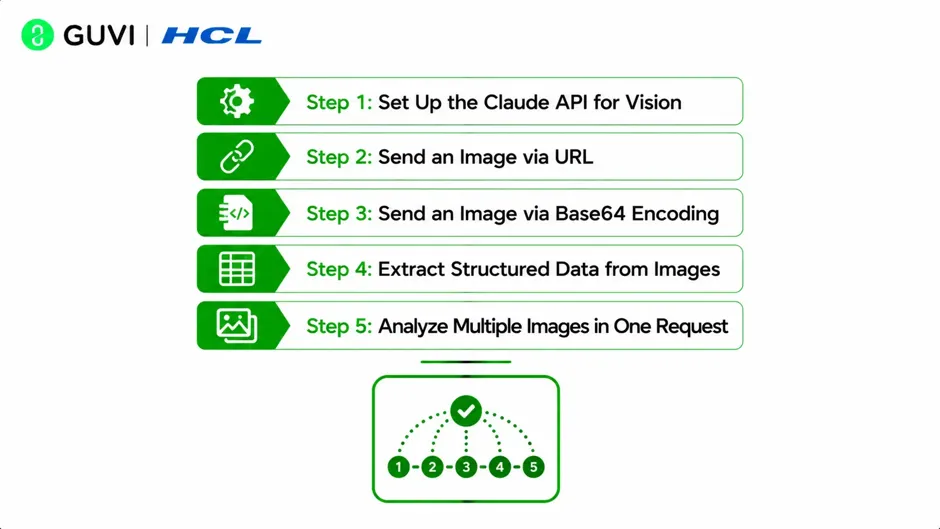
- Step 1: Set Up the Claude API for Vision
- Step 2: Send an Image via URL
- Step 3: Send an Image via Base64 Encoding
- Step 4: Extract Structured Data from Images
- Step 5: Analyze Multiple Images in One Request
- Conclusion
- FAQ
Introduction
Many real-world applications need to extract structured information from images, whether reading text from scanned documents, interpreting charts in financial reports, classifying product photos, or verifying identity documents. The Claude Vision API makes this possible through a straightforward API call that combines an image with a natural language instruction, returning analysis that would previously have required specialized computer vision models trained on specific tasks.
Quick TL;DR
The Claude Vision API allows developers to send images directly to Claude and receive detailed, accurate analysis in natural language, including object identification, text extraction, chart interpretation, document understanding, and visual question answering. Images are passed to the API as base64-encoded data or public URLs alongside a text prompt instructing Claude what to analyze.
Want to build real AI-powered applications using vision APIs and develop the skills modern AI development roles demand? Explore HCL GUVI’s Artificial Intelligence & Machine Learning Course, designed to help you go from AI concepts to deployed, production-ready systems.
What Claude Vision API Can Analyze
Claude’s vision capabilities cover a wide range of image analysis tasks that span multiple industries and use cases.
| Analysis Type | Examples |
| Object and scene recognition | Identifying items in product photos, describing scene contents |
| Text extraction (OCR) | Reading text from scanned documents, receipts, signs, screenshots |
| Chart and graph interpretation | Extracting data trends, values, and labels from visualizations |
| Document understanding | Parsing invoices, forms, contracts, and ID documents |
| Visual question answering | Answering specific questions about image content |
| Image comparison | Identifying differences between two images |
| Code screenshot analysis | Reading and explaining code captured in screenshots |
| Medical and scientific images | Describing diagrams, lab results, and technical illustrations |
Claude handles all of these through the same unified API endpoint with no task-specific model switching required.
Read More: Visuals That Appear as You Study with Claude
Step 1: Set Up the Claude API for Vision
Install the Anthropic SDK and configure your API key:
pip install anthropic

export ANTHROPIC_API_KEY="your-api-key-here"
Initialize the client in your Python script:
import anthropic
import os

client = anthropic.Anthropic(api_key=os.environ.get("ANTHROPIC_API_KEY"))
The vision API uses the same client and endpoint as text-only requests. The difference is in how you structure the message content to include image data alongside your text prompt.
Want to build real AI-powered applications using vision APIs and develop the skills modern AI development roles demand? Explore HCL GUVI’s Artificial Intelligence & Machine Learning Course, designed to help you go from AI concepts to deployed, production-ready systems.

Step 2: Send an Image via URL
The simplest way to pass an image to Claude is through a publicly accessible URL. Claude fetches and processes the image directly.
def analyze_image_url(image_url, prompt):
    response = client.messages.create(
        model="claude-sonnet-4-6",
        max_tokens=1024,
        messages=[
            {
                "role": "user",
                "content": [
                    {
                        "type": "image",
                        "source": {
                            "type": "url",
                            "url": image_url
                        }
                    },
                    {
                        "type": "text",
                        "text": prompt
                    }
                ]
            }
        ]
    )
    return response.content[0].text

result = analyze_image_url(
    "https://upload.wikimedia.org/wikipedia/commons/thumb/4/47/PNG_transparency_demonstration_1.png/280px-PNG_transparency_demonstration_1.png",
    "Describe what you see in this image in detail."
)
print(result)
Use URL-based image passing for publicly accessible images. For private or locally stored images, use base64 encoding covered in the next step.
Traditional OCR systems have existed since the 1960s but require cleanly formatted documents and fail on handwriting, unusual fonts, or complex layouts. Claude’s Vision API handles messy real-world documents including handwritten notes, mixed-language text, and rotated pages that traditional OCR struggles with significantly.
Step 3: Send an Image via Base64 Encoding
For local files, private images, or images generated programmatically, encode the image as base64 before sending.
import base64
import anthropic
import os

def encode_image_to_base64(image_path):
    with open(image_path, "rb") as image_file:
        return base64.standard_b64encode(image_file.read()).decode("utf-8")

def analyze_local_image(image_path, prompt):
    image_data = encode_image_to_base64(image_path)

    extension = image_path.split(".")[-1].lower()
    media_type_map = {
        "jpg": "image/jpeg",
        "jpeg": "image/jpeg",
        "png": "image/png",
        "gif": "image/gif",
        "webp": "image/webp"
    }
    media_type = media_type_map.get(extension, "image/jpeg")

    response = client.messages.create(
        model="claude-sonnet-4-6",
        max_tokens=1024,
        messages=[
            {
                "role": "user",
                "content": [
                    {
                        "type": "image",
                        "source": {
                            "type": "base64",
                            "media_type": media_type,
                            "data": image_data
                        }
                    },
                    {
                        "type": "text",
                        "text": prompt
                    }
                ]
            }
        ]
    )
    return response.content[0].text

result = analyze_local_image("invoice.png", "Extract all line items, quantities, and prices from this invoice.")
print(result)
Always specify the correct media_type for the image format. Claude supports JPEG, PNG, GIF, and WebP formats.
Claude’s vision capabilities are built into the same model that handles text, unlike earlier AI systems requiring separate specialized computer vision models. This means Claude can combine visual understanding with reasoning, not just identifying what is in an image but explaining why it matters or using it as evidence in a multi-step analytical task.
Step 4: Extract Structured Data from Images
For production applications, you often need Claude’s image analysis returned as structured data rather than freeform text. Prompt Claude to return JSON and parse the response.
import json

def extract_invoice_data(image_path):
    image_data = encode_image_to_base64(image_path)

    response = client.messages.create(
        model="claude-sonnet-4-6",
        max_tokens=2048,
        messages=[
            {
                "role": "user",
                "content": [
                    {
                        "type": "image",
                        "source": {
                            "type": "base64",
                            "media_type": "image/png",
                            "data": image_data
                        }
                    },
                    {
                        "type": "text",
                        "text": """Extract the following information from this invoice
and return it as valid JSON only, no other text:
{
    "invoice_number": "",
    "date": "",
    "vendor_name": "",
    "total_amount": "",
    "line_items": [
        {"description": "", "quantity": "", "unit_price": "", "total": ""}
    ]
}"""
                    }
                ]
            }
        ]
    )

    raw_response = response.content[0].text
    return json.loads(raw_response)

invoice_data = extract_invoice_data("invoice.png")
print(json.dumps(invoice_data, indent=2))
Instructing Claude to return only JSON with no preamble produces clean, parseable output that integrates directly into downstream data processing pipelines.
Step 5: Analyze Multiple Images in One Request
Claude can process multiple images in a single API call, useful for comparison tasks or multi-page document analysis.
def compare_two_images(image_path_1, image_path_2, comparison_prompt):
    image_1_data = encode_image_to_base64(image_path_1)
    image_2_data = encode_image_to_base64(image_path_2)

    response = client.messages.create(
        model="claude-sonnet-4-6",
        max_tokens=1024,
        messages=[
            {
                "role": "user",
                "content": [
                    {
                        "type": "image",
                        "source": {
                            "type": "base64",
                            "media_type": "image/png",
                            "data": image_1_data
                        }
                    },
                    {
                        "type": "image",
                        "source": {
                            "type": "base64",
                            "media_type": "image/png",
                            "data": image_2_data
                        }
                    },
                    {
                        "type": "text",
                        "text": comparison_prompt
                    }
                ]
            }
        ]
    )
    return response.content[0].text

result = compare_two_images(
    "product_v1.png",
    "product_v2.png",
    "List all visual differences between these two product images."
)
print(result)
Conclusion
The Claude Vision API removes the need for task-specific computer vision models by handling a wide range of image analysis tasks through a single, unified API endpoint that combines visual understanding with natural language instruction.
Validate the output quality against known ground truth before integrating into a production pipeline, add structured JSON extraction for any use case that feeds downstream systems, and implement image resizing and error handling before deploying at scale.
FAQ
- What is the Claude Vision API?
It is the capability within the Claude API that allows developers to send images alongside text prompts and receive detailed natural language analysis of the image content.
- What image formats does the Claude Vision API support?
Claude supports JPEG, PNG, GIF, and WebP image formats for both base64-encoded and URL-based image inputs.
- How do I send a local image file to the Claude Vision API?
Encode the image file as base64 using Python’s base64 module, specify the correct media_type, and include it in the message content alongside your text prompt.
- Can Claude extract text from images?
Yes. Claude can extract printed and handwritten text from images including scanned documents, screenshots, signs, receipts, and forms, handling mixed layouts and complex formatting that traditional OCR systems struggle with.
- How do I get structured JSON output from Claude vision analysis?
Include a JSON template in your prompt specifying the exact fields you need and instruct Claude to return only valid JSON with no additional text. Wrap the response parsing in a try-except block for robustness.
- Can I send multiple images in a single Claude API call?
Yes. Include multiple image content blocks in the same user message. Claude processes all images in context, making this useful for comparison tasks or multi-page document analysis.
Success Stories

About the Author
Vishalini Devarajan
An Aerospace Engineer turned content writer, I focus on making complex concepts easy to understand through well-structured, reader-friendly blogs. Whether it’s a technical topic or a non-technical one, I love creating content that is clear, engaging, and impactful.
View all posts by Vishalini Devarajan
Connect with me @







Did you enjoy this article?