


Artificial Intelligence and Machine Learning Articles
Using Claude to Prepare for Difficult Conversations
Claude for Habit Tracking and Accountability


Get In Touch For Details! Request More Information
How to Use Claude to Learn a New Skill Faster
Aug 13, 2026 3 Min Read 40 Views
(Last Updated)
Use Claude to learn a new skill faster can open doors to better career opportunities, personal growth, and continuous professional development. However, finding the right resources, staying motivated, and practicing consistently can be challenging. Claude helps learners create personalized study plans, explain complex concepts, recommend learning resources, and provide hands-on practice, making skill development more structured and efficient.
Table of contents
- TL;DR
- Direct Answer Box
- Benefits of Using Claude to Learn a New Skill
- How to Use Claude to Learn a New Skill Faster
- Step 1: Define Your Learning Goal
- Step 2: Assess Your Current Level
- Step 3: Create a Personalized Learning Roadmap
- Step 4: Learn Concepts Through Simple Explanations
- Step 5: Practice What You Learn
- Step 6: Review Your Progress
- Step 7: Continuously Improve Your Skills
- Build a Learning Portfolio with Claude
- How to Measure Your Learning Progress with Claude
- Learning Tasks You Can Automate with Claude
- Tasks Claude Should Not Replace
- Best Practices for Using Claude to Learn a New Skill Faster
- Conclusion
- FAQs
- Can Claude create a personalized learning plan?
- Can Claude explain difficult concepts?
- Can Claude recommend learning resources?
- Can Claude generate quizzes and practice exercises?
- Is Claude useful for self-learning?
- Should I rely only on Claude for learning?
- How can Claude help me learn faster?
TL;DR
- Claude helps create personalized learning plans.
- AI explains complex concepts in simple language.
- It recommends resources, projects, and practice exercises.
- Human practice and consistency remain essential.
- Claude accelerates learning through personalized guidance.
📚 Data Point: Continuous learning has become one of the most valuable professional skills as technology evolves rapidly across industries. AI-powered learning assistants are increasingly being used to personalize education and improve learning efficiency.
Source: World Economic Forum – Future of Jobs Report
Direct Answer Box
| Claude helps users learn new skills faster by creating personalized learning roadmaps, explaining concepts, recommending resources, generating practice exercises, answering questions, and tracking learning progress. While AI improves learning efficiency, consistent practice and real-world application remain essential for mastering any skill. |
Benefits of Using Claude to Learn a New Skill
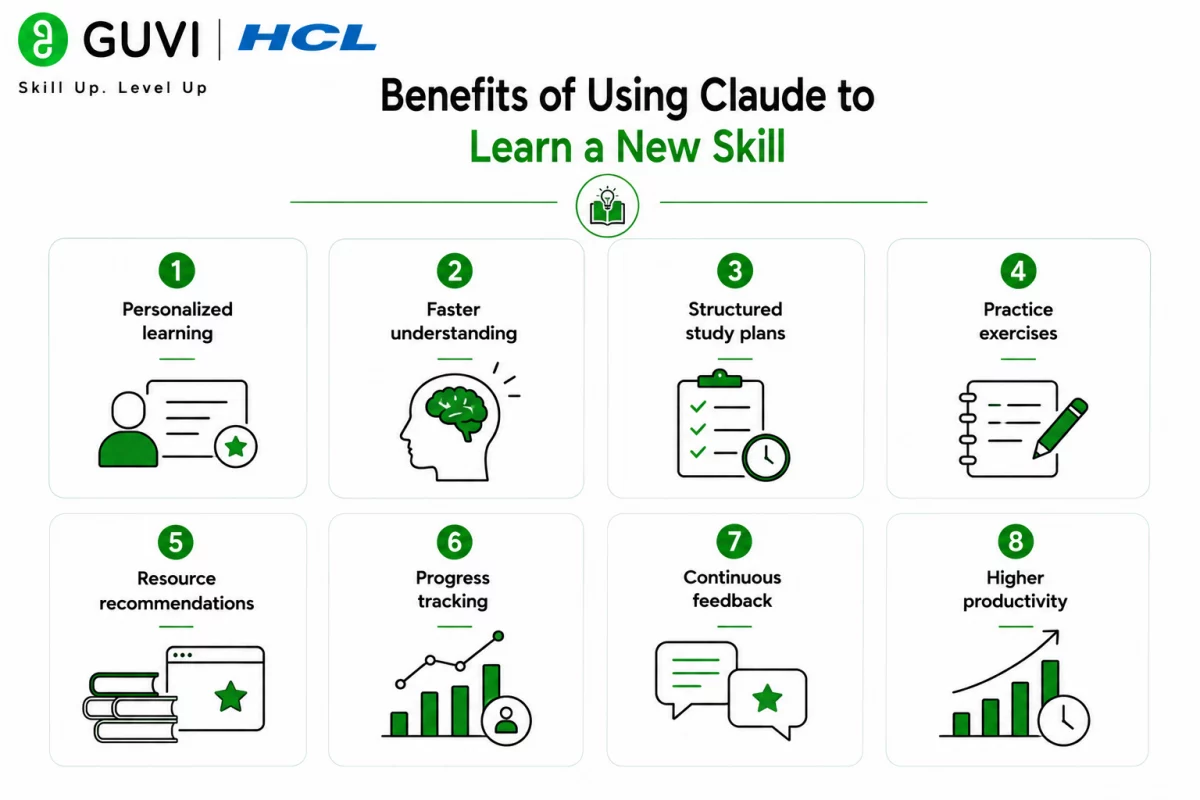
Learning becomes more effective when information is organized, personalized, and reinforced through regular practice. Claude supports learners by adapting explanations and recommendations to individual goals.
Key benefits include:
- Personalized learning
- Faster understanding
- Structured study plans
- Practice exercises
- Resource recommendations
- Progress tracking
- Continuous feedback
- Higher productivity
How to Use Claude to Learn a New Skill Faster
Step 1: Define Your Learning Goal
Start by clearly explaining the skill you want to learn and why you want to learn it.
Define:
- Target skill
- Current knowledge
- Learning objective
- Available time
- Deadline
Step 2: Assess Your Current Level
Ask Claude to determine your existing knowledge and identify your starting point.
Include:
- Previous experience
- Existing skills
- Strengths
- Weaknesses
- Learning preferences
- Career goals
Step 3: Create a Personalized Learning Roadmap
Use Claude to build a structured learning plan with achievable milestones.
Plan:
- Beginner topics
- Intermediate concepts
- Advanced skills
- Weekly milestones
- Practice schedule
- Revision plan
Step 4: Learn Concepts Through Simple Explanations
Ask Claude to explain difficult topics using examples, analogies, and step-by-step breakdowns.
Learn:
- Core concepts
- Terminology
- Examples
- Practical applications
- Common mistakes
- Best practices
Step 5: Practice What You Learn
Apply your knowledge through exercises, quizzes, projects, and real-world scenarios.
Practice:
- Exercises
- Mini projects
- Coding challenges
- Case studies
- Quizzes
- Problem-solving tasks
Step 6: Review Your Progress
Regularly evaluate what you’ve learned and identify areas that need more practice.
Review:
- Completed topics
- Knowledge gaps
- Weak areas
- Practice results
- Revision needs
- Next milestones

Step 7: Continuously Improve Your Skills
Learning is an ongoing journey. Continue practicing, building projects, seeking feedback, and exploring advanced topics to strengthen your expertise. Learners who want to develop practical AI knowledge, machine learning fundamentals, and prompt engineering skills can build real-world expertise through HCL GUVI’s Artificial Intelligence and Machine Learning Course.
Many students and professionals use AI assistants as personal tutors to explain concepts, create study schedules, generate quizzes, summarize learning materials, and provide instant feedback during their learning journey.
Build a Learning Portfolio with Claude
Learning becomes more valuable when you can demonstrate your skills through practical work. Claude can help you create projects, organize your work, and build a portfolio that showcases your progress to potential employers or clients.
Claude can help you build:
- Personal projects
- Case studies
- Portfolio websites
- Technical blogs
- Research summaries
- Project documentation
- GitHub repositories
- Presentations
- Practice assignments
- Skill showcase projects
- Learning journals
- Achievement trackers
A well-structured portfolio demonstrates your practical skills, problem-solving abilities, and continuous learning, making it easier to showcase your expertise during job applications, interviews, and career advancement opportunities.
How to Measure Your Learning Progress with Claude
Learning a new skill is more effective when you regularly evaluate your progress. Claude can help you assess what you’ve learned, identify knowledge gaps, and recommend the next steps to keep improving. Tracking measurable progress also helps maintain motivation and ensures you’re building practical skills instead of simply consuming information.
Claude can help you measure:
- Topics completed
- Learning consistency
- Quiz performance
- Project completion
- Knowledge gaps
- Practical skill development
- Revision frequency
- Confidence levels
- Milestone achievements
- Goal completion
- Areas requiring improvement
- Readiness for advanced topics
By reviewing your progress regularly, you can adjust your learning plan, focus on weaker areas, and continue developing your skills with greater confidence and efficiency.
Learning Tasks You Can Automate with Claude
Claude can support many learning and skill development activities.
Claude can help with:
- Learning roadmaps
- Concept explanations
- Study schedules
- Practice exercises
- Quiz generation
- Progress tracking
- Resource recommendations
- Project ideas
- Revision planning
- Skill assessments
- Learning summaries
- Motivation strategies
The HCL GUVI’s Artificial Intelligence eBook introduces practical AI concepts, prompt engineering techniques, learning workflows, and real-world applications. It demonstrates how AI can improve education, self-learning, productivity, and professional skill development.
Tasks Claude Should Not Replace
Claude is a valuable learning assistant, but true mastery requires personal effort.
Claude should not replace:
- Hands-on practice
- Real-world experience
- Professional mentoring
- Practical projects
- Independent thinking
- Critical analysis
- Skill application
- Continuous practice
- Personal discipline
While Claude can guide your learning journey, long-term success depends on consistent practice and applying knowledge in real-world situations.
⚠️ Warning: Claude can explain concepts and recommend learning resources, but AI-generated information may occasionally contain inaccuracies or outdated content. Always verify important information using trusted educational resources and practical experience.
Best Practices for Using Claude to Learn a New Skill Faster
- Set clear learning goals.
- Study consistently.
- Practice every day.
- Build real-world projects.
- Ask follow-up questions.
- Review your progress regularly.
- Test your knowledge frequently.
- Verify important information.
Conclusion
Claude makes learning faster and more personalized by creating structured study plans, explaining difficult concepts, generating practice exercises, and tracking progress. When combined with consistent practice, hands-on projects, and continuous learning, it becomes a powerful assistant for mastering new skills and achieving long-term personal and professional growth.
FAQs
1. Can Claude create a personalized learning plan?
Yes. Claude can generate customized learning roadmaps based on your current knowledge, goals, available time, and preferred learning style.
2. Can Claude explain difficult concepts?
Yes. Claude can simplify complex topics using examples, analogies, and step-by-step explanations suitable for different experience levels.
3. Can Claude recommend learning resources?
Yes. Claude can suggest books, courses, tutorials, websites, videos, and other educational resources for a wide range of skills.
4. Can Claude generate quizzes and practice exercises?
Yes. Claude can create quizzes, coding exercises, case studies, and practical assignments to reinforce learning.
5. Is Claude useful for self-learning?
Yes. Claude supports independent learners by providing explanations, personalized study plans, progress tracking, and practice activities.
6. Should I rely only on Claude for learning?
No. Claude should complement books, courses, practical projects, mentors, and real-world experience rather than replace them.
7. How can Claude help me learn faster?
Claude accelerates learning by personalizing study plans, answering questions instantly, generating practice material, recommending resources, and helping learners stay organized and consistent.
Success Stories

About the Author
HCL GUVI
This article was selected and published as part of the HCL GUVI AI Blogathon 2026, an initiative designed to encourage students, AI enthusiasts, and aspiring tech writers to simplify complex AI concepts through impactful technical content. The contest recognized high-quality, original, and insightful AI-focused blogs, with selected authors receiving publication opportunities on the HCL GUVI blog platform along with official author credits and recognition.
View all posts by HCL GUVI
Connect with me @








Did you enjoy this article?