


Career Articles
10 Best System Design Courses in 2026 (Free + Paid)
How to Use GitHub to Strengthen Your Resume: The 2026 Complete Guide
Is It Too Late to Start Learning AI and ML in Your 30s or 40s?


Get In Touch For Details! Request More Information
How to Transition from Construction Project Management to IT Project Management: A Complete Guide
Feb 17, 2026 7 Min Read 1415 Views
(Last Updated)
Are you tired of slow construction work and feeling stuck while the digital world moves fast? Does your day feel like it is always outdoors, on-site, and on calls that leave you with no personal time? If yes, you are in the right place.
Many construction professionals are stuck and exhausted with the never-ending, unpredictable schedules. But, here is the fact:
According to LinkedIn research, over 80% of the professionals in India plan to switch their careers. So shifting to a new field is not as hard as it seems.
In this guide, you will learn how to make your transition smoother. You will understand the new career path, the skills you need, and the complete roadmap for transitioning from construction project management to IT project management in a simple, practical way. Let’s dive in!
Quick Answer:
You can transition from construction to IT project management by learning Agile and SDLC basics, using tools like Jira, getting certifications like CSM, and starting with a coordinator or junior PM roles.
Table of contents
- Why the Shift?
- Specific duties include
- Construction Project Manager vs IT Project Manager: What's Different?
- What's Different in IT?
- Transferable Skills for a Construction Manager to an IT Manager
- What You Need to Learn for IT Project Management
- Understanding How Software is Built
- Tools You Need to Know
- Certificates You Should Get
- Your Step-by-Step Transition Plan
- Step 2: Learn the Tools (Weeks 2-4)
- Step 3: Get Certified (Weeks 4-8)
- Step 4: Fix Your Resume (Week 8)
- Step 5: Start Applying (Weeks 9-12)
- Step 6: Practice for Interviews (Weeks 8-12)
- Challenges You Might Face (And How to Beat Them)
- I'm Not a Tech Person
- 2. Software is Confusing
- The Tools Look Scary
- I Keep Getting Rejected
- Everyone Seems Smarter Than Me
- Why Your Construction Background Is Actually Good
- You Can Lead People Under Pressure
- You Know How to Talk to Different People
- You Know How to Deal with Problems
- You Know How to Deliver
- You Think Practically
- What Your Career Could Look Like
- Getting Started
- Years 2-3: Growing
- Years 5+: Senior Roles
- The Future is Growing
- More Jobs Coming
- Artificial Intelligence is Coming
- Working from Home is Here to Stay
- You Can Specialize
- Key Takeaways
- Wrapping Up
- Frequently Asked Questions
- Can a construction project manager switch to IT?
- Do I need coding?
- How long does the transition take?
Why the Shift?
Construction project managers are increasingly looking to transition from construction to IT project management due to industry volatility, workforce pressures, and attractive compensation opportunities.
There is also a consistent rise in demand for project managers. According to NASSCOM, 88% of CEOs expect to increase project management hiring in the coming years.
Specific duties include
‣ Planning project phases and timelines
‣ Managing budgets and controlling costs throughout the project lifecycle
‣ Hiring and supervising on-site teams
‣ Liaising with clients to refine plans and track progress
‣ Monitoring compliance with building codes and safety regulations
‣ Resolving conflicts between design specifications and practical constraints
‣ Conducting site inspections and quality assurance checks
Project managers spend almost 90% of their time communicating. Emails, calls, team chats, client updates — communication is their real superpower.
A Day in the Life of a Project Manager
Here is what a typical day looks like for an IT project manager:
Morning check-in: Review project status, check emails, reply to blockers.
Stand-up meeting: Quick sync with the team on progress and tasks.
Planning sessions: Break work into tasks, assign responsibilities, update timelines.
Client calls: Share updates, clarify requirements, gather feedback.
Risk and issue handling: Solve sudden problems, remove dependencies, help the team move forward.
Documentation: Update Jira, Confluence, reports, and progress dashboards.
End-of-day wrap: Review goals, plan for the next day, update stakeholders.
Construction Project Manager vs IT Project Manager: What’s Different?
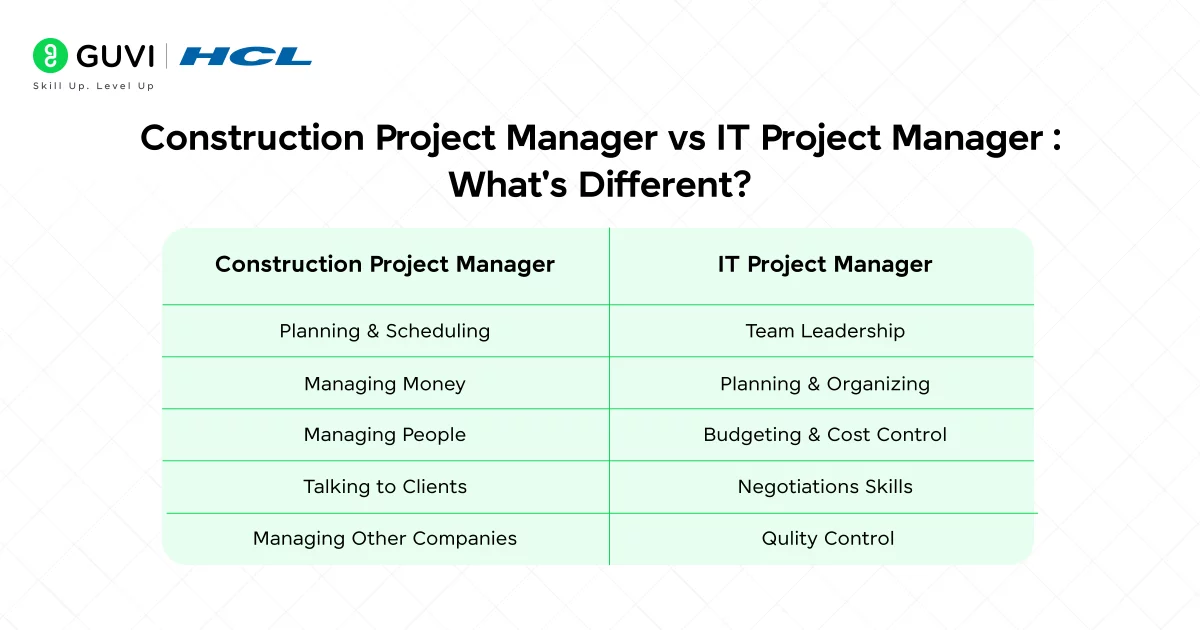
Both construction managers and IT managers do similar work:
Planning & Scheduling: You break big projects into smaller pieces and figure out how long each piece takes. Whether you’re building a house or writing software, the idea is the same.
Managing Money: You track how much things cost. You make sure the project doesn’t go over budget. This is the same whether you’re buying concrete or paying software developers.
Managing People: You assign tasks to workers. You make sure everyone knows what they’re supposed to do. This is the same in any industry.
Talking to Clients: You keep the people paying for the project happy. You tell them what’s happening. You handle their complaints. Same thing everywhere.
Managing Other Companies: You work with outside vendors and suppliers. You negotiate prices. You make sure they do good work. Same everywhere.
Career Tip:
HCL GUVI’s IITM Pravaratak certified MERN Full Stack Development Course, guided by experts, with hands-on experience and dedicated career support, gives you an effective career roadmap if you are planning to launch a career in tech.

What’s Different in IT?
Speed of Change: Construction projects follow a plan. Things don’t change much once you start building. In IT, things change all the time. The plan gets updated constantly.
You Can’t See the Work: In construction, you can walk on the site and see what’s being built. In IT, you can’t see software being built. It’s just people typing on computers. This means you need different ways to track progress.
Technical Language: In IT, people talk about things like APIs, databases, and ‘code.’ You’ll need to understand what these words mean, but you don’t need to know how to do them yourself.
Testing is Different: In construction, you inspect the building to make sure it’s safe. In IT, people called “testers” run the software and look for problems.
Dealing with Problems: Things go wrong. You need to figure out what went wrong and fix it fast. You’re already good at this.
Finishing on Time and On Budget: Both kinds of projects have deadlines and budgets. Both require careful planning and quick thinking.
Being a Leader: You motivate people. You make decisions. You keep everyone moving in the same direction. These skills work everywhere.
Transferable Skills for a Construction Manager to an IT Manager
You’ve been doing this job for years. You have real skills that IT companies need. These transferable skills make it easier to transition from construction to IT project management without starting from zero. Here’s what you know how to do:
| What You Do Now | What It’s Called in IT | Why It Matters |
| Direct workers on site | Team Leadership | Managing people who do different kinds of work |
| Write schedules | Planning & Organizing | Breaking projects into steps with deadlines |
| Keep projects under budget | Budgeting & Cost Control | Making smart money decisions |
| Negotiate with suppliers | Negotiation Skills | Getting good deals and fair agreements |
| Make sure quality is good | Quality Control | Checking work and fixing problems |
| Be in charge and make calls | Leadership | Making decisions when things are unclear |
| Update clients about progress | Communication | Keeping everyone informed |
| Fix arguments between workers | Problem Solving | Handling conflicts and finding solutions |
| Spot dangers before they happen | Risk Planning | Seeing problems coming and stopping them |
What You Need to Learn for IT Project Management
You’re not starting from zero, but you do need to learn some new things.
Understanding How Software is Built
You don’t need to learn to write code. You need to understand the process.
The Basic Steps:
- Someone decides what the software should do
- Developers write the code
- Testers check for problems
- The software is released to customers
- Problems that happen get fixed
This is called SDLC (Software Development Life Cycle). It’s simpler than it sounds.
Two Different Ways to Work:
Waterfall: Everything is planned before you start. You finish one step completely, then move to the next step. Like a waterfall, you can’t go backwards. This is more like construction.
Agile: You work in small cycles. Every two weeks, you make a little bit of progress. Then you show people what you made. They give you feedback. You change your plan based on what they say. You repeat this many times until the project is done.
Most tech companies use Agile now. It’s different from construction, but you’ll learn it fast.
Tools You Need to Know
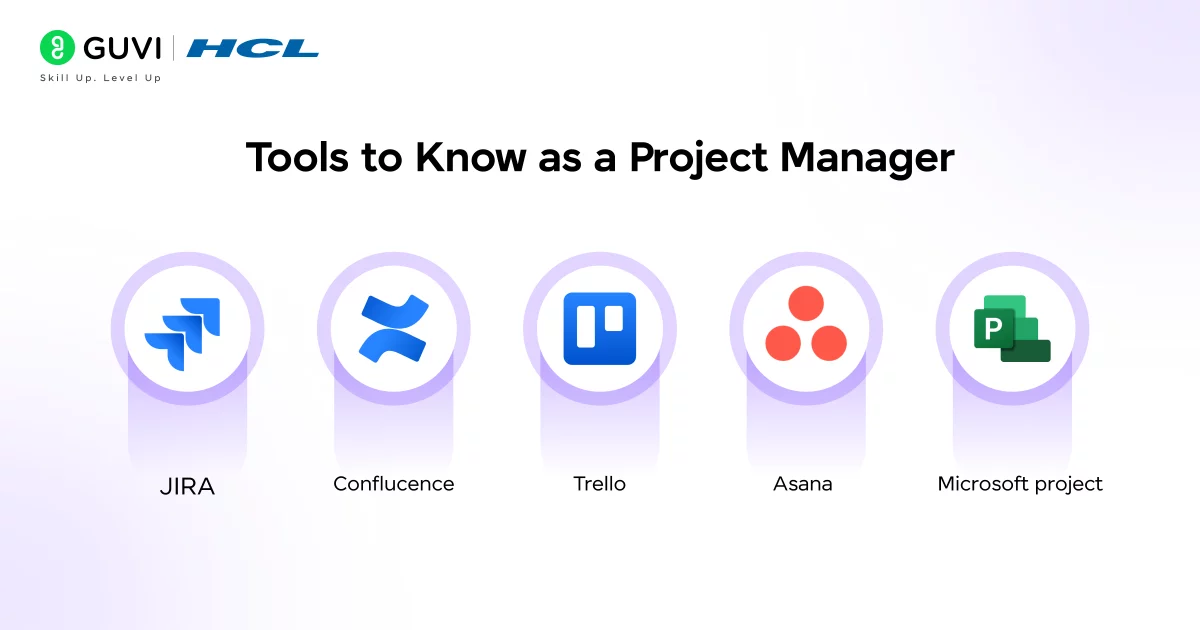
Tech companies use special software to manage their projects. Here are the most important ones:
JIRA: This is the most popular one. Everyone uses it. It’s where the team tracks tasks, problems, and progress. Once you learn JIRA, other tools are easier.
Confluence: This is where teams write things down. It’s like a shared notebook for the whole team.
Trello: This is simple. You have columns (To Do, Doing, Done) and cards for each task. You move cards from column to column.
Asana: Similar to Trello but more powerful. Good for bigger projects.
Microsoft Project: The old way of managing projects. Big companies still use it.
Certificates You Should Get
People with project management certificates can earn up to 23% more. These certificates show employers that you know how to manage projects well.
Here are the most important ones:
Certified Scrum Master (CSM):
Certified Scrum Master (CSM) is a short 3-day training program that teaches you the Scrum framework, which is how most IT teams plan and deliver work. It is one of the most respected and widely accepted certifications in IT companies, especially for project and delivery roles.
Google Project Management Certificate:
You can complete it online at your own pace, and it teaches general project management concepts that are easy to understand for beginners. It is also a good option if you want to start with a low-cost certification.
ITIL Foundation
It teaches how IT services work and can help understand processes, though it is not as essential as a CSM.
PMP (Project Management Professional):
PMP, on the other hand, is the major certification in project management, but it requires more preparation and experience.
It is better to get your CSM first and then pursue PMP later when you gain more exposure in the field.
Your Step-by-Step Transition Plan
Here’s a practical roadmap to help you transition from construction to IT project management in a structured and confident way.
Step 1: Learn the Basics (Weeks 1-2)
Watch free videos on YouTube about:
- What SDLC means
- The difference between Agile and Waterfall
- What Scrum ceremonies are
You don’t need to be an expert. Just understand the basics.
Time: 4-5 hours
Step 2: Learn the Tools (Weeks 2-4)
JIRA:
- Sign up for free
- Create a test project
- Add some fake tasks
- Move them around
- Practice until it feels normal
Confluence:
- Write some pages
- Link them together
- Learn how the team uses it
Time: 2-3 hours per week
Step 3: Get Certified (Weeks 4-8)
Take a CSM course. This is important. Here’s why:
- Employers look for it
- It teaches you what you need to know
- You can get hired faster with a certificate
Time: 3 days in class + study time
Step 4: Fix Your Resume (Week 8)
Change how you talk about your construction job:
Don’t: ‘Managed 50 workers’ Do: ‘Led a team of 50+ people on complex projects worth millions’
Don’t: ‘Negotiated contracts’ Do: ‘Managed vendor relationships and saved money without losing quality’
Add: Your new certificate, courses you took, and tools you learned
Time: 3-4 hours
Step 5: Start Applying (Weeks 9-12)
Look for these jobs:
- IT Project Coordinator
- Associate Project Manager
- Delivery Coordinator
- Junior Scrum Master
Target:
- Startups (they hire career changers more easily)
- Growing companies (they need experienced people)
- Companies changing to digital (they need PMs who understand complexity)
Apply to many companies. You might get rejected a lot. That’s normal. Keep applying.
Step 6: Practice for Interviews (Weeks 8-12)
Tech interviews ask different questions than construction.
They might ask:
Question: Tell me about a time you dealt with a difficult client.
How to Frame Answer: Answer with a story from your construction job. Show that you listened and fixed the problem.
What would you do if the team couldn’t finish the work on time?
How to Frame Answer: Talk about how you’ve handled this before. Show you think about solutions, not just problems.
Explain Scrum to me.
How to Frame Answer: Use simple language. Talk about sprints, daily meetings, and showing work to clients.
Tell me about a mistake you made and what you learned.
How to Frame Answer: Be honest. Show that you learned something.
Thinking about switching to a tech career? HCL GUVI’s full-stack development course is a great way to get your hands dirty with real-world projects and build the skills you’ll actually use on the job. It’s a solid step if you’re ready to dive in and see what tech’s all about.
Challenges You Might Face (And How to Beat Them)
1. I’m Not a Tech Person
You don’t need to be. You need to understand processes and lead people. You already know how to do that.
What to do: Spend 2-3 weeks learning IT basics. Read articles. Watch videos. After that, you’ll know enough to do the job.
2. Software is Confusing
It seems confusing at first. But think about this: software is built the same way a house is built. You need a plan (requirements), workers (developers), quality control (testers), and a grand opening (launch).
What to do: Draw these parallels.
Software development = house building. Once you see that, everything makes sense.
3. The Tools Look Scary
JIRA looks overwhelming at first. Don’t worry.
What to do: Start simple. Create a task. Assign it. Move it to done. Practice for a few hours. Then it stops being scary.
4. I Keep Getting Rejected
You might apply to 10 jobs and only get 1-2 interviews. This is normal in IT.
What to do: Keep applying. Get your CSM certificate—it helps a lot. Apply to smaller companies and coordinator roles. Don’t give up.
5. Everyone Seems Smarter Than Me
You’re in a new field. Everyone feels like this when they start something new.
What to do: Your construction job taught you how to handle pressure, solve problems, and get things done.
That’s valuable.
Tech companies need people who can actually deliver, not just people who know fancy tech words.
Why Your Construction Background Is Actually Good
You Can Lead People Under Pressure
Construction projects have tight deadlines and money problems. You’ve learned to be a leader even when things are stressful. Software projects also have tight deadlines and money problems. Your ability to keep people calm and focused is valuable.
You Know How to Talk to Different People
Construction managers deal with architects, builders, inspectors, safety people, and customers. IT managers deal with developers, testers, customers, and executives. Both require you to keep different groups happy. You know how to do this.
You Know How to Deal with Problems
You’ve handled weather delays, supply problems, safety issues, and difficult customers. You’ve learned to see problems coming and fix them before they get bigger. Software projects have different problems, but the skill of ‘spot it early and fix it’ is the same.
You Know How to Deliver
You’ve successfully finished projects on time and on budget even when things were hard. That’s the hardest thing about being a PM. Companies want people who deliver. Your construction background proves you can.
You Think Practically
Construction teaches you that perfect plans often don’t work. You need to be creative and quick. Tech companies need this. Many tech people get stuck trying to make things perfect. Your practical “let’s just fix it and move on” attitude is valuable.
What Your Career Could Look Like
Getting Started
Jobs you might get:
- IT Project Coordinator (₹5-7 lakhs/year)
- Associate Project Manager (₹6-8 lakhs/year)
- Junior Scrum Master (₹6-8 lakhs/year)
You’ll support other managers. You’ll learn how IT companies work. You’ll do simple projects with guidance.
Years 2-3: Growing
Jobs you might get:
- Project Manager (₹10-15 lakhs/year)
- Senior Scrum Master (₹12-18 lakhs/year)
- Program Manager (₹12-18 lakhs/year)
You’ll lead your own projects. You’ll manage small teams. You’ll make important decisions.
Years 5+: Senior Roles
Jobs you might get:
- Senior Project Manager (₹18-25 lakhs/year)
- Program Director (₹20-30 lakhs/year)
- IT Director (₹30+ lakhs/year)
You’ll manage many projects. You’ll manage other managers. You’ll help create company strategy.
The Future is Growing
More Jobs Coming
The world is changing to use more software and technology. Companies everywhere need IT project managers. The job market is growing 10-15% every year. If you make this switch now, there will be lots of job opportunities.
Artificial Intelligence is Coming
AI will start doing routine tasks like writing status reports and reminding people of deadlines. But AI won’t replace real leaders. Decision-making, talking to people, and leadership will stay important. Your skills will become more valuable, not less.
Working from Home is Here to Stay
IT jobs almost always let you work from home. Many companies let you work from home full-time. This is a huge advantage over construction work.
You Can Specialize
As you grow, you can choose what kind of projects you manage:
- Managing products
- Managing big technology systems
- Consulting for companies
- Working for startups or big corporations
Your Action Plan
- Week 1: Watch some videos about Agile and SDLC
- Week 2: Get a free JIRA account and practice
- Week 3-4: Sign up for a CSM course
- Week 4-6: Study for CSM and get certified
- Week 6-7: Update your resume
- Week 8+: Start applying to jobs
Key Takeaways
Many construction project managers are moving to IT because the tech industry offers better pay, more growth, and flexible work. The process to transition from construction to IT project management is simpler than most people think.
Your current skills such as planning, budgeting, leadership, communication, and problem-solving already match what IT project managers do.
You do not need to learn coding. You only need to understand how software is built and how IT teams work.
Learn the basics of software development, Agile, Scrum, and tools like Jira and Confluence.
Get simple and popular certificates like Google Project Management, CSM, or ITIL Foundation to prove your skills.
Start with beginner roles like IT Project Coordinator, Associate Project Manager, or Junior Scrum Master.
Expect challenges, but they are normal, especially understanding IT terms, new tools, and getting used to faster project changes.
Your construction background is a strength. You already know how to manage teams, avoid risks, and deliver projects on time.
Follow the roadmap: Learn basics → Learn tools → Get certified → Update your resume → Apply → Practice interviews.
This switch is possible in a few months if you stay consistent and keep learning.
Wrapping Up
You can make this change. Switching from construction to IT project management is completely possible.
You already have most of the skills you need. You’ve managed projects. You’ve led teams. You’ve solved problems under pressure. You’ve delivered results.
Frequently Asked Questions
1. Can a construction project manager switch to IT?
Yes, a construction project manager can switch to IT project management. Learning IT processes, Agile, and gaining relevant certifications will make the transition smoother.
2. Do I need coding?
No, you do not need to learn coding. IT project managers mainly coordinate teams and projects.
3. How long does the transition take?
The transition typically takes 3 to 6 months if you consistently learn the basics of IT project management, practice using project tools, get certified, and apply for entry-level IT project roles.
Success Stories

About the Author
Salini Balasubramaniam
A curious, information-savvy writer loves to turn deep insights into authentic and engaging content that connects. With experience in writing for brands and driving audience engagement, I believe that words can make a powerful difference.
View all posts by Salini Balasubramaniam
Connect with me @










Did you enjoy this article?