


Java Articles
Kafka Streams Tutorial: Build Your First Data Pipeline
What is ArrayList in Java: A Complete Guide
What is HashMap in Java: How It Works, Methods, and Examples


Get In Touch For Details! Request More Information
10+ Java Productivity Tools Every Developer Should Use in 2026
Mar 06, 2026 2 Min Read 2993 Views
(Last Updated)
Being a Java developer in 2026 means more than just writing code it’s about building robust applications, deploying them efficiently, and maintaining clean, testable systems. Whether you’re a fresher just starting or an experienced pro, the right tools can supercharge your productivity and reduce burnout.
Let’s explore 10+ Java Productivity Tools and how to get the best out of them in your daily development life.
Table of contents
- Essential Java Productivity Tools
- IntelliJ IDEA – Smart Java IDE
- Maven or Gradle – Build Automation
- Git + GitHub/GitLab/Bitbucket – Version Control
- Postman – API Testing Tool
- Docker – Containerization Made Simple
- Lombok – Reduce Boilerplate
- SonarLint & Checkstyle – Code Quality & Standards
- JUnit + Mockito + Testcontainers
- Swagger/OpenAPI – API Documentation
- Micrometer + Spring Boot Actuator
- 5 Bonus Tools You’ll Love
- VisualVM / JProfiler
- Spring Initializr
- Notion / Obsidian
- ChatGPT / GitHub Copilot
- Trello / JIRA
- Real-World Productivity Use Cases
- Pro Tips for Building a Productive Java Dev Environment
- Conclusion
Essential Java Productivity Tools
1. IntelliJ IDEA – Smart Java IDE
Best for: Writing, debugging, and navigating Java code.
- Smart autocompletion, refactoring, and error detection.
- Git, Maven, Docker, and Kubernetes support.
- Powerful plugins (e.g., JPA Buddy, REST Client).
Tip for Freshers: Use “Find Usages” and “Refactor” tools instead of doing it manually.
Tip for Pros: Learn and customize keyboard shortcuts to speed up workflow.
2. Maven or Gradle – Build Automation
Best for: Managing dependencies and building projects.
- Maven: XML-based, beginner-friendly.
- Gradle: Fast, flexible, and supports Kotlin DSL.
Start with: mvn spring-boot:run or ./gradlew bootRun
Pro tip: Use multi-module Gradle builds for microservices.
3. Git + GitHub/GitLab/Bitbucket – Version Control
Best for: Source control and team collaboration.
- Pull requests, code reviews, and issue tracking.
- Automate builds and deploys with GitHub Actions or GitLab CI/CD.
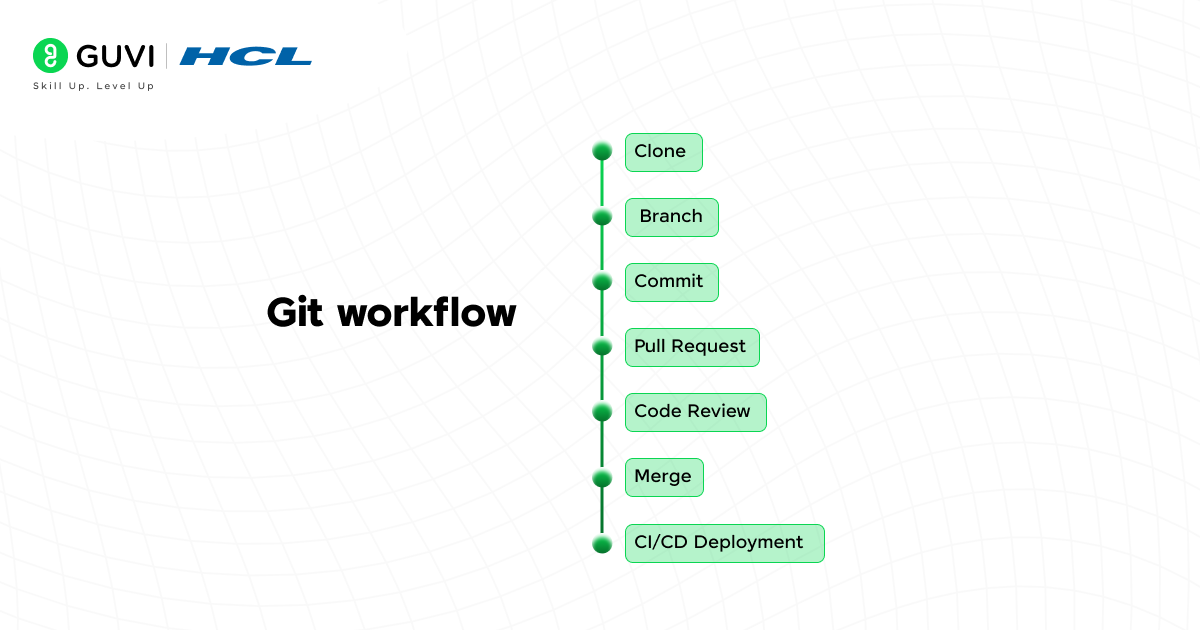
Freshers: Learn branching, merging, and basic commands.
Experienced: Use advanced rebasing, stash, and hooks.
4. Postman – API Testing Tool
Best for: Testing REST APIs built with Spring Boot or Jakarta EE.
- Save collections, set environments, add tests.
- Share and automate test suites.
Learn: GET, POST, PUT, DELETE methods.
Automate: Pre-request scripts and test assertions.
5. Docker – Containerization Made Simple
Best for: Packaging Java apps with all their dependencies.
- Avoid “works on my machine” issues.
- Deploy same image in dev, test, and prod.
Start with: Dockerize a Spring Boot app.
Pro Use: Docker Compose for multi-container apps (e.g., app + MySQL + Redis).
6. Lombok – Reduce Boilerplate
Best for: Writing cleaner POJOs and DTOs.
- Auto-generate @Getter, @Setter, @ToString, @Builder, etc.
Just add: Lombok plugin + dependency.
Debug Tip: Use delombok in the IDE to see the generated code.
7. SonarLint & Checkstyle – Code Quality & Standards
Best for: Maintaining a clean and consistent codebase.
- Instant linting and suggestions in the IDE.
- Integrate SonarQube in CI/CD pipelines.
Install SonarLint in IntelliJ or VS Code.
Experienced Teams: Define project-wide rules with .editorconfig or XML config.
8. JUnit + Mockito + Testcontainers
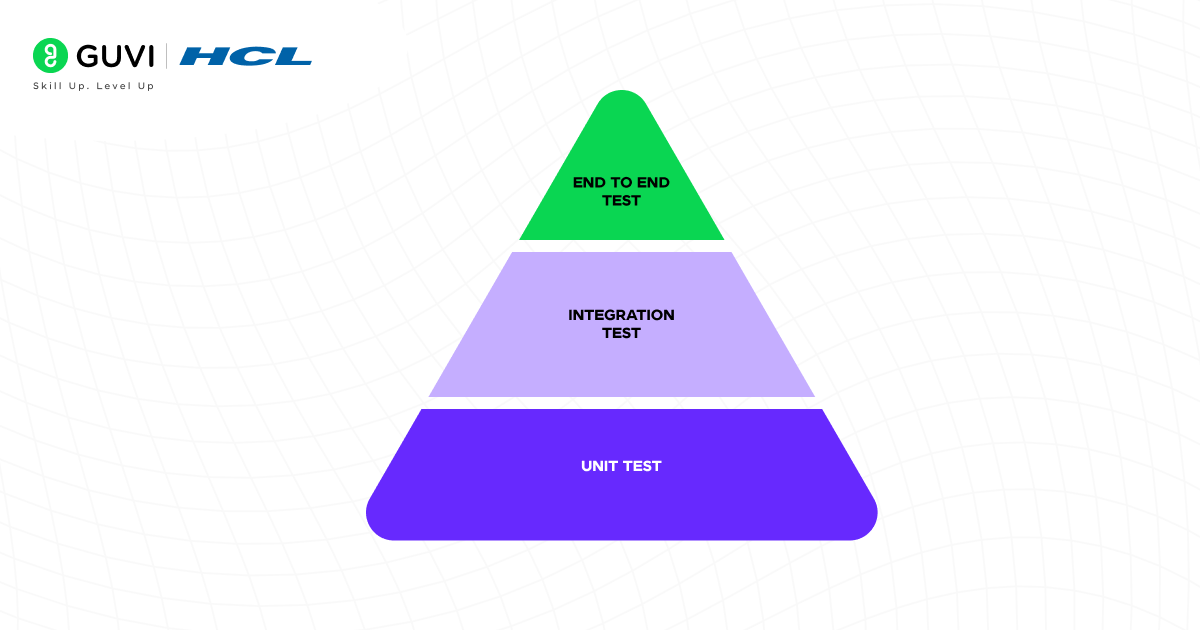
Best for: Writing reliable and automated tests.
- JUnit 5 for unit tests.
- Mockito for mocking.
- Testcontainers to spin up real DBs (like MySQL, MongoDB) for integration tests.
Start with: Simple JUnit tests
Go deeper: Use Testcontainers for running tests against PostgreSQL or Kafka.

9. Swagger/OpenAPI – API Documentation
Best for: Documenting and exploring REST APIs.
- Auto-generate from Spring annotations using springdoc-openapi.
Add dependency: springdoc-openapi-ui
Use: /swagger-ui.html for an interactive API explorer.
10. Micrometer + Spring Boot Actuator
Best for: Monitoring and observability.
- Collect metrics (CPU, memory, DB usage)
- Integrate with Prometheus + Grafana
Enable actuator endpoints like /health, /metrics
Add custom metrics using @Timed, @Metered
5 Bonus Tools You’ll Love
11. VisualVM / JProfiler
- JVM memory, heap, GC analysis
- Find memory leaks and thread issues
12. Spring Initializr
- Quick project generator
- Add Spring Boot starters and download a ready-to-run skeleton
13. Notion / Obsidian
- Organize notes, code snippets, tutorials, and interview prep
14. ChatGPT / GitHub Copilot
- Get logic explained, write boilerplate code, generate test cases
15. Trello / JIRA
- Track tasks, bugs, and user stories
- Follow Agile and Scrum sprints
Real-World Productivity Use Cases
| Scenario | Tool Stack |
| Build and deploy a Spring Boot app | IntelliJ + Maven + Docker |
| Test API endpoints | Postman + Swagger + JUnit |
| Write clean, short Java classes | Lombok + Checkstyle |
| Monitor and debug live app | Actuator + VisualVM |
| Automate deployment on Git push | GitHub Actions + Docker Hub |
Pro Tips for Building a Productive Java Dev Environment
- Use dark mode in IntelliJ to reduce eye strain.
- Master IntelliJ shortcuts (Ctrl+Shift+A, Alt+Enter, Shift+Shift)
- Use .editorconfig to enforce formatting rules across teams.
- Use multi-terminal tools like Tabby or Warp for CLI workflows.
- Make testing a habit TDD improves design clarity.
Begin your career journey with HCL GUVI’s Java Full Stack Development Course, providing placement assistance. Master essential technologies, including Java, Maven, Eclipse, HTML, CSS, MongoDB, and more, while working on practical, real-world projects to enhance your expertise.
Conclusion
Whether you’re:
- A fresher just starting Java and Spring Boot
- A mid-level developer in a product company
- A trainer mentoring students or junior devs
These Java Productivity tools will help you code smarter, test better, and deploy faster.
Master your tools, they are your developer superpowers.
And remember, great tools + good habits = productivity and career growth!
Success Stories

About the Author
Chittaranjan Ghosh
Java Corporate Trainer with 9+ years of experience, currently honing skills and inspiring learners at GUVI. Passionate about simplifying complex concepts and empowering the next generation of developers. Let's code and grow together!
View all posts by Chittaranjan Ghosh
Connect with me @






























Did you enjoy this article?