


Artificial Intelligence and Machine Learning Articles
Using Claude to Prepare for Difficult Conversations
Claude for Habit Tracking and Accountability


Get In Touch For Details! Request More Information
Claude for Test-Driven Development (TDD)
Aug 13, 2026 3 Min Read 34 Views
(Last Updated)
Claude for Test-Driven Development (TDD) is a software development methodology where developers write tests before implementing application code. This approach improves software quality, encourages modular design, and helps identify bugs early in the development cycle. Claude assists developers by generating unit tests, explaining testing concepts, debugging failing tests, and suggesting improvements for test coverage, making TDD easier to learn and implement.
Table of contents
- TL;DR
- Direct Answer Box
- Benefits of Using Claude for Test-Driven Development
- How to Use Claude for Test-Driven Development
- Step 1: Define the Feature Requirements
- Step 2: Generate Unit Tests First
- Step 3: Implement the Minimum Code
- Step 4: Debug Failing Tests
- Step 5: Refactor the Code
- Step 6: Expand Test Coverage
- Step 7: Continuously Improve Your Testing Workflow
- Claude Prompts for Test-Driven Development
- Generate Unit Tests
- Explain a Failing Test
- Improve Test Coverage
- Refactor Without Breaking Tests
- Create Mock Objects
- Review Test Quality
- Generate Integration Tests
- Debug Test Errors
- Test-Driven Development Tasks You Can Automate with Claude
- Tasks Claude Should Not Replace
- Best Practices for Using Claude for Test-Driven Development
- Conclusion
- FAQs
- What is Test-Driven Development?
- Can Claude generate unit tests?
- Can Claude debug failing tests?
- Does Claude support different testing frameworks?
- Should I validate AI-generated tests?
- Can Claude improve test coverage?
- Is Claude useful for learning TDD?
TL;DR
- Claude helps generate unit tests before writing application code.
- AI assists with debugging, refactoring, and improving test coverage.
- It supports popular testing frameworks across multiple programming languages.
- Human validation is essential for reliable software quality.
- Claude accelerates learning and practicing Test-Driven Development.
📚 Data Point: Test-Driven Development is widely adopted in Agile software development because writing tests first often leads to more maintainable, reliable, and modular code while reducing defects during development.
Source: Martin Fowler Documentation
Direct Answer Box
| Claude helps developers practice Test-Driven Development by generating unit tests, explaining testing frameworks, debugging failing tests, recommending refactoring strategies, and improving code quality. While AI accelerates the TDD workflow, developers should always validate tests and application behavior before deployment. |
Benefits of Using Claude for Test-Driven Development
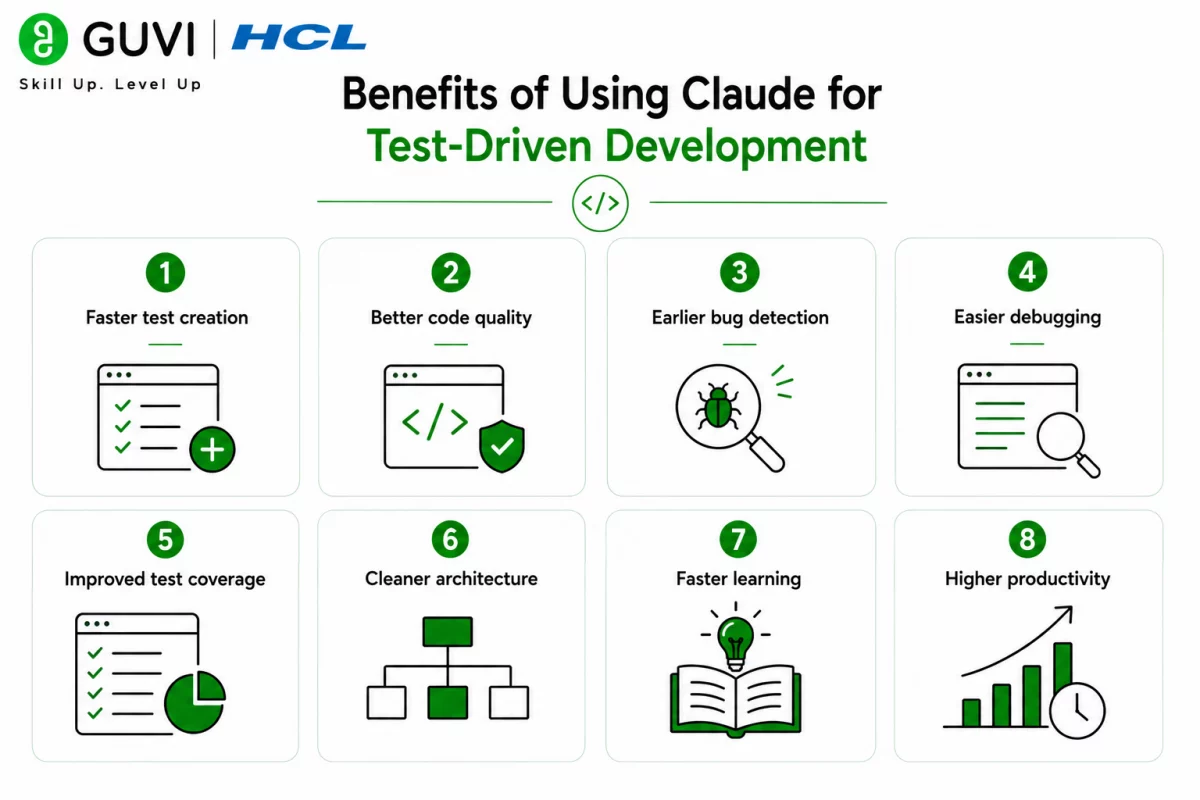
Writing tests before implementation encourages cleaner architecture and reduces software defects. Claude simplifies this process by generating test cases, explaining failures, and supporting developers throughout the testing cycle.
Key benefits include:
- Faster test creation
- Better code quality
- Earlier bug detection
- Easier debugging
- Improved test coverage
- Cleaner architecture
- Faster learning
- Higher productivity
How to Use Claude for Test-Driven Development
Step 1: Define the Feature Requirements
Clearly describe the functionality before requesting test cases.
Define:
- Feature requirements
- Expected behavior
- Input values
- Output expectations
- Edge cases
Step 2: Generate Unit Tests First
Ask Claude to create unit tests before writing the implementation.
Generate:
- Positive test cases
- Negative test cases
- Boundary conditions
- Edge cases
- Exception handling
- Mock objects
Step 3: Implement the Minimum Code
Write only enough code to satisfy the generated tests.
Focus on:
- Business logic
- Simplicity
- Readability
- Function correctness
- Small iterations
Step 4: Debug Failing Tests
If tests fail, ask Claude to analyze the issue and recommend fixes.
Review:
- Error messages
- Stack traces
- Assertions
- Logic errors
- Missing conditions
- Test assumptions
Step 5: Refactor the Code
Once tests pass, improve the implementation without changing functionality.
Improve:
- Code structure
- Naming conventions
- Duplicate code
- Performance
- Maintainability
- Readability
Step 6: Expand Test Coverage
Continue adding tests for new features and unexpected scenarios.
Test:
- Edge cases
- Invalid inputs
- Integration points
- Performance scenarios
- Error handling
- Regression cases

Step 7: Continuously Improve Your Testing Workflow
Successful TDD relies on writing meaningful tests, maintaining clean code, and continuously improving application quality. Developers interested in mastering frontend, backend, APIs, databases, testing, and deployment can build practical expertise through HCL GUVI’s Full Stack Development Course.
Many development teams use AI assistants to generate unit tests, explain failing assertions, improve test coverage, and accelerate debugging, allowing developers to focus more on application design and business logic.
Claude Prompts for Test-Driven Development
Writing detailed prompts helps Claude generate accurate, maintainable, and reliable tests.
Generate Unit Tests
“Generate unit tests for this [function/class] using [testing framework], covering positive, negative, and edge-case scenarios.”
Explain a Failing Test
“Analyze this failing test, explain why it failed, and recommend the necessary code changes to make it pass.”
Improve Test Coverage
“Review this codebase and identify areas with insufficient test coverage. Suggest additional unit tests.”
Refactor Without Breaking Tests
“Refactor this code to improve readability and maintainability while ensuring all existing unit tests continue to pass.”
Create Mock Objects
“Generate mock objects and test fixtures for this service using [testing framework].”
Review Test Quality
“Review these unit tests for readability, reliability, maintainability, and adherence to TDD best practices.”
Generate Integration Tests
“Create integration test cases for this API, covering successful requests, validation failures, and error responses.”
Debug Test Errors
“Review these test failures, identify the root cause, and provide corrected implementation and test code.”
Using structured prompts helps Claude produce better tests, improve software quality, and streamline the Test-Driven Development workflow.
Test-Driven Development Tasks You Can Automate with Claude
Claude can assist with many testing-related activities.
Claude can help with:
- Unit test generation
- Test case creation
- Mock object generation
- Test debugging
- Code refactoring
- Test documentation
- Integration testing
- Regression testing
- Test coverage analysis
- Assertion improvements
- Framework explanations
- Error analysis
The HCL GUVI’s Artificial Intelligence eBook introduces practical AI concepts, prompt engineering techniques, coding workflows, and real-world AI applications. It demonstrates how AI can improve software development, testing, debugging, and engineering productivity.
Tasks Claude Should Not Replace
Claude supports software testing, but it should not replace engineering judgment.
Claude should not replace:
- Manual testing
- Production validation
- Security testing
- Performance testing
- Code reviews
- Architecture decisions
- Compliance testing
- Final deployment approval
- Human engineering expertise
While Claude can generate useful tests and recommendations, developers should always verify correctness before shipping software.
⚠️ Warning: Claude can generate accurate unit tests and testing strategies, but AI-generated tests may overlook business rules, edge cases, or environment-specific behavior. Always execute, review, and validate tests before using them in production environments.
Best Practices for Using Claude for Test-Driven Development
- Clearly define feature requirements.
- Write tests before implementation.
- Cover positive and negative scenarios.
- Include edge cases.
- Review the generated tests carefully.
- Refactor after tests pass.
- Expand test coverage continuously.
- Validate AI-generated code.
Conclusion
Claude simplifies Test-Driven Development by helping developers generate unit tests, debug failures, improve test coverage, and refactor code with confidence. Combined with human expertise and disciplined testing practices, it becomes a valuable assistant for building reliable, maintainable, and high-quality software.
FAQs
1. What is Test-Driven Development?
Test-Driven Development is a software development approach where developers write tests before implementing application code.
2. Can Claude generate unit tests?
Yes. Claude can generate unit tests for functions, classes, APIs, and applications using popular testing frameworks.
3. Can Claude debug failing tests?
Yes. Claude can analyze test failures, explain the causes, and recommend fixes for both the tests and the implementation.
4. Does Claude support different testing frameworks?
Yes. Claude can assist with frameworks such as Jest, PyTest, JUnit, NUnit, Mocha, and many others.
5. Should I validate AI-generated tests?
Yes. Always execute and review generated tests to ensure they accurately reflect business requirements.
6. Can Claude improve test coverage?
Yes. Claude can identify missing scenarios and recommend additional unit and integration tests.
7. Is Claude useful for learning TDD?
Yes. Claude explains TDD concepts, generates examples, and helps developers practice the Red-Green-Refactor workflow while improving software quality.
Success Stories

About the Author
HCL GUVI
This article was selected and published as part of the HCL GUVI AI Blogathon 2026, an initiative designed to encourage students, AI enthusiasts, and aspiring tech writers to simplify complex AI concepts through impactful technical content. The contest recognized high-quality, original, and insightful AI-focused blogs, with selected authors receiving publication opportunities on the HCL GUVI blog platform along with official author credits and recognition.
View all posts by HCL GUVI
Connect with me @










Did you enjoy this article?