


Uncategorised Articles
Q-Learning Explained: A Beginner's Guide
Claude for Code Documentation with JSDoc


Get In Touch For Details! Request More Information
Why Claude Sometimes Gets Things Wrong (and How to Fix It)
Aug 13, 2026 3 Min Read 216 Views
(Last Updated)
Claude can generate helpful, detailed, and context-aware responses, but like any large language model, it can occasionally produce incorrect or misleading information, commonly referred to as AI hallucinations. Understanding why Claude sometimes gets things wrong occur and how to reduce them helps users improve response accuracy and build more reliable AI workflows.
Table of contents
- TL;DR
- Direct Answer Box
- Why Does Claude Hallucinate?
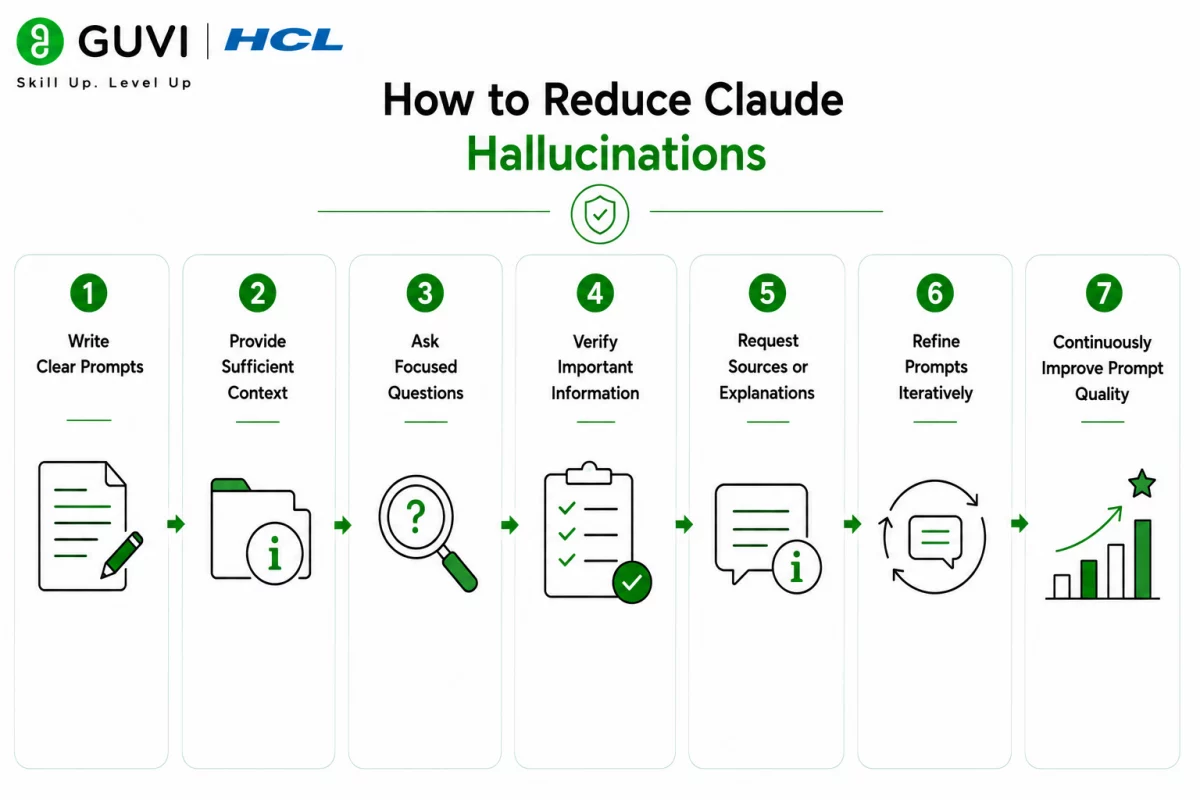
- How to Reduce Claude Hallucinations
- Step 1: Write Clear Prompts
- Step 2: Provide Sufficient Context
- Step 3: Ask Focused Questions
- Step 4: Verify Important Information
- Step 5: Request Sources or Explanations
- Step 6: Refine Prompts Iteratively
- Step 7: Continuously Improve Prompt Quality
- Tasks You Can Automate While Reducing Hallucinations
- Tasks Claude Should Not Replace
- Best Practices for Reducing Claude Hallucinations
- Conclusion
- FAQs
- What are Claude's hallucinations?
- Why does Claude sometimes generate incorrect information?
- How can I reduce Claude's hallucinations?
- Can Claude eliminate hallucinations?
- Should I trust Claude for business or academic work?
- Does providing more context improve accuracy?
- What are the best practices for reducing Claude hallucinations?
TL;DR
- Claude may occasionally generate incorrect or fabricated information, known as AI hallucinations.
- Hallucinations often occur because of ambiguous prompts, missing context, or limited information.
- Writing clear prompts and providing relevant context helps improve response accuracy.
- Always verify AI-generated information before using it for important decisions.
- Human review remains essential for high-impact tasks.
📚 Data Point: AI hallucinations are a recognized challenge for large language models. Prompt design, retrieval techniques, and human verification are widely used to improve response accuracy and reduce incorrect outputs.
Source: Anthropic Documentation
Direct Answer Box
| Claude sometimes generates incorrect or misleading information because it predicts likely responses based on patterns in data rather than verifying facts. Clear prompts, sufficient context, fact-checking, and human review help reduce hallucinations and improve response quality. |
Why Does Claude Hallucinate?
Common causes include:
- Ambiguous prompts
- Missing context
- Insufficient information
- Complex reasoning tasks
- Outdated knowledge
- Unsupported assumptions
- Overly broad questions
- Conflicting instructions
How to Reduce Claude Hallucinations
Step 1: Write Clear Prompts
Provide specific instructions that clearly define the task. The more precise your prompt, the more likely Claude is to generate accurate and relevant responses.
Include:
- Clear objectives
- Required output format
- Relevant constraints
- Necessary background information
- Expected level of detail
Step 2: Provide Sufficient Context
Give Claude the information he needs before asking questions. Relevant context reduces ambiguity and improves response quality.
Include:
- Reference documents
- Project details
- Business requirements
- Definitions
- Examples
- Supporting information
Step 3: Ask Focused Questions
Instead of asking broad or open-ended questions, divide complex requests into smaller, more specific tasks. This helps Claude reason more effectively and reduces the likelihood of inaccurate responses.
Focus on:
- One objective at a time
- Specific questions
- Clear instructions
- Defined scope
- Measurable outcomes
Step 4: Verify Important Information
Always fact-check AI-generated content before relying on it for business, academic, financial, legal, or medical purposes. Verification is especially important when accuracy is critical.
Review:
- Facts
- Dates
- Statistics
- Names
- Calculations
- References
Step 5: Request Sources or Explanations
Ask Claude to explain its reasoning or identify the information it used when appropriate. This makes it easier to review responses and spot potential inaccuracies.
You can ask Claude to:
- Explain its reasoning
- Summarize supporting information
- Highlight uncertainty
- Compare alternatives
- Identify assumptions
Step 6: Refine Prompts Iteratively
If the first response isn’t accurate or complete, refine your prompt by adding context, clarifying instructions, or narrowing the scope. Small prompt improvements often produce better results.
Refine prompts by:
- Clarifying objectives
- Adding examples
- Narrowing the scope
- Improving formatting
- Removing ambiguity
- Asking follow-up questions
Step 7: Continuously Improve Prompt Quality
Prompt quality improves with regular testing and refinement. Review Claude’s responses, identify recurring issues, and update your prompts to improve accuracy over time. Professionals who want to master prompt engineering and build reliable AI applications can strengthen these skills through HCL GUVI’s Artificial Intelligence and Machine Learning Course.
AI hallucinations can often be reduced by providing better prompts and relevant context rather than simply asking the same question repeatedly. Well-structured prompts help Claude generate more reliable and context-aware responses.
Tasks You Can Automate While Reducing Hallucinations
It can help with:

- Document summarization
- Content drafting
- Research assistance
- Information extraction
- Report generation
- Code explanation
- Technical documentation
- Brainstorming ideas
- Meeting summaries
- Workflow documentation
- Knowledge base analysis
- Prompt refinement
The HCL GUVI’s Artificial Intelligence eBook is an excellent resource for learning practical Artificial Intelligence concepts, prompt engineering, business automation, and real-world AI applications. It explains how AI can improve productivity while highlighting the importance of verification and responsible AI use.
Tasks Claude Should Not Replace
Claude is a powerful AI assistant, but certain responsibilities should always remain with human experts.
It should not replace:
- Final business decisions
- Legal advice
- Medical diagnosis
- Financial approvals
- Regulatory compliance decisions
- Security assessments
- Human quality assurance
- Strategic planning
- Expert judgment
While Claude can generate useful insights and recommendations, important decisions should always involve human review and verification.
⚠️ Warning: Even with clear prompts, Claude may occasionally generate inaccurate or misleading information. Always verify AI-generated facts, calculations, citations, and recommendations before using them for business, legal, financial, medical, or other high-impact decisions.
Best Practices for Reducing Claude Hallucinations
Follow these best practices to improve response accuracy:
- Write clear and specific prompts.
- Provide sufficient context.
- Break complex tasks into smaller steps.
- Verify important facts and references.
- Ask follow-up questions when needed.
- Refine prompts based on previous responses.
- Review AI-generated content carefully.
- Use Claude to assist, not replace, expert judgment.
- Validate critical information using trusted sources.
Conclusion
Claude can occasionally generate incorrect or misleading information, but well-structured prompts, sufficient context, and careful verification significantly reduce hallucinations. By refining prompts, reviewing responses, and maintaining human oversight, users can build more reliable AI workflows and make better use of Claude for everyday and professional tasks.
FAQs
1. What are Claude’s hallucinations?
Claude’s hallucinations occur when the model generates incorrect, misleading, or fabricated information that appears believable but is not factually accurate.
2. Why does Claude sometimes generate incorrect information?
Claude predicts likely responses based on patterns in its training rather than verifying facts in real time. Ambiguous prompts, missing context, and insufficient information can increase the likelihood of hallucinations.
3. How can I reduce Claude’s hallucinations?
Write clear prompts, provide relevant context, ask focused questions, verify important information, and refine prompts based on previous responses.
4. Can Claude eliminate hallucinations?
No. Hallucinations cannot be eliminated, but they can be significantly reduced through better prompt design, additional context, and human verification.
5. Should I trust Claude for business or academic work?
Claude is useful for research, drafting, and analysis, but important facts, calculations, citations, and conclusions should always be verified before use.
6. Does providing more context improve accuracy?
Yes. Relevant context helps Claude better understand the task and generally improves the relevance and quality of its responses.
7. What are the best practices for reducing Claude hallucinations?
Use clear prompts, provide relevant context, verify important information, refine prompts iteratively, review AI-generated content carefully, and use Claude to support, not replace human expertise.
Success Stories

About the Author
Vishalini Devarajan
An Aerospace Engineer turned content writer, I focus on making complex concepts easy to understand through well-structured, reader-friendly blogs. Whether it’s a technical topic or a non-technical one, I love creating content that is clear, engaging, and impactful.
View all posts by Vishalini Devarajan
Connect with me @















Did you enjoy this article?