


Career Articles
Wipro Elite NTH Eligibility Criteria 2026: CGPA, Branch & Backlog Rules Explained
What is Wipro Elite NTH? Complete Overview for 2026 Graduates
How to Get a Tech Job Abroad From India: Visa, Platforms & Timelines
How to Build a Python Developer Portfolio That Gets You Hired


Get In Touch For Details! Request More Information
How to Set Up the Perfect Dev Workspace at Home
Aug 21, 2026 4 Min Read 359 Views
(Last Updated)
The workspace where you write code shapes how you think. A cramped desk, a flickering monitor, and a noisy environment do not just cause discomfort. They fragment your concentration at exactly the moments when deep focus matters most. This guide walks you through how to set up the perfect dev workspace at home in 2026, covering hardware, ergonomics, software environment, lighting, and budget options so you can build a setup that supports real work.
Table of contents
- TL;DR Summary
- Why Your Dev Workspace at Home Matters More Than You Think
- The Hardware Essentials
- Ergonomics: The Part Most Developers Skip
- The Software Environment
- Lighting and Noise
- How to Set Up the Perfect Dev Workspace at Home on a Budget
- 💡 Did You Know?
- Common Mistakes to Avoid
- Conclusion
- FAQs
- What do I need to set up the perfect dev workspace at home?
- What is the best monitor for a home dev workspace?
- How much does it cost to set up the perfect dev workspace at home in India?
- Does a second monitor help developer productivity?
- What software should I set up for my home developer workspace?
TL;DR Summary
- To set up the perfect dev workspace at home, start with ergonomics, then hardware, then software environment.
- The single biggest productivity killer in a home workspace is not the desk or monitor. It is context: noise, visual clutter, and poor boundaries.
- You do not need an expensive battlestation. A good monitor, a mechanical keyboard, a proper chair, and fast internet are the four non-negotiables.
- Your software environment matters as much as your hardware. A misconfigured terminal or slow IDE wastes more time daily than any physical setup.
- Consistent lighting and a dedicated physical space are what separate a productive home workspace from a couch with a laptop.
Why Your Dev Workspace at Home Matters More Than You Think
Most developers upgrade their GPU before their chair and buy a second monitor before fixing their lighting. But ergonomics and environment affect output far more than hardware beyond a basic baseline. A developer who sets up the perfect dev workspace at home is removing the silent daily tax of discomfort, noise, and visual clutter on their coding output.
The Hardware Essentials
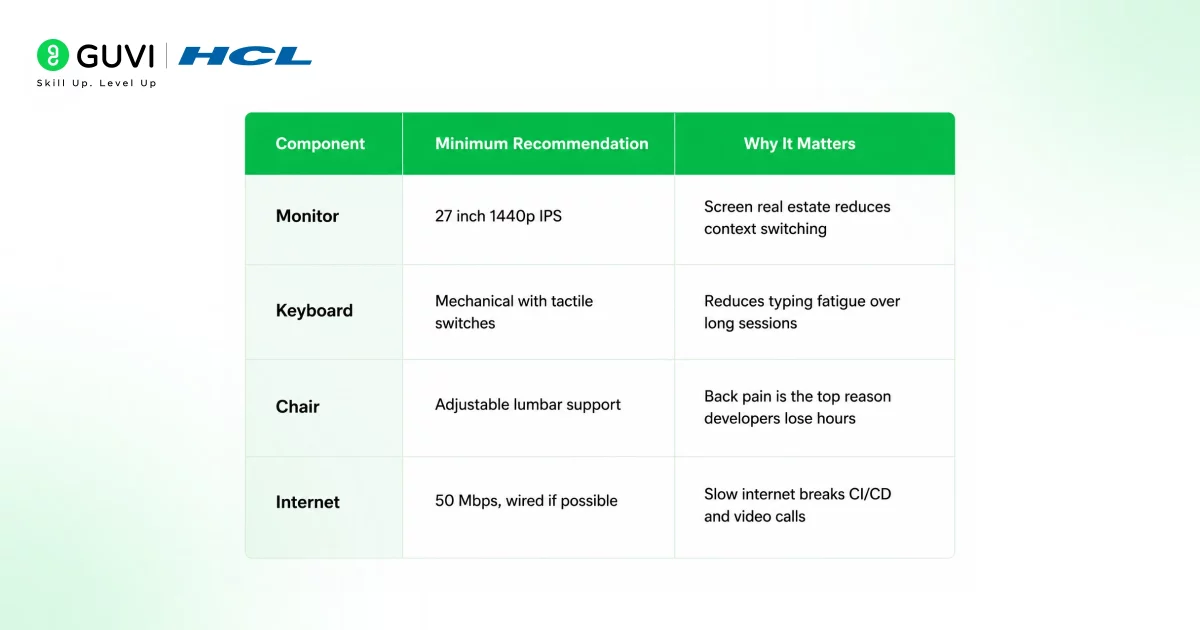
You do not need to spend a lot to set up the perfect dev workspace at home. You need to spend on the right things.
| Component | Minimum Recommendation | Why It Matters |
| Monitor | 27 inch 1440p IPS | Screen real estate reduces context switching |
| Keyboard | Mechanical with tactile switches | Reduces typing fatigue over long sessions |
| Chair | Adjustable lumbar support | Back pain is the top reason developers lose hours |
| Internet | 50 Mbps, wired if possible | Slow internet breaks CI/CD and video calls |
Monitor is the highest-impact upgrade for most developers. A 27 inch 1440p display gives you visible code, terminal, browser, and docs simultaneously without constant window switching.
Chair is the most commonly underspent item. A good ergonomic chair costs ₹15,000 to ₹40,000 and pays back in reduced back pain within months.
Ergonomics: The Part Most Developers Skip
To truly set up the perfect dev workspace at home, ergonomics is not optional. Poor ergonomics cause cumulative injury that is invisible until it is serious.
Three rules that matter most:
- Screen at eye level. The top of your monitor should be at or slightly below eye level. Looking down at a laptop all day creates neck strain within weeks. A monitor arm or laptop stand costs under ₹2,000 and solves this immediately.
- Elbows at 90 degrees. Your keyboard should sit at a height where your elbows bend at a right angle. If your desk is too high, your shoulders rise. Over months, this causes shoulder and neck tension that compounds.
- Feet flat on the floor. Your hips should sit slightly above your knees with both feet flat. A footrest costs ₹500 and prevents lower back compression during long sessions.
The Software Environment
The physical desk is only half the workspace. Your terminal, IDE, and tooling are where most of your working hours actually happen.
Terminal: Use a modern terminal with good tab and pane support. iTerm2 on macOS, Windows Terminal on Windows, or Alacritty cross-platform. Pair with zsh or fish and Oh My Zsh for faster navigation.
IDE: VS Code remains the dominant choice in 2026 for full stack and general development. Configure it with a good font (JetBrains Mono or Fira Code with ligatures enabled), a low-contrast dark theme (Catppuccin Mocha or One Dark Pro), and extensions scoped only to the languages you use daily.
Dotfiles: Store your terminal config, shell aliases, git config, and editor settings in a dotfiles repository on GitHub. When you switch machines or reinstall, setup takes minutes instead of hours.
Browser profiles: Use a dedicated browser profile for work with only work-related bookmarks and extensions. Mixing personal and work browsing sessions creates visual noise and temptation throughout the day.

Lighting and Noise
Lighting: Natural light from the side is best. Light coming directly behind your screen creates glare. Light coming from behind you reflects on your screen. A bias light strip behind your monitor reduces eye strain during evening sessions and costs under ₹1,000.
Noise: If you cannot control ambient noise, a pair of active noise-cancelling headphones is one of the highest-ROI items you can buy to set up the perfect dev workspace at home. Bose QC45, Sony WH-1000XM5, or budget options like Anker Soundcore Q45 are all worth considering depending on your budget. Use a white noise app like Dark Noise during deep work blocks if you prefer not to wear headphones.
How to Set Up the Perfect Dev Workspace at Home on a Budget
You can set up a functional, high-quality dev workspace without spending a lot.
| Priority | Item | Approx. Cost (India) |
| 1 | Ergonomic chair (Featherlite or Green Soul) | ₹8,000 to ₹15,000 |
| 2 | 24 inch 1080p IPS monitor (LG or Dell) | ₹10,000 to ₹14,000 |
| 3 | Laptop stand plus external keyboard and mouse | ₹2,000 to ₹5,000 |
| 4 | Bias light strip for monitor | ₹500 to ₹1,000 |
| 5 | Budget ANC headphones (Anker Q45) | ₹4,000 to ₹6,000 |
Total for a functional, ergonomic setup: ₹25,000 to ₹40,000. This beats working hunched over a laptop at a kitchen table within the first month.
A great workspace supports great work. But what you work on matters as much as where you work on it. HCL GUVI’s Full Stack Development Course and AI Software Development Course are both IITM Pravartak certified and designed for the self-paced learner working from exactly the kind of setup described in this guide.
💡 Did You Know?
- A Cornell University ergonomics study found that employees with properly adjusted workstations reported a 17.7% increase in productivity compared to those with suboptimal setups. Posture and monitor positioning accounted for the largest portion of that gain, more than hardware speed or screen size.
Common Mistakes to Avoid
- Working from your bed or couch regularly. These spaces signal rest to your brain, not focus. Over time, working from bed degrades both your sleep quality and your ability to focus during work hours. A dedicated physical workspace, however small, is non-negotiable to set up the perfect dev workspace at home.
- Buying a second monitor before fixing your chair. Most developers who are uncomfortable at their desk have a chair problem, not a screen problem. Fix ergonomics before adding hardware.
- Letting cable clutter pile up. A cable-cluttered desk creates visual noise that fragments attention. A basic cable management tray costs under ₹500 and removes one low-grade source of daily distraction.
Conclusion
To set up the perfect dev workspace at home, start with ergonomics, not gear. A good chair and a monitor at eye level matter more than a second screen or RGB lighting. Build a software environment with clean dotfiles, a focused IDE configuration, and separated browser profiles. Control your lighting and noise. And keep the desk itself visually clean, because a cluttered workspace produces a cluttered working day. The setup you invest in this month pays dividends every single working day for years.
FAQs
1. What do I need to set up the perfect dev workspace at home?
The four non-negotiables are a good monitor, a proper ergonomic chair, a dedicated physical workspace, and fast internet. Everything else improves on that baseline.
2. What is the best monitor for a home dev workspace?
A 27 inch 1440p IPS panel gives excellent colour accuracy and screen real estate. LG and Dell both offer good options in the ₹14,000 to ₹20,000 range in India. A 24 inch 1080p IPS is a solid budget starting point.
3. How much does it cost to set up the perfect dev workspace at home in India?
A functional, ergonomic home workspace costs roughly ₹25,000 to ₹40,000 covering a chair, monitor, laptop stand, keyboard, mouse, and basic lighting. Premium setups with standing desks and ANC headphones run ₹70,000 to ₹1,50,000.
4. Does a second monitor help developer productivity?
Yes, but only after your primary monitor is large enough and your ergonomics are correct. Adding a second 24 inch monitor beside a well-configured primary reduces window switching significantly for full stack developers working across a terminal, browser, and IDE simultaneously.
5. What software should I set up for my home developer workspace?
Configure a modern terminal with zsh or fish, VS Code with language-specific extensions only, dotfiles in GitHub, and a dedicated browser profile for work. Keep your tooling lean: more installed equals more to maintain.
Success Stories

About the Author
Jebasta
I translate the language of data into stories that anyone can understand. As a writer with a data science background, I simplify analytics, AI, and decision-making so beginners and enthusiasts can confidently explore the world of data.
View all posts by Jebasta
Connect with me @















Did you enjoy this article?