


Python Articles
Freelancing as a Python Developer: Getting Your First Client
Common Python Mistakes Beginners Make And How to Fix Them
Python Best Practices: Writing Clean, Maintainable Code Like a Pro
How to Build a Python Developer Portfolio That Gets You Hired


Get In Touch For Details! Request More Information

Python asyncio: Event Loops, Tasks & Coroutines
Jul 23, 2026 4 Min Read 678 Views
(Last Updated)
Many developers use asyncio without fully understanding what happens beneath the surface. They know await pauses execution and async def defines a coroutine, but the mechanics of how the event loop schedules work, how tasks differ from coroutines, and why asyncio beats threading for I/O-bound work remain unclear. This guide breaks all of it down with real code and practical examples.
Table of contents
- TL;DR Summary
- What Is asyncio and Why Does It Exist?
- What Is a Coroutine in Python?
- What Is the Event Loop?
- How Does asyncio.gather Work?
- How Does the Event Loop Use the OS Under the Hood?
- Common Mistakes When Using Python asyncio
- Conclusion
- FAQ
- What is asyncio in Python?
- What is the difference between async and await in Python?
- What is the difference between a coroutine and a task in asyncio?
- When should I use asyncio instead of threading?
- What is asyncio.gather used for?
- Why does blocking code break asyncio?
- What is loop.run_in_executor() used for in asyncio?
- How does asyncio compare to Node.js concurrency?
TL;DR Summary
- Python asyncio explained is one of the most searched advanced Python topics among developers building high-concurrency applications in 2026.
- asyncio is Python’s built-in library for writing concurrent code using a single-threaded event loop model. It allows thousands of I/O-bound operations to run concurrently without threads or processes.
- Understanding how event loops, coroutines, and tasks work under the hood will make you significantly more effective at building fast, scalable Python applications.
Want to build production-grade Python applications using asyncio, FastAPI, and modern concurrency patterns? Explore HCL GUVI’s Python Programming Course, designed for developers ready to go beyond the basics and into high-performance backend development.
What Is asyncio and Why Does It Exist?
asyncio is Python‘s built-in library for asynchronous I/O, introduced in Python 3.4 and significantly improved through 3.13. It enables concurrent execution of multiple I/O-bound operations using a single thread and a cooperative multitasking model.
Traditional multithreading creates one thread per operation, consuming memory and requiring costly OS context switches at scale. asyncio replaces this with a single event loop that coordinates many tasks. When one task waits for I/O, it voluntarily yields control so another can run, with no thread switching and no GIL contention.
Read More: The Asynchronous IO Revolution : How Python is Changing the Game
What Is a Coroutine in Python?

A coroutine is a function defined with async def that can pause its execution at an await point and resume later. It is the fundamental building block of asyncio.
| import asyncio async def greet(name): print(f”Hello, {name}”) await asyncio.sleep(1) print(f”Goodbye, {name}”) asyncio.run(greet(“Priya”)) |
Calling greet(“Priya”) does not execute the function. It returns a coroutine object. The coroutine only runs when it is awaited or scheduled on the event loop.
The await keyword does two things:
- Suspends the current coroutine until the awaited object completes
- Returns control to the event loop so other tasks can run
FastAPI, one of the fastest-growing Python web frameworks, is built on asyncio and the ASGI (Asynchronous Server Gateway Interface) standard. Its asynchronous architecture enables it to efficiently handle thousands of concurrent connections, and independent benchmarks have shown that FastAPI can process significantly more requests per second than traditional synchronous frameworks such as Flask when running with a single worker.
What Is the Event Loop?

The event loop is the core of asyncio. It is an infinite loop that monitors tasks, waits for I/O events, and resumes suspended coroutines when their awaited operations complete.
Here is a simplified mental model of what the event loop does on every iteration:
- Check which tasks are ready to run
- Run each ready task until it hits an await
- Register the awaited I/O operation with the OS
- Move to the next ready task
- When the OS signals that an I/O operation is done, mark the waiting task as ready
| import asyncio async def task_one(): print(“Task 1 started”) await asyncio.sleep(2) print(“Task 1 done”) async def task_two(): print(“Task 2 started”) await asyncio.sleep(1) print(“Task 2 done”) async def main(): await asyncio.gather(task_one(), task_two()) asyncio.run(main()) # Output: # Task 1 started # Task 2 started # Task 2 done (after 1 second) # Task 1 done (after 2 seconds) # Total time: ~2 seconds, not 3 |
Both tasks run concurrently within a single thread. Task 2 completes first because it sleeps for less time. The total elapsed time is 2 seconds, not 3, because both sleeps happen simultaneously.
Want to build production-grade Python applications using asyncio, FastAPI, and modern concurrency patterns? Explore HCL GUVI’s Python Programming Course, designed for developers ready to go beyond the basics and into high-performance backend development.
How Does asyncio.gather Work?
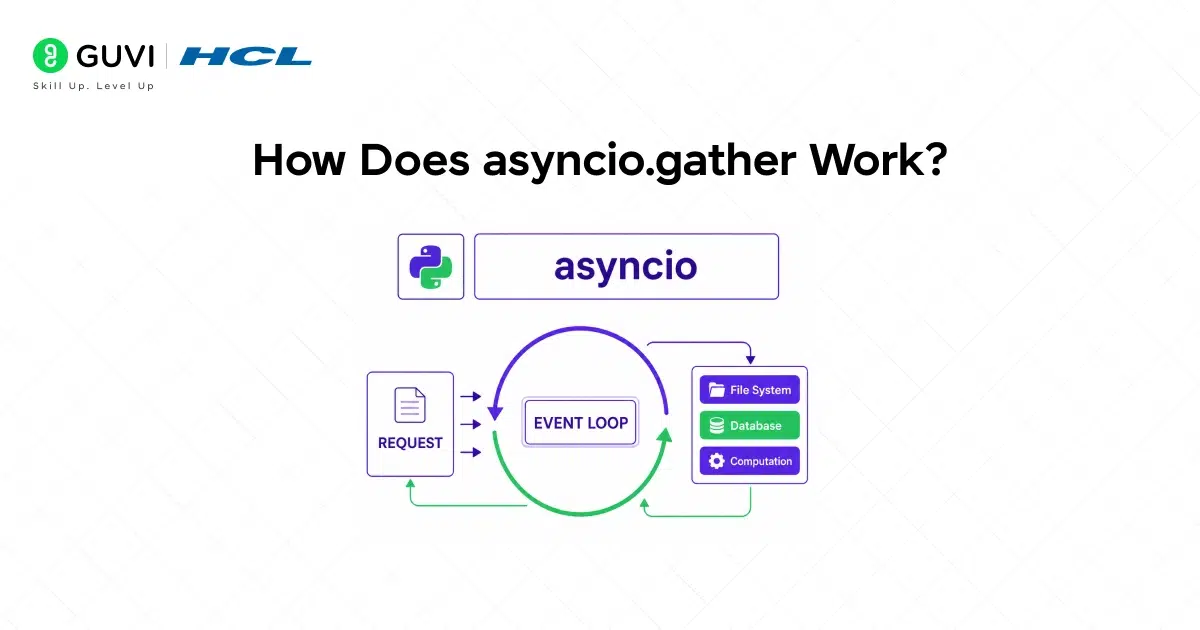
asyncio.gather schedules multiple coroutines or tasks concurrently and waits for all of them to complete. It returns a list of results in the same order as the inputs regardless of completion order.
| import asyncio async def fetch(url, delay): await asyncio.sleep(delay) return f”Response from {url}” async def main(): results = await asyncio.gather( fetch(“api.example.com/users”, 2), fetch(“api.example.com/orders”, 1), fetch(“api.example.com/products”, 3), ) print(results) asyncio.run(main()) # Total time: ~3 seconds (longest task) # Not 6 seconds (sum of all tasks) |
All three fetches run concurrently. Total time is determined by the slowest task, not the sum of all tasks.

How Does the Event Loop Use the OS Under the Hood?
asyncio delegates I/O monitoring to the operating system using platform-specific APIs: epoll on Linux, kqueue on macOS, and IOCP on Windows. These APIs let the event loop register thousands of I/O operations and receive notifications when any complete, without polling each one individually.
This is what allows a single event loop to handle thousands of concurrent connections with minimal CPU usage.
Python’s asyncio event loop is single-threaded, so CPU-intensive work performed inside a coroutine can block the entire event loop and prevent other asynchronous tasks from running. To keep applications responsive, you can use loop.run_in_executor() to offload CPU-heavy operations to a thread pool or process pool, allowing the event loop to continue handling other tasks concurrently.
Common Mistakes When Using Python asyncio
1. Mixing blocking calls inside coroutines: Calling a blocking function like requests.get() or time.sleep() inside a coroutine blocks the entire event loop, preventing all other tasks from running.
2. Awaiting coroutines directly instead of creating tasks: Awaiting two coroutines one after another runs them sequentially. Wrap them in asyncio.create_task() or use asyncio.gather() to run them concurrently.
3. Running CPU-bound code in the event loop: CPU-heavy operations block all other coroutines in the event loop since asyncio is single-threaded.
4. Not handling exceptions in gathered tasks: When using asyncio.gather(), an exception in one task does not automatically cancel the others by default.
5. Using asyncio.run() inside an already running event loop: Calling asyncio.run() inside a Jupyter notebook or inside another async context raises a RuntimeError because an event loop is already running.
Conclusion
As Python’s async ecosystem continues to mature in 2026 with faster event loops, improved tooling, and growing adoption in frameworks like FastAPI and Django Channels, understanding asyncio at a deeper level is becoming a core competency for backend Python developers.
Mastering the relationship between coroutines, tasks, and the event loop gives you the foundation to write Python applications that handle thousands of concurrent users on a single process.
FAQ
What is asyncio in Python?
asyncio is Python’s standard library for writing asynchronous, concurrent code using a single-threaded event loop.
What is the difference between async and await in Python?
async def defines a coroutine function that can be paused and resumed. await is used inside a coroutine to pause execution until the awaited operation completes and return control to the event loop so other tasks can run.
What is the difference between a coroutine and a task in asyncio?
A coroutine is a definition of work that runs inline when awaited directly. A task wraps a coroutine and schedules it to run independently on the event loop, allowing it to run concurrently with other tasks without blocking the caller.
When should I use asyncio instead of threading?
Use asyncio for I/O-bound workloads where you need to handle many concurrent operations with low memory overhead, such as web scraping, API clients, or web servers. Use threading when working with blocking libraries that do not support async interfaces and the number of concurrent operations is modest.
What is asyncio.gather used for?
asyncio.gather schedules multiple coroutines or tasks to run concurrently and waits for all of them to complete.
Why does blocking code break asyncio?
asyncio runs in a single thread. A blocking call like requests.get() or time.sleep() holds the thread and prevents the event loop from running any other coroutines until the blocking operation completes.
What is loop.run_in_executor() used for in asyncio?
run_in_executor() offloads blocking or CPU-bound work to a thread pool or process pool while the event loop continues processing other tasks.
How does asyncio compare to Node.js concurrency?
Both asyncio and Node.js use a single-threaded event loop with non-blocking I/O. The key difference is that Node.js is event-driven by default while Python’s asyncio requires explicit async and await syntax.
Success Stories

About the Author
Vishalini Devarajan
An Aerospace Engineer turned content writer, I focus on making complex concepts easy to understand through well-structured, reader-friendly blogs. Whether it’s a technical topic or a non-technical one, I love creating content that is clear, engaging, and impactful.
View all posts by Vishalini Devarajan
Connect with me @












Did you enjoy this article?